

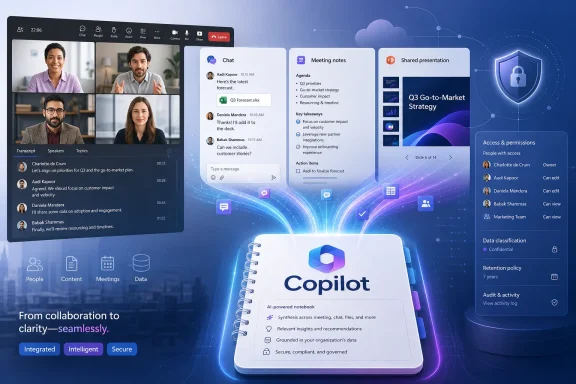
The launch status deserves a narrower reading than the roadmap’s “across Microsoft 365” wording suggests. Microsoft’s own Notebook documentation says Teams is a premium source, available to Microsoft 365 Copilot users rather than the broader Copilot Chat tier. The feature is therefore a new capability for organizations already licensing Microsoft 365 Copilot, not a meeting-intelligence upgrade automatically arriving for every Microsoft 365 tenant or every Copilot Chat user.
Microsoft’s roadmap says the feature began preview availability in April 2026 and reached general availability in June 2026, across Android, desktop, iOS, and the web in the worldwide standard multi-tenant cloud. The entry was updated on August 11 and now reports a Launched status.
A notebook can now retain the meeting’s working context
Copilot Notebooks are Microsoft’s project-oriented grounding space: users add a bounded collection of sources and then ask Copilot to synthesize, draft, or analyze only that material. Until recently, the most reliable way to include a Teams meeting was to add artifacts created around it — a PowerPoint deck, an exported recap, a Loop page, or a Word document containing notes.
Roadmap item 560706 changes the input model. Rather than treating a meeting as something users must first turn into a file, it makes the meeting itself the reference. Microsoft says the reference can connect the meeting’s transcript, notes, chat, and shared content to a notebook. A product-launch notebook, for example, can combine the approved plan with the actual discussion in the readiness meeting and subsequent decisions posted in its meeting chat.
That produces a more useful kind of grounding than an isolated transcript. A transcript records spoken words, but project reasoning often hinges on a decision recorded in notes, a clarification in chat, and a spreadsheet or deck shared during the call. Microsoft’s stated objective is to let downstream Copilot experiences use that composite record when creating presentations and briefs.
It also shifts the boundary between Teams and the Microsoft 365 Copilot app. Copilot inside Teams has long been oriented around the immediate meeting: summarize the discussion, identify tasks, answer questions based on the transcript, and help late joiners catch up. A meeting reference in a Notebook turns that time-bounded recap into reusable project context that can be combined with sources from OneDrive, SharePoint, Outlook, and OneNote.
“Launched” arrived after the stated GA month
There is a recordkeeping wrinkle in Microsoft’s rollout trail. The current roadmap entry lists general availability as June 2026 and is now marked Launched, but the Microsoft 365 Message Center Archive’s preserved June 1 version of the same item still showed it as Rolling out. The archive also records the same April preview and June GA targets.
That does not prove a delayed feature rollout. Microsoft’s roadmap status, GA month, and “last updated” timestamp are separate fields, and Microsoft has not published a deployment timeline showing when each client or tenant received meeting references. But it does show why IT teams should not interpret the June GA date as evidence that the capability was universally available in June.
Microsoft’s June support documentation for adding Notebook references contains an additional caution: some described features are rolling out gradually and may not yet be present in every user’s experience. The August 11 Launched designation appears to close the roadmap item, but it does not identify a minimum Microsoft 365 Copilot app version, Teams version, or mobile build.
For administrators, the sensible validation is operational rather than calendar-based: open Copilot Notebooks with a properly licensed test account, choose Add references, and determine whether a relevant Teams meeting appears as an available source. The roadmap’s platform tags indicate intended support on Android, desktop, iOS, and web; they do not document identical controls or rollout timing on every client.
Copilot Chat access does not equal Teams meeting access
Microsoft expanded Copilot Notebooks to Copilot Chat users in June, describing the change in a Microsoft Community Hub post as a way for more people to collaborate around shared project context. But Microsoft drew a clear line between licensing tiers. Copilot Chat users can use standard sources, while Microsoft 365 Copilot users can add premium sources including Teams, SharePoint, OneDrive content, and internal URLs.
That distinction is easy to miss because both tiers can participate in the same shared notebook. A Copilot Chat user may be able to open the notebook, contribute their own chat conversation, and work with supported files; that does not establish that they can add a Teams meeting or receive the same grounded results from premium meeting material.
The product consequence is a potentially uneven notebook inside mixed-license teams. A paid Copilot user can assemble the project’s richest context, including a Teams meeting, while colleagues on Copilot Chat have a more limited source set. Microsoft presents that as a collaboration feature, but it also makes the Microsoft 365 Copilot license the gatekeeper for the data sources most likely to contain a project’s live decisions.
Microsoft has not published a separate public support article for roadmap item 560706 that spells out whether a Copilot Chat participant in a shared notebook can query an organizer-added meeting reference, whether the meeting is visible in the reference pane, or how those results differ by license. Those are implementation details enterprises should test before advertising a “meeting-to-notebook” workflow across a mixed deployment.
Sharing remains the governance pressure point
Microsoft’s broader Notebook permissions documentation says Notebooks live in user-owned SharePoint Embedded containers, currently identified as the Loop application in the SharePoint admin center and PowerShell. It also says that sharing a Notebook generally gives recipients access to all files referenced in it, with automatic access granted where possible and exceptions where permissions cannot be changed.
That is an important warning for anyone treating a Notebook as a lightweight AI workspace rather than a sharing boundary. Adding the meeting itself as project context may be cleaner than attaching copied notes, but the notebook still aggregates potentially sensitive material into a single object designed for analysis and sharing.
Microsoft also says Copilot only uses content the user has permission to access. For Teams meeting AI, Microsoft’s documentation similarly limits Copilot to the meeting conversation’s underlying data and the users entitled to see it. Those controls reduce the risk of Copilot surfacing a meeting to an unauthorized employee, but they do not solve a more ordinary governance problem: a notebook owner may make a useful collection of sources broadly shareable without appreciating everything the collection represents.
The roadmap entry does not say how meeting-reference permissions behave when a Notebook is shared, whether a meeting reference will grant or request access in the same way a file reference can, or how sensitivity labels, encrypted meetings, external attendees, and retention policies affect selection. Microsoft’s current Notebook documentation says external sharing is not supported for Copilot Notebooks. Organizations that permit guest-heavy meetings should therefore assume the feature is intended for internal workspaces until Microsoft documents a more specific cross-tenant model.
The usable source still depends on what Teams captured
Meeting references do not magically reconstruct meetings that left no durable record. Microsoft’s Teams documentation says Copilot in a transcribed meeting relies on the transcript; without transcription, its meeting experience is limited to the meeting chat. Notes and shared materials may add context, but the quality of a Notebook’s answer will still follow the quality and availability of the original meeting artifacts.
That makes transcription settings, meeting policies, retention, and participant behavior part of the Notebook deployment story. A team that wants to create an accurate project brief from a decision meeting needs a transcript where policy permits it, meaningful notes rather than placeholder agendas, and the relevant deck or file actually shared through the meeting context. Simply adding a calendar event with no usable content will not create the decision record Microsoft’s promotional description implies.
For Windows and Microsoft 365 administrators, the feature is best treated as an extension of existing Teams data governance rather than as a standalone Copilot toggle. Review who has Microsoft 365 Copilot licenses, which meetings are allowed to generate transcripts and AI artifacts, what retention policies preserve, and how Notebook sharing is configured before positioning meeting references as a standard project workflow.
Microsoft has now closed Roadmap 560706 as launched, but the meaningful rollout milestone for an organization is simpler: a licensed user can add a real Teams meeting to a Notebook, receive answers grounded in the expected transcript and supporting artifacts, and share the notebook without widening access to a meeting record that was never meant to travel.