
There is also a calendar correction worth making. On August 15, 2026, Windows 11 is four years and 10 months old, not five years old; its fifth anniversary arrives on October 5, 2026. That does not weaken the broader conclusion that Microsoft has spent most of the product’s life repairing compromises made at launch. It does make the present-tense claims about its newest Taskbar and Start menu flexibility more important to qualify.
Microsoft’s own Windows Insider documentation says the return of top, left, and right Taskbar positions began in the Experimental channel on May 15, 2026. The company described unfinished support for auto-hide, the tablet-optimized Taskbar, touch gestures, and Taskbar search boxes in alternate positions. Those are not small footnotes. They mean the feature Windows 11 removed in 2021 has not yet returned as a finished, broadly supported capability for the installed base.
The same is true of Start menu sizing and section controls. Microsoft has shown Small and Large Start menu options, separate visibility controls for Pinned, Recommended, and All sections, and an option to hide the account identity area. But those changes were also announced as staged Insider work. For a user on a retail Windows 11 installation, the practical question is not whether Microsoft has demonstrated the option; it is whether their particular build has received it.
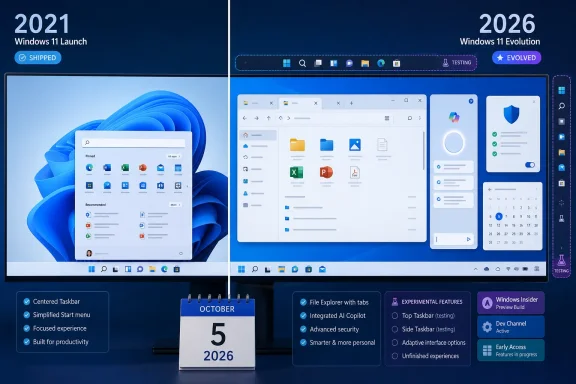 The Taskbar is the clearest measure of Windows 11’s repair work
Windows 11’s original Taskbar was the most visible example of Microsoft treating a redesign as a substitute for established workflow. The 2021 release removed drag-and-drop onto Taskbar icons, limited the right-click menu, eliminated “Never combine” labels, and locked the Taskbar to the bottom edge of the display. These were not obscure power-user controls. They affected developers juggling terminal windows, help-desk staff tracking remote sessions, and anyone who used a vertical Taskbar to preserve vertical screen space.
Microsoft did restore several of those capabilities over subsequent feature updates. Drag-and-drop came back first; labels and never-combine behavior returned later. Those are meaningful repairs that have reached mainstream Windows 11 releases.
But the moveable Taskbar is different. Microsoft’s latest public Support guidance still tells users that standard Windows 11 settings do not move the Taskbar to the top or sides of the display. Meanwhile, the Windows Insider team says that ability is being tested in Experimental builds, where it has known gaps. The documentation is contradictory because the product is mid-transition, not because the feature is universally available.
That distinction changes the advice for IT departments. Do not promise users a vertical Taskbar as a solved Windows 11 issue, and do not deploy Insider builds to obtain it. Experimental flights are for validation and feedback, not a substitute for a supported desktop standard. If a vertical Taskbar is central to an employee’s workflow, plan around the retail capability available today rather than around an announced test feature.
Windows Central is right that Microsoft has finally acknowledged the demand. The stronger finding is that Microsoft is still validating the implementation nearly five years after removing it.
File Explorer shows what a completed improvement looks like
File Explorer offers a useful contrast because its major post-launch improvements have had time to leave the preview pipeline. Windows 11 launched with a cleaner command bar and redesigned context menus, but the practical file-management experience initially felt stripped down. The new menu hid many familiar commands behind “Show more options,” and File Explorer lacked tabs despite years of demand for them.
Microsoft began testing tabs in 2022 and delivered them later that year. Gallery followed as a more visual entry point for photo collections, while later updates added incremental cloud, thumbnail, Home, and performance work. The underlying Explorer code still carries decades of compatibility requirements, which explains why legacy dialogs and shell extensions remain visible. But tabs are no longer a promise on a slide or a feature limited to a niche channel.
That is the standard Microsoft should meet before treating Taskbar movement, Start menu resizing, or AI-driven search as evidence that Windows 11 has already finished its original redesign. A feature counts as a repair when it is supported on normal installations, documented for the edition and version in question, and behaves consistently across the configurations people actually use.
Explorer is still imperfect, particularly in network-heavy environments and when third-party shell extensions are involved. Microsoft’s January 2026 Release Preview notes specifically referenced work to improve responsiveness when navigating network locations. But it is now recognizably more capable than the File Explorer Windows 11 shipped with. The same cannot yet be said without qualification for every 2026 Start and Taskbar change.
AI has changed Windows, but availability and control remain uneven
The largest functional change since 2021 is Microsoft’s decision to make AI a first-class Windows feature. Recall, Click to Do, improved voice experiences, image and text features, and natural-language interaction have turned newer Copilot+ PCs into a materially different class of Windows hardware. Those capabilities depend in part on neural processing units and do not describe the experience on every Windows 11 PC.
That hardware split matters more than broad statements that “Windows 11 now has AI.” A conventional Windows 11 desktop may receive Copilot-related interface changes and cloud-connected features while lacking the local models and Copilot+ experiences that Microsoft reserves for supported hardware. Some features also vary by market and language. IT teams should inventory device eligibility rather than assume an update ring will make their entire fleet function alike.
Microsoft is also actively changing the relationship between search and Copilot. At Ignite 2025, the company described Ask Copilot on the Taskbar as a preview entry point tying together Microsoft 365 Copilot, agents, and search. That is an announced product direction, not proof that traditional Windows Search has been replaced for all users.
The editorial problem with treating AI as a single completed milestone is that it conceals these boundaries. Copilot+ capabilities, previews, staged rollouts, commercial Microsoft 365 integrations, and retail Windows features overlap, but they are not one deployable package. Administrators need build-specific release notes, hardware requirements, regional availability, and policy controls before they can decide what will appear on managed devices.
Security progress is real, but one flagship feature exposes the limits
Windows 11’s tougher hardware baseline was present from the start: TPM 2.0, Secure Boot expectations, and a stronger emphasis on Windows Hello differentiated it from Windows 10. The security story since then includes passkeys, broader Windows Hello Enhanced Sign-in Security support, and more platform protection on newer hardware.
Microsoft’s January 2026 Release Preview documentation, for example, extended Enhanced Sign-in Security support to compatible external fingerprint readers. That is a concrete improvement for desktop and laptop users who want phishing-resistant sign-in protection without relying exclusively on an integrated biometric sensor.
Administrator Protection deserves more caution. Microsoft introduced it as a Windows 11 security model intended to reduce the exposure of administrator privileges, but the Windows Developer Blog later said the company disabled it from retail and Insider channels on May 23, 2026, after finding a reliability issue. It should not be described as a settled layer of protection currently available to every Windows 11 user.
This is not an argument against the feature. It is a reminder that a security announcement and an operational security control are different things. Organizations should verify whether Administrator Protection is enabled and supported in their chosen Windows version before basing elevation procedures, support documentation, or compliance claims on it.
Setup has become more connected, not more flexible
The account and connectivity debate has been one of the areas where Windows 11 has moved decisively in Microsoft’s preferred direction. Microsoft’s current deployment documentation says Windows Out-of-Box Experience requires network connectivity on Home editions, and its OOBE flow is designed around signing in with or creating a Microsoft account. OneDrive, Windows Backup, the Store, subscription prompts, and account services all benefit from that choice.
For consumer users, the effect is straightforward: a clean install increasingly begins as a connected Microsoft service experience rather than an isolated local PC configuration. Windows Central is correct to identify this as a reduction in user choice, even if it also simplifies restoration and cloud synchronization for people who want those services.
For enterprise IT, the conclusion is more practical than ideological. Business deployments should not rely on consumer OOBE behavior. Microsoft Entra join, Windows Autopilot, provisioning packages, Intune, and other managed deployment paths exist precisely because organizations need controlled enrollment, identity, policy, and application installation. Treating a Home-edition setup flow as a model for managed Windows deployment will only create avoidable confusion.
Windows 11’s record since 2021 is therefore less a clean before-and-after transformation than a long repair program with a growing set of cloud and AI dependencies attached. File Explorer tabs, restored Taskbar labels, better Settings coverage, and security improvements demonstrate real maturation. The moveable Taskbar, Start menu sizing, and parts of the AI vision demonstrate where Microsoft is headed—but, as of August 15, 2026, they should still be reported as work in progress rather than completed repairs.
