
UC Today’s report correctly identifies Zendesk’s attempt to connect employee questions to service workflows, but its timeline contains a material inconsistency. It says the program began on July 30 in one section and August 3 elsewhere. Zendesk’s own support announcement resolves that point: the company announced the feature on July 10 and set the rollout start for August 3. As of August 17, this is an early-access deployment, not a general-availability launch.
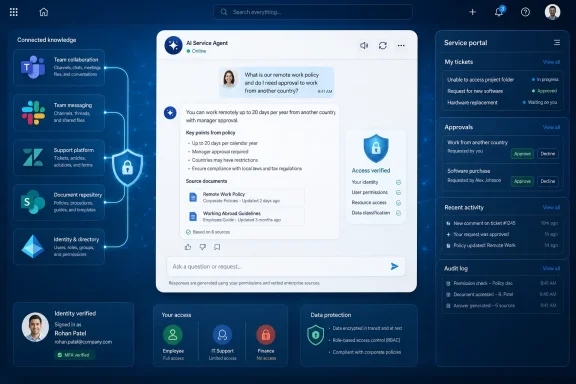
The more important correction is to the premise that the employee portal may be in trouble. Zendesk’s documentation says the opposite in practical terms: when the Employee Service AI agent is enabled, the conventional search bar in the company help center becomes an interactive conversation. The portal is being redesigned as an AI interface, while Teams and Slack become additional entry points. Enterprises still need a controlled service destination for catalog items, approvals, cases, reporting, and administration; a Teams chat thread does not replace those functions.
 The rollout changes search first, not the entire service desk
Zendesk describes the early-access release as a conversational support layer for internal requests. It can be connected to enterprise knowledge sources and deployed into Slack and Microsoft Teams, letting employees ask a question in the collaboration tool where they already work rather than first locating the correct HR, IT, finance, or identity-management portal.
For Windows and enterprise IT administrators, the key technical claim is source-level permission enforcement. Zendesk says its Unleash acquisition supplies enterprise search that respects permissions held in the originating system. In a Microsoft-heavy environment, that means a Teams or SharePoint answer should be limited by the employee’s existing access rather than by a separate, broad Zendesk knowledge audience.
That is the right design target, but buyers should test it rather than accept a product-page promise. Permission-aware retrieval depends on identity mapping, connector configuration, source indexing, group changes, and the behavior of each integrated repository. A role change in Microsoft Entra ID that has not propagated to SharePoint or Teams can still create an access mismatch somewhere in the chain. Zendesk can enforce what the connected source reports; it cannot make an organization’s identity and content-governance model coherent on its own.
Zendesk acquired Unleash in December 2025, and the company says the technology can search more than 70 content sources. The early-access documentation names a smaller initial connector set: Box, Confluence, Google Drive, SharePoint, Notion, Slack, Teams, Seismic, and a web crawler. That distinction matters. “More than 70” describes Unleash’s broader connector library, not necessarily the connectors an Employee Service AI Agent customer can deploy today.
Microsoft Teams becomes a service channel, not a system of record
The appeal of the Teams integration is obvious. An employee who cannot access a finance system, receive a device, locate a benefits policy, or understand an onboarding task should not have to know which department owns the work before asking for help. A conversational agent can interpret the request, search governed knowledge, and direct the employee toward a formal case or workflow.
But Teams is only a useful service interface if the record behind the conversation remains complete. IT teams need to know who asked, which knowledge source was consulted, what answer the agent gave, whether a case was created, who approved an action, what external system changed, and whether the employee’s actual problem was resolved. A fluent response in a Teams chat is not evidence that a provisioning action succeeded.
Zendesk’s own Action Flows documentation shows why administrators should be precise about this boundary. Action Flows can create and update tickets, send approvals, interact with external systems, branch on conditions, and retry certain transient errors. Yet its Slack-event documentation also warns that when a Slack event creates a Zendesk ticket, there is no built-in ongoing link between the original Slack message and the ticket; only the initiating message content is available for inclusion in the ticket.
That warning applies to a specific Action Flow trigger, not necessarily to the new Employee Service AI Agent experience. Still, it identifies a deployment test that applies equally to Teams: create a real request from the collaboration channel, add context after the first message, escalate to a human, complete an external action, and verify that the employee sees the final outcome in the right place. If the chat and case histories drift apart, the organization has traded a portal-navigation problem for an auditability problem.
Action Flows are the missing capability at launch
Zendesk has already announced Action Flows for AI Agents as part of its broader AI platform. The workflow builder supports Zendesk and external actions, custom API actions, branching, error paths, retries, and custom JavaScript. In principle, that can support familiar enterprise tasks such as sending an approval request, creating a Jira issue, updating a ticket, or invoking an identity-management API.
The Employee Service AI Agent, however, does not receive its Action Flows connection on the initial early-access rollout. Zendesk says that integration will arrive “soon after” the EAP begins. The wording offers no date, no named supported action set, no list of identity systems enabled through the employee-facing agent, and no statement on whether every existing Action Flow can be safely invoked by it.
That leaves a clear dividing line between what is shipping now and what buyers may be expecting. The August rollout can search connected knowledge, answer through the help center, Teams, and Slack, and route support into Zendesk’s employee-service environment. The more consequential promise—an agent that can carry out multi-step work across identity, HR, device, and approval systems—remains dependent on a forthcoming integration.
This is especially relevant for Microsoft Entra ID administrators. An agent that explains how to request access to an application is one thing. An agent that changes group membership, activates or disables an account, applies a role, or triggers downstream access changes is an identity automation surface. Those actions demand least-privilege service accounts, scoped approvals, logs that identify both the requesting employee and the automation identity, and testing for partial failure.
Zendesk’s error-handling options are useful but bounded. Its documentation says automatic retries currently cover HTTP 429 rate-limit responses and HTTP 503 server-unavailable responses, at intervals spanning from 15 seconds to one hour. Other failures require a designed response: stop the flow, continue, or send work down an error branch. A failed access change due to an invalid request, conflicting policy, or insufficient privilege is not fixed by a retry.
Automatic activation deserves an administrator review
The launch is also less opt-in than the phrase “early access” may suggest. Zendesk says the Employee Service AI Agent experience turns on automatically for eligible Employee Service Suite accounts. Accounts certified for HIPAA or FedRAMP, accounts opted out of generative AI, accounts already running an AI agent solution, and Employee Service Suite Team plans are excluded. Administrators could opt out before launch and can disconnect the agent from the help center afterward.
That automatic enablement makes a short governance review worthwhile even for organizations that welcome the feature. Administrators should identify which knowledge repositories will be connected, confirm that their Microsoft Entra ID groups accurately reflect access policy, inspect crawler scope, determine whether sensitive HR or finance content is eligible for retrieval, and establish human escalation paths before positioning the agent as a support destination.
The early-access period is free, according to Zendesk, but the company also says that when the product reaches general availability, resolutions involving connected external sources might count against automated-resolution credits and totals. Zendesk has not published the eventual pricing mechanics in the announcement. IT leaders should therefore treat the EAP as a technical and governance evaluation, not as evidence that the eventual operating cost will be negligible.
The portal survives because work still needs structure
Zendesk’s strategy is stronger than the claim that it can “kill” the employee portal. It tries to reduce the amount of portal navigation an employee must do before getting help, then preserve a structured record once the request becomes work. That is a sensible direction for organizations where employee issues routinely cross Teams, SharePoint, Entra ID, HR systems, approval queues, and device-management tools.
The portal remains where employees and administrators need visible status, service catalogs, formal requests, documentation, approvals, and case history. Teams and Slack are where a request is likely to begin. Zendesk’s first early-access release connects those entry points to governed knowledge; its pending Action Flows link will determine whether the product can reliably turn a conversational request into a completed, auditable change.
For Microsoft-centric organizations, the practical next step is to pilot a narrow set of SharePoint- and Teams-based knowledge scenarios first, then add one low-risk workflow with clear rollback and human ownership once the Action Flows connection arrives. The product’s value will be established by whether it preserves permissions and service history when something goes wrong—not by how quickly it can produce an answer in a chat window.
