📎 AI Summary:
Henry Wong initially sought help on a WindowsForum thread regarding connectivity issues between Visual Studio on workstations and SQL Server 2008 R2 running on Windows Server 2008 R1, suspecting firewall or port configuration problems. He shared a screenshot for context but later identified the solution himself after consulting a Stack Overflow article, realizing the issue was related to error 28 and resolving the connection problem. Overall, the thread reflects a troubleshooting journey where external research helped Henry resolve his issue.

Henry Wong

Well-Known Member
Joined
Aug 11, 2013
Messages
60
Thread Author #1
I have installed on my Windows Server 2008 R1 32 Bit a copy of SQL Server 2008 R2 32 Bit and my security solution is Symantec Endpoint Protection 12.1. I am trying to run SQL remotely from workstations running multiple versions of Visual Studio all running the same security solution. None of the Visual Studio installs will connect to the SQL server. I was wondering if anyone had any thoughts on what I may be forgetting to do. Is there some port I may have forgotten to unblock or maybe an application that I need to allow through the firewall.
 

Henry Wong

Well-Known Member
Joined
Aug 11, 2013
Messages
60
Thread Author #2
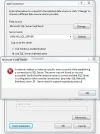
Here is a screen snip...thought it might help to figure out what I'm doing wrong.
 

Attachments

  • SQL Error.webp
    SQL Error.webp
    36 KB · Views: 510

Henry Wong

Well-Known Member
Joined
Aug 11, 2013
Messages
60
Thread Author #3

Attachments

  • SQL Config.webp
    SQL Config.webp
    72.2 KB · Views: 470