📎 AI Summary:
The user transitioned from OS X to Windows 10 and is seeking a way to make the Windows corner buttons resemble OS X El Capitan. One respondent suggests using Windows 7 Builder or manually editing system files with resource hacker, while another comment offers minimal assistance. Overall, the thread reflects a desire to customize Windows 10's appearance to mimic OS X, with some guidance provided on potential methods.

Zeon

New Member
Joined
Feb 28, 2016
Messages
1
Thread Author #1
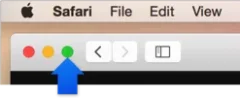
Hi. I recently transferred for OS X to Windows for the wider range of software available. I have since been trying to skin Windows to look like OS X El Capitan but there is one thing I am struggling with. How do I make the regular Windows 10 corner buttons (minimize, maximize, close) look like to OS X ones? (See attached image)

Does anyone know of a tool or a skinpack that can help me?
 

Attachments

  • S0001_FullScreenEnter.webp
    S0001_FullScreenEnter.webp
    3 KB · Views: 361
Solution
Windows 7 Builder might still work. You could also do it manually with resource hacker, but it's a lot more work that way. The file that contains those buttons is C:\Windows\Resources\aero\aero.msstyles

Neemobeer

Windows Forum Team
Staff member
Joined
Jul 4, 2015
Messages
8,995
Windows 7 Builder might still work. You could also do it manually with resource hacker, but it's a lot more work that way. The file that contains those buttons is C:\Windows\Resources\aero\aero.msstyles
 

Solution