


Zowie
New Member
Member details
- Joined
- Jan 28, 2016
- Messages
- 10
Hello! First time posting here, I believe.
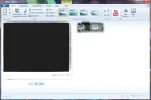
Anyway, I'm having problems with getting my Windows Movie Maker to work properly. All off the graphics inside of the frame become "melty" when I try to take any actions.
I've attached a screenshot of what happens.
This has also happened to my Microsoft Office Word, too, and I believe I had to change something to do with graphics, like the accelerator, but that fix hasn't worked for Windows Movie Maker.
Anyway, I'm having problems with getting my Windows Movie Maker to work properly. All off the graphics inside of the frame become "melty" when I try to take any actions.
I've attached a screenshot of what happens.
This has also happened to my Microsoft Office Word, too, and I believe I had to change something to do with graphics, like the accelerator, but that fix hasn't worked for Windows Movie Maker.
Attachments
-
 Microsoft Defender: No threats detected Scan detailsmovie maker.webp33.5 KB · Views: 350


