
📎 AI Summary:
The thread discusses resolving Skype visibility and notification issues. The original poster, Mitchell_A, shares a solution for displaying Skype status on the web by adjusting a setting in Skype’s Privacy options. Later, Jimbo22 provides a method to disable Skype advertisements and tip messages, including a link for further instructions. Overall, the thread offers practical tips for managing Skype visibility and notifications.
Thread Author
I'd noticed my Skype status wasn't being displayed anywhere on the web, So I set out in search of a solution.

It turned out to be a simple setting I'd missed, go figure.

So here it is:

Open Skype, navigate to Options, then to Privacy.
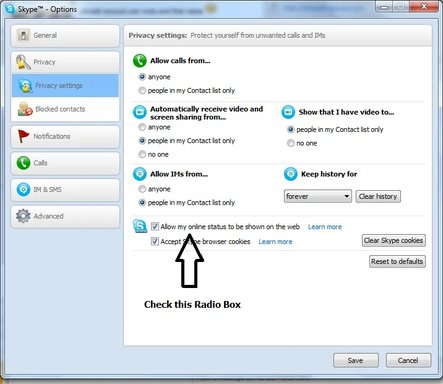
:)

skype.webp


Last edited:

Jimbo22

Essential Member
Joined
Aug 27, 2008
Messages
5,035
To turn off Skype pop up advertisement messages as well as Skype tip and help messages.....here you go.

Link Removed