sunny1881

New Member
Joined
May 30, 2010
Messages
4
Just so we are clear, you are not trying to UPGRADE from within XP, are you? You know you have to boot to the DVD. If the x64 version boots, and your system is x64, it should allow you the option of doing a custom install.

When you say, you have to boot to the dvd, how do you do this? I have a new Windows 7 Ultimate dvd, I shut down my computer and turn it on with the dvd in the player and the computer is suppose to recognize it and boot from there but it is not recognizing it and starting the Install. How do I boot directly to the dvd?
 

Saltgrass

Excellent Member
Microsoft Community Contributor
Joined
Oct 16, 2009
Messages
15,152
If you have and F12 key option, you might be able to select the DVD to boot from there.

If not, you need to have the DVD set to first boot in the bios. If a bootable DVD is in the drive, it should recognize it and give you a message that if you want to boot the DVD, hit a key. If you burned the DVD yourself, it must be burned as an image and not just a data disc.

After you hit a key, it should boot and start the install.

If this sequence is occurring and you still cannot boot from the DVD, you may have either a bad DVD drive, or a bad DVD.
 

sunny1881

New Member
Joined
May 30, 2010
Messages
4
If you have and F12 key option, you might be able to select the DVD to boot from there.

If not, you need to have the DVD set to first boot in the bios. If a bootable DVD is in the drive, it should recognize it and give you a message that if you want to boot the DVD, hit a key. If you burned the DVD yourself, it must be burned as an image and not just a data disc.

After you hit a key, it should boot and start the install.

If this sequence is occurring and you still cannot boot from the DVD, you may have either a bad DVD drive, or a bad DVD.

Ok, I burned the disc myself, so I probably burned it as a data disc. How do I burn it as an image?
 

Saltgrass

Excellent Member
Microsoft Community Contributor
Joined
Oct 16, 2009
Messages
15,152
What utility are you using to burn it? In Nero, you have to burn as image and that is one of the options.
 

cybercore

New Member
Joined
Jul 7, 2009
Messages
15,612
Ok, I burned the disc myself, so I probably burned it as a data disc. How do I burn it as an image?

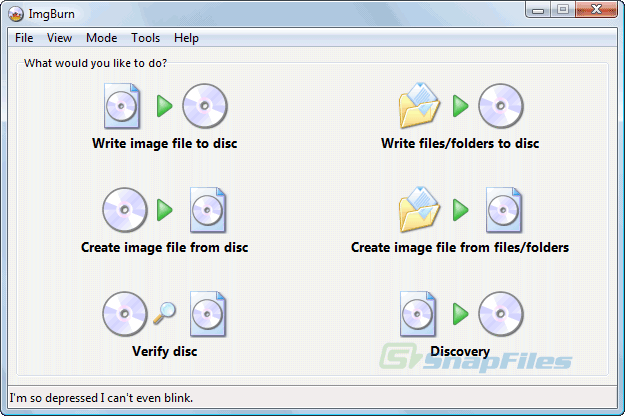
1. Make sure that you have a bootable image of 7, .iso or .img
2. Use the freeware ImgBurn from The Official ImgBurn Website :

ImgBurn.gif


Click on "Write image file to disk" - make sure you have a blank DVD+-R/RW in the drive.


3. For best result, do not perform any other operations during the burn. Once your bootable DVD is ready, ensure the DVD device boot priority in your bios setup.

Please let us know if you need more help.
 

kwydjibo

New Member
Joined
May 21, 2010
Messages
16
Hello all. I replaced the ide dvd burner with a newer one and it sees the disc just fine, booted, installed and is working great.

For whatever reason, the drive didn't like the 64bit edition disc.

talk about a frustrating frustrating problem though.

thanks everybody who offered ideas =)

best regards
 

cybercore

New Member
Joined
Jul 7, 2009
Messages
15,612
Thanks for updating your thread.