
📎 AI Summary:
The thread discusses how to change desktop icons and application icons on Windows. The original poster struggles with finding the option to change system icons and learns that icons for programs like Microsoft Office are embedded resources, making them difficult to modify unless creating new shortcuts. The overall tone is informational, with helpful guidance provided step-by-step by another user.

Lambada10

Active Member
Joined
Nov 18, 2019
Messages
7
Thread Author #1
Hi. I have downloaded some icons (.ico files) and I want to apply it. But in every page on Internet says I must go to control panel -> personalization -> change desktop icons. But I don't have that. Can u give me step by step guide how to do it? Thanks a lot.

Wysłane z mojego RNE-L21 przy użyciu Tapatalka
 

Neemobeer

Windows Forum Team
Staff member
Joined
Jul 4, 2015
Messages
8,995
Right click the desktop, select "Personalize" > Themes > "Desktop Icon Settings" (on the right)
 

Lambada10

Active Member
Joined
Nov 18, 2019
Messages
7
Thread Author #3
Thanks! But can I change other icons e. g. Excel, chrome?

Wysłane z mojego RNE-L21 przy użyciu Tapatalka
 

Neemobeer

Windows Forum Team
Staff member
Joined
Jul 4, 2015
Messages
8,995
You can change the icons on short cuts by right clicking them and selecting properties. Then click "Change Icon"
 

Solution

Lambada10

Active Member
Joined
Nov 18, 2019
Messages
7
Thread Author #5
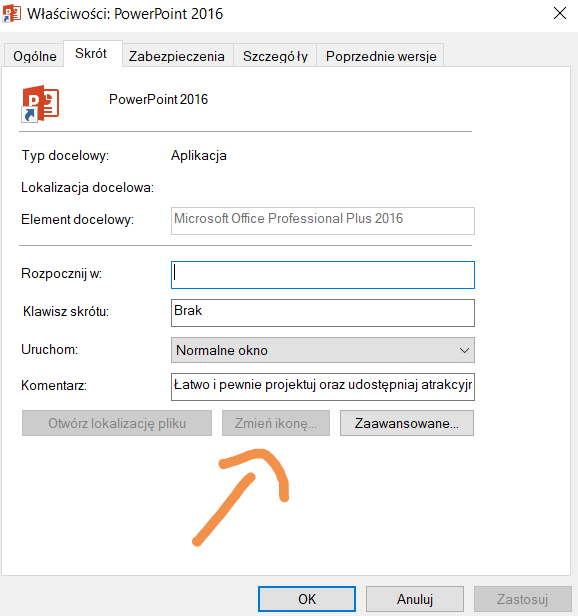
Why I can't change the icons of Microsoft Office apps
a0440f56af82112bb2f96e30642eace9.jpg


Wysłane z mojego RNE-L21 przy użyciu Tapatalka
 

Neemobeer

Windows Forum Team
Staff member
Joined
Jul 4, 2015
Messages
8,995
Because a flag can be set in the shortcut that doesn't allow for a different icon. You'd have to create a new shortcut to the Office apps to be able to change the icon.
 

Lambada10

Active Member
Joined
Nov 18, 2019
Messages
7
Thread Author #7
And (I think) last question. Why I can't change icons of appp, only shortcuts.

Wysłane z mojego RNE-L21 przy użyciu Tapatalka