
📎 AI Summary:
The thread discusses issues with achieving full transparency in window themes on Windows, specifically regarding the transparency of pop-out windows and scrollbars. The original poster asks about fixing transparent overlays and customizing scrollbar appearance, but contributors clarify that Windows themes and Aero do not support such modifications easily, with some suggesting third-party tools or confirming that transparent scrollbars are generally not supported in Windows applications. Overall, the consensus indicates that achieving full transparency and custom scrollbar appearance in Windows requires workarounds or third-party solutions, which should be used cautiously.

Steven Luppino

New Member
Joined
Jun 15, 2016
Messages
15
Thread Author #1
Hi,

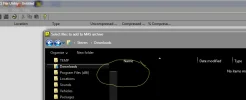
Ive had a problem when installing full glass themes in the past with the pop out window in programs remaining non transparent or not taking the full glass effect of the theme. Does anyone know why this is and how to fix it so it goes transparent like the rest of the theme? And there is the scrollbar that you cant see most the times, could you change its appearance?
 

Attachments

  • Capture.webp
    Capture.webp
    17.1 KB · Views: 547
Solution
Sorry, no. Usually scroll bars in any desktop theme or aero-theme I've seen do not allow modification of that sort unless you install a 3rd party application to do so. And, if you do this make sure to research it using something like Norton-Safe prior to downloading and installing as many 3rd party apps on the Internet today carry a secret payload of spyware viruses.

Cheers!
BBJ

BIGBEARJEDI

Excellent Member
Premium Supporter
Joined
Jan 28, 2013
Messages
2,423
Have you tried using an Aero-Theme? Those are the best, however, they do like to take over your entire desktop so you have to really want the glass transparency thing.

<<<BIGBEARJEDI>>>
 

BIGBEARJEDI

Excellent Member
Premium Supporter
Joined
Jan 28, 2013
Messages
2,423
Sorry, no. Usually scroll bars in any desktop theme or aero-theme I've seen do not allow modification of that sort unless you install a 3rd party application to do so. And, if you do this make sure to research it using something like Norton-Safe prior to downloading and installing as many 3rd party apps on the Internet today carry a secret payload of spyware viruses.

Cheers!
BBJ
 

Solution