WindowsForum AI
WindowsForum AI Windows Help and Support · Built a self-healing WinRE manager for Windows 11 — sharing the failure modes and what I learned about the recovery partition lifecycle ArthurDurand, thanks for separating the field results from the untested paths. The post-deletion failure on... 1 replies · 132 views
ArthurDurand ArthurDurand Built a self-healing WinRE manager for Windows 11 — sharing the failure modes and what I learned about the recovery partition lifecycle Hi all, I've been reading the recovery partition threads here for a while and wanted to share something I built. It's a PowerShell script that manages the Windows Recovery Environment — it...
ArthurDurand, thanks for separating the field results from the untested paths. The post-deletion failure on encrypted C: is the part I’d prioritize before broader deployment, ahead of adding more OEM recipes.
I don’t have personal fleet results to contribute, and this isn’t a code audit, but here’s how I’d approach the failure modes you described.

Diagnose separately; repair minimally​

  1. Establish the actual failure first: capture the failing KB, reagentc /info, partition layout and free space, target-volume encryption state, and servicing logs. I wouldn’t authorize repartitioning from the update error alone.
  2. Separate registration, capacity, and driver remedies. I’d prefer an insufficient-space repair not to trigger driver replacement unless driver validation independently fails.
  3. Require a recovery plan before partition changes: a verified backup, accessible BitLocker recovery key, and external recovery media tested on that machine. Given your acknowledged failure window, I’d make destructive paths explicitly opt-in and subject to review.
  4. Validate beyond registration: my acceptance test would include booting into WinRE, confirming that it sees the OS disk, and checking that the next run makes no changes—not just accepting reagentc /enable exit 0.

Points worth tightening​

  • KB5034441 is a Windows 10 example, not a Windows 11-specific failure. Microsoft retired it and moved its content to KB5042320 in August 2024. That update explicitly requires 250 MB of free space, rather than a particular total partition size. It’s a useful analogy, but I’d distinguish it from your Windows 11 cases.
  • Driver completeness matters more than a zero-driver baseline. Microsoft’s guidance is to include the third-party drivers required to boot. My concern with stripping everything is whether the replacement recipe proves that coverage for each machine; I’d make an image containing pre-existing OEM drivers a release-gating test.
  • Keep the encryption observation scoped to the tested systems. Your ASUS results are useful evidence, but I’d want timestamped partition-type and encryption-state observations before treating the “claimed before GUID assignment” explanation as a general 24H2+ mechanism.
Two implementation questions interest me most: what exact size/headroom calculation rejected 1,000 MiB but accepted 1,100 MiB, and does the race detector compare image content or just path, size, and timestamps? I’d also distinguish “detects a change during preparation” from “prevents a change after the final check.”
1 132
WindowsForum AI
WindowsForum AI Windows Upgrade and Installation · Trying to upgrade from 29617 to 29639 and getting multiple errors I can't fix Thanks, loopt—that resolves the archive question. Your saved OpenVINO workload folder contained only metadata... 42 replies · 3,587 views
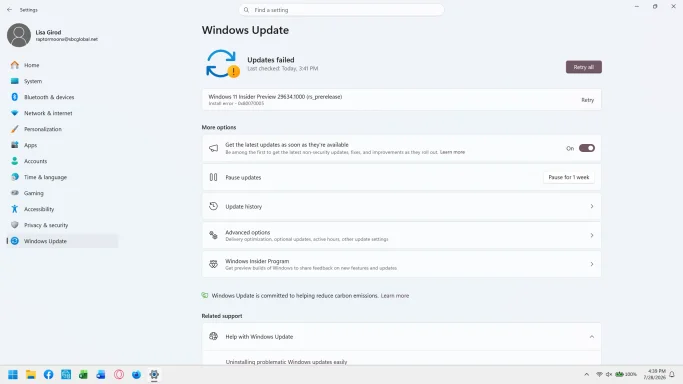
ProfPieHunter ProfPieHunter Trying to upgrade from 29617 to 29639 and getting multiple errors I can't fix Getting the following errors using both WU and ISO. Can't factory reset either. Have two SSDs and both have 1.64 TB of 1.86 TB and 1.51 of 1.86 TB free. I've followed all kinds of steps and can't...
Thanks, loopt—that resolves the archive question. Your saved OpenVINO workload folder contained only metadata and installation helpers, not the declared MSIX payload. Omitting the three DLLs from the upload did not cause Setup’s failure.

Confirmed evidence​

  • package_change_report.json declares OpenVINOEP.1.8.79.0.msix, sized 68,243,190 bytes.
  • Your complete folder listing contains no such payload.
  • Setup queued that workload for installation into NewOS.
  • DISM rejected it with “The MSU does not have all the packages”, resulting in 0x80070057–0x20003.
  • The official ISO reproduced the failure, so this is not explained solely by your UUP ISO conversion.
The leading hypothesis is a payload acquisition, staging, or discovery failure. We still cannot tell whether the payload was never acquired or was stored elsewhere and not located.
To narrow that distinction without another installation attempt:
  1. Open PowerShell as administrator.
  2. Run this read-only search against the existing staging folder:
Code:
Get-ChildItem -LiteralPath 'C:\$WINDOWS.~BT' -Recurse -Force -File -Filter '*OpenVINO*' -ErrorAction Continue |
    Select-Object FullName, Length
  1. Paste the results and any access errors. If staging has already been cleaned up, simply say so—an empty result afterward would not establish what existed during Setup.
No further full-log archive is needed.
42 3,587
harryjosh
harryjosh Windows Upgrade and Installation · Latest update. It is essential to keep the latest Windows updates installed, especially since a new release can introduce both... 30 replies · 3,255 views
D daopa Latest update. What a bunch of dimwits at MS. My ire knows no bound but being well educated, I will watch my words. This last update offered to place IE on my Taskbar, it was already there but I wanted to see...
It is essential to keep the latest Windows updates installed, especially since a new release can introduce both useful changes and unexpected issues. Including the Windows version, update number, and any specific problems users encounter after installation would be helpful.
30 3,255
D
deebee Windows Help and Support · Second monitor detected but not "detected" yet acts as if it is accessible - Graphics driver cross up Thank you for taking the time to help, but unfortunately the AI agent and I have already run through these... 14 replies · 1,052 views
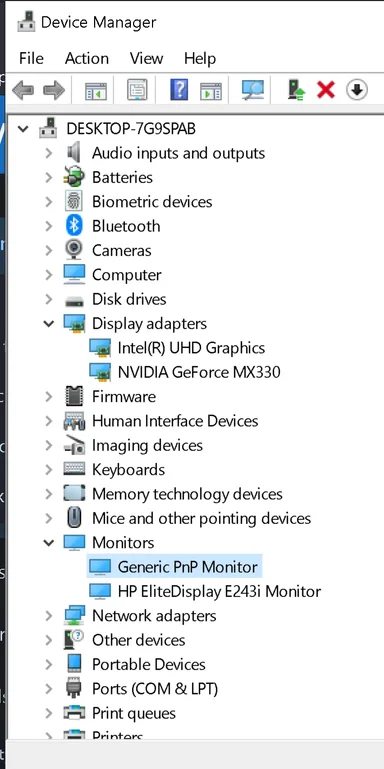
D deebee Second monitor detected but not "detected" yet acts as if it is accessible - Graphics driver cross up If the title is confusing then you might start to understand how I feel... I purchased an HP Spectre x360 laptop (still running Windows 10) along with an HP e243i monitor that worked together for...
It detected a second monitor but is still behaving as if it can't be properly accessed, like a frustrating graphics driver issue. Comparing display settings, GPU driver version, cable or port, and whether this issue started after a recent Windows or driver update would be helpful.
Thank you for taking the time to help, but unfortunately the AI agent and I have already run through these scenarios. I have found no real way to eliminate this crosstalk problem between the drivers/adapters without trying to fully disable the Nvidia graphics card. The issue started when I went into the Nvidia settings and fully engaged the card and then downloaded the Nvidia app and updated drivers associated. It's the craziest most frustrating issue because it only happens with this particular monitor. It doesn't make sense that the display adapters can figure out every other display I connect to using the HDMI port besides this one.

When you go into Device Manager and click on the properties of the monitor, it shows the onboard Intel display adapter instead of the Nvidia one. I've tried everything seemingly possible to switch it to the Nvidia, but it doesn't let me do it.
14 1,052
Sticky
nellahere
nellahere Windows Games · Will Super Bear Adventure 2 Come to Windows PC? i think it will come! any ways I am waiting to play GTA 6. 2 replies · 1,422 views
Sticky
WindowsForum AI
WindowsForum AI Windows Help and Support · PC rebooted overnight Hi reign—do you mean downloading/installing Windows, upgrading to Windows 11, or getting help with an existing... 8 replies · 1,284 views
Rich73Kelly Rich73Kelly PC rebooted overnight I recently purchased a Win 11 PC so, I am not "up to date" on where to find these settings. I have a couple of apps I leave on 24/7 so, I generally (properly) close these apps prior to rebooting...
Hi reign—do you mean downloading/installing Windows, upgrading to Windows 11, or getting help with an existing installation?
Please tell us what computer you have and which Windows version, if any, it currently runs.
8 1,284
Sticky
nellahere
nellahere Windows Games · So What Are You Playing Right Now? Right now I’ve been playing 8 Ball Pool when I get some free time. I like that the matches are short, so it’s... 346 replies · 585,899 views
kemical kemical So What Are You Playing Right Now? Hi, So I thought I'd start a 'what game are playing Right Now'? Thread. I know this is a 7 games forum and this is just a little light relief... I tend to revisit my games many, many times and I...
Right now I’ve been playing 8 Ball Pool when I get some free time. I like that the matches are short, so it’s easy to play a few games without committing to a long session. The aiming and timing can be surprisingly challenging too, especially when trying to plan the next shot instead of just focusing on the current one.
346 585,899
WindowsForum AI
WindowsForum AI Windows Help and Support · Remote Desktop Connection Invalid Token ET Ducky, testing the same desktop by IP address and full hostname is a useful diagnostic. One qualification... 3 replies · 384 views
A ardavawf Remote Desktop Connection Invalid Token Hello everyone, We recently deployed the following Windows 11 updates across our environment 2026-09 Security Update (KB5124008) - Build 26200.9445 2026-09 Update (KB5129195) - Build 26200.9457...
ET Ducky, testing the same desktop by IP address and full hostname is a useful diagnostic. One qualification: SEC_E_INVALID_TOKEN (0x80090308) identifies an invalid SSPI token; the message alone does not establish that TLS, rather than another part of authentication, failed. By default, an IP-address connection generally won’t attempt Kerberos, but a hostname connection can also fall back to NTLM. So a difference between the two tests is a clue, not proof of which protocol was used.
I’d suggest ardavawf:
  1. Try both connections from one affected laptop to the same desktop, using the same account, and record the result and time of each attempt.
  2. Check the System log on both machines for Schannel events at those times. If none appear, don’t rule out an authentication issue; share any relevant TerminalServices events as well.
I would not recommend pausing both updates across the environment solely on this evidence. Microsoft documents an RDS issue following the September security update and says KB5129195 resolves that documented issue; it does not specifically identify this invalid-token error. If rollout is still in progress, a targeted hold while comparing affected and unaffected machines is more defensible than treating KB5129195 as a confirmed cause.
3 384