

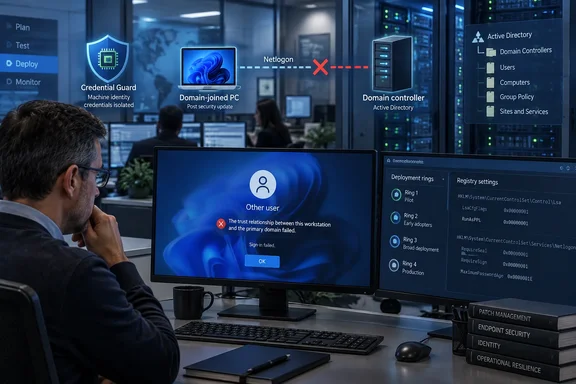
The practical risk is higher than a routine post-patch nuisance. A broken machine trust can strand a user at the Windows sign-in screen, shift devices onto the Public firewall profile, interrupt Kerberos-dependent services, and complicate remote recovery precisely because the workstation’s relationship with the domain has failed. Cached credentials may allow an already-established user to sign in offline, but that is not a substitute for a working computer account secure channel.
The reports point most strongly to a Machine Identity Isolation transition, a Credential Guard-related protection that moves a computer’s machine-account secret out of normal LSASS storage and into the isolated Credential Guard environment. That is a legitimate security boundary. The immediate problem is that administrators are reporting systems where the update appears to put that setting into enforcement mode, followed by loss of the trust relationship that enforcement is meant to protect.
KB5124008 applies to both Windows 11 24H2 and 25H2
Microsoft released KB5124008 on September 8, 2026, for all editions of Windows 11 versions 24H2 and 25H2. The package takes 25H2 systems to build 26200.9445 and 24H2 systems to build 26100.9445. It is a cumulative security update, so simply uninstalling it removes September’s security fixes as well as the suspected regression.
Microsoft’s release notes identify other September problems, including host-folder sharing failures in certain HCS-managed Linux virtual machines and Remote Desktop Services instability. Those issues received a documented out-of-band repair in KB5129195, released September 14. But Microsoft’s KB5129195 notes describe fixes for the known RDS issue and security changes; they do not identify a correction for domain trust or Machine Identity Isolation.
That omission matters for change-control decisions. KB5129195 is cumulative and supersedes the earlier package for normal servicing purposes, but there is no public Microsoft statement that it prevents or repairs the reported secure-channel failures. Admins should not treat the existence of the out-of-band update as evidence that this separate problem is resolved.
The failure looks like machine authentication, not a bad user password
In Active Directory, each domain-joined workstation has a machine account and a shared secret used to establish a Netlogon secure channel with a domain controller. If the local copy and Active Directory’s expectation no longer line up—or if Windows cannot access the credential needed to negotiate the channel—the domain may reject the relationship. The familiar symptoms are a trust-relationship error, rejected domain credentials, and authentication fallbacks from Kerberos toward NTLM and Netlogon.
The Microsoft Q&A thread cited by BleepingComputer contains several administrator reports of a repeatable sequence: a Windows 11 workstation installs KB5124008, reboots, and later loses its secure channel. One reporter said removing the update and restoring the computer’s domain relationship recovered the machine, while reinstalling the update reproduced the failure. Other administrators reported the issue in environments using Windows Server 2019 and Windows Server 2022 domain controllers.
Those posts are field reports rather than a Microsoft root-cause analysis, and the impact is plainly not universal. Some organizations report patched clients operating normally, even against older domain controllers. That makes blanket claims about every Windows 11 device or every Server 2019 domain controller unjustified. But the reports are consistent enough to support a targeted deployment hold where affected policy settings are present.
Machine Identity Isolation is the key configuration to inventory
Microsoft’s DeviceGuard policy documentation defines Machine Identity Isolation as a three-state setting:
- Value 0 keeps the machine password in the conventional LSASS-bound location.
- Value 1, audit mode, stores it in both the conventional location and the isolated Credential Guard location.
- Value 2, enforcement mode, keeps it only in the isolated location.
Microsoft describes the setting as available to Enterprise, Education, and IoT Enterprise editions through the Virtualization Based Security policy. The default listed in Microsoft Intune’s Windows security baseline is disabled. In other words, this should not be a universal Windows 11 configuration, which helps explain why a broad cumulative update can cause a severe enterprise problem without producing a matching flood of consumer complaints.
The reports collected by BleepingComputer and in Microsoft’s Q&A forum repeatedly mention MachineIdentityIsolation being set to 2 after KB5124008. Administrators linked that state to the failure because changing it to 0, rebooting, and repairing the computer account’s secure channel stopped the recurring breakage in some environments.
That correlation is useful for triage, but it is not a Microsoft-confirmed root cause. The public KB5124008 documentation does not say that the update intentionally enables Machine Identity Isolation, changes its mode, or alters its handling of the machine-account secret. Microsoft has confirmed only that it is investigating the reports, according to BleepingComputer.
There is also a configuration detail that deserves care. Microsoft’s policy documentation maps the managed policy to HKLM\SOFTWARE\Policies\Microsoft\Windows\DeviceGuard, while incident reports focus on a runtime value under HKLM\SYSTEM\CurrentControlSet\Control\Lsa. Administrators should inspect effective Group Policy and MDM policy, not make a fleet-wide conclusion from one registry value alone. A policy engine can reapply an enforcement setting after an ad hoc local registry change.
Microsoft’s own documentation warns against the quick rollback
The community workaround has been deceptively simple: set Machine Identity Isolation to disabled, restart, then use an elevated PowerShell session to repair the computer secure channel. The command commonly reported is:
Test-ComputerSecureChannel -Repair -Credential (Get-Credential)
It can be appropriate as a repair step after the configuration is understood and an administrator has confirmed that the device can still reach a domain controller. It does not prove the underlying issue is fixed, and it cannot restore trust if the machine cannot authenticate or contact the required domain services.
More importantly, Microsoft’s documentation for Credential Guard-protected machine accounts says that disabling Machine Identity Isolation after it had been enabled in enforcement mode can itself break domain authentication. Microsoft advises that a device previously using enforcement mode must be unjoined and rejoined to the domain because it cannot authenticate otherwise. The warning directly conflicts with the assumption that switching 2 to 0 is harmless.
That does not mean the reported workaround never works; several administrators say it did. It means a local registry edit is an emergency mitigation with a potentially destructive edge case, not a vendor-supported fleet remediation. A poorly sequenced policy change could turn a limited post-patch incident into a wider authentication outage.
What to do before the next deployment ring
Organizations that have not yet installed KB5124008 or its cumulative successor should identify Windows 11 24H2 and 25H2 devices subject to Virtualization Based Security, Credential Guard, Device Guard, or Machine Identity Isolation policy. Check the applicable GPO and Intune assignments first, then verify the effective setting on a representative pilot ring. Test an actual domain sign-in after reboot, a secure-channel check, and access to services that require Kerberos—not merely whether Windows reaches the desktop.
For machines already affected, preserve evidence before changing settings: capture the installed update history, relevant Netlogon and LSA events, effective Group Policy output, Machine Identity Isolation state, the result of nltest or secure-channel tests, and the domain-controller version and patch level. Those records will matter if Microsoft provides a support path or requests diagnostic data.
Administrators should also make sure they have a recovery method that does not depend on the broken domain relationship. That may mean a tested local administrator account managed through Windows LAPS, an endpoint-management agent that runs as Local System, console or out-of-band access, and a documented process for resetting or rejoining computer accounts. Remote PowerShell access cannot be assumed once the affected device begins rejecting domain authentication.
Microsoft has already issued September fixes for other KB5124008-related failures, but the domain-trust reports remain outside the formal known-issues list as of September 16. Until Microsoft identifies the trigger and publishes supported recovery guidance, the defensible course is a controlled pilot, a policy inventory, and a rollback plan—not an emergency registry change pushed across every domain-joined Windows 11 PC.
Update: Microsoft acknowledges secure-channel bug and publishes mitigation (September 17, 2026)
Microsoft has now acknowledged the Machine Identity Isolation failure and published manual recovery guidance, according to Neowin. The company says the issue can cause Credential Guard-protected Windows 11 clients to lose their secure channel with on-premises Active Directory and block interactive domain sign-ins.
The newly stated scope includes Windows 11 24H2, 25H2, and 26H1 clients paired with domain controllers below the Windows Server 2025 domain functional level. Microsoft reportedly says that domain controllers and AD replication are not affected. The trigger is no longer described only as a suspected policy transition: KB5124008 causes Windows to begin honoring existing or policy-provisioned Machine Identity Isolation settings.
Contrary to the earlier concern that disabling enforcement may invariably require unjoining and rejoining a device, Microsoft’s current workaround instructs affected administrators to disable Machine Identity Isolation through the same channel that enabled it—Intune, Group Policy, or directly in the registry—restart the device, and then repair the secure channel with Test-ComputerSecureChannel -Repair -Credential (Get-Credential).
Microsoft also plans to temporarily prevent Machine Identity Isolation enforcement in a future update. Until that change arrives, admins should apply the documented mitigation only to affected systems and ensure policy changes are made centrally so enforcement is not reapplied at the next refresh.
Update: Additional details (September 17, 2026)
BleepingComputer reports that the corresponding September update for Windows 11 26H1 is KB5124012. Microsoft says Machine Identity Isolation enforcement is supported only where clients connect to domain controllers operating at the Windows Server 2025 domain functional level or higher.
For registry-configured devices, Microsoft’s workaround specifically directs admins to check both HKLM\SYSTEM\CurrentControlSet\Control\Lsa\MachineIdentityIsolation and HKLM\SOFTWARE\Policies\Microsoft\Windows\DeviceGuard\MachineIdentityIsolation. If the value is 2, it should be changed to 0, followed by a restart and secure-channel repair.
Update: Microsoft adds domain-trust failure to its known-issues list (September 17, 2026)
The Register reports that Microsoft added the Machine Identity Isolation-related domain sign-in failure to its Windows known-issues documentation on September 16. This formally supersedes the article’s earlier statement that the secure-channel problem was absent from Microsoft’s public known-issues list.
Microsoft’s clarification is also more precise about the trigger: the September update does not itself enable Machine Identity Isolation enforcement. Instead, it causes Windows to honor an enforcement configuration that was already present through policy or prior setup. Affected clients require Machine Identity Isolation to be disabled if they are not connected to domain controllers operating at the Windows Server 2025 domain functional level or later.
For administrators, the practical recovery path remains unchanged: disable the setting through its original management channel, restart the device, and repair the secure channel. Microsoft says Active Directory services and replication on domain controllers are not affected.
References
- Windows 11 KB5124008 update breaks domain trust for some users - BleepingComputer BleepingComputer · 2026-09-16T20:39:29+00:00
- Microsoft shares workaround for Windows domain login issues BleepingComputer · 2026-09-17T04:24:48-04:00
- Microsoft patch gives domain-joined Windows PCs trust issues The Register · 2026-09-17T13:45:00+00:00