

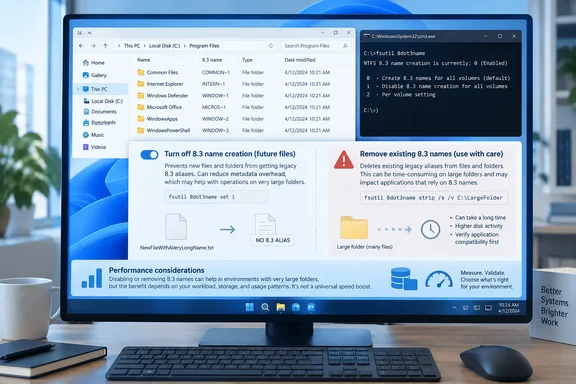
Windows 11 still generates 8.3 short names, and fsutil still manages them
The 8.3 convention comes from the original MS-DOS FAT file system. It allowed eight characters for the base name, three for the extension, and a dot between them, for 12 characters in total. Microsoft's file-naming documentation for Win32 developers explains that NTFS and Windows' FAT implementations support long filenames, but they still support 8.3 versions of those names for backward compatibility. When Windows creates a file with a long name, it may also create an 8.3 alias and store it on disk. On many file systems, the alias contains a tilde in any part of the name that was too long, which is why paths like PROGRA~1 exist.
Microsoft's documentation also says this aliasing "can be disabled for performance reasons" either system-wide or per volume, depending on the file system. Per-volume control only arrived with Windows 7 and Windows Server 2008 R2. On Windows XP, Vista, Server 2003 and Server 2008, the setting could only be changed for the whole system.
The management tool is fsutil 8dot3name. Microsoft's reference page gives the syntax for four subcommands: query, scan, set and strip. The same page lists Windows 11, Windows 10, Windows Server 2016 through 2025, and Azure Local 2311.2 and later as supported platforms. Nothing about Windows' short-name behavior changed on the day the Reddit post appeared. The tool and its warnings have been documented for years.
The Reddit report on Explorer lag and Android transfers is one user's anecdote
According to Neowin, which picked up the Reddit post, the user had been bothered for years by slow file browsing in Windows and by slow copying between Windows and an Android phone over USB and FTP. This happened even though the PC had a fast M.2 SSD. The user checked the setting with fsutil 8dot3name query C:, turned off short-name creation for new files and folders, and then stripped existing short names from a movie collection with fsutil 8dot3name strip /f /s D:\Movies.
The user described several improvements afterwards:
- Scrolling in Explorer's Tile view was noticeably smoother.
- After the same treatment on other frequently used folders, file searches were much faster.
- External hard drives felt faster.
- An Android directory accessed over USB or FTP behaved more like a local Windows folder, including when copying large numbers of music files.
These are one person's impressions. The post includes no before-and-after timings, no hardware details and no controlled comparison. It shows that one user's problem went away after the change. It doesn't show that short names caused every symptom, and it doesn't show that other PCs will improve the same way. The Android-over-FTP result is the hardest to explain with the documented mechanism. The best-supported claim is the general one: large directories on NTFS can run into short-name overhead.
Dell's Avamar testing puts numbers on the slowdown at million-file scale
The strongest independent evidence comes from a Dell support article for its Avamar backup product. Dell describes a failure where restoring a Windows folder with more than a million files to an NTFS volume starts quickly, then slows down over time, until the job is still running days later. Dell's diagnosis is blunt: it is a performance issue on Windows NTFS volumes where 8.3 filename support is enabled.
Avamar Engineering isolated the effect from its own backup software. They used a tool that kept creating unique files in a single directory and logged how many files existed each minute. With 8.3 names enabled, file creation slowed sharply after a certain point, and that point varied from machine to machine. Dell says creation stalled at about 1.3 million files with short names enabled. With short names disabled, more than 5 million files were created in two to three hours. Dell also gives a practical limit of about 1.1 million files in one folder before creation performance drops off exponentially. Its fix is to check the target volume with fsutil 8dot3name query and turn short names off if they're enabled.
Microsoft's own engineers have given similar advice for servers. Jose Barreto, then on Microsoft's file server team, wrote in 2012 that disabling short names "has been a performance tip for File Servers for some time now". He said there were "big performance savings" both from disabling 8.3 naming and from removing existing short names on a volume. Microsoft's File Server Capacity Tool documentation says the same thing. It shows fsutil 8dot3name set d: 1 for disabling creation on volume D, and suggests considering stripping existing names if the volume already holds data.
All of this evidence is about servers, backup restores and folders with more than a million entries. That's the scale where the cost is proven. A folder with a few thousand movies or MP3s is far smaller, so the Reddit user's gains may have other causes, or causes on top of this one.
Disabling creation and stripping existing names are separate decisions
Turning off short-name creation only affects files and folders created afterwards. As Barreto put it, new files won't get a short name, but a volume may still hold many older files that were created with both versions. The Reddit user needed the separate strip command for that reason, and that command is where Microsoft's warning applies.
Microsoft's fsutil reference says permanently removing 8.3 names without updating registry keys that point to them "may lead to unexpected application failures, including the inability to uninstall an application." It recommends backing up the directory or volume first. The risk comes from old software and installers that recorded paths in short form. Barreto noted that some old installers do exactly that. If a registry entry points to C:\PROGRA~1\... and the alias is gone, the path no longer resolves.
Some current enterprise software still depends on short names. Oracle's documentation says 8.3 name creation must be turned on for servers running Oracle Enterprise Performance Management System. It also warns against disabling it after installation and configuration because some startup services will not work. This is the kind of dependency Microsoft's warning describes.
The switches used in the Reddit example also matter:
/sapplies the strip to every subdirectory under the specified path./fremoves short names even when registry keys point to them. Microsoft says it does not modify those keys, and recommends a backup before using it./truns the strip in test mode. It does everything except remove the names, which makes it a way to find registry keys that reference short names./lwrites to a specified log file. Without it, fsutil logs to%temp%\8dot3_removal_log@(GMT YYYY-MM-DD HH-MM-SS).log./vprints the logged information to the console as well.
The command includes /f specifically to override fsutil's built-in safety check. Without it, fsutil checks the registry for references before removing names. On a folder of media files that no program has registered, the risk is small. The same command run against C:\ or a Program Files tree is the case Microsoft is warning about. Microsoft also notes that strip skips any file whose directory path plus filename is longer than 260 characters, so some aliases may survive a strip.
Reading the fsutil 8dot3name set values correctly
The set subcommand works on two levels, and mixing them up gives a different result than intended. Given a single number, it writes the system-wide default to HKLM\System\CurrentControlSet\Control\FileSystem\NtfsDisable8dot3NameCreation. Microsoft documents four values:
| Value | Effect |
|---|---|
| 0 | Enables 8.3 name creation on all volumes |
| 1 | Disables 8.3 name creation on all volumes |
| 2 | Uses each volume's own setting |
| 3 | Disables 8.3 name creation on all volumes except the system volume |
Given a volume and a number, as in fsutil 8dot3name set D: 1, the command changes that volume's own flag: 0 enables creation, 1 disables it. Microsoft says the system-wide default must be 2 for per-volume settings to apply. The Reddit account describes a system-wide set 1, which changes every volume, including the system drive. That's a broader change than the per-volume approach shown in Microsoft's and Dell's examples.
When you query a volume, fsutil reports both levels and the combined result. Barreto's example output shows a volume state of 0 (creation enabled), a registry state of 2 (per-volume setting, the default), and the conclusion that 8dot3 name creation is enabled on D: Dell's article shows the same output pattern for C:. Barreto also wrote that in his Windows Server 2012 era setup, new volumes defaulted to having short names disabled, while the system-wide setting left the decision to each volume. In practice, many data drives formatted by recent Windows versions may already have creation turned off, while the system volume may not. Querying each volume is the only way to know.
What this means for you
Most people should query their volumes and then leave things alone, unless they have a very large directory that is actually slow or run a server that creates files at high volume. The documented gains are at the scale of a million files per folder. Disabling creation on a data volume is low-risk and reversible. Stripping existing names is the step that can break things, especially on the system drive or anywhere installed software lives. Changing the setting requires an elevated command prompt, as Dell's instructions note. The Oracle case shows that some server software requires short names.
- Run
fsutil 8dot3name queryfor each drive letter before changing anything. On some drives, short-name creation may already be off. - For a slow data volume, prefer the per-volume form,
fsutil 8dot3name set D: 1, over a system-wideset 1, and leave the system volume alone unless you have a specific reason to change it. - Before stripping names, run
fsutil 8dot3name scan /sor a strip with/ton the target directory to list any registry keys that reference its short names, and back up the directory or volume as Microsoft recommends. - Keep
/ffor folders with no installed software, such as media libraries. Microsoft says it does not repair registry references and can cause uninstall failures. - On servers running vendor software such as Oracle EPM, check the vendor's requirements first, because some products still need 8.3 names turned on.
Short names cost real performance at file-server scale, and Microsoft has said so in its own documentation for more than a decade. Windows 11 still creates them for compatibility, and that trade-off has shipped for years. Turning off creation on a data drive is a documented, reversible optimization. Stripping existing names is closer to a one-way change, and the registry check built into fsutil is the protection that /f removes.