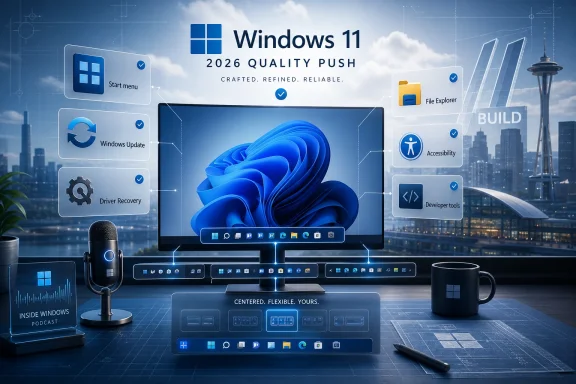
Microsoft’s May 29, 2026 Windows quality update says new Insider builds are beginning to roll out taskbar and Start personalization, File Explorer fixes, accessibility improvements, touchpad controls, and driver-reliability work tied to the Driver Quality Initiative and Cloud Initiated Driver Recovery. The pitch is “momentum,” but the more interesting story is restraint. After years of Windows 11 debates dominated by ads, AI surfaces, hardware requirements, and removed customization options, Microsoft is trying to make quality feel visible again. That is a harder job than shipping one headline feature, because it asks users to believe that the operating system is becoming more predictable in the places where they notice friction every day.
The May update is not a conventional feature drop in the old Windows sense. There is no single flagship capability that will sell a PC, anchor a keynote, or give Microsoft’s marketing department a clean 15-second demo. Instead, Marcus Ash’s post frames a set of Insider experiments as evidence that Windows is improving through accumulation: File Explorer behaving more sensibly, Start becoming less rigid, drivers failing less catastrophically, and accessibility settings reflecting more varied ways people actually use PCs.
That matters because Windows quality has become a strategic issue, not merely a support issue. For consumers, “quality” is whether the taskbar works the way their muscle memory expects. For administrators, it is whether a driver update detonates a fleet. For developers, it is whether Windows feels responsive enough to stay out of the way. For Microsoft, it is the difference between an operating system people tolerate and one they trust enough to accept more ambitious changes later.
The company’s language is careful. “Momentum” is doing a lot of work here, because Microsoft is not claiming the job is done. It is claiming the pipeline has changed. The May post repeatedly points to improvements that are beginning to roll out in the Experimental Channel, which means these changes are visible to some Insiders now but still subject to telemetry, feedback, and delay before they become everyday Windows.
That is the right posture. Windows users have heard enough grand reinvention speeches. What they need now is proof that Microsoft can make the familiar parts of Windows less annoying without turning every improvement into a tradeoff.
On paper, this is personalization. In practice, it is Microsoft slowly repairing one of Windows 11’s earliest self-inflicted wounds. When Windows 11 launched, its cleaner taskbar and centered Start menu made the OS look more modern, but they also narrowed years of accumulated user choice. For many longtime Windows users, that felt less like simplification and more like a reminder that Microsoft’s design priorities could override established workflows.
The return of taskbar positioning is therefore not just a checkbox for power users. It is an admission that choice itself is part of perceived quality on Windows. A side-mounted taskbar is not a niche luxury for the people who use it all day; it is a layout decision tied to screen geometry, accessibility, development workflows, ultrawide monitors, and personal habit.
The smaller taskbar option lands in the same category. Microsoft’s original Windows 11 taskbar was designed for touch targets, visual calm, and modern spacing. Those are defensible goals. But on small laptops, remote sessions, virtual machines, and dense workstations, spaciousness can feel like waste. Giving users a compact option is Microsoft recognizing that quality cannot be measured only in design consistency.
Start menu changes are more subtle but just as revealing. Letting users hide Pinned, Recommended, and All apps independently suggests Microsoft has finally accepted that Start is not one surface with one ideal layout. Some people want a launcher. Some want a recent-file dashboard. Some want privacy during screen sharing. Some want to avoid recommendations entirely. Treating those as legitimate choices rather than edge cases is a healthier design philosophy.
“Recent” is less ambitious and more honest. It tells the user the section is primarily about activity: recently used files, recently installed apps, and content related to current work. That does not eliminate concerns about ranking, telemetry, or promotion, but it narrows the promise to something Windows can plausibly deliver.
This is the kind of craft decision Microsoft used to underplay. A label can change how users interpret the same surface. If a file appears under Recommended and seems irrelevant, the OS looks presumptuous. If it appears under Recent and is merely stale, the OS looks imperfect. That distinction matters when Windows is trying to rebuild trust around surfaces that have often felt like contested real estate.
The more important change is separability. Microsoft says users will gain controls that make Start easier to shape, including independent section toggles and privacy controls. If those controls survive the path from Experimental Channel to general availability, they will mark a welcome shift away from the “all-or-nothing” settings that have too often defined Windows personalization.
Still, the rollout channel matters. Experimental Channel features are not promises in the same way a production release note is. Microsoft is showing direction, not a guaranteed shipping schedule. Insiders should test these features with that in mind, and administrators should avoid treating them as near-term deployment assumptions until Microsoft moves them into more stable channels.
The address bar changes are particularly telling. Microsoft says File Explorer now better supports paths containing double backslashes and quotation marks, which should improve compatibility with paths users paste or type. This is the sort of fix that sounds trivial until you remember how many Windows workflows involve copying paths from scripts, terminals, documentation, emails, logs, network shares, and cloud sync locations.
File Explorer is a bridge between casual users and deeply technical workflows. It has to tolerate imprecise human behavior while also respecting exact system syntax. When pasted paths fail, when quotes confuse the UI, or when suggestions linger after selection, users do not think about parser behavior. They think File Explorer is flaky.
The file size formatting change is another small but overdue improvement. Showing sizes in appropriate units such as KB, MB, and GB instead of leaning awkwardly on KB-only displays improves readability in the one place users constantly scan for context. This is not innovation. It is Windows doing the obvious thing at the obvious moment.
Renaming fixes fall into the same category. Case-only filename changes, repeated selection while renaming, and inconsistencies across local and cloud-backed storage are the kinds of bugs that erode confidence because they happen during ordinary file management. A user renaming a file is not performing an advanced operation. If Windows makes that feel uncertain, the OS loses credibility in a place it should be boring.
The broader point is that File Explorer has become a test of Microsoft’s seriousness about craft. It is one of the oldest, most-used pieces of the Windows experience, but it also sits at the intersection of legacy shell behavior, cloud storage integration, modern UI work, and performance complaints. Improving it requires patience more than spectacle.
Unlike tightly controlled platforms, Windows must absorb hardware diversity at industrial scale. OEMs, silicon vendors, peripheral makers, and independent hardware vendors all contribute to the user’s perception of whether Windows is stable. When a bad driver causes crashes, battery drain, thermal problems, or broken connectivity, most users do not assign blame to the vendor’s kernel-mode component. They say Windows broke.
DQI is Microsoft’s attempt to shift that from reactive blame management to proactive quality control. The initiative emphasizes architecture, trust, lifecycle management, and broader quality measures. In plain English, Microsoft wants fewer risky drivers in the most sensitive parts of the OS, stronger validation and partner accountability, cleaner catalog hygiene, and quality signals that look beyond crash counts.
That last point is important. A driver can avoid crashing and still make a PC worse. It can hurt battery life, cause heat, degrade performance, break sleep behavior, or introduce intermittent device weirdness that never produces a clean dump file. Measuring quality across stability, functionality, performance, power, and thermal impact is closer to how users actually experience reliability.
There is also a security subtext here. The industry has spent years relearning that kernel-level code is both powerful and dangerous. Windows’ historical openness to third-party kernel drivers enables hardware breadth, but it also expands the blast radius when something goes wrong. Moving more functionality toward user-mode drivers or Microsoft-authored class drivers is not just a reliability play; it is part of a long-running effort to reduce how often third-party code needs the keys to the kernel.
The challenge is incentives. Microsoft can raise requirements, improve analysis, and clean up delivery paths, but the Windows ecosystem includes many vendors with different engineering cultures, device lifecycles, and support budgets. DQI will be judged less by its architecture diagrams than by whether ordinary users see fewer driver-related failures over the next several release cycles.
For IT administrators, driver recovery is not an abstract feature. A bad driver can create support tickets across an organization before anyone has a clear root cause. If recovery can move devices back to a known-good state with less manual intervention, it changes the operational cost of Windows hardware diversity.
The phrase “cloud initiated” will make some readers uneasy, and not without reason. Windows users have grown wary of remote decision-making that changes their systems without obvious consent or control. But in the driver context, cloud coordination can be useful if it is transparent, policy-aware, and reversible. The key is whether Microsoft gives administrators enough visibility and governance to understand what changed, why it changed, and how to control it across managed fleets.
There is a consumer angle too. Most home users do not know what driver caused a problem, where to find a replacement, or whether Windows Update, an OEM utility, or a hardware vendor package is the safer source. If Windows can detect a failed driver deployment and roll the machine back automatically, that is a real quality improvement. It turns a potentially technical recovery process into an OS-level safety net.
But Microsoft must be careful not to treat recovery as a substitute for prevention. A PC that recovers from a bad driver is better than one that stays broken, but a PC that never receives the bad driver is better still. DQI and Cloud Initiated Driver Recovery are strongest as a pair: one raises the bar before deployment, the other narrows the damage when the bar is missed.
Voice Isolation in Voice Access targets a concrete problem: background noise. Voice control is only as useful as its consistency, and inconsistent recognition can be more frustrating than no feature at all. If Windows can better focus on the speaker and reduce environmental interference, voice input becomes more practical outside ideal conditions.
Screen tint and Magnifier improvements are similarly grounded in long-session reality. Users do not experience displays as spec sheets; they experience them through lighting, fatigue, visual sensitivity, and changing tasks. More direct control over tint, opacity, and zoom levels gives users a way to tune Windows without spelunking through Settings every time their environment changes.
The touchpad controls are more enthusiast-relevant than they may first appear. Automatic scrolling, gesture speed, accelerated scrolling, and optional single-finger scrolling support are all about reducing the mismatch between user intent and device response. Laptop users live with those micro-interactions constantly. A touchpad that feels wrong makes the whole PC feel wrong.
This is where Microsoft’s “craft” language earns its keep. Craft is not decoration. It is the accumulated absence of friction. If the system hears you better, scrolls the way you expect, zooms without a detour, and adapts to your visual needs, Windows feels less like a fixed interface and more like an environment you can inhabit.
That contrast is healthy. Windows cannot be a credible developer platform if the underlying desktop experience feels neglected. Developers notice taskbar layout, File Explorer behavior, search speed, terminal integration, driver stability, power management, and input precision because they spend long, dense days inside those workflows. A platform story built on AI assistants and new APIs still depends on the old promise that the machine is fast, stable, and controllable.
Microsoft also used the post to point to Inside Windows, a podcast featuring Pavan Davuluri and Windows team members. That is part of a broader effort to narrate Windows development more openly. The company appears to understand that users want not only fixes but explanations: why something changed, what tradeoffs were considered, and what work remains.
The risk is that transparency becomes another layer of marketing. Windows users are good at detecting when “we’re listening” is a slogan rather than a process. The value of these quality posts will depend on whether the same themes keep showing up in builds, feedback responses, known-issue lists, and eventually production releases.
Build will almost certainly bring bigger Windows narratives, particularly around developers and AI-era workflows. But this May update is a reminder that Microsoft’s most important Windows story may be quieter. Before Windows can ask users to embrace the next interface layer, it has to prove the existing one is being cared for.
That matters for the taskbar in particular. Moving the taskbar to alternate screen edges sounds simple until the rest of the shell has to follow. Start, Search, flyouts, touch behavior, auto-hide, multiple monitors, drag-and-drop, window labels, and tablet modes all need to behave sensibly. Microsoft’s own earlier taskbar post acknowledged some features are still incomplete or being evaluated. That is not a minor footnote; it is the engineering reality behind restoring flexibility.
Start menu customization has similar edge cases. Hiding sections should not break discoverability. Privacy controls should be obvious enough for presenters and streamers to trust. Recent file ranking should be useful without feeling invasive. Settings should not become a maze of toggles that only power users understand.
File Explorer fixes require another kind of validation. The shell is full of legacy behaviors that some users depend on, even when those behaviors look strange from the outside. Changing parsing, navigation, context menu behavior, and rename handling requires caution because small shell regressions can derail workflows in ways telemetry may not fully capture.
This is why Insider feedback remains important, even in an era when Microsoft can measure enormous amounts of system behavior. Telemetry can show crashes, hangs, and usage patterns. It is less good at explaining why a workflow feels slower, why a menu placement breaks muscle memory, or why a renamed section feels less intrusive. Quality is partly measurable and partly lived.
That does not mean Microsoft deserves a victory lap yet. Experimental features can stall. Promising controls can ship partially. Driver initiatives can look impressive at conferences and still fail to prevent the next messy update. File Explorer can get five fixes and still need fifty more. The Windows community has learned to separate announcements from lived results.
But the direction is notable. Microsoft is not framing quality only as fewer blue screens or better benchmark numbers. It is framing quality as predictability, personalization, recovery, and craft. That is closer to what Windows users have been asking for than another abstract promise of modernization.
The next year will show whether this is a durable shift or a well-timed pre-Build narrative. If Microsoft keeps returning control to users, hardening the driver ecosystem, and sanding down daily shell friction, Windows 11 could gradually become what it should have been from the start: not merely a cleaner Windows, but a more trustworthy one.
 Microsoft Is Selling Quality as a Product Feature Again
The May update is not a conventional feature drop in the old Windows sense. There is no single flagship capability that will sell a PC, anchor a keynote, or give Microsoft’s marketing department a clean 15-second demo. Instead, Marcus Ash’s post frames a set of Insider experiments as evidence that Windows is improving through accumulation: File Explorer behaving more sensibly, Start becoming less rigid, drivers failing less catastrophically, and accessibility settings reflecting more varied ways people actually use PCs.That matters because Windows quality has become a strategic issue, not merely a support issue. For consumers, “quality” is whether the taskbar works the way their muscle memory expects. For administrators, it is whether a driver update detonates a fleet. For developers, it is whether Windows feels responsive enough to stay out of the way. For Microsoft, it is the difference between an operating system people tolerate and one they trust enough to accept more ambitious changes later.
The company’s language is careful. “Momentum” is doing a lot of work here, because Microsoft is not claiming the job is done. It is claiming the pipeline has changed. The May post repeatedly points to improvements that are beginning to roll out in the Experimental Channel, which means these changes are visible to some Insiders now but still subject to telemetry, feedback, and delay before they become everyday Windows.
That is the right posture. Windows users have heard enough grand reinvention speeches. What they need now is proof that Microsoft can make the familiar parts of Windows less annoying without turning every improvement into a tradeoff.
The Taskbar Retreat Becomes a Quality Story
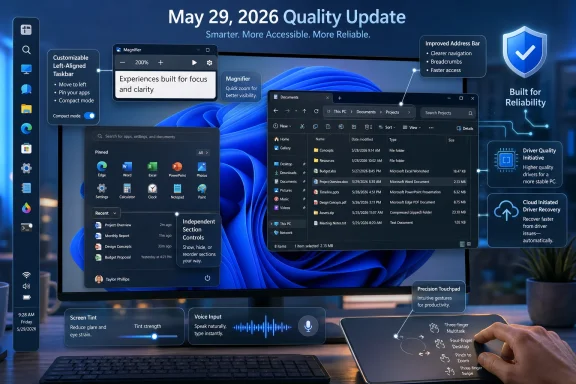
The most symbolically important change in the May update is the return of deeper taskbar flexibility. Windows Insiders in the Experimental Channel are getting the ability to move the taskbar to any edge of the screen, choose icon alignment based on position, use app labels across positions, and enable a smaller taskbar to reclaim screen space. Start also gets new controls for showing or hiding sections, resizing the menu, and hiding the user name and profile picture.On paper, this is personalization. In practice, it is Microsoft slowly repairing one of Windows 11’s earliest self-inflicted wounds. When Windows 11 launched, its cleaner taskbar and centered Start menu made the OS look more modern, but they also narrowed years of accumulated user choice. For many longtime Windows users, that felt less like simplification and more like a reminder that Microsoft’s design priorities could override established workflows.
The return of taskbar positioning is therefore not just a checkbox for power users. It is an admission that choice itself is part of perceived quality on Windows. A side-mounted taskbar is not a niche luxury for the people who use it all day; it is a layout decision tied to screen geometry, accessibility, development workflows, ultrawide monitors, and personal habit.
The smaller taskbar option lands in the same category. Microsoft’s original Windows 11 taskbar was designed for touch targets, visual calm, and modern spacing. Those are defensible goals. But on small laptops, remote sessions, virtual machines, and dense workstations, spaciousness can feel like waste. Giving users a compact option is Microsoft recognizing that quality cannot be measured only in design consistency.
Start menu changes are more subtle but just as revealing. Letting users hide Pinned, Recommended, and All apps independently suggests Microsoft has finally accepted that Start is not one surface with one ideal layout. Some people want a launcher. Some want a recent-file dashboard. Some want privacy during screen sharing. Some want to avoid recommendations entirely. Treating those as legitimate choices rather than edge cases is a healthier design philosophy.
“Recommended” Quietly Becomes “Recent”
The renaming of Recommended to Recent may look cosmetic, but it is one of the more politically loaded changes in the update. “Recommended” has always carried a whiff of platform agenda. It implies Windows is not merely showing what you used, but deciding what you should see.“Recent” is less ambitious and more honest. It tells the user the section is primarily about activity: recently used files, recently installed apps, and content related to current work. That does not eliminate concerns about ranking, telemetry, or promotion, but it narrows the promise to something Windows can plausibly deliver.
This is the kind of craft decision Microsoft used to underplay. A label can change how users interpret the same surface. If a file appears under Recommended and seems irrelevant, the OS looks presumptuous. If it appears under Recent and is merely stale, the OS looks imperfect. That distinction matters when Windows is trying to rebuild trust around surfaces that have often felt like contested real estate.
The more important change is separability. Microsoft says users will gain controls that make Start easier to shape, including independent section toggles and privacy controls. If those controls survive the path from Experimental Channel to general availability, they will mark a welcome shift away from the “all-or-nothing” settings that have too often defined Windows personalization.
Still, the rollout channel matters. Experimental Channel features are not promises in the same way a production release note is. Microsoft is showing direction, not a guaranteed shipping schedule. Insiders should test these features with that in mind, and administrators should avoid treating them as near-term deployment assumptions until Microsoft moves them into more stable channels.
File Explorer Is Where Small Bugs Become Daily Irritation
File Explorer gets a less glamorous but arguably more important batch of changes. The May update calls out address bar improvements, clearer file size formatting, keyboard navigation fixes, and renaming reliability work. None of that will make a keynote audience applaud. All of it affects whether Windows feels professionally maintained.The address bar changes are particularly telling. Microsoft says File Explorer now better supports paths containing double backslashes and quotation marks, which should improve compatibility with paths users paste or type. This is the sort of fix that sounds trivial until you remember how many Windows workflows involve copying paths from scripts, terminals, documentation, emails, logs, network shares, and cloud sync locations.
File Explorer is a bridge between casual users and deeply technical workflows. It has to tolerate imprecise human behavior while also respecting exact system syntax. When pasted paths fail, when quotes confuse the UI, or when suggestions linger after selection, users do not think about parser behavior. They think File Explorer is flaky.
The file size formatting change is another small but overdue improvement. Showing sizes in appropriate units such as KB, MB, and GB instead of leaning awkwardly on KB-only displays improves readability in the one place users constantly scan for context. This is not innovation. It is Windows doing the obvious thing at the obvious moment.
Renaming fixes fall into the same category. Case-only filename changes, repeated selection while renaming, and inconsistencies across local and cloud-backed storage are the kinds of bugs that erode confidence because they happen during ordinary file management. A user renaming a file is not performing an advanced operation. If Windows makes that feel uncertain, the OS loses credibility in a place it should be boring.
The broader point is that File Explorer has become a test of Microsoft’s seriousness about craft. It is one of the oldest, most-used pieces of the Windows experience, but it also sits at the intersection of legacy shell behavior, cloud storage integration, modern UI work, and performance complaints. Improving it requires patience more than spectacle.
Driver Quality Is the Enterprise Half of the Same Argument
The Driver Quality Initiative is the most enterprise-relevant part of the May post. Microsoft frames drivers as central to reliability because they connect Windows to silicon, components, and peripherals across an enormous ecosystem of partners. That ecosystem is Windows’ superpower, but it is also one of the reasons Windows quality is so hard to standardize.Unlike tightly controlled platforms, Windows must absorb hardware diversity at industrial scale. OEMs, silicon vendors, peripheral makers, and independent hardware vendors all contribute to the user’s perception of whether Windows is stable. When a bad driver causes crashes, battery drain, thermal problems, or broken connectivity, most users do not assign blame to the vendor’s kernel-mode component. They say Windows broke.
DQI is Microsoft’s attempt to shift that from reactive blame management to proactive quality control. The initiative emphasizes architecture, trust, lifecycle management, and broader quality measures. In plain English, Microsoft wants fewer risky drivers in the most sensitive parts of the OS, stronger validation and partner accountability, cleaner catalog hygiene, and quality signals that look beyond crash counts.
That last point is important. A driver can avoid crashing and still make a PC worse. It can hurt battery life, cause heat, degrade performance, break sleep behavior, or introduce intermittent device weirdness that never produces a clean dump file. Measuring quality across stability, functionality, performance, power, and thermal impact is closer to how users actually experience reliability.
There is also a security subtext here. The industry has spent years relearning that kernel-level code is both powerful and dangerous. Windows’ historical openness to third-party kernel drivers enables hardware breadth, but it also expands the blast radius when something goes wrong. Moving more functionality toward user-mode drivers or Microsoft-authored class drivers is not just a reliability play; it is part of a long-running effort to reduce how often third-party code needs the keys to the kernel.
The challenge is incentives. Microsoft can raise requirements, improve analysis, and clean up delivery paths, but the Windows ecosystem includes many vendors with different engineering cultures, device lifecycles, and support budgets. DQI will be judged less by its architecture diagrams than by whether ordinary users see fewer driver-related failures over the next several release cycles.
Cloud-Initiated Driver Recovery Is Microsoft Planning for Failure
Cloud Initiated Driver Recovery may be the most practical idea in the update because it starts from the premise that bad drivers will still happen. Microsoft says the approach is meant to improve how drivers are validated, delivered, and maintained, including catching issues earlier, targeting updates more precisely, and enabling automatic recovery when needed. That is the right mental model: resilience is not the absence of failure, but the ability to recover quickly and safely.For IT administrators, driver recovery is not an abstract feature. A bad driver can create support tickets across an organization before anyone has a clear root cause. If recovery can move devices back to a known-good state with less manual intervention, it changes the operational cost of Windows hardware diversity.
The phrase “cloud initiated” will make some readers uneasy, and not without reason. Windows users have grown wary of remote decision-making that changes their systems without obvious consent or control. But in the driver context, cloud coordination can be useful if it is transparent, policy-aware, and reversible. The key is whether Microsoft gives administrators enough visibility and governance to understand what changed, why it changed, and how to control it across managed fleets.
There is a consumer angle too. Most home users do not know what driver caused a problem, where to find a replacement, or whether Windows Update, an OEM utility, or a hardware vendor package is the safer source. If Windows can detect a failed driver deployment and roll the machine back automatically, that is a real quality improvement. It turns a potentially technical recovery process into an OS-level safety net.
But Microsoft must be careful not to treat recovery as a substitute for prevention. A PC that recovers from a bad driver is better than one that stays broken, but a PC that never receives the bad driver is better still. DQI and Cloud Initiated Driver Recovery are strongest as a pair: one raises the bar before deployment, the other narrows the damage when the bar is missed.
Accessibility Changes Show Quality Is Not One Workflow
The May update also bundles improvements to voice input, screen tint, Magnifier, and precision touchpad controls. These changes are easy to treat as a secondary lane, but they fit the same quality thesis. Windows is only dependable if it adapts to different bodies, environments, devices, and work sessions.Voice Isolation in Voice Access targets a concrete problem: background noise. Voice control is only as useful as its consistency, and inconsistent recognition can be more frustrating than no feature at all. If Windows can better focus on the speaker and reduce environmental interference, voice input becomes more practical outside ideal conditions.
Screen tint and Magnifier improvements are similarly grounded in long-session reality. Users do not experience displays as spec sheets; they experience them through lighting, fatigue, visual sensitivity, and changing tasks. More direct control over tint, opacity, and zoom levels gives users a way to tune Windows without spelunking through Settings every time their environment changes.
The touchpad controls are more enthusiast-relevant than they may first appear. Automatic scrolling, gesture speed, accelerated scrolling, and optional single-finger scrolling support are all about reducing the mismatch between user intent and device response. Laptop users live with those micro-interactions constantly. A touchpad that feels wrong makes the whole PC feel wrong.
This is where Microsoft’s “craft” language earns its keep. Craft is not decoration. It is the accumulated absence of friction. If the system hears you better, scrolls the way you expect, zooms without a detour, and adapts to your visual needs, Windows feels less like a fixed interface and more like an environment you can inhabit.
Build Looms Over a Deliberately Unflashy Update
The timing of the post is not accidental. Microsoft published the May quality update ahead of Build, where the company says it will discuss the developer experience across the Windows platform. That creates a useful contrast. Build is where Microsoft typically talks about platforms, APIs, AI, tooling, and future-facing developer stories. The May post is about the stuff users touch before they open an IDE.That contrast is healthy. Windows cannot be a credible developer platform if the underlying desktop experience feels neglected. Developers notice taskbar layout, File Explorer behavior, search speed, terminal integration, driver stability, power management, and input precision because they spend long, dense days inside those workflows. A platform story built on AI assistants and new APIs still depends on the old promise that the machine is fast, stable, and controllable.
Microsoft also used the post to point to Inside Windows, a podcast featuring Pavan Davuluri and Windows team members. That is part of a broader effort to narrate Windows development more openly. The company appears to understand that users want not only fixes but explanations: why something changed, what tradeoffs were considered, and what work remains.
The risk is that transparency becomes another layer of marketing. Windows users are good at detecting when “we’re listening” is a slogan rather than a process. The value of these quality posts will depend on whether the same themes keep showing up in builds, feedback responses, known-issue lists, and eventually production releases.
Build will almost certainly bring bigger Windows narratives, particularly around developers and AI-era workflows. But this May update is a reminder that Microsoft’s most important Windows story may be quieter. Before Windows can ask users to embrace the next interface layer, it has to prove the existing one is being cared for.
Insiders Are Being Asked to Validate Trust, Not Just Features
The Experimental Channel framing is central to how this update should be read. Microsoft is not simply handing users finished functionality. It is using Insiders to test whether these changes solve the right problems without creating new ones.That matters for the taskbar in particular. Moving the taskbar to alternate screen edges sounds simple until the rest of the shell has to follow. Start, Search, flyouts, touch behavior, auto-hide, multiple monitors, drag-and-drop, window labels, and tablet modes all need to behave sensibly. Microsoft’s own earlier taskbar post acknowledged some features are still incomplete or being evaluated. That is not a minor footnote; it is the engineering reality behind restoring flexibility.
Start menu customization has similar edge cases. Hiding sections should not break discoverability. Privacy controls should be obvious enough for presenters and streamers to trust. Recent file ranking should be useful without feeling invasive. Settings should not become a maze of toggles that only power users understand.
File Explorer fixes require another kind of validation. The shell is full of legacy behaviors that some users depend on, even when those behaviors look strange from the outside. Changing parsing, navigation, context menu behavior, and rename handling requires caution because small shell regressions can derail workflows in ways telemetry may not fully capture.
This is why Insider feedback remains important, even in an era when Microsoft can measure enormous amounts of system behavior. Telemetry can show crashes, hangs, and usage patterns. It is less good at explaining why a workflow feels slower, why a menu placement breaks muscle memory, or why a renamed section feels less intrusive. Quality is partly measurable and partly lived.
The May Quality Drop Draws a Map of Microsoft’s Repair Work
The practical lesson from this update is that Windows quality is being attacked on several fronts at once: interface flexibility, shell reliability, driver resilience, and accessibility. None of those fronts is sufficient alone. Together, they suggest Microsoft is trying to make Windows feel less brittle.- The taskbar and Start changes are Microsoft’s clearest signal that Windows 11 customization complaints have been heard and are being addressed through actual shell work, not just messaging.
- The File Explorer improvements focus on everyday reliability problems that rarely make headlines but strongly shape whether Windows feels polished during normal work.
- The Driver Quality Initiative is aimed at the hardware ecosystem problem that Microsoft cannot solve solely inside the Windows team, because many failures originate in partner code and device-specific behavior.
- Cloud Initiated Driver Recovery acknowledges that prevention will never be perfect and that Windows needs faster, safer paths back from bad driver updates.
- The accessibility and touchpad additions show Microsoft treating quality as a range of human experiences rather than a single default desktop workflow.
- The Experimental Channel rollout means these changes are directionally important but not yet a deployment plan for enterprises or a promise to mainstream users on a fixed schedule.
The Real Test Comes After the Applause
The most encouraging thing about the May update is also the easiest thing to overlook: Microsoft is talking about Windows as a system of habits again. The taskbar, Start, File Explorer, drivers, voice input, magnification, and touchpad behavior are not glamorous individually, but they are the surfaces through which users decide whether the OS respects their time.That does not mean Microsoft deserves a victory lap yet. Experimental features can stall. Promising controls can ship partially. Driver initiatives can look impressive at conferences and still fail to prevent the next messy update. File Explorer can get five fixes and still need fifty more. The Windows community has learned to separate announcements from lived results.
But the direction is notable. Microsoft is not framing quality only as fewer blue screens or better benchmark numbers. It is framing quality as predictability, personalization, recovery, and craft. That is closer to what Windows users have been asking for than another abstract promise of modernization.
The next year will show whether this is a durable shift or a well-timed pre-Build narrative. If Microsoft keeps returning control to users, hardening the driver ecosystem, and sanding down daily shell friction, Windows 11 could gradually become what it should have been from the start: not merely a cleaner Windows, but a more trustworthy one.
References
- Primary source: Microsoft - Windows Insiders Blog
Published: Fri, 29 May 2026 17:32:03 +0000

Windows quality update: May
Hey Windows Insiders, One of the best parts of the work is hearing directly from the people using Windows every day. I was recently in Hyderabad and Taipei meeting with local Windows Insiders, and those conversations gave me a lot of energy heading blogs.windows.com