

Google disclosed CVE-2026-11640 on June 8, 2026, as a critical integer overflow in Chrome’s bundled libyuv library, fixed in Chrome 149.0.7827.102/.103 for desktop platforms, with NVD describing it as a renderer-compromise-to-sandbox-escape flaw triggered through a crafted HTML page. The short version for Windows users is simple: update Chrome, then make sure every Chromium-based browser in the fleet follows. The longer version is more interesting, because this is not merely “another Chrome bug.” It is a reminder that the browser’s security boundary now depends on a sprawling supply chain of media parsers, graphics libraries, codec helpers, and sandbox assumptions that most users never see.
CVE-2026-11640 lives in libyuv, a low-level library used for image and video color conversion, scaling, rotation, and pixel-format handling. That sounds mundane until you remember that modern browsers are, among other things, hostile-media-processing machines. They constantly ingest images, video frames, WebRTC streams, canvas output, camera input, and GPU-adjacent data from sources that range from trusted enterprise apps to malicious drive-by pages.
An integer overflow in this sort of component is not automatically a full browser compromise. Integer overflows often become dangerous when a calculation wraps around, producing a smaller-than-expected allocation, an incorrect length, or a corrupted boundary check. In a browser, those mistakes can cascade from “bad math” into memory corruption, and memory corruption is where attackers begin trying to turn a bug into code execution or sandbox escape.
The key phrase in the NVD description is not simply “crafted HTML page.” It is “who had compromised the renderer process.” Chrome’s renderer sandbox is supposed to assume that web content is hostile and contain it accordingly. CVE-2026-11640 matters because the described impact starts after the attacker already has a renderer foothold and then points toward the more serious prize: escaping the sandbox.
That makes this a second-stage vulnerability in practical exploit-chain terms. It is the kind of bug that may not be the first click, the first tab, or the first crash. It is the bug that becomes valuable after another vulnerability, logic flaw, malicious extension path, or exploit primitive has already put the attacker inside the renderer and looking for a way out.
Chrome’s severity rating is product-aware. The Chrome team understands where a bug sits in the browser architecture, how it can combine with other classes of bug, and how much damage a sandbox escape can do in the browser threat model. CVSS, by contrast, tries to compress exploitability and impact into a portable numerical score.
For defenders, the Chromium label is the one that should drive urgency. A sandbox escape in a mainstream browser is not a theoretical nuisance. It is precisely the class of weakness that turns “the user visited a bad page” into “the attacker may now be closer to the operating system, user profile, credentials, files, and enterprise session material.”
The high attack complexity in the vector should temper panic, not create complacency. Many browser exploit chains are complex. That has not prevented commercial spyware vendors, criminal brokers, and state-backed operators from building them when the target value justifies the work.
A renderer compromise is bad, but Chrome is designed so that a renderer compromise alone should not immediately mean full device compromise. The sandbox limits what the renderer can touch. It restricts direct file access, narrows system calls, and forces the compromised process to communicate through brokered interfaces.
A sandbox escape is the attempt to break that cage. Sometimes that means abusing an IPC interface. Sometimes it means exploiting a privileged process. Sometimes it means using a memory corruption flaw in code that straddles trust boundaries. The details of CVE-2026-11640 remain restricted, which is normal while users are still patching, but the public description places it squarely in this escape-chain territory.
This is why the bug is relevant even if there is no public proof-of-concept and no confirmed in-the-wild exploitation attached to this specific CVE. Chrome’s June 8 desktop update also included a separate V8 issue, CVE-2026-11645, that Google said had an exploit in the wild. In a release containing dozens of security fixes, defenders should avoid tunnel vision: the exploited bug gets the headline, but the critical sandbox-escape-class bug may be what determines the blast radius of a successful chain.
Google’s advisory says the stable desktop channel moved to 149.0.7827.102/.103 for Windows and Mac, and 149.0.7827.102 for Linux. NVD describes Chrome versions prior to 149.0.7827.103 as affected, which is a common simplification in vulnerability records even when platform-specific build numbers differ. Windows administrators should therefore verify against Google’s platform-specific stable-channel release, not merely rely on a scanner’s string comparison if it mishandles the .102/.103 distinction.
That distinction matters in patch management systems. Some tools normalize versions cleanly; others may flag Windows systems as still vulnerable because NVD says “prior to 149.0.7827.103” while Google’s Windows stable build may present as 149.0.7827.102 or .103 depending on channel packaging and rollout details. The right response is not to dismiss the alert, but to confirm the installed build against Google’s release channel data and the browser’s own update status.
In managed environments, the operational test is straightforward. Inventory Chrome versions, force an update where needed, require a browser restart, and then re-scan. A browser that downloaded the update but has not restarted is still running old code, which is the sort of boring detail that turns a patched fleet on paper into an exposed fleet in practice.
This is also where security tooling can get noisy. CPEs are useful for vulnerability matching, but they are not a perfect model of modern software distribution. Chrome is an application with bundled third-party components, rapid release channels, platform-specific builds, and enterprise update controls. A single CPE expression rarely captures that complexity gracefully.
The “Are we missing a CPE?” prompt on NVD pages is not evidence that a second product is definitely missing. It is a standing feedback mechanism. In this case, the most obvious affected product is Google Chrome before the fixed desktop build. The more complicated question is whether other Chromium-based browsers, downstream packages, Electron apps, or standalone libyuv consumers inherited the same flaw.
That is where administrators should be careful. NVD’s Chrome entry does not automatically prove that Microsoft Edge, Brave, Vivaldi, Opera, Electron runtimes, or every Linux package using libyuv is affected in the same exploitable way. It does, however, justify checking vendor advisories for any Chromium-derived browser or application that ships its own copy of the relevant code.
Microsoft Edge usually tracks Chromium security fixes closely, but administrators should verify the Edge stable version rather than assume parity from Chrome’s release alone. WebView2 also deserves attention because it is the Chromium runtime behind many Windows desktop applications. If a line-of-business app renders remote content through WebView2, browser engine patching becomes application security, not just user convenience.
Electron is the slower-moving part of the story. Many Electron applications pin a specific Chromium version until the app vendor rebuilds and ships an update. That does not mean every Electron app is vulnerable to CVE-2026-11640 in a practical sense, but it does mean a browser-class flaw can persist outside the browser icon users recognize.
This is one reason browser vulnerabilities frustrate enterprise defenders. The patched browser may be visible, auto-updated, and easy to validate, while the same family of code may be embedded in apps that update monthly, quarterly, or only when someone remembers to package a new release. Chromium’s security model has become infrastructure, and infrastructure tends to sprawl.
A modern browser is a video conferencing client, PDF viewer, graphics stack, audio workstation, authentication broker, GPU scheduler, local file previewer, and app runtime. Each role pulls in libraries that were not designed in the age of hostile web-scale input. Some are hardened impressively; others were built for performance first and threat modeling second.
Media code is especially attractive because it handles complex binary formats at speed. The code paths are performance-sensitive, often vectorized, and frequently cross CPU, GPU, and memory-management boundaries. That does not make libyuv uniquely suspect; it makes it representative of the tension between rich web features and minimal attack surface.
The old advice “don’t click suspicious links” is comically inadequate against this class of risk. A crafted HTML page can be delivered through malvertising, compromised legitimate sites, injected content, phishing, or watering-hole campaigns. The browser will parse, decode, composite, and display the page because that is its job.
Once a security fix ships, attackers can diff the old and new code to infer the bug. Public issue details can shorten that process dramatically. If a third-party library is involved, the risk broadens: projects outside Chrome may need time to patch before the precise exploit path is handed to everyone.
That creates an uncomfortable asymmetry. Defenders are told to patch urgently without receiving full technical details. Attackers, meanwhile, may already be reverse-engineering the patch. This is not ideal, but it is the normal operating condition for browser security at scale.
The practical answer is to treat the vendor’s severity rating and affected-version boundary as actionable enough. Waiting for a public proof-of-concept before patching a critical Chrome sandbox-escape-class vulnerability is not prudence. It is a decision to let the exploit-development community set your maintenance calendar.
An actively exploited renderer bug and a critical sandbox-escape-class bug in the same security release are the sort of pairing that should sharpen attention, even if no public source says they were used together. Browser exploitation commonly involves chaining a code-execution primitive with a sandbox escape. The fact pattern does not prove a chain; it does make delay harder to justify.
This is where risk management often fails in large organizations. Teams triage the “known exploited” CVE, build an emergency exception for that one item, and leave the rest of the release to the next patch cycle. That approach misunderstands how browser updates work. Chrome security releases are integrated bundles, and the safest unit of remediation is the browser build, not the individual CVE row.
The correct question is not “Is CVE-2026-11640 exploited in the wild?” The better question is “Do we have any reason to keep running a browser build that Google has replaced because it contains a critical sandbox-escape-class flaw and dozens of other memory-safety fixes?” For most environments, the answer should be no.
User interaction can be misleading in browser bugs. It may mean the user needs to visit a page, open a link, view embedded content, or otherwise let the browser do what users do all day. In enterprise settings, that is not a meaningful barrier. Employees live in browsers, and attackers know how to route them through web content without asking them to download an obvious executable.
High attack complexity also needs context. It may reduce the likelihood of mass exploitation by low-skill actors, but it does not eliminate targeted exploitation. The economics of browser exploits are well established. If the target is valuable enough, complexity becomes an engineering problem.
The impact fields are the real warning. A scope change with high confidentiality, integrity, and availability impact is exactly what security teams worry about when sandbox boundaries are involved. The browser sandbox is supposed to contain damage; a vulnerability that helps cross that boundary is categorically different from a bug that merely crashes a tab.
Enterprise Chrome controls can help, but they need to be configured with urgency in mind. Administrators can set relaunch notification policies, enforce relaunch windows, and use management tooling to detect stale running versions. The trick is balancing user disruption against the fact that browser vulnerabilities are among the most reachable bugs in the desktop estate.
For unmanaged users, the advice remains refreshingly concrete. Open Chrome’s About page, let it check for updates, and relaunch. Then do the same for Edge and any other Chromium-based browser you actually use. On a family PC, that may matter more than many traditional Patch Tuesday items because the browser is the front door to almost everything.
Security teams should also pay attention to remote desktop hosts, kiosk systems, shared workstations, jump boxes, and lab machines. These are easy to miss because they may not look like normal browsing endpoints. If Chrome is installed and can render web content, it belongs in the patch scope.
Browser vendors have built impressive processes for fuzzing, patching, and shipping fixes quickly. The downstream ecosystem is less consistent. A third-party library flaw may be fixed rapidly in Chromium but remain present in applications that copied or vendored the library months earlier. Without component-level visibility, organizations discover that lag only after a scanner, incident, or advisory forces the issue.
This is not an argument for panic over every bundled library. It is an argument for knowing which applications render untrusted content and which runtimes they embed. A desktop app that only opens internal files has a different exposure profile from one that loads arbitrary web pages, previews external media, or displays user-generated content.
Windows administrators already learned this lesson with WebView, PDF engines, archive libraries, and image codecs. CVE-2026-11640 is another entry in the same ledger. The attack surface is not just the operating system and the browser; it is the collection of parsers and renderers that sit between users and untrusted data.
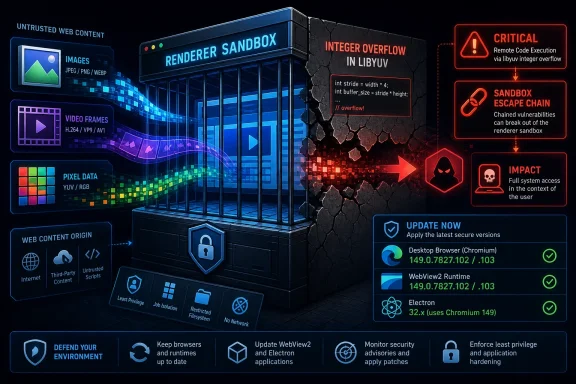 A Media Conversion Library Became a Browser Boundary
CVE-2026-11640 lives in libyuv, a low-level library used for image and video color conversion, scaling, rotation, and pixel-format handling. That sounds mundane until you remember that modern browsers are, among other things, hostile-media-processing machines. They constantly ingest images, video frames, WebRTC streams, canvas output, camera input, and GPU-adjacent data from sources that range from trusted enterprise apps to malicious drive-by pages.An integer overflow in this sort of component is not automatically a full browser compromise. Integer overflows often become dangerous when a calculation wraps around, producing a smaller-than-expected allocation, an incorrect length, or a corrupted boundary check. In a browser, those mistakes can cascade from “bad math” into memory corruption, and memory corruption is where attackers begin trying to turn a bug into code execution or sandbox escape.
The key phrase in the NVD description is not simply “crafted HTML page.” It is “who had compromised the renderer process.” Chrome’s renderer sandbox is supposed to assume that web content is hostile and contain it accordingly. CVE-2026-11640 matters because the described impact starts after the attacker already has a renderer foothold and then points toward the more serious prize: escaping the sandbox.
That makes this a second-stage vulnerability in practical exploit-chain terms. It is the kind of bug that may not be the first click, the first tab, or the first crash. It is the bug that becomes valuable after another vulnerability, logic flaw, malicious extension path, or exploit primitive has already put the attacker inside the renderer and looking for a way out.
Critical Does Not Mean Simple, and High Does Not Mean Harmless
There is an apparent mismatch in the public metadata that administrators should not ignore. Chromium labels CVE-2026-11640 as critical, while the CISA-ADP CVSS 3.1 score listed by NVD is 8.3, or high, with attack complexity marked high and user interaction required. That is not a contradiction so much as a collision between two scoring cultures.Chrome’s severity rating is product-aware. The Chrome team understands where a bug sits in the browser architecture, how it can combine with other classes of bug, and how much damage a sandbox escape can do in the browser threat model. CVSS, by contrast, tries to compress exploitability and impact into a portable numerical score.
For defenders, the Chromium label is the one that should drive urgency. A sandbox escape in a mainstream browser is not a theoretical nuisance. It is precisely the class of weakness that turns “the user visited a bad page” into “the attacker may now be closer to the operating system, user profile, credentials, files, and enterprise session material.”
The high attack complexity in the vector should temper panic, not create complacency. Many browser exploit chains are complex. That has not prevented commercial spyware vendors, criminal brokers, and state-backed operators from building them when the target value justifies the work.
The Renderer Is the Cage, Not the Castle
Chrome’s multi-process architecture changed the economics of web exploitation by putting untrusted web content in constrained renderer processes. That design is one of the great defensive successes of modern browser engineering. But it also means that attackers increasingly think in chains rather than single bugs.A renderer compromise is bad, but Chrome is designed so that a renderer compromise alone should not immediately mean full device compromise. The sandbox limits what the renderer can touch. It restricts direct file access, narrows system calls, and forces the compromised process to communicate through brokered interfaces.
A sandbox escape is the attempt to break that cage. Sometimes that means abusing an IPC interface. Sometimes it means exploiting a privileged process. Sometimes it means using a memory corruption flaw in code that straddles trust boundaries. The details of CVE-2026-11640 remain restricted, which is normal while users are still patching, but the public description places it squarely in this escape-chain territory.
This is why the bug is relevant even if there is no public proof-of-concept and no confirmed in-the-wild exploitation attached to this specific CVE. Chrome’s June 8 desktop update also included a separate V8 issue, CVE-2026-11645, that Google said had an exploit in the wild. In a release containing dozens of security fixes, defenders should avoid tunnel vision: the exploited bug gets the headline, but the critical sandbox-escape-class bug may be what determines the blast radius of a successful chain.
The Version Number Is the Policy
For consumers, Chrome’s update mechanism usually reduces this story to a restart prompt. For enterprises, version numbers are policy objects. Chrome 149.0.7827.102/.103 is not just a build; it is the line between a known vulnerable browser and a patched one.Google’s advisory says the stable desktop channel moved to 149.0.7827.102/.103 for Windows and Mac, and 149.0.7827.102 for Linux. NVD describes Chrome versions prior to 149.0.7827.103 as affected, which is a common simplification in vulnerability records even when platform-specific build numbers differ. Windows administrators should therefore verify against Google’s platform-specific stable-channel release, not merely rely on a scanner’s string comparison if it mishandles the .102/.103 distinction.
That distinction matters in patch management systems. Some tools normalize versions cleanly; others may flag Windows systems as still vulnerable because NVD says “prior to 149.0.7827.103” while Google’s Windows stable build may present as 149.0.7827.102 or .103 depending on channel packaging and rollout details. The right response is not to dismiss the alert, but to confirm the installed build against Google’s release channel data and the browser’s own update status.
In managed environments, the operational test is straightforward. Inventory Chrome versions, force an update where needed, require a browser restart, and then re-scan. A browser that downloaded the update but has not restarted is still running old code, which is the sort of boring detail that turns a patched fleet on paper into an exposed fleet in practice.
NVD’s CPE Entry Is Awkward, but Not Meaningless
The user-facing NVD page shows a CPE configuration that effectively combines Google Chrome with operating system platforms: Windows, Linux, and macOS. That can look strange if you are expecting a neat list of “vulnerable products.” It is NVD trying to express that the vulnerable application is Chrome, and that the relevant configurations are Chrome running on desktop operating systems.This is also where security tooling can get noisy. CPEs are useful for vulnerability matching, but they are not a perfect model of modern software distribution. Chrome is an application with bundled third-party components, rapid release channels, platform-specific builds, and enterprise update controls. A single CPE expression rarely captures that complexity gracefully.
The “Are we missing a CPE?” prompt on NVD pages is not evidence that a second product is definitely missing. It is a standing feedback mechanism. In this case, the most obvious affected product is Google Chrome before the fixed desktop build. The more complicated question is whether other Chromium-based browsers, downstream packages, Electron apps, or standalone libyuv consumers inherited the same flaw.
That is where administrators should be careful. NVD’s Chrome entry does not automatically prove that Microsoft Edge, Brave, Vivaldi, Opera, Electron runtimes, or every Linux package using libyuv is affected in the same exploitable way. It does, however, justify checking vendor advisories for any Chromium-derived browser or application that ships its own copy of the relevant code.
Windows Shops Have More Than One Chromium to Chase
For WindowsForum readers, the Chrome fix is only the first pass. Many Windows desktops run multiple Chromium-based surfaces: Chrome, Edge, WebView2-powered apps, embedded browser controls, collaboration tools, password managers, helpdesk agents, and Electron applications. Some of those inherit Chromium fixes quickly. Some lag. Some bundle components in ways that are opaque to normal inventory systems.Microsoft Edge usually tracks Chromium security fixes closely, but administrators should verify the Edge stable version rather than assume parity from Chrome’s release alone. WebView2 also deserves attention because it is the Chromium runtime behind many Windows desktop applications. If a line-of-business app renders remote content through WebView2, browser engine patching becomes application security, not just user convenience.
Electron is the slower-moving part of the story. Many Electron applications pin a specific Chromium version until the app vendor rebuilds and ships an update. That does not mean every Electron app is vulnerable to CVE-2026-11640 in a practical sense, but it does mean a browser-class flaw can persist outside the browser icon users recognize.
This is one reason browser vulnerabilities frustrate enterprise defenders. The patched browser may be visible, auto-updated, and easy to validate, while the same family of code may be embedded in apps that update monthly, quarterly, or only when someone remembers to package a new release. Chromium’s security model has become infrastructure, and infrastructure tends to sprawl.
The libyuv Clue Points to the Browser’s Expanding Attack Surface
The presence of libyuv in the vulnerability title is a useful corrective to how people talk about browser security. The popular imagination still treats browser bugs as JavaScript engine failures or DOM weirdness. Those remain important, but the web platform has expanded far beyond documents and scripts.A modern browser is a video conferencing client, PDF viewer, graphics stack, audio workstation, authentication broker, GPU scheduler, local file previewer, and app runtime. Each role pulls in libraries that were not designed in the age of hostile web-scale input. Some are hardened impressively; others were built for performance first and threat modeling second.
Media code is especially attractive because it handles complex binary formats at speed. The code paths are performance-sensitive, often vectorized, and frequently cross CPU, GPU, and memory-management boundaries. That does not make libyuv uniquely suspect; it makes it representative of the tension between rich web features and minimal attack surface.
The old advice “don’t click suspicious links” is comically inadequate against this class of risk. A crafted HTML page can be delivered through malvertising, compromised legitimate sites, injected content, phishing, or watering-hole campaigns. The browser will parse, decode, composite, and display the page because that is its job.
The Restricted Bug Is a Feature, Not a Cover-Up
Google’s advisory notes that access to bug details and links may remain restricted until most users are updated, and that restrictions can remain if the bug exists in a third-party library used by other projects. This frustrates researchers and administrators who want to understand exposure immediately, but the policy is defensible.Once a security fix ships, attackers can diff the old and new code to infer the bug. Public issue details can shorten that process dramatically. If a third-party library is involved, the risk broadens: projects outside Chrome may need time to patch before the precise exploit path is handed to everyone.
That creates an uncomfortable asymmetry. Defenders are told to patch urgently without receiving full technical details. Attackers, meanwhile, may already be reverse-engineering the patch. This is not ideal, but it is the normal operating condition for browser security at scale.
The practical answer is to treat the vendor’s severity rating and affected-version boundary as actionable enough. Waiting for a public proof-of-concept before patching a critical Chrome sandbox-escape-class vulnerability is not prudence. It is a decision to let the exploit-development community set your maintenance calendar.
The Zero-Day Next Door Changes the Risk Calculation
CVE-2026-11640 is not the Chrome issue Google publicly tied to active exploitation in this update. That distinction belongs to CVE-2026-11645, a V8 out-of-bounds memory access vulnerability marked high severity. But defenders should read the advisory as a whole, not as a single-CVE press release.An actively exploited renderer bug and a critical sandbox-escape-class bug in the same security release are the sort of pairing that should sharpen attention, even if no public source says they were used together. Browser exploitation commonly involves chaining a code-execution primitive with a sandbox escape. The fact pattern does not prove a chain; it does make delay harder to justify.
This is where risk management often fails in large organizations. Teams triage the “known exploited” CVE, build an emergency exception for that one item, and leave the rest of the release to the next patch cycle. That approach misunderstands how browser updates work. Chrome security releases are integrated bundles, and the safest unit of remediation is the browser build, not the individual CVE row.
The correct question is not “Is CVE-2026-11640 exploited in the wild?” The better question is “Do we have any reason to keep running a browser build that Google has replaced because it contains a critical sandbox-escape-class flaw and dozens of other memory-safety fixes?” For most environments, the answer should be no.
CVSS Is a Starting Point, Not a Maintenance Strategy
The CISA-ADP vector for CVE-2026-11640 says the attack is network-based, requires no privileges, requires user interaction, has high attack complexity, changes scope, and carries high confidentiality, integrity, and availability impact. That is a dense way of saying the bug is not a trivial one-shot, but the consequences of successful exploitation are severe.User interaction can be misleading in browser bugs. It may mean the user needs to visit a page, open a link, view embedded content, or otherwise let the browser do what users do all day. In enterprise settings, that is not a meaningful barrier. Employees live in browsers, and attackers know how to route them through web content without asking them to download an obvious executable.
High attack complexity also needs context. It may reduce the likelihood of mass exploitation by low-skill actors, but it does not eliminate targeted exploitation. The economics of browser exploits are well established. If the target is valuable enough, complexity becomes an engineering problem.
The impact fields are the real warning. A scope change with high confidentiality, integrity, and availability impact is exactly what security teams worry about when sandbox boundaries are involved. The browser sandbox is supposed to contain damage; a vulnerability that helps cross that boundary is categorically different from a bug that merely crashes a tab.
Patch Management Has to Include the Restart
Chrome’s auto-update story is one of the better ones in consumer software, but update delivery is not the same thing as update activation. The browser must restart to move running processes onto the fixed build. On Windows, that detail collides with the reality of users who keep sessions open for days, suspend laptops, and ignore relaunch prompts.Enterprise Chrome controls can help, but they need to be configured with urgency in mind. Administrators can set relaunch notification policies, enforce relaunch windows, and use management tooling to detect stale running versions. The trick is balancing user disruption against the fact that browser vulnerabilities are among the most reachable bugs in the desktop estate.
For unmanaged users, the advice remains refreshingly concrete. Open Chrome’s About page, let it check for updates, and relaunch. Then do the same for Edge and any other Chromium-based browser you actually use. On a family PC, that may matter more than many traditional Patch Tuesday items because the browser is the front door to almost everything.
Security teams should also pay attention to remote desktop hosts, kiosk systems, shared workstations, jump boxes, and lab machines. These are easy to miss because they may not look like normal browsing endpoints. If Chrome is installed and can render web content, it belongs in the patch scope.
The Supply Chain Lesson Is Bigger Than Chrome
The libyuv angle should push vendors and defenders toward better component visibility. Software composition analysis is common in server-side development, but desktop application inventories often stop at the product name and version. That is no longer enough when high-impact vulnerabilities can sit inside bundled media and rendering libraries.Browser vendors have built impressive processes for fuzzing, patching, and shipping fixes quickly. The downstream ecosystem is less consistent. A third-party library flaw may be fixed rapidly in Chromium but remain present in applications that copied or vendored the library months earlier. Without component-level visibility, organizations discover that lag only after a scanner, incident, or advisory forces the issue.
This is not an argument for panic over every bundled library. It is an argument for knowing which applications render untrusted content and which runtimes they embed. A desktop app that only opens internal files has a different exposure profile from one that loads arbitrary web pages, previews external media, or displays user-generated content.
Windows administrators already learned this lesson with WebView, PDF engines, archive libraries, and image codecs. CVE-2026-11640 is another entry in the same ledger. The attack surface is not just the operating system and the browser; it is the collection of parsers and renderers that sit between users and untrusted data.
The Practical Read for WindowsForum Readers
CVE-2026-11640 is not a bug most users will debug, reproduce, or understand from a stack trace. It is a bug they should outpace. The good news is that the primary remediation is already available through Chrome’s stable channel, and the operational task is verification rather than invention.- Chrome desktop installations should be updated to the fixed 149.0.7827.102/.103 stable release line or later, with a full browser relaunch after the update is staged.
- Administrators should verify Microsoft Edge, WebView2, and other Chromium-based browsers separately instead of assuming Chrome’s update remediates the whole Windows estate.
- Vulnerability scanners may differ on whether they key off 149.0.7827.102 or 149.0.7827.103, so teams should compare findings against Google’s platform-specific stable-channel release notes.
- The absence of confirmed exploitation for CVE-2026-11640 should not lower priority, because sandbox-escape-class flaws are valuable as part of exploit chains.
- Electron and other embedded Chromium applications deserve a follow-up inventory pass, especially when they render remote or user-supplied content.
- A browser that has downloaded an update but has not restarted should still be treated as exposed for practical risk management.
References
- Primary source: NVD / Chromium
Published: 2026-06-15T19:13:47-07:00
NVD - CVE-2026-11640
 nvd.nist.gov
- Security advisory: MSRC
Published: 2026-06-15T19:13:47-07:00
Original feed URL
Security Update Guide - Microsoft Security Response Center
 msrc.microsoft.com
- Related coverage: radar.offseq.com
CVE-2026-11678: Integer overflow in Google Chrome - Live Threat Intelligence - Threat Radar | OffSeq.com
Detailed information about CVE-2026-11678: Integer overflow in Google Chrome affecting Google Chrome. Get real-time updates, technical details, and mitigation sradar.offseq.com
