

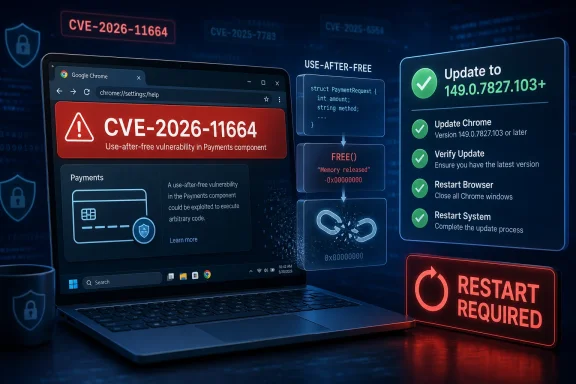
Google Chrome CVE-2026-11664 is a high-severity use-after-free flaw in Chrome’s Payments component, disclosed June 8, 2026, affecting Chrome versions before 149.0.7827.103 and potentially exploitable by a remote attacker through a crafted HTML page. The bug is not the headline-grabbing zero-day from the same Chrome update, but it is the kind of memory-safety defect that keeps browser teams, enterprise patch managers, and vulnerability scanners busy long after the first advisory lands. Its NVD record also exposes a familiar problem: the vulnerability itself is relatively straightforward, while the metadata around affected platforms can look stranger than the bug. For Windows users and administrators, the practical answer is simple: update Chrome, verify the version, and treat Chromium-based browsers as part of the same risk surface until their vendors confirm patched builds.
Chrome security updates rarely arrive as single-issue events anymore. They are bundled releases, stuffed with dozens of fixes, partial descriptions, restricted bug links, staggered platform builds, and enough CVE identifiers to make even a well-run vulnerability-management program pause before assigning risk. CVE-2026-11664 landed inside that familiar machinery.
The vulnerability is described as a use after free in Payments, a Chrome component tied to browser-based payment flows and related web platform plumbing. In plain English, use-after-free bugs happen when software continues to reference memory after it has already been released. If an attacker can influence what occupies that memory afterward, the bug can become more than a crash; it can become a path toward heap corruption and potentially code execution primitives.
The NVD entry says exploitation would require a crafted HTML page and user interaction. That matters. This is not described as a wormable network service bug or an unauthenticated server-side takeover. It is a browser bug, which means the attack path runs through the oldest and most reliable browser exploit delivery mechanism on the Internet: convincing someone, somewhere, to load hostile content.
That should not reassure anyone too much. Browser exploitation has always lived in the space between “requires user interaction” and “users browse the web all day.” A malicious page, compromised site, poisoned ad chain, or targeted phishing link can all satisfy that interaction requirement.
Chrome’s Payments component participates in the browser’s implementation of payment-related web APIs and user-interface flows. A flaw there does not necessarily mean an attacker must complete a purchase, steal a credit card, or abuse a particular bank page. The advisory language points instead to a crafted HTML page, which suggests the dangerous part is reachable through web-exposed browser behavior rather than a traditional financial transaction.
That distinction matters for risk triage. Security teams should avoid treating component names as strict boundaries. A bug in “Payments,” “Views,” “Autofill,” or “Extensions” may still be reachable in ways that are surprising from the outside because modern browsers are large, shared, multi-process applications with many internal service layers.
The Payments label is still useful, but mostly as a clue for exploit developers and browser engineers. For everyone else, the operational message is broader: vulnerable Chrome builds before the fixed release contain a remotely reachable memory-corruption issue, and the fix is already available through the stable channel.
Chrome has spent years investing in mitigations designed to make memory corruption harder to weaponize. Site isolation, sandboxing, partitioned allocators, MiraclePtr-style protections, and exploit mitigations across operating systems have raised the bar substantially. But “harder” is not “impossible,” especially when the browser remains one of the most attacked client applications in the enterprise.
CVE-2026-11664’s CVSS 3.1 vector from CISA-ADP lands at 8.8, with network attack vector, low attack complexity, no privileges required, user interaction required, and high impacts to confidentiality, integrity, and availability. That is the scoring profile of a serious browser memory-safety issue: not automatically catastrophic in isolation, but dangerous enough that defenders should not wait for public proof-of-concept code.
The public record does not say this specific CVE is being exploited in the wild. That is an important distinction because the same Chrome update also addressed CVE-2026-11645, a V8 issue that Google acknowledged had an exploit in the wild. In a large patch bundle, those two facts can blur together quickly. CVE-2026-11664 is high severity and patch-worthy; CVE-2026-11645 appears to be the actively exploited emergency item in the same release.
That discrepancy is not unusual in Chrome land, but it is exactly the kind of thing that confuses dashboards. Chrome’s stable-channel updates can carry slightly different build numbers across platforms while representing the same security train. Administrators should avoid assuming that one numeric string applies identically to every operating system without checking the vendor release notes and the installed browser’s own update page.
For WindowsForum readers, the practical check is mundane but decisive. On an individual machine, open Chrome’s About page, let it check for updates, and restart the browser. In managed environments, confirm reporting from the endpoint management platform rather than trusting that auto-update completed just because the installer was deployed.
Chrome updates are often downloaded silently but not fully applied until restart. That restart gap is where “patched” becomes a matter of policy rather than package availability. If users keep browser sessions open for days or weeks, the fleet can remain exposed even after the update has technically arrived.
It means the affected product is Chrome running on those operating-system families. NVD often models browser vulnerabilities with an application CPE constrained by platform CPEs. The result can look awkward because the operating system appears in the affected configuration, even though the vulnerable code belongs to the application.
This is a metadata problem with real consequences. Vulnerability scanners and asset systems consume CPE data to decide whether a device is vulnerable. If the configuration is modeled too broadly, teams get noisy findings. If it is modeled too narrowly, vulnerable installations can be missed. Browser CPEs sit at the messy intersection of application inventory, OS detection, and vendor-specific build numbering.
So, are we missing a CPE? Based on the public NVD configuration as described, the obvious core CPE is present: Google Chrome as an application, versions up to but excluding 149.0.7827.103. The platform CPEs for Windows, Linux, and macOS are not additional vulnerable products in the usual sense; they are applicability constraints. The more useful question for enterprise defenders is whether their scanner correctly maps installed Chrome versions, including per-user installations and Chromium-derived browsers, rather than whether the NVD page’s platform modeling looks elegant.
Microsoft Edge is the most important case for Windows environments. Edge uses Chromium as its browser engine, but Microsoft ships its own browser builds and security advisories. When Google patches a Chromium flaw, Edge administrators should watch Microsoft’s release channel for the corresponding Edge update rather than trying to infer protection solely from Chrome’s version number.
The same logic applies to Electron applications, WebView-based apps, and managed browser runtimes, though the mapping becomes less direct. A vulnerability in a Chrome browser component may not apply to every embedded Chromium consumer. Still, large organizations often discover during incidents that they have more Chromium in the estate than their browser inventory reports suggest.
This is why Chrome security releases increasingly behave like ecosystem events. The advisory starts at Google, but the patch wave rolls through browser vendors, operating-system app stores, enterprise packaging tools, virtual desktop images, kiosk systems, and software that quietly bundles web-rendering engines.
In reality, restricted bug details are a normal part of browser vulnerability handling. Browser vendors often limit access until a majority of users have updated. The reason is not merely public relations. Detailed bug reports can contain enough information to help attackers reproduce or adapt an exploit before the patch has reached the long tail of users.
This creates an uncomfortable asymmetry. Attackers may reverse-engineer patches quickly, while defenders may have only component names, severity ratings, and high-level descriptions. But public disclosure of full technical detail on day one would not fix that asymmetry; it could make it worse.
For security teams, the absence of exploit detail should not become an excuse for inaction. The right response to a high-severity browser memory-corruption CVE is not to wait for a blog post that proves exploitability. The right response is to reduce exposure while the technical community catches up.
But browser bugs do not live in a vacuum. The same release train included a Chrome zero-day reportedly exploited in the wild. Attackers who are already targeting Chrome users pay close attention to adjacent fixes. Patch diffing can turn today’s silent fix into tomorrow’s exploit experiment.
The right deadline depends on environment. Consumer devices should update immediately because the cost is low and the exposure is constant. Enterprise fleets should treat the update as urgent, especially for users exposed to email, collaboration links, unmanaged browsing, advertising-heavy sites, or sensitive web applications.
For high-risk users — administrators, executives, developers with production access, finance staff, journalists, and anyone likely to be targeted — the argument for accelerated browser restarts is stronger. These are the users for whom “requires a crafted HTML page” is not much of a barrier.
This is where browser security becomes user-experience policy. Aggressive forced restarts annoy users and can interrupt work. Gentle reminders are often ignored. The security team’s job is to decide where the organization sits between those two failures.
Chrome and Edge both offer enterprise controls for update behavior, relaunch notifications, and deadlines. Those controls are not glamorous, but they are often more important than the patch deployment step itself. A vulnerable browser process that remains running after an update is staged can preserve exposure in exactly the period when attackers are racing to understand the fix.
Administrators should also check nonstandard installation paths. Chrome may be installed system-wide, per-user, inside VDI images, on lab machines, on kiosk endpoints, and in developer-managed environments outside central packaging. Browser inventory that only sees the obvious installation misses the endpoints most likely to surprise you during an audit.
A crafted page can be delivered directly through phishing. It can be reached through a compromised legitimate site. It can be embedded in an ad path, opened from a chat message, or loaded by a user researching a topic that attackers know they care about. The browser is the universal client, and HTML is the universal delivery format.
That does not mean every high-severity Chrome bug is instantly exploitable at scale. Modern exploitation often requires chaining: a renderer compromise, a sandbox escape, an information leak, or a logic flaw that turns a crash into control. But defenders usually do not get to see the full chain until later, if ever.
CVE-2026-11664’s description stops at potential heap corruption. That is enough to justify urgency but not enough to claim remote code execution outside the browser sandbox. The responsible reading is cautious: this is a serious memory-safety bug in a web-exposed browser component, and its real-world exploitability depends on details that are not yet public.
That is especially true in cloud-heavy environments. If a browser session contains SSO cookies, administrative consoles, SaaS tokens, synced secrets, internal dashboards, and access to corporate data, stealing or manipulating browser context can be devastating without dropping traditional malware. Security impact is not limited to whether an attacker escapes to kernel mode.
This is why browser hardening has become a first-class enterprise control. Extension governance, site isolation policies, password-manager decisions, profile separation, phishing-resistant MFA, and conditional access all matter because a browser exploit lands in the middle of the user’s digital identity.
CVE-2026-11664 may be “just” one high-severity bug in one component, but it belongs to that larger reality. The browser is where authentication, commerce, work, and personal life converge. Memory corruption in that environment deserves more than routine patch Tuesday fatigue.
For humans, this is mildly annoying. For automation, it can be consequential. A vulnerability-management system may treat an unscored CVE differently from a high-severity one, even if another authoritative enrichment source has already supplied a vector. A dashboard may show “N/A” in one column and “High” in another, leaving analysts to reconcile the mismatch.
The solution is not to abandon CVSS but to stop treating it as a single source of operational truth. Browser CVEs should be prioritized using a combination of vendor severity, exploit status, affected version, asset exposure, user population, and the presence of related active exploitation in the same release train.
In this case, the operational decision is easy despite the metadata wrinkles. Chrome before the fixed build is vulnerable. The flaw is high severity. The update exists. The right move is to deploy and verify, not wait for the last database field to settle.
Attackers understand this. They do not need every endpoint to be vulnerable. They need one useful endpoint, preferably one belonging to a user with access worth stealing. Browser vulnerabilities are especially attractive because they can be delivered selectively, tested quietly, and paired with social engineering.
Organizations that already enforce browser update deadlines are in a better position. Organizations that rely on passive auto-update and monthly reporting should treat Chrome security releases like this as a reason to tighten the loop. A browser that updates eventually is better than one that never updates, but “eventually” is not a comforting word when exploit developers are diffing patches.
The practical metric is not whether the update was deployed. It is how many active browser sessions are still running vulnerable code 24, 48, and 72 hours after disclosure. That is the number most organizations do not measure well.
For administrators, the work is broader. Confirm Chrome stable-channel coverage across Windows, macOS, and Linux. Check whether Edge or other Chromium-based browsers have corresponding updates. Review endpoint telemetry for stale versions. Pay attention to machines that do not check in regularly.
There is also a policy question around third-party patch management. Tools that package Chrome updates may lag the vendor release by hours or days. That delay may be acceptable for ordinary maintenance releases; it is less acceptable when the same release train includes an exploited Chrome zero-day. If your organization depends on a packaging vendor, make sure your emergency path is faster than your routine path.
This is not about panic. It is about reducing the number of assumptions between a vendor advisory and a verified fixed browser process.
Attackers do not read advisories one CVE at a time. They study clusters. A release that touches V8, Payments, Views, Network, and other browser internals offers a map of recently vulnerable code paths. Some bugs will be dead ends. Others may become useful primitives. A few may combine in ways the original severity labels do not fully capture.
Defenders should read the release the same way. The existence of multiple memory-safety and browser-internal fixes in one train argues for fast adoption, even if any individual CVE lacks public exploitation evidence. A patched browser is not invulnerable, but an unpatched browser becomes increasingly indefensible as days pass.
This is especially true for Windows environments because Chrome and Edge are often both present. A user may default to Edge for corporate SSO, keep Chrome for personal or developer workflows, and run embedded Chromium inside collaboration tools. The browser monoculture problem is no longer about one executable; it is about one engine family spread across many workflows.
 The Browser Patch Train Has No Quiet Car
Chrome security updates rarely arrive as single-issue events anymore. They are bundled releases, stuffed with dozens of fixes, partial descriptions, restricted bug links, staggered platform builds, and enough CVE identifiers to make even a well-run vulnerability-management program pause before assigning risk. CVE-2026-11664 landed inside that familiar machinery.The vulnerability is described as a use after free in Payments, a Chrome component tied to browser-based payment flows and related web platform plumbing. In plain English, use-after-free bugs happen when software continues to reference memory after it has already been released. If an attacker can influence what occupies that memory afterward, the bug can become more than a crash; it can become a path toward heap corruption and potentially code execution primitives.
The NVD entry says exploitation would require a crafted HTML page and user interaction. That matters. This is not described as a wormable network service bug or an unauthenticated server-side takeover. It is a browser bug, which means the attack path runs through the oldest and most reliable browser exploit delivery mechanism on the Internet: convincing someone, somewhere, to load hostile content.
That should not reassure anyone too much. Browser exploitation has always lived in the space between “requires user interaction” and “users browse the web all day.” A malicious page, compromised site, poisoned ad chain, or targeted phishing link can all satisfy that interaction requirement.
Payments Is Not Just About Buying Things
The name “Payments” can make the bug sound narrower than it is. A casual reader may assume this affects only users actively typing card numbers into a checkout form. Browser architecture is rarely that tidy.Chrome’s Payments component participates in the browser’s implementation of payment-related web APIs and user-interface flows. A flaw there does not necessarily mean an attacker must complete a purchase, steal a credit card, or abuse a particular bank page. The advisory language points instead to a crafted HTML page, which suggests the dangerous part is reachable through web-exposed browser behavior rather than a traditional financial transaction.
That distinction matters for risk triage. Security teams should avoid treating component names as strict boundaries. A bug in “Payments,” “Views,” “Autofill,” or “Extensions” may still be reachable in ways that are surprising from the outside because modern browsers are large, shared, multi-process applications with many internal service layers.
The Payments label is still useful, but mostly as a clue for exploit developers and browser engineers. For everyone else, the operational message is broader: vulnerable Chrome builds before the fixed release contain a remotely reachable memory-corruption issue, and the fix is already available through the stable channel.
Use-After-Free Remains the Browser Bug That Refuses to Retire
Use-after-free flaws are old, well-studied, and stubbornly persistent. They thrive in complex C++ codebases where object lifetime, asynchronous callbacks, UI events, renderer processes, and privilege boundaries all meet. Browsers are an ideal habitat.Chrome has spent years investing in mitigations designed to make memory corruption harder to weaponize. Site isolation, sandboxing, partitioned allocators, MiraclePtr-style protections, and exploit mitigations across operating systems have raised the bar substantially. But “harder” is not “impossible,” especially when the browser remains one of the most attacked client applications in the enterprise.
CVE-2026-11664’s CVSS 3.1 vector from CISA-ADP lands at 8.8, with network attack vector, low attack complexity, no privileges required, user interaction required, and high impacts to confidentiality, integrity, and availability. That is the scoring profile of a serious browser memory-safety issue: not automatically catastrophic in isolation, but dangerous enough that defenders should not wait for public proof-of-concept code.
The public record does not say this specific CVE is being exploited in the wild. That is an important distinction because the same Chrome update also addressed CVE-2026-11645, a V8 issue that Google acknowledged had an exploit in the wild. In a large patch bundle, those two facts can blur together quickly. CVE-2026-11664 is high severity and patch-worthy; CVE-2026-11645 appears to be the actively exploited emergency item in the same release.
The Version Number Tells Administrators Where the Line Is
The line for CVE-2026-11664 is Chrome before 149.0.7827.103. That is the version threshold called out in the CVE description and NVD record. Advisory reporting around the stable desktop release also shows platform-specific patched builds, with Windows and Linux appearing as 149.0.7827.102 in some release references and Mac as 149.0.7827.103.That discrepancy is not unusual in Chrome land, but it is exactly the kind of thing that confuses dashboards. Chrome’s stable-channel updates can carry slightly different build numbers across platforms while representing the same security train. Administrators should avoid assuming that one numeric string applies identically to every operating system without checking the vendor release notes and the installed browser’s own update page.
For WindowsForum readers, the practical check is mundane but decisive. On an individual machine, open Chrome’s About page, let it check for updates, and restart the browser. In managed environments, confirm reporting from the endpoint management platform rather than trusting that auto-update completed just because the installer was deployed.
Chrome updates are often downloaded silently but not fully applied until restart. That restart gap is where “patched” becomes a matter of policy rather than package availability. If users keep browser sessions open for days or weeks, the fleet can remain exposed even after the update has technically arrived.
The CPE Record Looks Odd Because Browsers Sit on Top of Operating Systems
The user-facing question in the NVD entry — “Are we missing a CPE here?” — is easy to misread. The record shows a vulnerable application CPE for Google Chrome versions before the fixed release, combined with operating-system CPEs for Windows, Linux, and macOS. That does not mean Windows itself, the Linux kernel itself, or macOS itself contains the Payments use-after-free bug.It means the affected product is Chrome running on those operating-system families. NVD often models browser vulnerabilities with an application CPE constrained by platform CPEs. The result can look awkward because the operating system appears in the affected configuration, even though the vulnerable code belongs to the application.
This is a metadata problem with real consequences. Vulnerability scanners and asset systems consume CPE data to decide whether a device is vulnerable. If the configuration is modeled too broadly, teams get noisy findings. If it is modeled too narrowly, vulnerable installations can be missed. Browser CPEs sit at the messy intersection of application inventory, OS detection, and vendor-specific build numbering.
So, are we missing a CPE? Based on the public NVD configuration as described, the obvious core CPE is present: Google Chrome as an application, versions up to but excluding 149.0.7827.103. The platform CPEs for Windows, Linux, and macOS are not additional vulnerable products in the usual sense; they are applicability constraints. The more useful question for enterprise defenders is whether their scanner correctly maps installed Chrome versions, including per-user installations and Chromium-derived browsers, rather than whether the NVD page’s platform modeling looks elegant.
Chromium’s Shadow Extends Beyond Google Chrome
A Chrome CVE is rarely only a Chrome concern. The Chromium project underpins Microsoft Edge, Brave, Vivaldi, Opera, Arc, and many embedded browser surfaces. Not every Chromium-based browser ships every Chrome component in the same way, and not every CVE applies cleanly to every derivative. But defenders cannot assume safety just because the desktop icon is not Chrome.Microsoft Edge is the most important case for Windows environments. Edge uses Chromium as its browser engine, but Microsoft ships its own browser builds and security advisories. When Google patches a Chromium flaw, Edge administrators should watch Microsoft’s release channel for the corresponding Edge update rather than trying to infer protection solely from Chrome’s version number.
The same logic applies to Electron applications, WebView-based apps, and managed browser runtimes, though the mapping becomes less direct. A vulnerability in a Chrome browser component may not apply to every embedded Chromium consumer. Still, large organizations often discover during incidents that they have more Chromium in the estate than their browser inventory reports suggest.
This is why Chrome security releases increasingly behave like ecosystem events. The advisory starts at Google, but the patch wave rolls through browser vendors, operating-system app stores, enterprise packaging tools, virtual desktop images, kiosk systems, and software that quietly bundles web-rendering engines.
The Restricted Bug Link Is a Feature, Not a Cover-Up
The Chromium issue tracker entry for CVE-2026-11664 is restricted. That tends to frustrate defenders who want technical detail immediately. It also fuels speculation: if the bug is hidden, is it worse than advertised?In reality, restricted bug details are a normal part of browser vulnerability handling. Browser vendors often limit access until a majority of users have updated. The reason is not merely public relations. Detailed bug reports can contain enough information to help attackers reproduce or adapt an exploit before the patch has reached the long tail of users.
This creates an uncomfortable asymmetry. Attackers may reverse-engineer patches quickly, while defenders may have only component names, severity ratings, and high-level descriptions. But public disclosure of full technical detail on day one would not fix that asymmetry; it could make it worse.
For security teams, the absence of exploit detail should not become an excuse for inaction. The right response to a high-severity browser memory-corruption CVE is not to wait for a blog post that proves exploitability. The right response is to reduce exposure while the technical community catches up.
CVSS Says “High,” But Context Decides the Deadline
An 8.8 CVSS score is serious, but patch priority is not determined by score alone. CVE-2026-11664 requires user interaction and is not publicly described as actively exploited. In a vacuum, that might place it below an actively exploited zero-day, a remote unauthenticated server bug, or a privilege-escalation flaw chained in ransomware campaigns.But browser bugs do not live in a vacuum. The same release train included a Chrome zero-day reportedly exploited in the wild. Attackers who are already targeting Chrome users pay close attention to adjacent fixes. Patch diffing can turn today’s silent fix into tomorrow’s exploit experiment.
The right deadline depends on environment. Consumer devices should update immediately because the cost is low and the exposure is constant. Enterprise fleets should treat the update as urgent, especially for users exposed to email, collaboration links, unmanaged browsing, advertising-heavy sites, or sensitive web applications.
For high-risk users — administrators, executives, developers with production access, finance staff, journalists, and anyone likely to be targeted — the argument for accelerated browser restarts is stronger. These are the users for whom “requires a crafted HTML page” is not much of a barrier.
Windows Administrators Have a Browser Restart Problem, Not Just a Patch Problem
Most Windows shops already know how to deploy Chrome updates. The harder problem is making sure the browser actually restarts into the fixed build. Chrome’s auto-update mechanism is mature, and enterprise tools can push MSI packages or manage update policies. None of that guarantees that a user who lives in pinned tabs and half-finished web apps has restarted.This is where browser security becomes user-experience policy. Aggressive forced restarts annoy users and can interrupt work. Gentle reminders are often ignored. The security team’s job is to decide where the organization sits between those two failures.
Chrome and Edge both offer enterprise controls for update behavior, relaunch notifications, and deadlines. Those controls are not glamorous, but they are often more important than the patch deployment step itself. A vulnerable browser process that remains running after an update is staged can preserve exposure in exactly the period when attackers are racing to understand the fix.
Administrators should also check nonstandard installation paths. Chrome may be installed system-wide, per-user, inside VDI images, on lab machines, on kiosk endpoints, and in developer-managed environments outside central packaging. Browser inventory that only sees the obvious installation misses the endpoints most likely to surprise you during an audit.
The Crafted HTML Page Is the Modern Attack Surface in Miniature
The phrase “crafted HTML page” appears so often in browser CVEs that it risks becoming background noise. It should not. It describes the entire modern web attack surface compressed into one line.A crafted page can be delivered directly through phishing. It can be reached through a compromised legitimate site. It can be embedded in an ad path, opened from a chat message, or loaded by a user researching a topic that attackers know they care about. The browser is the universal client, and HTML is the universal delivery format.
That does not mean every high-severity Chrome bug is instantly exploitable at scale. Modern exploitation often requires chaining: a renderer compromise, a sandbox escape, an information leak, or a logic flaw that turns a crash into control. But defenders usually do not get to see the full chain until later, if ever.
CVE-2026-11664’s description stops at potential heap corruption. That is enough to justify urgency but not enough to claim remote code execution outside the browser sandbox. The responsible reading is cautious: this is a serious memory-safety bug in a web-exposed browser component, and its real-world exploitability depends on details that are not yet public.
The Payments Bug Is Also a Reminder About Browser Privilege
Browsers are no longer passive document viewers. They are credential vaults, payment mediators, WebAuthn clients, password managers, file uploaders, enterprise application portals, video conferencing clients, and identity front ends. A browser compromise can be a workstation compromise in practical terms even when the operating-system sandbox technically holds.That is especially true in cloud-heavy environments. If a browser session contains SSO cookies, administrative consoles, SaaS tokens, synced secrets, internal dashboards, and access to corporate data, stealing or manipulating browser context can be devastating without dropping traditional malware. Security impact is not limited to whether an attacker escapes to kernel mode.
This is why browser hardening has become a first-class enterprise control. Extension governance, site isolation policies, password-manager decisions, profile separation, phishing-resistant MFA, and conditional access all matter because a browser exploit lands in the middle of the user’s digital identity.
CVE-2026-11664 may be “just” one high-severity bug in one component, but it belongs to that larger reality. The browser is where authentication, commerce, work, and personal life converge. Memory corruption in that environment deserves more than routine patch Tuesday fatigue.
NVD Lag Is Normal, But It Complicates Automation
The NVD record for CVE-2026-11664 initially lacked a NIST CVSS score while showing CISA-ADP enrichment with an 8.8 CVSS 3.1 rating. That split is common in the modern vulnerability-data pipeline. CVEs arrive from vendors, enrichment follows, scoring may be added later, and downstream tools ingest snapshots at different times.For humans, this is mildly annoying. For automation, it can be consequential. A vulnerability-management system may treat an unscored CVE differently from a high-severity one, even if another authoritative enrichment source has already supplied a vector. A dashboard may show “N/A” in one column and “High” in another, leaving analysts to reconcile the mismatch.
The solution is not to abandon CVSS but to stop treating it as a single source of operational truth. Browser CVEs should be prioritized using a combination of vendor severity, exploit status, affected version, asset exposure, user population, and the presence of related active exploitation in the same release train.
In this case, the operational decision is easy despite the metadata wrinkles. Chrome before the fixed build is vulnerable. The flaw is high severity. The update exists. The right move is to deploy and verify, not wait for the last database field to settle.
Enterprise Risk Lives in the Long Tail
The first 48 hours after a Chrome security release get the attention. The long tail creates the risk. Home users who rarely restart, contractors on unmanaged laptops, shared machines, kiosk browsers, VDI base images, lab systems, and old golden images can all preserve vulnerable Chrome builds after the main fleet is clean.Attackers understand this. They do not need every endpoint to be vulnerable. They need one useful endpoint, preferably one belonging to a user with access worth stealing. Browser vulnerabilities are especially attractive because they can be delivered selectively, tested quietly, and paired with social engineering.
Organizations that already enforce browser update deadlines are in a better position. Organizations that rely on passive auto-update and monthly reporting should treat Chrome security releases like this as a reason to tighten the loop. A browser that updates eventually is better than one that never updates, but “eventually” is not a comforting word when exploit developers are diffing patches.
The practical metric is not whether the update was deployed. It is how many active browser sessions are still running vulnerable code 24, 48, and 72 hours after disclosure. That is the number most organizations do not measure well.
The Chrome Fix Is Simple; the Inventory Is Not
For individual users, remediation is almost boring. Update Chrome to the fixed stable build or later, restart the browser, and confirm the version. If the browser says an update is pending, do not postpone the relaunch indefinitely.For administrators, the work is broader. Confirm Chrome stable-channel coverage across Windows, macOS, and Linux. Check whether Edge or other Chromium-based browsers have corresponding updates. Review endpoint telemetry for stale versions. Pay attention to machines that do not check in regularly.
There is also a policy question around third-party patch management. Tools that package Chrome updates may lag the vendor release by hours or days. That delay may be acceptable for ordinary maintenance releases; it is less acceptable when the same release train includes an exploited Chrome zero-day. If your organization depends on a packaging vendor, make sure your emergency path is faster than your routine path.
This is not about panic. It is about reducing the number of assumptions between a vendor advisory and a verified fixed browser process.
The Signal Inside This Chrome Advisory Is Not Just One CVE
CVE-2026-11664 is worth patching on its own merits, but its real significance is as part of a broader Chrome security release. The same June 2026 stable-channel update addressed a large set of issues, including at least one high-severity V8 vulnerability that Google said had exploit activity in the wild. That context changes the tempo.Attackers do not read advisories one CVE at a time. They study clusters. A release that touches V8, Payments, Views, Network, and other browser internals offers a map of recently vulnerable code paths. Some bugs will be dead ends. Others may become useful primitives. A few may combine in ways the original severity labels do not fully capture.
Defenders should read the release the same way. The existence of multiple memory-safety and browser-internal fixes in one train argues for fast adoption, even if any individual CVE lacks public exploitation evidence. A patched browser is not invulnerable, but an unpatched browser becomes increasingly indefensible as days pass.
This is especially true for Windows environments because Chrome and Edge are often both present. A user may default to Edge for corporate SSO, keep Chrome for personal or developer workflows, and run embedded Chromium inside collaboration tools. The browser monoculture problem is no longer about one executable; it is about one engine family spread across many workflows.
The Patch Window Is Where Policy Becomes Security
CVE-2026-11664 gives administrators a useful checklist, but not a complicated one. The important work is making sure the checklist is executed quickly enough to matter.- Chrome installations older than the fixed 149.0.7827.103 threshold should be treated as vulnerable and updated without waiting for additional exploit detail.
- The operating-system CPEs in the NVD record describe affected platform applicability, not separate vulnerabilities in Windows, Linux, or macOS.
- The public record identifies CVE-2026-11664 as high severity, while the actively exploited Chrome issue in the same update is CVE-2026-11645.
- Browser restarts are part of remediation, because staged updates do not fully protect users who keep vulnerable sessions alive.
- Chromium-based browsers and embedded runtimes deserve separate verification rather than assumptions based on Chrome’s update status alone.
- Vulnerability-management systems should reconcile vendor advisories, CISA-ADP enrichment, NVD metadata, and observed installed versions instead of waiting for every database field to agree.
References
- Primary source: NVD / Chromium
Published: 2026-06-15T19:14:20-07:00

NVD - CVE-2026-11664
 nvd.nist.gov
- Security advisory: MSRC
Published: 2026-06-15T19:14:20-07:00
Original feed URL

Security Update Guide - Microsoft Security Response Center
 msrc.microsoft.com
- Related coverage: radar.offseq.com
CVE-2026-11664: Use after free in Google Chrome - Live Threat Intelligence - Threat Radar | OffSeq.com
Detailed information about CVE-2026-11664: Use after free in Google Chrome affecting Google Chrome. Get real-time updates, technical details, and mitigation strradar.offseq.com
