
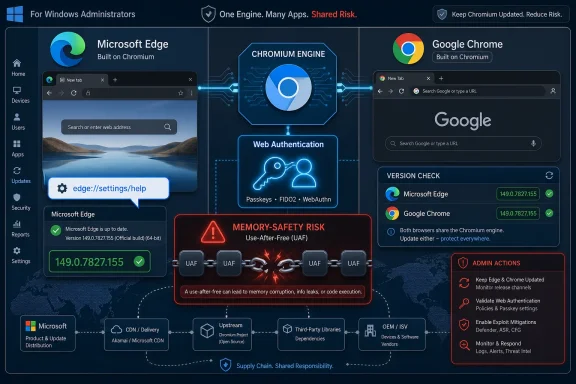
Microsoft documented CVE-2026-12443 in the Security Update Guide because the bug is in Chromium’s open-source Web Authentication code, Google Chrome fixed it in version 149.0.7827.155, and Microsoft Edge inherits that code through its Chromium-based browser engine. The practical answer is simple: this is not “a Chrome-only problem” once the vulnerable Chromium component ships inside Edge. The more important answer is that browser security has become a supply-chain story, and Microsoft’s guide is where many Windows administrators expect that story to be reconciled against Microsoft products. To check whether you are protected, open Edge and go to
There was a time when seeing a Google Chrome CVE in a Microsoft security bulletin felt like a category error. Microsoft had Internet Explorer, then legacy Edge, and Chrome was Google’s problem. That world ended when Microsoft rebuilt Edge on Chromium and made the web platform a shared dependency rather than a proprietary stack.
CVE-2026-12443 is a use-after-free vulnerability in Web Authentication, the browser plumbing behind modern sign-in flows such as passkeys and hardware-backed authentication. The published description says Chrome versions before 149.0.7827.155 were vulnerable, with exploitation possible through a crafted HTML page. That phrase is familiar because browser memory-safety bugs tend to arrive wearing the same uniform: lure the user to hostile content, trigger corruption in a complex subsystem, and see what the sandbox and mitigations can contain.
Microsoft’s reason for listing it is therefore not mysterious. Edge consumes Chromium open source software, so when Chromium fixes a security issue in a component Edge also ships, Microsoft has to tell Edge customers whether Microsoft’s browser is still exposed. The Security Update Guide entry is less a claim of authorship than a statement of accountability.
That distinction matters. The vulnerability may have been found, fixed, and initially disclosed in the Chrome ecosystem, but Windows administrators do not patch “ecosystems.” They patch products installed on endpoints, servers used for remote work, kiosk machines, VDI images, and developer laptops. If Edge is on those systems, Edge’s exposure belongs in Microsoft’s security ledger.
That concentration has an upside. A bug fixed in Chromium can benefit Chrome, Edge, Brave, Vivaldi, Opera, and other Chromium-derived browsers once each vendor integrates and ships the patch. The disclosure pipeline is faster and broader than it would be if every browser engine carried an entirely separate implementation of every web feature.
The downside is that a single memory-corruption flaw in a Chromium component can ripple across multiple products that users think of as separate browsers. That is why “Chrome CVE” is often shorthand rather than a complete product-impact statement. It may be discovered in Chrome, assigned through Google’s process, and written up in Chrome release notes, but downstream vendors still need to do the boring, essential work of mapping that fix to their own builds.
Microsoft’s Security Update Guide is built for that mapping. It is where a Windows-focused administrator can see that a vulnerability has a Microsoft product impact, even when the code originated elsewhere. If Microsoft omitted these entries, the result would not be cleaner taxonomy; it would be more confusion.
That does not automatically mean CVE-2026-12443 compromises every passkey or steals every credential. Vulnerability descriptions are deliberately terse, and browser vendors often withhold exploit details until users have had time to update. But the affected area should still get administrators’ attention, because authentication surfaces sit close to workflows users and enterprises increasingly treat as high trust.
A use-after-free bug is a class of memory-safety flaw where software continues to use memory after it has already been released. Attackers try to manipulate that stale memory reference so the program behaves in a way the developer did not intend. In browsers, those bugs are dangerous because the browser is designed to process untrusted content from the open web all day long.
Modern browsers have sandboxes, site isolation, exploit mitigations, and increasingly aggressive hardening. Those protections matter, and they often turn a would-be compromise into a crash or a contained exploit. But they do not make memory-corruption CVEs irrelevant; they make prompt patching part of a layered defense rather than a bureaucratic ritual.
That dual identity makes Microsoft both a consumer of upstream Chromium security work and a publisher of downstream product guidance. The company must track whether a Chromium CVE affects Edge Stable, Edge Extended Stable, Beta, Dev, Canary, and sometimes WebView2. It must also provide a version boundary so administrators can decide whether an installed build is vulnerable.
For home users, this may collapse into one instruction: update Edge and relaunch it. For enterprise administrators, it becomes asset inventory, channel awareness, update policy review, staged rollout, vulnerability scanner tuning, and exception management for machines that cannot update immediately. The same CVE can be a two-click fix on a personal laptop and a change-control item across thousands of endpoints.
That is why Microsoft’s documentation language is careful. The entry says the vulnerability is in Chromium OSS consumed by Microsoft Edge and that the Security Update Guide documents the latest Edge version as no longer vulnerable. It is not trying to relitigate Chrome’s advisory. It is translating upstream risk into Microsoft’s support and patch universe.
For Microsoft Edge, the simplest check is to type
For Google Chrome, the equivalent page is
That last step is where many patch programs quietly fail. A browser can download an update and still leave users running old code until they restart. In offices where users keep dozens of tabs open for weeks, the “relaunch” button can become the weakest link in the security chain.
Administrators should therefore treat version verification as more than a help-desk nicety. If the fixed version boundary is 149.0.7827.155 for the vulnerable Chromium code, then installed browsers below the relevant vendor-fixed build remain the population of concern. The exact Edge build number may differ from Chrome’s even when it contains the same Chromium fix, so Edge should be checked against Microsoft’s Edge security release notes and the Security Update Guide rather than Chrome’s version string alone.
A malicious page does not need to look malicious. It can be a compromised legitimate site, an ad slot, a redirect in a phishing chain, a fake login page, or a payload hidden behind a link in chat or email. The user’s action may be no more exotic than visiting a web page in the course of an ordinary workday.
The browser’s job is to parse documents, execute scripts, decode media, handle credentials, isolate sites, process graphics, and mediate device access while assuming much of what it receives is hostile. That is an extraordinary amount of complexity compressed into an application many users treat as plumbing. Every new web feature adds capability, but capability also adds parser paths, state machines, permissions prompts, and memory-management edges.
Web Authentication belongs to the better side of that trade-off. It is central to moving the industry away from passwords and toward phishing-resistant authentication. But better authentication does not mean simpler browser internals. CVE-2026-12443 is a reminder that security features are still software, and software that touches untrusted web content must be patched with the same urgency as any other browser component.
Enterprises, however, rarely get to live in the ideal world of instant universal updates. They have web apps that depend on specific behavior, regulated change windows, remote users, virtualized desktops, kiosks, call-center machines, and executives who somehow always discover incompatibilities first. The result is a permanent negotiation between speed and control.
Edge gives organizations policy levers for update behavior, including automatic updates, manual update checks, target channels, and Extended Stable. Those controls are useful, but they can also become self-inflicted exposure if they are used to freeze browser versions without a compensating process for security fixes. A policy that made sense during an application compatibility incident can become dangerous if nobody removes it.
Extended Stable is often misunderstood in this context. It slows the feature cadence, not the need for security fixes. Organizations on slower feature rings still need critical Chromium security patches as they arrive. The entire premise is that enterprises can reduce feature churn without opting out of the security stream.
The security implication is straightforward: Chromium vulnerabilities can matter even when a user is not consciously “using Edge.” If a line-of-business app, installer, help viewer, sign-in flow, or desktop client embeds WebView2, the underlying runtime becomes part of the application’s attack surface. Updating the visible browser is necessary, but not always sufficient for the broader Chromium footprint on Windows.
This is where vulnerability management gets messy. Asset tools often inventory installed browsers more reliably than embedded runtimes. Users may know how to check Edge’s About page but have no idea whether a business application is using WebView2. Developers may assume the evergreen runtime will update itself, while administrators may block or stage runtime updates under enterprise policy.
CVE-2026-12443 is listed in the context of Edge, but it belongs to a wider pattern. Chromium has become a platform dependency on Windows, not just a browser choice. Treating it as such is the difference between checking one icon on the taskbar and understanding the web-rendering layer across the desktop fleet.
That is not always elegant. CVE records, vendor advisories, scanner plugins, browser release notes, and enterprise patch catalogs do not always use language that lines up neatly. One source may say “Google Chrome prior to version X,” while another says “Microsoft Edge is no longer vulnerable as of version Y.” Both can be true because they are describing different products built on overlapping code.
The alternative would be worse. If Microsoft only documented vulnerabilities in code it wrote from scratch, Edge administrators would need to chase Chromium advisories separately and infer Microsoft impact themselves. If vulnerability scanners treated all Chromium-derived browsers as identical, they would create false positives and false negatives based on version mismatches. The correct middle ground is vendor-specific documentation for shared upstream flaws.
That is what the Security Update Guide entry is doing. It does not mean Windows itself is vulnerable in the same way Chrome was vulnerable. It means Microsoft ships a product that consumed the affected Chromium component, and the fixed Edge release is the supported answer for Microsoft customers.
At scale, the same task becomes evidence collection. Administrators need to know which devices have Edge installed, which channel they are on, whether update policies are blocking current builds, whether users have relaunched, and whether security tools are correctly recognizing the fixed version. A vulnerability entry in the Security Update Guide is only the start of that workflow.
This is why version drift deserves more attention than it gets. Two machines can both be “managed” and still sit on different browser builds because one was offline, one is on Extended Stable, one is pinned by policy, and one has a broken updater. Browser patch compliance is not a static checkbox; it is a moving target that changes as rapidly as the release cadence.
For Windows enthusiasts, the lesson is personal as well as professional. If Edge is your secondary browser, you may not open it often enough to trigger the habits that keep Chrome or Firefox current in your daily workflow. Since Edge is integrated into Windows experiences and may be called by apps or system components, ignoring it because it is not your default browser is a poor security strategy.
That makes browser integrity more important, not less. Users may think of passkeys as something stored in Windows Hello, a phone, a password manager, or a hardware security key. Yet the browser remains the mediator between the website and the authenticator. If the browser’s implementation of the authentication ceremony has a memory-safety flaw, the surrounding trust architecture has to rely on patches and mitigations to keep the chain intact.
This is not an argument against Web Authentication. It is an argument against magical thinking. Strong authentication reduces entire classes of attacks, but it does not abolish browser exploitation, malicious pages, confused-deputy problems, or implementation bugs. Security improvements are cumulative, and each layer still has to be maintained.
For Microsoft, that means Edge’s role in passwordless sign-in is inseparable from its Chromium patch discipline. For administrators, it means browser update compliance belongs in identity-security discussions. The device that performs a phishing-resistant sign-in still needs a browser that can safely process hostile web content.
A better question is whether the affected component exists in the product you run and whether your installed version includes the fix. For CVE-2026-12443, the affected component is Chromium Web Authentication code, and Microsoft says Edge consumed the relevant Chromium OSS. That is enough to put Edge in scope until the fixed Edge version is deployed.
Security teams should also resist the opposite overreaction. Not every Chrome CVE automatically means every Chromium-based browser is exploitable in the same way on every platform. Features may be disabled, patched earlier, differently integrated, or reachable only under certain conditions. The right answer is neither dismissal nor panic; it is vendor-specific verification.
That is why Microsoft’s guide entry is valuable even when it feels redundant. It converts the upstream Chrome vulnerability into a Microsoft product statement. In vulnerability management, that translation is often the difference between noisy awareness and actionable remediation.
edge://settings/help, or use Settings and more, Help and feedback, About Microsoft Edge.
 Microsoft’s Security Guide Is Now a Chromium Weather Report
There was a time when seeing a Google Chrome CVE in a Microsoft security bulletin felt like a category error. Microsoft had Internet Explorer, then legacy Edge, and Chrome was Google’s problem. That world ended when Microsoft rebuilt Edge on Chromium and made the web platform a shared dependency rather than a proprietary stack.CVE-2026-12443 is a use-after-free vulnerability in Web Authentication, the browser plumbing behind modern sign-in flows such as passkeys and hardware-backed authentication. The published description says Chrome versions before 149.0.7827.155 were vulnerable, with exploitation possible through a crafted HTML page. That phrase is familiar because browser memory-safety bugs tend to arrive wearing the same uniform: lure the user to hostile content, trigger corruption in a complex subsystem, and see what the sandbox and mitigations can contain.
Microsoft’s reason for listing it is therefore not mysterious. Edge consumes Chromium open source software, so when Chromium fixes a security issue in a component Edge also ships, Microsoft has to tell Edge customers whether Microsoft’s browser is still exposed. The Security Update Guide entry is less a claim of authorship than a statement of accountability.
That distinction matters. The vulnerability may have been found, fixed, and initially disclosed in the Chrome ecosystem, but Windows administrators do not patch “ecosystems.” They patch products installed on endpoints, servers used for remote work, kiosk machines, VDI images, and developer laptops. If Edge is on those systems, Edge’s exposure belongs in Microsoft’s security ledger.
The Browser Wars Ended, but the Patch Wars Did Not
The old browser wars were fought over rendering engines, default settings, standards compliance, and market share. The current fight is quieter and more operational: who can ingest upstream fixes, ship them quickly, expose the right version data, and give enterprises enough control without slowing down the patch train. Chromium won much of the engine war, but it also concentrated risk in a shared codebase.That concentration has an upside. A bug fixed in Chromium can benefit Chrome, Edge, Brave, Vivaldi, Opera, and other Chromium-derived browsers once each vendor integrates and ships the patch. The disclosure pipeline is faster and broader than it would be if every browser engine carried an entirely separate implementation of every web feature.
The downside is that a single memory-corruption flaw in a Chromium component can ripple across multiple products that users think of as separate browsers. That is why “Chrome CVE” is often shorthand rather than a complete product-impact statement. It may be discovered in Chrome, assigned through Google’s process, and written up in Chrome release notes, but downstream vendors still need to do the boring, essential work of mapping that fix to their own builds.
Microsoft’s Security Update Guide is built for that mapping. It is where a Windows-focused administrator can see that a vulnerability has a Microsoft product impact, even when the code originated elsewhere. If Microsoft omitted these entries, the result would not be cleaner taxonomy; it would be more confusion.
Web Authentication Raises the Stakes Beyond Ordinary Browsing
Web Authentication is not an obscure corner of the browser anymore. It is part of the infrastructure behind phishing-resistant sign-ins, passkeys, platform authenticators, and security keys. In plain terms, it is where the browser helps websites ask a device or hardware token to prove that the person signing in really controls a credential.That does not automatically mean CVE-2026-12443 compromises every passkey or steals every credential. Vulnerability descriptions are deliberately terse, and browser vendors often withhold exploit details until users have had time to update. But the affected area should still get administrators’ attention, because authentication surfaces sit close to workflows users and enterprises increasingly treat as high trust.
A use-after-free bug is a class of memory-safety flaw where software continues to use memory after it has already been released. Attackers try to manipulate that stale memory reference so the program behaves in a way the developer did not intend. In browsers, those bugs are dangerous because the browser is designed to process untrusted content from the open web all day long.
Modern browsers have sandboxes, site isolation, exploit mitigations, and increasingly aggressive hardening. Those protections matter, and they often turn a would-be compromise into a crash or a contained exploit. But they do not make memory-corruption CVEs irrelevant; they make prompt patching part of a layered defense rather than a bureaucratic ritual.
Edge’s Chromium Lineage Makes Microsoft Both Consumer and Publisher
Microsoft is not merely redistributing Google Chrome with a different icon. Edge has its own services, management policies, enterprise features, identity integrations, PDF behavior, sidebar features, update channels, and Windows tie-ins. But the core browser engine lineage means that Chromium vulnerabilities can become Edge vulnerabilities when the affected code is present and reachable.That dual identity makes Microsoft both a consumer of upstream Chromium security work and a publisher of downstream product guidance. The company must track whether a Chromium CVE affects Edge Stable, Edge Extended Stable, Beta, Dev, Canary, and sometimes WebView2. It must also provide a version boundary so administrators can decide whether an installed build is vulnerable.
For home users, this may collapse into one instruction: update Edge and relaunch it. For enterprise administrators, it becomes asset inventory, channel awareness, update policy review, staged rollout, vulnerability scanner tuning, and exception management for machines that cannot update immediately. The same CVE can be a two-click fix on a personal laptop and a change-control item across thousands of endpoints.
That is why Microsoft’s documentation language is careful. The entry says the vulnerability is in Chromium OSS consumed by Microsoft Edge and that the Security Update Guide documents the latest Edge version as no longer vulnerable. It is not trying to relitigate Chrome’s advisory. It is translating upstream risk into Microsoft’s support and patch universe.
The Version Number Is the Only Answer That Survives Spin
When browser vendors publish vulnerability guidance, the temptation is to read the prose and stop there. That is a mistake. The decisive detail is always the version number actually running on the machine.For Microsoft Edge, the simplest check is to type
edge://settings/help into the address bar. Edge will display the installed version, check for updates, and usually download an available update automatically if policy allows it. The same page is reachable through the three-dot menu under Help and feedback, then About Microsoft Edge.For Google Chrome, the equivalent page is
chrome://settings/help, also available through the three-dot menu under Help, then About Google Chrome. Chrome will show the installed build and check for updates. In both browsers, the update is not fully effective until the browser relaunches into the new version.That last step is where many patch programs quietly fail. A browser can download an update and still leave users running old code until they restart. In offices where users keep dozens of tabs open for weeks, the “relaunch” button can become the weakest link in the security chain.
Administrators should therefore treat version verification as more than a help-desk nicety. If the fixed version boundary is 149.0.7827.155 for the vulnerable Chromium code, then installed browsers below the relevant vendor-fixed build remain the population of concern. The exact Edge build number may differ from Chrome’s even when it contains the same Chromium fix, so Edge should be checked against Microsoft’s Edge security release notes and the Security Update Guide rather than Chrome’s version string alone.
The Crafted HTML Page Is the Oldest Browser Threat in Modern Clothes
The phrase “crafted HTML page” can sound almost quaint. HTML is the web’s basic document format, not a suspicious attachment or an executable binary. That is precisely why browser bugs are so operationally important: the attack surface is normal browsing.A malicious page does not need to look malicious. It can be a compromised legitimate site, an ad slot, a redirect in a phishing chain, a fake login page, or a payload hidden behind a link in chat or email. The user’s action may be no more exotic than visiting a web page in the course of an ordinary workday.
The browser’s job is to parse documents, execute scripts, decode media, handle credentials, isolate sites, process graphics, and mediate device access while assuming much of what it receives is hostile. That is an extraordinary amount of complexity compressed into an application many users treat as plumbing. Every new web feature adds capability, but capability also adds parser paths, state machines, permissions prompts, and memory-management edges.
Web Authentication belongs to the better side of that trade-off. It is central to moving the industry away from passwords and toward phishing-resistant authentication. But better authentication does not mean simpler browser internals. CVE-2026-12443 is a reminder that security features are still software, and software that touches untrusted web content must be patched with the same urgency as any other browser component.
Enterprise Edge Deployments Live Between Speed and Control
Microsoft Edge updates are designed to be frequent, automatic, and largely invisible. That model is appropriate for the modern web, where waiting for the next monthly operating-system patch cycle can leave users exposed for too long. Browser security is not comfortably aligned with Patch Tuesday.Enterprises, however, rarely get to live in the ideal world of instant universal updates. They have web apps that depend on specific behavior, regulated change windows, remote users, virtualized desktops, kiosks, call-center machines, and executives who somehow always discover incompatibilities first. The result is a permanent negotiation between speed and control.
Edge gives organizations policy levers for update behavior, including automatic updates, manual update checks, target channels, and Extended Stable. Those controls are useful, but they can also become self-inflicted exposure if they are used to freeze browser versions without a compensating process for security fixes. A policy that made sense during an application compatibility incident can become dangerous if nobody removes it.
Extended Stable is often misunderstood in this context. It slows the feature cadence, not the need for security fixes. Organizations on slower feature rings still need critical Chromium security patches as they arrive. The entire premise is that enterprises can reduce feature churn without opting out of the security stream.
WebView2 Turns Browser CVEs Into Application Inventory Problems
The Chromium conversation does not stop at the browser window. Microsoft’s WebView2 runtime lets Windows applications embed web content using the Edge Chromium engine. That has been a major shift for app developers, replacing older embedded web controls with a modern, evergreen runtime.The security implication is straightforward: Chromium vulnerabilities can matter even when a user is not consciously “using Edge.” If a line-of-business app, installer, help viewer, sign-in flow, or desktop client embeds WebView2, the underlying runtime becomes part of the application’s attack surface. Updating the visible browser is necessary, but not always sufficient for the broader Chromium footprint on Windows.
This is where vulnerability management gets messy. Asset tools often inventory installed browsers more reliably than embedded runtimes. Users may know how to check Edge’s About page but have no idea whether a business application is using WebView2. Developers may assume the evergreen runtime will update itself, while administrators may block or stage runtime updates under enterprise policy.
CVE-2026-12443 is listed in the context of Edge, but it belongs to a wider pattern. Chromium has become a platform dependency on Windows, not just a browser choice. Treating it as such is the difference between checking one icon on the taskbar and understanding the web-rendering layer across the desktop fleet.
The Security Update Guide Is Annoying Because It Is Honest
Some of the confusion around this CVE comes from branding. Users see “Google Chrome” and “Microsoft Security Update Guide” in the same breath and wonder whether Microsoft is padding its bulletin, claiming someone else’s bug, or warning about software it does not own. The answer is less dramatic: the guide is reflecting a shared dependency.That is not always elegant. CVE records, vendor advisories, scanner plugins, browser release notes, and enterprise patch catalogs do not always use language that lines up neatly. One source may say “Google Chrome prior to version X,” while another says “Microsoft Edge is no longer vulnerable as of version Y.” Both can be true because they are describing different products built on overlapping code.
The alternative would be worse. If Microsoft only documented vulnerabilities in code it wrote from scratch, Edge administrators would need to chase Chromium advisories separately and infer Microsoft impact themselves. If vulnerability scanners treated all Chromium-derived browsers as identical, they would create false positives and false negatives based on version mismatches. The correct middle ground is vendor-specific documentation for shared upstream flaws.
That is what the Security Update Guide entry is doing. It does not mean Windows itself is vulnerable in the same way Chrome was vulnerable. It means Microsoft ships a product that consumed the affected Chromium component, and the fixed Edge release is the supported answer for Microsoft customers.
The User-Facing Fix Is Easy; Proving It Happened Is Not
On a single PC, remediation is refreshingly mundane. Open Edge, visit the About page, let it check for updates, and relaunch. If the browser says it is up to date and the version is at or above the Microsoft-fixed build for this CVE, the user is done.At scale, the same task becomes evidence collection. Administrators need to know which devices have Edge installed, which channel they are on, whether update policies are blocking current builds, whether users have relaunched, and whether security tools are correctly recognizing the fixed version. A vulnerability entry in the Security Update Guide is only the start of that workflow.
This is why version drift deserves more attention than it gets. Two machines can both be “managed” and still sit on different browser builds because one was offline, one is on Extended Stable, one is pinned by policy, and one has a broken updater. Browser patch compliance is not a static checkbox; it is a moving target that changes as rapidly as the release cadence.
For Windows enthusiasts, the lesson is personal as well as professional. If Edge is your secondary browser, you may not open it often enough to trigger the habits that keep Chrome or Firefox current in your daily workflow. Since Edge is integrated into Windows experiences and may be called by apps or system components, ignoring it because it is not your default browser is a poor security strategy.
Passkeys Make Browser Hygiene More Important, Not Less
The industry’s move toward passkeys is often sold as liberation from passwords, and that is largely fair. Passkeys can reduce phishing risk, eliminate password reuse, and make account takeover harder. But the trust path still runs through the browser for many web sign-ins.That makes browser integrity more important, not less. Users may think of passkeys as something stored in Windows Hello, a phone, a password manager, or a hardware security key. Yet the browser remains the mediator between the website and the authenticator. If the browser’s implementation of the authentication ceremony has a memory-safety flaw, the surrounding trust architecture has to rely on patches and mitigations to keep the chain intact.
This is not an argument against Web Authentication. It is an argument against magical thinking. Strong authentication reduces entire classes of attacks, but it does not abolish browser exploitation, malicious pages, confused-deputy problems, or implementation bugs. Security improvements are cumulative, and each layer still has to be maintained.
For Microsoft, that means Edge’s role in passwordless sign-in is inseparable from its Chromium patch discipline. For administrators, it means browser update compliance belongs in identity-security discussions. The device that performs a phishing-resistant sign-in still needs a browser that can safely process hostile web content.
The Chrome Label Should Not Decide Your Risk
One of the worst habits in vulnerability triage is judging relevance by the first product name in the advisory. If the headline says Chrome, Edge teams may ignore it. If the bulletin says Microsoft, Chrome users may assume it is not their problem. Shared codebases punish that kind of brand-driven filtering.A better question is whether the affected component exists in the product you run and whether your installed version includes the fix. For CVE-2026-12443, the affected component is Chromium Web Authentication code, and Microsoft says Edge consumed the relevant Chromium OSS. That is enough to put Edge in scope until the fixed Edge version is deployed.
Security teams should also resist the opposite overreaction. Not every Chrome CVE automatically means every Chromium-based browser is exploitable in the same way on every platform. Features may be disabled, patched earlier, differently integrated, or reachable only under certain conditions. The right answer is neither dismissal nor panic; it is vendor-specific verification.
That is why Microsoft’s guide entry is valuable even when it feels redundant. It converts the upstream Chrome vulnerability into a Microsoft product statement. In vulnerability management, that translation is often the difference between noisy awareness and actionable remediation.
The Small Version Check That Carries the Whole Story
The fastest way to make this CVE concrete is to check the browser in front of you and then check the fleet behind it. The consumer instruction and the enterprise instruction are different in scale, but not in principle: find the version, compare it to the fixed release, and make sure the update has actually taken effect after relaunch.- Open Microsoft Edge and type
edge://settings/helpin the address bar to see the installed version and trigger an update check. - Use the menu path Settings and more, Help and feedback, About Microsoft Edge if you prefer not to type the internal page address.
- Open Google Chrome and type
chrome://settings/helpif you also need to verify Chrome against the fixed 149.0.7827.155 release line. - Relaunch the browser after the update downloads, because the old process can remain in memory until restart.
- In managed environments, review Edge update policies and any target-version settings that could keep devices below the fixed build.
- Treat Edge, Chrome, and WebView2 as related but separately verified assets, because Chromium fixes must still land in each installed product.
References
- Primary source: MSRC
Published: 2026-06-19T13:52:25-07:00
Security Update Guide - Microsoft Security Response Center
 msrc.microsoft.com
- Related coverage: datacomm.com
- Official source: learn.microsoft.com
Release notes for Microsoft Edge Security Updates | Microsoft Learn
Release notes for Microsoft Edge Security Updateslearn.microsoft.com - Related coverage: vulnerability.circl.lu
Vulnerability-Lookup
Vulnerability-Lookup - Fast vulnerability lookup correlation from different sources.vulnerability.circl.lu - Related coverage: tomsguide.com
Google issues critical Chrome update to patch zero-day vulnerability | Tom's Guide
A brand new Chrome vulnerability has been patched by Google, which means its time to update your browser again.www.tomsguide.com - Related coverage: www2.gov.bc.ca
- Related coverage: aha.org
h isac tlp white microsoft edge addresses exploited zero day vulnerability cve 2024 7971 8 23 2024
PDF documentwww.aha.org
