

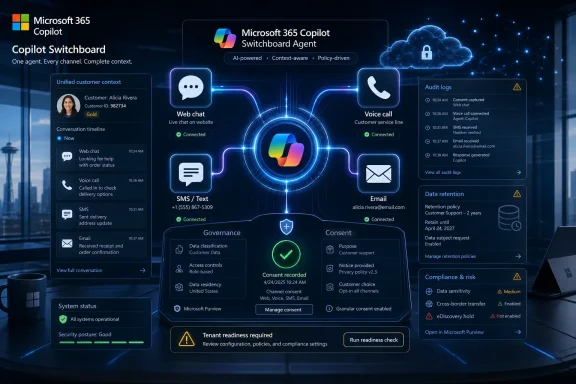
Microsoft added Roadmap ID 567001 on July 8, 2026, for a Microsoft 365 Copilot web capability that will let organizations engage customers through web chat, voice, SMS, and email, with preview planned for July 2026 and general availability planned for August 2026. The feature is still marked in development, which matters: this is not a shipped product promise so much as a visible marker of where Microsoft wants Copilot to sit in customer-facing workflows. The strategic move is bigger than another agent checkbox. Microsoft is trying to turn Copilot from an internal productivity assistant into a front-office engagement layer that can follow a customer across channels without losing the thread.
That is both useful and dangerous. A single AI-assisted outreach workflow that spans chat, phone, text, and email could reduce the handoff tax that has plagued sales and service teams for years. It could also concentrate consent, logging, data-retention, brand-risk, and compliance problems in one place. For WindowsForum readers who administer Microsoft 365 tenants, the important question is not whether multi-channel engagement sounds modern. It is whether your tenant, CRM, data labels, call-recording rules, opt-in records, and human escalation paths are ready for an agent that may soon operate where customers actually answer.
Microsoft’s roadmap entry describes a multi-channel outreach capability for Microsoft Copilot in Microsoft 365, delivered on the web, for the Worldwide Standard Multi-Tenant cloud. The channel list is deliberately broad: web chat, voice, SMS, and email. Microsoft’s own description frames the feature as a way to meet customers in the channel they prefer, reduce drop-off when one channel fails, and support always-on engagement from initial intent through close.
That wording is revealing. Microsoft is not describing Copilot as a better inbox assistant or a smarter sales prompt generator. It is describing Copilot as orchestration infrastructure for customer contact, with continuity across surfaces and a handoff into sales motions. In plain English, the company wants Copilot to help decide not only what to say, but where and when to continue the conversation.
The roadmap status is “in development,” with preview in July 2026 and general availability in August 2026. Microsoft’s roadmap pages explicitly treat release timing as estimated and subject to change, so admins should read those months as planning windows rather than deployment guarantees. Still, the entry’s arrival is a serious signal: Microsoft is putting multi-channel customer engagement inside the Microsoft 365 Copilot orbit, not leaving it exclusively to standalone CRM, marketing automation, or contact-center products.
That is the core story. The productivity suite is becoming an engagement suite. The place where employees write, meet, search, and summarize is being connected to the place where prospects and customers reply.
The Copilot roadmap entry points to a different model: the customer conversation as the durable object, with channels as interchangeable transport. If a web chat fails, the agent can theoretically continue by SMS. If a text thread needs richer context, it can move to email. If urgency rises, a call can enter the workflow. The promise is not that every channel is new; it is that the handoffs stop being lossy.
Microsoft Learn documentation for Copilot Studio already describes agents as deployable across websites, apps, Teams, and other channels supported by Microsoft’s bot infrastructure. Dynamics 365 and contact-center documentation also shows Microsoft’s existing interest in voice, SMS, chat, email, proactive engagement, and handoff scenarios. Roadmap ID 567001 appears to pull that broader platform direction into the Microsoft 365 Copilot sales-and-engagement experience.
The practical consequence is subtle but important. Instead of a seller or service representative switching between five tools and relying on memory, the agent can maintain context and guide the next touch. That could mean fewer duplicate questions, fewer abandoned leads, and fewer “per my last email” loops. It could also mean a machine is now close enough to the customer relationship that governance can no longer be treated as a backend concern.
The table is simple, but the operational difference is large. Multi-channel is not merely “more places to send a message.” Each channel has a different social contract. A customer tolerates a longer explanation in email than in SMS. A voice call may require disclosure that a chat message does not. A web chat can begin with low-friction intent but weak identity confidence. Treating those channels as equivalent would be the fastest way to turn an efficiency project into a compliance incident.
Microsoft’s own admin documentation for Copilot agents emphasizes that administrators can manage agents in the Microsoft 365 admin center by enabling, disabling, assigning, blocking, or removing them. Microsoft also frames Agent 365 as a control plane for deploying, organizing, and governing agents at scale. That direction matters because multi-channel customer outreach is exactly the kind of agent scenario that will need central inventory, ownership, monitoring, and lifecycle controls.
The entry’s cloud instance is Worldwide Standard Multi-Tenant. That is the broad commercial cloud, not a sovereign or specialized government cloud designation in the fact table. Organizations with stricter residency, regulated communications, or sector-specific retention rules should not assume availability in their environment unless Microsoft later publishes explicit support. The absence of a government cloud listing is not a minor detail for banks, healthcare providers, public-sector contractors, or heavily regulated customer-service operations.
The “release rings” field lists both Preview and General Availability. That means organizations may be able to test before broad production availability, but it also creates the familiar Microsoft 365 challenge: features arrive fast, user enthusiasm outruns governance, and admins are left converting an innovation demo into a controlled service. Preview is the time to decide whether the feature belongs in your business process, not the time to let a sales team improvise outbound AI engagement with real prospects.
July 2026 — Preview availability is planned for the web capability in the Worldwide Standard Multi-Tenant cloud.
August 2026 — General availability is planned, with the roadmap item still marked in development at the time it was added.
That is the old CRM paradox with an AI multiplier. Sales wants continuity and speed. Compliance wants proof and restraint. IT wants manageable identity, permissions, logs, and support boundaries. Customers want not to be spammed, misled, called at the wrong time, or forced to repeat themselves. A multi-channel Copilot feature sits at the intersection of all four.
Coverage from KbWorks, which tracks Microsoft 365 roadmap and message-center updates, framed the setup areas around channel strategy, content guidance, consent controls, and CRM logging. That is the right lens. The feature is not just “turn on agent.” It is decide which conversations may move to which channel, what language the agent may use, how opt-ins and opt-outs are respected, and where every interaction is recorded.
If those foundations are missing, the feature can make existing bad process faster. A team with sloppy lead ownership will now have faster sloppy lead ownership. A tenant with overshared customer files will now have a more conversational way to surface them. A company with weak SMS consent records will now have a tempting interface for sending texts. The agent does not fix governance debt; it operationalizes it.
Microsoft’s roadmap entry does not spell out the consent model. That omission is not surprising for a roadmap item, but it is exactly why admins should start asking questions before preview testing. Where will channel preferences live? Can the agent see them? Can the workflow prevent outreach when consent is absent or withdrawn? How are opt-out signals captured? What happens if a seller attempts to override a recommended channel?
The best implementation will treat consent as a first-class runtime control, not as a training slide. The agent should not simply “know” that SMS is effective. It should know whether SMS is allowed for this customer, this region, this purpose, this business unit, and this moment. That requires integration with systems of record, not a prompt that says “follow policy.”
Voice adds another layer. If calls can be initiated or assisted through the workflow, organizations need to decide whether the customer is interacting with AI, a human, or a handoff between both. Disclosure rules, recording policies, call summaries, and escalation triggers must be designed before the first pilot. A voice channel that delights in a demo can become a complaint generator if customers feel tricked or trapped.
Automatic logging is therefore not a nice-to-have. It is the difference between an agentic workflow and a prettier notification system. Every channel transition should leave behind enough metadata to answer basic questions: who initiated contact, through which channel, under what consent basis, with what content, using what customer identity, and with what outcome. Without that, AI-assisted outreach becomes difficult to audit precisely because it is fluid.
This is where Microsoft has an advantage and a burden. Microsoft 365 already sits near Outlook, Teams, SharePoint, Exchange, Purview, Entra ID, and the broader business application ecosystem. That gives Microsoft a credible path to governed continuity. It also means a misconfigured deployment can draw from a large surface area of enterprise data and communication history.
Admins should resist any pilot that measures only response rates. Response rate is a business metric, not a governance metric. A proper pilot should also measure logging completeness, opt-out handling, escalation accuracy, prompt adherence, hallucinated claims, duplicate outreach, and the human effort required to correct the record. If the agent raises conversion while muddying the customer history, the bill comes due later.
A useful first scenario might be inbound web-chat qualification followed by email summary and human review. Another might be SMS appointment confirmation after a customer explicitly opts in during a web interaction. A more aggressive scenario might route a high-value lead from web chat to a voice callback. These are very different risk profiles, even though they use the same channel list.
The best channel strategy will define not only the allowed path, but the stop signs. Do not continue by SMS if consent is unclear. Do not call if the customer asked for email. Do not generate pricing promises unless grounded in approved systems. Do not summarize a conversation into CRM without marking whether the summary was AI-generated and whether a human reviewed it. Do not let the agent improvise a discount, support commitment, refund position, or legal statement.
Microsoft’s source wording says the goal is continuity of conversations and reduced drop-off when a single channel fails. That is reasonable, but “channel fails” must be defined carefully. A customer not replying to an email is not automatically an invitation to text. A web chat abandonment is not automatically consent to call. A missed voice call is not automatically permission to send a long SMS sequence. The technology can bridge channels; policy must decide when it should.
The endpoint angle is also real. Sellers and service representatives will use managed Windows PCs to review conversations, approve messages, join calls, and update records. Browser policies, session controls, identity posture, device compliance, and data-loss controls all become part of the story. If a user can access sensitive customer context through a web-based Copilot workflow from an unmanaged device, the feature has become a data-exposure path, not merely a productivity tool.
Microsoft Learn’s Copilot agent governance guidance repeatedly points admins toward existing Microsoft 365 permissions, admin center controls, Purview, audit, DLP, and agent lifecycle management. That is reassuring only if those controls are already mature. Copilot agents generally respect user permissions, but permission-respecting systems can still reveal overshared data to users who technically have access but should not operationally be using that content for customer outreach.
Before preview testing, admins should review SharePoint and OneDrive oversharing, mailbox permissions, CRM roles, service accounts, connector policies, and environment-level DLP. The customer-facing nature of this feature raises the stakes. An internal Copilot mistake may confuse an employee. An external outreach mistake can misinform a customer, trigger a complaint, or create discoverable evidence.
That shift changes the competitive frame. Microsoft is not only competing with other AI assistants. It is moving toward the territory of CRM automation, sales engagement platforms, contact-center AI, customer journey orchestration, and low-code business process tools. The advantage is distribution: Microsoft 365 is already where many workers spend the day. The risk is sprawl: every department may believe its agent is just a small extension of everyday work.
Customer engagement is a particularly valuable front. Internal productivity gains can be hard to quantify, and Copilot adoption has often required careful change management. Customer response rates, qualification speed, and handoff efficiency are easier to put into a business case. If Microsoft can credibly say Copilot helps turn intent into pipeline, the product moves from a knowledge-work assistant to a revenue-adjacent platform.
But revenue-adjacent tools face tougher scrutiny. A bad meeting summary is annoying. A bad customer promise is material. An internal hallucination can be corrected before it leaves the company. A hallucinated outreach message may already be in a customer’s inbox, SMS history, call transcript, or complaint file. The closer Copilot gets to the customer, the less tolerance organizations should have for fuzzy ownership.
Start with a synthetic or low-risk use case. Use test customers or internal aliases where possible. Validate that channel transitions preserve context accurately. Confirm that opt-out events stop future outreach. Test whether the agent respects content guidance under pressure: angry customer, ambiguous pricing, unsupported product claim, request for legal assurance, demand for immediate callback, or conflicting CRM data.
Then test the boring parts. Can admins find the agent? Can they disable it? Can they see who has access? Can they export or search relevant records? Can they distinguish human-authored content from AI-assisted content? Can they explain to a business owner what happened in a specific interaction two weeks later? If the answer is no, the preview is not ready for production-like use.
This is also the time to involve legal, privacy, sales operations, and customer support leadership. IT can manage the service, but IT cannot decide alone what counts as acceptable outreach. The organization needs agreed rules for tone, frequency, escalation, disclosure, channel choice, and recordkeeping. The feature crosses too many boundaries for a purely technical rollout.
Bad handoffs are already one of the most frustrating parts of customer service and sales. A multi-channel agent can make them better by preserving context, or worse by creating a false sense that context was preserved. If a customer moves from web chat to SMS to voice and the human representative starts with “Can you explain the issue again?”, the organization has simply added AI to the old maze.
Human handoff design should specify when escalation occurs, what summary is shown, what source transcript is available, and what the human is allowed to rely on. AI summaries are useful, but they should not become the sole record when the conversation involves pricing, commitments, complaints, regulated advice, or identity verification. Representatives need fast context, but they also need the ability to inspect the underlying exchange.
There is also a labor-management dimension. Sales and service teams may welcome fewer manual updates but resist opaque AI scoring or automated next-best actions that feel imposed. Training should not present the agent as a magic closer. It should present the system as a continuity tool whose recommendations must be checked against customer reality.
The upside is significant. A well-governed multi-channel Copilot workflow could help small teams behave like larger ones, reduce manual CRM hygiene, and make customer engagement less dependent on heroic individual sellers. It could also standardize follow-up quality, reduce forgotten leads, and make handoffs less painful. For organizations already invested in Microsoft 365, the integration story may be more attractive than adding another standalone engagement platform.
The danger is the familiar Microsoft 365 one: powerful capabilities arriving faster than organizational readiness. Admin centers can expose toggles. Product pages can promise governance. Documentation can explain controls. But only the customer organization can decide which channels are appropriate, which data is reliable, which teams are trained, and which risks are unacceptable.
That is why the roadmap timing matters. July 2026 is not just a preview month; it is the planning deadline. August 2026 is not just a general-availability target; it is the point at which business users may start asking why they cannot use the new customer engagement feature they saw in a demo or heard about from a partner.
Microsoft’s new Copilot roadmap item is therefore less a feature announcement than a warning shot for the next phase of enterprise AI. The assistant that summarized meetings is becoming an agent that may contact customers, preserve context, and move conversations across channels. If Microsoft hits its July preview and August general-availability windows, the winners will not be the tenants that enable it first. They will be the tenants that can prove, channel by channel, that Copilot is allowed to speak before it does.
That is both useful and dangerous. A single AI-assisted outreach workflow that spans chat, phone, text, and email could reduce the handoff tax that has plagued sales and service teams for years. It could also concentrate consent, logging, data-retention, brand-risk, and compliance problems in one place. For WindowsForum readers who administer Microsoft 365 tenants, the important question is not whether multi-channel engagement sounds modern. It is whether your tenant, CRM, data labels, call-recording rules, opt-in records, and human escalation paths are ready for an agent that may soon operate where customers actually answer.
 Microsoft Is Moving Copilot Out of the Back Office
Microsoft’s roadmap entry describes a multi-channel outreach capability for Microsoft Copilot in Microsoft 365, delivered on the web, for the Worldwide Standard Multi-Tenant cloud. The channel list is deliberately broad: web chat, voice, SMS, and email. Microsoft’s own description frames the feature as a way to meet customers in the channel they prefer, reduce drop-off when one channel fails, and support always-on engagement from initial intent through close.That wording is revealing. Microsoft is not describing Copilot as a better inbox assistant or a smarter sales prompt generator. It is describing Copilot as orchestration infrastructure for customer contact, with continuity across surfaces and a handoff into sales motions. In plain English, the company wants Copilot to help decide not only what to say, but where and when to continue the conversation.
The roadmap status is “in development,” with preview in July 2026 and general availability in August 2026. Microsoft’s roadmap pages explicitly treat release timing as estimated and subject to change, so admins should read those months as planning windows rather than deployment guarantees. Still, the entry’s arrival is a serious signal: Microsoft is putting multi-channel customer engagement inside the Microsoft 365 Copilot orbit, not leaving it exclusively to standalone CRM, marketing automation, or contact-center products.
That is the core story. The productivity suite is becoming an engagement suite. The place where employees write, meet, search, and summarize is being connected to the place where prospects and customers reply.
The Agent Becomes the Switchboard
For years, enterprise customer communication has been organized around systems, not conversations. Email lives in Exchange and Outlook. Chat sits on a website widget. SMS is often mediated by a marketing or service provider. Voice is owned by the contact center. CRM becomes the after-the-fact ledger where someone is supposed to write down what happened.The Copilot roadmap entry points to a different model: the customer conversation as the durable object, with channels as interchangeable transport. If a web chat fails, the agent can theoretically continue by SMS. If a text thread needs richer context, it can move to email. If urgency rises, a call can enter the workflow. The promise is not that every channel is new; it is that the handoffs stop being lossy.
Microsoft Learn documentation for Copilot Studio already describes agents as deployable across websites, apps, Teams, and other channels supported by Microsoft’s bot infrastructure. Dynamics 365 and contact-center documentation also shows Microsoft’s existing interest in voice, SMS, chat, email, proactive engagement, and handoff scenarios. Roadmap ID 567001 appears to pull that broader platform direction into the Microsoft 365 Copilot sales-and-engagement experience.
The practical consequence is subtle but important. Instead of a seller or service representative switching between five tools and relying on memory, the agent can maintain context and guide the next touch. That could mean fewer duplicate questions, fewer abandoned leads, and fewer “per my last email” loops. It could also mean a machine is now close enough to the customer relationship that governance can no longer be treated as a backend concern.
| Channel | What it changes | Where it helps | Where admins should worry |
|---|---|---|---|
| Web chat | Captures intent while the customer is already active | Qualification, routing, initial Q&A | Anonymous or semi-known identity, transcript retention |
| Voice | Raises immediacy and emotional context | Urgent follow-up, complex qualification | Recording rules, disclosure, latency, escalation |
| SMS | Reaches customers where response rates can be higher | Reminders, quick confirmations, re-engagement | Consent, quiet hours, opt-out handling |
| Preserves detail and formal follow-up | Proposals, summaries, next steps | DLP, tone control, CRM logging, sensitive content |
The Roadmap Says “Web,” but the Blast Radius Is Tenant-Wide
The platform field in the roadmap entry is Web. That should not lull anyone into thinking the feature is isolated to a browser UI. In Microsoft 365, “web” often describes the surface where a capability is exposed, not the full boundary of the data and policy implications behind it. A web-based Copilot workflow can still touch CRM records, email content, customer notes, scripts, prompts, audit logs, and agent configuration.Microsoft’s own admin documentation for Copilot agents emphasizes that administrators can manage agents in the Microsoft 365 admin center by enabling, disabling, assigning, blocking, or removing them. Microsoft also frames Agent 365 as a control plane for deploying, organizing, and governing agents at scale. That direction matters because multi-channel customer outreach is exactly the kind of agent scenario that will need central inventory, ownership, monitoring, and lifecycle controls.
The entry’s cloud instance is Worldwide Standard Multi-Tenant. That is the broad commercial cloud, not a sovereign or specialized government cloud designation in the fact table. Organizations with stricter residency, regulated communications, or sector-specific retention rules should not assume availability in their environment unless Microsoft later publishes explicit support. The absence of a government cloud listing is not a minor detail for banks, healthcare providers, public-sector contractors, or heavily regulated customer-service operations.
The “release rings” field lists both Preview and General Availability. That means organizations may be able to test before broad production availability, but it also creates the familiar Microsoft 365 challenge: features arrive fast, user enthusiasm outruns governance, and admins are left converting an innovation demo into a controlled service. Preview is the time to decide whether the feature belongs in your business process, not the time to let a sales team improvise outbound AI engagement with real prospects.
Timeline
July 8, 2026 — Microsoft created and last updated Roadmap ID 567001 for the Microsoft Copilot in Microsoft 365 multi-channel customer engagement capability.July 2026 — Preview availability is planned for the web capability in the Worldwide Standard Multi-Tenant cloud.
August 2026 — General availability is planned, with the roadmap item still marked in development at the time it was added.
This Is a Sales Tool Wearing an IT Problem’s Clothes
The source description is explicit about business goals: higher response rates, faster qualification, reduced drop-off, and smoother handoff to sales motions. Those are sales outcomes, but the implementation burden lands on IT, security, compliance, and operations. Every useful customer-engagement agent must know enough to be helpful, act quickly enough to matter, and stay constrained enough not to create liability.That is the old CRM paradox with an AI multiplier. Sales wants continuity and speed. Compliance wants proof and restraint. IT wants manageable identity, permissions, logs, and support boundaries. Customers want not to be spammed, misled, called at the wrong time, or forced to repeat themselves. A multi-channel Copilot feature sits at the intersection of all four.
Coverage from KbWorks, which tracks Microsoft 365 roadmap and message-center updates, framed the setup areas around channel strategy, content guidance, consent controls, and CRM logging. That is the right lens. The feature is not just “turn on agent.” It is decide which conversations may move to which channel, what language the agent may use, how opt-ins and opt-outs are respected, and where every interaction is recorded.
If those foundations are missing, the feature can make existing bad process faster. A team with sloppy lead ownership will now have faster sloppy lead ownership. A tenant with overshared customer files will now have a more conversational way to surface them. A company with weak SMS consent records will now have a tempting interface for sending texts. The agent does not fix governance debt; it operationalizes it.
Consent Is the Real Product Boundary
Among the four channels, SMS and voice are the sharpest edges. Email misuse is familiar and heavily tooled. Web chat can often be bounded by the site experience. But phone and text touch legal, cultural, and customer-trust boundaries much faster. They can feel intrusive, and in many jurisdictions they carry consent and disclosure expectations that differ from email or website chat.Microsoft’s roadmap entry does not spell out the consent model. That omission is not surprising for a roadmap item, but it is exactly why admins should start asking questions before preview testing. Where will channel preferences live? Can the agent see them? Can the workflow prevent outreach when consent is absent or withdrawn? How are opt-out signals captured? What happens if a seller attempts to override a recommended channel?
The best implementation will treat consent as a first-class runtime control, not as a training slide. The agent should not simply “know” that SMS is effective. It should know whether SMS is allowed for this customer, this region, this purpose, this business unit, and this moment. That requires integration with systems of record, not a prompt that says “follow policy.”
Voice adds another layer. If calls can be initiated or assisted through the workflow, organizations need to decide whether the customer is interacting with AI, a human, or a handoff between both. Disclosure rules, recording policies, call summaries, and escalation triggers must be designed before the first pilot. A voice channel that delights in a demo can become a complaint generator if customers feel tricked or trapped.
CRM Logging Will Decide Whether This Helps or Haunts You
The promise of multi-channel continuity depends on memory, and in business workflows memory usually means CRM. If the agent can move across web chat, voice, SMS, and email but the record of those interactions remains fragmented, the organization gets automation theater rather than operational improvement. The seller still lacks context. The customer still repeats the story. The compliance team still cannot reconstruct what happened.Automatic logging is therefore not a nice-to-have. It is the difference between an agentic workflow and a prettier notification system. Every channel transition should leave behind enough metadata to answer basic questions: who initiated contact, through which channel, under what consent basis, with what content, using what customer identity, and with what outcome. Without that, AI-assisted outreach becomes difficult to audit precisely because it is fluid.
This is where Microsoft has an advantage and a burden. Microsoft 365 already sits near Outlook, Teams, SharePoint, Exchange, Purview, Entra ID, and the broader business application ecosystem. That gives Microsoft a credible path to governed continuity. It also means a misconfigured deployment can draw from a large surface area of enterprise data and communication history.
Admins should resist any pilot that measures only response rates. Response rate is a business metric, not a governance metric. A proper pilot should also measure logging completeness, opt-out handling, escalation accuracy, prompt adherence, hallucinated claims, duplicate outreach, and the human effort required to correct the record. If the agent raises conversion while muddying the customer history, the bill comes due later.
The Channel Strategy Cannot Be “All of Them”
A feature that supports four channels invites a predictable mistake: enabling all four because all four exist. That is not strategy. A serious deployment starts with a small number of permitted journeys and expands only after the organization understands the failure modes.A useful first scenario might be inbound web-chat qualification followed by email summary and human review. Another might be SMS appointment confirmation after a customer explicitly opts in during a web interaction. A more aggressive scenario might route a high-value lead from web chat to a voice callback. These are very different risk profiles, even though they use the same channel list.
The best channel strategy will define not only the allowed path, but the stop signs. Do not continue by SMS if consent is unclear. Do not call if the customer asked for email. Do not generate pricing promises unless grounded in approved systems. Do not summarize a conversation into CRM without marking whether the summary was AI-generated and whether a human reviewed it. Do not let the agent improvise a discount, support commitment, refund position, or legal statement.
Microsoft’s source wording says the goal is continuity of conversations and reduced drop-off when a single channel fails. That is reasonable, but “channel fails” must be defined carefully. A customer not replying to an email is not automatically an invitation to text. A web chat abandonment is not automatically consent to call. A missed voice call is not automatically permission to send a long SMS sequence. The technology can bridge channels; policy must decide when it should.
Where Windows and Microsoft 365 Admins Actually Fit
This story is not directly about Windows desktop builds, but it is absolutely about the WindowsForum audience. Most organizations that live in Microsoft 365 also live in Windows endpoints, Entra ID, Edge, Outlook, Teams, and the admin centers that govern them. A customer-engagement Copilot feature may appear in a web surface, but support tickets will still arrive as “Copilot sent the wrong thing,” “a user can’t access the agent,” “the customer says they opted out,” or “why did this conversation show up in the CRM?”The endpoint angle is also real. Sellers and service representatives will use managed Windows PCs to review conversations, approve messages, join calls, and update records. Browser policies, session controls, identity posture, device compliance, and data-loss controls all become part of the story. If a user can access sensitive customer context through a web-based Copilot workflow from an unmanaged device, the feature has become a data-exposure path, not merely a productivity tool.
Microsoft Learn’s Copilot agent governance guidance repeatedly points admins toward existing Microsoft 365 permissions, admin center controls, Purview, audit, DLP, and agent lifecycle management. That is reassuring only if those controls are already mature. Copilot agents generally respect user permissions, but permission-respecting systems can still reveal overshared data to users who technically have access but should not operationally be using that content for customer outreach.
Before preview testing, admins should review SharePoint and OneDrive oversharing, mailbox permissions, CRM roles, service accounts, connector policies, and environment-level DLP. The customer-facing nature of this feature raises the stakes. An internal Copilot mistake may confuse an employee. An external outreach mistake can misinform a customer, trigger a complaint, or create discoverable evidence.
Action checklist for admins
- Identify which teams, if any, should be allowed into the July 2026 preview, and keep the pilot group small.
- Map approved customer journeys before enabling channels; do not enable web chat, voice, SMS, and email simply because they are available.
- Verify where consent, opt-out status, customer channel preferences, and quiet-hour rules are stored and whether the workflow can enforce them.
- Review CRM logging requirements for every channel, including transcript retention, AI-generated summaries, and human review markers.
- Confirm Microsoft 365 agent controls, Purview policies, DLP rules, audit logging, and connector governance before exposing the feature to live customer data.
- Prepare helpdesk and sales-operations runbooks for misfires: wrong channel, wrong customer, duplicate outreach, missing CRM record, or escalation failure.
Microsoft’s Bigger Bet Is the Front-Office Copilot
Roadmap ID 567001 makes more sense when viewed against Microsoft’s broader agent push. Microsoft has spent the last several product waves moving Copilot from “chat over your work data” toward agents that can act across apps, workflows, and business systems. Microsoft’s public Copilot materials now routinely emphasize agents, Copilot Studio, business-app integration, and centralized governance through Agent 365.That shift changes the competitive frame. Microsoft is not only competing with other AI assistants. It is moving toward the territory of CRM automation, sales engagement platforms, contact-center AI, customer journey orchestration, and low-code business process tools. The advantage is distribution: Microsoft 365 is already where many workers spend the day. The risk is sprawl: every department may believe its agent is just a small extension of everyday work.
Customer engagement is a particularly valuable front. Internal productivity gains can be hard to quantify, and Copilot adoption has often required careful change management. Customer response rates, qualification speed, and handoff efficiency are easier to put into a business case. If Microsoft can credibly say Copilot helps turn intent into pipeline, the product moves from a knowledge-work assistant to a revenue-adjacent platform.
But revenue-adjacent tools face tougher scrutiny. A bad meeting summary is annoying. A bad customer promise is material. An internal hallucination can be corrected before it leaves the company. A hallucinated outreach message may already be in a customer’s inbox, SMS history, call transcript, or complaint file. The closer Copilot gets to the customer, the less tolerance organizations should have for fuzzy ownership.
The Preview Should Be Treated Like a Compliance Drill
Preview availability in July 2026 gives organizations a narrow but useful window. The right approach is not to run a flashy sales pilot and hope governance catches up. The right approach is to treat the preview as a compliance drill wrapped around a business workflow.Start with a synthetic or low-risk use case. Use test customers or internal aliases where possible. Validate that channel transitions preserve context accurately. Confirm that opt-out events stop future outreach. Test whether the agent respects content guidance under pressure: angry customer, ambiguous pricing, unsupported product claim, request for legal assurance, demand for immediate callback, or conflicting CRM data.
Then test the boring parts. Can admins find the agent? Can they disable it? Can they see who has access? Can they export or search relevant records? Can they distinguish human-authored content from AI-assisted content? Can they explain to a business owner what happened in a specific interaction two weeks later? If the answer is no, the preview is not ready for production-like use.
This is also the time to involve legal, privacy, sales operations, and customer support leadership. IT can manage the service, but IT cannot decide alone what counts as acceptable outreach. The organization needs agreed rules for tone, frequency, escalation, disclosure, channel choice, and recordkeeping. The feature crosses too many boundaries for a purely technical rollout.
The Customer Experience Will Fail If the Human Handoff Is Weak
Microsoft’s description explicitly mentions seamless handoff to sales motions. That phrase should be read as a dependency, not a benefit. AI can qualify, summarize, nudge, and route, but the moment a customer needs negotiation, empathy, exception handling, or accountability, the workflow must hand off cleanly to a person.Bad handoffs are already one of the most frustrating parts of customer service and sales. A multi-channel agent can make them better by preserving context, or worse by creating a false sense that context was preserved. If a customer moves from web chat to SMS to voice and the human representative starts with “Can you explain the issue again?”, the organization has simply added AI to the old maze.
Human handoff design should specify when escalation occurs, what summary is shown, what source transcript is available, and what the human is allowed to rely on. AI summaries are useful, but they should not become the sole record when the conversation involves pricing, commitments, complaints, regulated advice, or identity verification. Representatives need fast context, but they also need the ability to inspect the underlying exchange.
There is also a labor-management dimension. Sales and service teams may welcome fewer manual updates but resist opaque AI scoring or automated next-best actions that feel imposed. Training should not present the agent as a magic closer. It should present the system as a continuity tool whose recommendations must be checked against customer reality.
The Risks Are Manageable, but Only If Owned Early
None of this means Microsoft’s direction is wrong. In fact, the underlying problem is real. Customers do not live in a company’s preferred system of record. They move between website, phone, text, and email depending on urgency, convenience, and trust. Businesses that cannot follow that movement lose context and often lose the customer.The upside is significant. A well-governed multi-channel Copilot workflow could help small teams behave like larger ones, reduce manual CRM hygiene, and make customer engagement less dependent on heroic individual sellers. It could also standardize follow-up quality, reduce forgotten leads, and make handoffs less painful. For organizations already invested in Microsoft 365, the integration story may be more attractive than adding another standalone engagement platform.
The danger is the familiar Microsoft 365 one: powerful capabilities arriving faster than organizational readiness. Admin centers can expose toggles. Product pages can promise governance. Documentation can explain controls. But only the customer organization can decide which channels are appropriate, which data is reliable, which teams are trained, and which risks are unacceptable.
That is why the roadmap timing matters. July 2026 is not just a preview month; it is the planning deadline. August 2026 is not just a general-availability target; it is the point at which business users may start asking why they cannot use the new customer engagement feature they saw in a demo or heard about from a partner.
What This Means Before the August Window Opens
The most concrete reading of Roadmap ID 567001 is that Microsoft 365 Copilot is being positioned as a multi-channel customer engagement layer, not merely as an employee-facing assistant. The feature is still in development, but the shape is clear enough for admins to prepare.- Roadmap ID 567001 was created and last updated on July 8, 2026.
- The capability targets Microsoft Copilot in Microsoft 365 on the web.
- Preview is planned for July 2026, with general availability planned for August 2026.
- The supported channel set in the roadmap description is web chat, voice, SMS, and email.
- The business promise is continuity: fewer dropped conversations, faster qualification, and smoother handoff into sales.
- The administrative burden is governance: consent, CRM logging, DLP, audit, channel policy, and human escalation.
Microsoft’s new Copilot roadmap item is therefore less a feature announcement than a warning shot for the next phase of enterprise AI. The assistant that summarized meetings is becoming an agent that may contact customers, preserve context, and move conversations across channels. If Microsoft hits its July preview and August general-availability windows, the winners will not be the tenants that enable it first. They will be the tenants that can prove, channel by channel, that Copilot is allowed to speak before it does.
References
- Primary source: Microsoft 365 Roadmap
Published: 2026-07-08T23:10:57.8991775Z
Microsoft 365 Roadmap | Microsoft 365
The Microsoft 365 Roadmap lists updates that are currently planned for applicable subscribers. Check here for more information on the status of new features and updates.www.microsoft.com
- Official source: learn.microsoft.com
Adopt, extend and build Copilot experiences across the Microsoft Cloud | Microsoft Learn
Learn how you can adopt, extend and build Copilot experiences.learn.microsoft.com - Official source: blogs.microsoft.com
Introducing the First Frontier Suite built on Intelligence + Trust - The Official Microsoft Blog
Today Microsoft is announcing: Wave 3 of Microsoft 365 Copilot Expanded model diversity with Claude and next-gen OpenAI models available today General availability of Agent 365 on May 1 for $15 per user General availability of the new Microsoft 365 E7: The Frontier Suite on May 1 for $99 per...blogs.microsoft.com - Official source: fpc.microsoft.com
- Official source: news.microsoft.com
Introducing Microsoft 365 Copilot: your copilot for work - Source
Harnessing the power of AI, Microsoft 365 Copilot turns your words into the most powerful productivity tool on the planet REDMOND, Wash. — March 16, 2023 — On Thursday, Microsoft Corp. announced it is bringing the power of next-generation AI to its workplace productivity tools with Microsoft 365... news.microsoft.com
- Official source: techcommunity.microsoft.com
- Official source: appsource.microsoft.com
Restaurant AI Agent Solutions Powered by Microsoft Copilot Studio
Food and Beverage AI Agent Solutions for Customer Service - Powered by Microsoft Copilot Studioappsource.microsoft.com
- Official source: marketplace.microsoft.com
Microsoft Marketplace | cloud solutions, AI apps, and agents
marketplace.microsoft.com
- Related coverage: kbworks.eu
Microsoft Roadmap, messagecenter and blogs updates from 01-07-2026 - KbWorks - SharePoint and Teams Specialist
01-July-2026 Below you will find a collection of news published yesterday. This news consists of Microsoft's Roadmap when it is updated it will be below withkbworks.eu
