

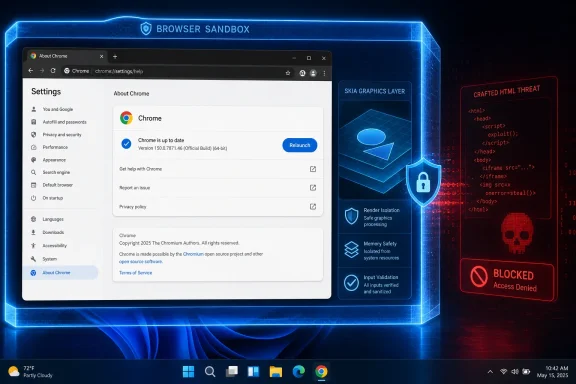
Google Chrome users on Windows should update to version 150.0.7871.46 or later to address CVE-2026-14429, a high-severity Skia input-validation vulnerability that may allow a remote attacker to escape Chrome’s sandbox through crafted HTML after first compromising a renderer process.
That prerequisite is the key technical distinction: CVE-2026-14429 is a potential sandbox-escape stage in an exploit chain, not a documented stand-alone route from an ordinary webpage to complete control of a Windows PC.
WindowsForum recommends installing the corrected Chrome release promptly. Open Chrome and select ⋮ > Help > About Google Chrome, or enter chrome://settings/help in the address bar. Google Chrome Help says Chrome checks for updates from the About page and presents Relaunch when an update is ready; selecting it restarts Chrome and applies the update. After Chrome reopens, return to the About page and confirm that the complete displayed version is 150.0.7871.46 or later.
The version boundary is straightforward: Google Chrome builds below 150.0.7871.46 are affected. Version 150.0.7871.46 and later are outside the affected range documented for this CVE.
A browser renderer is intended to process web content within a restricted security boundary. A sandbox escape can become important when an attacker has already gained execution or control inside that restricted environment and then seeks to cross the boundary. The public description therefore presents this vulnerability as a possible second stage rather than a complete attack by itself.
That distinction prevents two reporting errors. The CVE should not be reduced to an inconsequential validation bug merely because another compromise is required. Defeating a browser sandbox can materially increase the impact of an exploit chain. At the same time, it should not be described as proof that visiting any crafted page immediately gives an attacker unrestricted control of Windows.
The public description uses qualified language and does not identify the exact malformed input, affected Skia operation, exploit reliability, platform-specific behavior, or complete set of conditions needed to reproduce the issue. It also does not provide a proof of concept or establish that CVE-2026-14429 has been combined with a separate renderer-compromise vulnerability in a working public chain.
Those unknowns limit exploit analysis, but they do not prevent version-based remediation. The supplied record establishes the affected product and the version boundary needed to check Chrome installations.
The available information does not establish whether the invalid input involves images, fonts, coordinates, dimensions, Canvas content, GPU operations, a graphics backend, or another type of data. It does not identify a particular rendering pipeline or disclose the code path through which crafted HTML reaches the vulnerable condition.
Administrators should not convert the Skia name or the broad CWE classification into unsupported workaround advice. The supplied record does not establish that disabling JavaScript, hardware acceleration, an image format, Canvas, WebGL, or any other individual browser capability removes exposure.
Likewise, a graphics-related crash, malformed image, or unusual webpage is not evidence that CVE-2026-14429 was exploited. The record supplies no CVE-specific malicious domains, file hashes, process signatures, network indicators, or crash patterns.
The defensible control is the corrected browser version. Configuration changes should not be presented as equivalent mitigations unless Google publishes CVE-specific guidance establishing that result.
AV:N/AC:H/PR:N/UI:R/S:C/C:H/I:H/A:H
The metrics summarize the contributed assessment:
The vector does not override the CVE description’s renderer-compromise prerequisite. Read together, the record describes potentially severe impact but demanding exploit conditions: crafted content, required user interaction, high attack complexity, and prior compromise of the renderer.
High attack complexity is not proof that exploitation is impractical, just as a High score is not proof that exploitation has occurred. WindowsForum’s recommendation to patch promptly is based on the availability of a corrected version and the potential impact of a successful sandbox escape, not on a claim that Google or CISA issued an emergency instruction in the supplied material.
SSVC note: At the timestamp represented by the supplied CISA-ADP entry, exploitation was recorded as “none.” That is a point-in-time assessment, not a permanent finding that exploitation cannot emerge later.
The four version components must be compared in order: 150, then 0, then 7871, then 46. A report that says only “Chrome 150” cannot establish whether the installed build is before or after the corrected threshold.
The machine-readable affected-version information may show 150.0.7871.46 while applying an exclusive “less than” relationship. The relationship provides the operational rule: the vulnerable range ends immediately before 150.0.7871.46.
The supplied record does not establish a Chrome release date, a particular rollout duration, or the total number of fixes included in the corresponding browser update. Those details are unnecessary for the CVE-specific check. The relevant question is whether the complete installed version is lower than the documented threshold.
Administrators should normally deploy the current vendor-supported Chrome release available through their approved channel rather than treating 150.0.7871.46 as a version on which systems should remain indefinitely. The number is the minimum documented boundary for this finding, not a substitute for continuing browser maintenance.
That internal address opens Chrome’s version and update page directly. Google’s guidance explains that selecting Relaunch restarts Chrome and applies the update.
After Chrome reopens, return to the About page and read the complete version shown beneath the Google Chrome heading. For CVE-2026-14429, the required result is 150.0.7871.46 or later.
If Chrome remains below the threshold, use the support process appropriate to the installation. On an organization-managed computer, users should contact the responsible administrator if management controls prevent the update. The NVD record does not prescribe how to resolve updater failures or managed-policy conflicts, and it does not establish a feature-level workaround that can replace the corrected version.
Chrome should also be checked independently of Windows Update. The CVE record defines a Google Chrome version boundary; the current patch status of Windows does not, by itself, report which Chrome build is installed.
That limitation produces an explicit Edge caveat for Windows users: do not use Chrome 150.0.7871.46 as an Edge compliance threshold. Check Microsoft’s security information for a product-specific determination linking Edge to CVE-2026-14429 and, if applicable, follow the affected and corrected versions Microsoft provides.
The same rule applies to other browsers and applications. The presence of Chromium-related technology or Skia does not, by itself, establish that a particular product falls within this CVE record. Conversely, the absence of another product from the Chrome-specific record should not be converted into a broad technical declaration that the product cannot be affected.
The appropriate decision process is product-specific:
Managed environments need the same result at scale, but the supplied CVE information does not prescribe a Google Admin console path, Chrome Enterprise policy, registry query, endpoint-management product, telemetry field, or deployment command.
Administrators should therefore use their organization’s established and supported browser-management, software-distribution, asset-inventory, or endpoint-management system. The meaning of each status field must be determined from that management product’s documentation rather than inferred from the CVE record.
Package assignment, policy receipt, installation status, endpoint check-in, and browser-version reporting are different kinds of operational evidence. Organizations should define closure around a current, trustworthy Chrome version result instead of assuming that any generic deployment status necessarily represents the browser version being evaluated.
Missing or old inventory data should be treated as unresolved as a generic vulnerability-management practice. This does not assert that a particular Chrome Enterprise console reports stale data or that a particular class of device will miss the update. It simply preserves an honest third state between “affected” and “verified”: unknown.
It does not provide a detailed exploit walkthrough. There is no supported basis in the supplied record for naming the precise graphics input, memory behavior, rendering subsystem, Windows API interaction, post-escape access level, persistence mechanism, or privilege consequence.
The record also does not establish:
CISA-ADP enrichment — CISA-ADP contributed the displayed CVSS 3.1 score and SSVC assessment, including the point-in-time exploitation value of “none.”
NVD and NIST presentation and analysis — The public NVD record presents contributed information and affected-product analysis from multiple sources. A field displayed on the page is not necessarily an assessment authored independently by NVD or NIST.
Exact July 2 and July 3 event claims are omitted because the available material reviewed for this article does not adequately confirm those dates for CVE-2026-14429. The sequence preserves the useful attribution without turning unverified metadata dates into disclosure or release events.
The practical response does not require exaggerating either side of that evidence. WindowsForum recommends promptly moving affected Chrome installations to a current supported release, following Google Chrome Help’s documented About Google Chrome and Relaunch workflow, and checking the complete version after Chrome reopens.
For organizations, the durable lesson is to make browser vulnerability closure measurable. A management process should be able to identify the affected product, compare its complete version with a published boundary, preserve unknown results as unresolved, and produce fresh evidence after remediation.
Microsoft Edge and other Chromium-derived browsers remain separate product decisions until their vendors establish applicability and corrected versions. Chrome’s threshold should not be generalized beyond the scope supported by the record.
For this finding, the final test is concise: Google Chrome below 150.0.7871.46 remains within the documented affected range; Chrome displaying 150.0.7871.46 or later after the update and relaunch workflow has crossed the published boundary.
That prerequisite is the key technical distinction: CVE-2026-14429 is a potential sandbox-escape stage in an exploit chain, not a documented stand-alone route from an ordinary webpage to complete control of a Windows PC.
WindowsForum recommends installing the corrected Chrome release promptly. Open Chrome and select ⋮ > Help > About Google Chrome, or enter chrome://settings/help in the address bar. Google Chrome Help says Chrome checks for updates from the About page and presents Relaunch when an update is ready; selecting it restarts Chrome and applies the update. After Chrome reopens, return to the About page and confirm that the complete displayed version is 150.0.7871.46 or later.
The version boundary is straightforward: Google Chrome builds below 150.0.7871.46 are affected. Version 150.0.7871.46 and later are outside the affected range documented for this CVE.
 WindowsForum Decision Table
| Decision point | What administrators and users should do |
|---|---|
| Affected Chrome versions | Treat every complete Google Chrome version below 150.0.7871.46 as affected |
| Fixed threshold | Install Google Chrome 150.0.7871.46 or a later supported release |
| Windows update procedure | Open ⋮ > Help > About Google Chrome, or enter chrome://settings/help |
| Applying the update | Select Relaunch when Chrome presents the button |
| Verification | After Chrome reopens, confirm that the full displayed version is 150.0.7871.46 or later |
| Microsoft Edge | Do not apply Chrome’s version boundary to Edge without Microsoft guidance establishing applicability and its own corrected release |
| Other Chromium browsers | Evaluate each product through its vendor’s security information rather than assuming the Chrome record applies |
| Managed environments | Use the organization’s supported management tools to deploy the update and collect current, complete Chrome-version evidence |
The Dangerous Part Begins After the First Compromise
CVE-2026-14429 is identified as an improper-input-validation vulnerability in Skia. According to the Chrome-originated description carried by the National Vulnerability Database, insufficient validation of untrusted input could allow a remote attacker to perform a sandbox escape through a crafted HTML page, provided the attacker had already compromised the renderer process.A browser renderer is intended to process web content within a restricted security boundary. A sandbox escape can become important when an attacker has already gained execution or control inside that restricted environment and then seeks to cross the boundary. The public description therefore presents this vulnerability as a possible second stage rather than a complete attack by itself.
That distinction prevents two reporting errors. The CVE should not be reduced to an inconsequential validation bug merely because another compromise is required. Defeating a browser sandbox can materially increase the impact of an exploit chain. At the same time, it should not be described as proof that visiting any crafted page immediately gives an attacker unrestricted control of Windows.
The public description uses qualified language and does not identify the exact malformed input, affected Skia operation, exploit reliability, platform-specific behavior, or complete set of conditions needed to reproduce the issue. It also does not provide a proof of concept or establish that CVE-2026-14429 has been combined with a separate renderer-compromise vulnerability in a working public chain.
Those unknowns limit exploit analysis, but they do not prevent version-based remediation. The supplied record establishes the affected product and the version boundary needed to check Chrome installations.
Skia Is the Named Vulnerable Component
The record identifies Skia as the affected component and associates the vulnerability with CWE-20, Improper Input Validation. That classification describes the general weakness: software does not adequately validate data before using it. It is not a detailed root-cause report.The available information does not establish whether the invalid input involves images, fonts, coordinates, dimensions, Canvas content, GPU operations, a graphics backend, or another type of data. It does not identify a particular rendering pipeline or disclose the code path through which crafted HTML reaches the vulnerable condition.
Administrators should not convert the Skia name or the broad CWE classification into unsupported workaround advice. The supplied record does not establish that disabling JavaScript, hardware acceleration, an image format, Canvas, WebGL, or any other individual browser capability removes exposure.
Likewise, a graphics-related crash, malformed image, or unusual webpage is not evidence that CVE-2026-14429 was exploited. The record supplies no CVE-specific malicious domains, file hashes, process signatures, network indicators, or crash patterns.
The defensible control is the corrected browser version. Configuration changes should not be presented as equivalent mitigations unless Google publishes CVE-specific guidance establishing that result.
The CVSS Vector Describes Serious Impact and Demanding Conditions
CISA-ADP assigned CVE-2026-14429 a CVSS 3.1 base score of 8.3, categorized as High. The recorded vector is:AV:N/AC:H/PR:N/UI:R/S:C/C:H/I:H/A:H
The metrics summarize the contributed assessment:
- AV:N — Attack Vector: Network. The modeled attack can originate through network-delivered content rather than requiring physical access.
- AC:H — Attack Complexity: High. Successful exploitation depends on conditions reflected as elevated complexity. The supplied material does not disclose enough detail to identify every reason for that selection.
- PR:N — Privileges Required: None. The assessment does not require the attacker to begin with authorized privileges on the target.
- UI:R — User Interaction: Required. Some user participation is required. The description identifies crafted HTML but does not document every action needed to reach the vulnerable condition.
- S:C — Scope: Changed. The modeled result can cross the security authority represented by the initially vulnerable component.
- C:H/I:H/A:H — High confidentiality, integrity, and availability impact. The assessment models potentially serious consequences if exploitation succeeds.
The vector does not override the CVE description’s renderer-compromise prerequisite. Read together, the record describes potentially severe impact but demanding exploit conditions: crafted content, required user interaction, high attack complexity, and prior compromise of the renderer.
High attack complexity is not proof that exploitation is impractical, just as a High score is not proof that exploitation has occurred. WindowsForum’s recommendation to patch promptly is based on the availability of a corrected version and the potential impact of a successful sandbox escape, not on a claim that Google or CISA issued an emergency instruction in the supplied material.
SSVC note: At the timestamp represented by the supplied CISA-ADP entry, exploitation was recorded as “none.” That is a point-in-time assessment, not a permanent finding that exploitation cannot emerge later.
Chrome 150.0.7871.46 Draws a Clear Version Boundary
The affected-version rule identifies Google Chrome versions less than 150.0.7871.46 as vulnerable.| Version information | CVE-2026-14429 status | Practical interpretation |
|---|---|---|
| Earlier than 150.0.7871.46 | Affected | Install a corrected Chrome release |
| Exactly 150.0.7871.46 | Fixed threshold reached | Confirm the complete version after Chrome relaunches |
| Later than 150.0.7871.46 | Outside the documented affected range | Continue normal browser-update management |
| “Chrome 150” without the remaining components | Insufficient evidence | Obtain the complete four-part version |
| Missing or conflicting version information | Unknown | Keep the installation open for verification |
The machine-readable affected-version information may show 150.0.7871.46 while applying an exclusive “less than” relationship. The relationship provides the operational rule: the vulnerable range ends immediately before 150.0.7871.46.
The supplied record does not establish a Chrome release date, a particular rollout duration, or the total number of fixes included in the corresponding browser update. Those details are unnecessary for the CVE-specific check. The relevant question is whether the complete installed version is lower than the documented threshold.
Administrators should normally deploy the current vendor-supported Chrome release available through their approved channel rather than treating 150.0.7871.46 as a version on which systems should remain indefinitely. The number is the minimum documented boundary for this finding, not a substitute for continuing browser maintenance.
Updating Chrome on Windows
Google Chrome Help documents the desktop update workflow through the browser’s About page:- Open Google Chrome.
- Select the ⋮ menu in the upper-right corner.
- Select Help.
- Select About Google Chrome.
- Allow Chrome to check for and apply an available update.
- Select Relaunch when Chrome presents the button.
chrome://settings/helpThat internal address opens Chrome’s version and update page directly. Google’s guidance explains that selecting Relaunch restarts Chrome and applies the update.
After Chrome reopens, return to the About page and read the complete version shown beneath the Google Chrome heading. For CVE-2026-14429, the required result is 150.0.7871.46 or later.
If Chrome remains below the threshold, use the support process appropriate to the installation. On an organization-managed computer, users should contact the responsible administrator if management controls prevent the update. The NVD record does not prescribe how to resolve updater failures or managed-policy conflicts, and it does not establish a feature-level workaround that can replace the corrected version.
Chrome should also be checked independently of Windows Update. The CVE record defines a Google Chrome version boundary; the current patch status of Windows does not, by itself, report which Chrome build is installed.
Edge and Other Chromium Browsers Need Their Own Advisories
The affected product named in the supplied CVE record is Google Chrome. The record does not establish an affected range or corrected version for Microsoft Edge, Brave, Opera, Vivaldi, or another browser.That limitation produces an explicit Edge caveat for Windows users: do not use Chrome 150.0.7871.46 as an Edge compliance threshold. Check Microsoft’s security information for a product-specific determination linking Edge to CVE-2026-14429 and, if applicable, follow the affected and corrected versions Microsoft provides.
The same rule applies to other browsers and applications. The presence of Chromium-related technology or Skia does not, by itself, establish that a particular product falls within this CVE record. Conversely, the absence of another product from the Chrome-specific record should not be converted into a broad technical declaration that the product cannot be affected.
The appropriate decision process is product-specific:
- Apply the documented version boundary directly to Google Chrome.
- Evaluate Microsoft Edge through Microsoft’s guidance.
- Evaluate another browser through that browser vendor’s advisory.
- Do not copy Chrome’s version number into another product’s compliance rule.
- Do not assume that updating one installed browser changes the version of another.
- Do not label unrelated Skia-using applications vulnerable without authoritative product-specific information.
Verification for Individual and Managed Systems
For an individual Windows user, the closure test is the complete version displayed by Chrome after following Google’s documented update and relaunch workflow. A version below 150.0.7871.46 remains in the affected range; a version at or above the threshold has crossed the documented boundary.Managed environments need the same result at scale, but the supplied CVE information does not prescribe a Google Admin console path, Chrome Enterprise policy, registry query, endpoint-management product, telemetry field, or deployment command.
Administrators should therefore use their organization’s established and supported browser-management, software-distribution, asset-inventory, or endpoint-management system. The meaning of each status field must be determined from that management product’s documentation rather than inferred from the CVE record.
Package assignment, policy receipt, installation status, endpoint check-in, and browser-version reporting are different kinds of operational evidence. Organizations should define closure around a current, trustworthy Chrome version result instead of assuming that any generic deployment status necessarily represents the browser version being evaluated.
Missing or old inventory data should be treated as unresolved as a generic vulnerability-management practice. This does not assert that a particular Chrome Enterprise console reports stale data or that a particular class of device will miss the update. It simply preserves an honest third state between “affected” and “verified”: unknown.
Action checklist for administrators
- Inventory in-scope systems for installations of Google Chrome.
- Collect the complete four-part Chrome version rather than only the major release number.
- Flag versions below 150.0.7871.46 as affected.
- Treat missing, incomplete, old, or conflicting version results as unresolved.
- Deploy a current approved Chrome release through the organization’s supported management process.
- Account for Google’s documented relaunch step when planning user communications and maintenance.
- Collect fresh version information after the remediation activity.
- Keep installations below the threshold in the remediation queue.
- Record the evidence used to close each installation, including the observed version and collection time.
- Evaluate Edge and other browsers separately through their respective vendors.
- Monitor authoritative Chrome, NVD, CISA, and browser-vendor information for later changes in exploitation status or product scope.
The Public Technical Record Has Limits
The public material supports several concrete facts: the Google Chrome product identification, the Skia component, the improper-input-validation classification, the crafted-HTML description, the prerequisite renderer compromise, the affected-version boundary, and the contributed CISA-ADP assessment.It does not provide a detailed exploit walkthrough. There is no supported basis in the supplied record for naming the precise graphics input, memory behavior, rendering subsystem, Windows API interaction, post-escape access level, persistence mechanism, or privilege consequence.
The record also does not establish:
- A public proof of concept.
- A complete renderer-compromise-plus-sandbox-escape chain.
- A confirmed attack campaign.
- CVE-specific indicators of compromise.
- A configuration workaround equivalent to updating.
- A separate corrected version for Microsoft Edge.
- A universal version rule for Chromium-derived products.
- The exact date Google discovered the vulnerability.
- The exact date the corrected browser reached every user or managed channel.
Record timeline
Chrome-originated CVE information — The vulnerability description identifies improper input validation in Skia, crafted HTML, a prerequisite renderer compromise, potential sandbox escape, and the affected Chrome version range.CISA-ADP enrichment — CISA-ADP contributed the displayed CVSS 3.1 score and SSVC assessment, including the point-in-time exploitation value of “none.”
NVD and NIST presentation and analysis — The public NVD record presents contributed information and affected-product analysis from multiple sources. A field displayed on the page is not necessarily an assessment authored independently by NVD or NIST.
Exact July 2 and July 3 event claims are omitted because the available material reviewed for this article does not adequately confirm those dates for CVE-2026-14429. The sequence preserves the useful attribution without turning unverified metadata dates into disclosure or release events.
Verification Closes the Finding
CVE-2026-14429 presents a serious but qualified risk. The public description identifies a possible Chrome sandbox escape after prior renderer compromise, not a stand-alone webpage-to-Windows takeover. CISA-ADP’s High assessment models substantial potential impact, while its supplied SSVC entry did not record exploitation at the represented point in time.The practical response does not require exaggerating either side of that evidence. WindowsForum recommends promptly moving affected Chrome installations to a current supported release, following Google Chrome Help’s documented About Google Chrome and Relaunch workflow, and checking the complete version after Chrome reopens.
For organizations, the durable lesson is to make browser vulnerability closure measurable. A management process should be able to identify the affected product, compare its complete version with a published boundary, preserve unknown results as unresolved, and produce fresh evidence after remediation.
Microsoft Edge and other Chromium-derived browsers remain separate product decisions until their vendors establish applicability and corrected versions. Chrome’s threshold should not be generalized beyond the scope supported by the record.
For this finding, the final test is concise: Google Chrome below 150.0.7871.46 remains within the documented affected range; Chrome displaying 150.0.7871.46 or later after the update and relaunch workflow has crossed the published boundary.
References
- Primary source: NVD / Chromium
Published: 2026-07-11T15:38:16-07:00
NVD - CVE-2026-14429
 nvd.nist.gov
- Security advisory: MSRC
Published: 2026-07-11T15:38:16-07:00
Original feed URL
Security Update Guide - Microsoft Security Response Center
 msrc.microsoft.com
- Related coverage: cvefeed.io
CVE-2026-14429 - Skia Sandbox Escape
Insufficient validation of untrusted input in Skia in Google Chrome prior to 150.0.7871.46 allowed a remote attacker who had compromised the renderer process to potentially perform a sandbox escape via a crafted HTML page. (Chromium security severity: High)cvefeed.io - Related coverage: cve-dev.imfht.com
CVE-2026-14429: Insufficient validation of untrusted input in Skia in - Vulnerability Platform
[超危] Overview Prior to Google Chrome version 150.0.7871.46, the Skia library contained an issue involving insufficient validation of untrusted input. This cve-dev.imfht.com
