

Microsoft published CVE-2026-57976 on July 14, 2026; it is an Active Directory Domain Services denial-of-service vulnerability. Administrators should check the Microsoft Security Response Center entry for applicable updates and patch domain controllers in a staged order. Do not assume that an update, affected-product list, or specific knowledge-base article exists until the MSRC record identifies it.
The confirmed public facts supplied for this article are narrow: the CVE ID, the title Windows Active Directory Domain Services Denial of Service Vulnerability, a publication timestamp of July 14, 2026, at 7:00 a.m. Pacific time, and an unknown modification date. No KB number or affected-version list has been verified for this article.
That limited record supports prompt preparation, not technical speculation. Windows administrators can identify any update Microsoft publishes, map it to their domain controllers, prepare a canary deployment, preserve authentication capacity during maintenance, and monitor the advisory for revisions.
A clear separation between confirmed facts and open questions is essential for CVE-2026-57976. The vulnerability’s title establishes the affected Windows role and the security impact, but it does not by itself establish the vulnerable component, triggering request, required privileges, reachable protocol, failure behavior, or recovery sequence.
This distinction prevents two common errors. The first is treating a short advisory as evidence that the vulnerability is unimportant. The second is filling gaps with assumptions about network reachability, attacker privileges, implementation defects, exploit status, or affected Windows Server releases.
The appropriate response is evidence-driven: use the MSRC record as the source of update applicability, use the organization’s existing domain-controller maintenance process for deployment, and document every unresolved field that still requires Microsoft clarification.
The CVE title confirms denial of service, but it does not establish the scale or duration of an interruption. Administrators cannot yet infer whether the condition affects one process, one controller, one directory function, or a wider set of operations. They also cannot infer whether normal service resumes automatically or whether operator intervention is required.
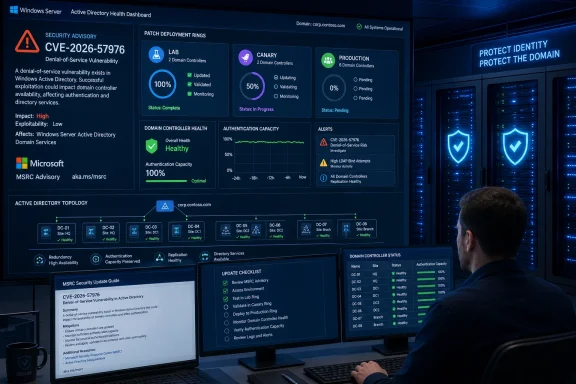
For rollout planning, the practical concern is straightforward: domain controllers provide shared identity services, so maintenance must preserve enough healthy capacity for each site and dependency group. That requirement applies even before the technical failure mode is published. It is also why installing an update everywhere at once is a poor default for an availability-related AD DS issue.
This article does not claim that CVE-2026-57976 corrupts directory data, exposes credentials, permits code execution, or grants elevated access. Its confirmed impact is denial of service. Any broader characterization requires additional information from Microsoft.
Use this update-discovery procedure:
No universal command sequence is provided here because the correct tools and syntax vary by supported Windows Server version, organizational baseline, monitoring stack, and recovery design. Use commands only when they are already validated for the relevant Windows Server release or supplied by Microsoft for the CVE.
A useful canary has:
Record the following:
This article has not verified an affected-version list, a KB number, an associated update, a workaround, a protocol path, attacker prerequisites, a failure mechanism, or CVE-specific detection and recovery instructions. Those fields must come from the current MSRC entry or other directly applicable Microsoft update metadata.
The immediate WindowsForum runbook is therefore simple and executable: monitor the MSRC record, extract affected products and KBs when they appear, map them to the domain-controller inventory, deploy through the organization’s approved Windows Update, WSUS, or Configuration Manager process, and proceed from a representative canary to controlled deployment rings.
As Microsoft expands or modifies the record, administrators should update the worksheet and rollout plan rather than preserving assumptions made from the initial title. The goal is prompt remediation without guessing at package applicability and without turning an AD DS denial-of-service fix into a maintenance-driven identity outage.
The confirmed public facts supplied for this article are narrow: the CVE ID, the title Windows Active Directory Domain Services Denial of Service Vulnerability, a publication timestamp of July 14, 2026, at 7:00 a.m. Pacific time, and an unknown modification date. No KB number or affected-version list has been verified for this article.
That limited record supports prompt preparation, not technical speculation. Windows administrators can identify any update Microsoft publishes, map it to their domain controllers, prepare a canary deployment, preserve authentication capacity during maintenance, and monitor the advisory for revisions.
 Confirmed, Not Yet Verified, and Safe Actions Now
A clear separation between confirmed facts and open questions is essential for CVE-2026-57976. The vulnerability’s title establishes the affected Windows role and the security impact, but it does not by itself establish the vulnerable component, triggering request, required privileges, reachable protocol, failure behavior, or recovery sequence.| Status | What administrators can record |
|---|---|
| Confirmed | The identifier is CVE-2026-57976. |
| Confirmed | Microsoft titles it Windows Active Directory Domain Services Denial of Service Vulnerability. |
| Confirmed | Microsoft published the record on July 14, 2026, at 7:00 a.m. Pacific time. |
| Confirmed | The supplied record lists the modification date as unknown. |
| Not yet verified for this article | Affected Windows Server products and versions. |
| Not yet verified for this article | An associated security update or KB number. |
| Not yet verified for this article | The vulnerable AD DS component, protocol, or request path. |
| Not yet verified for this article | Authentication, authorization, access, or privilege prerequisites. |
| Not yet verified for this article | The exact denial-of-service behavior and required recovery steps. |
| Not yet verified for this article | A Microsoft workaround, mitigation, detection method, or event signature. |
| Safe action now | Open the MSRC entry, check for product and update information, inventory domain controllers, and prepare a staged rollout. |
| Safe action now | Continue monitoring the same record because its modification date is not known. |
The appropriate response is evidence-driven: use the MSRC record as the source of update applicability, use the organization’s existing domain-controller maintenance process for deployment, and document every unresolved field that still requires Microsoft clarification.
Why the Operational Risk Deserves Attention
AD DS is an availability-sensitive Windows role. Organizations routinely rely on domain controllers for sign-in, domain authentication, directory lookups, policy processing, service-account operations, and applications integrated with the directory. An interruption on a domain controller can therefore appear as failures across systems that do not initially look related to Active Directory.The CVE title confirms denial of service, but it does not establish the scale or duration of an interruption. Administrators cannot yet infer whether the condition affects one process, one controller, one directory function, or a wider set of operations. They also cannot infer whether normal service resumes automatically or whether operator intervention is required.
For rollout planning, the practical concern is straightforward: domain controllers provide shared identity services, so maintenance must preserve enough healthy capacity for each site and dependency group. That requirement applies even before the technical failure mode is published. It is also why installing an update everywhere at once is a poor default for an availability-related AD DS issue.
This article does not claim that CVE-2026-57976 corrupts directory data, exposes credentials, permits code execution, or grants elevated access. Its confirmed impact is denial of service. Any broader characterization requires additional information from Microsoft.
How to Discover the Applicable Update Without Guessing a KB
No KB number and no affected-version list are verified in this article. Administrators should derive both directly from the current MSRC record rather than from a guessed monthly rollup, a search-engine snippet, or a package selected only because its release date appears close to the CVE publication date.Use this update-discovery procedure:
- Open Microsoft’s MSRC CVE page for CVE-2026-57976.
Start with the Microsoft Security Response Center Security Update Guide and locate the entry by its exact CVE identifier. - Check the Security Updates or affected-products section if present.
Review the product rows associated with the CVE. Do not treat the vulnerability title alone as proof that every supported Windows Server release is affected. - Record every applicable product exactly as Microsoft lists it.
Capture the Windows Server product name, release, installation type or architecture when shown, and any other applicability distinction in the record. - Record the associated KB and package details if Microsoft provides them.
Preserve the KB number, update classification, release date, supersedence information, and restart requirement shown by the official update source. If the page does not identify a KB, mark the field as pending rather than substituting another update. - Match the product rows to the domain-controller inventory.
Compare Microsoft’s list with each controller’s installed Windows Server release and servicing state. Flag controllers that do not have a verified product-row match for manual review. - Confirm package applicability in the organization’s approved update platform.
Use the established Windows Update, Windows Server Update Services, Microsoft Configuration Manager, or other approved enterprise servicing process. Verify that the update offered to each controller corresponds to the Microsoft product and KB information already recorded. - Approve only the verified package for the canary group.
Do not approve an update solely because it belongs to the same monthly release. The package-to-CVE relationship must come from Microsoft’s current record or the update’s official metadata. - Save evidence with the change record.
Record when the MSRC page was checked, who checked it, which product rows were applicable, which KBs were identified, and which controllers were mapped to each package.
Update-discovery worksheet
| Field | Required entry |
|---|---|
| CVE | CVE-2026-57976 |
| MSRC page checked at | Date, time, and time zone |
| Reviewer | Named administrator or change owner |
| Applicable Windows Server product | Exact Microsoft product label |
| Installation or architecture distinction | Exact value if listed |
| KB | Exact Microsoft KB, or “not yet listed” |
| Restart requirement | Value shown in approved update metadata |
| Supersedence | Value shown in approved update metadata |
| Matching domain controllers | Hostnames or asset identifiers |
| Deployment ring | Lab, canary, site group, or broad deployment |
| Next advisory review | Scheduled date and owner |
Domain-Controller-Safe Deployment Runbook
The following runbook is operational rather than CVE-specific technical guidance. Microsoft has not been verified here as publishing special commands, event IDs, service checks, or recovery instructions for CVE-2026-57976. Administrators should use their organization’s validated domain-controller health procedures and version-appropriate tooling.Phase 1: Build the deployment set
- Export or review the current inventory of writable and read-only domain controllers.
- Record each controller’s Windows Server product, site, maintenance group, operational owner, and servicing channel.
- Identify controllers that provide site-local authentication or other required services during maintenance.
- Record role placement and service dependencies that affect sequencing.
- Identify applications or appliances configured to use a specific controller instead of normal directory discovery.
- Map each controller to an affected-product row and KB only after Microsoft publishes that relationship.
- Exclude systems whose applicability remains unresolved and assign them for manual investigation.
Phase 2: Establish a pre-deployment baseline
Before changing the first controller, capture the checks already required by the organization’s domain-controller maintenance procedure. At minimum, the change record should answer these operational questions:- Is the selected controller currently in service and free of unresolved maintenance incidents?
- Are the organization’s replication-health checks passing?
- Are the organization’s DNS and directory-service health checks passing?
- Is the controller’s time state within the organization’s accepted baseline?
- Is SYSVOL operating normally under the organization’s standard validation method?
- Are there existing Directory Service, DNS, authentication, storage, or system errors that could confuse post-update analysis?
- Is a current, policy-compliant recovery option available?
- Is the supported recovery procedure documented and assigned to an operator?
- Is another healthy controller available to serve the site or dependency group during the maintenance window?
- Are monitoring, service-desk, identity, application, and change-management contacts aware of the canary window?
No universal command sequence is provided here because the correct tools and syntax vary by supported Windows Server version, organizational baseline, monitoring stack, and recovery design. Use commands only when they are already validated for the relevant Windows Server release or supplied by Microsoft for the CVE.
Phase 3: Select a useful canary
Choose a controller that is representative enough to expose integration problems but is not the only viable authentication resource for a site.A useful canary has:
- A verified match to an affected Microsoft product row.
- A verified applicable package in the approved update platform.
- Normal production-like directory and authentication activity.
- A healthy peer capable of carrying required services during maintenance.
- Active monitoring and an operator available for immediate validation.
- A documented recovery path.
- No unresolved fault that would make results ambiguous.
Phase 4: Deploy through the approved servicing process
- Open a change record tied to CVE-2026-57976 and the verified KB.
- Confirm that the package displayed in Windows Update, WSUS, Configuration Manager, or the approved enterprise tool matches the recorded Microsoft metadata.
- Place the canary in the normal maintenance state used by the organization.
- Deploy the verified package.
- Follow the restart requirement shown by the approved update metadata.
- Record package status, restart time, return-to-service time, and any tool-reported errors.
- Keep the next controller group on hold until post-deployment validation is complete.
Phase 5: Validate the canary
Successful package installation is only one validation point. Use the organization’s established checks to confirm that the controller has returned to normal service.Record the following:
- The expected update is installed and reported successfully by the approved servicing platform.
- The controller completed any required restart and returned to monitoring.
- Standard replication-health checks return to the accepted baseline.
- Standard DNS, SYSVOL, directory-service, and time checks return to the accepted baseline.
- Domain sign-in tests succeed through the organization’s supported test method.
- Representative directory-dependent applications complete their normal authentication or lookup tests.
- Group Policy processing passes the organization’s test case where that dependency is relevant.
- Scheduled services, identity connectors, synchronization systems, or appliances assigned to the canary continue operating.
- No new high-severity errors or repeated service failures appear during the observation window.
- Help-desk and monitoring channels show no related increase in failures.
Phase 6: Expand in controlled rings
After the canary passes the observation window:- Patch a small second group with similar configurations.
- Validate that group using the same recorded criteria.
- Proceed site by site or dependency group by dependency group.
- Keep sufficient verified working capacity available during each maintenance window.
- Avoid simultaneous maintenance on all controllers supporting the same site or critical application path.
- Pause expansion when a material regression, unexplained health failure, or package mismatch appears.
- Resume only after the issue is understood and the change owner approves the next ring.
- Complete a final inventory reconciliation so every applicable controller is installed, deferred with an owner, or formally excepted.
Phase 7: Close and retain evidence
The final change record should contain:- The date Microsoft’s advisory was last reviewed.
- The affected products and KBs copied from official Microsoft information.
- The controllers mapped to each product and package.
- Pre-deployment health evidence.
- Canary and ring deployment times.
- Post-deployment validation results.
- Failures, pauses, rollback decisions, and exceptions.
- The remaining unpatched or unresolved systems.
- The owner and date for the next MSRC advisory review.
Advisory-Watch Checklist
The unknown modification date makes repeated review important. Assign ownership rather than relying on individual administrators to notice a revised page.Watch for additions or changes to:
- Affected Windows Server products and versions.
- Security Updates or affected-products rows.
- KB numbers and download or deployment metadata.
- Supersedence information.
- Restart requirements.
- Technical attack prerequisites.
- Required authentication, privileges, or access.
- The affected AD DS component or protocol.
- Microsoft-provided mitigations or workarounds.
- Microsoft-provided detection or logging guidance.
- Recovery information for an affected controller.
- A revised publication or modification timestamp.
On every advisory review:
- Record the review time and reviewer.
- Compare the current product rows with the saved worksheet.
- Reconcile new or removed product entries against the domain-controller inventory.
- Verify that recorded KB information still matches Microsoft’s current entry.
- Update deployment scope when Microsoft changes applicability.
- Send technical changes to the patch owner, identity team, security operations team, and change manager.
- Reassess exceptions and deferred controllers.
- Preserve the prior worksheet so the organization has an audit trail of advisory changes.
Admin Checklist
Before Microsoft identifies an applicable update
- [ ] Open and review the MSRC entry for CVE-2026-57976.
- [ ] Record that no KB or affected-version list has yet been verified for this article.
- [ ] Assign an owner and schedule for advisory rechecks.
- [ ] Inventory all writable and read-only domain controllers.
- [ ] Record Windows Server product information and site placement.
- [ ] Identify site-local and application-specific dependencies.
- [ ] Confirm that the organization has a validated domain-controller maintenance and recovery process.
- [ ] Prepare lab, canary, and deployment-ring groups.
After Microsoft identifies an applicable update
- [ ] Record each affected product exactly as Microsoft lists it.
- [ ] Record each associated KB without guessing.
- [ ] Match each domain controller to a verified product row.
- [ ] Confirm package applicability in the approved servicing platform.
- [ ] Capture the pre-deployment health baseline.
- [ ] Confirm recovery readiness under organizational policy.
- [ ] Deploy to a representative, non-singular canary.
- [ ] Complete post-update authentication, directory, replication, DNS, SYSVOL, time, monitoring, and application checks using validated procedures.
- [ ] Expand deployment in controlled rings.
- [ ] Preserve authentication capacity for every site or dependency group during maintenance.
- [ ] Reconcile installed, deferred, unresolved, and excepted systems.
- [ ] Recheck the MSRC entry before closing the change.
What Administrators Can Say With Confidence
CVE-2026-57976 is Microsoft’s identifier for the Windows Active Directory Domain Services Denial of Service Vulnerability. Microsoft published the record on July 14, 2026, at 7:00 a.m. Pacific time, and the supplied facts list its modification date as unknown.This article has not verified an affected-version list, a KB number, an associated update, a workaround, a protocol path, attacker prerequisites, a failure mechanism, or CVE-specific detection and recovery instructions. Those fields must come from the current MSRC entry or other directly applicable Microsoft update metadata.
The immediate WindowsForum runbook is therefore simple and executable: monitor the MSRC record, extract affected products and KBs when they appear, map them to the domain-controller inventory, deploy through the organization’s approved Windows Update, WSUS, or Configuration Manager process, and proceed from a representative canary to controlled deployment rings.
As Microsoft expands or modifies the record, administrators should update the worksheet and rollout plan rather than preserving assumptions made from the initial title. The goal is prompt remediation without guessing at package applicability and without turning an AD DS denial-of-service fix into a maintenance-driven identity outage.
References
- Primary source: MSRC
Published: 2026-07-14T07:00:00-07:00
Security Update Guide - Microsoft Security Response Center
 msrc.microsoft.com
- Official source: learn.microsoft.com
Directory Services component updates | Microsoft Learn
Learn more about: Directory Services component updateslearn.microsoft.com
