

Apple’s iOS 27 public beta is now available, but BGR’s July 19 rundown is a useful reminder that “public” does not mean production-ready. The release is intended for broad testing ahead of the final iOS 27 rollout, not for the iPhone that handles a user’s work calls, authentication apps, travel documents, and payment credentials.
The familiar beta risks apply: crashes, inconsistent performance, accelerated battery drain, and features that may change or disappear between builds. Public betas are generally further along than the first developer seeds, but they remain unfinished operating systems distributed precisely to expose bugs across a far wider set of devices, networks, apps, and usage patterns.
As BGR notes, the less predictable downside is third-party software compatibility. A beta may work well enough for messaging, browsing, and Apple’s own apps while breaking a banking app, VPN client, mobile-device-management agent, enterprise authenticator, game, or vehicle companion app.
That risk matters beyond ordinary inconvenience. For Windows users who rely on an iPhone for Microsoft Authenticator, Outlook, Teams, Remote Desktop, company VPN access, or Intune-managed work access, one incompatible app can turn an otherwise stable-looking beta into a support problem. IT admins should not assume that an iOS public beta has passed validation for corporate mobile workflows simply because it is available through Apple’s consumer beta channel.
That distinction is important. A backup created after moving to iOS 27 beta may not be usable on an iPhone returned to an older stable iOS version. Anyone testing the beta should therefore keep a current pre-beta backup, ideally an encrypted local backup as well as their normal cloud backup, and verify that recovery is practical before updating.
Users can stop receiving beta updates through iOS software-update settings and wait for the next shipping release, but that does not immediately revert the installed beta. Apple’s support guidance makes clear that an immediate downgrade involves restoring the device.
BGR also flags security concerns. The more precise point is that beta software has not completed its normal release cycle, so users should not treat it as the preferred platform for sensitive or business-critical use. Apple continues to issue beta updates as issues are found, but the testing process inherently carries more uncertainty than a current public release.
For most users, iOS 27 beta belongs on a spare iPhone; everyone else should back up first and be prepared to restore the device if a critical app fails.
The familiar beta risks apply: crashes, inconsistent performance, accelerated battery drain, and features that may change or disappear between builds. Public betas are generally further along than the first developer seeds, but they remain unfinished operating systems distributed precisely to expose bugs across a far wider set of devices, networks, apps, and usage patterns.
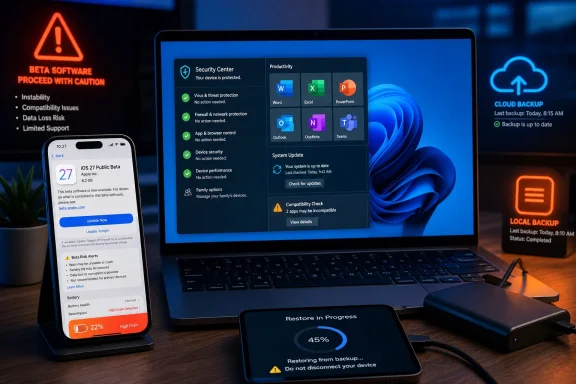 App failures can be the real problem
As BGR notes, the less predictable downside is third-party software compatibility. A beta may work well enough for messaging, browsing, and Apple’s own apps while breaking a banking app, VPN client, mobile-device-management agent, enterprise authenticator, game, or vehicle companion app.That risk matters beyond ordinary inconvenience. For Windows users who rely on an iPhone for Microsoft Authenticator, Outlook, Teams, Remote Desktop, company VPN access, or Intune-managed work access, one incompatible app can turn an otherwise stable-looking beta into a support problem. IT admins should not assume that an iOS public beta has passed validation for corporate mobile workflows simply because it is available through Apple’s consumer beta channel.
Rollback is not a casual undo button
Apple’s own beta documentation advises users to create a backup before installing pre-release software and to use beta builds on non-production devices where possible. Restoring an iPhone to an earlier public iOS release can require erasing the device and restoring it from a backup made before the beta installation.That distinction is important. A backup created after moving to iOS 27 beta may not be usable on an iPhone returned to an older stable iOS version. Anyone testing the beta should therefore keep a current pre-beta backup, ideally an encrypted local backup as well as their normal cloud backup, and verify that recovery is practical before updating.
Users can stop receiving beta updates through iOS software-update settings and wait for the next shipping release, but that does not immediately revert the installed beta. Apple’s support guidance makes clear that an immediate downgrade involves restoring the device.
Battery, heat, and security trade-offs
Performance and battery-life regressions are common early-beta complaints because background indexing, diagnostics, and unoptimized code paths can put extra load on a phone. Those issues may improve in later builds, but they are especially unwelcome on an older iPhone already near the edge of acceptable battery health.BGR also flags security concerns. The more precise point is that beta software has not completed its normal release cycle, so users should not treat it as the preferred platform for sensitive or business-critical use. Apple continues to issue beta updates as issues are found, but the testing process inherently carries more uncertainty than a current public release.
For most users, iOS 27 beta belongs on a spare iPhone; everyone else should back up first and be prepared to restore the device if a critical app fails.
References
- Primary source: bgr.com
Published: 2026-07-19T17:47:00+00:00
4 Disadvantages Of Installing iOS Public Beta On Your iPhone
Installing the iOS 27 public beta gives your iPhone early features, but four significant disadvantages may make the upgrade less appealing.www.bgr.com - Related coverage: macrumors.com
How to Install iOS Beta Software Updates on iPhone
In a break from the past, Apple these days offers non-developers the opportunity to download beta software updates on their iPhones for free. Keep reading to learn how it's done. Before iOS 17 was announced in June 2023, Apple made its first major beta software updates available only to...www.macrumors.com - Related coverage: 9to5mac.com
iOS 27 public beta is here with Siri AI, iPhone speed upgrades, and more
Apple’s iOS 27 public beta is now available, giving iPhone users their first chance to try Siri AI, faster performance, and more.9to5mac.com - Official source: beta.apple.com
Unenroll Your Devices - Apple Beta
How to unenroll your iPhone, iPad, Mac, Apple TV, Apple Watch, HomePod, or AirPods from the Apple Beta Software Program and stop receiving beta updates.beta.apple.com - Related coverage: tomsguide.com
How to download and install iOS 26 | Tom's Guide
If you're ready to take the iOS 26 plunge, here's how to download and install the iOS 26 beta.www.tomsguide.com
