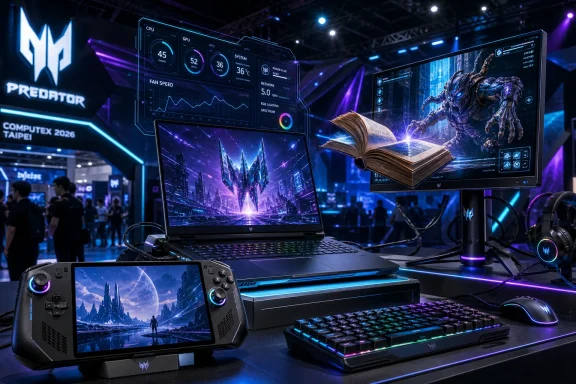
Acer announced the Predator Atlas 8 at Computex 2026 in Taipei on May 28, positioning the 8-inch Windows 11 handheld as an Intel Arc G-Series gaming PC with a 120Hz display, Thunderbolt 4, Wi-Fi 7, and an expected October 2026 launch. The spec sheet is impressive, but the more interesting story is strategic: Acer is betting that the next phase of handheld PC gaming will be won less by novelty and more by platform maturity. Intel, meanwhile, is trying to turn a category long dominated by AMD silicon into a proof point for its own mobile graphics comeback. For Windows users, this is not just another Steam Deck rival; it is a test of whether the Windows handheld can finally become a coherent product class.
The Predator Atlas 8 is not Acer’s first gaming machine, but it is one of the company’s clearest attempts to bring its mainstream gaming brand into a category that has been unusually hard to define. Handheld gaming PCs sit somewhere between consoles, laptops, tablets, and enthusiast toys. Their success depends on hardware polish, driver maturity, battery behavior, thermals, game compatibility, and the uneasy marriage of Windows with a controller-first interface.
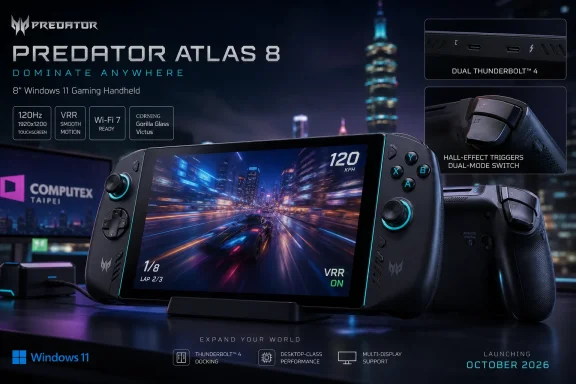
Acer’s pitch is straightforward: take a familiar Windows 11 gaming PC stack, shrink it into an 8-inch device, and give it enough display, I/O, and controls to feel like more than a curiosity. The Atlas 8 pairs a 1920 x 1200 IPS touchscreen with a 120Hz refresh rate, variable refresh rate support, 500-nit brightness, and Gorilla Glass Victus protection. That is the language of a premium handheld, not a budget experiment.
The design brief also reads like Acer has been paying attention to what the market has learned since the first wave of Windows handhelds stumbled into view. Full-size analog sticks, Hall effect L2/R2 triggers, dual Thunderbolt 4 ports, microSD expansion, and Intel Killer Wi-Fi 7 are not headline gimmicks on their own. Together, they suggest a device meant to be docked, charged, expanded, updated, and abused like a small PC rather than treated like a sealed appliance.
That distinction matters. Valve’s Steam Deck succeeded in part because it made PC gaming feel console-like without pretending to stop being a PC. Windows handhelds have had the opposite challenge: they are undeniably PCs, but often struggle to feel like coherent handhelds. Acer is now walking into that tension with a product that looks confident on paper and will be judged ruthlessly in the hand.
That is why the Arc G-Series branding is more than a chip name. Intel is trying to signal that handheld gaming is not merely another laptop power envelope but a distinct design target. If Arc G3 can deliver competitive performance, reliable drivers, and good battery scaling, Intel gains a visible, enthusiast-friendly showcase for its graphics work at exactly the point where integrated GPUs are becoming more important to consumer PCs.
Acer benefits from being early, but Intel is the party with the larger reputational upside. A good Predator Atlas 8 would give Intel a tangible answer to years of AMD-powered handheld wins. A bad one would reinforce the suspicion that Windows handhelds need not just better chips but better platform stewardship.
The timing is also telling. Computex has become a stage for AI PCs, thin-and-light refreshes, and the usual component theater, but the handheld PC category has a different emotional charge. It is one of the few PC segments where enthusiasts still argue about form factor, ergonomics, operating systems, and performance-per-watt with the intensity once reserved for desktop GPUs. Intel wants into that conversation because it is one of the few growth narratives in client PCs that still feels unscripted.
The battery options are more revealing. Acer is expected to offer 60Wh and 80Wh configurations, with the 80Wh model weighing around 770 grams. That makes the Atlas 8 heavier than some handheld rivals, but it also acknowledges the brutal math of portable PC gaming: performance without battery capacity is just a benchmark demo waiting for a charger.
An 80Wh pack in a handheld is a serious design choice. It pushes the device closer to the upper limits of what users will tolerate in hand, but it gives Acer room to run the silicon at useful power levels without turning every session into a race against the battery icon. If the Arc G3 Extreme can scale down gracefully for lighter games and scale up for demanding titles, the Atlas 8 could offer something that has eluded many Windows handhelds: a performance range that feels intentional rather than chaotic.
Thermals will decide how much of that promise survives contact with real games. Acer is using its Predator AeroBlade cooling system with dual fans, including a metal fan in the cooling assembly. That sounds impressive, but handheld cooling is never just about airflow. It is about fan tone, surface temperature, grip comfort, sustained clocks, and whether the device becomes socially unacceptable in a quiet room.
The 120Hz refresh rate is not only about chasing high frame rates. On a handheld, variable refresh rate support may matter even more because many games will live in the messy middle between 40 and 80 frames per second. VRR can make fluctuating performance feel smoother, which is exactly what a power-constrained gaming PC needs.
The 500-nit brightness figure also points to the reality that handhelds are used in more varied environments than desktops or gaming laptops. People play them on couches, trains, flights, hotel rooms, patios, and anywhere else they can steal thirty minutes. A dim screen can make even a powerful handheld feel compromised.
What Acer is not offering, at least in the reported core spec, is OLED. That will disappoint some buyers, especially after OLED handhelds sharpened consumer expectations for contrast and response. But IPS still makes sense if Acer is prioritizing cost, VRR behavior, brightness, and supply reliability. The bigger question is whether the panel feels premium in person, because handheld screens are not abstract specifications; they are the whole stage.
But Windows was not designed first for thumbsticks, small screens, and suspend-resume sessions between subway stops. Every Windows handheld maker has had to build a layer of software around Microsoft’s desktop assumptions, whether that means a launcher, controller overlay, quick settings panel, performance profiles, or a custom startup flow. The quality of that layer often determines whether a device feels consumer-ready or like a weekend project.
Acer has the advantage of scale and an existing gaming software stack, but it is still playing inside Microsoft’s house. The Atlas 8 can have excellent controls and silicon, yet still be undermined if Windows updates interrupt sessions, if sleep behavior is inconsistent, if text is too small, or if game launchers demand keyboard-and-mouse contortions. These are not edge cases; they are the daily texture of the Windows handheld experience.
Microsoft has made gestures toward making Windows better on handhelds, and the broader Xbox-on-PC strategy gives Redmond plenty of incentive to solve the problem. Still, the Atlas 8 will arrive in October 2026 into a market that has learned to distinguish between runs Windows and works well as a handheld. Acer cannot afford to treat the operating system as a solved problem.
Hall effect sensors in the sticks and triggers are another sign of that maturation. Drift anxiety has become part of the modern controller conversation, and handheld PCs are more exposed than standard controllers because their controls are built into the device. If a gamepad fails, you replace a gamepad. If a handheld’s controls fail, you may be looking at a repair, an RMA, or a very expensive docked-only PC.
The trigger switch also shows that Acer understands genre-specific ergonomics. Shooters reward short, crisp inputs. Racing games benefit from analog finesse. A handheld that lets the same hardware serve both use cases is doing more than chasing specs; it is acknowledging that portable PC gaming includes everything from competitive shooters to sim-adjacent driving games to indie platformers.
This is where Windows handhelds can differentiate from consoles if manufacturers take the opportunity seriously. PCs are flexible machines, and handheld PCs should be flexible controllers. The best devices in this category will be the ones that expose enough customization to satisfy enthusiasts without forcing ordinary users to become device administrators.
This is one of the places where Windows handhelds can outmaneuver more console-like competitors. They may be clunkier in handheld mode, but their openness gives users room to build strange, useful workflows. A sysadmin can carry a handheld that doubles as a troubleshooting PC. A student can dock it to a monitor and keyboard. A frequent traveler can use it as both gaming machine and lightweight Windows environment.
The microSD card slot matters for similar reasons, even if microSD performance is not a substitute for a fast internal SSD. Handheld gaming libraries are large, and the ability to keep less demanding games, media, or installers on removable storage remains practical. In a category where storage upgrades can be expensive or awkward, expandable storage is not just a convenience feature.
Wi-Fi 7 is more forward-looking. It will not magically improve a bad hotel network, and many users still lack Wi-Fi 7 routers at home. But handhelds are natural clients for streaming, cloud saves, remote play, and massive downloads, so the wireless stack matters more than it might on a static desktop. Acer is building the Atlas 8 for a connectivity environment that is still arriving.
The Atlas 8’s components do not suggest bargain positioning. An 8-inch 120Hz VRR display, Arc G3 Extreme option, up to 24GB of LPDDR5x memory, up to 1TB of storage, Thunderbolt 4, Wi-Fi 7, Hall effect controls, and an 80Wh battery all point toward a device that may need to be priced like a premium handheld. That is not automatically a problem, but it narrows the buyer pool.
Acer will have to explain why someone should buy this instead of a Steam Deck, an ROG Ally-class Windows handheld, an MSI Claw model, a gaming laptop, or a console. The answer cannot simply be “Intel Arc G3.” Silicon is an ingredient, not a product story. The product story has to be sustained performance, better compatibility, better ergonomics, better docking, better battery life, or some combination that survives reviews.
This is where early Computex excitement can mislead. Trade-show handhelds often run curated demos in controlled conditions, sometimes with power, cooling, and software settings that do not reflect the retail experience. The Atlas 8 will not be judged by whether it looks good under lights in Taipei. It will be judged by whether it plays a messy Steam library on a couch in November.
Arc G-Series will need strong day-one support for popular engines, anti-cheat systems, upscalers, frame pacing, power profiles, and sleep-resume behavior. Raw GPU performance is only one part of the experience. Frame-time consistency, shader compilation behavior, driver overhead, and game-specific bugs often matter more on a small device than peak benchmark scores.
Intel does have a strategic advantage if it treats handhelds as a focused target rather than a side effect of laptop graphics work. A constrained set of Arc G-Series designs could make optimization easier than the sprawling PC GPU market. If Intel, Acer, MSI, and other partners coordinate closely, the platform could mature quickly.
But that is an “if,” not a guarantee. The first generation of any newly emphasized platform tends to expose gaps between marketing and reality. Enthusiasts will test obscure games, old games, emulators, modded titles, anti-cheat-heavy multiplayer releases, and power profiles no vendor demo anticipated. Intel needs those users to come away feeling surprised in the right direction.
Competition should be good for buyers. If Intel can deliver credible performance-per-watt, AMD cannot simply coast on incumbency. If AMD responds with stronger handheld-focused silicon, better software support, or sharper pricing, the whole category improves. The danger is fragmentation, where each vendor’s platform has its own quirks, overlays, power behaviors, upscaling assumptions, and driver edge cases.
Acer’s choice to back Intel in the Atlas 8 also gives OEMs more leverage. Hardware makers do not want a single supplier defining the economics of an expanding category. Intel’s participation gives companies like Acer more room to differentiate, negotiate, and experiment. That may produce better devices, but it may also produce a confusing wave of SKUs that require careful review before purchase.
For WindowsForum readers, the practical implication is simple: the handheld PC buying decision is becoming more like the laptop buying decision. The badge on the box will matter less than the exact processor, power profile, thermal design, memory configuration, storage option, screen, and vendor software layer. The category is growing up, and that means spec literacy is back.
That does not mean businesses will buy fleets of Predator Atlas 8 units for field staff. It means employees may travel with them, connect them to hotel networks, sign into Microsoft accounts, sync files, install VPNs, plug them into monitors, and use them as secondary PCs. The boundary between personal gaming device and work-capable Windows endpoint is thin.
Security teams should think about these devices the way they think about any personally owned Windows machine. They can store credentials, run unsigned software, connect to corporate services, and receive updates on consumer timelines. Their gaming identity does not make them less relevant to endpoint policy.
There is also a support angle. If Windows handhelds become more common, help desks will see more questions about docking, display scaling, Bluetooth peripherals, driver updates, game overlays interfering with productivity apps, and battery health. The Atlas 8 may wear a Predator logo, but under the shell it is still a Windows PC. That is the point and the problem.
By October, buyers will likely have more clarity on Intel Arc G-Series performance across multiple handhelds. Reviews of competing designs may reveal whether the silicon is broadly strong or whether Acer’s implementation is doing unusual work. That context will matter because handheld performance is deeply dependent on cooling, firmware, and power management.
The launch window also puts the Atlas 8 in the path of the holiday buying season. That is good for visibility but unforgiving for execution. A product shipping into October needs retail availability, stable firmware, mature drivers, and clear pricing fast enough for buyers to make decisions before the market gets noisy.
Acer has a chance to turn the Atlas 8 into one of the defining Windows handhelds of 2026. It also has a chance to become one more promising device that enthusiasts admire, review, debate, and then watch get undercut by something cheaper or more polished. The gap between those outcomes will be filled by details that do not fit neatly on a Computex spec card.
 Acer Puts a Predator Badge on the Handheld PC Moment
The Predator Atlas 8 is not Acer’s first gaming machine, but it is one of the company’s clearest attempts to bring its mainstream gaming brand into a category that has been unusually hard to define. Handheld gaming PCs sit somewhere between consoles, laptops, tablets, and enthusiast toys. Their success depends on hardware polish, driver maturity, battery behavior, thermals, game compatibility, and the uneasy marriage of Windows with a controller-first interface.Acer’s pitch is straightforward: take a familiar Windows 11 gaming PC stack, shrink it into an 8-inch device, and give it enough display, I/O, and controls to feel like more than a curiosity. The Atlas 8 pairs a 1920 x 1200 IPS touchscreen with a 120Hz refresh rate, variable refresh rate support, 500-nit brightness, and Gorilla Glass Victus protection. That is the language of a premium handheld, not a budget experiment.
The design brief also reads like Acer has been paying attention to what the market has learned since the first wave of Windows handhelds stumbled into view. Full-size analog sticks, Hall effect L2/R2 triggers, dual Thunderbolt 4 ports, microSD expansion, and Intel Killer Wi-Fi 7 are not headline gimmicks on their own. Together, they suggest a device meant to be docked, charged, expanded, updated, and abused like a small PC rather than treated like a sealed appliance.
That distinction matters. Valve’s Steam Deck succeeded in part because it made PC gaming feel console-like without pretending to stop being a PC. Windows handhelds have had the opposite challenge: they are undeniably PCs, but often struggle to feel like coherent handhelds. Acer is now walking into that tension with a product that looks confident on paper and will be judged ruthlessly in the hand.
Intel Needs This Category More Than Acer Does
The Atlas 8 matters because it arrives with Intel’s new Arc G-Series processors, including Arc G3 and Arc G3 Extreme configurations. For years, AMD has been the default silicon supplier for serious PC handhelds, largely because Ryzen mobile APUs paired competent CPU cores with integrated graphics strong enough to make modern games plausible at handheld resolutions. Intel has had integrated graphics wins before, but not a sustained reputation in this particular corner of gaming hardware.That is why the Arc G-Series branding is more than a chip name. Intel is trying to signal that handheld gaming is not merely another laptop power envelope but a distinct design target. If Arc G3 can deliver competitive performance, reliable drivers, and good battery scaling, Intel gains a visible, enthusiast-friendly showcase for its graphics work at exactly the point where integrated GPUs are becoming more important to consumer PCs.
Acer benefits from being early, but Intel is the party with the larger reputational upside. A good Predator Atlas 8 would give Intel a tangible answer to years of AMD-powered handheld wins. A bad one would reinforce the suspicion that Windows handhelds need not just better chips but better platform stewardship.
The timing is also telling. Computex has become a stage for AI PCs, thin-and-light refreshes, and the usual component theater, but the handheld PC category has a different emotional charge. It is one of the few PC segments where enthusiasts still argue about form factor, ergonomics, operating systems, and performance-per-watt with the intensity once reserved for desktop GPUs. Intel wants into that conversation because it is one of the few growth narratives in client PCs that still feels unscripted.
The Spec Sheet Is Ambitious, but the Battery Is the Real Promise
Acer lists configurations with up to 24GB of LPDDR5x memory and up to 1TB of SSD storage, which puts the Atlas 8 in line with the expectations of modern Windows gaming rather than the compromises of older handheld designs. The 24GB memory ceiling is especially useful in a shared-memory graphics architecture, where starving the GPU can quickly turn a good chip into a stuttering experience. Storage up to 1TB is no longer luxurious in a world where a handful of AAA games can devour hundreds of gigabytes.The battery options are more revealing. Acer is expected to offer 60Wh and 80Wh configurations, with the 80Wh model weighing around 770 grams. That makes the Atlas 8 heavier than some handheld rivals, but it also acknowledges the brutal math of portable PC gaming: performance without battery capacity is just a benchmark demo waiting for a charger.
An 80Wh pack in a handheld is a serious design choice. It pushes the device closer to the upper limits of what users will tolerate in hand, but it gives Acer room to run the silicon at useful power levels without turning every session into a race against the battery icon. If the Arc G3 Extreme can scale down gracefully for lighter games and scale up for demanding titles, the Atlas 8 could offer something that has eluded many Windows handhelds: a performance range that feels intentional rather than chaotic.
Thermals will decide how much of that promise survives contact with real games. Acer is using its Predator AeroBlade cooling system with dual fans, including a metal fan in the cooling assembly. That sounds impressive, but handheld cooling is never just about airflow. It is about fan tone, surface temperature, grip comfort, sustained clocks, and whether the device becomes socially unacceptable in a quiet room.
The 8-Inch Screen Is the Sensible Center of the Handheld War
The Atlas 8’s display lands in the sweet spot that much of the category has been drifting toward: larger than the Steam Deck’s original 7-inch class, but not so large that the device becomes a small laptop with handles. At 1920 x 1200, the panel gives Windows and games a useful 16:10 canvas while still allowing practical upscaling and lower internal render resolutions when battery life matters.The 120Hz refresh rate is not only about chasing high frame rates. On a handheld, variable refresh rate support may matter even more because many games will live in the messy middle between 40 and 80 frames per second. VRR can make fluctuating performance feel smoother, which is exactly what a power-constrained gaming PC needs.
The 500-nit brightness figure also points to the reality that handhelds are used in more varied environments than desktops or gaming laptops. People play them on couches, trains, flights, hotel rooms, patios, and anywhere else they can steal thirty minutes. A dim screen can make even a powerful handheld feel compromised.
What Acer is not offering, at least in the reported core spec, is OLED. That will disappoint some buyers, especially after OLED handhelds sharpened consumer expectations for contrast and response. But IPS still makes sense if Acer is prioritizing cost, VRR behavior, brightness, and supply reliability. The bigger question is whether the panel feels premium in person, because handheld screens are not abstract specifications; they are the whole stage.
Windows Remains the Feature and the Friction
The Predator Atlas 8 runs Windows 11 Home, which is simultaneously its strongest compatibility advantage and its most obvious usability burden. Windows brings access to Steam, Epic Games Store, Xbox, Battle.net, GOG, emulators, mods, launchers, anti-cheat systems, cloud saves, peripheral drivers, and the general chaos of the PC ecosystem. That breadth is why Windows handhelds exist.But Windows was not designed first for thumbsticks, small screens, and suspend-resume sessions between subway stops. Every Windows handheld maker has had to build a layer of software around Microsoft’s desktop assumptions, whether that means a launcher, controller overlay, quick settings panel, performance profiles, or a custom startup flow. The quality of that layer often determines whether a device feels consumer-ready or like a weekend project.
Acer has the advantage of scale and an existing gaming software stack, but it is still playing inside Microsoft’s house. The Atlas 8 can have excellent controls and silicon, yet still be undermined if Windows updates interrupt sessions, if sleep behavior is inconsistent, if text is too small, or if game launchers demand keyboard-and-mouse contortions. These are not edge cases; they are the daily texture of the Windows handheld experience.
Microsoft has made gestures toward making Windows better on handhelds, and the broader Xbox-on-PC strategy gives Redmond plenty of incentive to solve the problem. Still, the Atlas 8 will arrive in October 2026 into a market that has learned to distinguish between runs Windows and works well as a handheld. Acer cannot afford to treat the operating system as a solved problem.
The Trigger Switch Is a Small Detail With a Big Lesson
One of the more interesting hardware choices is the Atlas 8’s dual-mode trigger switch, which lets users toggle trigger behavior between faster actuation for shooters and smoother analog travel for racing games. That sounds like a small gamer-friendly flourish, but it reveals the direction handheld PCs need to go. They cannot simply miniaturize laptop hardware; they must adapt to the way different genres feel in the hand.Hall effect sensors in the sticks and triggers are another sign of that maturation. Drift anxiety has become part of the modern controller conversation, and handheld PCs are more exposed than standard controllers because their controls are built into the device. If a gamepad fails, you replace a gamepad. If a handheld’s controls fail, you may be looking at a repair, an RMA, or a very expensive docked-only PC.
The trigger switch also shows that Acer understands genre-specific ergonomics. Shooters reward short, crisp inputs. Racing games benefit from analog finesse. A handheld that lets the same hardware serve both use cases is doing more than chasing specs; it is acknowledging that portable PC gaming includes everything from competitive shooters to sim-adjacent driving games to indie platformers.
This is where Windows handhelds can differentiate from consoles if manufacturers take the opportunity seriously. PCs are flexible machines, and handheld PCs should be flexible controllers. The best devices in this category will be the ones that expose enough customization to satisfy enthusiasts without forcing ordinary users to become device administrators.
Thunderbolt 4 Makes This More Than a Couch Machine
Two Thunderbolt 4 ports are a quiet but important part of the Atlas 8 story. A handheld PC with serious high-speed I/O can become a docked desktop, a travel workstation, a capture source, a living-room console, or an external display machine. That does not mean most buyers will use all those modes, but it makes the device easier to justify as part of a broader PC setup.This is one of the places where Windows handhelds can outmaneuver more console-like competitors. They may be clunkier in handheld mode, but their openness gives users room to build strange, useful workflows. A sysadmin can carry a handheld that doubles as a troubleshooting PC. A student can dock it to a monitor and keyboard. A frequent traveler can use it as both gaming machine and lightweight Windows environment.
The microSD card slot matters for similar reasons, even if microSD performance is not a substitute for a fast internal SSD. Handheld gaming libraries are large, and the ability to keep less demanding games, media, or installers on removable storage remains practical. In a category where storage upgrades can be expensive or awkward, expandable storage is not just a convenience feature.
Wi-Fi 7 is more forward-looking. It will not magically improve a bad hotel network, and many users still lack Wi-Fi 7 routers at home. But handhelds are natural clients for streaming, cloud saves, remote play, and massive downloads, so the wireless stack matters more than it might on a static desktop. Acer is building the Atlas 8 for a connectivity environment that is still arriving.
The Price Will Decide Whether This Is a Product or a Showcase
Acer has not yet made pricing the center of the conversation, and that leaves the biggest commercial question unanswered. The handheld market has become more crowded and more segmented. At one end are cheaper devices that make compromises but offer credible access to PC gaming. At the other are premium Windows handhelds whose prices begin to overlap with gaming laptops.The Atlas 8’s components do not suggest bargain positioning. An 8-inch 120Hz VRR display, Arc G3 Extreme option, up to 24GB of LPDDR5x memory, up to 1TB of storage, Thunderbolt 4, Wi-Fi 7, Hall effect controls, and an 80Wh battery all point toward a device that may need to be priced like a premium handheld. That is not automatically a problem, but it narrows the buyer pool.
Acer will have to explain why someone should buy this instead of a Steam Deck, an ROG Ally-class Windows handheld, an MSI Claw model, a gaming laptop, or a console. The answer cannot simply be “Intel Arc G3.” Silicon is an ingredient, not a product story. The product story has to be sustained performance, better compatibility, better ergonomics, better docking, better battery life, or some combination that survives reviews.
This is where early Computex excitement can mislead. Trade-show handhelds often run curated demos in controlled conditions, sometimes with power, cooling, and software settings that do not reflect the retail experience. The Atlas 8 will not be judged by whether it looks good under lights in Taipei. It will be judged by whether it plays a messy Steam library on a couch in November.
Intel’s Driver Burden Has Not Gone Away
Intel’s recent graphics efforts have improved substantially, but the company still carries a trust deficit in gaming drivers compared with AMD and Nvidia. Handheld gaming amplifies that issue because users expect console-like immediacy from PC-like complexity. A desktop gamer may tolerate driver hunting, settings tweaks, or occasional launch problems; a handheld gamer is less forgiving when the device is supposed to be picked up and played.Arc G-Series will need strong day-one support for popular engines, anti-cheat systems, upscalers, frame pacing, power profiles, and sleep-resume behavior. Raw GPU performance is only one part of the experience. Frame-time consistency, shader compilation behavior, driver overhead, and game-specific bugs often matter more on a small device than peak benchmark scores.
Intel does have a strategic advantage if it treats handhelds as a focused target rather than a side effect of laptop graphics work. A constrained set of Arc G-Series designs could make optimization easier than the sprawling PC GPU market. If Intel, Acer, MSI, and other partners coordinate closely, the platform could mature quickly.
But that is an “if,” not a guarantee. The first generation of any newly emphasized platform tends to expose gaps between marketing and reality. Enthusiasts will test obscure games, old games, emulators, modded titles, anti-cheat-heavy multiplayer releases, and power profiles no vendor demo anticipated. Intel needs those users to come away feeling surprised in the right direction.
AMD Finally Gets a Real Fight in Its Favorite Niche
The handheld PC boom has been one of AMD’s most visible client success stories. Ryzen APUs gave hardware makers a credible way to build portable gaming PCs without discrete GPUs, and that advantage helped define the category’s performance expectations. Intel’s arrival with Arc G-Series does not erase that history, but it does change the competitive pressure.Competition should be good for buyers. If Intel can deliver credible performance-per-watt, AMD cannot simply coast on incumbency. If AMD responds with stronger handheld-focused silicon, better software support, or sharper pricing, the whole category improves. The danger is fragmentation, where each vendor’s platform has its own quirks, overlays, power behaviors, upscaling assumptions, and driver edge cases.
Acer’s choice to back Intel in the Atlas 8 also gives OEMs more leverage. Hardware makers do not want a single supplier defining the economics of an expanding category. Intel’s participation gives companies like Acer more room to differentiate, negotiate, and experiment. That may produce better devices, but it may also produce a confusing wave of SKUs that require careful review before purchase.
For WindowsForum readers, the practical implication is simple: the handheld PC buying decision is becoming more like the laptop buying decision. The badge on the box will matter less than the exact processor, power profile, thermal design, memory configuration, storage option, screen, and vendor software layer. The category is growing up, and that means spec literacy is back.
The Windows Handheld Is Becoming a Small Enterprise Problem
It is tempting to treat devices like the Predator Atlas 8 purely as consumer toys, but IT professionals should pay attention. Every successful consumer PC form factor eventually wanders into work-adjacent use. A Windows handheld with Thunderbolt, Wi-Fi 7, USB-C docking, a touchscreen, and a full operating system is a gaming device, but it is also a highly portable unmanaged endpoint waiting to happen.That does not mean businesses will buy fleets of Predator Atlas 8 units for field staff. It means employees may travel with them, connect them to hotel networks, sign into Microsoft accounts, sync files, install VPNs, plug them into monitors, and use them as secondary PCs. The boundary between personal gaming device and work-capable Windows endpoint is thin.
Security teams should think about these devices the way they think about any personally owned Windows machine. They can store credentials, run unsigned software, connect to corporate services, and receive updates on consumer timelines. Their gaming identity does not make them less relevant to endpoint policy.
There is also a support angle. If Windows handhelds become more common, help desks will see more questions about docking, display scaling, Bluetooth peripherals, driver updates, game overlays interfering with productivity apps, and battery health. The Atlas 8 may wear a Predator logo, but under the shell it is still a Windows PC. That is the point and the problem.
Acer’s October Window Gives Rivals Time to Answer
Acer expects the Predator Atlas 8 to go on sale in October 2026, which creates both anticipation and risk. The announcement gives the company a Computex halo and positions it among the first visible Intel Arc G-Series handhelds. But a several-month runway gives competitors time to refine their own devices, adjust pricing, and shape the narrative.By October, buyers will likely have more clarity on Intel Arc G-Series performance across multiple handhelds. Reviews of competing designs may reveal whether the silicon is broadly strong or whether Acer’s implementation is doing unusual work. That context will matter because handheld performance is deeply dependent on cooling, firmware, and power management.
The launch window also puts the Atlas 8 in the path of the holiday buying season. That is good for visibility but unforgiving for execution. A product shipping into October needs retail availability, stable firmware, mature drivers, and clear pricing fast enough for buyers to make decisions before the market gets noisy.
Acer has a chance to turn the Atlas 8 into one of the defining Windows handhelds of 2026. It also has a chance to become one more promising device that enthusiasts admire, review, debate, and then watch get undercut by something cheaper or more polished. The gap between those outcomes will be filled by details that do not fit neatly on a Computex spec card.
The Atlas 8 Gives Windows Handheld Buyers a New Checklist
The Predator Atlas 8’s importance is not that it instantly crowns a new handheld champion. It is that it raises the standard for what a serious Windows handheld in late 2026 is expected to bring to the table. The next wave of buyers should look past the launch glow and judge it like a PC, a controller, a display, and a battery-powered thermal system all at once.- The Predator Atlas 8 is Acer’s most serious move yet into Windows handheld gaming, with an 8-inch 120Hz VRR display and premium connectivity.
- Intel’s Arc G-Series processors make the device a major test case for whether Intel can challenge AMD’s handheld APU dominance.
- The 60Wh and 80Wh battery options suggest Acer is prioritizing sustained play time, but weight and thermals will determine whether that trade-off feels right.
- Windows 11 compatibility remains a major advantage, but Acer’s software layer and Microsoft’s handheld usability gaps will heavily shape the experience.
- The dual-mode Hall effect triggers show that handheld PCs are starting to evolve beyond laptop parts in a controller shell.
- Pricing, driver maturity, and real-world battery behavior will matter more than the Computex spec sheet when the device reaches buyers in October 2026.
References
- Primary source: zamin.uz
Published: 2026-06-02T19:10:09.030849
Mobile Windows and Intel: Acer introduces the Predator Atlas 8 portable gaming PC – Zamin.uz, 02.06.2026
Acer showcased its new Predator Atlas 8 portable gaming PC at Computex 2026. This compact device is powered by the new generation… – Zamin.uz, 02.06.2026zamin.uz - Related coverage: pcgamer.com
Acer's Predator Atlas 8 handheld gaming PC with new Intel G-series chips looks a lot like a beefier Lenovo Legion Go S | PC Gamer
Beefier in raw horsepower as well as weight, from the looks of it.www.pcgamer.com - Related coverage: tomsguide.com
I tested the Acer Predator Atlas 8, and played a game Intel told me not to — the numbers are staggering | Tom's Guide
I played Forza Horizon 6 on the Acer Predator Atlas 8 — the one game Intel told me not to play. It’s a real showcase of what this new chip is truly capable of.www.tomsguide.com - Related coverage: windowscentral.com
"The upgrade I've been waiting for": Intel's new Arc G-Series gaming handheld chips are taking the fight straight to AMD Ryzen | Windows Central
Intel has followed through on its promise to shake up the handheld gaming market with new specialized SoCs.www.windowscentral.com - Related coverage: t3.com
Intel's new handheld gaming chip is a huge deal – and Acer's new PC gaming handheld shows exactly why | T3
The market might be about to shift againwww.t3.com - Related coverage: news.acer.com
Acer Expands Gaming Portfolio With Predator Atlas 8 Handheld Powered by Intel
New Predator gaming handheld expands possibilities for mobile gaming, combining new Intel Arc G-Series processors with up to Intel Arc B390 graphics, formidable Predator AeroBlade cooling, stunning visuals, and extensive battery lifenews.acer.com
- Related coverage: tomshardware.com
Acer brings Intel Arc B390 graphics to Predator Atlas 8 gaming handheld – G3 Extreme CPU paired with segment-first metal fan for increased airflow | Tom's Hardware
Up to an 80 Wh battery should help longevity, but a 120 Hz, 500-nit touchscreen means you’ll probably want to keep the power cable close by.www.tomshardware.com - Related coverage: techtimes.com
Acer Predator Atlas 8: Intel Arc G3 Extreme Arrives as AMD Handheld Challenger
Acer Predator Atlas 8 launches in October 2026 with Intel’s Arc G3 Extreme chip, purpose-built for Windows gaming handhelds. The device includes Arc B390 graphics with XeSS 3 AI upscaling, an 80Whwww.techtimes.com - Related coverage: overclock3d.net
Acer unveils its Intel ARC G3 Elite powered Predator Atlas 8 PC gaming handheld
Acer is getting ready to showcase its Intel G3 Elite powered Predator Atlas 8 PC gaming handheld at Computex 2026.overclock3d.net - Related coverage: techradar.com
MSI Claw 8 EX AI+ with Intel Arc G3 Extreme inside revealed at Computex 2026 | TechRadar
True MFG for the handheld PC gaming marketwww.techradar.com - Related coverage: abs-cbn.com
PREVIEW: Acer’s new Predator Atlas 8 handheld bets big on Intel Arc graphics | ABS-CBN News
Acer is officially expanding its PC gaming empire into the handheld space.www.abs-cbn.com - Related coverage: tweaktown.com
Acer's new Predator Atlas 8 gaming handheld is powered by the new Intel Arc G-Series
The new Predator Atlas 8 gaming handheld from Atlas will arrive with up to Intel Arc B390 graphics to power fast and smooth 1080p gaming. www.tweaktown.com
- Related coverage: technews.tw
宏碁 Predator Atlas 8 傳 COMPUTEX 2026 亮相,有望首搭 Intel Arc G3 | TechNews 科技新報
科技媒體 Videocardz 5 月 26 日報導,宏碁(Acer)正計劃以 Predator(掠奪者)品牌推出新的 Windows 掌機,內部暫稱為 Predator Atlas 8,並傳出將於 Computex 2026 期間亮相。訊息指出,這款裝置主打約 8 吋螢幕,定位明顯對準華碩(ASU...technews.tw - Related coverage: prnewswire.com
Acer Expands Gaming Portfolio With Predator Atlas 8 Handheld Powered by Intel
New Predator gaming handheld expands possibilities for mobile gaming, combining new Intel Arc G-Series processors with up to Intel Arc B390 graphics,... www.prnewswire.com
- Related coverage: download.intel.com