

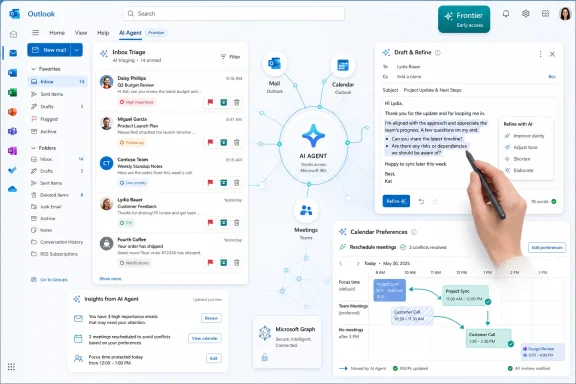
Microsoft began rolling out new agentic Copilot capabilities for Outlook in spring 2026, giving eligible Microsoft 365 Copilot users in the Frontier program tools that can manage inbox triage, draft and refine messages, handle calendar preferences, and act across mail and meetings in Outlook on the web and new Outlook for Windows. The pitch is simple: Outlook is no longer just a place where work arrives, but a place where an AI agent can start moving that work along. That is a meaningful escalation from “summarize this thread” to “keep my calendar aligned with my priorities.” It is also the moment when Copilot stops being merely helpful and starts becoming operationally consequential.
Microsoft has spent the past two years trying to convince customers that Copilot is not a chatbot bolted onto Office. The new Outlook capabilities are among the clearest examples of that strategy finally becoming visible in a daily workflow. Email and calendar are where knowledge work already collapses into decision fatigue, so Microsoft is putting Copilot exactly where the mess is.
The shift is from assistance to delegation. Older Copilot features in Outlook could summarize long threads, help write replies, suggest better phrasing, and surface context. Those were useful, but they still assumed the user would remain the operator, clicking through messages, interpreting urgency, and deciding what should happen next.
The new model asks Copilot to carry intent across multiple steps. If a user tells it to handle certain meeting invitations based on organizer, subject, working hours, or priority, the assistant can apply that preference as new calendar items arrive. If a user needs a meeting moved, a room rebooked, or a recurring one-on-one protected from conflicts, Copilot is no longer just explaining the calendar; it is participating in its maintenance.
That matters because Outlook is not a side app in the Microsoft 365 universe. It is the command center for a huge share of corporate communication. By turning Outlook into the place where agents act, Microsoft is making a broader claim about the future of productivity software: the winning AI interface may not be a separate chatbot window, but the familiar app that already holds the user’s obligations.
Microsoft’s current Outlook Copilot experience can prioritize messages, explain why something may matter, summarize long conversations, and help users act on mail without manually processing every thread. The newer agentic inbox management features push further by allowing Copilot to assist with triage actions such as flagging, archiving, deleting, pinning, marking messages read or unread, creating rules, and generating draft replies.
This is the right battlefield for enterprise AI because the productivity loss is not theoretical. Every company has employees who spend their best hours sorting other people’s urgency. The promise of Copilot in Outlook is not that it will make email delightful. The promise is that it can compress the administrative layer between “a message arrived” and “the right response happened.”
But this is also where users will notice failures fastest. A hallucinated paragraph in a draft can be fixed before sending. A badly prioritized message can sit unnoticed. A rule created from a misunderstood instruction can silently reshape the inbox. The closer Copilot gets to acting on mail, the less tolerance users will have for ambiguity.
Microsoft appears to understand this by emphasizing visible, editable, and reversible workflows. That design principle is essential. In an inbox, the AI cannot be a black box with a confident tone. It has to be an accountable clerk whose work can be inspected.
The new Outlook features can use preferences to manage RSVPs, help resolve conflicts, reschedule certain meetings, block focus time, rebook rooms, draft agendas, and prepare users with relevant context before a meeting. For anyone who has spent half a morning negotiating time slots, this sounds less like a gimmick and more like overdue plumbing.
The “AI chief of staff” framing is persuasive because executives have long relied on human assistants to perform exactly this kind of judgment. They do not merely put things on a calendar; they know which meetings matter, which can move, which people need a quick response, and which conflicts require escalation. Microsoft is trying to productize a thin slice of that function for everyone with the right license.
The danger is that calendars encode social nuance that software historically handles poorly. Declining a meeting from a senior colleague is not the same as declining a vendor update. Moving a one-on-one can be harmless in one organization and politically loaded in another. Copilot can follow instructions, but the quality of the outcome depends on whether those instructions capture the unwritten rules of the workplace.
That is why the best version of this feature is not full autonomy. It is structured delegation. Users should be able to define guardrails, review changes, and receive explanations. Copilot should make the low-risk moves and ask before touching the sensitive ones.
That distinction matters for WindowsForum readers because Microsoft’s AI announcements often blur together consumer Copilot, Copilot Pro, Copilot Chat, Microsoft 365 Copilot, and app-specific Copilot features. The Outlook experience a home user sees in Microsoft 365 Personal or Family can differ significantly from what a commercial tenant sees with Microsoft 365 Copilot licensing and admin controls. The phrase “Copilot in Outlook” does not describe one uniform product.
For IT admins, the rollout mechanics are part of the story. Frontier features require organizational opt-in and licensing decisions, not just user enthusiasm. That means pilots, policy reviews, training, and support documentation will matter before a company lets Copilot begin acting across mailboxes and calendars.
This also gives Microsoft a buffer. By keeping the most agentic features in an early-access channel, the company can gather feedback without declaring the experience fully mature. That is sensible, but it also means breathless descriptions of Copilot as a finished AI executive assistant should be treated cautiously.
The likely path is uneven adoption. Some organizations will test these capabilities aggressively with executives, sales teams, recruiters, and project managers. Others will wait until Microsoft clarifies governance, auditability, data boundaries, and user controls. In enterprise software, “available” and “safe to deploy broadly” are not synonyms.
That is Microsoft’s structural advantage. It owns the productivity surface and the enterprise data layer. If a company already runs on Exchange Online, Teams, OneDrive, SharePoint, Entra ID, and Microsoft 365, then Copilot has a privileged position that outside AI tools must negotiate through connectors, permissions, or user copy-paste.
This is why Outlook is such a strategic venue. Email and calendar are not isolated apps; they are the front door to organizational memory. When Copilot summarizes a thread, drafts a response, proposes a meeting agenda, and prepares a briefing from related materials, it is demonstrating the value of connecting work artifacts rather than treating them as separate files.
Competitors can offer smarter models or cleaner interfaces. Microsoft can offer proximity. The question is whether proximity plus adequate intelligence beats a better standalone assistant. In corporate environments, the answer may often be yes, because integration reduces friction more reliably than model cleverness increases delight.
Still, integration is not magic. Users have already seen cases where AI assistants misunderstand context, overstate what they can do, or produce plausible but wrong summaries. The more Microsoft ties Copilot to action, the more it needs to make confidence, permissions, and audit trails visible to ordinary users rather than buried in admin portals.
The new Outlook has improved, but its reputation remains bruised among users who prefer classic Outlook’s depth, offline behavior, add-in compatibility, and mature workflows. For those customers, Microsoft’s AI roadmap can feel like a lever to accelerate migration rather than a neutral enhancement. If the most advanced Copilot features arrive first in the new client, the AI story becomes part of the broader campaign to move users off classic Outlook.
This creates a credibility problem. Microsoft is asking users to trust Copilot with more consequential tasks at the same time some of those users are still asking Microsoft to restore or refine long-standing Outlook functionality. AI calendar agents are impressive, but they will not placate an admin whose users are angry about missing workflow details in the client itself.
The company’s challenge is to avoid making Copilot feel like frosting on an unfinished cake. If Outlook basics are slow, inconsistent, or confusing, the assistant becomes another surface to blame. The more central Outlook becomes to AI productivity, the more Microsoft must prove that the foundation is stable.
For Windows enthusiasts, this is familiar territory. Microsoft often pushes the future before everyone is satisfied with the present. Sometimes that works. Sometimes it turns promising technology into another reason users feel managed instead of served.
On the other side, inbox and calendar automation expands the blast radius of mistakes. If an assistant can draft replies, create rules, move messages, and act on meeting invitations, then administrators need clear answers about logging, retention, eDiscovery, permissions, and policy enforcement. AI actions should be attributable, reviewable, and constrained by the same governance model that applies to user actions.
There is also the matter of social engineering. Attackers already craft messages designed to manipulate human urgency. As AI agents become intermediaries, attackers will probe how those agents interpret instructions, priorities, and content. A malicious email that tricks a human is bad; a malicious email that influences an automated rule or calendar decision could be worse.
Microsoft’s enterprise customers will want assurances that Copilot respects existing security boundaries. The assistant should not make private information more visible simply because it can synthesize across sources. It should not expose sensitive context in a draft because the user asked for a quick reply. And it should not create administrative actions without leaving a trail.
The strongest deployment posture is cautious enthusiasm. Let Copilot reduce toil, but do not treat it as an invisible employee. Treat it as software with privileges, and govern it accordingly.
That distinction matters because most knowledge work is not a clean sequence of tasks. It is a stream of exceptions. A meeting invite might be routine until the organizer changes. A thread might look low priority until one sentence creates a legal or customer issue. A draft might be correct in content but wrong in tone.
Copilot can reduce the cost of routine work, but it cannot remove responsibility from the person whose name is on the mailbox. Users will still need to review sensitive replies, check high-impact calendar changes, and correct the assistant’s assumptions. The best productivity gains will come from identifying the tasks that are repetitive enough to delegate but consequential enough to benefit from oversight.
That is why training will matter more than Microsoft’s demos suggest. Users need to learn how to write durable preferences, not just clever prompts. They need to understand when Copilot is using inbox context, when it is reasoning from calendar data, and when it is making a suggestion rather than taking action. Admins need to define which groups get which features and what review expectations apply.
The agentic future will not arrive as a single switch. It will arrive as a series of small permissions granted to software that already sits inside the workday. Outlook is simply where many users will feel that change first.
For users, the immediate value will be in summarization, prioritization, meeting preparation, and reducing repetitive scheduling work. For administrators, the real work is deciding where automation belongs, how much autonomy users should get, and what policies must be in place before Copilot starts acting across business-critical communications.
The key details are concrete:
 Outlook Becomes the Agent Microsoft Always Wanted
Microsoft has spent the past two years trying to convince customers that Copilot is not a chatbot bolted onto Office. The new Outlook capabilities are among the clearest examples of that strategy finally becoming visible in a daily workflow. Email and calendar are where knowledge work already collapses into decision fatigue, so Microsoft is putting Copilot exactly where the mess is.The shift is from assistance to delegation. Older Copilot features in Outlook could summarize long threads, help write replies, suggest better phrasing, and surface context. Those were useful, but they still assumed the user would remain the operator, clicking through messages, interpreting urgency, and deciding what should happen next.
The new model asks Copilot to carry intent across multiple steps. If a user tells it to handle certain meeting invitations based on organizer, subject, working hours, or priority, the assistant can apply that preference as new calendar items arrive. If a user needs a meeting moved, a room rebooked, or a recurring one-on-one protected from conflicts, Copilot is no longer just explaining the calendar; it is participating in its maintenance.
That matters because Outlook is not a side app in the Microsoft 365 universe. It is the command center for a huge share of corporate communication. By turning Outlook into the place where agents act, Microsoft is making a broader claim about the future of productivity software: the winning AI interface may not be a separate chatbot window, but the familiar app that already holds the user’s obligations.
The Inbox Is Where AI Help Becomes Measurable
Email is the most boring possible place to launch an AI revolution, which is exactly why it matters. Most workers do not need a poetic model; they need to find the one message that can ruin the afternoon. Copilot’s inbox features are aimed at that mundane but expensive problem.Microsoft’s current Outlook Copilot experience can prioritize messages, explain why something may matter, summarize long conversations, and help users act on mail without manually processing every thread. The newer agentic inbox management features push further by allowing Copilot to assist with triage actions such as flagging, archiving, deleting, pinning, marking messages read or unread, creating rules, and generating draft replies.
This is the right battlefield for enterprise AI because the productivity loss is not theoretical. Every company has employees who spend their best hours sorting other people’s urgency. The promise of Copilot in Outlook is not that it will make email delightful. The promise is that it can compress the administrative layer between “a message arrived” and “the right response happened.”
But this is also where users will notice failures fastest. A hallucinated paragraph in a draft can be fixed before sending. A badly prioritized message can sit unnoticed. A rule created from a misunderstood instruction can silently reshape the inbox. The closer Copilot gets to acting on mail, the less tolerance users will have for ambiguity.
Microsoft appears to understand this by emphasizing visible, editable, and reversible workflows. That design principle is essential. In an inbox, the AI cannot be a black box with a confident tone. It has to be an accountable clerk whose work can be inspected.
Calendar Automation Is the More Radical Move
Inbox triage feels natural because email has always invited filtering. Calendar automation is more sensitive because a calendar is a map of power, attention, and availability. Letting an AI assistant accept, decline, move, or prepare meetings is a bigger step than asking it to summarize a thread.The new Outlook features can use preferences to manage RSVPs, help resolve conflicts, reschedule certain meetings, block focus time, rebook rooms, draft agendas, and prepare users with relevant context before a meeting. For anyone who has spent half a morning negotiating time slots, this sounds less like a gimmick and more like overdue plumbing.
The “AI chief of staff” framing is persuasive because executives have long relied on human assistants to perform exactly this kind of judgment. They do not merely put things on a calendar; they know which meetings matter, which can move, which people need a quick response, and which conflicts require escalation. Microsoft is trying to productize a thin slice of that function for everyone with the right license.
The danger is that calendars encode social nuance that software historically handles poorly. Declining a meeting from a senior colleague is not the same as declining a vendor update. Moving a one-on-one can be harmless in one organization and politically loaded in another. Copilot can follow instructions, but the quality of the outcome depends on whether those instructions capture the unwritten rules of the workplace.
That is why the best version of this feature is not full autonomy. It is structured delegation. Users should be able to define guardrails, review changes, and receive explanations. Copilot should make the low-risk moves and ask before touching the sensitive ones.
Frontier Availability Keeps the Hype in Check
The most important caveat is availability. These agentic Outlook features are not simply appearing for every Outlook user with a Microsoft account. Microsoft is positioning many of the newest capabilities through its Frontier program, which is designed to give organizations early access to experimental Microsoft 365 Copilot experiences.That distinction matters for WindowsForum readers because Microsoft’s AI announcements often blur together consumer Copilot, Copilot Pro, Copilot Chat, Microsoft 365 Copilot, and app-specific Copilot features. The Outlook experience a home user sees in Microsoft 365 Personal or Family can differ significantly from what a commercial tenant sees with Microsoft 365 Copilot licensing and admin controls. The phrase “Copilot in Outlook” does not describe one uniform product.
For IT admins, the rollout mechanics are part of the story. Frontier features require organizational opt-in and licensing decisions, not just user enthusiasm. That means pilots, policy reviews, training, and support documentation will matter before a company lets Copilot begin acting across mailboxes and calendars.
This also gives Microsoft a buffer. By keeping the most agentic features in an early-access channel, the company can gather feedback without declaring the experience fully mature. That is sensible, but it also means breathless descriptions of Copilot as a finished AI executive assistant should be treated cautiously.
The likely path is uneven adoption. Some organizations will test these capabilities aggressively with executives, sales teams, recruiters, and project managers. Others will wait until Microsoft clarifies governance, auditability, data boundaries, and user controls. In enterprise software, “available” and “safe to deploy broadly” are not synonyms.
Microsoft’s Real Advantage Is the Graph, Not the Chatbot
The Outlook update is best understood as a Microsoft Graph story. Copilot is valuable here because it can reason over mail, calendar events, meetings, documents, chats, and organizational context that already live inside Microsoft 365. A generic chatbot can write a polished email; Outlook Copilot can potentially know which meeting prompted it, which thread contains the decision, and which calendar slot is actually open.That is Microsoft’s structural advantage. It owns the productivity surface and the enterprise data layer. If a company already runs on Exchange Online, Teams, OneDrive, SharePoint, Entra ID, and Microsoft 365, then Copilot has a privileged position that outside AI tools must negotiate through connectors, permissions, or user copy-paste.
This is why Outlook is such a strategic venue. Email and calendar are not isolated apps; they are the front door to organizational memory. When Copilot summarizes a thread, drafts a response, proposes a meeting agenda, and prepares a briefing from related materials, it is demonstrating the value of connecting work artifacts rather than treating them as separate files.
Competitors can offer smarter models or cleaner interfaces. Microsoft can offer proximity. The question is whether proximity plus adequate intelligence beats a better standalone assistant. In corporate environments, the answer may often be yes, because integration reduces friction more reliably than model cleverness increases delight.
Still, integration is not magic. Users have already seen cases where AI assistants misunderstand context, overstate what they can do, or produce plausible but wrong summaries. The more Microsoft ties Copilot to action, the more it needs to make confidence, permissions, and audit trails visible to ordinary users rather than buried in admin portals.
The New Outlook Problem Has Not Gone Away
There is an awkward subplot to all of this: Microsoft’s most ambitious Outlook AI work is tied heavily to the modern Outlook experience, including Outlook on the web and the new Outlook for Windows. That is technically understandable, but it collides with the reality that many power users and administrators still distrust the new Outlook client.The new Outlook has improved, but its reputation remains bruised among users who prefer classic Outlook’s depth, offline behavior, add-in compatibility, and mature workflows. For those customers, Microsoft’s AI roadmap can feel like a lever to accelerate migration rather than a neutral enhancement. If the most advanced Copilot features arrive first in the new client, the AI story becomes part of the broader campaign to move users off classic Outlook.
This creates a credibility problem. Microsoft is asking users to trust Copilot with more consequential tasks at the same time some of those users are still asking Microsoft to restore or refine long-standing Outlook functionality. AI calendar agents are impressive, but they will not placate an admin whose users are angry about missing workflow details in the client itself.
The company’s challenge is to avoid making Copilot feel like frosting on an unfinished cake. If Outlook basics are slow, inconsistent, or confusing, the assistant becomes another surface to blame. The more central Outlook becomes to AI productivity, the more Microsoft must prove that the foundation is stable.
For Windows enthusiasts, this is familiar territory. Microsoft often pushes the future before everyone is satisfied with the present. Sometimes that works. Sometimes it turns promising technology into another reason users feel managed instead of served.
Security Teams Will See Both Promise and Risk
For security-minded readers, agentic Outlook is a double-edged development. On one side, Copilot could help users identify important messages, surface action items, and reduce the overload that causes people to miss warnings or mishandle requests. A less overwhelmed employee is often a safer employee.On the other side, inbox and calendar automation expands the blast radius of mistakes. If an assistant can draft replies, create rules, move messages, and act on meeting invitations, then administrators need clear answers about logging, retention, eDiscovery, permissions, and policy enforcement. AI actions should be attributable, reviewable, and constrained by the same governance model that applies to user actions.
There is also the matter of social engineering. Attackers already craft messages designed to manipulate human urgency. As AI agents become intermediaries, attackers will probe how those agents interpret instructions, priorities, and content. A malicious email that tricks a human is bad; a malicious email that influences an automated rule or calendar decision could be worse.
Microsoft’s enterprise customers will want assurances that Copilot respects existing security boundaries. The assistant should not make private information more visible simply because it can synthesize across sources. It should not expose sensitive context in a draft because the user asked for a quick reply. And it should not create administrative actions without leaving a trail.
The strongest deployment posture is cautious enthusiasm. Let Copilot reduce toil, but do not treat it as an invisible employee. Treat it as software with privileges, and govern it accordingly.
The Human-in-the-Loop Era Is Not Over
The marketing language around agentic AI can make it sound as though the human is about to leave the loop. Outlook tells a more complicated story. The better framing is that the human moves from doing every step to supervising a system that proposes and performs some steps.That distinction matters because most knowledge work is not a clean sequence of tasks. It is a stream of exceptions. A meeting invite might be routine until the organizer changes. A thread might look low priority until one sentence creates a legal or customer issue. A draft might be correct in content but wrong in tone.
Copilot can reduce the cost of routine work, but it cannot remove responsibility from the person whose name is on the mailbox. Users will still need to review sensitive replies, check high-impact calendar changes, and correct the assistant’s assumptions. The best productivity gains will come from identifying the tasks that are repetitive enough to delegate but consequential enough to benefit from oversight.
That is why training will matter more than Microsoft’s demos suggest. Users need to learn how to write durable preferences, not just clever prompts. They need to understand when Copilot is using inbox context, when it is reasoning from calendar data, and when it is making a suggestion rather than taking action. Admins need to define which groups get which features and what review expectations apply.
The agentic future will not arrive as a single switch. It will arrive as a series of small permissions granted to software that already sits inside the workday. Outlook is simply where many users will feel that change first.
The Practical Reading for WindowsForum Readers
The new Copilot in Outlook is neither a toy nor a finished replacement for an assistant. It is an early version of a deeper Microsoft 365 operating model, where AI is embedded in the apps that already control communication, scheduling, and organizational memory. That makes it more important than another sidebar feature.For users, the immediate value will be in summarization, prioritization, meeting preparation, and reducing repetitive scheduling work. For administrators, the real work is deciding where automation belongs, how much autonomy users should get, and what policies must be in place before Copilot starts acting across business-critical communications.
The key details are concrete:
- Microsoft is moving Copilot in Outlook from single-task assistance toward agentic workflows that can act across inbox and calendar tasks.
- The most advanced new capabilities are tied to eligible Microsoft 365 Copilot users and early-access Frontier availability, not every Outlook installation.
- Copilot can help prioritize mail, summarize threads, draft and refine messages, create or apply inbox management actions, and surface follow-ups.
- Calendar features are more ambitious because they can manage RSVPs, resolve conflicts, reschedule meetings, prepare agendas, and protect time based on preferences.
- Organizations should pilot these tools with clear guardrails because AI actions in Outlook affect communication, scheduling, compliance, and trust.
- The success of the feature will depend as much on Outlook’s reliability and Microsoft’s governance controls as on the underlying AI model.
References
- Primary source: thewincentral.com
Published: 2026-06-01T14:45:25.480880
Microsoft Copilot in Outlook Gets Powerful Inbox Calendar AI Features - WinCentral
Microsoft upgrades Copilot in Outlook with AI-powered inbox management, calendar actions, meeting preparation, & task automation features. - Read in AI News on WinCentral thewincentral.com
- Official source: support.microsoft.com

Use Microsoft 365 Copilot in Outlook Calendar with a screen reader | Microsoft Support
Learn how to prepare for a meeting with Copilot in Outlook Calander.
support.microsoft.com
- Official source: microsoft.com
Get Up to Speed with Copilot in Outlook | Microsoft 365
Copilot in Outlook can help busy professionals cut catch-up time with email summaries, daily briefings, and meeting prep.www.microsoft.com - Related coverage: business-standard.com
Copilot can now draft emails in Outlook, manage calendar with your prompts | Tech News - Business Standard
Microsoft has upgraded Copilot in Microsoft Outlook with agentic features that can prioritise emails, draft replies, manage schedules, and handle routine tasks across inbox and calendar workflowswww.business-standard.com
- Related coverage: windowscentral.com
How to use Microsoft Copilot to Auto-Reschedule Outlook Meetings | Windows Central
Check-ins and regular meetings are important, but they're not always the top priority. The latest Copilot feature makes you calendar match that reality.www.windowscentral.com - Official source: info.microsoft.com
- Official source: cdn-dynmedia-1.microsoft.com
- Official source: techcommunity.microsoft.com
Copilot in Outlook: New agentic experiences for email and calendar | Microsoft Community Hub
In Outlook, Copilot helps you go from intent to execution across email and calendar—without losing context or creating extra steps. Copilot in Outlook is... techcommunity.microsoft.com
- Related coverage: windowsreport.com

Microsoft Brings Agentic Copilot to Outlook for Email and Calendar Management
Microsoft brings agentic Copilot to Outlook, enabling AI-driven email and calendar management across Windows and web through Frontier rollout.
windowsreport.com
- Related coverage: thurrott.com
Copilot in Outlook Can Now Proactively Manage your Inbox and Calendar
New agentic features in Outlook will allow Copilot to intelligently prioritize emails, proactively manage calendars, and more. www.thurrott.com
- Related coverage: elevenforum.com
Copilot in Outlook: New agentic experiences for email and calendar
Outlook Blog: Wave 3 of Microsoft 365 Copilot marks a shift from single-shot tasks to agentic experiences embedded in the apps where work happens. In Outlook, Copilot helps you go from intent to execution across email and calendar—without losing context or creating extra steps. Copilot in... www.elevenforum.com
- Related coverage: ai-market-watch.com
Microsoft Copilot in Outlook becomes agentic, triaging emails and rescheduling calendar conflicts
Microsoft rolls out agentic Copilot features for Outlook that autonomously triage emails and reschedule calendar conflicts, leveraging Office distribution to embed AI agents into enterprise workflows.www.ai-market-watch.com
- Related coverage: johnacook.wordpress.com
Copilot in Outlook: New agentic experiences for email and calendar | Microsoft Community Hub
Copilot in Outlook is now agentic, taking on the ongoing work of running your inbox and calendar. It triages emails, reschedules conflicts, and surfaces… — Read on techcommunity.microsoft.com…johnacook.wordpress.com
- Related coverage: blog-en.topedia.com
Agentic Outlook Calendar capabilities in Microsoft 365 Copilot | Topedia Blog
Microsoft has added agentic calendar capabilities to Microsoft 365 Copilot for users in the Frontier program, enabling users to automatically accept, decline, and manage Outlook meetings. blog-en.topedia.com
- Related coverage: msftnewsnow.com
Copilot In Outlook Becomes Your Always‑On Email And Calendar Agent Now Available In 2026
Microsoft’s new agentic Copilot in Outlook now triages email, manages your calendar, and aligns your time to what matters most. msftnewsnow.com
- Related coverage: testingcatalog.com
Microsoft Copilot in Outlook adds AI to manage inbox
What's new? Copilot triages emails, drafts replies and manages calendar tasks for Frontier users; Copilot sets inbox rules, flags overdue messages and fixes meeting conflicts; www.testingcatalog.com
- Related coverage: spscc.edu
