- Thread Author
- #1
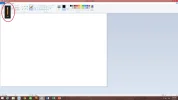
I’m using windows 8. Whenever I first boot up my computer, this volume bar will appear (refer to the picture). Everything will lag when this happens. It’ll not disappear until I reboot my computer.
Virus scan had been done, and windows have been updated to the latest version. I have tried formatting my computer too, but it doesn’t help.
This problem started around January 2014. Does anyone here know what causes this? Any help will be appreciated.
Virus scan had been done, and windows have been updated to the latest version. I have tried formatting my computer too, but it doesn’t help.
This problem started around January 2014. Does anyone here know what causes this? Any help will be appreciated.