

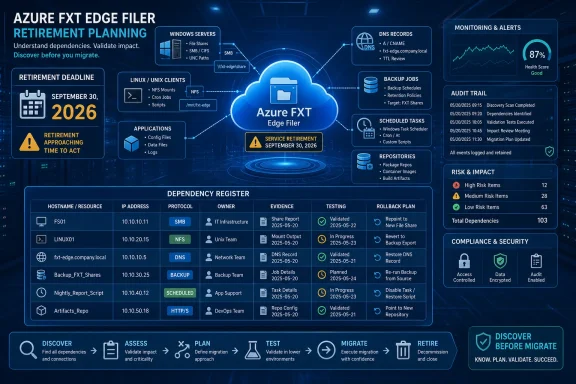
Azure FXT Edge Filer retires on September 30, 2026, so freeze replacement selection until a dependency register is complete and begin by collecting Azure retirement signals, DNS records, Windows and Linux client evidence, scheduled tasks, configuration references, and backup jobs. The urgent task is to prove where every FXT hostname, alias, IP address, NFS export, and indirect dependency is used—not to start copying data.
Microsoft Lifecycle lists the final cutoff as September 30, 2026 at 10:59:59.999 p.m. Pacific Time. Treat that as a support boundary, not a production change window. Set an earlier internal deadline that leaves time for testing, stabilization, and rollback.
WindowsForum’s coverage of other Azure retirements supports this sequence. Its reporting on Azure API for FHIR emphasized finding Windows endpoint dependencies before planning a database move, while its BlobFuse v1 report called for classifying Linux-mounted workloads before migration. WindowsForum’s reports on the October 2025 Azure Front Door incidents also show why cloud changes need operational safeguards. Tested rollback remains WindowsForum guidance for this FXT project, but those incident reports do not establish FXT-specific compatibility or control-plane behavior.
Add status, search date, collector, command or query, result-file location, and risk-acceptance fields.
For example, retain a zero-result package containing the endpoint list, target host list, PowerShell script version, execution timestamp, transcript, exported CSV files, and the ticket identifying the collector. That package shows what was searched and allows the result to be repeated later.
For every subscription, record the subscription ID, tenant ID, query or workbook, filters, execution time, result count, and export path.
From Linux, run:
Export authoritative zone records containing each identifier. If DNS query logging is enabled, capture the query time, source client, queried name, record type, and response.
Use DNS changes as a cutover mechanism only after testing. The Microsoft retirement information does not establish that an FXT alias can be redirected to a replacement without protocol, path, identity, or application changes.
Search SMB mappings and UNC references only where a gateway, alias, application service, or other intermediary may depend on FXT. Verify the actual protocol and intermediary for every match.
Search approved application directories:
Record the client, referenced path, service or task, execution identity, executable, arguments, source file, line number, protocol validation, and collection time. A binary path is a lead to investigate, not proof of storage access.
Where available, add:
Record the client hostname, source server or IP, export, local mount point, filesystem type, options, persistent-definition file, line number, and service or process owner.
For other exports:
Search deployment templates, scripts, environment files, pipeline variables, configuration-management data, application settings, scaling procedures, failover runbooks, and recovery documentation. Record repository, revision, path, line number, matched string, owner, and search date.
Export matching CMDB records and reconcile missing owners, dormant environments, and systems marked for decommissioning.
Repeat the search in monitoring rules, synthetic tests, dashboards, log queries, archive jobs, replication tools, and disaster-recovery plans. Test a restore to the proposed replacement and retain the result.
The client commands, register design, protocol-validation gate, DNS testing, identity review, evidence-retention process, and approval criteria are WindowsForum operational guidance. They are not Microsoft guarantees about FXT behavior, protocol compatibility, ACL translation, or endpoint interchangeability.
The migration can proceed once the evidence gate is satisfied. Until then, selecting a destination or copying data leaves the central question unanswered: which clients and operational processes still expect the retiring service or an intermediary dependent on it to exist?
Microsoft Lifecycle lists the final cutoff as September 30, 2026 at 10:59:59.999 p.m. Pacific Time. Treat that as a support boundary, not a production change window. Set an earlier internal deadline that leaves time for testing, stabilization, and rollback.
WindowsForum’s coverage of other Azure retirements supports this sequence. Its reporting on Azure API for FHIR emphasized finding Windows endpoint dependencies before planning a database move, while its BlobFuse v1 report called for classifying Linux-mounted workloads before migration. WindowsForum’s reports on the October 2025 Azure Front Door incidents also show why cloud changes need operational safeguards. Tested rollback remains WindowsForum guidance for this FXT project, but those incident reports do not establish FXT-specific compatibility or control-plane behavior.
 Immediate-Action Checklist
- Set an internal completion deadline comfortably before September 30, 2026.
- Compile all known FXT names, aliases, IP addresses, NFS exports, management endpoints, and possible indirect SMB or UNC references.
- Obtain read access to every in-scope Azure subscription, endpoint inventory, DNS platform, repository, backup console, and configuration source.
- Run Azure retirement discovery across all subscriptions.
- Collect endpoint evidence from Windows, Linux, automation, monitoring, backup, and recovery systems.
- Populate the dependency register with owners, protocols, identities, evidence locations, and last-seen dates.
- Assign an owner and escalation date to every access or evidence gap.
- Block replacement approval until every gap is resolved or formally accepted by an accountable approver.
Start With Required Access and Inputs
Assign a discovery lead and obtain these inputs before running searches:- Azure: Tenant ID, subscription list, and at least Reader access to each in-scope subscription. Access to Service Health, Advisor, workbooks, Resource Graph, and relevant APIs must be permitted.
- DNS: Read access to authoritative zones and available query logs. DNS Administrator or equivalent access is needed only for later changes.
- Endpoints: A CMDB or exported list of Windows servers, Linux servers, virtual desktops, application hosts, appliances, and recovery systems.
- Configuration sources: Read access to Git repositories, deployment pipelines, configuration-management platforms, runbooks, and documentation stores.
- Backups: Read or audit access to backup, archive, replication, and disaster-recovery consoles.
- Servers: Local administrator or delegated PowerShell-remoting access for Windows discovery, plus root or sufficient
sudoand SSH access for Linux discovery. - FXT inputs: Every known client-facing or management hostname, alias, IP address, NFS export, and upstream target. Include SMB shares and UNC paths only where a gateway, alias, application layer, or other intermediary may ultimately depend on FXT.
Build the Dependency Register First
Use one row per client-to-path dependency:| Endpoint | Alias/IP | Actual protocol | Client | Mount/share/path | Workload owner | Execution identity | Upstream target | Evidence source | Last seen | Replacement requirement | Test evidence | Cutover wave | Rollback expiry |
|---|
For example, retain a zero-result package containing the endpoint list, target host list, PowerShell script version, execution timestamp, transcript, exported CSV files, and the ticket identifying the collector. That package shows what was searched and allows the result to be repeated later.
The Executable Discovery Runbook
1. Establish the Azure and FXT Inventory
In the Azure portal, switch to each tenant and subscription, then:- Open Monitor > Service Health > Health advisories, review service-retirement notices, and save or export relevant records.
- Open Advisor > Recommendations. Microsoft documents retirement recommendations under Reliability; use the retirement-related category or filter presented in the tenant and export the results.
- Use the service-retirement workbook available in the tenant, where exposed. Portal labels and workbook placement can vary, so do not rely on one universal navigation path.
- In Resource Graph Explorer, select all in-scope subscriptions, search resource names, IDs, tags, and properties for each known FXT identifier, and download the results.
- Use the corresponding Advisor and Azure Resource Graph APIs when automation is required. Preserve the request, subscription scope, execution time, and JSON response.
For every subscription, record the subscription ID, tenant ID, query or workbook, filters, execution time, result count, and export path.
2. Prove Every DNS Name and Address Was Searched
For each known name, alias, and IP, collect forward and reverse results from an administrative workstation:
Code:
Resolve-DnsName fxt-name.contoso.com -Type A
Resolve-DnsName fxt-alias.contoso.com -Type CNAME
Resolve-DnsName 10.20.30.40 -Type PTR
nslookup fxt-name.contoso.com
nslookup 10.20.30.40
Code:
dig fxt-name.contoso.com A
dig fxt-alias.contoso.com CNAME
dig -x 10.20.30.40
getent hosts fxt-name.contoso.comUse DNS changes as a cutover mechanism only after testing. The Microsoft retirement information does not establish that an FXT alias can be redirected to a replacement without protocol, path, identity, or application changes.
3. Validate Protocols Before Endpoint Collection
Classify each known identifier before treating it as a client dependency:- NFS client path
- SMB path through a gateway, alias, or intermediary
- Management-only endpoint
- DNS-only alias or record
- Upstream storage target
- Another application or client path
- Unknown and requiring owner review
4. Collect Windows Service, Task, and Indirect SMB Evidence
On Windows endpoints, run:
Code:
Get-SmbMapping |
  Select-Object LocalPath,RemotePath,Status |
  Export-Csv C:\Temp\smb-mappings.csv -NoTypeInformation

cmd /c "net use" > C:\Temp\net-use.txt

Get-CimInstance Win32_Service |
  Select-Object Name,DisplayName,State,StartName,PathName |
  Export-Csv C:\Temp\services.csv -NoTypeInformation

Get-ScheduledTask | ForEach-Object {
  $task = $_
  foreach ($action in $task.Actions) {
    [pscustomobject]@{
      TaskPath=$task.TaskPath; TaskName=$task.TaskName
      Execute=$action.Execute; Arguments=$action.Arguments
      WorkingDirectory=$action.WorkingDirectory
      UserId=$task.Principal.UserId
    }
  }
} | Export-Csv C:\Temp\scheduled-tasks.csv -NoTypeInformation
Search approved application directories:
Code:
Get-ChildItem C:\Apps,C:\Scripts,C:\ProgramData -Recurse -File -ErrorAction SilentlyContinue |
  Select-String -SimpleMatch 'fxt-name','fxt-alias','10.20.30.40','\\gateway\share' |
  Select-Object Path,LineNumber,Line |
Export-Csv C:\Temp\fxt-config-hits.csv -NoTypeInformation5. Collect Linux NFS and Mount Evidence
On every Linux endpoint, capture active and persistent mounts:
Code:
hostname -f
findmnt -o TARGET,SOURCE,FSTYPE,OPTIONS
mount
grep -RInE 'fxt-name|fxt-alias|10\.20\.30\.40|:/export' \
  /etc/fstab /etc/auto.* /etc/autofs* /etc/systemd/system \
  /usr/lib/systemd/system /opt /srv /usr/local 2>/dev/null
systemctl list-unit-files --type=mount --type=automountnfsstat -mRecord the client hostname, source server or IP, export, local mount point, filesystem type, options, persistent-definition file, line number, and service or process owner.
6. Search Repositories, Automation, and the CMDB
For Git repositories:git grep -n -I -e 'fxt-name' -e 'fxt-alias' -e '10.20.30.40' -e '\\gateway\share'For other exports:
rg -n -i 'fxt-name|fxt-alias|10\.20\.30\.40|\\\\gateway\\share' .Search deployment templates, scripts, environment files, pipeline variables, configuration-management data, application settings, scaling procedures, failover runbooks, and recovery documentation. Record repository, revision, path, line number, matched string, owner, and search date.
Export matching CMDB records and reconcile missing owners, dormant environments, and systems marked for decommissioning.
7. Inspect Backup, Monitoring, and Recovery Systems
In each backup console, search job names, source paths, targets, scripts, agents, restore mappings, and credentials for every identifier. Export the job name, protected client, source, destination, schedule, last run, last restore test, execution identity, and owner.Repeat the search in monitoring rules, synthetic tests, dashboards, log queries, archive jobs, replication tools, and disaster-recovery plans. Test a restore to the proposed replacement and retain the result.
Separate Microsoft Statements From Operational Guidance
The Microsoft points used here are the September 30, 2026 retirement date, the Lifecycle timestamp, the availability of Azure retirement-discovery tools, and the warning that Advisor coverage is not comprehensive.The client commands, register design, protocol-validation gate, DNS testing, identity review, evidence-retention process, and approval criteria are WindowsForum operational guidance. They are not Microsoft guarantees about FXT behavior, protocol compatibility, ACL translation, or endpoint interchangeability.
Migration Approval Requires Measurable Evidence
Approve a design only when:- Every known identifier has retained search evidence and a validated protocol classification.
- Every dependency has an owner, execution identity, replacement requirement, and completed test.
- Backup restore, production-like access, monitoring, and rollback tests have passed.
- Each unresolved item has an owner, escalation date, impact statement, and time-limited risk acceptance.
- Each rollback procedure has been tested and expires before the retirement cutoff.
Frequently Asked Questions
When does Azure FXT Edge Filer retire?
Microsoft Lifecycle lists September 30, 2026. The page shows a final support timestamp of September 30, 2026 at 10:59:59.999 p.m. Pacific Time.Can Azure Advisor find every affected workload?
No. Microsoft states that Advisor’s retirement coverage is not comprehensive. Use it alongside client commands, DNS evidence, repository searches, CMDB reconciliation, and backup-console reviews.What should be completed before choosing a replacement?
Complete the dependency register and identify the protocols, paths, clients, execution identities, upstream targets, operational jobs, restore requirements, and rollback constraints the replacement must satisfy.How should a negative search result be documented?
Retain the endpoint strings searched, system or repository scope, exact command or query, collector, timestamp, result count, and output file. If access was unavailable, record not searched rather than no dependency.The migration can proceed once the evidence gate is satisfied. Until then, selecting a destination or copying data leaves the central question unanswered: which clients and operational processes still expect the retiring service or an intermediary dependent on it to exist?
References
- Primary source: learn.microsoft.com
Azure FXT Edge Filer - Microsoft Lifecycle | Microsoft Learn
Azure FXT Edge Filer follows the Modern Lifecycle Policy.learn.microsoft.com - Independent coverage: g2.com
- Independent coverage: gartner.com
Top Azure FXT Edge Filer (Legacy) Alternatives & Competitors 2026 | Gartner Peer Insights
Learn more about the top Azure FXT Edge Filer (Legacy) alternatives. Easily compare competitors and read verified real user reviews on Gartner Peer Insights.www.gartner.com - Primary source: WindowsForum
Azure API for FHIR Retires September 30, 2026: Find Windows Dependencies | Windows Forum
Microsoft will retire Azure API for FHIR on September 30, 2026, but healthcare IT teams should treat endpoint discovery—not database migration—as the...windowsforum.com
