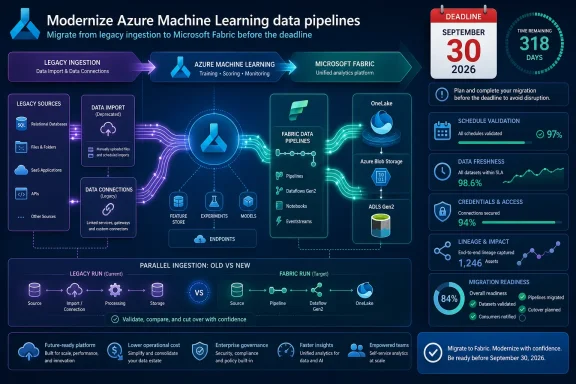
Verdict: move every Azure Machine Learning Data Import or Data Connection workload to a Fabric-managed ingestion design before September 30, 2026, but do not treat Fabric as a like-for-like connector replacement. Use scheduled Fabric Pipelines when Azure ML needs a controlled copy, OneLake shortcuts when direct access is appropriate, Snowflake mirroring for a Snowflake-centered data estate, and Azure Blob Storage or ADLS Gen2 when existing training jobs already depend on Azure Storage paths.
Microsoft announced the deprecation on March 31, 2026. Azure Machine Learning Data Import (Preview) and Data Connections (Preview) will retire on September 30, 2026; after that date, existing connections will stop working and scheduled refreshes will no longer run. Microsoft’s Learn documentation recommends moving external ingestion to Microsoft Fabric, then exposing the resulting data to Azure ML through datastores.
The immediate task is not “recreate the connection.” It is to preserve the actual contract between source system, refresh cadence, transformed data, Azure ML datastore, data asset, and training job.
The closest replacement for most scheduled Azure ML imports is a Fabric Pipeline that writes a managed copy. Choose this path when a training job benefits from predictable files, when the source can be slow or intermittently available, or when the ML team needs an independently controlled refresh boundary. The old Azure ML import feature cached imported data, stored it as Parquet in Azure Storage, and provided versioning and lineage benefits; a pipeline-based replacement should deliberately recreate the operational outcome rather than merely deliver bytes somewhere.
For an Azure ML workload that already trains from Azure Blob Storage or ADLS Gen2, Fabric Pipelines that copy into that storage are often the least disruptive route. The datastore relationship and downstream job assumptions can remain closer to the current model, while Fabric takes over external ingestion. That does not eliminate migration work, but it avoids coupling a mature Azure ML training estate to a new OneLake access pattern simply because Fabric is now the recommended ingestion layer.
OneLake shortcuts are the better fit when the organization’s primary requirement is access without another copy. They can reduce redundant movement and simplify a data estate already governed around OneLake. But a shortcut is not automatically a substitute for an Azure ML cache: teams should establish whether their training code expects stable partitions, immutable run inputs, or performance characteristics that depended on a materialized copy.
Snowflake mirroring deserves its own lane. If Snowflake is the system where data is governed, curated, and operationally owned, mirroring may be more coherent than building a separate extract-and-copy chain. If Azure ML training simply needs periodic, bounded snapshots from Snowflake, however, a pipeline copy into the storage location already used by the workspace may be easier to validate and operate.
The decision can be reduced to four practical tests:
Build a migration worksheet for each workload with these fields:
This inventory is also where teams discover an important feature-parity gap. Azure ML Data Import created a cache, transferred data as Parquet, partitioned the transfer, and supplied versioning and lineage capabilities for imported data. Fabric can support a stronger overall ingestion architecture, but those exact behaviors are not automatic just because a Fabric connector can reach the source.
A migration should therefore document where version identity now lives, how lineage will be reviewed, how partitions are produced and retained, and where transformations execute. If those answers are vague, the team has selected a connector, not an architecture.
During the parallel period, run the Fabric path on the intended production cadence and compare its output with the legacy import. Validate schema and record-level expectations where feasible, then run representative Azure ML training jobs against the new datastore path. The point is not only to prove that Fabric moved the data; it is to prove that the model workflow still receives the intended snapshot at the intended time.
Keep the legacy import available while it remains supported, but make rollback precise. A rollback plan should identify which Azure ML data asset or job reference returns to the previous datastore path, who can make that change, and what happens if the new refresh arrives late or produces an unusable dataset. By the time the old route is removed, rollback should mean restoring a known Fabric output or prior Azure Storage snapshot—not trying to revive a retired preview feature.
For a broader view of Fabric’s expanding role across data engineering and AI workloads, see WindowsForum’s coverage of the Microsoft Fabric June 2025 update and its discussion of Azure Machine Learning’s changing data-integration direction.
RBAC and network design need the same scrutiny. The team that owns the source, the Fabric process, the Azure ML workspace, and the destination datastore may not be the same team. A migration plan should explicitly assign ownership of credentials, access reviews, failed-refresh triage, and the approval path for schema changes. The retirement is an opportunity to eliminate personal or opaque connection ownership before it becomes the new Fabric dependency.
Fabric capacity is also a planning input, not an afterthought. A pipeline that works during a test refresh may behave differently once it runs on the production schedule alongside other Fabric workloads. Administrators should make the migration team state its expected cadence, data volume behavior, retry expectations, and operational priority, even where exact capacity sizing depends on local usage patterns.
Microsoft announced the deprecation on March 31, 2026. Azure Machine Learning Data Import (Preview) and Data Connections (Preview) will retire on September 30, 2026; after that date, existing connections will stop working and scheduled refreshes will no longer run. Microsoft’s Learn documentation recommends moving external ingestion to Microsoft Fabric, then exposing the resulting data to Azure ML through datastores.
The immediate task is not “recreate the connection.” It is to preserve the actual contract between source system, refresh cadence, transformed data, Azure ML datastore, data asset, and training job.
- Inventory every Azure ML Data Import and Data Connection, including source, connection owner, schedule, destination datastore path, consuming data assets, training pipelines, and credentials or secrets.
- Classify each import by its required freshness and whether Azure ML needs a physical, versioned copy or can safely consume data through a supported direct-access design.
- Build the selected Fabric path in parallel: a scheduled Fabric Pipeline to OneLake, a OneLake shortcut, Snowflake mirroring, or a Fabric Pipeline that lands data in Azure Blob Storage or ADLS Gen2.
- Register or reconnect the destination through an Azure ML datastore, then point Azure ML jobs and data assets at the new location.
- Run the legacy import and Fabric path side by side long enough to compare row counts, partitions, schema, refresh timing, and training-job behavior.
- Cut over consumers only after validation, retain the old route as a rollback reference during the transition, and remove obsolete secrets and schedules before retirement.
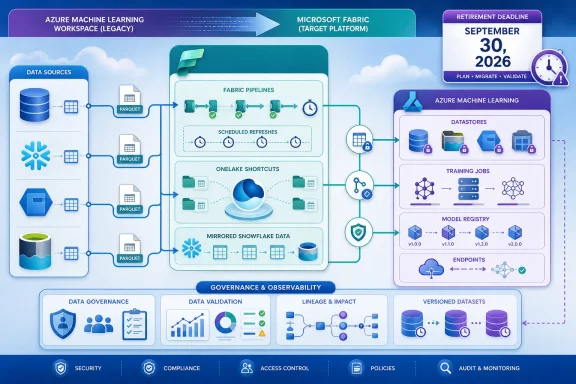 Which Fabric migration path fits the training workload?
The closest replacement for most scheduled Azure ML imports is a Fabric Pipeline that writes a managed copy. Choose this path when a training job benefits from predictable files, when the source can be slow or intermittently available, or when the ML team needs an independently controlled refresh boundary. The old Azure ML import feature cached imported data, stored it as Parquet in Azure Storage, and provided versioning and lineage benefits; a pipeline-based replacement should deliberately recreate the operational outcome rather than merely deliver bytes somewhere.For an Azure ML workload that already trains from Azure Blob Storage or ADLS Gen2, Fabric Pipelines that copy into that storage are often the least disruptive route. The datastore relationship and downstream job assumptions can remain closer to the current model, while Fabric takes over external ingestion. That does not eliminate migration work, but it avoids coupling a mature Azure ML training estate to a new OneLake access pattern simply because Fabric is now the recommended ingestion layer.
OneLake shortcuts are the better fit when the organization’s primary requirement is access without another copy. They can reduce redundant movement and simplify a data estate already governed around OneLake. But a shortcut is not automatically a substitute for an Azure ML cache: teams should establish whether their training code expects stable partitions, immutable run inputs, or performance characteristics that depended on a materialized copy.
Snowflake mirroring deserves its own lane. If Snowflake is the system where data is governed, curated, and operationally owned, mirroring may be more coherent than building a separate extract-and-copy chain. If Azure ML training simply needs periodic, bounded snapshots from Snowflake, however, a pipeline copy into the storage location already used by the workspace may be easier to validate and operate.
The decision can be reduced to four practical tests:
- Choose a Fabric Pipeline to OneLake when Fabric is becoming the central data engineering and governance plane, and training can consume a curated OneLake-oriented destination.
- Choose a OneLake shortcut when avoiding a duplicate data copy matters more than creating a separate ML-ready snapshot, and the direct-access scenario is supported.
- Choose Snowflake mirroring when Snowflake remains the authoritative operating center and the wider Fabric estate needs synchronized data.
- Choose a Fabric Pipeline to Azure Blob Storage or ADLS Gen2 when Azure ML jobs, datastores, and operational runbooks are already designed around Azure Storage.
Start with an inventory, not a migration wizard
The retirement creates a hidden dependency problem. An Azure ML data import may have looked like one asset in Studio, but it could encode a source query, a workspace connection, a refresh schedule, a target path, a cached output, and multiple downstream consumers. If the team only inventories Data Connections, it can miss data assets and jobs that fail later because their expected location or refresh rhythm changed.Build a migration worksheet for each workload with these fields:
| Capture item | Why it matters at cutover |
|---|---|
| Source system and source object | Determines whether a pipeline, shortcut, mirror, or storage copy is realistic. |
| Schedule and required freshness | Prevents an hourly or daily training dependency from silently becoming an ad hoc refresh. |
| Destination path and datastore | Identifies what Azure ML jobs must be reconnected to. |
| Data asset and job consumers | Separates a safe connector change from an application-level migration. |
| Transformations and partition assumptions | Reveals logic that may have been implicit in the prior import flow. |
| Connection ownership and secrets | Prevents a new Fabric process from depending on an unmanaged personal credential. |
| Validation measure | Defines what “same data” means before the old path is retired. |
A migration should therefore document where version identity now lives, how lineage will be reviewed, how partitions are produced and retained, and where transformations execute. If those answers are vague, the team has selected a connector, not an architecture.
Parallel validation is the only safe cutover
Do not wait for September 2026 to discover a training job consumed the old cache more directly than expected. Microsoft says existing Data Connections will stop functioning and scheduled refreshes will cease after retirement, so the final deadline is a hard operational boundary rather than a period for experimentation.During the parallel period, run the Fabric path on the intended production cadence and compare its output with the legacy import. Validate schema and record-level expectations where feasible, then run representative Azure ML training jobs against the new datastore path. The point is not only to prove that Fabric moved the data; it is to prove that the model workflow still receives the intended snapshot at the intended time.
Keep the legacy import available while it remains supported, but make rollback precise. A rollback plan should identify which Azure ML data asset or job reference returns to the previous datastore path, who can make that change, and what happens if the new refresh arrives late or produces an unusable dataset. By the time the old route is removed, rollback should mean restoring a known Fabric output or prior Azure Storage snapshot—not trying to revive a retired preview feature.
For a broader view of Fabric’s expanding role across data engineering and AI workloads, see WindowsForum’s coverage of the Microsoft Fabric June 2025 update and its discussion of Azure Machine Learning’s changing data-integration direction.
The cost and governance questions arrive after the connector test passes
A copy-first migration can add storage and pipeline execution costs. A direct-access design can reduce copying but may shift performance, availability, or source-system load into the training window. Mirroring can simplify a Snowflake-to-Fabric relationship while adding another managed data flow to monitor. Those are architecture tradeoffs, not product defects.RBAC and network design need the same scrutiny. The team that owns the source, the Fabric process, the Azure ML workspace, and the destination datastore may not be the same team. A migration plan should explicitly assign ownership of credentials, access reviews, failed-refresh triage, and the approval path for schema changes. The retirement is an opportunity to eliminate personal or opaque connection ownership before it becomes the new Fabric dependency.
Fabric capacity is also a planning input, not an afterthought. A pipeline that works during a test refresh may behave differently once it runs on the production schedule alongside other Fabric workloads. Administrators should make the migration team state its expected cadence, data volume behavior, retry expectations, and operational priority, even where exact capacity sizing depends on local usage patterns.
Frequently Asked Questions
Does Azure ML Data Import stop working before September 30, 2026?
Microsoft says the preview features can continue without disruption until retirement, but after September 30, 2026, Data Connections will stop functioning and scheduled refreshes will no longer run.Is OneLake always the preferred Azure ML destination?
No. OneLake is one Fabric option, but Azure Storage may be the better destination when Azure ML datastores and training jobs already consume Blob Storage or ADLS Gen2.Can a shortcut replace the Azure ML import cache?
Not automatically. A shortcut addresses direct access; teams must separately validate reproducibility, performance, partitioning, and how their Azure ML jobs consume the resulting data.What should be completed first?
Complete the inventory of schedules, connections, assets, consuming jobs, and secrets first. Without it, a successful Fabric ingestion test can still leave a broken Azure ML training dependency behind.References
- Primary source: learn.microsoft.com
Import data (preview) - Azure Machine Learning | Microsoft Learn
Learn how to import data from external sources to the Azure Machine Learning platform.learn.microsoft.com - Primary source: WindowsForum
Azure Machine Learning 2025: Revolutionizing Data Integration for AI | Windows Forum
Azure Machine Learning is setting the stage for a data revolution in 2025, promising to extend its support far beyond traditional databases to encompass a...windowsforum.com