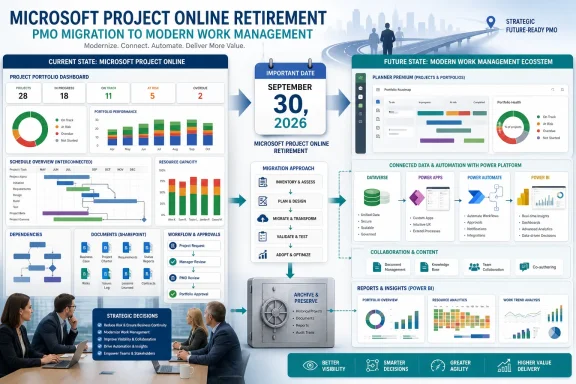
Microsoft Project Online will retire on September 30, 2026, leaving construction firms that use its Project Web App environment barely 10 weeks to choose a replacement, archive their data and test the workflows that keep bids, resource plans and master schedules moving. The deadline is real, but a newly circulated construction-industry warning gets a crucial part of the story wrong: Project for the web and the Project and Roadmap apps in Teams were retired on August 1, 2025, then folded into Microsoft Planner—not scheduled for a fall 2026 shutdown.
That distinction matters. The construction-focused article published by For Construction Pros frames the change as a forthcoming retirement of Microsoft Project broadly, and suggests Planner is inherently a lightweight task tool unable to support serious scheduling. Microsoft’s product documentation tells a more precise story. Project Online is the service ending this September; Project desktop, Project Server Subscription Edition and Planner remain available. Meanwhile, the former Project for the web capability set now lives inside Planner’s premium plans.
For IT teams supporting construction operations, this is not a semantic correction. It changes the inventory, the migration plan and the realistic set of options.
Microsoft announced the Project Online retirement in September 2025, stopped selling Project Online-only SKUs to new customers on October 1, 2025, and has set September 30, 2026 as the service’s final day. Existing tenants can continue to use Project Online, its integrations and Project Web App sites until then, according to Microsoft’s Planner team and Lifecycle documentation.
Project Online is the older cloud portfolio-and-project-management platform built around SharePoint Online and Project Web App. It is not the same product as the Windows desktop client that many schedulers still call “Microsoft Project,” nor is it Project for the web.
That leaves three groups with very different immediate exposure:
Planner premium plans retain a number of capabilities inherited from Project for the web, including advanced dependencies with lead and lag, baselines, critical-path views, roadmaps, goals and resource-related functionality. Microsoft’s current service description also lists limits of up to 3,000 tasks, 150 resources and 2,000 successor links per project for the former Project for the web architecture.
None of that automatically makes Planner a drop-in replacement for every construction schedule. A high-complexity commercial or civil program may have established requirements around cost-loaded schedules, contractual reporting, specialized progress measurement, formal change control, external integrations or portfolio controls that extend well beyond Planner’s premium feature set. But the correct conclusion is that firms need a requirements test—not that Planner is categorically only a marketing or IT task board.
Microsoft positions Planner as the cloud-forward option, including its Copilot and Project Manager agent investments. That is vendor positioning, not evidence that every contractor should move. Construction organizations should verify whether the specific Planner features they need are available in their tenant, their license tier and their geographic cloud environment before declaring the platform suitable or unsuitable.
Its complexity is real, as are the training and governance costs. A schedule maintained only by a planning department can indeed lag conditions on site, whether it runs in P6, Project Online, a desktop
The practical comparison should be more grounded. If a contractor is contractually required to submit P6 files, has an owner’s scheduling specification built around P6, or relies on features not available in Planner, replacing Project Online with P6—or maintaining P6 for specific work—may be the conservative and appropriate move. Conversely, a smaller general contractor may reasonably decide that a collaborative cloud platform with simpler field access outweighs the overhead of a heavyweight scheduling system.
The key is to separate a scheduling engine’s capabilities from the team’s ability to operate it. Modern interfaces and mobile updates can improve schedule participation, but they do not remove the need for disciplined logic, reliable actuals, schedule quality checks and accountable ownership.
The first task is identifying what is actually in use. It is common for a company to describe itself as a “Microsoft Project shop” while different teams use Project desktop, Project Online, Planner, Excel and contractor-provided P6 schedules simultaneously. Those systems have different risks and different retirement dates.
A useful transition sequence is straightforward:
There may be sound reasons to select a construction-specific cloud platform. Better field participation, subcontractor collaboration, look-ahead planning and accessible mobile workflows are credible goals. They should be judged through a pilot, commercial terms, data portability, security review, implementation support and the ability to meet schedule and contract requirements—not through an inflated reading of Microsoft’s retirement notices.
The immediate Microsoft news is narrower but more actionable: Project Online will disappear on September 30, 2026; Project itself is not being retired wholesale. Construction firms that still depend on Project Web App should use the remaining weeks to map their actual estate, protect their records and prove a replacement workflow against a live project before the service goes dark.
That distinction matters. The construction-focused article published by For Construction Pros frames the change as a forthcoming retirement of Microsoft Project broadly, and suggests Planner is inherently a lightweight task tool unable to support serious scheduling. Microsoft’s product documentation tells a more precise story. Project Online is the service ending this September; Project desktop, Project Server Subscription Edition and Planner remain available. Meanwhile, the former Project for the web capability set now lives inside Planner’s premium plans.
For IT teams supporting construction operations, this is not a semantic correction. It changes the inventory, the migration plan and the realistic set of options.
 The September deadline belongs to Project Online
Microsoft announced the Project Online retirement in September 2025, stopped selling Project Online-only SKUs to new customers on October 1, 2025, and has set September 30, 2026 as the service’s final day. Existing tenants can continue to use Project Online, its integrations and Project Web App sites until then, according to Microsoft’s Planner team and Lifecycle documentation.Project Online is the older cloud portfolio-and-project-management platform built around SharePoint Online and Project Web App. It is not the same product as the Windows desktop client that many schedulers still call “Microsoft Project,” nor is it Project for the web.
That leaves three groups with very different immediate exposure:
- Firms using Project Online or Project Web App must plan for a September 30 service retirement and should export data well before the cutoff.
- Firms using Project for the web have already experienced the endpoint change; their plans should be accessed through Microsoft Planner, assuming licenses and tenant rollout are in order.
- Firms working primarily in Project desktop with local
.mppfiles are not facing a September 30 application shutdown, though they may lose their Project Online connection if that service is part of their process.
Planner Is Not the Basic Board the Argument Assumes
The strongest claim in the construction article—that Planner cannot accommodate critical-path construction work—does not fit Microsoft’s current product lineup. It would have been more defensible if it referred only to the classic, basic Planner boards included with many Microsoft 365 subscriptions. But Microsoft has spent the past several years combining Planner, To Do and Project for the web into one Planner experience with both basic and premium plans.Planner premium plans retain a number of capabilities inherited from Project for the web, including advanced dependencies with lead and lag, baselines, critical-path views, roadmaps, goals and resource-related functionality. Microsoft’s current service description also lists limits of up to 3,000 tasks, 150 resources and 2,000 successor links per project for the former Project for the web architecture.
None of that automatically makes Planner a drop-in replacement for every construction schedule. A high-complexity commercial or civil program may have established requirements around cost-loaded schedules, contractual reporting, specialized progress measurement, formal change control, external integrations or portfolio controls that extend well beyond Planner’s premium feature set. But the correct conclusion is that firms need a requirements test—not that Planner is categorically only a marketing or IT task board.
Microsoft positions Planner as the cloud-forward option, including its Copilot and Project Manager agent investments. That is vendor positioning, not evidence that every contractor should move. Construction organizations should verify whether the specific Planner features they need are available in their tenant, their license tier and their geographic cloud environment before declaring the platform suitable or unsuitable.
Primavera P6 Is Not a Universal “Step Backward”
The article also presents Oracle Primavera P6 as an obsolete retreat that necessarily isolates field personnel. That is too broad. Primavera P6 remains deeply embedded in major construction, engineering, infrastructure and government project environments precisely because its scheduling, resource and portfolio functions can satisfy sophisticated owner and contract requirements.Its complexity is real, as are the training and governance costs. A schedule maintained only by a planning department can indeed lag conditions on site, whether it runs in P6, Project Online, a desktop
.mpp file or a new SaaS platform. But that is an operating-model failure, not a property unique to one legacy product.The practical comparison should be more grounded. If a contractor is contractually required to submit P6 files, has an owner’s scheduling specification built around P6, or relies on features not available in Planner, replacing Project Online with P6—or maintaining P6 for specific work—may be the conservative and appropriate move. Conversely, a smaller general contractor may reasonably decide that a collaborative cloud platform with simpler field access outweighs the overhead of a heavyweight scheduling system.
The key is to separate a scheduling engine’s capabilities from the team’s ability to operate it. Modern interfaces and mobile updates can improve schedule participation, but they do not remove the need for disciplined logic, reliable actuals, schedule quality checks and accountable ownership.
The Migration Work Is Bigger Than Copying Project Files
Project Online shops should treat this as a business-system retirement, not a software reinstall. In a construction environment, the real dependencies may include Power BI reports, Power Automate flows, SharePoint document sites, Teams channels, custom fields, timesheets, portfolio dashboards and project-specific reporting obligations.The first task is identifying what is actually in use. It is common for a company to describe itself as a “Microsoft Project shop” while different teams use Project desktop, Project Online, Planner, Excel and contractor-provided P6 schedules simultaneously. Those systems have different risks and different retirement dates.
A useful transition sequence is straightforward:
- Inventory Project Online Project Web App sites, active projects, inactive historical projects, customizations, integrations, license assignments and external users.
- Preserve an export of both project data and the reports, documents and business rules needed to interpret it later.
- Classify schedules by complexity, contract obligation, sensitivity and the need for resource, cost or portfolio controls.
- Run representative pilot projects in the proposed replacement rather than testing only a clean sample schedule.
- Decide how legacy schedules will be retained for claims, audits, closeout and long-term reference after Project Online is unavailable.
A Deadline, Not a Reason to Buy the First Replacement
The approaching September 30 date creates legitimate urgency, but it does not validate the notion that contractors face only three stark choices: Planner, P6 or an unnamed “next-generation” visual scheduler. The For Construction Pros piece is published around Planera’s argument for modern collaborative scheduling, and its prescription naturally favors that product category.There may be sound reasons to select a construction-specific cloud platform. Better field participation, subcontractor collaboration, look-ahead planning and accessible mobile workflows are credible goals. They should be judged through a pilot, commercial terms, data portability, security review, implementation support and the ability to meet schedule and contract requirements—not through an inflated reading of Microsoft’s retirement notices.
The immediate Microsoft news is narrower but more actionable: Project Online will disappear on September 30, 2026; Project itself is not being retired wholesale. Construction firms that still depend on Project Web App should use the remaining weeks to map their actual estate, protect their records and prove a replacement workflow against a live project before the service goes dark.
References
- Primary source: For Construction Pros
Published: 2026-07-18T12:00:00+00:00
Construction Firms Face Autumn Microsoft Project Retirement Deadline | For Construction Pros
With Microsoft Project set to retire in 2026, contractors are weighing new scheduling platforms and collaborative project management tools. www.forconstructionpros.com
- Official source: techcommunity.microsoft.com
- Official source: learn.microsoft.com
Project for the web - Microsoft Lifecycle | Microsoft Learn
Project for the web follows the Modern Lifecycle Policy.learn.microsoft.com - Official source: support.microsoft.com
Project for the web and Project Online | Microsoft Support
Learn about how Project for the web works with Project Online.support.microsoft.com