

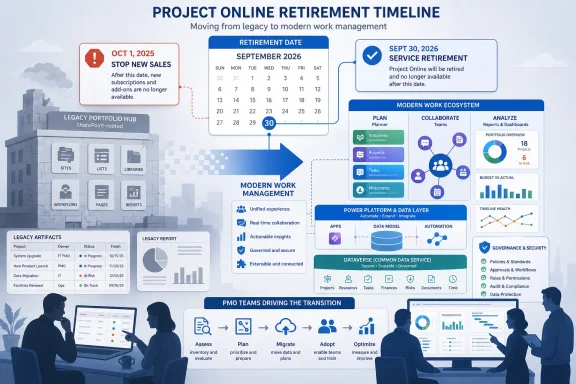
Microsoft Project Online will retire on September 30, 2026, with Microsoft ending sales of Project Online-only plans to new customers on October 1, 2025, leaving existing enterprise customers roughly one remaining planning cycle to move their project and portfolio management work elsewhere. This is not the death of Microsoft Project as a brand, nor the immediate disappearance of desktop scheduling. It is the end of a particular cloud-era compromise: SharePoint-rooted portfolio management delivered as a service. For PMO teams, that distinction matters because the migration is less about replacing a task list and more about preserving governance.
Project Online occupied an awkward but important place in the Microsoft stack. It was never the friendliest project management tool in the room, and it did not have the viral adoption patterns of Trello, Asana, Jira, or Planner. But for many enterprise PMOs, it became the place where formal project intake, portfolio scoring, resource planning, schedule governance, and executive reporting could be made to live inside the Microsoft 365 perimeter.
That history is why its retirement will feel uneven. A team that used Project Online as a web-accessible schedule repository may see the move as overdue cleanup. A PMO that built years of workflows, custom fields, Power BI dashboards, OData feeds, SharePoint-connected artifacts, and governance gates around it will see something closer to a platform extraction.
Microsoft’s message is that the future of work management lives in Planner, premium Planner capabilities, Microsoft 365 Copilot, and newer AI-assisted experiences such as Project Manager agent. Strategically, that makes sense. Project Online belongs to an older architecture, and Microsoft has spent years folding work management into Teams, Microsoft 365, Power Platform, and the broader Copilot narrative.
But product strategy and operating reality rarely move at the same speed. PMOs are not merely deciding where tasks should go next. They are deciding how much structure their organizations still need — and whether Microsoft’s newer work management model is mature enough to carry the same governance load.
A mature Project Online deployment is usually not a single application. It is a small ecosystem. There may be Project Web App sites, enterprise custom fields, lookup tables, security groups, workflows, demand management forms, resource pools, templates, timesheet patterns, reporting datasets, and integrations with finance, HR, ticketing, or document systems.
The end of new Project Online-only sales on October 1, 2025, was the first hard commercial signal. It told customers that Microsoft was no longer trying to expand this part of the portfolio. The 2026 retirement date is the second signal, and it is the one that makes inaction risky.
A PMO that begins planning in mid-2026 will not simply be “late.” It will be competing for the same consultants, internal administrators, Power Platform developers, reporting specialists, and change-management bandwidth as every other organization that waited. Migration waves create bottlenecks, and bottlenecks turn avoidable planning work into expensive triage.
The practical deadline is therefore not September 30, 2026. For any organization with serious Project Online customization, the practical deadline is the point at which there is still enough time to inventory the environment, decide what actually needs to survive, test the replacement, train users, migrate active work, archive historical data, and keep the business running while all of that happens.
Planner has become Microsoft’s central work management surface, and its direction is clear. Microsoft wants a simpler, more collaborative experience that spans basic task management, premium project capabilities, Teams integration, and AI assistance. For many users, that is a better daily interface than Project Online ever offered.
But PMO work is not just “work management.” It is governance management. It asks whether the organization is doing the right projects, whether scarce resources are being allocated intelligently, whether delivery risk is visible early enough to matter, and whether executives can compare initiatives using consistent data.
Project Online, for all its age, could be shaped into that kind of system. It supported portfolio constructs, enterprise fields, reporting patterns, demand management, and formalized processes that lightweight task tools often avoid because they make casual users unhappy. Planner’s challenge is to become more capable without becoming the very thing Microsoft is retiring.
This is where PMOs need to resist vendor shorthand. “Move to Planner” is not an implementation plan. It is a direction of travel. The actual decision is which combination of Planner, Power Platform, Dataverse, Power BI, Teams, SharePoint, third-party PPM tools, and possibly Project Server or desktop Project will reproduce the controls the organization still needs.
Desktop Project is still useful for detailed scheduling, dependency modeling, critical path analysis, and project managers who need a serious scheduling engine. It is not, by itself, a portfolio governance platform. A collection of
Project Server is a different answer. For some organizations, especially those with heavy governance requirements, regulatory constraints, or established on-premises patterns, it may remain part of the conversation. But moving from Project Online to server-based infrastructure is not a modernization strategy for everyone. It may preserve familiar capabilities while reintroducing operational overhead that many cloud-first IT teams spent the last decade trying to reduce.
That leaves most Microsoft 365-centered organizations in a middle zone. They do not want to run old-style infrastructure, but they also cannot pretend portfolio governance is the same thing as task collaboration. The retirement of Project Online forces them to confront that middle zone directly.
The harder migration is reporting. PMOs have spent years building executive dashboards, status templates, RAG indicators, portfolio rollups, capacity views, benefits-tracking reports, and steering committee packs. Some of that work is documented. Much of it lives in the heads of administrators, analysts, and veteran project managers who know which fields are trusted and which ones are political theater.
Project Online’s retirement threatens those reporting habits. If data lands in multiple systems without a common model, executives may lose the single portfolio view they have come to rely on. Worse, they may still receive dashboards that look familiar but are now stitched together from inconsistent sources.
This is the point at which PMOs should be brutally honest. Not every report deserves to survive. Some dashboards exist because the old system made them possible, not because anyone makes decisions from them. A forced migration is a rare opportunity to separate governance signals from reporting clutter.
The best migrations will treat reporting as a first-class design problem. They will define the portfolio data model before choosing every screen. They will decide which metadata is mandatory, which status fields are meaningful, which approvals need auditability, and which historical records must be preserved for trend analysis or compliance.
Project Online often enforced governance because it was difficult to avoid. That was both a strength and a flaw. Users complained about rigidity, but the PMO got standardized intake, common templates, resource categories, lifecycle stages, and reporting fields.
Modern Microsoft 365 tools are more flexible. Flexibility is useful, but it shifts responsibility from the product to the implementation. If every department creates its own Planner plans, Power Apps forms, SharePoint lists, and reporting conventions, the organization may gain adoption while losing comparability.
The PMO therefore needs to define the operating model before migration. Which projects require formal intake? Which initiatives can live as lightweight team plans? Which work belongs in agile delivery systems such as Azure DevOps or Jira? Which projects require budget tracking, executive approval, dependency mapping, or resource capacity forecasting?
Those are not software questions. They are governance questions. The software should follow the answers.
The next PPM architecture will be judged by the same standard. A replacement that integrates cleanly with Microsoft Entra ID, Teams, SharePoint, Power BI, Purview, and existing security policies will have an easier path through enterprise review than a standalone SaaS tool that creates another identity island and another data governance exception.
That does not mean every PMO should automatically stay inside Microsoft’s ecosystem. Some organizations may be better served by dedicated portfolio management platforms, especially if they need mature financial controls, scenario planning, program dependency management, or industry-specific workflows. But any external move must be honest about integration costs.
The Microsoft 365-native path has its own risks. It can become a low-code sprawl of Power Apps, Dataverse tables, Power Automate flows, SharePoint sites, Teams tabs, Planner plans, and Power BI datasets that only one internal architect understands. That is not modernization; it is technical debt with a newer license model.
A credible tenant-native replacement needs product discipline. It should have a defined data model, lifecycle ownership, support procedures, role-based permissions, retention policies, environment strategy, and a plan for what happens when the original builder leaves.
But AI is not a substitute for clean portfolio data. If project metadata is inconsistent, risk fields are optional, status narratives are performative, and resource assignments are incomplete, AI will merely accelerate the production of confident-looking noise. A Copilot can summarize chaos, but it cannot govern it.
This is where PMOs have leverage. The retirement of Project Online gives them a reason to modernize data hygiene. They can simplify templates, standardize status definitions, rationalize portfolio categories, and make sure the next system produces machine-readable signals rather than prose buried in steering decks.
The organizations that benefit most from AI-assisted project management will not be the ones that merely turn on the newest feature. They will be the ones that do the dull foundational work first. Governance becomes more important, not less, when machines start generating summaries executives may be tempted to trust.
That inventory should include active and inactive Project Web App sites, project templates, enterprise custom fields, lookup tables, resource pools, security groups, workflows, reports, integrations, archived projects, and undocumented workarounds. It should also identify which departments depend on Project Online directly and which merely consume its reports.
This exercise will expose uncomfortable truths. Some projects may be stale but still included in executive views. Some fields may be mandatory but meaningless. Some reports may depend on fragile queries that no one wants to touch. Some “enterprise standards” may exist only because a previous PMO leader preferred them.
That discomfort is useful. A migration that preserves everything also preserves the mess. A migration that challenges the estate can produce a smaller, clearer, more defensible operating model.
A departmental task plan does not need enterprise portfolio governance. A regulatory program, ERP rollout, data-center migration, product launch, or merger integration probably does. Treating both as the same class of work either overburdens small teams or undercontrols strategic initiatives.
The replacement model should therefore divide work into tiers. Lightweight collaboration can live in Planner or Teams-centered task experiences. Formal projects may need premium planning features, standardized templates, managed metadata, and Power BI reporting. Strategic portfolios may require deeper PPM tooling, financial governance, dependency management, and resource capacity planning.
This segmentation is not a retreat from standardization. It is a better form of standardization. The PMO defines which controls apply at each level, rather than forcing every piece of work through the same machinery.
The danger is that leadership frames the work as a narrow migration. If the goal is only to avoid service shutdown, the organization will rush toward the least disruptive replacement and recreate old habits in a new interface. That may keep the lights on, but it misses the larger opportunity.
The better framing is a PMO operating model refresh. Which governance gates still matter? Which approvals slow work without reducing risk? Which reports drive decisions? Which project categories need capacity planning? Which delivery methods should coexist? Which data must be standardized because the executive team actually uses it?
That kind of review is harder than a lift-and-shift, but it is also more valuable. Microsoft is removing the old platform. PMOs can use the moment to remove old friction.
 Microsoft Is Retiring the System PMOs Bent Around Their Own Processes
Project Online occupied an awkward but important place in the Microsoft stack. It was never the friendliest project management tool in the room, and it did not have the viral adoption patterns of Trello, Asana, Jira, or Planner. But for many enterprise PMOs, it became the place where formal project intake, portfolio scoring, resource planning, schedule governance, and executive reporting could be made to live inside the Microsoft 365 perimeter.That history is why its retirement will feel uneven. A team that used Project Online as a web-accessible schedule repository may see the move as overdue cleanup. A PMO that built years of workflows, custom fields, Power BI dashboards, OData feeds, SharePoint-connected artifacts, and governance gates around it will see something closer to a platform extraction.
Microsoft’s message is that the future of work management lives in Planner, premium Planner capabilities, Microsoft 365 Copilot, and newer AI-assisted experiences such as Project Manager agent. Strategically, that makes sense. Project Online belongs to an older architecture, and Microsoft has spent years folding work management into Teams, Microsoft 365, Power Platform, and the broader Copilot narrative.
But product strategy and operating reality rarely move at the same speed. PMOs are not merely deciding where tasks should go next. They are deciding how much structure their organizations still need — and whether Microsoft’s newer work management model is mature enough to carry the same governance load.
The Date Is Fixed, but the Real Deadline Arrives Earlier
The official retirement date is September 30, 2026. Until then, existing Project Online customers can continue using their current environments with support. That sounds generous until you remember what lives inside many Project Online tenants.A mature Project Online deployment is usually not a single application. It is a small ecosystem. There may be Project Web App sites, enterprise custom fields, lookup tables, security groups, workflows, demand management forms, resource pools, templates, timesheet patterns, reporting datasets, and integrations with finance, HR, ticketing, or document systems.
The end of new Project Online-only sales on October 1, 2025, was the first hard commercial signal. It told customers that Microsoft was no longer trying to expand this part of the portfolio. The 2026 retirement date is the second signal, and it is the one that makes inaction risky.
A PMO that begins planning in mid-2026 will not simply be “late.” It will be competing for the same consultants, internal administrators, Power Platform developers, reporting specialists, and change-management bandwidth as every other organization that waited. Migration waves create bottlenecks, and bottlenecks turn avoidable planning work into expensive triage.
The practical deadline is therefore not September 30, 2026. For any organization with serious Project Online customization, the practical deadline is the point at which there is still enough time to inventory the environment, decide what actually needs to survive, test the replacement, train users, migrate active work, archive historical data, and keep the business running while all of that happens.
Planner Is the Destination Microsoft Wants, Not a One-for-One Replacement
The most tempting mistake is to treat this as a branding shuffle: Project Online goes away, Planner becomes the new home, and the tenant carries on. That may be true for some teams, but it is not a safe assumption for a PMO.Planner has become Microsoft’s central work management surface, and its direction is clear. Microsoft wants a simpler, more collaborative experience that spans basic task management, premium project capabilities, Teams integration, and AI assistance. For many users, that is a better daily interface than Project Online ever offered.
But PMO work is not just “work management.” It is governance management. It asks whether the organization is doing the right projects, whether scarce resources are being allocated intelligently, whether delivery risk is visible early enough to matter, and whether executives can compare initiatives using consistent data.
Project Online, for all its age, could be shaped into that kind of system. It supported portfolio constructs, enterprise fields, reporting patterns, demand management, and formalized processes that lightweight task tools often avoid because they make casual users unhappy. Planner’s challenge is to become more capable without becoming the very thing Microsoft is retiring.
This is where PMOs need to resist vendor shorthand. “Move to Planner” is not an implementation plan. It is a direction of travel. The actual decision is which combination of Planner, Power Platform, Dataverse, Power BI, Teams, SharePoint, third-party PPM tools, and possibly Project Server or desktop Project will reproduce the controls the organization still needs.
Desktop Project and Project Server Survive, but They Do Not Solve the Cloud Gap
Microsoft is not retiring every product with the word Project in the name. The desktop Project application remains available and supported. Project Server Subscription Edition also remains a supported path for organizations that want server-based project management. Those distinctions matter because confusion around Microsoft’s project product family has been a recurring tax on customers for years.Desktop Project is still useful for detailed scheduling, dependency modeling, critical path analysis, and project managers who need a serious scheduling engine. It is not, by itself, a portfolio governance platform. A collection of
.mpp files can preserve scheduling sophistication while destroying enterprise visibility.Project Server is a different answer. For some organizations, especially those with heavy governance requirements, regulatory constraints, or established on-premises patterns, it may remain part of the conversation. But moving from Project Online to server-based infrastructure is not a modernization strategy for everyone. It may preserve familiar capabilities while reintroducing operational overhead that many cloud-first IT teams spent the last decade trying to reduce.
That leaves most Microsoft 365-centered organizations in a middle zone. They do not want to run old-style infrastructure, but they also cannot pretend portfolio governance is the same thing as task collaboration. The retirement of Project Online forces them to confront that middle zone directly.
The Hidden Migration Is Reporting, Not Tasks
The visible part of a project migration is usually the task plan. People ask whether tasks, milestones, owners, dates, and dependencies can be moved. That matters, but it is often the least strategic part of the problem.The harder migration is reporting. PMOs have spent years building executive dashboards, status templates, RAG indicators, portfolio rollups, capacity views, benefits-tracking reports, and steering committee packs. Some of that work is documented. Much of it lives in the heads of administrators, analysts, and veteran project managers who know which fields are trusted and which ones are political theater.
Project Online’s retirement threatens those reporting habits. If data lands in multiple systems without a common model, executives may lose the single portfolio view they have come to rely on. Worse, they may still receive dashboards that look familiar but are now stitched together from inconsistent sources.
This is the point at which PMOs should be brutally honest. Not every report deserves to survive. Some dashboards exist because the old system made them possible, not because anyone makes decisions from them. A forced migration is a rare opportunity to separate governance signals from reporting clutter.
The best migrations will treat reporting as a first-class design problem. They will define the portfolio data model before choosing every screen. They will decide which metadata is mandatory, which status fields are meaningful, which approvals need auditability, and which historical records must be preserved for trend analysis or compliance.
Governance Cannot Be Rebuilt After the Rollout
A common enterprise mistake is to deploy the replacement tool first and “add governance later.” That almost never works. Once teams learn the new system as a loose collaboration space, imposing structure after the fact feels like bureaucracy invading a place that was already working.Project Online often enforced governance because it was difficult to avoid. That was both a strength and a flaw. Users complained about rigidity, but the PMO got standardized intake, common templates, resource categories, lifecycle stages, and reporting fields.
Modern Microsoft 365 tools are more flexible. Flexibility is useful, but it shifts responsibility from the product to the implementation. If every department creates its own Planner plans, Power Apps forms, SharePoint lists, and reporting conventions, the organization may gain adoption while losing comparability.
The PMO therefore needs to define the operating model before migration. Which projects require formal intake? Which initiatives can live as lightweight team plans? Which work belongs in agile delivery systems such as Azure DevOps or Jira? Which projects require budget tracking, executive approval, dependency mapping, or resource capacity forecasting?
Those are not software questions. They are governance questions. The software should follow the answers.
The Microsoft 365 Tenant Becomes the New PPM Battleground
One reason Project Online lasted as long as it did is that it lived inside the Microsoft trust boundary. For many enterprises, that was decisive. Data residency, identity, permissions, compliance, and administrative control mattered as much as user experience.The next PPM architecture will be judged by the same standard. A replacement that integrates cleanly with Microsoft Entra ID, Teams, SharePoint, Power BI, Purview, and existing security policies will have an easier path through enterprise review than a standalone SaaS tool that creates another identity island and another data governance exception.
That does not mean every PMO should automatically stay inside Microsoft’s ecosystem. Some organizations may be better served by dedicated portfolio management platforms, especially if they need mature financial controls, scenario planning, program dependency management, or industry-specific workflows. But any external move must be honest about integration costs.
The Microsoft 365-native path has its own risks. It can become a low-code sprawl of Power Apps, Dataverse tables, Power Automate flows, SharePoint sites, Teams tabs, Planner plans, and Power BI datasets that only one internal architect understands. That is not modernization; it is technical debt with a newer license model.
A credible tenant-native replacement needs product discipline. It should have a defined data model, lifecycle ownership, support procedures, role-based permissions, retention policies, environment strategy, and a plan for what happens when the original builder leaves.
AI Does Not Remove the Need for PMO Discipline
Microsoft’s public direction around project management now sits inside the broader Copilot story. That is unsurprising. Every productivity product is being reframed around AI assistance, and project management is an obvious target. Summaries, risk detection, plan generation, status drafting, meeting follow-ups, and dependency suggestions are all plausible uses.But AI is not a substitute for clean portfolio data. If project metadata is inconsistent, risk fields are optional, status narratives are performative, and resource assignments are incomplete, AI will merely accelerate the production of confident-looking noise. A Copilot can summarize chaos, but it cannot govern it.
This is where PMOs have leverage. The retirement of Project Online gives them a reason to modernize data hygiene. They can simplify templates, standardize status definitions, rationalize portfolio categories, and make sure the next system produces machine-readable signals rather than prose buried in steering decks.
The organizations that benefit most from AI-assisted project management will not be the ones that merely turn on the newest feature. They will be the ones that do the dull foundational work first. Governance becomes more important, not less, when machines start generating summaries executives may be tempted to trust.
The Migration Plan Starts With an Uncomfortable Inventory
The first serious step is not tool selection. It is inventory. PMOs need to know what they actually have before deciding where it should go.That inventory should include active and inactive Project Web App sites, project templates, enterprise custom fields, lookup tables, resource pools, security groups, workflows, reports, integrations, archived projects, and undocumented workarounds. It should also identify which departments depend on Project Online directly and which merely consume its reports.
This exercise will expose uncomfortable truths. Some projects may be stale but still included in executive views. Some fields may be mandatory but meaningless. Some reports may depend on fragile queries that no one wants to touch. Some “enterprise standards” may exist only because a previous PMO leader preferred them.
That discomfort is useful. A migration that preserves everything also preserves the mess. A migration that challenges the estate can produce a smaller, clearer, more defensible operating model.
PMOs Must Split the Portfolio Before Choosing the Platform
The most important architectural decision is segmentation. Not all work deserves the same process, and not all projects need the same tooling.A departmental task plan does not need enterprise portfolio governance. A regulatory program, ERP rollout, data-center migration, product launch, or merger integration probably does. Treating both as the same class of work either overburdens small teams or undercontrols strategic initiatives.
The replacement model should therefore divide work into tiers. Lightweight collaboration can live in Planner or Teams-centered task experiences. Formal projects may need premium planning features, standardized templates, managed metadata, and Power BI reporting. Strategic portfolios may require deeper PPM tooling, financial governance, dependency management, and resource capacity planning.
This segmentation is not a retreat from standardization. It is a better form of standardization. The PMO defines which controls apply at each level, rather than forcing every piece of work through the same machinery.
The Smart Money Treats Retirement as a Governance Reset
Project Online’s retirement is a forcing function, and forcing functions are not always bad. Many PMOs have wanted to modernize for years but lacked the executive attention to do it. A fixed retirement date changes the conversation.The danger is that leadership frames the work as a narrow migration. If the goal is only to avoid service shutdown, the organization will rush toward the least disruptive replacement and recreate old habits in a new interface. That may keep the lights on, but it misses the larger opportunity.
The better framing is a PMO operating model refresh. Which governance gates still matter? Which approvals slow work without reducing risk? Which reports drive decisions? Which project categories need capacity planning? Which delivery methods should coexist? Which data must be standardized because the executive team actually uses it?
That kind of review is harder than a lift-and-shift, but it is also more valuable. Microsoft is removing the old platform. PMOs can use the moment to remove old friction.
The Deadline Rewards PMOs That Separate Schedules From Strategy
The organizations that handle this well will not be the ones that pick a replacement fastest. They will be the ones that understand what Project Online was really doing in their environment and decide deliberately which functions need to continue.- Existing Project Online customers can keep using the service until September 30, 2026, but complex PMO migrations should begin well before the final support window closes.
- The retirement does not eliminate Microsoft Project desktop or Project Server Subscription Edition, so scheduling and server-based options remain available for specific use cases.
- Planner is Microsoft’s strategic work management direction, but it should not be assumed to replace every portfolio governance pattern from Project Online without design work.
- Reporting, metadata, approvals, resource planning, and historical data preservation are likely to be more difficult than moving task lists.
- PMOs should classify work into lightweight tasks, managed projects, and strategic portfolios before choosing tools.
- The best migration projects will use the deadline to simplify governance rather than recreate every old field, workflow, and dashboard.
References
- Primary source: ustimesnow.com
Published: 2026-06-04T11:42:11.195417
What Microsoft Project Online Retirement Means for PMO Teams - US Times Now
The retirement of Microsoft Project Online represents a major shift for enterprise project management offices.www.ustimesnow.com - Official source: learn.microsoft.com
Project Online - Microsoft Lifecycle | Microsoft Learn
Project Online follows the Modern-Online Policy.learn.microsoft.com - Official source: support.microsoft.com
Frequently asked questions about Microsoft Planner | Microsoft Support
Get answers to the top questions about using Microsoft Planner.support.microsoft.com - Official source: techcommunity.microsoft.com
Microsoft Project Online is retiring: What you need to know | Microsoft Community Hub
After more than a decade of supporting project managers and teams around the world, Project Online will officially retire on September 30, 2026. We know... techcommunity.microsoft.com
- Related coverage: schneider.im
- Related coverage: proha.com
Microsoft Project Online expires 30.9.2026 - Proha Oy
Microsoft announced on 5 September 2025 that Microsoft Project Online will be retired on 30 September 2026, confirming that Microsoft’s solutions based on ageing technologies, such as Project Online and Project Server, will be the first products to be retired, with Project Online now being...proha.com
- Related coverage: project-online.com
Announcement - Project Online
Microsoft Project Online is Retiring September 30, 2026 Microsoft is retiring Project Online because its legacy architecture limits the delivery of modern AI-powered and deeply integrated experiences across Microsoft 365. Investment is shifting toward Planner, Microsoft 365 Copilot and the new... project-online.com
- Related coverage: ppmworks.com
- Related coverage: senseiprojectsolutions.com.au
- Related coverage: recktechdigital.com
wp-content | ReckTech Digital
Premium consulting platform specializing in digital transformation, operational optimization, and project delivery. recktechdigital.com
- Official source: download.microsoft.com
