

The 2026 free AI image-generator market is led by Microsoft Copilot Designer, Google Gemini, Leonardo AI, Tensor.art, Stable Diffusion, Adobe Firefly, Canva, Freepik, Craiyon, and Perchance, but the ranking changes sharply depending on whether users value image quality, commercial safety, creative control, privacy, or loose content restrictions. The useful story is not that free image generation has become abundant; it is that “free” now hides a maze of quotas, watermarks, licensing traps, and model churn. For Windows users, small businesses, creators, and IT admins, the best tool is no longer simply the one that makes the prettiest image. It is the one whose restrictions will not ambush your workflow after the first good result.
AI image generation has moved from novelty to default interface. A few years ago, a designer needed Photoshop skills, stock-photo subscriptions, a camera, or a freelancer to turn a rough visual idea into a usable asset. In 2026, a text prompt can produce a mockup, banner, concept illustration, product scene, or avatar in less time than it takes to find the old folder of brand templates.
That shift explains why rankings like VentureBurn’s matter. They are not just shopping guides for hobbyists. They are maps of a new software layer that increasingly sits between imagination and publishing, especially for people who are not professional illustrators.
But the list also exposes a recurring problem in the AI market: the headline capability is often clearer than the usage rights. “Free AI image generator” can mean a no-login toy, a corporate demo with strict filters, a limited creative suite, an open-source model you must run yourself, or a community model marketplace with wildly uneven safety and quality standards.
That is why the best ranking in 2026 has to judge tools on more than output quality. The practical winners are the products that balance three things at once: good images, predictable limits, and terms that match the way people actually intend to use the work.
Its biggest practical advantage is still text rendering. AI image models have historically been bad at lettering, signs, labels, posters, and UI-adjacent mockups. Copilot Designer, backed by DALL-E 3-era strengths, is often better than Stable Diffusion-derived tools when a flyer, presentation graphic, or mock product shot needs legible words inside the image.
That makes Copilot Designer unusually useful for office work. It is less a fantasy-art machine than a visual assistant for PowerPoint slides, social posts, internal communications, thumbnails, and quick campaign drafts. A marketing manager who needs a readable “Spring Sale” poster will usually get further here than in an open community model trained for anime or cinematic portraiture.
The catch is that Microsoft’s consumer terms and commercial-use positioning have not always been as simple as users assume. Some third-party comparisons treat Copilot output as plainly commercial-safe, but Microsoft’s consumer AI services have historically drawn distinctions between personal, business, and enterprise contexts. Anyone generating images for paid client work should read the current product terms rather than relying on a table in a roundup.
Copilot is also a filtered environment. That is not a defect for business users, schools, or family machines; it is part of the product. But it means Copilot is not the right tool for users who want edgy, adult, political, celebrity-adjacent, or otherwise high-risk imagery. Microsoft has chosen convenience and guardrails over artistic chaos.
The ranking’s claim that Gemini is one of the best free tools for photorealism is broadly plausible. Google’s image-generation work has consistently leaned toward realism, prompt adherence, and clean lighting. A simple prompt for a café, desk setup, street scene, or product photograph often comes back with fewer of the melted textures and surreal artifacts that defined earlier free image tools.
The limit story is less stable. Free image quotas in Gemini have changed repeatedly, and Google has been experimenting with more visible usage meters and tiered access. That matters because a “15 images per day” estimate may be true for one region, account type, model, or week, and wrong the next.
This is the new tax on free AI tools: users are not merely choosing software, they are choosing a moving allocation of cloud compute. Google can make the product feel unlimited one month and rationed the next, especially as newer image models become more expensive to serve. For casual use, that is tolerable. For production workflows, it is a warning.
Gemini’s other limitation is style. It can produce art, but it is not as tunable as Leonardo, Tensor.art, or a local Stable Diffusion stack. If the goal is a coherent fantasy character sheet, a repeatable comic style, or a controlled visual identity across dozens of outputs, Gemini’s simplicity becomes a ceiling.
Its free-token model is also a decent compromise. A daily allowance of roughly 150 tokens can go quickly if users select expensive settings, but it is enough for experimentation. For concept artists, game modders, YouTubers, indie developers, and small teams, Leonardo’s value is not just the number of images. It is the ability to test a look, iterate, and compare outputs across styles.
That control comes with complexity. A beginner who only wants “a nice image for a blog post” may find the token accounting and model selection less friendly than Copilot, Gemini, or Canva. Leonardo’s interface rewards users who are willing to learn how models differ and how settings affect cost, speed, and output.
Its commercial terms also require more attention than Adobe’s. Leonardo allows commercial use in many contexts, including free-plan experimentation, but the details can depend on account status, public versus private generation, model terms, and the nature of the image. That is not unusual in AI, but it is exactly why serious users should treat licensing as part of the workflow, not a checkbox at export time.
For creative control, Leonardo is probably the best hosted free option in the list. It is not as unrestricted as local Stable Diffusion and not as commercially conservative as Firefly, but it sits in the productive middle. That middle is where a lot of real creative work happens.
That makes it especially useful for users chasing a specific look. Community models can be trained around anime styles, game-art conventions, fashion photography, fantasy illustration, 3D renders, character archetypes, or obscure visual subcultures. A mainstream assistant may refuse a prompt or flatten it into house style; a community model may understand exactly what the user is aiming for.
The downside is consistency. Output quality can vary dramatically between models, and model pages are not always written for ordinary users. Some require technical prompting habits. Others depend on negative prompts, trigger words, aspect-ratio assumptions, or settings that are not obvious on first use.
The content-moderation issue is also not a footnote. Tensor.art’s looser model ecosystem makes it attractive to users looking for “uncensored” image generation, but that word covers a lot of ground. It may mean artistic freedom, adult content, horror, political satire, or material that creates legal and ethical problems quickly. Users should not confuse fewer filters with fewer consequences.
For Windows enthusiasts and power users, Tensor.art is interesting because it points toward the future of image generation as a community ecosystem rather than a single vendor service. But enterprises should be wary. A large model library is also a large compliance question.
The phrase “Stable Diffusion Online,” however, needs careful handling. There is no single canonical “online” version that defines the whole ecosystem. There are demos, hosted front ends, local apps, notebooks, marketplaces, and commercial wrappers. The best experience depends heavily on which interface the user chooses and whether they run models locally or through someone else’s server.
Local generation is where Stable Diffusion becomes truly different. Running a model on your own hardware changes the privacy equation. Prompts and outputs do not need to pass through a corporate moderation system or third-party gallery, and high-volume experimentation does not require burning daily credits. For artists, researchers, and tinkerers, that autonomy is the point.
The price is hardware and maintenance. A capable GPU, enough VRAM, model downloads, driver updates, Python environments, and UI tools like ComfyUI or Automatic1111 can turn a “free” generator into a weekend sysadmin project. Windows users comfortable with gaming rigs and driver troubleshooting may enjoy that; casual users will not.
Commercial use also depends on the specific model, not merely the Stable Diffusion label. Base models may permit broad use, while fine-tunes, LoRAs, or datasets can add restrictions or uncertainty. The open-source world gives users freedom, but it also transfers responsibility from the vendor to the operator.
Firefly’s free tier is not generous compared with community tools. A small monthly credit allocation can disappear quickly during real creative iteration. But Firefly is not trying to win the “most free images per day” contest. It is trying to win the boardroom argument.
That makes Firefly especially relevant for agencies, enterprise communications teams, and freelancers working with cautious clients. A lower image count may be acceptable if the output comes with clearer provenance, Content Credentials, and a vendor willing to stand behind its commercial positioning. In professional settings, certainty has economic value.
The artistic trade-off is real. Firefly can feel more conservative than Leonardo, Tensor.art, or Stable Diffusion. It is often strongest when asked for polished commercial assets rather than weird, chaotic, or highly stylized art. That is not accidental; the product is built for brand-safe production.
For WindowsForum readers who use Adobe apps professionally, Firefly is less a standalone toy than an embedded capability. Its real advantage appears when generation is part of Photoshop, Illustrator, Express, or a broader creative workflow. As with Microsoft and Google, the strongest moat is not the model alone. It is integration.
That matters more than enthusiasts sometimes admit. A small-business owner does not want an image model; they want an Instagram post, flyer, presentation slide, thumbnail, invitation, or ad creative. Canva collapses the journey from generation to layout, typography, resizing, brand kit, and export.
The free allowance is modest, but the workflow is unusually efficient. A user can generate an image, drop it into a template, adjust copy, resize for multiple platforms, and publish without opening another app. For non-designers, that integration is often more valuable than model superiority.
The limitation is control. Canva is designed to keep people moving, not to expose every model parameter. If users need repeatable character consistency, advanced inpainting, custom checkpoints, or experimental styles, Canva will feel shallow. But that is not the job it is applying for.
Canva’s commercial-use terms are generally friendly, but users should still remember that AI output is only one part of a Canva design. Templates, stock assets, fonts, and media elements may carry their own licensing conditions. The final asset is a bundle, and bundles deserve a terms check before client delivery.
That makes Freepik more practical than glamorous. Its best use is not necessarily high-concept art. It is producing images that sit naturally beside stock assets: business scenes, generic product contexts, editorial headers, website backgrounds, social graphics, and brand-adjacent visuals.
The free tier is constrained, and commercial rights on free plans may be limited. That makes Freepik less attractive for heavy production than Copilot, Gemini, Leonardo, or a local stack. But for users who need occasional stock-like images, it is a sensible addition to the toolbox.
Freepik also reflects a broader market trend. Stock sites cannot merely host human-shot and human-designed assets anymore. They must either integrate AI generation or watch users leave for prompt-based alternatives. In that sense, Freepik is not just competing with other generators; it is defending the old stock-media business by absorbing the new one.
For businesses, the appeal is consistency. AI images that look like stock may not excite artists, but they can be exactly what a landing page, newsletter, or brochure needs. Not every image has to be a masterpiece. Some just need to fit the layout and not look suspicious.
That makes Craiyon useful for brainstorming rather than production. It can help users explore prompt directions, generate silly concepts, or create rough visual ideas before moving to a more capable model. Its visible watermark and free-tier commercial restrictions make it a poor choice for serious publishing, but that does not make it useless.
Perchance occupies a different niche: no-account, permissive, often NSFW-capable generation. It appeals to users who value anonymity and low friction more than enterprise polish. In a market where every major platform wants an account, usage meter, safety policy, and subscription upgrade path, that simplicity feels almost rebellious.
The trade-offs are exactly what one would expect. Output quality can lag behind premium tools, commercial terms can be inconsistent, and users should not expect the reliability, support, or governance of a major vendor. Perchance is useful precisely because it is lightweight, but lightweight tools rarely offer heavyweight assurances.
These tools also reveal a cultural divide in AI image generation. Corporate platforms want to make image generation acceptable for offices, classrooms, and advertisers. Open and semi-open tools preserve the messy experimentation that made the category explode in the first place. Both forces are shaping 2026.
But “uncensored” is also a marketing term that can blur legal and ethical lines. A platform with fewer filters may still prohibit non-consensual sexual imagery, depictions of real people, minors, harassment, or other abusive content. Local tools may lack platform oversight, but users remain subject to law, employment rules, client contracts, and basic decency.
For IT administrators, this matters because image generators are now workplace tools. A permissive web app on an unmanaged browser can create data-loss, HR, and compliance problems quickly. The same tool that lets an artist explore an edgy style can let an employee generate material that should never touch a corporate network.
That is why “best uncensored generator” is not the same as “best generator.” Tensor.art, Perchance, and local Stable Diffusion may be the right tools for some private creative use cases. They are usually the wrong default for schools, managed offices, regulated businesses, or shared family devices.
The mature stance is not to pretend that filters are always good or always bad. Filters reduce risk and suppress some legitimate work. Fewer filters expand creative control and increase user responsibility. The correct choice depends on context, not ideology.
The more important distinction is between visible watermarks, invisible metadata, and provenance systems such as Content Credentials. Adobe and Microsoft-style metadata is not there to ruin the image; it is there to mark how the asset was made. That may become increasingly important as platforms, clients, publishers, and regulators ask whether synthetic content should be labeled.
For creators, this cuts both ways. Invisible credentials can help prove that a workflow was legitimate and tool-based rather than stolen from a specific artist. They can also make some users nervous about traceability, especially when they want private experimentation.
Craiyon’s visible watermark is still a practical limitation. It signals “free-tier output” immediately and complicates reuse. By contrast, no visible watermark from Gemini, Canva, Copilot, or Perchance can make outputs easier to place in designs, but it does not answer the deeper licensing question.
The next fight will not be over whether an AI image has a corner logo. It will be over whether platforms, browsers, marketplaces, and operating systems preserve or strip provenance metadata. For Windows users, that eventually becomes a file-management and trust problem, not merely an art problem.
For readable text and office-friendly graphics, Copilot Designer is hard to beat. Its integration with Microsoft identity and its DALL-E lineage make it a strong default for ordinary users who need useful images quickly. But its filters and licensing details make it less universal than boosters imply.
For realism, Gemini is the obvious contender. It is excellent for images that should look photographed rather than illustrated. Its weakness is that Google’s limits and model access can shift, which makes it harder to treat as a predictable production engine.
For creative control on the web, Leonardo is the strongest general recommendation. It gives users model variety without forcing them to run a local stack. For maximum control, privacy, and volume, Stable Diffusion remains the serious user’s answer, provided the user can tolerate the setup burden.
For commercial safety, Firefly is the cleanest answer. For no-friction design, Canva wins. For stock-like imagery, Freepik is practical. For unlimited play, Craiyon is still useful. For permissive, no-login generation, Perchance and parts of Tensor.art serve a market the big vendors deliberately avoid.
A Windows user might draft office graphics in Copilot, create realistic lifestyle images in Gemini, explore a visual style in Leonardo, clean up commercial assets in Firefly, assemble the final deliverable in Canva, and keep Stable Diffusion installed locally for private or high-volume experiments. That is not inefficiency. It is the emerging shape of free creative software.
The risk is fragmentation. Each tool has its own account system, limits, rights language, safety policy, export formats, and retention practices. The more tools a user adopts, the more important it becomes to track where each asset came from and what terms applied at creation.
That is where IT professionals should pay attention. AI image generation is already shadow software in many organizations. Employees will use whatever free tool gets the job done unless companies provide approved alternatives and clear policies. Blocking everything is unrealistic; ignoring everything is negligent.
The better answer is a tiered policy. Permit low-risk tools for internal drafts, require approved platforms for external publication, mandate rights review for client work, and restrict uncensored or no-login generators on managed devices. AI image generation is now common enough to deserve governance, not panic.
The free AI image-generator market in 2026 is no longer a race to produce the most astonishing demo image; it is a test of whether vendors can turn synthetic media into dependable infrastructure. The next phase will be less about who makes the prettiest café at golden hour and more about who can provide stable limits, clear rights, trustworthy provenance, and workflows that survive contact with real users. For WindowsForum readers, the best generator is not the one that wins a screenshot contest today. It is the one whose trade-offs you still understand when the image leaves the prompt box and enters the world.
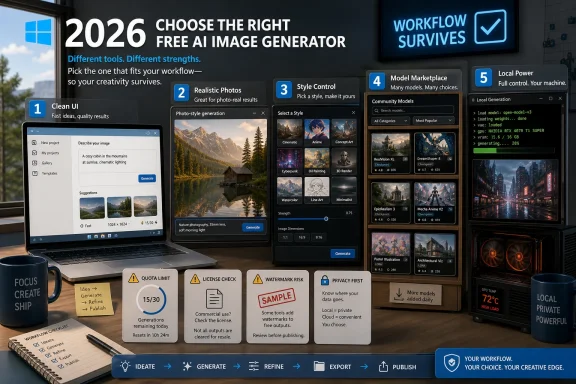 The Free Tier Became the New Creative Operating System
AI image generation has moved from novelty to default interface. A few years ago, a designer needed Photoshop skills, stock-photo subscriptions, a camera, or a freelancer to turn a rough visual idea into a usable asset. In 2026, a text prompt can produce a mockup, banner, concept illustration, product scene, or avatar in less time than it takes to find the old folder of brand templates.That shift explains why rankings like VentureBurn’s matter. They are not just shopping guides for hobbyists. They are maps of a new software layer that increasingly sits between imagination and publishing, especially for people who are not professional illustrators.
But the list also exposes a recurring problem in the AI market: the headline capability is often clearer than the usage rights. “Free AI image generator” can mean a no-login toy, a corporate demo with strict filters, a limited creative suite, an open-source model you must run yourself, or a community model marketplace with wildly uneven safety and quality standards.
That is why the best ranking in 2026 has to judge tools on more than output quality. The practical winners are the products that balance three things at once: good images, predictable limits, and terms that match the way people actually intend to use the work.
Microsoft Still Owns the Easiest Door Into DALL-E Quality
Microsoft Copilot Designer remains the cleanest mainstream entry point for users who want DALL-E-style image quality without paying for a dedicated subscription. For many WindowsForum readers, this is the default option because it is already tied to the Microsoft account ecosystem. You do not need to understand model names, checkpoints, samplers, LoRAs, or prompt weights. You type, wait, revise, and download.Its biggest practical advantage is still text rendering. AI image models have historically been bad at lettering, signs, labels, posters, and UI-adjacent mockups. Copilot Designer, backed by DALL-E 3-era strengths, is often better than Stable Diffusion-derived tools when a flyer, presentation graphic, or mock product shot needs legible words inside the image.
That makes Copilot Designer unusually useful for office work. It is less a fantasy-art machine than a visual assistant for PowerPoint slides, social posts, internal communications, thumbnails, and quick campaign drafts. A marketing manager who needs a readable “Spring Sale” poster will usually get further here than in an open community model trained for anime or cinematic portraiture.
The catch is that Microsoft’s consumer terms and commercial-use positioning have not always been as simple as users assume. Some third-party comparisons treat Copilot output as plainly commercial-safe, but Microsoft’s consumer AI services have historically drawn distinctions between personal, business, and enterprise contexts. Anyone generating images for paid client work should read the current product terms rather than relying on a table in a roundup.
Copilot is also a filtered environment. That is not a defect for business users, schools, or family machines; it is part of the product. But it means Copilot is not the right tool for users who want edgy, adult, political, celebrity-adjacent, or otherwise high-risk imagery. Microsoft has chosen convenience and guardrails over artistic chaos.
Gemini’s Strength Is Realism, but Google Keeps Moving the Meter
Google Gemini is the strongest free candidate for users who want realistic-looking images without learning a specialist image platform. Its image models have become especially good at everyday scenes: lifestyle photos, interiors, food, travel imagery, product environments, and “this could plausibly be a real photograph” compositions. For users already living in Google’s ecosystem, that makes Gemini feel less like a separate app and more like another search-and-create surface.The ranking’s claim that Gemini is one of the best free tools for photorealism is broadly plausible. Google’s image-generation work has consistently leaned toward realism, prompt adherence, and clean lighting. A simple prompt for a café, desk setup, street scene, or product photograph often comes back with fewer of the melted textures and surreal artifacts that defined earlier free image tools.
The limit story is less stable. Free image quotas in Gemini have changed repeatedly, and Google has been experimenting with more visible usage meters and tiered access. That matters because a “15 images per day” estimate may be true for one region, account type, model, or week, and wrong the next.
This is the new tax on free AI tools: users are not merely choosing software, they are choosing a moving allocation of cloud compute. Google can make the product feel unlimited one month and rationed the next, especially as newer image models become more expensive to serve. For casual use, that is tolerable. For production workflows, it is a warning.
Gemini’s other limitation is style. It can produce art, but it is not as tunable as Leonardo, Tensor.art, or a local Stable Diffusion stack. If the goal is a coherent fantasy character sheet, a repeatable comic style, or a controlled visual identity across dozens of outputs, Gemini’s simplicity becomes a ceiling.
Leonardo AI Is Where Casual Prompting Turns Into Art Direction
Leonardo AI earns its place because it gives users something the big assistants often hide: choice. Instead of one general-purpose image model behind a chat box, Leonardo exposes multiple models and workflows aimed at different aesthetics. That makes it feel less like asking a chatbot for a picture and more like operating a lightweight creative studio.Its free-token model is also a decent compromise. A daily allowance of roughly 150 tokens can go quickly if users select expensive settings, but it is enough for experimentation. For concept artists, game modders, YouTubers, indie developers, and small teams, Leonardo’s value is not just the number of images. It is the ability to test a look, iterate, and compare outputs across styles.
That control comes with complexity. A beginner who only wants “a nice image for a blog post” may find the token accounting and model selection less friendly than Copilot, Gemini, or Canva. Leonardo’s interface rewards users who are willing to learn how models differ and how settings affect cost, speed, and output.
Its commercial terms also require more attention than Adobe’s. Leonardo allows commercial use in many contexts, including free-plan experimentation, but the details can depend on account status, public versus private generation, model terms, and the nature of the image. That is not unusual in AI, but it is exactly why serious users should treat licensing as part of the workflow, not a checkbox at export time.
For creative control, Leonardo is probably the best hosted free option in the list. It is not as unrestricted as local Stable Diffusion and not as commercially conservative as Firefly, but it sits in the productive middle. That middle is where a lot of real creative work happens.
Tensor.art Shows the Power and Mess of Community Models
Tensor.art represents the part of AI image generation that the big platforms cannot fully absorb: community-trained models, niche aesthetics, and looser norms. It is attractive because it gives users access to a large library of models based on Flux, SDXL, and other architectures, often with far fewer creative restrictions than corporate tools. If Copilot and Gemini are polished shopping malls, Tensor.art is a sprawling maker market.That makes it especially useful for users chasing a specific look. Community models can be trained around anime styles, game-art conventions, fashion photography, fantasy illustration, 3D renders, character archetypes, or obscure visual subcultures. A mainstream assistant may refuse a prompt or flatten it into house style; a community model may understand exactly what the user is aiming for.
The downside is consistency. Output quality can vary dramatically between models, and model pages are not always written for ordinary users. Some require technical prompting habits. Others depend on negative prompts, trigger words, aspect-ratio assumptions, or settings that are not obvious on first use.
The content-moderation issue is also not a footnote. Tensor.art’s looser model ecosystem makes it attractive to users looking for “uncensored” image generation, but that word covers a lot of ground. It may mean artistic freedom, adult content, horror, political satire, or material that creates legal and ethical problems quickly. Users should not confuse fewer filters with fewer consequences.
For Windows enthusiasts and power users, Tensor.art is interesting because it points toward the future of image generation as a community ecosystem rather than a single vendor service. But enterprises should be wary. A large model library is also a large compliance question.
Stable Diffusion Remains the Escape Hatch for People Who Want Control
Stable Diffusion is not just another entry on the list. It is the foundation beneath much of the open image-generation world. If users want local generation, privacy, model swapping, no platform queue, no visible watermark, and deep control over the pipeline, Stable Diffusion remains the obvious place to start.The phrase “Stable Diffusion Online,” however, needs careful handling. There is no single canonical “online” version that defines the whole ecosystem. There are demos, hosted front ends, local apps, notebooks, marketplaces, and commercial wrappers. The best experience depends heavily on which interface the user chooses and whether they run models locally or through someone else’s server.
Local generation is where Stable Diffusion becomes truly different. Running a model on your own hardware changes the privacy equation. Prompts and outputs do not need to pass through a corporate moderation system or third-party gallery, and high-volume experimentation does not require burning daily credits. For artists, researchers, and tinkerers, that autonomy is the point.
The price is hardware and maintenance. A capable GPU, enough VRAM, model downloads, driver updates, Python environments, and UI tools like ComfyUI or Automatic1111 can turn a “free” generator into a weekend sysadmin project. Windows users comfortable with gaming rigs and driver troubleshooting may enjoy that; casual users will not.
Commercial use also depends on the specific model, not merely the Stable Diffusion label. Base models may permit broad use, while fine-tunes, LoRAs, or datasets can add restrictions or uncertainty. The open-source world gives users freedom, but it also transfers responsibility from the vendor to the operator.
Adobe Firefly Is the Tool for People Who Fear the Invoice After the Image
Adobe Firefly is the safest recommendation for commercial professionals who care less about pushing boundaries and more about staying out of copyright trouble. Adobe’s pitch has been unusually clear: Firefly is designed for commercially safe generation, trained on licensed and permitted material, and integrated into Adobe’s broader creative ecosystem. That message matters to businesses that cannot afford to treat intellectual-property risk as a hobbyist debate.Firefly’s free tier is not generous compared with community tools. A small monthly credit allocation can disappear quickly during real creative iteration. But Firefly is not trying to win the “most free images per day” contest. It is trying to win the boardroom argument.
That makes Firefly especially relevant for agencies, enterprise communications teams, and freelancers working with cautious clients. A lower image count may be acceptable if the output comes with clearer provenance, Content Credentials, and a vendor willing to stand behind its commercial positioning. In professional settings, certainty has economic value.
The artistic trade-off is real. Firefly can feel more conservative than Leonardo, Tensor.art, or Stable Diffusion. It is often strongest when asked for polished commercial assets rather than weird, chaotic, or highly stylized art. That is not accidental; the product is built for brand-safe production.
For WindowsForum readers who use Adobe apps professionally, Firefly is less a standalone toy than an embedded capability. Its real advantage appears when generation is part of Photoshop, Illustrator, Express, or a broader creative workflow. As with Microsoft and Google, the strongest moat is not the model alone. It is integration.
Canva Wins by Making the Image Generator Disappear
Canva’s Magic Media is not the most powerful AI image generator in the ranking. It is not the most flexible, the most realistic, the most open, or the most permissive. Its advantage is that it sits exactly where many users need the image to end up: inside a design.That matters more than enthusiasts sometimes admit. A small-business owner does not want an image model; they want an Instagram post, flyer, presentation slide, thumbnail, invitation, or ad creative. Canva collapses the journey from generation to layout, typography, resizing, brand kit, and export.
The free allowance is modest, but the workflow is unusually efficient. A user can generate an image, drop it into a template, adjust copy, resize for multiple platforms, and publish without opening another app. For non-designers, that integration is often more valuable than model superiority.
The limitation is control. Canva is designed to keep people moving, not to expose every model parameter. If users need repeatable character consistency, advanced inpainting, custom checkpoints, or experimental styles, Canva will feel shallow. But that is not the job it is applying for.
Canva’s commercial-use terms are generally friendly, but users should still remember that AI output is only one part of a Canva design. Templates, stock assets, fonts, and media elements may carry their own licensing conditions. The final asset is a bundle, and bundles deserve a terms check before client delivery.
Freepik Turns AI Into Stock Photography’s Next Tab
Freepik’s AI image generator is interesting because it does not ask users to abandon the stock-media mindset. It extends it. For people who already search for stock photos, vectors, icons, and editorial-style imagery, AI generation becomes another way to fill a visual gap when the library does not have the exact asset.That makes Freepik more practical than glamorous. Its best use is not necessarily high-concept art. It is producing images that sit naturally beside stock assets: business scenes, generic product contexts, editorial headers, website backgrounds, social graphics, and brand-adjacent visuals.
The free tier is constrained, and commercial rights on free plans may be limited. That makes Freepik less attractive for heavy production than Copilot, Gemini, Leonardo, or a local stack. But for users who need occasional stock-like images, it is a sensible addition to the toolbox.
Freepik also reflects a broader market trend. Stock sites cannot merely host human-shot and human-designed assets anymore. They must either integrate AI generation or watch users leave for prompt-based alternatives. In that sense, Freepik is not just competing with other generators; it is defending the old stock-media business by absorbing the new one.
For businesses, the appeal is consistency. AI images that look like stock may not excite artists, but they can be exactly what a landing page, newsletter, or brochure needs. Not every image has to be a masterpiece. Some just need to fit the layout and not look suspicious.
Craiyon and Perchance Keep the Weird Old Internet Alive
Craiyon survives because unlimited, low-friction generation still has value. It is slower, lower-resolution, and less polished than the major platforms, but it is approachable in the way early web tools were approachable. You open it, type something, and see what happens.That makes Craiyon useful for brainstorming rather than production. It can help users explore prompt directions, generate silly concepts, or create rough visual ideas before moving to a more capable model. Its visible watermark and free-tier commercial restrictions make it a poor choice for serious publishing, but that does not make it useless.
Perchance occupies a different niche: no-account, permissive, often NSFW-capable generation. It appeals to users who value anonymity and low friction more than enterprise polish. In a market where every major platform wants an account, usage meter, safety policy, and subscription upgrade path, that simplicity feels almost rebellious.
The trade-offs are exactly what one would expect. Output quality can lag behind premium tools, commercial terms can be inconsistent, and users should not expect the reliability, support, or governance of a major vendor. Perchance is useful precisely because it is lightweight, but lightweight tools rarely offer heavyweight assurances.
These tools also reveal a cultural divide in AI image generation. Corporate platforms want to make image generation acceptable for offices, classrooms, and advertisers. Open and semi-open tools preserve the messy experimentation that made the category explode in the first place. Both forces are shaping 2026.
“Uncensored” Is a Feature Until It Becomes a Liability
The VentureBurn list explicitly includes “uncensored” and NSFW-friendly tools, which is where any serious ranking has to slow down. There is a legitimate demand for adult creative work, horror, political art, experimental bodies, and themes that mainstream platforms block too aggressively. Artists have always pushed boundaries, and AI tools are now part of that practice.But “uncensored” is also a marketing term that can blur legal and ethical lines. A platform with fewer filters may still prohibit non-consensual sexual imagery, depictions of real people, minors, harassment, or other abusive content. Local tools may lack platform oversight, but users remain subject to law, employment rules, client contracts, and basic decency.
For IT administrators, this matters because image generators are now workplace tools. A permissive web app on an unmanaged browser can create data-loss, HR, and compliance problems quickly. The same tool that lets an artist explore an edgy style can let an employee generate material that should never touch a corporate network.
That is why “best uncensored generator” is not the same as “best generator.” Tensor.art, Perchance, and local Stable Diffusion may be the right tools for some private creative use cases. They are usually the wrong default for schools, managed offices, regulated businesses, or shared family devices.
The mature stance is not to pretend that filters are always good or always bad. Filters reduce risk and suppress some legitimate work. Fewer filters expand creative control and increase user responsibility. The correct choice depends on context, not ideology.
Watermarks Are Less Important Than Provenance
Visible watermarks used to be the easiest way to judge whether a free tool was usable. If the image had a logo stamped on it, it was unsuitable for most professional work. If it did not, users assumed they were clear. In 2026, that assumption is obsolete.The more important distinction is between visible watermarks, invisible metadata, and provenance systems such as Content Credentials. Adobe and Microsoft-style metadata is not there to ruin the image; it is there to mark how the asset was made. That may become increasingly important as platforms, clients, publishers, and regulators ask whether synthetic content should be labeled.
For creators, this cuts both ways. Invisible credentials can help prove that a workflow was legitimate and tool-based rather than stolen from a specific artist. They can also make some users nervous about traceability, especially when they want private experimentation.
Craiyon’s visible watermark is still a practical limitation. It signals “free-tier output” immediately and complicates reuse. By contrast, no visible watermark from Gemini, Canva, Copilot, or Perchance can make outputs easier to place in designs, but it does not answer the deeper licensing question.
The next fight will not be over whether an AI image has a corner logo. It will be over whether platforms, browsers, marketplaces, and operating systems preserve or strip provenance metadata. For Windows users, that eventually becomes a file-management and trust problem, not merely an art problem.
The Ranking Changes When You Ask What the Image Is For
There is no single best free AI image generator in 2026 because “image” now covers too many jobs. A YouTube thumbnail, a product mockup, a fantasy character, a stock-style business photo, a private adult illustration, and a legally conservative ad campaign do not belong to the same category simply because they are all pixels.For readable text and office-friendly graphics, Copilot Designer is hard to beat. Its integration with Microsoft identity and its DALL-E lineage make it a strong default for ordinary users who need useful images quickly. But its filters and licensing details make it less universal than boosters imply.
For realism, Gemini is the obvious contender. It is excellent for images that should look photographed rather than illustrated. Its weakness is that Google’s limits and model access can shift, which makes it harder to treat as a predictable production engine.
For creative control on the web, Leonardo is the strongest general recommendation. It gives users model variety without forcing them to run a local stack. For maximum control, privacy, and volume, Stable Diffusion remains the serious user’s answer, provided the user can tolerate the setup burden.
For commercial safety, Firefly is the cleanest answer. For no-friction design, Canva wins. For stock-like imagery, Freepik is practical. For unlimited play, Craiyon is still useful. For permissive, no-login generation, Perchance and parts of Tensor.art serve a market the big vendors deliberately avoid.
The Real 2026 Ranking Is a Stack, Not a Crown
The mistake is treating these tools as if users must choose one forever. A sensible 2026 creative workflow may use several free generators, each for the job it handles best. That is especially true for small teams that cannot justify paid plans across every creative category.A Windows user might draft office graphics in Copilot, create realistic lifestyle images in Gemini, explore a visual style in Leonardo, clean up commercial assets in Firefly, assemble the final deliverable in Canva, and keep Stable Diffusion installed locally for private or high-volume experiments. That is not inefficiency. It is the emerging shape of free creative software.
The risk is fragmentation. Each tool has its own account system, limits, rights language, safety policy, export formats, and retention practices. The more tools a user adopts, the more important it becomes to track where each asset came from and what terms applied at creation.
That is where IT professionals should pay attention. AI image generation is already shadow software in many organizations. Employees will use whatever free tool gets the job done unless companies provide approved alternatives and clear policies. Blocking everything is unrealistic; ignoring everything is negligent.
The better answer is a tiered policy. Permit low-risk tools for internal drafts, require approved platforms for external publication, mandate rights review for client work, and restrict uncensored or no-login generators on managed devices. AI image generation is now common enough to deserve governance, not panic.
The Free Lunch Now Comes With a Usage Meter
The concrete lesson from this ranking is that free AI image generation is real, useful, and uneven. Users can get impressive results without paying, but they should not mistake free access for unlimited rights or stable availability.- Copilot Designer is the best free starting point for Microsoft users who need readable text, presentation graphics, and quick business-friendly visuals.
- Gemini is the strongest mainstream choice for photorealistic scenes, but its free limits and model access should be treated as changeable.
- Leonardo AI offers the best hosted balance of model variety, style control, and free experimentation for creative users.
- Stable Diffusion is the best option for privacy, volume, and deep control, but only for users willing to manage local tools and model licensing.
- Adobe Firefly is the safest free-tier option for cautious commercial work, even though its credit allowance is comparatively small.
- Tensor.art and Perchance are powerful for permissive creative exploration, but they require more judgment around legality, workplace use, and output rights.
The free AI image-generator market in 2026 is no longer a race to produce the most astonishing demo image; it is a test of whether vendors can turn synthetic media into dependable infrastructure. The next phase will be less about who makes the prettiest café at golden hour and more about who can provide stable limits, clear rights, trustworthy provenance, and workflows that survive contact with real users. For WindowsForum readers, the best generator is not the one that wins a screenshot contest today. It is the one whose trade-offs you still understand when the image leaves the prompt box and enters the world.
References
- Primary source: Ventureburn
Published: 2026-05-25T02:50:08.019734
Free AI Image Generators (2026): Top 10 Tools Ranked
The 10 best free AI image generators in 2026, ranked and tested. Compare free limits, models, watermarks, and commercial rights.ventureburn.com - Related coverage: morphed.app
Bing AI Image Generator: Honest Review + Better Options (2026) | Morphed
We tested Bing Image Creator (DALL-E 3) against dedicated AI tools. Real boost limits, content filter behavior, resolution caps, and when to switch. morphed.app
- Official source: microsoft.com
AI Art Improvements with DALL-E 3 | Microsoft Copilot
Learn how to generate AI art using Copilot with integrated DALL-E 3. Explore the ways DALL-E 3 elevates creating AI art directly in Copilot.www.microsoft.com - Related coverage: aifreeapi.com
Gemini Image Free Tier in 2026: Current Daily Limits for App vs API - Verified March 2026 Gemini app vs API limits | AI Free API
Gemini still offers free image generation in the app, but the 2026 answer is no longer the old '100 images per day' or '500 free API requests' story. This guide separates the current Gemini app caps from the current Gemini API pricing tables, explains why older quota pages...www.aifreeapi.com - Related coverage: blog.laozhang.ai
Gemini Image Generation Free Limits 2026: Every Model, Every Tier, Every Trick to Maximize Your Quota | LaoZhang AI Blog
Every Gemini image generation free limit explained — from the Gemini App's 100 images/day to the API's 500 RPD and AI Studio's dynamic 500-1,000/day quota. Learn the channel-stacking strategy that gets you 1,600+ free images daily, plus what changed after December 2025 and when to...blog.laozhang.ai - Related coverage: toolcolumn.com
Leonardo.ai Free Tier Limits: 150 Tokens, Rights and API | ToolColumn
Leonardo.ai Free explained: 150 Fast Tokens per day, public generations, commercial-use rights, token reset, API separation, and upgrade triggers.www.toolcolumn.com
- Related coverage: stacksheriff.com
Leonardo AI Free Plan 2026: 150 Tokens/Day Explained
Leonardo AI free plan gives 150 tokens/day. All images public, no private mode. What's included, what's locked, and when to upgrade. Checked May 2026. stacksheriff.com
- Related coverage: techradar.com
OpenAI and Google quietly limit free Sora, Nano Banana Pro and Gemini 3 Pro use – here’s what it means for you | TechRadar
You get less daily prompts and video generations nowwww.techradar.com - Related coverage: androidcentral.com
Google breaks down Gemini’s daily limits for prompts and image creation | Android Central
The vague language is gone—now you know exactly what you get.www.androidcentral.com
