- Thread Author
- #1
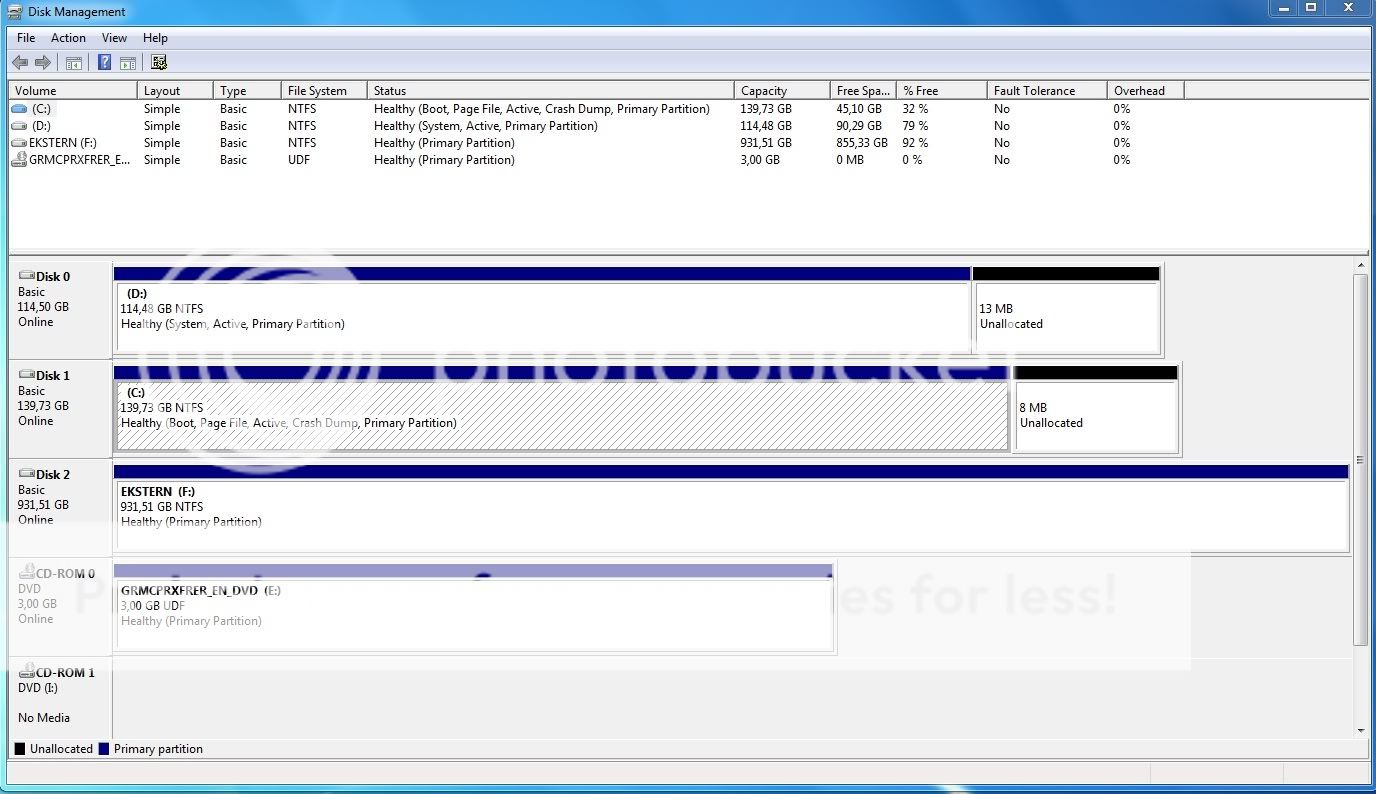
Right, i just got my hands on a 64 bit Win 7. In confusion about device numbering i accidently installed it on my secondary harddrive D: as my logic told me that Device 0 would be C: . Realizing my mistake, i installed it on C:, which contained an old Danish 32bit vista, which i removed through deleting the windows.old folder.
But when i try to boot i get a
"\windows\system32\winload.exe
Status: 0xc0000428
Failed to confirm the digital signature of the file. (translation from Danish)"
It suggests me to use the installation CD and do a repair, tried it but didn't change anything. Also did the memory diagnostics and chkdsk on the C: in addition to the "boot without forcing digital signature" or whatever it's called. Without any effect at all what so ever, and no bad sectors.
However if i put in the win7 dvd and restart it, it boots without any hassle, besides asking me which windows 7 i'd like to boot.
I've tried deleting the windows 7 folder on the D: drive, which just gives me the error message "you require permission from TrustedInstaller to make changes to this folder", i've tried giving my self admin rights through a commandoprompt, but that didn't change anything either. I can't change the admin rights on D: and it won't let me format it.
Anyonr got any idea? cause i'm lost.
Thanks in advance
But when i try to boot i get a
"\windows\system32\winload.exe
Status: 0xc0000428
Failed to confirm the digital signature of the file. (translation from Danish)"
It suggests me to use the installation CD and do a repair, tried it but didn't change anything. Also did the memory diagnostics and chkdsk on the C: in addition to the "boot without forcing digital signature" or whatever it's called. Without any effect at all what so ever, and no bad sectors.
However if i put in the win7 dvd and restart it, it boots without any hassle, besides asking me which windows 7 i'd like to boot.
I've tried deleting the windows 7 folder on the D: drive, which just gives me the error message "you require permission from TrustedInstaller to make changes to this folder", i've tried giving my self admin rights through a commandoprompt, but that didn't change anything either. I can't change the admin rights on D: and it won't let me format it.
Anyonr got any idea? cause i'm lost.
Thanks in advance