

Organisations facing the end of Windows 10 support now have a clear, pragmatic option to protect operations and buy time for thoughtful hardware refreshes: virtualisation — used strategically — can deliver centrally managed Windows 11 experiences to legacy devices while teams plan and execute device replacement on a controlled cadence.
The vendor lifecycle clock that governs enterprise desktops reached a hard milestone when Microsoft ended mainstream support for Windows 10 on October 14, 2025. After that date, unmanaged Windows 10 machines no longer receive routine security and feature updates unless they are enrolled in an Extended Security Updates (ESU) program — a stopgap that carries cost and governance implications. This lifecycle change forces a practical decision across sectors that still rely on long‑lived endpoints — manufacturing HMI consoles, clinical workstations, financial trading systems, and retail PoS terminals. Many of those devices are functionally reliable but fall short of the hardware gating Microsoft requires for Windows 11 (UEFI Secure Boot, TPM 2.0, and a supported CPU family). Organisations therefore face three general choices: replace at scale, purchase time with ESU (where available), or adopt virtualisation to host modern Windows 11 workloads centrally while endpoints are refreshed in a controlled, risk‑ranked sequence. The CAJ News Africa briefing frames this second path — virtualisation as a pragmatic bridge — and positions it as the foundation for a staged migration.
Other practical risks to budget and timing include:
Virtualisation is not a panacea but a powerful programmatic lever: it preserves security posture, reduces immediate capital strain, and buys necessary time to design a sustainable Windows 11 estate. When combined with disciplined inventory, strong identity controls, integrated endpoint telemetry and a measured device refresh plan, virtualised Windows 11 desktops can turn a hard support‑deadline into a controlled modernization opportunity rather than a compliance crisis. The CAJ News Africa briefing captures that balanced posture and the key operational trade‑offs: virtualisation as a bridge to a secure, cloud‑first Windows 11 future, not an indefinite substitute for modern devices.
Source: CAJ News Africa Leveraging Virtualisation for Enterprise Migration to Windows 11 - CAJ News Africa
 Background / Overview
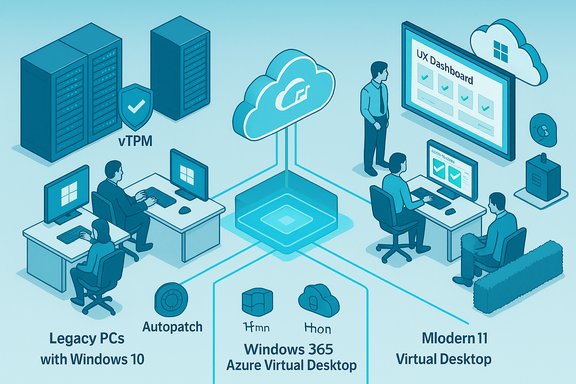
The vendor lifecycle clock that governs enterprise desktops reached a hard milestone when Microsoft ended mainstream support for Windows 10 on October 14, 2025. After that date, unmanaged Windows 10 machines no longer receive routine security and feature updates unless they are enrolled in an Extended Security Updates (ESU) program — a stopgap that carries cost and governance implications. This lifecycle change forces a practical decision across sectors that still rely on long‑lived endpoints — manufacturing HMI consoles, clinical workstations, financial trading systems, and retail PoS terminals. Many of those devices are functionally reliable but fall short of the hardware gating Microsoft requires for Windows 11 (UEFI Secure Boot, TPM 2.0, and a supported CPU family). Organisations therefore face three general choices: replace at scale, purchase time with ESU (where available), or adopt virtualisation to host modern Windows 11 workloads centrally while endpoints are refreshed in a controlled, risk‑ranked sequence. The CAJ News Africa briefing frames this second path — virtualisation as a pragmatic bridge — and positions it as the foundation for a staged migration.Why Windows 11 matters for modern enterprises
Security primitives: hardware + hypervisor protection
Windows 11 is designed to leverage modern silicon and firmware to make certain classes of attacks materially harder. Key capabilities include hardware‑rooted attestation (TPM 2.0), UEFI Secure Boot, and virtualization‑based security (VBS) together with Hypervisor‑protected Code Integrity (HVCI, also called memory integrity). Those features create an isolated security runtime (a higher virtual trust level) that protects credentials, kernel code integrity, and secrets even if the main OS is compromised. Microsoft documents show VBS and HVCI are built into the platform and are the structural basis for the operating system’s hardened posture.Cloud integration, management and AI readiness
Beyond raw security, Windows 11 is the current anchor for Microsoft’s cloud management and AI strategy. Native integration with Microsoft 365, Intune, Autopatch and Entra ID improves lifecycle automation, conditional access, and telemetry-driven policy enforcement. Copilot and on‑device AI capabilities (Copilot+ PCs with NPUs) are increasingly tied to modern hardware profiles; organisations that want to adopt these features at scale will need hardware that supports them or a cloud‑hosted Windows environment that provides compatible runtimes. Microsoft’s official guidance highlights these advantages and recommends cloud‑first management for large fleets.The compatibility floor: what Windows 11 requires
The baseline technical requirements that determine whether a physical PC can run Windows 11 are straightforward and non‑negotiable for many devices: a compatible 64‑bit processor, UEFI firmware with Secure Boot capability, TPM 2.0, at least 4 GB RAM, and 64 GB storage. Virtual machines can also host Windows 11 but must be configured with generation‑2 VM settings, virtual TPM (vTPM), and secure boot equivalents on the host. These constraints explain why many in‑service machines — especially those with older CPUs or legacy firmware — cannot be upgraded in place and are good candidates for a virtualised delivery model instead of immediate replacement.Virtualisation: the bridge from legacy fleets to Windows 11
Two distinct cloud/hosted models
Organisations typically choose between two broad hosted models when virtualising desktops:- Azure Virtual Desktop (AVD) / self‑managed VDI — a flexible, infrastructure‑level service that gives IT full control over session hosts, images, and scaling strategies. It supports Windows 11 Enterprise multi‑session, RemoteApp, GPU acceleration and a range of VM sizing options for different workloads.
- Windows 365 Cloud PC (Cloud PC / DaaS) — a managed, per‑user Cloud PC SaaS offering that simplifies provisioning and delivers a persistent 1:1 Cloud PC with predictable pricing and lifecycle management hooks into Intune and Microsoft 365. Windows 365 targets ease of deployment and predictable seat costs.
Core benefits for migration
Virtualisation supports migration to Windows 11 in three practical ways:- Containment of risk and data — sensitive data and LOB apps run in hardened datacentre images rather than on locally stored disks, lowering exposure and simplifying regulatory controls.
- Centralised patching and configuration — instead of patching thousands of disparate endpoints, IT manages a small number of golden images and session hosts, which accelerates security baseline deployment and reduces drift.
- Phased hardware procurement — virtual desktops decouple OS lifecycle from physical device replacement, allowing procurement to be sequenced by business criticality and budget cycles instead of a cliff‑edge refresh.
Sector use‑cases where virtualisation wins
Manufacturing and industrial control
Factory floor consoles and HMI stations often run tightly coupled software and drivers linked to specific PCI(e) cards and serial devices. Replacing those systems can trigger vendor re‑certification and production downtime. Virtualising GUIs on a secure host while using thin clients as remote consoles preserves operations and reduces immediate capital pressure; where direct device access is required, carefully planned passthrough (IOMMU/VFIO or dedicated HCI with direct I/O) is the path forward.Healthcare and regulated environments
Clinical devices and image‑capture stations present strict audit and validation requirements. Hosting certified applications in a central VM maintains a single validated image, allows controlled patching windows and buys time to test replacements. Use validated host hardware, vTPM and trusted launch patterns to preserve attestation and chain‑of‑trust guarantees.Finance, legal and professional services
Desks that run high‑value trading or legal systems can be standardised using Cloud PCs or Azure Virtual Desktop while retaining strict DLP and EDR policies delivered from the cloud. Integration with Defender for Endpoint and Purview retains parity with on-device controls and reduces the need for per‑endpoint compensating devices.Designing a virtualisation‑led migration: a practical playbook
A migration driven by virtualisation is best implemented as a program of distinct phases rather than a single lift‑and‑shift.Phase 1 — Discover and classify (0–30 days)
- Run automated discovery tools and build a canonical inventory: CPU family, firmware (UEFI), Secure Boot state, TPM status, memory, storage and attached peripherals.
- Map line‑of‑business (LOB) applications and vendor support windows; identify apps that require vendor recertification before moving to a new OS.
Phase 2 — Containment and compensating controls (30–60 days)
- Segment and isolate devices that will remain on Windows 10 temporarily.
- Apply strict EDR, least privilege, network ACLs and monitor telemetry closely.
- Use ESU only as a time‑boxed bridge for unavoidable holdouts.
Phase 3 — Pilot (60–120 days)
- Run small Cloud PC and AVD cohorts (10–50 users) representing different user personas (frontline task workers, knowledge workers, power users).
- Validate logon times, application performance, USB/serial and token passthrough, printer behavior and user experience metrics.
- Iterate image sizes, storage tiers, and autoscale policies before scaling.
Phase 4 — Staged rollout and hardware cadence (120+ days)
- Prioritise high‑risk and regulatory users for physical replacement.
- Use virtual desktops for knowledge workers and contractors who can tolerate modest latency.
- Convert suitable endpoints to thin clients or repurpose devices where feasible to reduce immediate CapEx.
Phase 5 — Validate, decommission and govern
- Maintain rollback images, validate BitLocker + vTPM recovery procedures, and confirm EDR/AV telemetry.
- Securely wipe and recycle decommissioned devices to reduce e‑waste and meet ESG goals.
Technical checklist and hard requirements for secure hosting
Use this distilled checklist to ensure a hardened virtualised environment:- Host hardware should support Trusted Launch, vTPM, measured boot and IOMMU/VT‑d for safe passthrough.
- Integrate Cloud PCs / VDI with Defender for Endpoint, Purview DLP, and Entra conditional access to maintain consistent policy enforcement.
- Validate peripheral compatibility (USB tokens, smartcard readers, lab instrumentation) and implement a narrow, audited exception program for passthrough scenarios.
- Maintain a small set of golden images, keep image hygiene, automate patching, and use snapshot‑based rollback for upgrades and hotfix testing.
- Test and document BitLocker + vTPM recovery procedures thoroughly — loss of vTPM state can make volumes unrecoverable.
Risks, operational trade‑offs and concentration concerns
Virtualisation reduces endpoint attack surface but introduces concentration risk: centrally hosted session hosts and Cloud PC infrastructure become high‑value targets. Effective mitigation requires layered hardening (trusted launch, vTPM, conditional access, privileged identity management), micro‑segmentation, and robust logging/alerting. The operational surface also expands — IT must operate image pipelines, scaling rules, storage IO, GPU assignments and license management in addition to the endpoint fleet. The CAJ briefing explicitly flags that virtualisation is a bridge, not an indefinite substitute for modern hardware.Other practical risks to budget and timing include:
- Procurement pressure: late device ordering increases costs and lead times; early procurement secures pricing and channel capacity.
- Vendor compatibility: line‑of‑business (LOB) apps and specialized drivers may require vendor testing, and not all will perform identically in a hosted environment.
- Insurance and compliance: some cyber insurers factor unsupported OS presence into underwriting decisions; documented compensating controls and migration plans are essential for coverage.
When to virtualise, when to replace, when to buy ESU — a decision matrix
Use this pragmatic decision matrix as a starting point:- If a device is business‑critical and cannot be remediated immediately (regulatory validation, embedded hardware), enrol in ESU for a strictly limited period while you virtualise or replace.
- If a LOB application can be hosted with acceptable UX and peripheral support, AVD or Windows 365 is often the optimal choice to remove endpoint OS dependency.
- If the device can be upgraded (firmware/driver fixes or supported CPU), prefer an in‑place Windows 11 upgrade with Autopatch/Intune and Autopilot workflows.
Cost and procurement realities: what the market data says
Public estimates and vendor statements suggest a very large installed base remains on Windows 10, and a significant share of those are not upgradeable due to hardware gating. Recent vendor commentary indicated there are hundreds of millions of PCs that either haven’t upgraded yet or are too old to run Windows 11 — numbers that vary by methodology but signal the scale of the refresh challenge. Treat headline device counts as directional rather than exact, and rely on your inventory for precise planning. Procurement tactics to reduce cost and timeline risk:- Stagger purchases across budget cycles and prioritise high‑risk roles for early replacement.
- Use trade‑in, refurbishment channels and DaaS to manage CapEx and reduce e‑waste.
- Negotiate SLAs that include imaging, logistics and local warranty support with distributors and VARs to reduce integration friction.
Measurable KPIs and governance for the migration program
Track a focused set of KPIs to ensure the program remains on track and delivers measurable benefits:- Percentage of fleet inventoried and risk‑ranked (target: 100% authoritative inventory within 30 days).
- Number of Cloud PCs / AVD sessions in pilot and pilot‑measured user satisfaction (CSAT) vs legacy baseline.
- Support ticket volume and mean time to remediate (MTTR) during ramp phases.
- Patching and image drift metrics (time to deploy critical patch to production images).
Practical cautionary notes and unverifiable claims
- Device‑count headlines from vendors and analysts are useful for trend context but vary by methodology; they should never substitute for an organisation’s own discovery telemetry when sizing procurement. Treat public figures as directional estimates and validate with your in‑house inventory.
- Not every Windows 11 benefit is universal. On‑device AI gains depend on precise hardware SKU (NPU capabilities, driver maturity, license entitlements). Pilot AI use cases on representative hardware before assuming uniform productivity gains.
- Virtualisation reduces endpoint risk but creates a new high‑value attack surface. Concentrated hosts must be hardened, monitored, and supported with strong identity controls and encryption. Failure to invest in the hosting plane negates much of the security benefit.
Final recommendations — an executive checklist
- Run an authoritative automated inventory for every managed endpoint (CPU family, TPM, UEFI, drivers, attached peripherals).
- Risk‑rank devices and identify three cohorts: immediate replacement, virtualise, short ESU bridge.
- Pilot both Windows 365 Cloud PCs and an Azure Virtual Desktop cohort to measure UX, cost, peripheral compatibility and support burden.
- Integrate Cloud PCs/VDI with Defender for Endpoint, Purview DLP and Entra for consistent policy enforcement.
- Establish image hygiene, snapshot rollback plans and vTPM/BitLocker recovery procedures before broad rollout.
- Engage procurement and channel partners early for device supply, financing and trade‑in programs.
- Treat ESU as a temporary, documented exception only — plan to retire ESU‑covered devices within a defined window.
Virtualisation is not a panacea but a powerful programmatic lever: it preserves security posture, reduces immediate capital strain, and buys necessary time to design a sustainable Windows 11 estate. When combined with disciplined inventory, strong identity controls, integrated endpoint telemetry and a measured device refresh plan, virtualised Windows 11 desktops can turn a hard support‑deadline into a controlled modernization opportunity rather than a compliance crisis. The CAJ News Africa briefing captures that balanced posture and the key operational trade‑offs: virtualisation as a bridge to a secure, cloud‑first Windows 11 future, not an indefinite substitute for modern devices.
Source: CAJ News Africa Leveraging Virtualisation for Enterprise Migration to Windows 11 - CAJ News Africa
