

Microsoft’s Build 2026 Windows announcements changed the near-term job for IT and security teams: Windows is being positioned as a place where AI agents run under containment, not just a place where people use apps. The concrete news is that Microsoft introduced the early-preview Microsoft Execution Containers SDK for Windows and WSL, made Windows 365 for Agents generally available, and described new developer hardware arriving later in 2026.
The takeaway is simple: do not wait for agent tooling to become routine before writing the rules. This quarter, IT should inventory agent-like automation, separate local Windows, WSL, and Cloud PC execution, define approval paths for agent access to files and tools, require agent-specific logging fields, and run a lab pilot before production teams normalize preview-era behavior.
Use Build 2026 as a readiness trigger, not as a reason for broad production deployment of preview components.
That matters because agents are not just chatbots with nicer interfaces. Some can invoke tools, inspect files, launch processes, operate browsers, interact with applications, or perform multi-step work on behalf of a user or business process. Once software starts acting inside a PC environment, the old endpoint model becomes incomplete.
The verified part is Microsoft’s announced direction: an early-preview MXC SDK for Windows and WSL, plus Windows 365 for Agents as a Cloud PC execution option. The planning inference is that organizations will need agent governance alongside endpoint governance, identity governance, data governance, and developer-platform governance.
Waiting until these patterns are fully mainstream would leave policy trailing deployment. WindowsForum readers have seen the same timing problem across Windows 11 feature changes, Insider builds, CPU requirement updates, hardware rollouts, bugs, and 24H2 issues: by the time a change becomes everyday behavior, administrators are already dealing with support tickets, compatibility questions, and user workarounds. Agent execution has a higher risk profile than a Start menu adjustment or a context-menu change, so the preparation window matters more.
Start with inventory. Most organizations do not yet have a clean boundary between ordinary automation and agentic automation. That boundary does not need to be philosophical. If a tool can decide steps, call tools, modify files, operate a browser, work through an interface, inspect repositories, or act across business systems, put it in the inventory.
The inventory should include:
Finally, define boundaries before exception requests pile up. Decide which folders an agent may read, which directories it may write, which tools it may launch, which network destinations are allowed, which credentials are off-limits, and which actions require human approval.
In practical terms, the enterprise questions are straightforward:
WindowsForum’s weekly Microsoft coverage is useful here because it shows how platform changes actually land with users: Windows 11 redesign notes, Insider build behavior, update bugs, CPU requirement changes, Surface announcements, gaming updates, and 24H2 issues all move from news into lived support work. Build 2026’s agent story should be treated the same way, but with security telemetry and policy enforcement as the central test areas.
That is useful for developers. If agents are going to generate code, run tests, manipulate repositories, use package managers, call command-line tools, or work with infrastructure scripts, they need to operate near the environments developers already use.
It is also a security planning issue. WSL environments can contain SSH keys, package tokens, cloned repositories, local datasets, build artifacts, deployment scripts, and configuration files that reach cloud systems. An agent that can act inside WSL may be operating close to sensitive development assets.
The implementation response should be specific:
That could be useful. A Cloud PC can be provisioned, monitored, reset, segmented, and governed more predictably than a random physical endpoint. For higher-risk agent workflows, that may be cleaner than allowing autonomous activity on a user’s daily laptop.
But “cloud-hosted” does not automatically mean “safe.” IT still needs to define who owns the Cloud PC, what data it can access, which applications are installed, how credentials are handled, how sessions are monitored, how snapshots or resets work, and how long evidence is retained.
A practical classification model should separate at least four categories:
The safe position is this: if Microsoft provides official management details for an agent governance service, those details should be read directly from Microsoft’s documentation and mapped into enterprise controls. Without that source-locked detail, IT teams should not assume exact local identity behavior, cloud identity behavior, policy inheritance, telemetry schemas, lifecycle controls, or management-plane integration.
That does not prevent useful planning. Organizations already know what they need from any agent management layer:
The answer is not a vague “use governance” message. It is a clear workflow with risk tiers.
For low-risk pilots, require a short form: owner, purpose, execution location, test data confirmation, tools used, logging location, and end date.
For developer agents, require repository scope, branch permissions, package-manager access, shell access, WSL access, test-data rules, secret-handling rules, and code-review requirements.
For business-process agents, require application-owner approval, data classification, user-impact assessment, transaction limits, human-in-the-loop checkpoints, audit logging, rollback process, and support contact.
For regulated or production-impacting agents, require security review, compliance review, identity review, disaster-recovery plan, monitoring plan, incident-response playbook, legal or privacy review where applicable, and executive business approval.
Every approval should expire. Permanent exceptions are how temporary experiments become unowned infrastructure.
At minimum, logs should capture:
A useful lab should include:
That wording matters because it keeps the claim aligned to the provided facts. The planning inference is that Microsoft expects some AI development and agent experimentation to remain local, not only cloud-hosted.
For enthusiasts, that is exciting. For IT, it raises a practical asset-management question: what happens when high-capability local AI development machines enter the fleet?
A powerful local development box may hold code, credentials, models, datasets, test outputs, and automation tooling in one place. That does not make it bad hardware. It makes it an endpoint category that deserves specific policy.
IT should decide whether these machines require:
Agents complicate that model because they introduce automated action inside the user’s environment. That does not mean every agent is dangerous. It means the execution context inside the device now matters as much as the device itself.
A locked-down laptop that allows a loosely controlled agent to read sensitive folders, run shell commands, use browser sessions, and interact with internal applications is not locked down in the way security teams care about.
Enterprises have seen similar patterns before with scripts, macros, browser extensions, OAuth apps, and RPA tools. The risky layer often begins as a productivity convenience. It becomes part of the attack surface later, after users and business processes depend on it.
Build 2026’s Windows agent announcements should be read through that history. The important question is not whether agents will be useful. They will be. The question is whether organizations make containment, approval, and logging default requirements before adoption spreads.
The answer is graded trust.
A low-risk local experiment using synthetic data should not face the same process as an agent that can modify a production deployment script. A code-review assistant should not face the same process as an agent that can operate a finance application. A WSL-based test runner should not face the same process as an agent with access to cloud credentials.
Developer-facing policy should include:
That community pattern should shape how readers interpret Build 2026. Agent containment is not just another item in the weekly Windows news stream. It is a platform shift that will eventually affect endpoint management, developer workstations, identity review, data governance, help-desk procedures, procurement, and incident response.
The WindowsForum weekly roundups about smoother Windows 11 Start menu experiences, revised CPU requirements, Insider insights, bugs, hardware changes, and 24H2 friction all point to the same operational lesson: early signals matter. Administrators who wait until a feature is widely normalized usually inherit the mess after users have already built habits around it.
Agentic computing raises the stakes. A Start menu change can frustrate users. A bad agent policy can expose data, modify code, misuse credentials, or create audit gaps.
Verified from the provided article facts:
The takeaway is simple: do not wait for agent tooling to become routine before writing the rules. This quarter, IT should inventory agent-like automation, separate local Windows, WSL, and Cloud PC execution, define approval paths for agent access to files and tools, require agent-specific logging fields, and run a lab pilot before production teams normalize preview-era behavior.
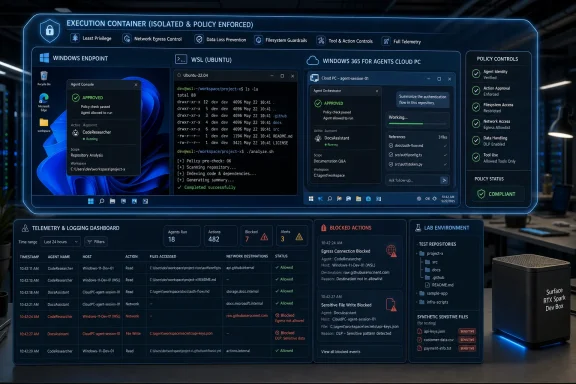 What IT Should Do Now
Use Build 2026 as a readiness trigger, not as a reason for broad production deployment of preview components.- Create an agent inventory. Track AI assistants, workflow bots, browser automation, scripts with AI decisioning, Copilot extensions, computer-using agents, and any tool that can read files, write files, launch processes, use credentials, call APIs, operate a browser, manipulate repositories, or interact with business applications.
- Classify where each agent runs. Use separate categories for local Windows endpoints, WSL environments, Windows 365 for Agents Cloud PCs, SaaS-hosted automation, CI/CD runners, and unmanaged personal or lab machines.
- Assign policy owners. Endpoint engineering should own local execution rules; identity/security should own authentication, least privilege, and audit requirements; developer platform teams should own WSL and repository access patterns; compliance or data governance should own sensitive-data approvals; business application owners should approve agent access to line-of-business systems.
- Define an approval workflow. Require a named business owner, technical owner, data classification, execution location, requested tools, requested file paths, network destinations, identity model, logging destination, rollback plan, and expiration date for elevated access.
- Require useful logs before pilots expand. At minimum, capture agent name, agent version, human initiator, execution host, execution location, policy applied, file paths accessed, processes launched, network destinations contacted, credentials or tokens requested, tool invocations, blocked actions, approval IDs, timestamps, and correlation IDs.
- Pilot with realistic but non-production data. A useful lab should include representative developer workstations, WSL distributions, test repositories, mock secrets, sample business documents, Windows 365 for Agents instances where appropriate, EDR/endpoint telemetry, identity logs, and deliberate policy-denial tests.
Microsoft’s Build Message Was About Control, Not Just Code
The easy read of Build 2026 is that Microsoft had another AI-heavy developer conference. The sharper read is that Microsoft is trying to make Windows a more controlled execution surface for agentic computing. MXC, WSL support, and Windows 365 for Agents all point in the same direction: autonomous or semi-autonomous software needs boundaries that administrators can understand.That matters because agents are not just chatbots with nicer interfaces. Some can invoke tools, inspect files, launch processes, operate browsers, interact with applications, or perform multi-step work on behalf of a user or business process. Once software starts acting inside a PC environment, the old endpoint model becomes incomplete.
The verified part is Microsoft’s announced direction: an early-preview MXC SDK for Windows and WSL, plus Windows 365 for Agents as a Cloud PC execution option. The planning inference is that organizations will need agent governance alongside endpoint governance, identity governance, data governance, and developer-platform governance.
Waiting until these patterns are fully mainstream would leave policy trailing deployment. WindowsForum readers have seen the same timing problem across Windows 11 feature changes, Insider builds, CPU requirement updates, hardware rollouts, bugs, and 24H2 issues: by the time a change becomes everyday behavior, administrators are already dealing with support tickets, compatibility questions, and user workarounds. Agent execution has a higher risk profile than a Start menu adjustment or a context-menu change, so the preparation window matters more.
The Immediate Playbook Starts Before the Preview Becomes Policy
There is no single production MXC switch that every administrator should flip today. Microsoft introduced MXC as an early preview, so the responsible response is preparation and controlled testing, not blanket deployment.Start with inventory. Most organizations do not yet have a clean boundary between ordinary automation and agentic automation. That boundary does not need to be philosophical. If a tool can decide steps, call tools, modify files, operate a browser, work through an interface, inspect repositories, or act across business systems, put it in the inventory.
The inventory should include:
- Name and purpose: agent name, business process, owner, and expected outcome.
- Execution location: local Windows endpoint, WSL, Windows 365 for Agents, SaaS platform, CI/CD runner, virtual desktop, server, or unmanaged lab machine.
- Access surface: folders, repositories, applications, browsers, APIs, databases, network destinations, and cloud resources.
- Data classification: public, internal, confidential, regulated, customer data, employee data, source code, credentials, or production operational data.
- Identity and initiation: human initiator, service account if any, delegated permissions, approval source, and whether the action is manual, scheduled, event-driven, or autonomous.
- Tooling: shells, IDEs, package managers, browsers, RPA tools, API clients, document processors, ticketing systems, and line-of-business applications.
- Logging and monitoring: where events land, how long they are retained, and who reviews them.
- Lifecycle: version, last review date, expiration date, rollback plan, and decommission owner.
Finally, define boundaries before exception requests pile up. Decide which folders an agent may read, which directories it may write, which tools it may launch, which network destinations are allowed, which credentials are off-limits, and which actions require human approval.
MXC Is a Planning Signal, Not a Finished Operating Model
Microsoft Execution Containers are important because they indicate that Microsoft sees agent containment as a Windows platform problem, not just an application design problem. The preview status matters. It means administrators should learn the model, test it, and influence internal standards now, while avoiding claims that every operational question has already been answered.In practical terms, the enterprise questions are straightforward:
- How does a developer declare what an agent needs?
- How does IT express policy?
- Which controls apply locally on Windows?
- Which controls apply in WSL-based workflows?
- What happens when an agent tries to exceed its approved scope?
- What telemetry is generated for allowed and denied actions?
- Can logs separate the human initiator from the automated actor?
- Can exceptions expire automatically?
- Can policies be tested before production use?
- Can containment rules survive common developer workflow changes?
WindowsForum’s weekly Microsoft coverage is useful here because it shows how platform changes actually land with users: Windows 11 redesign notes, Insider build behavior, update bugs, CPU requirement changes, Surface announcements, gaming updates, and 24H2 issues all move from news into lived support work. Build 2026’s agent story should be treated the same way, but with security telemetry and policy enforcement as the central test areas.
WSL Makes the Agent Story More Useful and More Risky
The WSL angle is not a footnote. Microsoft tied MXC to Windows and WSL, which reflects where a lot of serious Windows development already happens. AI, data, infrastructure, and cloud-native workflows often depend on Linux tooling from a Windows workstation.That is useful for developers. If agents are going to generate code, run tests, manipulate repositories, use package managers, call command-line tools, or work with infrastructure scripts, they need to operate near the environments developers already use.
It is also a security planning issue. WSL environments can contain SSH keys, package tokens, cloned repositories, local datasets, build artifacts, deployment scripts, and configuration files that reach cloud systems. An agent that can act inside WSL may be operating close to sensitive development assets.
The implementation response should be specific:
- Inventory WSL distributions by owner, machine, purpose, and repository access.
- Identify secrets, tokens, SSH keys, cloud CLIs, package registries, and deployment tooling available inside those distributions.
- Map Windows file-system mounts used from WSL.
- Test whether agent actions are visible in endpoint, identity, repository, and shell-history telemetry.
- Require separate approval for agents that can run commands, modify repositories, or access secrets inside WSL.
- Include WSL scenarios in red-team or purple-team exercises involving agentic tools.
Windows 365 for Agents Moves Some Risk Into a More Managed Space
Windows 365 for Agents being generally available is the clearest production-facing part of the Build 2026 Windows agent story. The verified claim is narrow: Windows 365 for Agents reached general availability. The planning inference is that many enterprises will evaluate Cloud PCs as controlled workspaces for agents that need to use Windows software, interfaces, and workflows.That could be useful. A Cloud PC can be provisioned, monitored, reset, segmented, and governed more predictably than a random physical endpoint. For higher-risk agent workflows, that may be cleaner than allowing autonomous activity on a user’s daily laptop.
But “cloud-hosted” does not automatically mean “safe.” IT still needs to define who owns the Cloud PC, what data it can access, which applications are installed, how credentials are handled, how sessions are monitored, how snapshots or resets work, and how long evidence is retained.
A practical classification model should separate at least four categories:
- Low-risk local experimentation: agents using test files, synthetic data, and no privileged credentials.
- Developer productivity agents: agents that inspect or modify code, run tests, and use development tools under repository and secret-management controls.
- Business-process agents: agents that interact with documents, tickets, CRM, ERP, HR, finance, or line-of-business applications.
- High-risk or regulated agents: agents touching customer records, employee data, production systems, legal documents, financial records, healthcare information, or security tooling.
Be Careful With Agent 365 Claims
Some discussions of Build 2026 have treated “Agent 365” as if every management-plane detail is already settled and publicly documented. This article should not do that.The safe position is this: if Microsoft provides official management details for an agent governance service, those details should be read directly from Microsoft’s documentation and mapped into enterprise controls. Without that source-locked detail, IT teams should not assume exact local identity behavior, cloud identity behavior, policy inheritance, telemetry schemas, lifecycle controls, or management-plane integration.
That does not prevent useful planning. Organizations already know what they need from any agent management layer:
- A unique agent record.
- A named business owner.
- A technical owner.
- Version and publisher information.
- Approved execution locations.
- Approved tools and applications.
- Approved data categories.
- Human approver and approval date.
- Expiration or review date.
- Logging destination.
- Decommission process.
- Incident contact.
- Exception history.
Approval Workflow: Make the Legitimate Path Faster Than the Shadow Path
Developers and business teams will push for speed, and they will have a point. Agentic tools are useful only when they can inspect context, call tools, and complete work. If approval takes weeks for every small change, teams will route around it.The answer is not a vague “use governance” message. It is a clear workflow with risk tiers.
For low-risk pilots, require a short form: owner, purpose, execution location, test data confirmation, tools used, logging location, and end date.
For developer agents, require repository scope, branch permissions, package-manager access, shell access, WSL access, test-data rules, secret-handling rules, and code-review requirements.
For business-process agents, require application-owner approval, data classification, user-impact assessment, transaction limits, human-in-the-loop checkpoints, audit logging, rollback process, and support contact.
For regulated or production-impacting agents, require security review, compliance review, identity review, disaster-recovery plan, monitoring plan, incident-response playbook, legal or privacy review where applicable, and executive business approval.
Every approval should expire. Permanent exceptions are how temporary experiments become unowned infrastructure.
Logging Fields Matter More Than Dashboards
Observability is the difference between governance and hope. A polished dashboard is not enough if it cannot answer basic incident-response questions.At minimum, logs should capture:
- Agent name.
- Agent ID if available.
- Agent version.
- Publisher or source.
- Human initiator.
- Business owner.
- Technical owner.
- Device name or Cloud PC name.
- Execution location: local Windows, WSL, Windows 365 for Agents, SaaS, CI/CD, or other.
- Start and stop time.
- Policy applied.
- Approval ID.
- Files read.
- Files written.
- Processes launched.
- Shell commands executed where applicable.
- Network destinations.
- Applications or tools invoked.
- APIs called.
- Credentials or tokens requested.
- Data classification touched.
- Actions blocked by policy.
- User approvals requested.
- User approvals granted or denied.
- Error state.
- Correlation ID across endpoint, identity, application, and network logs.
Lab and Pilot Criteria Should Be Written Before Production Demand Arrives
A good pilot is not a demo. It is a controlled attempt to discover what breaks, what is invisible, and what users will try to bypass.A useful lab should include:
- A managed Windows 11 developer workstation.
- A WSL environment with representative tooling.
- Test repositories with realistic structure but no production secrets.
- Synthetic sensitive files that should trigger policy decisions.
- A Windows 365 for Agents environment where that execution model is being considered.
- Endpoint security tooling.
- Identity logging.
- Network logging.
- Repository logging.
- A ticketing or approval workflow.
- At least one blocked-action test.
- At least one exception-request test.
- At least one rollback or reset test.
- At least one incident-review exercise.
- Administrators can identify where the agent ran.
- Administrators can identify who initiated it.
- Logs show what files, processes, tools, and destinations were involved.
- Blocked actions are understandable to both security teams and developers.
- Developers have a documented path to request additional access.
- Sensitive test data is not exposed outside the approved boundary.
- The agent can be disabled or removed.
- The environment can be reset.
- The pilot owner can explain the residual risk.
Surface RTX Spark Dev Box Is a Hardware Signal, Not the Whole Story
Microsoft says the Surface RTX Spark Dev Box is a compact developer PC built for local-first AI development, available later in 2026 in the United States exclusively through Microsoft.com, with a developer-optimized Windows 11 setup.That wording matters because it keeps the claim aligned to the provided facts. The planning inference is that Microsoft expects some AI development and agent experimentation to remain local, not only cloud-hosted.
For enthusiasts, that is exciting. For IT, it raises a practical asset-management question: what happens when high-capability local AI development machines enter the fleet?
A powerful local development box may hold code, credentials, models, datasets, test outputs, and automation tooling in one place. That does not make it bad hardware. It makes it an endpoint category that deserves specific policy.
IT should decide whether these machines require:
- Separate asset tags.
- Developer workstation baseline policies.
- Local model and dataset inventory.
- Repository-access review.
- WSL inventory.
- EDR tuning.
- Encryption confirmation.
- Peripheral and removable-storage rules.
- Network segmentation.
- Clear rules for test data versus production data.
- A retirement and data-wipe process.
The Old Endpoint Boundary Is No Longer Enough
Traditional endpoint management assumes a fairly clear relationship among user, device, app, and data. A user signs in, an app runs, policies apply, and telemetry flows back.Agents complicate that model because they introduce automated action inside the user’s environment. That does not mean every agent is dangerous. It means the execution context inside the device now matters as much as the device itself.
A locked-down laptop that allows a loosely controlled agent to read sensitive folders, run shell commands, use browser sessions, and interact with internal applications is not locked down in the way security teams care about.
Enterprises have seen similar patterns before with scripts, macros, browser extensions, OAuth apps, and RPA tools. The risky layer often begins as a productivity convenience. It becomes part of the attack surface later, after users and business processes depend on it.
Build 2026’s Windows agent announcements should be read through that history. The important question is not whether agents will be useful. They will be. The question is whether organizations make containment, approval, and logging default requirements before adoption spreads.
Developers Need Freedom, But Not an Empty Field
The strongest objection to strict agent rules will come from developers. Some of that objection will be valid. AI-assisted development is most useful when tools can inspect code, run tests, reproduce errors, and work across systems. Overly narrow controls can reduce agents to expensive autocomplete.The answer is graded trust.
A low-risk local experiment using synthetic data should not face the same process as an agent that can modify a production deployment script. A code-review assistant should not face the same process as an agent that can operate a finance application. A WSL-based test runner should not face the same process as an agent with access to cloud credentials.
Developer-facing policy should include:
- Preapproved low-risk patterns.
- Standard repository scopes.
- Clear rules for secrets.
- Standard WSL configurations.
- Temporary access windows.
- Fast review for common requests.
- Visible denial reasons.
- Self-service documentation.
- Security-office hours or support channels.
- A path from pilot to approved pattern.
WindowsForum User Reports Show Why Timing Matters
WindowsForum’s own Microsoft Weekly coverage has been tracking the broader Microsoft churn around Windows 11 updates, Start menu changes, CPU requirement revisions, Insider builds, bugs, Surface hardware, gaming updates, customization tools, 24H2 issues, and AI advancements. Those reports are useful because they capture the reality that platform changes do not arrive as isolated press releases. They arrive as a rolling mix of previews, user-visible changes, compatibility questions, hardware announcements, and support headaches.That community pattern should shape how readers interpret Build 2026. Agent containment is not just another item in the weekly Windows news stream. It is a platform shift that will eventually affect endpoint management, developer workstations, identity review, data governance, help-desk procedures, procurement, and incident response.
The WindowsForum weekly roundups about smoother Windows 11 Start menu experiences, revised CPU requirements, Insider insights, bugs, hardware changes, and 24H2 friction all point to the same operational lesson: early signals matter. Administrators who wait until a feature is widely normalized usually inherit the mess after users have already built habits around it.
Agentic computing raises the stakes. A Start menu change can frustrate users. A bad agent policy can expose data, modify code, misuse credentials, or create audit gaps.
Separate Verified Facts From Planning Inference
This distinction is essential.Verified from the provided article facts:
- Microsoft introduced the Microsoft Execution Containers SDK for Windows and WSL as an early preview at Build 2026.
- Windows 365 for Agents is generally available.
- Microsoft described Surface RTX Spark Dev Box as a compact developer PC for local-first AI development.
- Surface RTX Spark Dev Box is described as available later in 2026 in the United States exclusively through Microsoft.com.
- Surface RTX Spark Dev Box is described as having a developer-optimized Windows 11 setup.
- Enterprises should prepare for agent execution to become an endpoint-governance issue.
- WSL-based agent activity should be included in developer workstation governance.
- Some higher-risk workflows may be better suited to managed Cloud PC environments than to physical user endpoints.
- Agent-specific logging will be necessary for useful incident response.
- Approval workflows should be designed before business demand hardens into shadow automation.
- Exact Agent 365 management-plane behavior.
- Exact local agent identity implementation.
- Exact cloud-provisioned identity mechanics.
- Exact telemetry schemas.
- Exact policy inheritance across local Windows, WSL, and Cloud PCs.
- Exact administrative controls that have not been established in the provided facts.
The Checklist Belongs on the Security Desk Before the Dev Box Arrives
Administrators should turn the announcement into a readiness exercise now. The goal is not to freeze agent adoption. The goal is to keep adoption from outrunning policy, containment, and logging.- Create an inventory of AI agents and agent-like automation that can act on files, tools, browsers, repositories, business applications, or cloud resources.
- Classify where agents execute: local Windows, WSL, Windows 365 for Agents, SaaS-hosted automation, CI/CD, or unmanaged lab environments.
- Assign owners for endpoint policy, identity, WSL governance, repository access, data classification, business application approval, and compliance review.
- Define default boundaries for file access, process launch, network reach, credential use, repository modification, browser automation, and human approval.
- Require agent logs that distinguish human initiation from automated action.
- Pilot MXC-related capabilities only in controlled environments with realistic workflows and non-production data.
- Decide which agent categories should be evaluated for Windows 365 for Agents rather than physical endpoints.
- Treat local-first AI development hardware as a special developer workstation category with its own inventory and baseline.
- Expire exceptions automatically.
- Review the policy quarterly while the platform is still evolving.
Frequently Asked Questions
What changed at Build 2026?
Microsoft introduced the early-preview Microsoft Execution Containers SDK for Windows and WSL, Windows 365 for Agents reached general availability, and Microsoft described new developer hardware for local-first AI development arriving later in 2026. The practical change for IT is that agent execution now belongs in endpoint, identity, developer-platform, and Cloud PC planning.Should enterprises deploy MXC broadly right now?
No. Based on the provided facts, MXC is an early-preview SDK. Enterprises should test it in labs, document policy requirements, and evaluate telemetry and containment behavior before broad production use.Why does WSL matter?
WSL matters because many Windows-based developers use Linux tooling for AI, cloud, infrastructure, and software development workflows. If agents can operate near repositories, package managers, scripts, credentials, and cloud CLIs inside WSL, then WSL becomes part of the agent governance surface.Does Windows 365 for Agents remove the risk?
No. General availability makes it a real option to evaluate, but Cloud PC execution still needs ownership, access rules, identity controls, logging, monitoring, reset procedures, and data-governance review. It may reduce some endpoint risks, but it does not eliminate agent risk.What should be in an agent inventory?
Include the agent name, owner, purpose, execution location, tools used, data accessed, repositories touched, applications used, credentials requested, network destinations, logging destination, approval status, version, review date, and retirement plan.Who should approve agent access?
Approval should match the risk. Endpoint teams should approve local execution baselines, identity teams should approve authentication and permissions, developer-platform teams should approve repository and WSL access, application owners should approve business-system access, and compliance or data-governance teams should approve sensitive-data use.What logs are most important?
The most important logs show who initiated the action, which agent acted, where it ran, what policy applied, which files and tools it touched, what network destinations it contacted, what credentials it requested, what actions were blocked, and which approval authorized the activity.Is Surface RTX Spark Dev Box mainly a security story?
Not by itself. It is a hardware and developer-platform signal. The security relevance is that local-first AI development machines can concentrate code, data, credentials, models, and automation tooling. IT should treat them as a managed developer workstation category, not as ordinary commodity PCs.What is the biggest mistake IT can make after Build 2026?
The biggest mistake is waiting until agent tools are already embedded in daily workflows before defining boundaries. Once teams depend on unreviewed automation, every later control feels like a slowdown. Inventory, approval, logging, and lab testing should start before that happens.References
- Primary source: blogs.windows.com
Introducing Surface Laptop Ultra: Made for world makers
The world is full of makers. Only a few make the world. Surface Laptop Ultra is for them. For those building the systems, the breakthroughs and the infrastructure the world runs on and gets changed by. The ones who see limits as flaws and have theblogs.windows.com - Independent coverage: windowscentral.com
Windows 11's cluttered and controversial context menus are going away | Windows Central
Simpler, configurable context menus are on the way to Windows 11.www.windowscentral.com - Independent coverage: techradar.com
In a shock move from nowhere, it seems Microsoft is finally giving Windows 11 users the ability to configure the right-click menu | TechRadar
Right-click the right waywww.techradar.com - Independent coverage: windowslatest.com
Microsoft quietly dropped Copilot+ PC branding for Windows 11's powerful AI laptop, and it won't tell you why
The Surface Laptop Ultra is Microsoft's most powerful laptop, yet Copilot+ PC branding was nowhere at the reveal. The reason may be NVIDIA www.windowslatest.com
- Independent coverage: news.microsoft.com
- Primary source: WindowsForum
Microsoft Weekly Roundup: Windows 11 Updates, CPU Changes, and More | Windows Forum
Hello, Windows enthusiasts! Welcome to our deep dive into this week’s Microsoft Weekly roundup—a treasure trove of updates spanning a smoother Windows 11...windowsforum.com

