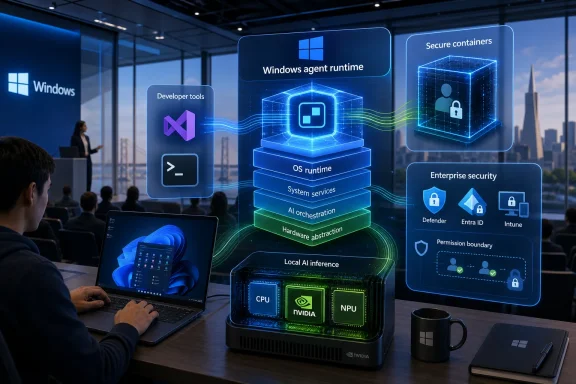
At Build 2026 in San Francisco, Microsoft used its developer keynote to pitch Windows as a secure home for autonomous AI agents, announcing Microsoft Execution Containers, native OpenClaw support, Project Solara concept devices, and RTX Spark-powered Surface hardware. The message was less “here is the next Windows” than “here is what comes after the app-centric PC.” That is a bolder claim than another Copilot sidebar, and a riskier one. Microsoft is no longer merely adding AI to Windows; it is preparing Windows for software that can act on the user’s behalf, sometimes without the user watching.
For three decades, Microsoft’s operating system story has been about the visible surface of computing: the Start menu, the taskbar, windows, files, apps, settings, notifications, and all the small frictions that make a PC feel like a PC. Build 2026 was different. Microsoft spent its oxygen on agents, containment, identities, and hardware acceleration — the plumbing for a machine that increasingly does things around the desktop rather than inside it.
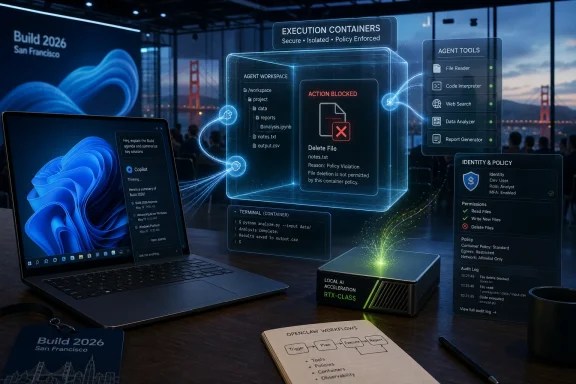
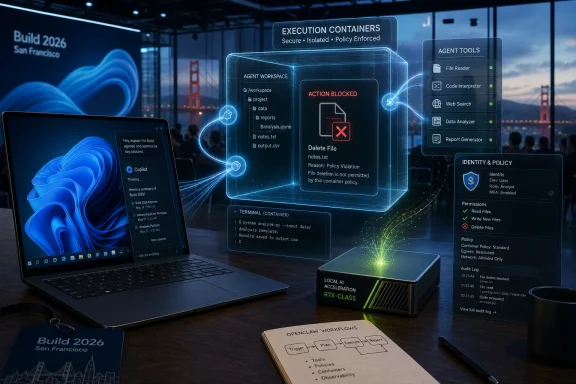
That is why the most revealing demo was not a productivity miracle. It was an AI agent trying to delete desktop files and failing. In old Windows demos, the failure would have been embarrassing. In this one, failure was the product.
The point was clear enough: if Microsoft wants developers and enterprises to let agents loose on Windows PCs, the first selling point cannot be intelligence. It has to be restraint. An agent that can code, click, summarize, edit, compile, file, and automate is useful only if it cannot also wreck the machine it is supposed to help.
That framing is both shrewd and telling. Microsoft knows the Windows audience has been trained by decades of malware, bloatware, driver drama, telemetry anxiety, and more recently Recall blowback to treat new platform-level automation with suspicion. So the company is trying to make the agentic PC feel less like a chatbot with admin rights and more like a managed workload inside a hardened boundary.
It also has an obvious downside. A useful agent needs access. It needs to inspect directories, call applications, execute commands, and modify artifacts. But the more access it has, the more a hallucination, prompt injection, malicious instruction, or plain misconfiguration can do damage.
Microsoft Execution Containers are Microsoft’s answer to that contradiction. The company described MXC as an operating-system-enforced containment layer that lets developers and administrators define what an agent can reach and what it cannot. In the keynote example, the Desktop folder could be made read-only, and the agent’s attempt to delete files was blocked.
That sounds almost mundane, but it is the core of the pitch. The future Microsoft showed is not a magical assistant that knows everything. It is a permissioned actor running inside a Windows-controlled sandbox, with the system mediating between user intent, agent behavior, and local resources.
The demo’s applause says something about where the industry is. Developers did not cheer because deleting files is hard. They cheered because stopping an autonomous agent from doing the obvious destructive thing is now a platform milestone.
That distinction matters because it changes what Windows is competing on. The old desktop wars were about applications, drivers, file compatibility, gaming, enterprise management, and hardware breadth. The new race is about whether a local machine can host models and agents with enough performance, context, isolation, and policy control to be trusted.
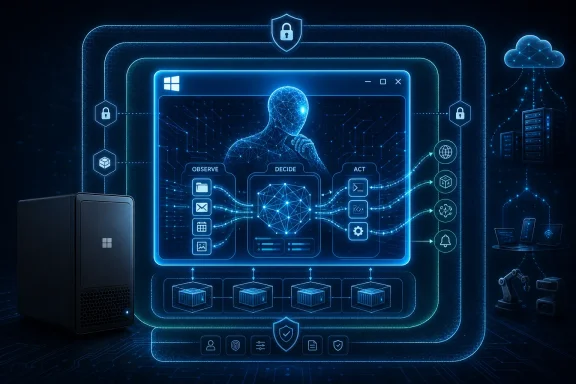
In that world, the GUI is no longer the primary interface. The interface may be a prompt, a command, a policy, a scheduled workflow, a message sent from a phone, or an instruction issued by another service. The Windows desktop still exists, but it becomes one layer in a larger choreography rather than the place where all meaningful interaction happens.
That is why the “barely looks like Windows” critique lands. Microsoft did not show a radically redesigned shell because the shell was not the center of the story. It showed a future in which Windows’ most important work may happen behind the glass.
The new Surface pitch is not simply faster Windows on Arm or another premium laptop refresh. It is a claim that a PC can become a local AI workstation: a portable machine with serious unified memory, Nvidia acceleration, and enough local compute to run models and agents without always leaning on the cloud. Microsoft also introduced a Surface RTX Spark Dev Box aimed more squarely at developers building and testing this new class of software.
This is a strategic correction. The first wave of AI PCs was muddled because NPUs were marketed heavily before everyday users had many compelling local AI workloads. A Copilot key and a few camera effects were never going to justify a platform transition. Agents, by contrast, are computationally hungry, latency-sensitive, and potentially privacy-sensitive enough to make local horsepower matter.
But the hardware story also narrows the audience. The people most likely to understand why they need an RTX Spark system are developers, researchers, AI startups, enterprise architects, and power users. Regular Windows customers may hear “personal AI” and see a premium price tag attached to a problem they did not know they had.
The PC is not disappearing, and Microsoft is not foolish enough to say it is. But Solara implies that the next growth surface may not be another laptop form factor with a better screen and a faster chip. It may be a class of devices where the user does not launch apps in the usual sense, and where the agent becomes the organizing layer.
That should make Windows loyalists both curious and uneasy. Microsoft has a long history of creating new platform abstractions that complement Windows until, one day, they compete with the assumptions Windows was built on. The web did this. Mobile did this. Cloud services did this. Now agents may do it from inside the house.
The safest reading is that Solara is an enterprise and developer platform experiment. The more aggressive reading is that Microsoft sees the classic PC interface as only one possible endpoint for Windows-era computing. Either way, Build 2026 made clear that Microsoft does not want to be trapped defending yesterday’s desktop metaphors while Apple, Google, OpenAI, Anthropic, and Nvidia define the agent layer.
That is why MXC matters politically as well as technically. Microsoft is not merely saying agents will be useful. It is saying agents will be governed. Permissions, containment, local identities, and administrator control are now front-stage concepts because Microsoft knows the trust deficit is real.
For consumers, the question will be brutally simple: what can this agent do for me that is worth the risk of letting it near my files, apps, browser sessions, and personal data? For enterprises, the question will be more complex but no less skeptical: can this be audited, governed, revoked, logged, isolated, and defended under real-world compliance pressure?
Microsoft is trying to answer before the backlash arrives. Showing an agent fail to delete files was a clever piece of theater because it dramatized control. But theater is not assurance. IT administrators will want documentation, policy hooks, event logs, integration with identity systems, and a clear account of what happens when an agent receives malicious instructions from an email, webpage, document, or compromised workflow.
For that audience, an agent that can safely edit a project, run tests, inspect logs, open issues, or refactor code is not science fiction. It is an imperfect but increasingly normal coworker. If Microsoft can make Windows a better environment for those agents than macOS or Linux, it has a real platform advantage to pursue.
The challenge is that developer enthusiasm can mislead platform companies. Developers love power tools that normal users find baffling. A sandboxed agent with configurable file permissions is exciting if you already understand why arbitrary file access is dangerous. It is not necessarily exciting if you are trying to organize vacation photos, reconcile a family budget, or remove three years of printer utilities from startup.
Microsoft’s bet is that developer workflows preview mainstream workflows. Sometimes that is true. Source control, cloud sync, browser tabs, and collaboration tools all moved from specialist contexts into everyday work. But sometimes the gap remains. The Windows command line is vastly better than it used to be, and most users still never open it.
There are plausible answers. An agent could clean up downloads, assemble tax documents, manage photos, troubleshoot a driver problem, install and configure software, prepare a presentation from local notes, or coordinate across email, calendar, files, and browser tabs. Those are real annoyances.
But plausibility is not the same as product-market fit. The more valuable the task, the more sensitive the access. The safer the sandbox, the more constrained the agent. The more autonomous the agent, the more the user needs to trust it. The more confirmations Microsoft inserts, the less autonomous it feels.
That is the central design trap. Users do not want an AI agent that constantly asks permission to do obvious things. They also do not want an AI agent that silently does consequential things wrong. The future of Windows may hinge on whether Microsoft can make that middle ground feel natural rather than bureaucratic.
Microsoft’s enterprise instinct is to domesticate that actor. Give it an identity. Put it in a container. Attach policy. Route its access through Windows primitives. Make its actions distinguishable from the human user’s actions. That is the right direction, and it plays to Microsoft’s strengths in identity, endpoint management, and enterprise trust.
Still, the operational questions are immense. Who approves an agent’s permissions? How are permissions reviewed after the agent’s role changes? Can an agent be limited to one project, one data classification, or one business unit? What happens when an agent’s output is wrong but its actions were technically authorized? How do help desks troubleshoot an agent that misread a prompt, exceeded its mandate, or became stuck halfway through a workflow?
These are not edge cases. They are the daily reality of enterprise computing once agents become persistent. Microsoft can make Windows the safest place to run them, but safety will be measured by how the system behaves in the boring, messy, ticket-generating middle of corporate life.
That is unsettling for software vendors. If the user asks an agent to “prepare the weekly report,” the agent might pull from Outlook, Teams, Excel, a CRM, local folders, and a browser. The user may care less which app performed which step. The agent becomes the experience layer, while applications become capability endpoints.
Microsoft is well positioned for this because it owns both the operating system and many of the productivity endpoints. But it also has to avoid making Windows feel like a stage for Microsoft 365 automation at the expense of the broader ecosystem. If agentic Windows works only when every serious action routes through Microsoft’s preferred services, developers and regulators will notice.
The healthier version is a Windows agent model where third-party apps can expose capabilities safely, users can grant granular access, and administrators can enforce policy without killing usefulness. That would be a genuine platform evolution. The unhealthy version is another walled garden wearing an open-platform badge.
For Windows, local agents also align with the PC’s historical identity. A personal computer is supposed to be yours. It should work with your files, your peripherals, your network constraints, and your local context. If the future of Windows is merely a thin client for cloud agents, Microsoft weakens the very premise of the PC.
The more compelling future is hybrid. Small and medium models run locally for private, fast, contextual tasks. Cloud models handle heavier reasoning when policy allows. The operating system brokers the relationship, enforcing access boundaries and preserving a user-visible chain of responsibility.
That is the theory. The practical version will depend on whether Microsoft can make local AI dependable across a fragmented PC market. A Surface Laptop Ultra may be a showcase, but Windows succeeds or fails on millions of less glamorous machines bought through procurement portals, retail discounts, school programs, and family recommendations.
Agents are Microsoft’s attempt to move beyond assistant theater. A chatbot answers. An agent acts. That difference is why the company is building containment rather than merely designing a friendlier panel.
But the Cortana lesson still applies: platform features fail when users cannot form a durable habit around them. If agents remain impressive keynote demos that ordinary users forget to invoke, they will become another layer of Windows furniture. If they interrupt too much, they will be disabled. If they make mistakes in sensitive contexts, they will be distrusted.
Microsoft needs agentic Windows to become boringly useful. Not dazzling. Not creepy. Not a brand campaign. Useful in the way Task Manager, File Explorer, clipboard history, Windows Hello, and OneDrive sync are useful when they work: quietly, repeatedly, and with a clear mental model.
An agent that correctly completes seven out of ten tasks may be impressive in a lab. On a personal machine, the three failures matter. In an enterprise, the three failures generate tickets, compliance reviews, and executive skepticism. In a regulated environment, one bad action can outweigh many successful automations.
That is why Microsoft’s security-first framing is necessary but incomplete. Containment can prevent certain classes of harm, like unauthorized file deletion. It cannot guarantee that an agent’s judgment is good, that its interpretation of a task is correct, or that its output is accurate. The sandbox can limit the blast radius, but it cannot make the agent wise.
The next stage of this story will be less glamorous than Build. It will involve logs, rollback, explainability, policy templates, safe defaults, user education, and integration with endpoint management. In other words, it will involve the unsexy work that determines whether platform promises survive contact with real deployments.
 Microsoft’s New Windows Pitch Is That Windows Stops Being the Main Event
For three decades, Microsoft’s operating system story has been about the visible surface of computing: the Start menu, the taskbar, windows, files, apps, settings, notifications, and all the small frictions that make a PC feel like a PC. Build 2026 was different. Microsoft spent its oxygen on agents, containment, identities, and hardware acceleration — the plumbing for a machine that increasingly does things around the desktop rather than inside it.That is why the most revealing demo was not a productivity miracle. It was an AI agent trying to delete desktop files and failing. In old Windows demos, the failure would have been embarrassing. In this one, failure was the product.
The point was clear enough: if Microsoft wants developers and enterprises to let agents loose on Windows PCs, the first selling point cannot be intelligence. It has to be restraint. An agent that can code, click, summarize, edit, compile, file, and automate is useful only if it cannot also wreck the machine it is supposed to help.
That framing is both shrewd and telling. Microsoft knows the Windows audience has been trained by decades of malware, bloatware, driver drama, telemetry anxiety, and more recently Recall blowback to treat new platform-level automation with suspicion. So the company is trying to make the agentic PC feel less like a chatbot with admin rights and more like a managed workload inside a hardened boundary.
The OpenClaw Demo Was Really a Security Demo in Disguise
OpenClaw’s role at Build was symbolic as much as technical. It represents the developer world’s fascination with autonomous agents that can operate across a computer: reading context, invoking tools, editing files, launching workflows, and behaving less like a feature than a junior operator. That kind of capability has an obvious appeal to programmers, researchers, and IT teams drowning in repetitive work.It also has an obvious downside. A useful agent needs access. It needs to inspect directories, call applications, execute commands, and modify artifacts. But the more access it has, the more a hallucination, prompt injection, malicious instruction, or plain misconfiguration can do damage.
Microsoft Execution Containers are Microsoft’s answer to that contradiction. The company described MXC as an operating-system-enforced containment layer that lets developers and administrators define what an agent can reach and what it cannot. In the keynote example, the Desktop folder could be made read-only, and the agent’s attempt to delete files was blocked.
That sounds almost mundane, but it is the core of the pitch. The future Microsoft showed is not a magical assistant that knows everything. It is a permissioned actor running inside a Windows-controlled sandbox, with the system mediating between user intent, agent behavior, and local resources.
The demo’s applause says something about where the industry is. Developers did not cheer because deleting files is hard. They cheered because stopping an autonomous agent from doing the obvious destructive thing is now a platform milestone.
Windows Is Being Recast as the Agent’s Operating Theater
Microsoft’s language around Windows at Build 2026 was not accidental. It wants Windows to be “a fantastic place to run and scale agents,” which is a very different ambition from making Windows a better place to run Word, Photoshop, Steam, Teams, or Visual Studio. The operating system is being recast as a trusted execution environment for semi-autonomous workers.That distinction matters because it changes what Windows is competing on. The old desktop wars were about applications, drivers, file compatibility, gaming, enterprise management, and hardware breadth. The new race is about whether a local machine can host models and agents with enough performance, context, isolation, and policy control to be trusted.
In that world, the GUI is no longer the primary interface. The interface may be a prompt, a command, a policy, a scheduled workflow, a message sent from a phone, or an instruction issued by another service. The Windows desktop still exists, but it becomes one layer in a larger choreography rather than the place where all meaningful interaction happens.
That is why the “barely looks like Windows” critique lands. Microsoft did not show a radically redesigned shell because the shell was not the center of the story. It showed a future in which Windows’ most important work may happen behind the glass.
Nvidia Gives Microsoft the Hardware Story It Was Missing
The agentic PC needs more than slogans. If agents are going to run locally, especially with large models and private data, Microsoft needs hardware that can make the idea plausible. That is where Nvidia’s RTX Spark platform and Microsoft’s Surface Laptop Ultra enter the narrative.The new Surface pitch is not simply faster Windows on Arm or another premium laptop refresh. It is a claim that a PC can become a local AI workstation: a portable machine with serious unified memory, Nvidia acceleration, and enough local compute to run models and agents without always leaning on the cloud. Microsoft also introduced a Surface RTX Spark Dev Box aimed more squarely at developers building and testing this new class of software.
This is a strategic correction. The first wave of AI PCs was muddled because NPUs were marketed heavily before everyday users had many compelling local AI workloads. A Copilot key and a few camera effects were never going to justify a platform transition. Agents, by contrast, are computationally hungry, latency-sensitive, and potentially privacy-sensitive enough to make local horsepower matter.
But the hardware story also narrows the audience. The people most likely to understand why they need an RTX Spark system are developers, researchers, AI startups, enterprise architects, and power users. Regular Windows customers may hear “personal AI” and see a premium price tag attached to a problem they did not know they had.
Project Solara Hints That Microsoft Is Willing to Route Around the PC
Project Solara may prove more important than it first looked because it suggests Microsoft is thinking beyond the traditional Windows device. The concept points toward agent-first hardware — machines designed around intent, context, and managed execution rather than conventional apps. That is a profound admission from the company that built the world’s dominant desktop OS.The PC is not disappearing, and Microsoft is not foolish enough to say it is. But Solara implies that the next growth surface may not be another laptop form factor with a better screen and a faster chip. It may be a class of devices where the user does not launch apps in the usual sense, and where the agent becomes the organizing layer.
That should make Windows loyalists both curious and uneasy. Microsoft has a long history of creating new platform abstractions that complement Windows until, one day, they compete with the assumptions Windows was built on. The web did this. Mobile did this. Cloud services did this. Now agents may do it from inside the house.
The safest reading is that Solara is an enterprise and developer platform experiment. The more aggressive reading is that Microsoft sees the classic PC interface as only one possible endpoint for Windows-era computing. Either way, Build 2026 made clear that Microsoft does not want to be trapped defending yesterday’s desktop metaphors while Apple, Google, OpenAI, Anthropic, and Nvidia define the agent layer.
The Recall Hangover Still Shapes Every AI Promise Microsoft Makes
Microsoft’s agent push cannot be separated from the company’s recent AI trust problem. Recall turned into a case study in how quickly an ambitious Windows AI feature can become a privacy controversy when users believe the operating system is observing too much, storing too much, or explaining too little. Even after Microsoft revised Recall’s security model, the episode changed the baseline mood.That is why MXC matters politically as well as technically. Microsoft is not merely saying agents will be useful. It is saying agents will be governed. Permissions, containment, local identities, and administrator control are now front-stage concepts because Microsoft knows the trust deficit is real.
For consumers, the question will be brutally simple: what can this agent do for me that is worth the risk of letting it near my files, apps, browser sessions, and personal data? For enterprises, the question will be more complex but no less skeptical: can this be audited, governed, revoked, logged, isolated, and defended under real-world compliance pressure?
Microsoft is trying to answer before the backlash arrives. Showing an agent fail to delete files was a clever piece of theater because it dramatized control. But theater is not assurance. IT administrators will want documentation, policy hooks, event logs, integration with identity systems, and a clear account of what happens when an agent receives malicious instructions from an email, webpage, document, or compromised workflow.
The Developer Audience Gets the Vision First Because It Has the Pain First
Build is a developer conference, so it is unsurprising that Microsoft led with developers. But there is a deeper reason the agentic Windows pitch starts there: developers are among the few groups already living with agent workflows daily enough to tolerate the rough edges. They are using coding agents, terminal assistants, repo-aware tools, and local models because the time savings can be tangible.For that audience, an agent that can safely edit a project, run tests, inspect logs, open issues, or refactor code is not science fiction. It is an imperfect but increasingly normal coworker. If Microsoft can make Windows a better environment for those agents than macOS or Linux, it has a real platform advantage to pursue.
The challenge is that developer enthusiasm can mislead platform companies. Developers love power tools that normal users find baffling. A sandboxed agent with configurable file permissions is exciting if you already understand why arbitrary file access is dangerous. It is not necessarily exciting if you are trying to organize vacation photos, reconcile a family budget, or remove three years of printer utilities from startup.
Microsoft’s bet is that developer workflows preview mainstream workflows. Sometimes that is true. Source control, cloud sync, browser tabs, and collaboration tools all moved from specialist contexts into everyday work. But sometimes the gap remains. The Windows command line is vastly better than it used to be, and most users still never open it.
The Consumer Use Case Is Still the Weakest Link
The PCMag account rightly highlights the uncertainty around ordinary Windows users. Microsoft can explain why an enterprise agent needs containment. It can explain why a developer might want local OpenClaw. It can explain why Nvidia-class compute matters for model-heavy workloads. It has a harder time explaining why the average Windows 11 user should want an autonomous actor on their personal machine.There are plausible answers. An agent could clean up downloads, assemble tax documents, manage photos, troubleshoot a driver problem, install and configure software, prepare a presentation from local notes, or coordinate across email, calendar, files, and browser tabs. Those are real annoyances.
But plausibility is not the same as product-market fit. The more valuable the task, the more sensitive the access. The safer the sandbox, the more constrained the agent. The more autonomous the agent, the more the user needs to trust it. The more confirmations Microsoft inserts, the less autonomous it feels.
That is the central design trap. Users do not want an AI agent that constantly asks permission to do obvious things. They also do not want an AI agent that silently does consequential things wrong. The future of Windows may hinge on whether Microsoft can make that middle ground feel natural rather than bureaucratic.
Enterprise IT Will See Both the Opportunity and the Blast Radius
For IT departments, agents are not just a feature. They are a new class of endpoint actor. A human employee has an identity, permissions, training obligations, and an audit trail. A service account has scope and governance. An AI agent sits awkwardly between those categories, acting on behalf of users while making probabilistic decisions based on instructions and context.Microsoft’s enterprise instinct is to domesticate that actor. Give it an identity. Put it in a container. Attach policy. Route its access through Windows primitives. Make its actions distinguishable from the human user’s actions. That is the right direction, and it plays to Microsoft’s strengths in identity, endpoint management, and enterprise trust.
Still, the operational questions are immense. Who approves an agent’s permissions? How are permissions reviewed after the agent’s role changes? Can an agent be limited to one project, one data classification, or one business unit? What happens when an agent’s output is wrong but its actions were technically authorized? How do help desks troubleshoot an agent that misread a prompt, exceeded its mandate, or became stuck halfway through a workflow?
These are not edge cases. They are the daily reality of enterprise computing once agents become persistent. Microsoft can make Windows the safest place to run them, but safety will be measured by how the system behaves in the boring, messy, ticket-generating middle of corporate life.
The App Model Is Starting to Look Like Legacy Infrastructure
One underappreciated consequence of the agent push is what it does to the idea of an application. Windows has always been app-centric: users pick a tool, open a file, manipulate the interface, and save the result. Agents blur that model because the agent’s job is often to move across tools rather than live inside one.That is unsettling for software vendors. If the user asks an agent to “prepare the weekly report,” the agent might pull from Outlook, Teams, Excel, a CRM, local folders, and a browser. The user may care less which app performed which step. The agent becomes the experience layer, while applications become capability endpoints.
Microsoft is well positioned for this because it owns both the operating system and many of the productivity endpoints. But it also has to avoid making Windows feel like a stage for Microsoft 365 automation at the expense of the broader ecosystem. If agentic Windows works only when every serious action routes through Microsoft’s preferred services, developers and regulators will notice.
The healthier version is a Windows agent model where third-party apps can expose capabilities safely, users can grant granular access, and administrators can enforce policy without killing usefulness. That would be a genuine platform evolution. The unhealthy version is another walled garden wearing an open-platform badge.
Local AI Is About Privacy, Latency, and Control — Not Just Offline Demos
Microsoft and Nvidia’s local-compute emphasis is easy to caricature as workstation theater, but there is a real architectural argument behind it. Cloud AI is powerful, but it introduces latency, cost, data-governance questions, and dependency on connectivity. Local AI can reduce some of those frictions, especially for sensitive workflows or repetitive tasks that do not need frontier-scale reasoning every time.For Windows, local agents also align with the PC’s historical identity. A personal computer is supposed to be yours. It should work with your files, your peripherals, your network constraints, and your local context. If the future of Windows is merely a thin client for cloud agents, Microsoft weakens the very premise of the PC.
The more compelling future is hybrid. Small and medium models run locally for private, fast, contextual tasks. Cloud models handle heavier reasoning when policy allows. The operating system brokers the relationship, enforcing access boundaries and preserving a user-visible chain of responsibility.
That is the theory. The practical version will depend on whether Microsoft can make local AI dependable across a fragmented PC market. A Surface Laptop Ultra may be a showcase, but Windows succeeds or fails on millions of less glamorous machines bought through procurement portals, retail discounts, school programs, and family recommendations.
Microsoft Is Trying to Avoid Another Cortana Moment
The history of Windows assistants is not glorious. Cortana arrived with ambition, retreated into narrow enterprise scenarios, and eventually became a reminder that voice-assistant branding could not substitute for deep utility. Copilot has fared better as a brand, but it has also been stretched across so many products that its meaning can feel mushy.Agents are Microsoft’s attempt to move beyond assistant theater. A chatbot answers. An agent acts. That difference is why the company is building containment rather than merely designing a friendlier panel.
But the Cortana lesson still applies: platform features fail when users cannot form a durable habit around them. If agents remain impressive keynote demos that ordinary users forget to invoke, they will become another layer of Windows furniture. If they interrupt too much, they will be disabled. If they make mistakes in sensitive contexts, they will be distrusted.
Microsoft needs agentic Windows to become boringly useful. Not dazzling. Not creepy. Not a brand campaign. Useful in the way Task Manager, File Explorer, clipboard history, Windows Hello, and OneDrive sync are useful when they work: quietly, repeatedly, and with a clear mental model.
The New Windows Risk Is Not That AI Fails, but That It Half-Works
The hardest platform transitions are not the ones where technology obviously fails. They are the ones where it works just often enough to be tempting and fails just often enough to be dangerous. That is the likely near-term state of PC agents.An agent that correctly completes seven out of ten tasks may be impressive in a lab. On a personal machine, the three failures matter. In an enterprise, the three failures generate tickets, compliance reviews, and executive skepticism. In a regulated environment, one bad action can outweigh many successful automations.
That is why Microsoft’s security-first framing is necessary but incomplete. Containment can prevent certain classes of harm, like unauthorized file deletion. It cannot guarantee that an agent’s judgment is good, that its interpretation of a task is correct, or that its output is accurate. The sandbox can limit the blast radius, but it cannot make the agent wise.
The next stage of this story will be less glamorous than Build. It will involve logs, rollback, explainability, policy templates, safe defaults, user education, and integration with endpoint management. In other words, it will involve the unsexy work that determines whether platform promises survive contact with real deployments.
The Build 2026 Message Windows Users Should Actually Hear
Microsoft’s Build 2026 keynote was not a Windows 12 reveal, and it was not merely another AI branding exercise. It was a declaration that Windows is being prepared for a world in which software agents are active participants on the PC. The company has not yet proven that ordinary users will want that world, but it has started building the guardrails that would make it less reckless.- Microsoft’s most important Windows announcement was not a new interface but a containment model for agents that can act on local resources.
- OpenClaw’s Windows debut matters because it turns an experimental agent workflow into something Microsoft wants developers to treat as a first-class PC workload.
- RTX Spark-powered Surface hardware gives Microsoft a more credible local AI story than the first wave of generic AI PC marketing.
- Project Solara shows Microsoft is already imagining agent-first devices that may not behave like traditional Windows PCs.
- The consumer case remains underdeveloped because the tasks most worth automating are also the tasks users are most nervous about delegating.
- Enterprise adoption will depend less on keynote demos than on policy, auditing, identity, rollback, and administrative control.
References
- Primary source: PCMag UK
Published: Wed, 03 Jun 2026 13:05:50 GMT
The Future Microsoft Showed at Build 2026 Barely Looks Like Windows
The loudest applause at Build 2026 came for OpenClaw, the AI agent system that may offer the clearest glimpse yet of Microsoft's vision for Windows.uk.pcmag.com - Related coverage: tomshardware.com
- Related coverage: axios.com
Microsoft debuts Nvidia-powered Microsoft Surface Ultra laptop
Microsoft is trying again to redefine the PC for the AI era.www.axios.com
- Related coverage: windowscentral.com
Surface Laptop Ultra: Microsoft and NVIDIA reveal the 128GB RAM, mini‑LED, RTX Spark powerhouse redefining Windows on Arm | Windows Central
Uncompromising raw NVIDIA N1x power meets legendary Surface craft, but can people afford it?www.windowscentral.com - Official source: blogs.microsoft.com
Microsoft Build 2026: Be yourself at work - The Official Microsoft Blog
Platforms shift when developers build. We explore, choose tools, dream, create. This platform shift comes with more information than ever, ready at your fingertips. This shift, it’s about building fast AND THEN: it’s about building, operating, optimizing and observing. Securing your...blogs.microsoft.com - Related coverage: pcworld.com
No Windows 12 at Build, but Microsoft has something else up its sleeve | PCWorld
Microsoft's Pavan Davuluri confirmed Windows 12 won't appear at Build 2026, but the new Surface Laptop Ultra with Nvidia N1X might steal the show.www.pcworld.com
- Official source: blogs.windows.com
Introducing Surface Laptop Ultra: Made for world makers
The world is full of makers. Only a few make the world. Surface Laptop Ultra is for them. For those building the systems, the breakthroughs and the infrastructure the world runs on and gets changed by. The ones who see limits as flaws and have theblogs.windows.com - Official source: news.microsoft.com
Microsoft Build 2026: esprimere se stessi al lavoro - Source EMEA
Di Kyle Daigle, COO, GitHub and CMO of Developer, Microsoft Le piattaforme evolvono quando a costruirle sono gli sviluppatori. Sono loro a esplorare, scegliere gli strumenti, immaginare, creare. Questa evoluzione porta con sé più informazioni che mai, disponibili a portata di mano...news.microsoft.com - Official source: commandline.microsoft.com
Composing a new platform for agent-first devices - Command Line
New interaction technology enables new types of computers. Learn more about Microsoft’s Project Solara.commandline.microsoft.com - Related coverage: windowslatest.com
Microsoft confirms it's not launching Windows 12, as it teases a big announcement
Microsoft officially shut down Windows 12 rumors to make way for a hardware breakthrough with the new NVIDIA N1X coming for Windows on ARM www.windowslatest.com
- Related coverage: thetechportal.com
Microsoft introduces Surface RTX Spark Dev Box, GitHub Copilot app, Project Solara, and new AI models at Build 2026 - The Tech Portal
Microsoft unveiled a series of major AI-focused announcements at its Build 2026 developer conference, including the new Surface thetechportal.com
- Related coverage: techcrunch.com
Microsoft is working on yet another OpenClaw-like agent | TechCrunch
The new features would be geared toward enterprise customers, with better security controls than the famously risky open source OpenClaw agent.techcrunch.com