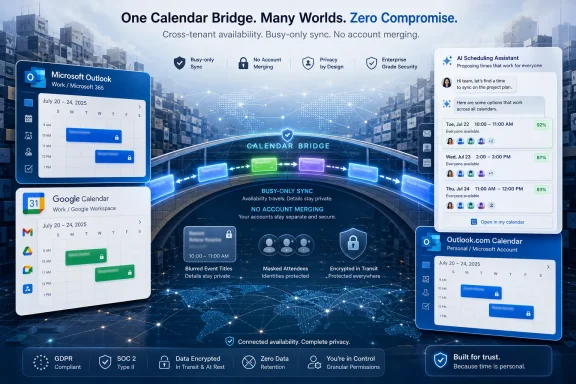
CalendarBridge said on June 23, 2026, that its cross-platform calendar sync and AI scheduling service has passed 100,000 users and 4 million events synced across Microsoft 365, Google, Outlook, and iCloud calendars. The milestone is not just a startup vanity metric; it is a signal that calendar fragmentation has become a real workflow tax. For Windows users and IT administrators, the interesting part is not another scheduling assistant, but the growing need to coordinate across tenants without collapsing identity, security, or compliance boundaries.
The old workplace calendar assumed a simpler world. You had one employer, one directory, one Exchange tenant, one set of colleagues, and one scheduling assistant that knew enough to keep you from double-booking a Tuesday afternoon. That model still exists inside many companies, but it no longer describes how a large slice of professional work actually happens.
Consultants live in client systems. Fractional executives bounce between portfolio companies. Lawyers, advisors, board members, acquisition teams, and contractors may have legitimate access to several organizations but no single “home” calendar that tells the truth. Even inside enterprises, joint ventures and regulated partnerships often require collaboration without shared tenancy.
That is the niche CalendarBridge is trying to own. Its pitch is not that Microsoft, Google, Apple, or Outlook are bad at calendaring in isolation. The pitch is that they are structurally limited when the work crosses organizational lines and nobody is willing—or allowed—to merge accounts.
For WindowsForum readers, that distinction matters. The pain here is familiar to anyone who has watched Outlook’s Scheduling Assistant work beautifully inside a tenant and then become nearly useless once half the attendees live somewhere else. A shared calendar view may help the individual user, but it often does not make that person’s real availability visible to colleagues scheduling from another organization’s native tools.
But the strength of that model is also its constraint. Microsoft’s calendar experience assumes the tenant is the meaningful organizing unit. That is sensible from a security architecture perspective, but increasingly awkward from a work architecture perspective.
Cross-tenant collaboration has improved across Microsoft 365, especially for identity, Teams, guest access, and B2B scenarios. Calendars, however, remain stubbornly personal and political. A user may need their availability reflected in multiple places while ensuring that client names, meeting subjects, board materials, and sensitive deal activity do not leak from one organization to another.
CalendarBridge is betting that this gap is not an edge case anymore. Its announcement frames the modern professional as someone whose day is spread across companies, clients, boards, and enterprise systems. That framing is marketing, but it also squares with what many administrators already see: the “one user, one company, one calendar” assumption is breaking down.
Four million synced events means CalendarBridge has processed enough real calendar activity to prove that this is more than a toy problem. Calendar events are not abstract records; they are commitments, conflicts, and sometimes confidential metadata. Syncing them across services introduces risk, but failing to sync them introduces a different kind of operational risk: missed meetings, double-bookings, manual holds, forwarding loops, and human coordination fatigue.
The company says it supports Microsoft 365, Google, Outlook, and iCloud, with configurable privacy settings and availability-focused syncing. Its help materials describe sync connections as user-defined rules that copy events from a source calendar to a destination calendar, with options controlling what details are included. Google and Microsoft source calendars are described as syncing in near real time, while iCloud and internet calendar sources are checked periodically.
That technical distinction is important. A calendar sync product lives or dies by freshness. If a meeting appears five minutes late, that may be good enough for a family calendar; it may not be good enough for an executive assistant trying to schedule with a customer during a moving negotiation. CalendarBridge’s claim of near-real-time sync for Google and Microsoft calendars reflects where most professional scheduling pressure exists.
Calendar metadata is deceptively sensitive. A meeting title can reveal a pending acquisition. An attendee list can reveal a customer issue. A recurring appointment can disclose medical treatment, union activity, legal strategy, or internal restructuring. Even free/busy data can be revealing when correlated with other signals.
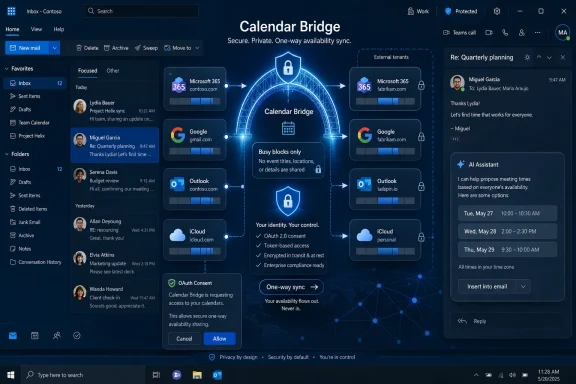
The company says it offers busy-only syncing, configurable visibility settings, OAuth2-based authorization, and no password collection. Those are baseline requirements rather than luxury features, but baseline requirements matter. In the Microsoft 365 world, administrators are rightly allergic to any third-party tool that asks users to surrender credentials or grants broader permissions than the workflow justifies.
OAuth does not magically make a service safe. It does, however, put the authorization model where it belongs: scoped consent, revocable access, and administrator approval where policy requires it. The hard enterprise question is not whether CalendarBridge uses OAuth, but exactly which permissions are requested, how tokens are stored, how calendar data is processed, how long metadata persists, and whether the vendor’s operational controls match the sensitivity of the calendars involved.
That is where IT buyers should read past the headline. “No password collection” is good. “Busy-only” is useful. “Configurable privacy” is necessary. But calendar sync is still a privileged workflow, and every organization should treat it as such.
That is a compelling demo, but it is not the deepest part of the product. AI scheduling assistants have come and gone for years, often collapsing under the weight of edge cases, social nuance, and trust. The hard part is not writing a polite email that says “How about Thursday at 2?” The hard part is knowing whether Thursday at 2 is actually safe to offer.
CalendarBridge’s more durable advantage, if it has one, is the availability graph created by syncing across accounts. An assistant without reliable availability is a chatbot wearing an executive assistant costume. An assistant with accurate availability across Microsoft 365, Google, Outlook, and iCloud is more useful because it can act on the messy reality of the user’s working life.
That does not eliminate the risks. AI agents operating in email threads raise obvious concerns around tone, authority, data exposure, and accidental commitments. A badly configured assistant can create embarrassment faster than a slow human scheduler. But if the assistant is constrained to proposing times, respecting rules, and booking on a chosen calendar, it becomes less science fiction and more automation layer.
The winning version of AI scheduling may be boring. It will not be the assistant that sounds most human. It will be the one that reliably avoids offering a time blocked by a confidential client call on a calendar the meeting organizer cannot see.
That distinction between “I can see it” and “others can schedule around it” is where many users get burned. A Windows desktop can display multiple calendars side by side. Outlook can overlay calendars. Mobile apps can aggregate accounts. But if an event only exists as a visible layer in your client, it may not affect free/busy lookups in another organization’s scheduling system.
CalendarBridge’s approach is to create event copies or availability placeholders where they need to exist. That is more intrusive than mere viewing, but also more functional. If a placeholder appears on the destination calendar, then tools that depend on that calendar’s availability have something to evaluate.
This is why cross-calendar sync can feel like a workaround and still be useful. In an ideal world, federated calendar availability would be seamless, standards-based, privacy-preserving, and natively respected by every major productivity suite. In the real world, professionals need meetings to stop colliding this week.
Administrators will want to know whether CalendarBridge supports centralized billing, transferable licenses, admin-managed syncing, consent controls, and least-privilege permissions. They will also care about whether user-created syncs can accidentally bridge calendars that policy says must remain isolated. “Keeping systems separate” is not just a workflow preference; in regulated environments, it may be a legal or contractual requirement.
There is also a governance tension in any product like this. The individual user wants the tool because it reduces friction across boundaries. The organization may fear the tool for exactly the same reason. A calendar bridge, by definition, makes it easier for information about one environment to influence another.
The best case is that privacy settings reduce exposure to availability rather than details. The worst case is that users misunderstand their configuration and leak meeting titles or locations into places they should not appear. That is not unique to CalendarBridge; it is the recurring problem of user-controlled integration in enterprise SaaS.
For IT, the right posture is neither blanket rejection nor blind approval. It is conditional permission: review the scopes, test the sync behavior, require busy-only defaults where appropriate, document the use cases, and make sure users understand what is copied and where.
During diligence, integration planning, or transition services, teams may need accurate availability without broad visibility. They may work under clean-team rules. They may be forbidden from sharing sensitive details prematurely. They may operate across legal, finance, HR, security, and executive groups that each have their own constraints.
Native collaboration suites can help once an integration architecture is chosen. They are less elegant in the liminal period when two companies need to work together but cannot yet behave as one company. That is where a narrowly scoped availability bridge can be attractive.
The same logic applies to consultants and fractional leaders. They are not trying to make all clients part of one directory. They are trying to prevent a partner meeting, a board call, and a customer workshop from landing on top of each other because each organization sees only its own slice of the person’s time.
This is the broader shift CalendarBridge is exploiting. Work is increasingly multi-tenant at the human level, even when enterprise software remains tenant-centric at the architectural level.
That also means CalendarBridge inherits the difficulties of integration products. It depends on provider APIs, permission models, rate limits, webhook reliability, recurring-event quirks, time-zone handling, cancellation semantics, and edge cases around edited copies. Calendar data looks simple until daylight saving time, delegated calendars, all-day holds, tentative events, private meetings, and recurring series exceptions enter the picture.
The company’s documentation describes one-way sync connections and notes that edits to copied events do not sync back to the source. That is an important guardrail. It reduces the risk that a destination-calendar edit corrupts the original event, but it also means users need to understand which calendar is authoritative.
This is the classic tradeoff in sync systems. Two-way sync sounds natural until it creates loops, duplicates, or conflicting edits. One-way sync is safer but requires design discipline. Multi-calendar professionals often need both patterns depending on the account pair, the privacy level, and the scheduling workflow.
For Windows admins, this should sound familiar. CalendarBridge is solving the same class of problem that directory sync, file sync, and identity federation have long confronted: users experience one workflow, but the underlying systems insist on boundaries.
That does not mean the company should see the details. It does mean the user’s work calendar should not pretend those commitments do not exist. Busy-only sync from iCloud to a Microsoft 365 calendar is precisely the kind of mundane feature that prevents real scheduling failures.
This is where consumer and enterprise calendaring blur. The organization may own the laptop, the identity, and the compliance policy, but it does not own the whole human schedule. Hybrid work made that visible; fractional work and cross-company collaboration make it operationally unavoidable.
Microsoft has improved Outlook’s ability to display and connect multiple account types, but display is not the same as availability propagation. A unified view helps the user make decisions manually. A synced placeholder helps other systems avoid bad decisions automatically.
That difference explains why a product like CalendarBridge can exist in the shadow of enormous platform vendors. The giants optimize for their ecosystems. The bridge exists for the gaps between them.
If users are not given an approved way to coordinate across calendars, they invent one. They forward invites to personal accounts. They create manual holds with revealing titles. They paste availability into email threads. They maintain duplicate calendars by hand. They grant access to consumer apps with little review. They ask assistants to manage conflicts through inbox spelunking.
A reviewed bridge with limited permissions and busy-only defaults may be safer than the ungoverned workarounds it replaces. That is not an argument for approving every scheduling startup. It is an argument for evaluating the actual risk landscape rather than pretending single-tenant purity still describes the workplace.
Security teams should test how private events are represented, whether deleted events are removed reliably, whether recurring changes propagate correctly, and how quickly access revocation takes effect. They should also examine whether the service stores event content, how support access is controlled, and what audit trails exist for administrative actions.
The calendar is no longer a low-risk convenience surface. It is a collaboration substrate. Treating it that way is overdue.
But link-based scheduling has social limits. Many executives dislike sending links in certain contexts. Some negotiations require back-and-forth rather than self-service booking. Some meetings involve multiple attendees whose constraints are not captured by one person’s page. Email remains the default coordination surface because it carries context, hierarchy, and nuance.
That is why AI scheduling assistants are reappearing with better timing. Large language models can parse messy email threads more effectively than earlier rule-based systems, and users are becoming more comfortable with delegated automation. The assistant can participate in the conversation rather than forcing the conversation into a booking page.
Still, the agent trend will only be as strong as the data underneath it. If the assistant reads one calendar but the user’s real obligations are scattered across four, it will fail in predictable ways. CalendarBridge’s sync foundation is therefore not a side feature; it is the prerequisite that makes the AI layer credible.
The company’s milestone announcement arrives at a moment when every productivity vendor is adding AI to workflows. CalendarBridge’s challenge is to prove that its assistant is not just another AI wrapper, but an agent grounded in cross-platform availability that Microsoft, Google, and Apple do not currently unify on the user’s behalf.
But the problem CalendarBridge targets is not purely technical. It is also political and commercial. Microsoft can make Microsoft calendars better. It can integrate with Google and Apple at the client layer. It can expose APIs and improve federation. What it cannot easily do is become the neutral availability broker for every worker whose obligations span competing ecosystems and separate organizations.
Google faces a similar constraint from the other side. Apple’s calendar ecosystem is even less oriented toward enterprise cross-tenant coordination. Each platform has incentives to make its own world coherent; none has overwhelming incentive to make everyone else’s world equally coherent.
That leaves room for independent tools. Their advantage is neutrality. Their disadvantage is dependence. They must live on top of APIs they do not control and earn trust from organizations that may be suspicious of small vendors touching sensitive productivity data.
CalendarBridge’s 100,000-user mark suggests that enough people are willing to make that trade. Whether enterprises do so at larger scale will depend on security posture, admin controls, reliability, and the company’s ability to avoid being perceived as a clever individual workaround rather than a governed collaboration layer.
That mismatch produces small daily failures. A meeting is booked over a client call. A personal appointment is invisible to the corporate scheduler. A consultant manually blocks time in three calendars and forgets one. A board advisor exposes more detail than intended. An assistant spends ten emails doing what software should have inferred.
CalendarBridge is not solving the entire collaboration problem. It is solving one irritating, high-frequency slice of it. That is often where durable infrastructure begins: not with a grand reimagining of work, but with a narrow bridge over a recurring gap.
The risk is that users may mistake synchronization for governance. Copying availability across systems does not remove the need for policy. It makes policy more important because the flow of metadata becomes automated. The product succeeds only if it preserves separation while reducing friction, not if it quietly erodes boundaries in the name of convenience.
IT teams should view this category through the lens of controlled enablement. If cross-company scheduling is already happening, the choice is rarely between risk and no risk. It is between visible, governed integration and invisible user improvisation.
A sensible pilot would start with users whose roles naturally span boundaries: executives, chiefs of staff, consultants, board liaisons, M&A teams, and partner managers. The default should be minimal disclosure, especially busy-only sync, with tighter controls for calendars that may contain legal, financial, medical, or personnel-sensitive information.
The AI assistant should be treated as a separate approval layer, not automatically blessed because sync is approved. Reading threads, proposing times, sending replies, and booking meetings introduce different risks from copying busy blocks. Organizations should evaluate those behaviors explicitly.
 The Calendar Is Now a Boundary Problem
The old workplace calendar assumed a simpler world. You had one employer, one directory, one Exchange tenant, one set of colleagues, and one scheduling assistant that knew enough to keep you from double-booking a Tuesday afternoon. That model still exists inside many companies, but it no longer describes how a large slice of professional work actually happens.Consultants live in client systems. Fractional executives bounce between portfolio companies. Lawyers, advisors, board members, acquisition teams, and contractors may have legitimate access to several organizations but no single “home” calendar that tells the truth. Even inside enterprises, joint ventures and regulated partnerships often require collaboration without shared tenancy.
That is the niche CalendarBridge is trying to own. Its pitch is not that Microsoft, Google, Apple, or Outlook are bad at calendaring in isolation. The pitch is that they are structurally limited when the work crosses organizational lines and nobody is willing—or allowed—to merge accounts.
For WindowsForum readers, that distinction matters. The pain here is familiar to anyone who has watched Outlook’s Scheduling Assistant work beautifully inside a tenant and then become nearly useless once half the attendees live somewhere else. A shared calendar view may help the individual user, but it often does not make that person’s real availability visible to colleagues scheduling from another organization’s native tools.
Microsoft 365 Is Strongest Where the Organization Is Singular
Microsoft 365 remains the gravitational center of enterprise scheduling. Exchange Online, Outlook, Teams, Entra ID, and Microsoft Graph give administrators a deeply integrated model for availability, meeting creation, delegation, room booking, compliance retention, and auditability. When everyone belongs to the same tenant, the machinery is mature.But the strength of that model is also its constraint. Microsoft’s calendar experience assumes the tenant is the meaningful organizing unit. That is sensible from a security architecture perspective, but increasingly awkward from a work architecture perspective.
Cross-tenant collaboration has improved across Microsoft 365, especially for identity, Teams, guest access, and B2B scenarios. Calendars, however, remain stubbornly personal and political. A user may need their availability reflected in multiple places while ensuring that client names, meeting subjects, board materials, and sensitive deal activity do not leak from one organization to another.
CalendarBridge is betting that this gap is not an edge case anymore. Its announcement frames the modern professional as someone whose day is spread across companies, clients, boards, and enterprise systems. That framing is marketing, but it also squares with what many administrators already see: the “one user, one company, one calendar” assumption is breaking down.
Four Million Synced Events Is Small Compared With Microsoft, But Large Enough to Matter
CalendarBridge’s 100,000-user figure is tiny next to Microsoft 365 or Google Workspace at global scale. That is not the point. The more relevant comparison is not platform market share but friction absorbed.Four million synced events means CalendarBridge has processed enough real calendar activity to prove that this is more than a toy problem. Calendar events are not abstract records; they are commitments, conflicts, and sometimes confidential metadata. Syncing them across services introduces risk, but failing to sync them introduces a different kind of operational risk: missed meetings, double-bookings, manual holds, forwarding loops, and human coordination fatigue.
The company says it supports Microsoft 365, Google, Outlook, and iCloud, with configurable privacy settings and availability-focused syncing. Its help materials describe sync connections as user-defined rules that copy events from a source calendar to a destination calendar, with options controlling what details are included. Google and Microsoft source calendars are described as syncing in near real time, while iCloud and internet calendar sources are checked periodically.
That technical distinction is important. A calendar sync product lives or dies by freshness. If a meeting appears five minutes late, that may be good enough for a family calendar; it may not be good enough for an executive assistant trying to schedule with a customer during a moving negotiation. CalendarBridge’s claim of near-real-time sync for Google and Microsoft calendars reflects where most professional scheduling pressure exists.
Privacy Is the Feature That Makes the Product Plausible
CalendarBridge’s announcement leans hard on the idea that users can coordinate availability without exposing sensitive calendar details. That is the right emphasis, because a cross-calendar tool that merely copies everything everywhere would be dead on arrival in many organizations.Calendar metadata is deceptively sensitive. A meeting title can reveal a pending acquisition. An attendee list can reveal a customer issue. A recurring appointment can disclose medical treatment, union activity, legal strategy, or internal restructuring. Even free/busy data can be revealing when correlated with other signals.
The company says it offers busy-only syncing, configurable visibility settings, OAuth2-based authorization, and no password collection. Those are baseline requirements rather than luxury features, but baseline requirements matter. In the Microsoft 365 world, administrators are rightly allergic to any third-party tool that asks users to surrender credentials or grants broader permissions than the workflow justifies.
OAuth does not magically make a service safe. It does, however, put the authorization model where it belongs: scoped consent, revocable access, and administrator approval where policy requires it. The hard enterprise question is not whether CalendarBridge uses OAuth, but exactly which permissions are requested, how tokens are stored, how calendar data is processed, how long metadata persists, and whether the vendor’s operational controls match the sensitivity of the calendars involved.
That is where IT buyers should read past the headline. “No password collection” is good. “Busy-only” is useful. “Configurable privacy” is necessary. But calendar sync is still a privileged workflow, and every organization should treat it as such.
AI Scheduling Is the Hook, But Sync Is the Moat
The fashionable part of CalendarBridge’s announcement is the AI Scheduling Assistant. The company describes an assistant that proposes times and follows up inside email threads, using real availability across connected calendars. In practical terms, that means the assistant can be copied into a conversation and respond with proposed times drawn from the user’s configured calendar state.That is a compelling demo, but it is not the deepest part of the product. AI scheduling assistants have come and gone for years, often collapsing under the weight of edge cases, social nuance, and trust. The hard part is not writing a polite email that says “How about Thursday at 2?” The hard part is knowing whether Thursday at 2 is actually safe to offer.
CalendarBridge’s more durable advantage, if it has one, is the availability graph created by syncing across accounts. An assistant without reliable availability is a chatbot wearing an executive assistant costume. An assistant with accurate availability across Microsoft 365, Google, Outlook, and iCloud is more useful because it can act on the messy reality of the user’s working life.
That does not eliminate the risks. AI agents operating in email threads raise obvious concerns around tone, authority, data exposure, and accidental commitments. A badly configured assistant can create embarrassment faster than a slow human scheduler. But if the assistant is constrained to proposing times, respecting rules, and booking on a chosen calendar, it becomes less science fiction and more automation layer.
The winning version of AI scheduling may be boring. It will not be the assistant that sounds most human. It will be the one that reliably avoids offering a time blocked by a confidential client call on a calendar the meeting organizer cannot see.
Windows Users Know the Outlook Gap Better Than Anyone
Outlook users have lived with calendar fragmentation for decades. Personal Microsoft accounts, Exchange on-premises, Exchange Online, Microsoft 365 work accounts, shared mailboxes, delegated calendars, ICS subscriptions, Google calendars, iCloud calendars, and mobile device overlays all coexist in ways that can look unified on screen while remaining separate underneath.That distinction between “I can see it” and “others can schedule around it” is where many users get burned. A Windows desktop can display multiple calendars side by side. Outlook can overlay calendars. Mobile apps can aggregate accounts. But if an event only exists as a visible layer in your client, it may not affect free/busy lookups in another organization’s scheduling system.
CalendarBridge’s approach is to create event copies or availability placeholders where they need to exist. That is more intrusive than mere viewing, but also more functional. If a placeholder appears on the destination calendar, then tools that depend on that calendar’s availability have something to evaluate.
This is why cross-calendar sync can feel like a workaround and still be useful. In an ideal world, federated calendar availability would be seamless, standards-based, privacy-preserving, and natively respected by every major productivity suite. In the real world, professionals need meetings to stop colliding this week.
The Enterprise Buyer Will Care Less About Convenience Than Control
The consumer story is straightforward: connect calendars, avoid double-booking, share scheduling links, and let an assistant handle some email back-and-forth. The enterprise story is more complicated. Convenience may drive adoption, but control determines whether the tool survives procurement.Administrators will want to know whether CalendarBridge supports centralized billing, transferable licenses, admin-managed syncing, consent controls, and least-privilege permissions. They will also care about whether user-created syncs can accidentally bridge calendars that policy says must remain isolated. “Keeping systems separate” is not just a workflow preference; in regulated environments, it may be a legal or contractual requirement.
There is also a governance tension in any product like this. The individual user wants the tool because it reduces friction across boundaries. The organization may fear the tool for exactly the same reason. A calendar bridge, by definition, makes it easier for information about one environment to influence another.
The best case is that privacy settings reduce exposure to availability rather than details. The worst case is that users misunderstand their configuration and leak meeting titles or locations into places they should not appear. That is not unique to CalendarBridge; it is the recurring problem of user-controlled integration in enterprise SaaS.
For IT, the right posture is neither blanket rejection nor blind approval. It is conditional permission: review the scopes, test the sync behavior, require busy-only defaults where appropriate, document the use cases, and make sure users understand what is copied and where.
The M&A Use Case Shows Why Native Suites Fall Short
One of the more telling examples in CalendarBridge’s announcement is M&A coordination before systems are integrated. That is not a casual scheduling problem. It is a scenario in which people need to coordinate across organizations precisely because those organizations are not yet one entity and may never become one.During diligence, integration planning, or transition services, teams may need accurate availability without broad visibility. They may work under clean-team rules. They may be forbidden from sharing sensitive details prematurely. They may operate across legal, finance, HR, security, and executive groups that each have their own constraints.
Native collaboration suites can help once an integration architecture is chosen. They are less elegant in the liminal period when two companies need to work together but cannot yet behave as one company. That is where a narrowly scoped availability bridge can be attractive.
The same logic applies to consultants and fractional leaders. They are not trying to make all clients part of one directory. They are trying to prevent a partner meeting, a board call, and a customer workshop from landing on top of each other because each organization sees only its own slice of the person’s time.
This is the broader shift CalendarBridge is exploiting. Work is increasingly multi-tenant at the human level, even when enterprise software remains tenant-centric at the architectural level.
Calendar Sync Is an Integration Product, Not a Calendar App
It would be easy to misread CalendarBridge as another calendar app in a crowded market. That undersells the category. The real product is integration: translating availability between ecosystems that were not designed to fully trust one another.That also means CalendarBridge inherits the difficulties of integration products. It depends on provider APIs, permission models, rate limits, webhook reliability, recurring-event quirks, time-zone handling, cancellation semantics, and edge cases around edited copies. Calendar data looks simple until daylight saving time, delegated calendars, all-day holds, tentative events, private meetings, and recurring series exceptions enter the picture.
The company’s documentation describes one-way sync connections and notes that edits to copied events do not sync back to the source. That is an important guardrail. It reduces the risk that a destination-calendar edit corrupts the original event, but it also means users need to understand which calendar is authoritative.
This is the classic tradeoff in sync systems. Two-way sync sounds natural until it creates loops, duplicates, or conflicting edits. One-way sync is safer but requires design discipline. Multi-calendar professionals often need both patterns depending on the account pair, the privacy level, and the scheduling workflow.
For Windows admins, this should sound familiar. CalendarBridge is solving the same class of problem that directory sync, file sync, and identity federation have long confronted: users experience one workflow, but the underlying systems insist on boundaries.
Apple and iCloud Support Matters More Than Enterprises Admit
The inclusion of iCloud may seem less relevant to Microsoft-focused organizations, but it matters in the real world. Executives and professionals often maintain personal Apple calendars even when their employers standardize on Microsoft 365. Board commitments, family events, travel, health appointments, and personal obligations may live outside the corporate tenant for good reasons.That does not mean the company should see the details. It does mean the user’s work calendar should not pretend those commitments do not exist. Busy-only sync from iCloud to a Microsoft 365 calendar is precisely the kind of mundane feature that prevents real scheduling failures.
This is where consumer and enterprise calendaring blur. The organization may own the laptop, the identity, and the compliance policy, but it does not own the whole human schedule. Hybrid work made that visible; fractional work and cross-company collaboration make it operationally unavoidable.
Microsoft has improved Outlook’s ability to display and connect multiple account types, but display is not the same as availability propagation. A unified view helps the user make decisions manually. A synced placeholder helps other systems avoid bad decisions automatically.
That difference explains why a product like CalendarBridge can exist in the shadow of enormous platform vendors. The giants optimize for their ecosystems. The bridge exists for the gaps between them.
The Security Review Should Start With Calendar Reality, Not Vendor Fear
Third-party calendar tools often trigger a reflexive “no” from security teams, and sometimes that reflex is justified. Calendars are full of sensitive metadata, and SaaS integrations can become shadow IT quickly. But refusing to acknowledge the workflow does not make it disappear.If users are not given an approved way to coordinate across calendars, they invent one. They forward invites to personal accounts. They create manual holds with revealing titles. They paste availability into email threads. They maintain duplicate calendars by hand. They grant access to consumer apps with little review. They ask assistants to manage conflicts through inbox spelunking.
A reviewed bridge with limited permissions and busy-only defaults may be safer than the ungoverned workarounds it replaces. That is not an argument for approving every scheduling startup. It is an argument for evaluating the actual risk landscape rather than pretending single-tenant purity still describes the workplace.
Security teams should test how private events are represented, whether deleted events are removed reliably, whether recurring changes propagate correctly, and how quickly access revocation takes effect. They should also examine whether the service stores event content, how support access is controlled, and what audit trails exist for administrative actions.
The calendar is no longer a low-risk convenience surface. It is a collaboration substrate. Treating it that way is overdue.
The Scheduling Market Is Moving From Links to Agents
The first wave of modern scheduling tools was built around links. A user published a booking page, recipients picked a time, and the system wrote the event. That model remains useful, especially for sales, recruiting, support, and external meetings.But link-based scheduling has social limits. Many executives dislike sending links in certain contexts. Some negotiations require back-and-forth rather than self-service booking. Some meetings involve multiple attendees whose constraints are not captured by one person’s page. Email remains the default coordination surface because it carries context, hierarchy, and nuance.
That is why AI scheduling assistants are reappearing with better timing. Large language models can parse messy email threads more effectively than earlier rule-based systems, and users are becoming more comfortable with delegated automation. The assistant can participate in the conversation rather than forcing the conversation into a booking page.
Still, the agent trend will only be as strong as the data underneath it. If the assistant reads one calendar but the user’s real obligations are scattered across four, it will fail in predictable ways. CalendarBridge’s sync foundation is therefore not a side feature; it is the prerequisite that makes the AI layer credible.
The company’s milestone announcement arrives at a moment when every productivity vendor is adding AI to workflows. CalendarBridge’s challenge is to prove that its assistant is not just another AI wrapper, but an agent grounded in cross-platform availability that Microsoft, Google, and Apple do not currently unify on the user’s behalf.
Microsoft Could Solve Some of This, But Not All of It
It is tempting to assume Microsoft could crush this category by improving Outlook and Microsoft 365 cross-calendar handling. In some respects, it could. Microsoft controls the dominant enterprise calendar client, the Exchange Online backend for many organizations, the Teams meeting layer, and the identity stack that governs access.But the problem CalendarBridge targets is not purely technical. It is also political and commercial. Microsoft can make Microsoft calendars better. It can integrate with Google and Apple at the client layer. It can expose APIs and improve federation. What it cannot easily do is become the neutral availability broker for every worker whose obligations span competing ecosystems and separate organizations.
Google faces a similar constraint from the other side. Apple’s calendar ecosystem is even less oriented toward enterprise cross-tenant coordination. Each platform has incentives to make its own world coherent; none has overwhelming incentive to make everyone else’s world equally coherent.
That leaves room for independent tools. Their advantage is neutrality. Their disadvantage is dependence. They must live on top of APIs they do not control and earn trust from organizations that may be suspicious of small vendors touching sensitive productivity data.
CalendarBridge’s 100,000-user mark suggests that enough people are willing to make that trade. Whether enterprises do so at larger scale will depend on security posture, admin controls, reliability, and the company’s ability to avoid being perceived as a clever individual workaround rather than a governed collaboration layer.
The Milestone Reveals a Work Pattern Hiding in Plain Sight
CalendarBridge’s announcement is framed around growth, but the more interesting story is structural. The workplace has become modular. People assemble their professional lives across clients, boards, teams, vendors, and platforms, while enterprise software still wants clean lines around identity and data.That mismatch produces small daily failures. A meeting is booked over a client call. A personal appointment is invisible to the corporate scheduler. A consultant manually blocks time in three calendars and forgets one. A board advisor exposes more detail than intended. An assistant spends ten emails doing what software should have inferred.
CalendarBridge is not solving the entire collaboration problem. It is solving one irritating, high-frequency slice of it. That is often where durable infrastructure begins: not with a grand reimagining of work, but with a narrow bridge over a recurring gap.
The risk is that users may mistake synchronization for governance. Copying availability across systems does not remove the need for policy. It makes policy more important because the flow of metadata becomes automated. The product succeeds only if it preserves separation while reducing friction, not if it quietly erodes boundaries in the name of convenience.
The Practical Read for Windows Shops Is Conditional Optimism
For Microsoft-heavy environments, CalendarBridge is worth watching because it addresses a problem Outlook users routinely experience but Microsoft 365 does not fully solve across organizational borders. The milestone does not prove the platform is enterprise-standard, but it proves the demand is real enough to take seriously.IT teams should view this category through the lens of controlled enablement. If cross-company scheduling is already happening, the choice is rarely between risk and no risk. It is between visible, governed integration and invisible user improvisation.
A sensible pilot would start with users whose roles naturally span boundaries: executives, chiefs of staff, consultants, board liaisons, M&A teams, and partner managers. The default should be minimal disclosure, especially busy-only sync, with tighter controls for calendars that may contain legal, financial, medical, or personnel-sensitive information.
The AI assistant should be treated as a separate approval layer, not automatically blessed because sync is approved. Reading threads, proposing times, sending replies, and booking meetings introduce different risks from copying busy blocks. Organizations should evaluate those behaviors explicitly.
The 100,000-User Signal Windows Admins Should Not Ignore
The most useful way to read CalendarBridge’s announcement is not as proof that one vendor has won a market, but as evidence that the market is changing under the feet of the major platforms. The calendar is becoming a cross-company coordination layer, and the organizations that manage it like a static personal productivity tool will keep paying in wasted time and avoidable exposure.- CalendarBridge says it has surpassed 100,000 users and 4 million synced events, showing meaningful demand for cross-platform calendar coordination.
- The service’s core value is not replacing Outlook, Google Calendar, or iCloud, but making availability usable across accounts that cannot be merged.
- Busy-only syncing and configurable visibility are central to the enterprise case because calendar metadata can be highly sensitive.
- The AI Scheduling Assistant is most useful when grounded in accurate multi-calendar availability rather than a single account’s view of the user’s day.
- Microsoft 365 administrators should evaluate tools like this through permissions, retention, revocation, auditability, and user education rather than convenience alone.
- The biggest risk may be unmanaged workarounds if organizations refuse to provide any approved path for cross-company scheduling.
References
- Primary source: The Manila Times
Published: 2026-06-23T13:12:07.025730
CalendarBridge Surpasses 100,000 Users and 4 Million Events Synced as Cross-Company Work Accelerates | The Manila Times
The calendar sync and AI scheduling platform helps professionals, consultants, fractional executives, and enterprise teams coordinate across Microsoft 365, Google, Outlook, and iCloud without merging accounts or exposing sensitive calendar details www.manilatimes.net
- Related coverage: help.calendarbridge.com

Syncing Overview - CalendarBridge Help
How CalendarBridge syncing works — sync connections, what information is copied, sync frequency by calendar type, and how to get started for groups.
help.calendarbridge.com
- Related coverage: calendarbridge.com
- Related coverage: app.calendarbridge.com
- Related coverage: aitoolnet.com
CalendarBridge - Sync All Your Calendars, End Scheduling Conflicts - Aitoolnet
CalendarBridge instantly unifies all your Google, Outlook & iCloud calendars. Eliminate double-bookings & manage your true availability with unmatched privacy.www.aitoolnet.com