

Canon’s imageFormula DR-S150 is a compact A4 document scanner for small offices that combines 45ppm duplex-capable scanning, a 60-sheet automatic document feeder, wired and wireless networking, and a 4.3in touchscreen for walk-up scan jobs. That sounds mundane until you remember how much office hardware still treats scanning as a punishment ritual. The DR-S150’s real trick is not raw speed; it is turning scan workflows into something a receptionist, accounts clerk, or roaming manager can launch without babysitting a PC. For small businesses still drowning in receipts, statements, delivery notes, forms, and supplier paperwork, that matters more than another theoretical claim about the paperless office.
The DR-S150 sits in the part of the market where office scanners either become invisible infrastructure or end up as an expensive tray for unopened envelopes. Canon clearly wants this model to be the former. It is small enough to live on a crowded counter, but its feature set is aimed less at the lone desktop user and more at a shared office where several people need the same scanning jobs without learning a new application every time.
That is why the touchscreen matters. A 4.3in colour display on a scanner is not glamorous, but it changes the posture of the machine. Instead of being a dumb peripheral waiting for a Windows application to tell it what to do, the DR-S150 can present predefined jobs directly on the device, letting users walk up, choose a destination or profile, and scan.
This is the kind of thing IT departments often underestimate until they have supported a branch office. The problem is rarely that staff do not understand what a PDF is. The problem is that “scan this invoice to the right folder with OCR, duplex enabled, blank pages removed, and the correct naming workflow” is too much institutional knowledge to embed in a casual task.
Canon’s answer is not revolutionary. It is a pragmatic bundling of network connectivity, shortcut-driven software, batch separation tools, and front-panel access. But in the small-business scanner category, pragmatic is often the difference between a device that gets used and a device that quietly accumulates dust.
The review experience described a straightforward wired setup, with the option to switch interfaces later using only a few taps. That flexibility is useful in real offices. A scanner may begin life on someone’s desk over USB, then migrate to a shared reception area over Ethernet, then end up in a back office where Wi-Fi is the only sane cable plan.
The touchscreen becomes more important once jobs are configured. Canon lets users assign shortcuts to soft buttons, with up to 100 jobs available from the panel. In practice, that means an office can create buttons for “supplier invoices to accounts,” “signed contracts to SharePoint,” “receipts to finance,” or “customer forms to searchable PDF” and remove guesswork from the process.
The device is still dependent on sensible setup. Someone has to define the jobs, destinations, quality settings, and batch rules. But once that work is done, the scanner behaves less like a peripheral and more like a kiosk, which is exactly what many small offices need.
The desktop software appears to be one of the DR-S150’s stronger points. Rather than burying scan profiles behind dense driver dialogs, CaptureOnTouch presents settings graphically: colour or mono, resolution, simplex or duplex, blank-page skipping, deskew, image rotation, and related cleanup options. These are ordinary scanner features, but ordinary features become valuable when ordinary people can find them.
PDF output is treated sensibly as well. Selecting PDF enables OCR by default, producing searchable files unless the user disables the option. That default is important because searchable PDFs are one of those features everyone wants later but forgets to enable at the moment of scanning.
The software also supports JPEG and PowerPoint output, which will matter in some edge workflows but not most office ones. For IT pros, the more relevant point is that Canon is not asking users to build workflows from scratch every time. The point is to define a repeatable job once and expose it through the application and the scanner panel.
The review notes that cloud integration is essentially local-folder based. Scans are dropped into the local sync folder for the relevant service, rather than being uploaded through a deeper cloud-native workflow with authentication, metadata, and policy controls. That is not necessarily a disaster, but it is not the same thing as a fully managed cloud document pipeline.
Email works in a similarly conservative way. Instead of sending files directly, CaptureOnTouch opens the default mail client and creates a new blank message with the scanned document attached. For some businesses, that is a safety feature: a human can check the recipient and message before anything leaves the machine. For others, it is an extra click in a process they wanted automated.
This distinction matters because scanners are often bought with vague hopes of “going digital.” The DR-S150 is very good at digitising paper and routing it into familiar destinations. It is not, by itself, a document-management strategy. Businesses expecting automated classification, records retention, compliance tagging, or deep cloud integration will still need software and policy around it.
At 300dpi, the scanner reportedly maintained 45ppm in greyscale and dropped to 32ppm for colour. At 600dpi, it fell to 17ppm mono and 7.7ppm colour. Those numbers are not surprising, and they reinforce a practical point: most business scanning does not need 600dpi.
For statements, invoices, forms, delivery notes, and general archive work, 200dpi searchable PDF is typically the sweet spot. It produces legible files, keeps sizes manageable, and lets the scanner operate at full speed. The temptation to increase resolution “just in case” often creates larger files and slower workflows without improving the business outcome.
The DR-S150’s value is therefore less about its maximum resolution than its ability to maintain speed at the settings people should actually use. A scanner that can rapidly create clean, searchable PDFs at 200dpi will do more for a small office than a slower machine boasting heroic optical capabilities that no one uses.
The review’s paper-handling tests are more revealing than the headline speed figures. The DR-S150 reportedly handled till receipts and very thin courier waybills without trouble, and its anti-skew feature performed well. That matters because small businesses rarely scan pristine office paper all day. They scan curled receipts, folded forms, flimsy slips, and documents that have lived in glove boxes, wallets, filing trays, and delivery bags.
Canon’s official feature set includes the kinds of driver-level corrections and protections expected in this class, including automatic page-size detection, blank-page skipping, deskew, text orientation recognition, bleed-through reduction, and ultrasonic double-feed detection. These are not luxuries. They are the difference between a trusted batch scan and an employee standing over the scanner checking every page.
There is one notable caveat: passports cannot simply be fed directly into the ADF. Users need Canon’s optional carrier sheet or an A4 flatbed add-on. That is not unusual for this class of device, but it is worth noting for businesses that handle identity documents, travel files, HR onboarding, or compliance checks.
This is especially useful in accounts and administration. A stack of supplier invoices can be separated into individual jobs. Delivery documents can be broken apart by barcode. Multi-customer forms can be scanned in one run and split without someone manually dragging pages around afterward.
The important point is that batch intelligence reduces the hidden labour of scanning. Feeding pages into a device is not usually the expensive part. Sorting the resulting files, checking whether documents merged incorrectly, renaming them, and moving them into the right folders is where time disappears.
Canon has not eliminated that work, but the DR-S150 gives small offices tools to formalise it. For a business that scans only ten pages a day, this may be overkill. For one that scans hundreds of mixed documents a week, it is the feature set that turns scanning from an interruption into a process.
That separation matters. Multifunction printers are convenient, but they are often poor document scanners compared with purpose-built sheet-fed devices. They may be slower, less reliable with mixed paper, less flexible with batch workflows, or more awkward for front-desk use. A compact dedicated scanner can sit exactly where paper enters the business, rather than where printing happens.
The wired and wireless options also make deployment less brittle. Ethernet is the obvious choice where reliability matters, especially in an office that scans batches to shared folders or server destinations. Wi-Fi gives smaller or awkwardly shaped offices more freedom, particularly where cabling is costly or the scanner needs to move.
For Windows environments, the DR-S150’s support for TWAIN and ISIS drivers keeps it compatible with many existing applications. That is an unglamorous but important detail. Businesses with line-of-business software, case-management systems, medical or legal intake tools, or accounting workflows often need scanner drivers that behave predictably rather than consumer-friendly apps that live in their own world.
This is where small-business IT often gets uncomfortable. The device makes ad hoc scanning painless, but painless ad hoc workflows can become compliance problems if sensitive files end up in local sync folders, personal email drafts, or loosely governed network shares. A scanner that encourages use also increases the need for sensible policy.
Canon’s light-touch cloud integration is part of this trade-off. Dropping scans into local OneDrive or Google Drive sync folders may be perfectly adequate for a small firm with basic needs. It may also be too informal for organisations subject to retention rules, access controls, client confidentiality requirements, or audit obligations.
The right reading of the DR-S150 is therefore not “set it up and forget it.” It is “set it up properly once, then let staff use it without improvising.” That is a stronger proposition, but it requires the buyer to understand that workflow design is part of the purchase.
Small businesses are full of documents that arrive outside the tidy paths of digital transformation. Customers bring printed forms. Suppliers send paper statements. Couriers leave slips. Staff collect receipts. Banks, landlords, government agencies, and legacy partners still produce paper at inconvenient moments.
The correct response is not to lecture those businesses about digitisation strategy. It is to give them a compact, reliable intake point. The DR-S150 works because it meets paper where it actually appears: at the front desk, beside the accounts computer, in a shared admin area, or wherever the office has a spare patch of counter space.
This is also why the scanner’s modest footprint matters. A bulky device becomes a destination; people must go to it. A compact scanner can be placed at the point of work, which subtly changes behaviour. If scanning is easy enough, documents are captured sooner, lost less often, and filed with fewer heroic end-of-month cleanup sessions.
That disappearance is harder to achieve than it looks. A scanner that is fast but confusing will be avoided. A scanner that is easy but slow will be resented. A scanner that produces beautiful files but requires manual sorting afterward will become a bottleneck. The DR-S150’s strength is that it balances enough speed, enough automation, and enough usability in one small box.
There are still limits. It is not a high-volume production scanner. It is not a replacement for a full document-management platform. Its cloud integrations are functional rather than sophisticated. Passport handling requires accessories. Colour scanning at very high resolutions slows sharply, as expected.
But those limitations mostly sit outside the daily use case. For the office that needs quick, repeatable, searchable scanning from a shared location, the DR-S150 appears to land in the right place: capable enough for structured workflows, simple enough for walk-up use, and compact enough not to require a furniture decision.
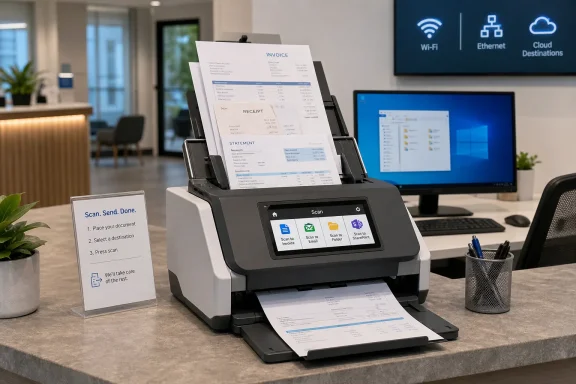 Canon’s Small Scanner Makes a Big Bet on Shared Workflows
The DR-S150 sits in the part of the market where office scanners either become invisible infrastructure or end up as an expensive tray for unopened envelopes. Canon clearly wants this model to be the former. It is small enough to live on a crowded counter, but its feature set is aimed less at the lone desktop user and more at a shared office where several people need the same scanning jobs without learning a new application every time.That is why the touchscreen matters. A 4.3in colour display on a scanner is not glamorous, but it changes the posture of the machine. Instead of being a dumb peripheral waiting for a Windows application to tell it what to do, the DR-S150 can present predefined jobs directly on the device, letting users walk up, choose a destination or profile, and scan.
This is the kind of thing IT departments often underestimate until they have supported a branch office. The problem is rarely that staff do not understand what a PDF is. The problem is that “scan this invoice to the right folder with OCR, duplex enabled, blank pages removed, and the correct naming workflow” is too much institutional knowledge to embed in a casual task.
Canon’s answer is not revolutionary. It is a pragmatic bundling of network connectivity, shortcut-driven software, batch separation tools, and front-panel access. But in the small-business scanner category, pragmatic is often the difference between a device that gets used and a device that quietly accumulates dust.
The Touchscreen Is the Product, Not the Accessory
The DR-S150’s setup begins on the scanner itself, and that is the first sign of Canon’s priorities. Users can choose USB, wired Ethernet, or wireless networking, with available Wi-Fi networks shown directly on the screen. That is a small thing, but it avoids the miserable dance of plugging in over USB simply to configure wireless settings through a half-forgotten utility.The review experience described a straightforward wired setup, with the option to switch interfaces later using only a few taps. That flexibility is useful in real offices. A scanner may begin life on someone’s desk over USB, then migrate to a shared reception area over Ethernet, then end up in a back office where Wi-Fi is the only sane cable plan.
The touchscreen becomes more important once jobs are configured. Canon lets users assign shortcuts to soft buttons, with up to 100 jobs available from the panel. In practice, that means an office can create buttons for “supplier invoices to accounts,” “signed contracts to SharePoint,” “receipts to finance,” or “customer forms to searchable PDF” and remove guesswork from the process.
The device is still dependent on sensible setup. Someone has to define the jobs, destinations, quality settings, and batch rules. But once that work is done, the scanner behaves less like a peripheral and more like a kiosk, which is exactly what many small offices need.
Windows Software Still Does the Heavy Lifting
For all the emphasis on walk-up scanning, the DR-S150 remains a Windows-friendly office scanner with Canon’s CaptureOnTouch V4 Pro and Job Tool utilities at the centre of the experience. Installation on a Windows 10 desktop reportedly took around 15 minutes, including drivers and utilities. That is not instant, but it is tolerable for business hardware, especially compared with the driver archaeology that still haunts older scanners.The desktop software appears to be one of the DR-S150’s stronger points. Rather than burying scan profiles behind dense driver dialogs, CaptureOnTouch presents settings graphically: colour or mono, resolution, simplex or duplex, blank-page skipping, deskew, image rotation, and related cleanup options. These are ordinary scanner features, but ordinary features become valuable when ordinary people can find them.
PDF output is treated sensibly as well. Selecting PDF enables OCR by default, producing searchable files unless the user disables the option. That default is important because searchable PDFs are one of those features everyone wants later but forgets to enable at the moment of scanning.
The software also supports JPEG and PowerPoint output, which will matter in some edge workflows but not most office ones. For IT pros, the more relevant point is that Canon is not asking users to build workflows from scratch every time. The point is to define a repeatable job once and expose it through the application and the scanner panel.
The Cloud Story Is Useful, But Not Modern
The DR-S150 supports a respectable set of destinations: network folders, printers, SharePoint, FTP servers, email addresses, and cloud sync services such as Dropbox, Google Drive, OneDrive, and SugarSync. On paper, that sounds like a scanner built for the modern hybrid office. In practice, the cloud side is more modest.The review notes that cloud integration is essentially local-folder based. Scans are dropped into the local sync folder for the relevant service, rather than being uploaded through a deeper cloud-native workflow with authentication, metadata, and policy controls. That is not necessarily a disaster, but it is not the same thing as a fully managed cloud document pipeline.
Email works in a similarly conservative way. Instead of sending files directly, CaptureOnTouch opens the default mail client and creates a new blank message with the scanned document attached. For some businesses, that is a safety feature: a human can check the recipient and message before anything leaves the machine. For others, it is an extra click in a process they wanted automated.
This distinction matters because scanners are often bought with vague hopes of “going digital.” The DR-S150 is very good at digitising paper and routing it into familiar destinations. It is not, by itself, a document-management strategy. Businesses expecting automated classification, records retention, compliance tagging, or deep cloud integration will still need software and policy around it.
Speed Is Fast Enough Because the Workflow Is Faster
Canon rates the DR-S150 at 45 pages per minute, and the reviewed unit reportedly hit that figure when scanning large batches of double-sided bank statements in colour and greyscale at 200dpi. That is the kind of spec that sounds like marketing until it survives contact with real paper. For most small offices, 45ppm is not just sufficient; it is comfortably ahead of the human feeding, sorting, and naming work around it.At 300dpi, the scanner reportedly maintained 45ppm in greyscale and dropped to 32ppm for colour. At 600dpi, it fell to 17ppm mono and 7.7ppm colour. Those numbers are not surprising, and they reinforce a practical point: most business scanning does not need 600dpi.
For statements, invoices, forms, delivery notes, and general archive work, 200dpi searchable PDF is typically the sweet spot. It produces legible files, keeps sizes manageable, and lets the scanner operate at full speed. The temptation to increase resolution “just in case” often creates larger files and slower workflows without improving the business outcome.
The DR-S150’s value is therefore less about its maximum resolution than its ability to maintain speed at the settings people should actually use. A scanner that can rapidly create clean, searchable PDFs at 200dpi will do more for a small office than a slower machine boasting heroic optical capabilities that no one uses.
Paper Handling Is Where Office Scanners Earn Trust
The automatic document feeder holds 60 sheets, which is generous for a compact desktop scanner. That capacity puts the DR-S150 in a useful middle ground. It is not a production scanner for a records department, but it is large enough for bank statements, invoice batches, onboarding packs, and other everyday office stacks.The review’s paper-handling tests are more revealing than the headline speed figures. The DR-S150 reportedly handled till receipts and very thin courier waybills without trouble, and its anti-skew feature performed well. That matters because small businesses rarely scan pristine office paper all day. They scan curled receipts, folded forms, flimsy slips, and documents that have lived in glove boxes, wallets, filing trays, and delivery bags.
Canon’s official feature set includes the kinds of driver-level corrections and protections expected in this class, including automatic page-size detection, blank-page skipping, deskew, text orientation recognition, bleed-through reduction, and ultrasonic double-feed detection. These are not luxuries. They are the difference between a trusted batch scan and an employee standing over the scanner checking every page.
There is one notable caveat: passports cannot simply be fed directly into the ADF. Users need Canon’s optional carrier sheet or an A4 flatbed add-on. That is not unusual for this class of device, but it is worth noting for businesses that handle identity documents, travel files, HR onboarding, or compliance checks.
Batch Scanning Is the DR-S150’s Quiet Enterprise Feature
The DR-S150’s batch controls are where it becomes more than a fast desktop scanner. The device and software can divide stacks using page counts, barcodes, zonal OCR, patch codes, or blank pages. That gives small businesses access to workflow patterns that used to feel more like enterprise capture systems than counter-top equipment.This is especially useful in accounts and administration. A stack of supplier invoices can be separated into individual jobs. Delivery documents can be broken apart by barcode. Multi-customer forms can be scanned in one run and split without someone manually dragging pages around afterward.
The important point is that batch intelligence reduces the hidden labour of scanning. Feeding pages into a device is not usually the expensive part. Sorting the resulting files, checking whether documents merged incorrectly, renaming them, and moving them into the right folders is where time disappears.
Canon has not eliminated that work, but the DR-S150 gives small offices tools to formalise it. For a business that scans only ten pages a day, this may be overkill. For one that scans hundreds of mixed documents a week, it is the feature set that turns scanning from an interruption into a process.
The Network Scanner Finally Fits the Small Office
Network scanning used to be associated with big multifunction printers: large machines parked in corridors, wrapped in authentication prompts, and shared by everyone whether they liked it or not. The DR-S150 takes a different route. It offers network access without forcing the business to give up the advantages of a dedicated document scanner.That separation matters. Multifunction printers are convenient, but they are often poor document scanners compared with purpose-built sheet-fed devices. They may be slower, less reliable with mixed paper, less flexible with batch workflows, or more awkward for front-desk use. A compact dedicated scanner can sit exactly where paper enters the business, rather than where printing happens.
The wired and wireless options also make deployment less brittle. Ethernet is the obvious choice where reliability matters, especially in an office that scans batches to shared folders or server destinations. Wi-Fi gives smaller or awkwardly shaped offices more freedom, particularly where cabling is costly or the scanner needs to move.
For Windows environments, the DR-S150’s support for TWAIN and ISIS drivers keeps it compatible with many existing applications. That is an unglamorous but important detail. Businesses with line-of-business software, case-management systems, medical or legal intake tools, or accounting workflows often need scanner drivers that behave predictably rather than consumer-friendly apps that live in their own world.
The Price of Simplicity Is Administrative Setup
The DR-S150 sounds easy because, for the end user, it can be easy. But that ease depends on someone making decisions upfront. Which users can scan to which locations? Are network folders permissioned correctly? Do scanned files need naming conventions? Should OCR be mandatory? Should email workflows be allowed, or should documents land only in controlled repositories?This is where small-business IT often gets uncomfortable. The device makes ad hoc scanning painless, but painless ad hoc workflows can become compliance problems if sensitive files end up in local sync folders, personal email drafts, or loosely governed network shares. A scanner that encourages use also increases the need for sensible policy.
Canon’s light-touch cloud integration is part of this trade-off. Dropping scans into local OneDrive or Google Drive sync folders may be perfectly adequate for a small firm with basic needs. It may also be too informal for organisations subject to retention rules, access controls, client confidentiality requirements, or audit obligations.
The right reading of the DR-S150 is therefore not “set it up and forget it.” It is “set it up properly once, then let staff use it without improvising.” That is a stronger proposition, but it requires the buyer to understand that workflow design is part of the purchase.
Canon Beats the Myth of the Paperless Office by Accepting Paper’s Survival
The DR-S150 is compelling because it does not pretend paper has vanished. It assumes paper remains an annoying but persistent part of business life, then focuses on getting it into digital systems with as little friction as possible. That is a more honest product philosophy than the usual paperless-office rhetoric.Small businesses are full of documents that arrive outside the tidy paths of digital transformation. Customers bring printed forms. Suppliers send paper statements. Couriers leave slips. Staff collect receipts. Banks, landlords, government agencies, and legacy partners still produce paper at inconvenient moments.
The correct response is not to lecture those businesses about digitisation strategy. It is to give them a compact, reliable intake point. The DR-S150 works because it meets paper where it actually appears: at the front desk, beside the accounts computer, in a shared admin area, or wherever the office has a spare patch of counter space.
This is also why the scanner’s modest footprint matters. A bulky device becomes a destination; people must go to it. A compact scanner can be placed at the point of work, which subtly changes behaviour. If scanning is easy enough, documents are captured sooner, lost less often, and filed with fewer heroic end-of-month cleanup sessions.
The Best Feature Is the One Staff Stop Noticing
The most convincing case for the DR-S150 is not that it has a touchscreen, or Wi-Fi, or a 60-sheet feeder, or OCR, or barcode-based batch separation. It is that these features can be combined into routines that staff do not have to think about. Good office hardware disappears into the working day.That disappearance is harder to achieve than it looks. A scanner that is fast but confusing will be avoided. A scanner that is easy but slow will be resented. A scanner that produces beautiful files but requires manual sorting afterward will become a bottleneck. The DR-S150’s strength is that it balances enough speed, enough automation, and enough usability in one small box.
There are still limits. It is not a high-volume production scanner. It is not a replacement for a full document-management platform. Its cloud integrations are functional rather than sophisticated. Passport handling requires accessories. Colour scanning at very high resolutions slows sharply, as expected.
But those limitations mostly sit outside the daily use case. For the office that needs quick, repeatable, searchable scanning from a shared location, the DR-S150 appears to land in the right place: capable enough for structured workflows, simple enough for walk-up use, and compact enough not to require a furniture decision.
The Office Scanner Canon Built for the Paper That Refuses to Die
The practical buying case for the DR-S150 is strongest when the scanner is treated as shared workflow infrastructure rather than a personal peripheral. Its headline specifications are solid, but the more durable value is in how Canon connects the panel, software, networking, and batch controls into a repeatable process.- The DR-S150 is best suited to small offices that scan recurring document types and want staff to launch predefined jobs from the device itself.
- The 45ppm performance at common 200dpi settings is more important than the slower 600dpi results because most office documents do not need archival-resolution colour scans.
- The 60-sheet ADF, anti-skew handling, blank-page skipping, OCR, and batch separation tools make the scanner useful for real mixed-paper workflows rather than just neat stacks of A4.
- The network options make placement flexible, but administrators should still define permissions, destinations, and naming practices before making the scanner broadly available.
- The cloud features are convenient but shallow, so businesses with compliance or records-management needs should pair the scanner with a more deliberate document workflow.
- The need for a carrier sheet or flatbed accessory for passports is worth planning for in HR, travel, legal, or identity-heavy environments.
References
- Primary source: IT Pro
Published: 2026-07-01T19:20:11.006005
Canon imageFormula DR-S150 review: Just walk up and scan | IT Pro
A highly capable network scanner that’s versatile, appealingly compact and supremely easy to usewww.itpro.com - Related coverage: canon.jp
仕様 DR-S150・DR-S130:ドキュメントスキャナー|法人|キヤノンMJグループ
ドキュメントスキャナー「imageFORMULA DR-S150・DR-S130」の仕様をご紹介しているページです。canon.jp - Related coverage: faq.canon.jp

【ドキュメントスキャナー】DR-S150 機種仕様
faq.canon.jp
- Related coverage: usa.canon.com
- Related coverage: canon.ie
- Related coverage: canon.cl
imageFORMULA DR-S150
El imageFORMULA DR-S150 de Canon es un escáner de documentos de oficina flexible y fácil de usar.www.canon.cl
- Related coverage: canon.com.cn
专业高速文件扫描仪 - DR-S150 - 产品规格 - 佳能(中国)
扫描仪可以直接通过Wi-Fi或有线局域网连接,并在同一网络上的任何计算机上操作。您可以在办公室的任何地方工作,甚至可以使用自己的智能设备。在扫描仪上,您可以使用大幅面彩色触摸屏的直观界面。www.canon.com.cn - Related coverage: canon.com.br
- Related coverage: cla.canon.com
- Related coverage: canon.a.bigcontent.io
- Related coverage: canon.com.au
Canon imageFORMULA DR-S150 delivers high performance scanning | Canon Australia
With wireless, wired and USB connectivity options, the imageFORMULA DR-S150 desktop document scanner offers scanning flexibility.www.canon.com.au - Related coverage: downloads.canon.com
- Related coverage: community.usa.canon.com
- Related coverage: arbikas.com
