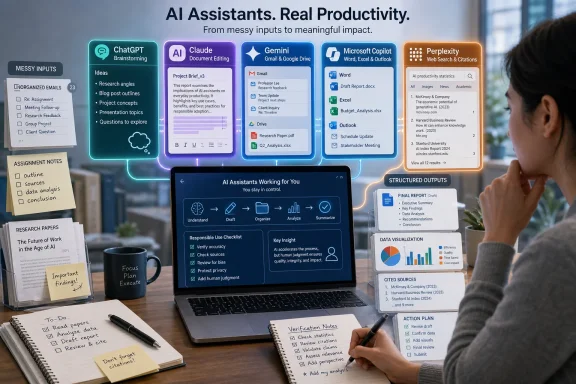
A defensible five-tool shortlist for the promise in India TV News’ July 10, 2026 roundup is ChatGPT, Google Gemini, Anthropic Claude, Microsoft Copilot, and Perplexity—services that can compress assignments, research, document analysis, and email drafting into a fraction of the usual manual work. Calling them chatbots for “lazy people” makes for a clickable headline, but it understates the more consequential shift: generative AI is becoming an interface for everyday knowledge work. The real advantage belongs not to people who stop thinking, but to those who learn which work to delegate, which tool to use, and where the machine must still be checked.
The chatbot market increasingly resembles the productivity-software market it is beginning to replace. Most leading assistants can brainstorm, summarize, rewrite, answer questions, inspect uploaded files, and generate respectable first drafts, so a generic feature checklist no longer identifies a clear winner.
What separates them is where the work already lives. ChatGPT is the broad generalist; Gemini is strongest when the user’s day revolves around Google services; Claude is particularly comfortable with long documents and sustained editorial work; Copilot has the most natural claim on Microsoft 365 and Windows workflows; and Perplexity is designed around web research with visible sourcing.
That distinction matters because the time saved by AI is not limited to faster writing. The larger gain comes from reducing the friction between finding information, understanding it, drafting a response, revising the result, and transferring it into the application where it belongs.
A chatbot that writes an email in 20 seconds is useful. A chatbot that can understand the thread, identify the unanswered question, preserve the appropriate tone, and prepare a reply inside the user’s existing productivity environment is closer to a workflow system.
That is why there is no honest universal ranking. A student analyzing several readings, an office worker clearing an Outlook backlog, a researcher checking current sources, and an administrator reviewing a policy document may each have a different best option.
The right choice therefore begins with a less glamorous question than “Which AI is smartest?” It begins with: Where do I lose time repeatedly? The answer may be writing, but it could just as easily be searching, reading, organizing, extracting action items, or moving information between applications.
That breadth is valuable for people whose work arrives in unpredictable forms. A user can begin by asking for an explanation of an unfamiliar concept, upload a document for analysis, turn the findings into a summary, and then ask for an email based on that summary—all within the same conversation.
OpenAI’s own guidance emphasizes working directly with uploaded files, including documents, spreadsheets, PDFs, and images. The significant productivity gain is not that ChatGPT can summarize a report; many systems can do that. It is that the summary can immediately become a table, a risk register, an executive memo, a revision plan, or a list of questions for the next meeting.
For students, that makes ChatGPT a capable tutor when it is prompted to teach rather than merely complete. It can explain a difficult passage at several levels, generate practice questions, critique an outline, identify unsupported arguments, or simulate the objections an instructor might raise.
The dangerous use is also obvious. Asking it to write an assignment from a title and submitting the result untouched removes the very learning that the assignment was designed to produce. It also leaves the student exposed to invented references, flattened arguments, generic prose, and factual errors that sound authoritative because the language is fluent.
In office work, the best use is usually transformation rather than invention. Feed it rough notes and ask for a concise update; give it an overly long email and request a direct version; upload a report and ask it to extract decisions, owners, deadlines, contradictions, and unresolved questions.
This is where the supposedly lazy workflow becomes surprisingly disciplined. A good user does not say, “Do my work.” A good user says, “Here is the source material, here is the audience, here is the required outcome, and here are the constraints—produce a draft that I will verify.”
ChatGPT’s weakness is the same flexibility that makes it attractive. Because it can attempt almost anything, users may mistake willingness for competence. It can generate an answer even when the evidence is incomplete, the task is ambiguous, or the premise is false.
The fix is not to avoid the tool but to force a better working method. Ask it to separate facts from assumptions, mark uncertain claims, state what information is missing, and identify which parts of its answer require an external source.
Google’s support material says Gemini can assist with writing and learning, summarize information from Gmail or Drive, work with uploaded documents and spreadsheets, and interact through text, voice, images, and a device camera. That makes it particularly attractive to users who spend their day switching among Gmail, Docs, Drive, Android, and web search.
Consider the ordinary burden of returning from leave. A worker may need to scan an overcrowded inbox, find messages requiring action, reconstruct decisions made in several threads, identify approaching meetings, and prepare responses. The manual work is not intellectually difficult, but it is fragmented and expensive in attention.
Gemini’s ecosystem position offers a route to compressing that process. Instead of treating each application as a separate container, an assistant can potentially help the user ask for the information needed to resume work: outstanding requests, relevant documents, scheduled commitments, and messages that deserve a reply.
The same integration can help students whose class material is stored in Drive. A collection of lecture notes, readings, drafts, and spreadsheets can become the basis for summaries, study plans, comparison charts, quizzes, and revision prompts without first being copied into an unrelated service.
On Android, the value shifts from document production to context. Google says Gemini can accept voice, photographs, camera input, and questions about what is displayed on the screen. That can eliminate the tedious step of describing a visual problem or transferring information from a phone into a desktop chat.
But Gemini also demonstrates why convenience and privacy must be examined together. Google’s documentation for connected applications describes the use of emails, files, events, photos, location information, and other account data to produce personalized responses, while also explaining the settings, processing, and review considerations around those interactions.
For an individual, that means reading the controls rather than treating “connect” as a harmless button. For an organization, it means deciding whether the value of contextual assistance justifies the data access required and whether managed accounts enforce the intended protections.
Gemini is therefore best understood as an ecosystem bet. If most of the user’s work already sits inside Google, it can reduce more friction than a marginally better standalone answer from another chatbot. If the user does not depend on Google services, much of that strategic advantage disappears.
Anthropic’s documentation lists support for common document formats such as PDF, DOCX, CSV, text, HTML, JSON, and spreadsheets where the appropriate analysis capability is available. It also explains that PDF processing can include both text and visual elements under supported conditions.
That makes Claude useful for the kind of work that begins with “Here are several documents; tell me what matters.” A user can ask it to identify inconsistencies between policies, compare versions of a proposal, extract obligations from a contract, or turn a large report into a structured briefing.
The distinction between summarization and analysis is important. A weak prompt asks for a shorter copy of the document. A stronger prompt asks what the document claims, which evidence supports those claims, where the argument is incomplete, who is affected, and what decisions follow.
Claude is also a natural fit for long-form revision. Instead of asking for a complete replacement draft, writers can use it as an editor: diagnose repetition, locate unsupported leaps, improve transitions, compare tone against an intended audience, and rewrite only the sections that are failing.
That workflow is safer because it preserves the author’s judgment. The human supplies the argument and accepts responsibility for the result; the assistant helps expose weaknesses and reduce the mechanical labor of revision.
For assignments, Claude can turn a reading packet into a study guide or help a student test an interpretation against the supplied text. It can also compare the student’s draft with a marking rubric and identify criteria that have not been addressed.
The limitation is that “supports documents” does not mean “understands every document perfectly.” Complex layouts, oversized files, scanned pages, charts, footnotes, and embedded images can all change what the system actually receives and interprets.
Users should therefore ask the assistant to describe what it could read before trusting the analysis. If page-specific precision matters, verify the cited passage in the original file rather than assuming the extracted representation is complete.
Claude’s broader lesson is that the biggest AI productivity gain may not come from generating more words. It may come from reducing the time needed to turn a mediocre draft into a defensible one.
Microsoft’s support documentation describes Copilot across Word, Excel, PowerPoint, OneNote, and Outlook in eligible Microsoft 365 offerings. The promise is straightforward: drafting should happen in Word, email assistance in Outlook, data work in Excel, and presentation creation in PowerPoint rather than inside a detached chatbot window.
That sounds less exciting than an all-purpose AI companion, but it may be more valuable in practice. Copying a response from a browser into a document, correcting its formatting, restoring the context it lost, and then repeating the process for email or slides quietly consumes much of the time that AI was supposed to save.
Copilot can reduce that transfer cost. A set of notes can become a Word draft; a document can become the basis of a presentation; an email thread can be summarized before a response is composed; and information in a spreadsheet can be explored without the user first turning every question into a formula.
For ordinary Windows users, the ideal email workflow is not “write a polite email.” It is “read this conversation, identify what the sender needs from me, draft a short reply that answers only those points, and do not promise anything beyond the attached project status.”
For managers, the value is compression. Long status documents, meeting records, and message threads can be converted into decisions, blockers, owners, and deadlines. That does not eliminate the need to read important material, but it can help determine what deserves immediate attention.
For IT departments, however, Copilot is not merely an end-user feature. It is a data-governance project that touches identity, permissions, document hygiene, retention, and the longstanding problem of employees having access to more information than they actually need.
An assistant capable of finding and summarizing authorized information can expose poor access control more efficiently than a human browsing folders. The AI has not created the permission problem, but it can make the consequences more visible.
That means a Copilot rollout should not begin with a mass announcement and a prompt-writing seminar. It should begin with an audit of sharing practices, stale groups, broadly accessible repositories, sensitive document locations, and the controls applied to managed accounts.
Integration is not the same as readiness. A feature appearing in a familiar Microsoft interface does not mean an organization has reviewed the data paths, licensing conditions, administrative controls, and user responsibilities surrounding it.
Copilot is nevertheless the most obvious choice for users whose daily work already revolves around Windows and Microsoft 365. Its advantage is not that it always produces the best paragraph. Its advantage is that it can shorten the path between the paragraph, the document, the inbox, the spreadsheet, and the meeting.
That makes it especially useful at the beginning of an unfamiliar task. Before writing a report, planning a purchase, comparing policies, or preparing for a meeting, users often spend more time discovering relevant material than they spend drafting the final output.
Perplexity can accelerate that discovery phase by combining multiple searches into a synthesized response. Its research-oriented features are designed to search iteratively, read sources, reason across the collected material, and prepare a consolidated report.
This is a better fit for current information than asking a general chatbot to answer from unspecified internal knowledge. The visible citations create a path back to the evidence and make it easier to identify whether the answer relies on an official source, a news report, a commercial blog, or something far less credible.
Yet citations can create their own false confidence. A source link proves only that a source exists; it does not prove that the chatbot interpreted it correctly, that the source is reliable, or that the cited page supports the exact claim being made.
Research users must still open the important sources. They should check the publication date, author, primary evidence, geographic relevance, and whether a quoted statistic was carried over from an older report.
Perplexity is therefore best used as a research accelerator, not an authority. It can map the territory, surface competing accounts, and provide an initial reading list, while the human verifies the facts that will carry weight in the final work.
For assignments, that means using it to discover primary sources and opposing arguments rather than copying its synthesis. For IT work, it can help locate vendor documentation, advisories, community reports, and technical explanations before the administrator validates the conclusion against first-party material.
The difference is subtle but critical: a general chatbot helps produce an answer, while Perplexity is strongest when helping establish where the answer came from.
The most effective prompt resembles a compact work order. It identifies the material to use, the intended audience, the requested output, the constraints, and the checks the assistant should perform before presenting the result.
For example, “Write an email about the delay” invites invention. “Using the attached status notes, draft a six-sentence update to the client explaining that testing is incomplete, avoid assigning blame, do not announce a new delivery date, and list any missing information after the draft” sharply limits the opportunity for error.
The same principle applies to assignments. “Write my essay” yields generic prose and uncertain facts. “Using only these readings, compare the authors’ explanations, identify their strongest disagreement, propose an outline, and flag where additional evidence is needed” turns the chatbot into an analytical aid.
Users also save time by separating jobs that are often collapsed into one prompt. Ask first for extraction, then analysis, then drafting, and finally criticism. Each stage produces an intermediate result that can be inspected before errors spread into the final document.
This staged approach initially looks less convenient than pressing one button. In reality, it prevents the much larger waste of repairing a polished response built on a misunderstood source.
A reliable workflow also asks the model to show its boundaries. Tell it not to invent missing facts, to mark uncertain statements, and to distinguish information taken from the supplied material from assumptions or outside knowledge.
That will not eliminate hallucinations. It does, however, transform silent uncertainty into something the user has a chance to notice.
For low-risk tasks, that threshold is easy to meet. Reformatting notes, generating subject-line options, shortening a draft, creating a checklist, or explaining a familiar concept can produce an immediate gain even if the output needs light editing.
For high-risk tasks, the economics change. Legal interpretations, financial decisions, medical information, security instructions, public statements, personnel matters, and production changes can all require enough checking that the chatbot’s first draft is only a small part of the job.
The cost of an error also matters more than the speed of generation. An inaccurate paragraph in private brainstorming is disposable. An inaccurate instruction applied to every managed Windows device is an incident.
Organizations should classify use cases accordingly. Some tasks can permit direct assistance with a quick human review; others should require source-grounded drafting, subject-matter approval, or an explicit prohibition on entering the relevant data into a consumer service.
Students face a parallel distinction. Using AI to generate practice questions may enhance learning, while using it to replace reading or submit unverified work can weaken both understanding and academic integrity.
This is why AI should remove friction, not responsibility. The person who sends, submits, publishes, deploys, or signs the output still owns it.
It may also contain personal data, credentials, confidential strategy, regulated information, unpublished financial results, source code, or details that an employee was never authorized to share with an external service.
The interface encourages casual disclosure because uploading a file feels similar to attaching it to an email. Technically and organizationally, however, the questions are broader: where the data is processed, how it is retained, whether it may be reviewed, what account controls apply, and which contractual protections cover the interaction.
Consumer, educational, business, and enterprise accounts may not be governed in the same way. Administrators should not assume that a vendor’s strongest published privacy commitment automatically applies to every user, account type, connected application, or optional setting.
Connected ecosystems require additional scrutiny because the assistant may not need a manual upload. When access to mail, storage, calendars, contacts, or organizational content is enabled, the permission itself becomes part of the security boundary.
The safe response is not a blanket ban. Unmanaged prohibition often drives users toward unsanctioned accounts and invisible shadow-AI use. A better policy provides approved tools, clearly defined data categories, and realistic workflows for employees who genuinely need assistance.
Most users need one default assistant and, at most, one specialist. A generalist such as ChatGPT can cover drafting, explanation, brainstorming, and file work, while Perplexity handles source-oriented research. A Microsoft 365-heavy organization may instead use Copilot as the default and reserve another tool for approved external research.
Google-centric users can make the same calculation around Gemini, while writers and document analysts may prefer Claude as their main workspace. The goal is not to own the largest AI toolbox; it is to reduce repeated decisions about where a task should go.
A useful selection test is to keep a time log for several days. Record the tasks that consume attention, the applications involved, the sensitivity of the data, and what part of each process is repetitive.
Then test assistants against those real tasks rather than generic demonstrations. Measure the time to a verified result, not the time to the first response. Include the effort required to correct formatting, confirm facts, restore omitted context, and move the output into the final application.
This method may reveal that the chatbot with the most impressive answer is not the fastest tool overall. Integration, reliable formatting, source visibility, and access to the right context frequently matter more than a small difference in prose quality.
It may also reveal that some work should not involve AI. If a task is already quick, highly sensitive, or dependent on personal judgment, adding a chatbot can create more review and governance overhead than it removes.
 The Best Chatbot Is the One Closest to the Work
The chatbot market increasingly resembles the productivity-software market it is beginning to replace. Most leading assistants can brainstorm, summarize, rewrite, answer questions, inspect uploaded files, and generate respectable first drafts, so a generic feature checklist no longer identifies a clear winner.What separates them is where the work already lives. ChatGPT is the broad generalist; Gemini is strongest when the user’s day revolves around Google services; Claude is particularly comfortable with long documents and sustained editorial work; Copilot has the most natural claim on Microsoft 365 and Windows workflows; and Perplexity is designed around web research with visible sourcing.
That distinction matters because the time saved by AI is not limited to faster writing. The larger gain comes from reducing the friction between finding information, understanding it, drafting a response, revising the result, and transferring it into the application where it belongs.
A chatbot that writes an email in 20 seconds is useful. A chatbot that can understand the thread, identify the unanswered question, preserve the appropriate tone, and prepare a reply inside the user’s existing productivity environment is closer to a workflow system.
That is why there is no honest universal ranking. A student analyzing several readings, an office worker clearing an Outlook backlog, a researcher checking current sources, and an administrator reviewing a policy document may each have a different best option.
| Chatbot | Best fit | Main time-saving role | Strongest practical advantage | Primary caution |
|---|---|---|---|---|
| ChatGPT | General-purpose personal work | Drafting, studying, file analysis and brainstorming | Broad range of tasks in one conversational workspace | Confident answers still require verification |
| Google Gemini | Google-centric users | Gmail, Drive, mobile assistance and document summaries | Proximity to Google Workspace and Android | Connected-data settings need careful review |
| Anthropic Claude | Long documents and polished writing | Reading, restructuring and refining large amounts of text | Strong document-centered working style | Uploaded material may exceed practical processing limits |
| Microsoft Copilot | Windows and Microsoft 365 environments | Email, Word documents, presentations and office workflows | Integration with familiar Microsoft applications | Availability and capabilities depend on account and configuration |
| Perplexity | Research and current-information gathering | Web discovery, source comparison and rapid briefings | Citations make claims easier to inspect | A cited answer is not automatically a correct one |
ChatGPT Wins the Generalist Job by Refusing to Stay in One Lane
ChatGPT remains the easiest recommendation for users who want one assistant rather than a collection of specialized tools. OpenAI describes it as an everyday assistant for writing, studying, planning, mathematics, coding, and analyzing files or images, which accurately captures its appeal: it can move between unrelated jobs without requiring the user to adopt a rigid workflow.That breadth is valuable for people whose work arrives in unpredictable forms. A user can begin by asking for an explanation of an unfamiliar concept, upload a document for analysis, turn the findings into a summary, and then ask for an email based on that summary—all within the same conversation.
OpenAI’s own guidance emphasizes working directly with uploaded files, including documents, spreadsheets, PDFs, and images. The significant productivity gain is not that ChatGPT can summarize a report; many systems can do that. It is that the summary can immediately become a table, a risk register, an executive memo, a revision plan, or a list of questions for the next meeting.
For students, that makes ChatGPT a capable tutor when it is prompted to teach rather than merely complete. It can explain a difficult passage at several levels, generate practice questions, critique an outline, identify unsupported arguments, or simulate the objections an instructor might raise.
The dangerous use is also obvious. Asking it to write an assignment from a title and submitting the result untouched removes the very learning that the assignment was designed to produce. It also leaves the student exposed to invented references, flattened arguments, generic prose, and factual errors that sound authoritative because the language is fluent.
In office work, the best use is usually transformation rather than invention. Feed it rough notes and ask for a concise update; give it an overly long email and request a direct version; upload a report and ask it to extract decisions, owners, deadlines, contradictions, and unresolved questions.
This is where the supposedly lazy workflow becomes surprisingly disciplined. A good user does not say, “Do my work.” A good user says, “Here is the source material, here is the audience, here is the required outcome, and here are the constraints—produce a draft that I will verify.”
ChatGPT’s weakness is the same flexibility that makes it attractive. Because it can attempt almost anything, users may mistake willingness for competence. It can generate an answer even when the evidence is incomplete, the task is ambiguous, or the premise is false.
The fix is not to avoid the tool but to force a better working method. Ask it to separate facts from assumptions, mark uncertain claims, state what information is missing, and identify which parts of its answer require an external source.
Gemini Turns Google’s Ecosystem Into the Product
Google Gemini’s most meaningful advantage is not an isolated writing feature. It is Google’s ability to place an assistant beside the email, files, calendars, search activity, maps, mobile devices, and documents that already structure a large share of users’ digital lives.Google’s support material says Gemini can assist with writing and learning, summarize information from Gmail or Drive, work with uploaded documents and spreadsheets, and interact through text, voice, images, and a device camera. That makes it particularly attractive to users who spend their day switching among Gmail, Docs, Drive, Android, and web search.
Consider the ordinary burden of returning from leave. A worker may need to scan an overcrowded inbox, find messages requiring action, reconstruct decisions made in several threads, identify approaching meetings, and prepare responses. The manual work is not intellectually difficult, but it is fragmented and expensive in attention.
Gemini’s ecosystem position offers a route to compressing that process. Instead of treating each application as a separate container, an assistant can potentially help the user ask for the information needed to resume work: outstanding requests, relevant documents, scheduled commitments, and messages that deserve a reply.
The same integration can help students whose class material is stored in Drive. A collection of lecture notes, readings, drafts, and spreadsheets can become the basis for summaries, study plans, comparison charts, quizzes, and revision prompts without first being copied into an unrelated service.
On Android, the value shifts from document production to context. Google says Gemini can accept voice, photographs, camera input, and questions about what is displayed on the screen. That can eliminate the tedious step of describing a visual problem or transferring information from a phone into a desktop chat.
But Gemini also demonstrates why convenience and privacy must be examined together. Google’s documentation for connected applications describes the use of emails, files, events, photos, location information, and other account data to produce personalized responses, while also explaining the settings, processing, and review considerations around those interactions.
For an individual, that means reading the controls rather than treating “connect” as a harmless button. For an organization, it means deciding whether the value of contextual assistance justifies the data access required and whether managed accounts enforce the intended protections.
Gemini is therefore best understood as an ecosystem bet. If most of the user’s work already sits inside Google, it can reduce more friction than a marginally better standalone answer from another chatbot. If the user does not depend on Google services, much of that strategic advantage disappears.
Claude Makes a Case for Slower, Better Drafting
Claude’s niche is not simply that it can write. Its appeal is that it often feels designed around reading, reasoning through, and revising substantial bodies of text rather than firing off an isolated response.Anthropic’s documentation lists support for common document formats such as PDF, DOCX, CSV, text, HTML, JSON, and spreadsheets where the appropriate analysis capability is available. It also explains that PDF processing can include both text and visual elements under supported conditions.
That makes Claude useful for the kind of work that begins with “Here are several documents; tell me what matters.” A user can ask it to identify inconsistencies between policies, compare versions of a proposal, extract obligations from a contract, or turn a large report into a structured briefing.
The distinction between summarization and analysis is important. A weak prompt asks for a shorter copy of the document. A stronger prompt asks what the document claims, which evidence supports those claims, where the argument is incomplete, who is affected, and what decisions follow.
Claude is also a natural fit for long-form revision. Instead of asking for a complete replacement draft, writers can use it as an editor: diagnose repetition, locate unsupported leaps, improve transitions, compare tone against an intended audience, and rewrite only the sections that are failing.
That workflow is safer because it preserves the author’s judgment. The human supplies the argument and accepts responsibility for the result; the assistant helps expose weaknesses and reduce the mechanical labor of revision.
For assignments, Claude can turn a reading packet into a study guide or help a student test an interpretation against the supplied text. It can also compare the student’s draft with a marking rubric and identify criteria that have not been addressed.
The limitation is that “supports documents” does not mean “understands every document perfectly.” Complex layouts, oversized files, scanned pages, charts, footnotes, and embedded images can all change what the system actually receives and interprets.
Users should therefore ask the assistant to describe what it could read before trusting the analysis. If page-specific precision matters, verify the cited passage in the original file rather than assuming the extracted representation is complete.
Claude’s broader lesson is that the biggest AI productivity gain may not come from generating more words. It may come from reducing the time needed to turn a mediocre draft into a defensible one.
Copilot’s Advantage Is That Windows Users Already Live in Microsoft’s House
Microsoft Copilot has a structural advantage on WindowsForum.com because many readers do not need another destination for AI. They need assistance inside the applications where their work is already being created, reviewed, presented, and sent.Microsoft’s support documentation describes Copilot across Word, Excel, PowerPoint, OneNote, and Outlook in eligible Microsoft 365 offerings. The promise is straightforward: drafting should happen in Word, email assistance in Outlook, data work in Excel, and presentation creation in PowerPoint rather than inside a detached chatbot window.
That sounds less exciting than an all-purpose AI companion, but it may be more valuable in practice. Copying a response from a browser into a document, correcting its formatting, restoring the context it lost, and then repeating the process for email or slides quietly consumes much of the time that AI was supposed to save.
Copilot can reduce that transfer cost. A set of notes can become a Word draft; a document can become the basis of a presentation; an email thread can be summarized before a response is composed; and information in a spreadsheet can be explored without the user first turning every question into a formula.
For ordinary Windows users, the ideal email workflow is not “write a polite email.” It is “read this conversation, identify what the sender needs from me, draft a short reply that answers only those points, and do not promise anything beyond the attached project status.”
For managers, the value is compression. Long status documents, meeting records, and message threads can be converted into decisions, blockers, owners, and deadlines. That does not eliminate the need to read important material, but it can help determine what deserves immediate attention.
For IT departments, however, Copilot is not merely an end-user feature. It is a data-governance project that touches identity, permissions, document hygiene, retention, and the longstanding problem of employees having access to more information than they actually need.
An assistant capable of finding and summarizing authorized information can expose poor access control more efficiently than a human browsing folders. The AI has not created the permission problem, but it can make the consequences more visible.
That means a Copilot rollout should not begin with a mass announcement and a prompt-writing seminar. It should begin with an audit of sharing practices, stale groups, broadly accessible repositories, sensitive document locations, and the controls applied to managed accounts.
Integration is not the same as readiness. A feature appearing in a familiar Microsoft interface does not mean an organization has reviewed the data paths, licensing conditions, administrative controls, and user responsibilities surrounding it.
Copilot is nevertheless the most obvious choice for users whose daily work already revolves around Windows and Microsoft 365. Its advantage is not that it always produces the best paragraph. Its advantage is that it can shorten the path between the paragraph, the document, the inbox, the spreadsheet, and the meeting.
Perplexity Treats the Source List as Part of the Answer
Perplexity is the most distinct member of this group because it approaches the problem from search rather than office productivity. Its central pitch is not simply that it can answer questions, but that it searches the web and attaches sources that users can inspect.That makes it especially useful at the beginning of an unfamiliar task. Before writing a report, planning a purchase, comparing policies, or preparing for a meeting, users often spend more time discovering relevant material than they spend drafting the final output.
Perplexity can accelerate that discovery phase by combining multiple searches into a synthesized response. Its research-oriented features are designed to search iteratively, read sources, reason across the collected material, and prepare a consolidated report.
This is a better fit for current information than asking a general chatbot to answer from unspecified internal knowledge. The visible citations create a path back to the evidence and make it easier to identify whether the answer relies on an official source, a news report, a commercial blog, or something far less credible.
Yet citations can create their own false confidence. A source link proves only that a source exists; it does not prove that the chatbot interpreted it correctly, that the source is reliable, or that the cited page supports the exact claim being made.
Research users must still open the important sources. They should check the publication date, author, primary evidence, geographic relevance, and whether a quoted statistic was carried over from an older report.
Perplexity is therefore best used as a research accelerator, not an authority. It can map the territory, surface competing accounts, and provide an initial reading list, while the human verifies the facts that will carry weight in the final work.
For assignments, that means using it to discover primary sources and opposing arguments rather than copying its synthesis. For IT work, it can help locate vendor documentation, advisories, community reports, and technical explanations before the administrator validates the conclusion against first-party material.
The difference is subtle but critical: a general chatbot helps produce an answer, while Perplexity is strongest when helping establish where the answer came from.
“Lazy” Prompts Usually Create More Work Than They Save
AI productivity advice often focuses on clever prompts, but the quality of the source material matters more than verbal tricks. A beautifully phrased instruction cannot rescue an email request that lacks the recipient, objective, relevant facts, or acceptable tone.The most effective prompt resembles a compact work order. It identifies the material to use, the intended audience, the requested output, the constraints, and the checks the assistant should perform before presenting the result.
For example, “Write an email about the delay” invites invention. “Using the attached status notes, draft a six-sentence update to the client explaining that testing is incomplete, avoid assigning blame, do not announce a new delivery date, and list any missing information after the draft” sharply limits the opportunity for error.
The same principle applies to assignments. “Write my essay” yields generic prose and uncertain facts. “Using only these readings, compare the authors’ explanations, identify their strongest disagreement, propose an outline, and flag where additional evidence is needed” turns the chatbot into an analytical aid.
Users also save time by separating jobs that are often collapsed into one prompt. Ask first for extraction, then analysis, then drafting, and finally criticism. Each stage produces an intermediate result that can be inspected before errors spread into the final document.
This staged approach initially looks less convenient than pressing one button. In reality, it prevents the much larger waste of repairing a polished response built on a misunderstood source.
A reliable workflow also asks the model to show its boundaries. Tell it not to invent missing facts, to mark uncertain statements, and to distinguish information taken from the supplied material from assumptions or outside knowledge.
That will not eliminate hallucinations. It does, however, transform silent uncertainty into something the user has a chance to notice.
The Hidden Cost Is Verification, Not Subscription
The headline promise is that chatbots save hours. They can, but only if verification takes less time than producing the work manually.For low-risk tasks, that threshold is easy to meet. Reformatting notes, generating subject-line options, shortening a draft, creating a checklist, or explaining a familiar concept can produce an immediate gain even if the output needs light editing.
For high-risk tasks, the economics change. Legal interpretations, financial decisions, medical information, security instructions, public statements, personnel matters, and production changes can all require enough checking that the chatbot’s first draft is only a small part of the job.
The cost of an error also matters more than the speed of generation. An inaccurate paragraph in private brainstorming is disposable. An inaccurate instruction applied to every managed Windows device is an incident.
Organizations should classify use cases accordingly. Some tasks can permit direct assistance with a quick human review; others should require source-grounded drafting, subject-matter approval, or an explicit prohibition on entering the relevant data into a consumer service.
Students face a parallel distinction. Using AI to generate practice questions may enhance learning, while using it to replace reading or submit unverified work can weaken both understanding and academic integrity.
This is why AI should remove friction, not responsibility. The person who sends, submits, publishes, deploys, or signs the output still owns it.
Convenience Becomes a Security Decision the Moment Files Are Uploaded
Every chatbot in this comparison becomes more useful when it receives context. Context may be an assignment, an inbox, a corporate report, a spreadsheet, a customer message, a support log, or a screenshot of an error.It may also contain personal data, credentials, confidential strategy, regulated information, unpublished financial results, source code, or details that an employee was never authorized to share with an external service.
The interface encourages casual disclosure because uploading a file feels similar to attaching it to an email. Technically and organizationally, however, the questions are broader: where the data is processed, how it is retained, whether it may be reviewed, what account controls apply, and which contractual protections cover the interaction.
Consumer, educational, business, and enterprise accounts may not be governed in the same way. Administrators should not assume that a vendor’s strongest published privacy commitment automatically applies to every user, account type, connected application, or optional setting.
Connected ecosystems require additional scrutiny because the assistant may not need a manual upload. When access to mail, storage, calendars, contacts, or organizational content is enabled, the permission itself becomes part of the security boundary.
The safe response is not a blanket ban. Unmanaged prohibition often drives users toward unsanctioned accounts and invisible shadow-AI use. A better policy provides approved tools, clearly defined data categories, and realistic workflows for employees who genuinely need assistance.
Action checklist for admins
- Inventory which public and licensed AI assistants employees are already using.
- Define what data may never be pasted, uploaded, photographed, or exposed through connected applications.
- Review identity, sharing, retention, audit, and administrative controls before enabling integrations.
- Audit Microsoft 365, Google Workspace, and file-sharing permissions for excessive access.
- Separate low-risk drafting from regulated, security-sensitive, personnel, financial, and customer-data workflows.
- Require source verification and accountable human approval for consequential output.
- Train users to report accidental disclosure and inaccurate AI-generated instructions.
- Reassess approved tools regularly because capabilities and data flows continue to change.
The Winning Strategy Is a Small Stack, Not Five Open Tabs
The temptation is to create an account with every major provider and constantly compare responses. That can turn a productivity experiment into a new form of procrastination.Most users need one default assistant and, at most, one specialist. A generalist such as ChatGPT can cover drafting, explanation, brainstorming, and file work, while Perplexity handles source-oriented research. A Microsoft 365-heavy organization may instead use Copilot as the default and reserve another tool for approved external research.
Google-centric users can make the same calculation around Gemini, while writers and document analysts may prefer Claude as their main workspace. The goal is not to own the largest AI toolbox; it is to reduce repeated decisions about where a task should go.
A useful selection test is to keep a time log for several days. Record the tasks that consume attention, the applications involved, the sensitivity of the data, and what part of each process is repetitive.
Then test assistants against those real tasks rather than generic demonstrations. Measure the time to a verified result, not the time to the first response. Include the effort required to correct formatting, confirm facts, restore omitted context, and move the output into the final application.
This method may reveal that the chatbot with the most impressive answer is not the fastest tool overall. Integration, reliable formatting, source visibility, and access to the right context frequently matter more than a small difference in prose quality.
It may also reveal that some work should not involve AI. If a task is already quick, highly sensitive, or dependent on personal judgment, adding a chatbot can create more review and governance overhead than it removes.
Five Rules That Actually Save the Hours
The India TV News framing captures a genuine demand: people want relief from assignments, overflowing inboxes, long documents, and repetitive office work. The practical results depend less on laziness than on choosing a narrow role for each assistant.- Use ChatGPT when the work moves across several formats and no single ecosystem dominates.
- Use Gemini when Gmail, Drive, Google Workspace, or Android provides the essential context.
- Use Claude when the core job is reading, restructuring, comparing, or polishing substantial documents.
- Use Copilot when the desired output belongs in Microsoft 365 and organizational governance is ready.
- Use Perplexity when current web research and inspectable sources matter more than standalone drafting.
- Never treat fluency, integration, or citations as substitutes for human verification.
References
- Primary source: India TV News
Published: 2026-07-12T01:50:28.562139
5 Best AI chatbots for lazy people to save hours of work: From assignments to emails | Technology - India TV News
From writing assignments and preparing presentations to drafting emails and summarising documents, these AI assistants can reduce workload and improve efficiency. Here are five of the best AI chatbots that can make your personal and professional life easier.www.indiatvnews.com