

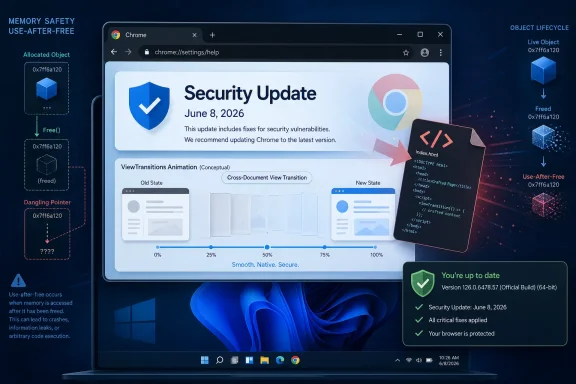
Google patched CVE-2026-11646, a high-severity use-after-free flaw in Chrome’s ViewTransitions component, in the June 8, 2026 Stable Channel desktop update, affecting Chrome versions before 149.0.7827.103 and exposing users to possible sandboxed code execution through a crafted HTML page. The vulnerability is not the lone alarm bell in that release, but it is the one that neatly captures Chrome’s modern security problem: the browser keeps adding richer interface machinery, and attackers keep looking for lifetime bugs in the seams. For Windows users and administrators, this is less a story about one animation API than about why browser patching has become core endpoint hygiene.
The View Transitions API exists to make the web feel less like a pile of documents and more like a native application. It gives developers a standardized way to animate movement between visual states, smoothing page transitions that used to require brittle JavaScript gymnastics. That is a legitimate advance for user experience, especially as web apps continue eating work once reserved for desktop software.
But every step toward native-feeling web UI pulls the browser deeper into complex state management. Rendering engines must snapshot pages, preserve relationships between old and new visual elements, coordinate compositor work, and handle timing as script, style, layout, and user input all move at once. A use-after-free bug lives exactly in that kind of complexity: one part of the program still believes an object exists after another part has released it.
That does not mean ViewTransitions is uniquely unsafe, nor does it mean users should disable modern web features in panic. It means the browser’s visual polish is not security-neutral. In 2026, the code that makes a tab feel fluid is also code that parses hostile content from strangers on the internet.
For WindowsForum readers, the important phrase in the CVE description is not “ViewTransitions.” It is “crafted HTML page.” This is the classic browser exploitation model in its simplest form: a victim visits or is redirected to a malicious page, and the browser is forced to process attacker-controlled content through a vulnerable path.
The “inside a sandbox” wording also matters. Chrome’s sandbox is designed to contain renderer compromise, and a bug like this, by itself, should not automatically equal full system takeover. A successful exploit may give the attacker code execution in a constrained browser process rather than immediate control of Windows.
That distinction should reassure users without relaxing administrators. Modern browser attacks often work as chains. One bug compromises the renderer; another escapes the sandbox; another elevates privileges or steals tokens from where the user is already authenticated. The absence of a public sandbox-escape pairing for CVE-2026-11646 does not make the first link harmless.
Google’s advisory also arrived in a release that fixed 74 security issues, including a separate V8 issue, CVE-2026-11645, for which Google said an exploit existed in the wild. CVE-2026-11646 is not described as exploited in the wild in the public advisory, but it shipped in the same security wave. That is precisely why defenders should avoid treating browser CVEs one at a time as if they arrive in neat, isolated envelopes.
The safe operational answer is still straightforward: Chrome should be at the current Stable Channel build offered by Google for the machine’s operating system, and administrators should not rely on a stale inventory rule that assumes one patch number covers every platform. Windows fleets may see 149.0.7827.102 or 149.0.7827.103 depending on rollout and packaging details, while security databases may normalize the threshold around .103.
That mismatch is not evidence that NVD is wrong or that Google’s advisory is careless. It is a reminder that vulnerability management data is often a map, not the territory. Security teams consume CVEs, CPEs, vendor advisories, package metadata, browser auto-update signals, EDR inventory, and user-reported screenshots, and those sources rarely line up perfectly on day one.
The CPE configuration in NVD identifies Google Chrome as the affected application across Windows, Linux, and macOS. That is useful for scanners, but it also creates the familiar Windows admin trap: the operating system entry in a CPE tree does not mean Windows itself contains the vulnerable code. The vulnerable product is Chrome; Windows is part of the affected platform context.
A use-after-free vulnerability is conceptually simple but technically slippery. Software allocates memory for an object, releases it, and later touches it again through a stale pointer or reference. If an attacker can influence what occupies that memory after release, the bug may become a route to controlled memory corruption rather than a mere crash.
Chrome has invested heavily in mitigations: site isolation, sandboxing, heap hardening, MiraclePtr-style protections, fuzzing, and process separation. The continuing appearance of use-after-free CVEs does not mean those defenses failed wholesale. It means the browser is a sprawling C++ system where reducing exploitability and eliminating bug classes are different goals.
That distinction matters in policy discussions. Enterprises often ask whether one more Chrome CVE proves they should move users to another browser. The better question is whether the organization has a fast, measurable, enforceable browser update process. Chromium-based browsers share a large amount of code, and non-Chromium browsers carry their own attack surfaces. Browser monoculture is a risk, but unpatched browsers are a certainty.
Each new capability reduces the gap between web and native software. That is why users can live inside browser tabs all day and why businesses can deploy critical workflows without shipping Win32 clients to every endpoint. It is also why a flaw in a visual transition system can matter to a domain-joined Windows laptop in a finance department.
Attackers do not care whether a feature is glamorous or obscure. They care whether it is reachable, complex, and inconsistently exercised by defensive testing. UI transition code has the same basic disadvantage as any other browser subsystem: it must safely process input from arbitrary sites while preserving performance and compatibility with the chaotic web.
This is also where security guidance often sounds too abstract. “Do not click suspicious links” is still sensible advice, but it is insufficient when legitimate sites can serve malicious ads, compromised pages can host exploit code, and phishing infrastructure can mimic routine business portals. The browser is not merely a place where users make decisions; it is a parser for the world’s least trustworthy input stream.
That is why browser patch latency deserves the same scrutiny as Windows Update compliance. A laptop that is fully current on cumulative Windows updates but two browser releases behind is not “patched” in any meaningful risk-management sense. It is a fully patched operating system running a vulnerable internet-facing runtime.
For managed Windows environments, the immediate control points are familiar. Confirm Chrome auto-update is enabled. Verify update status through management tooling rather than trusting user restarts. Watch for machines where Chrome remains open for days because the update has downloaded but not applied. Pay special attention to shared desktops, kiosks, VDI images, developer workstations, and servers where admins occasionally browse from privileged sessions.
The last category is the one everyone knows is bad and many teams still tolerate. Browsing from a server or privileged admin workstation turns a browser renderer bug into a much more interesting foothold. Even if Chrome’s sandbox holds, cookies, tokens, intranet access, password managers, and administrative portals can make “inside the browser” a valuable place for an attacker to be.
In small environments, opening Chrome’s About page is enough to force an update check and prompt a relaunch. In larger environments, that is folklore, not process. Security teams need reporting that distinguishes “update available,” “update downloaded,” “restart required,” and “patched build running.” Those states are operationally different.
The same applies to Chromium-based browsers beyond Google Chrome. Microsoft Edge, Brave, Vivaldi, Opera, and Electron-based apps may inherit related Chromium fixes on their own schedules, depending on release cadence and code exposure. A Chrome CVE is often a browser ecosystem event, not just a Google product event.
Windows shops that standardize on Edge should not ignore the Chrome advisory simply because the affected product string says Google Chrome. Edge uses Chromium, and Microsoft typically ships its own updates when Chromium security fixes land. The right response is to check the browser actually deployed in the environment, not to stop reading at the vendor name in the CVE.
Waiting for NVD to finish enrichment is a poor strategy for browser bugs. Vendor advisories and exploitability context often move faster than downstream scoring. If Google says a Chrome issue is high severity and the fix is available, the practical decision has already been made for most organizations.
The richer question is not whether CVE-2026-11646 is an emergency on the same level as a confirmed exploited zero-day. Publicly, it is not described that way. The better question is whether a high-severity remotely reachable browser memory safety bug should wait for a monthly maintenance window. For most endpoints, the answer should be no.
This is where vulnerability management maturity shows. Less mature programs chase the CVSS number. Better programs understand product class, exposure, exploit prerequisites, deployment friction, and compensating controls. Browser vulnerabilities score high because browsers sit on the front line, not because every CVE becomes a mass exploitation event.
For an individual Windows user, the action is simple. Restart Chrome. Check the version if you are unsure. Do not assume closing a tab is the same as restarting the browser. If Chrome says an update is ready, take the relaunch prompt seriously.
For IT teams, the action is broader. Patch Chrome, check Edge and other Chromium browsers, confirm managed policy is not blocking updates, and look for devices that have not restarted. If the organization allows users to postpone browser relaunches indefinitely, this is the kind of advisory that should force a rethink.
There is also a communications lesson here. Users are numb to update prompts because the industry trained them to be. A concise message that says “Chrome fixed a high-severity bug that can be triggered by a malicious web page; restart today” is more effective than forwarding a CVE entry full of vector strings. Security culture improves when warnings are specific, rare, and tied to an action users can complete.
That distinction should inform incident response. If a user visited a suspicious page before updating, the presence of a sandbox means defenders should avoid jumping straight to “system owned” without evidence. Browser crashes, suspicious child processes, token theft indicators, extension tampering, unusual downloads, and authentication anomalies are more relevant early signals than panic-driven reimaging.
But the sandbox should not become an excuse for delay. Attackers prize browser renderer exploits because they are useful even before a full escape. They can inspect page context, interfere with sessions, attack browser-exposed surfaces, and chain with other vulnerabilities when available. The sandbox is a wall, not a magic eraser.
For high-risk users — executives, administrators, developers with production credentials, journalists, legal teams, and anyone targeted by phishing — browser bugs deserve extra urgency. Their web sessions often contain the keys attackers actually want. A sandboxed foothold in the right browser profile may be more valuable than broad local access to the wrong machine.
The browser is no longer a single application surface. It is a federation of engines and subsystems, many of which behave like miniature platforms. Graphics has its own attack surface. Extensions have theirs. PDF rendering has another. WebRTC, Bluetooth, payments, autofill, printing, and service workers each represent different ways the web reaches into the desktop experience.
This is why “just use a secure browser” is an incomplete prescription. Security is not a static property of a brand. It is a moving relationship between code quality, update velocity, exploit mitigation, user behavior, enterprise controls, and how quickly a fix replaces vulnerable code on real machines.
Google’s restricted bug details are also part of that system. Vendors often withhold technical specifics until most users are patched, which frustrates researchers and defenders who want to understand exposure. But immediate full disclosure can also hand exploit developers a roadmap while a large population remains vulnerable. The result is an uncomfortable but rational delay: patch first, reverse-engineer later.
Bug bounty amounts reflect many factors: exploitability, novelty, report quality, duplication, internal discovery state, component importance, and program rules. A lower bounty does not mean a bug is irrelevant once it has a CVE, a high severity label, and a patch in Stable. It simply means the economics of vulnerability reward programs are not the same as the economics of enterprise risk.
The more useful takeaway is that even relatively modest externally reported bugs can land in components that every user carries around all day. A web platform feature designed for smoother transitions becomes part of an attacker’s map. A small entry in a long release note becomes a compliance item across thousands of endpoints.
That is the asymmetry defenders live with. Attackers need one reachable mistake. Browser vendors must ship features, preserve compatibility, and close entire classes of mistakes without breaking the web. Administrators sit between those forces, asked to convert a vendor’s patch into a measurable reduction in risk before the next campaign begins.
 Chrome’s Smoothest Features Are Now Part of the Attack Surface
The View Transitions API exists to make the web feel less like a pile of documents and more like a native application. It gives developers a standardized way to animate movement between visual states, smoothing page transitions that used to require brittle JavaScript gymnastics. That is a legitimate advance for user experience, especially as web apps continue eating work once reserved for desktop software.But every step toward native-feeling web UI pulls the browser deeper into complex state management. Rendering engines must snapshot pages, preserve relationships between old and new visual elements, coordinate compositor work, and handle timing as script, style, layout, and user input all move at once. A use-after-free bug lives exactly in that kind of complexity: one part of the program still believes an object exists after another part has released it.
That does not mean ViewTransitions is uniquely unsafe, nor does it mean users should disable modern web features in panic. It means the browser’s visual polish is not security-neutral. In 2026, the code that makes a tab feel fluid is also code that parses hostile content from strangers on the internet.
For WindowsForum readers, the important phrase in the CVE description is not “ViewTransitions.” It is “crafted HTML page.” This is the classic browser exploitation model in its simplest form: a victim visits or is redirected to a malicious page, and the browser is forced to process attacker-controlled content through a vulnerable path.
The Bug Is High Severity, Not Internet Doomsday
CVE-2026-11646 is rated high by Chromium, and CISA’s ADP scoring places it at 8.8 under CVSS 3.1. The vector tells the practical story: network exploitable, low attack complexity, no privileges required, user interaction required, with high potential impact to confidentiality, integrity, and availability. In plainer English, an attacker does not need an account on the machine, but they do need to get the target to load malicious web content.The “inside a sandbox” wording also matters. Chrome’s sandbox is designed to contain renderer compromise, and a bug like this, by itself, should not automatically equal full system takeover. A successful exploit may give the attacker code execution in a constrained browser process rather than immediate control of Windows.
That distinction should reassure users without relaxing administrators. Modern browser attacks often work as chains. One bug compromises the renderer; another escapes the sandbox; another elevates privileges or steals tokens from where the user is already authenticated. The absence of a public sandbox-escape pairing for CVE-2026-11646 does not make the first link harmless.
Google’s advisory also arrived in a release that fixed 74 security issues, including a separate V8 issue, CVE-2026-11645, for which Google said an exploit existed in the wild. CVE-2026-11646 is not described as exploited in the wild in the public advisory, but it shipped in the same security wave. That is precisely why defenders should avoid treating browser CVEs one at a time as if they arrive in neat, isolated envelopes.
The Version Number Is Messier Than the Risk
The NVD entry describes Chrome prior to 149.0.7827.103 as affected. Google’s release note says the Stable channel moved to 149.0.7827.102/.103 for Windows and Mac and 149.0.7827.102 for Linux. That kind of version notation always irritates enterprise patch teams because it turns a simple “patched or unpatched” question into a platform-specific check.The safe operational answer is still straightforward: Chrome should be at the current Stable Channel build offered by Google for the machine’s operating system, and administrators should not rely on a stale inventory rule that assumes one patch number covers every platform. Windows fleets may see 149.0.7827.102 or 149.0.7827.103 depending on rollout and packaging details, while security databases may normalize the threshold around .103.
That mismatch is not evidence that NVD is wrong or that Google’s advisory is careless. It is a reminder that vulnerability management data is often a map, not the territory. Security teams consume CVEs, CPEs, vendor advisories, package metadata, browser auto-update signals, EDR inventory, and user-reported screenshots, and those sources rarely line up perfectly on day one.
The CPE configuration in NVD identifies Google Chrome as the affected application across Windows, Linux, and macOS. That is useful for scanners, but it also creates the familiar Windows admin trap: the operating system entry in a CPE tree does not mean Windows itself contains the vulnerable code. The vulnerable product is Chrome; Windows is part of the affected platform context.
Use-After-Free Remains the Browser Bug That Refuses to Retire
Memory safety bugs have haunted browsers for decades because browsers are unusually hostile places to write low-level code. They ingest untrusted data, execute untrusted script, juggle multiple processes, accelerate graphics, decode media, parse fonts, run WebAssembly, broker device access, and preserve a responsive UI while doing it. That is a brutal workload even before performance pressure enters the room.A use-after-free vulnerability is conceptually simple but technically slippery. Software allocates memory for an object, releases it, and later touches it again through a stale pointer or reference. If an attacker can influence what occupies that memory after release, the bug may become a route to controlled memory corruption rather than a mere crash.
Chrome has invested heavily in mitigations: site isolation, sandboxing, heap hardening, MiraclePtr-style protections, fuzzing, and process separation. The continuing appearance of use-after-free CVEs does not mean those defenses failed wholesale. It means the browser is a sprawling C++ system where reducing exploitability and eliminating bug classes are different goals.
That distinction matters in policy discussions. Enterprises often ask whether one more Chrome CVE proves they should move users to another browser. The better question is whether the organization has a fast, measurable, enforceable browser update process. Chromium-based browsers share a large amount of code, and non-Chromium browsers carry their own attack surfaces. Browser monoculture is a risk, but unpatched browsers are a certainty.
The ViewTransitions Detail Is a Warning About Web App Ambition
It is tempting to dismiss ViewTransitions as eye candy. That would miss the larger shift. The modern web platform is not just HTML, CSS, and a little JavaScript anymore; it is a distributed application runtime with graphics pipelines, identity flows, storage APIs, hardware acceleration, installable apps, background workers, push notifications, and permission prompts.Each new capability reduces the gap between web and native software. That is why users can live inside browser tabs all day and why businesses can deploy critical workflows without shipping Win32 clients to every endpoint. It is also why a flaw in a visual transition system can matter to a domain-joined Windows laptop in a finance department.
Attackers do not care whether a feature is glamorous or obscure. They care whether it is reachable, complex, and inconsistently exercised by defensive testing. UI transition code has the same basic disadvantage as any other browser subsystem: it must safely process input from arbitrary sites while preserving performance and compatibility with the chaotic web.
This is also where security guidance often sounds too abstract. “Do not click suspicious links” is still sensible advice, but it is insufficient when legitimate sites can serve malicious ads, compromised pages can host exploit code, and phishing infrastructure can mimic routine business portals. The browser is not merely a place where users make decisions; it is a parser for the world’s least trustworthy input stream.
Windows Admins Should Treat Chrome Like an Operating System Component
On paper, Chrome is an application. In practice, it is part of the operating environment. It mediates SaaS access, identity sessions, password managers, device permissions, document previews, remote meetings, help desks, admin consoles, and sometimes the entire line-of-business application stack.That is why browser patch latency deserves the same scrutiny as Windows Update compliance. A laptop that is fully current on cumulative Windows updates but two browser releases behind is not “patched” in any meaningful risk-management sense. It is a fully patched operating system running a vulnerable internet-facing runtime.
For managed Windows environments, the immediate control points are familiar. Confirm Chrome auto-update is enabled. Verify update status through management tooling rather than trusting user restarts. Watch for machines where Chrome remains open for days because the update has downloaded but not applied. Pay special attention to shared desktops, kiosks, VDI images, developer workstations, and servers where admins occasionally browse from privileged sessions.
The last category is the one everyone knows is bad and many teams still tolerate. Browsing from a server or privileged admin workstation turns a browser renderer bug into a much more interesting foothold. Even if Chrome’s sandbox holds, cookies, tokens, intranet access, password managers, and administrative portals can make “inside the browser” a valuable place for an attacker to be.
The Enterprise Problem Is Restart Discipline, Not Patch Availability
Google can publish a browser update quickly, but deployment is only complete when the running browser process is replaced. This is where Chrome’s success as a quiet auto-updater becomes a liability. Users assume they are current because the browser usually takes care of itself. Administrators assume users will relaunch eventually. Attackers live in the gap.In small environments, opening Chrome’s About page is enough to force an update check and prompt a relaunch. In larger environments, that is folklore, not process. Security teams need reporting that distinguishes “update available,” “update downloaded,” “restart required,” and “patched build running.” Those states are operationally different.
The same applies to Chromium-based browsers beyond Google Chrome. Microsoft Edge, Brave, Vivaldi, Opera, and Electron-based apps may inherit related Chromium fixes on their own schedules, depending on release cadence and code exposure. A Chrome CVE is often a browser ecosystem event, not just a Google product event.
Windows shops that standardize on Edge should not ignore the Chrome advisory simply because the affected product string says Google Chrome. Edge uses Chromium, and Microsoft typically ships its own updates when Chromium security fixes land. The right response is to check the browser actually deployed in the environment, not to stop reading at the vendor name in the CVE.
NVD’s Missing Assessment Is Not a Reason to Wait
The NVD entry for CVE-2026-11646 had no NIST CVSS assessment when the vulnerability was published and enriched, while CISA-ADP supplied a CVSS 3.1 score. This is normal enough in the current vulnerability ecosystem, but it still trips up organizations that gate patch urgency on a single database field.Waiting for NVD to finish enrichment is a poor strategy for browser bugs. Vendor advisories and exploitability context often move faster than downstream scoring. If Google says a Chrome issue is high severity and the fix is available, the practical decision has already been made for most organizations.
The richer question is not whether CVE-2026-11646 is an emergency on the same level as a confirmed exploited zero-day. Publicly, it is not described that way. The better question is whether a high-severity remotely reachable browser memory safety bug should wait for a monthly maintenance window. For most endpoints, the answer should be no.
This is where vulnerability management maturity shows. Less mature programs chase the CVSS number. Better programs understand product class, exposure, exploit prerequisites, deployment friction, and compensating controls. Browser vulnerabilities score high because browsers sit on the front line, not because every CVE becomes a mass exploitation event.
Security Advisories Are Written for Machines, but Humans Have to Act on Them
The CVE format is efficient and emotionally dead. It says “use after free,” “crafted HTML page,” “execute arbitrary code inside a sandbox,” and moves on. That is useful for scanners and databases, but it underexplains why ordinary users should care and overexplains what most users cannot act on.For an individual Windows user, the action is simple. Restart Chrome. Check the version if you are unsure. Do not assume closing a tab is the same as restarting the browser. If Chrome says an update is ready, take the relaunch prompt seriously.
For IT teams, the action is broader. Patch Chrome, check Edge and other Chromium browsers, confirm managed policy is not blocking updates, and look for devices that have not restarted. If the organization allows users to postpone browser relaunches indefinitely, this is the kind of advisory that should force a rethink.
There is also a communications lesson here. Users are numb to update prompts because the industry trained them to be. A concise message that says “Chrome fixed a high-severity bug that can be triggered by a malicious web page; restart today” is more effective than forwarding a CVE entry full of vector strings. Security culture improves when warnings are specific, rare, and tied to an action users can complete.
The Sandbox Changes the Blast Radius, Not the Obligation
Chrome’s sandbox is one of the great defensive successes of the modern desktop. It is why many renderer compromises do not automatically become full machine compromises. It is also why CVE descriptions can sound oddly contradictory to non-specialists: arbitrary code execution, but inside a sandbox.That distinction should inform incident response. If a user visited a suspicious page before updating, the presence of a sandbox means defenders should avoid jumping straight to “system owned” without evidence. Browser crashes, suspicious child processes, token theft indicators, extension tampering, unusual downloads, and authentication anomalies are more relevant early signals than panic-driven reimaging.
But the sandbox should not become an excuse for delay. Attackers prize browser renderer exploits because they are useful even before a full escape. They can inspect page context, interfere with sessions, attack browser-exposed surfaces, and chain with other vulnerabilities when available. The sandbox is a wall, not a magic eraser.
For high-risk users — executives, administrators, developers with production credentials, journalists, legal teams, and anyone targeted by phishing — browser bugs deserve extra urgency. Their web sessions often contain the keys attackers actually want. A sandboxed foothold in the right browser profile may be more valuable than broad local access to the wrong machine.
The Patch Tells a Bigger Story Than the CVE
Chrome 149’s June 8 security update was not a tiny hotfix. It was a broad security release with dozens of fixes across browser subsystems. The list includes memory safety issues in UI components, media, networking, extensions, WebRTC, PDF handling, Skia, Dawn, and more. That spread is the real story of browser security in 2026.The browser is no longer a single application surface. It is a federation of engines and subsystems, many of which behave like miniature platforms. Graphics has its own attack surface. Extensions have theirs. PDF rendering has another. WebRTC, Bluetooth, payments, autofill, printing, and service workers each represent different ways the web reaches into the desktop experience.
This is why “just use a secure browser” is an incomplete prescription. Security is not a static property of a brand. It is a moving relationship between code quality, update velocity, exploit mitigation, user behavior, enterprise controls, and how quickly a fix replaces vulnerable code on real machines.
Google’s restricted bug details are also part of that system. Vendors often withhold technical specifics until most users are patched, which frustrates researchers and defenders who want to understand exposure. But immediate full disclosure can also hand exploit developers a roadmap while a large population remains vulnerable. The result is an uncomfortable but rational delay: patch first, reverse-engineer later.
The Practical Lesson Hidden in a $500 Bug
There is a striking contrast in Google’s reward listing. CVE-2026-11645, the separate V8 issue, carried a much larger reward. CVE-2026-11646, the ViewTransitions use-after-free, was listed with a $500 reward. Users should resist reading reward size as a direct proxy for operational risk.Bug bounty amounts reflect many factors: exploitability, novelty, report quality, duplication, internal discovery state, component importance, and program rules. A lower bounty does not mean a bug is irrelevant once it has a CVE, a high severity label, and a patch in Stable. It simply means the economics of vulnerability reward programs are not the same as the economics of enterprise risk.
The more useful takeaway is that even relatively modest externally reported bugs can land in components that every user carries around all day. A web platform feature designed for smoother transitions becomes part of an attacker’s map. A small entry in a long release note becomes a compliance item across thousands of endpoints.
That is the asymmetry defenders live with. Attackers need one reachable mistake. Browser vendors must ship features, preserve compatibility, and close entire classes of mistakes without breaking the web. Administrators sit between those forces, asked to convert a vendor’s patch into a measurable reduction in risk before the next campaign begins.
This Is the Chrome Work Windows Teams Cannot Skip
CVE-2026-11646 does not require drama to justify action. The facts are concrete enough: a high-severity Chrome memory safety bug, reachable through crafted HTML, fixed in the Stable Channel update published June 8, 2026, with NVD publication the same day and modification the next. The work now is verification, not debate.- Chrome installations should be updated to the patched Stable Channel build for their platform, and administrators should verify the running browser version rather than relying only on download status.
- Windows environments should check Edge and other Chromium-based browsers separately, because shared engine heritage does not guarantee identical update timing.
- Browser relaunch enforcement should be treated as a security control, since downloaded updates do not protect users until the vulnerable process is replaced.
- Vulnerability scanners should be interpreted carefully when NVD, vendor advisories, and platform-specific build numbers express the same fix in slightly different ways.
- High-risk users and privileged workstations should receive faster browser patch enforcement than ordinary endpoints, because browser compromise can expose valuable sessions even without full system control.
References
- Primary source: NVD / Chromium
Published: 2026-06-15T19:13:54-07:00
NVD - CVE-2026-11646
 nvd.nist.gov
- Security advisory: MSRC
Published: 2026-06-15T19:13:54-07:00
Original feed URL
Security Update Guide - Microsoft Security Response Center
 msrc.microsoft.com
