

TechRepublic is urging would-be ChromeOS Flex users to treat Google and Back Market’s reported $3 preloaded USB installer as a convenience product, not a compatibility guarantee. The kit may simplify booting an old Windows 10 PC into ChromeOS Flex, but a permanent installation erases the existing operating system, applications, settings, and local data.
ChromeOS Flex remains free to download and can be written to an 8GB-or-larger USB drive with Google’s Chromebook Recovery Utility. The prebuilt installer is therefore aimed at users who would rather avoid creating their own media. It does not make an aging PC a supported Chromebook.
Google’s certified-model list is the first stop. Certification applies to a specific manufacturer model and number, not an entire laptop family. The list includes model status, support end dates, and notes on features that are limited or unavailable.
Google guarantees core functions such as installation, networking, keyboard, touchpad, display output, sleep/resume, USB, audio, and webcam operation only on certified models. Bluetooth, touchscreen functions, SD readers, brightness controls, and some function keys may still have limitations. Hardware outside the list can work, but Google does not guarantee stability, performance, or functionality across future OS updates.
Minimum requirements are modest: an Intel or AMD x86-64 system, 4GB of RAM, 16GB of internal storage, USB boot capability, and BIOS or UEFI administrator access. Those specifications are a floor, not an endorsement of a particular machine.
For workplaces, the decision is broader than whether the PC boots. Google says ChromeOS Flex devices do not receive the same hardware-backed verified-boot assurances as purpose-built ChromeOS devices, while BIOS and UEFI firmware maintenance remains the owner’s responsibility. Secure Boot and TPM may improve the position on supported hardware, but organizations should verify endpoint tooling, encryption, VPN compatibility, compliance controls, and support eligibility before enrolling converted devices.
Back up files, browser data, licenses, passwords, and BitLocker recovery keys, then create Windows recovery media before installing ChromeOS Flex permanently.
ChromeOS Flex remains free to download and can be written to an 8GB-or-larger USB drive with Google’s Chromebook Recovery Utility. The prebuilt installer is therefore aimed at users who would rather avoid creating their own media. It does not make an aging PC a supported Chromebook.
 Check the exact model, not the badge
Google’s certified-model list is the first stop. Certification applies to a specific manufacturer model and number, not an entire laptop family. The list includes model status, support end dates, and notes on features that are limited or unavailable.Google guarantees core functions such as installation, networking, keyboard, touchpad, display output, sleep/resume, USB, audio, and webcam operation only on certified models. Bluetooth, touchscreen functions, SD readers, brightness controls, and some function keys may still have limitations. Hardware outside the list can work, but Google does not guarantee stability, performance, or functionality across future OS updates.
Minimum requirements are modest: an Intel or AMD x86-64 system, 4GB of RAM, 16GB of internal storage, USB boot capability, and BIOS or UEFI administrator access. Those specifications are a floor, not an endorsement of a particular machine.
Live boot first
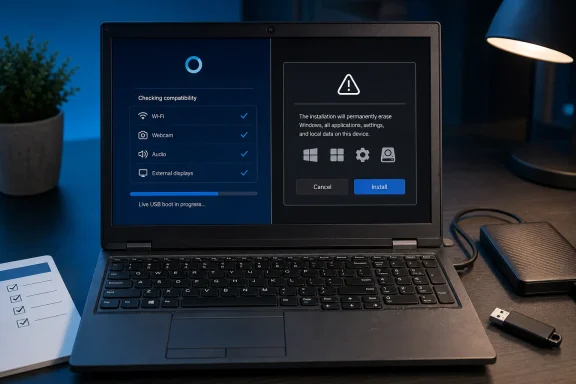
As TechRepublic notes, ChromeOS Flex can run directly from the installer before anything is wiped. Use that temporary session to test the hardware and workflow that actually matter:- Wi-Fi, audio, webcam, microphone, sleep and wake
- External displays, docks, printers, Bluetooth devices, and USB accessories
- Browser-based work apps, VPN access, and sign-in requirements
Windows replacement, not a Windows upgrade
ChromeOS Flex is best suited to browser-first devices: web apps, email, cloud storage, basic productivity, and shared terminals. It does not run traditional Windows desktop applications natively, and it does not offer the ordinary Chromebook Google Play and Android app experience. Google does permit deployment of certain Android VPN apps, but admins should not treat that exception as general Android support.For workplaces, the decision is broader than whether the PC boots. Google says ChromeOS Flex devices do not receive the same hardware-backed verified-boot assurances as purpose-built ChromeOS devices, while BIOS and UEFI firmware maintenance remains the owner’s responsibility. Secure Boot and TPM may improve the position on supported hardware, but organizations should verify endpoint tooling, encryption, VPN compatibility, compliance controls, and support eligibility before enrolling converted devices.
Back up files, browser data, licenses, passwords, and BitLocker recovery keys, then create Windows recovery media before installing ChromeOS Flex permanently.
References
- Primary source: TechRepublic
Published: 2026-07-15T18:19:29+00:00
What to Check Before Using ChromeOS Flex
Before replacing Windows 10 with ChromeOS Flex, check device support, hardware, apps, security requirements, and backup options.www.techrepublic.com
