

CISA and the FBI issued an updated June 2026 public warning that Russian intelligence-linked cyber actors are continuing phishing campaigns against commercial messaging applications, expanding on a March alert with newer tactics, mitigations, and examples of fraudulent messages. The important point is not that Signal, WhatsApp, Telegram, or similar tools have suddenly become unsafe because their encryption failed. It is that intelligence services have learned to walk around the cryptography by stealing the human account attached to it. For Windows users, administrators, journalists, government staff, and anyone whose contact list has value, the private messenger is now part of the enterprise attack surface.
The updated warning lands in a moment when encrypted messaging has become both mundane and politically loaded. Signal and WhatsApp are not fringe tools anymore; they are how officials coordinate, how reporters protect sources, how executives talk outside email, and how families route around carrier spam. That popularity has made them useful, but it has also made them worth targeting.
The Russian-linked campaigns described by CISA and the FBI are best understood as account-access operations, not cryptographic breakthroughs. The agencies have been careful to say that the actors compromised individual commercial messaging application accounts, not the underlying encryption or the applications themselves. That distinction is easy to flatten in headlines, but it is the central fact of the case.
End-to-end encryption protects a message in transit and, depending on implementation, limits what the platform itself can see. It does not save a user who is tricked into adding an attacker’s device to an account, surrendering a verification code, or handing over a PIN. Once the adversary becomes a legitimate account participant, the conversation is no longer being intercepted from the outside. It is being read from inside the room.
That is why this campaign should worry security teams that have spent the past decade pushing sensitive conversations out of SMS and email and into “secure” messaging apps. The advice was not wrong. It was incomplete. Secure messaging reduces one category of risk while concentrating another around identity, device linking, recovery flows, and trust between contacts.
This is not a novel trick. Banks, cloud providers, Microsoft 365 tenants, payroll portals, and VPN gateways have been abused this way for years. The novelty is the venue. A message arriving inside a trusted messaging app, possibly from a familiar contact or a plausible-looking support identity, feels less like a spam email and more like an operational alert.
That emotional shift matters. Users have learned, imperfectly, to distrust strange email links. They are less practiced at distrusting a chat thread that appears in the same inbox as their colleagues, relatives, sources, and security-conscious friends. A messenger’s intimacy becomes part of the lure.
The attack path is also well matched to mobile behavior. A phone is where users are most likely to act quickly, skim text, accept prompts, and treat account warnings as something to clear before the next meeting. Commercial messaging apps have spent years reducing friction for legitimate users. Intelligence operators are now turning some of that reduced friction into an account-takeover workflow.
The scary part is that linked-device compromise can be less dramatic than a full account takeover. The victim may not immediately lose access. Messages still arrive. Groups still appear normal. The attacker’s device, however, may also receive content or enough account visibility to harvest contacts, identify targets, and pivot into new conversations.
This is particularly relevant to WindowsForum readers because desktop linking is where the personal phone meets the Windows workstation. A user scans a QR code to bring a messenger onto a Windows PC, or uses the desktop app during the workday because it is faster than typing on glass. That bridge is legitimate, but it also creates a habit: scan, approve, move on.
The campaign abuses that habit. If a fake support message convinces a target to scan a malicious QR code or follow a link that initiates a pairing flow, the victim may believe they are securing the account while actually authorizing surveillance. This is the same psychological inversion that powers many modern attacks: the user performs the compromise in the name of protection.
Security professionals sometimes dismiss this as basic hygiene failure, but that underestimates the context. These campaigns are reportedly aimed at high-intelligence-value individuals: current and former government officials, military personnel, political figures, journalists, and people in their networks. The attacker is not blasting coupon spam at random. The attacker may know enough about the target’s role, contacts, language, timing, and current anxieties to make the request feel plausible.
Once an account is compromised, the intelligence value is broader than the victim’s own chat history. Contact lists are maps of trust. Group memberships reveal communities, projects, campaigns, units, beats, and informal power structures. A single account can become a launchpad for follow-on phishing because messages from a real account inherit credibility.
That is the compounding effect CISA and the FBI are trying to interrupt. A compromised account is not merely a breached inbox. It is a passport into other people’s attention.
This is the old endpoint problem in a new costume. Encryption can protect traffic between devices, but it cannot guarantee that every device is legitimate, every user action is informed, or every recovery path is resistant to social engineering. Messaging apps are now identity systems, device-management systems, and trust-distribution systems, whether their product teams want to describe them that way or not.
The practical burden also falls unevenly. A trained security engineer may know to check linked devices, distrust QR codes, and refuse to share one-time codes. A political staffer, local official, freelance reporter, or retired military officer may not. Many of the people most valuable to an intelligence service are not sitting behind a mature enterprise security stack.
For organizations, this creates a governance gap. Corporate email, endpoint detection, conditional access, and managed identity are heavily instrumented. Personal messaging apps used for sensitive work often are not. They may be tolerated, unofficially relied upon, or explicitly banned on paper while still flourishing in practice.
The risk cuts both ways. A compromised messaging account can lure a user into downloading malware onto a Windows machine. A compromised Windows machine can expose local message caches, screenshots, browser sessions, notification previews, or the QR-code pairing process itself. Even if an app’s core cryptography is sound, the surrounding Windows environment can leak the context an operator actually wants.
Administrators should resist the temptation to treat this as a purely mobile or consumer-app problem. If staff use desktop messaging clients for business-adjacent communications, those clients need to appear in asset inventories, acceptable-use policies, incident response playbooks, and user training. Shadow communication channels have a way of becoming official during crises and invisible during audits.
The update’s mention that actors may adopt additional techniques, including malware, is the bridge from social engineering into traditional endpoint defense. Today’s lure asks for a code. Tomorrow’s lure may install a payload, capture a session, or persist through a browser extension. The messaging account is the beachhead; the Windows device may be the interior.
For journalists, that can expose sources. For officials, it can expose informal channels. For military personnel, it can expose personal networks, deployment-adjacent chatter, or family connections useful for pressure campaigns. For political figures, it can expose strategy, donors, internal disagreements, or the broader circle of staff and advisers.
The intelligence service does not need every message to be classified to make the intrusion worthwhile. Metadata-like observations, group memberships, recurring contacts, and conversational timing can help build targeting packages. In espionage, context is often the product.
That is why “I don’t discuss anything sensitive there” is a weaker defense than many users assume. Attackers may be after the people around you, not just you. Your account can be the trusted voice that opens the next door.
But a ban is not a strategy if everyone knows it will be ignored. Workers use messaging apps because they are fast, cross-platform, familiar, and resilient when official systems are slow or inconvenient. Senior leaders are often the worst offenders because they have the most external contacts and the least patience for friction.
The better policy begins with an honest inventory of behavior. Which apps are used? By whom? For what kind of conversations? Are desktop clients installed? Are browser versions allowed? Are message-expiration settings compatible with records rules? Are high-risk users receiving tailored briefings rather than generic phishing slides?
Organizations then need practical controls. Managed devices can restrict unauthorized desktop clients where appropriate. Mobile device management can enforce baseline protections on employer-issued phones. Security teams can build reporting paths for suspicious messages that do not require users to admit embarrassment through a slow ticketing queue. Executives can be given concierge-style security support, not because they are special, but because they are targeted.
Out-of-band verification needs to become muscle memory. Call a known number. Use a managed corporate channel. Confirm in person. Check with the security team. For high-risk groups, establish phrases, procedures, or escalation paths before a crisis, not during one.
This is not just about refusing to share codes. It is about treating unexpected changes in conversational behavior as security signals. A contact who suddenly asks you to verify an account, join a new group, scan a QR code, move to another platform, or open an urgent file should trigger friction.
The problem is that friction is socially awkward. People do not want to look paranoid, especially when the apparent sender is a boss, source, client, or senior official. Security culture has to make verification polite, normal, and expected. A user who says “I’m going to confirm this another way” should be praised, not teased for slowing the work down.
Users are told to heed warnings. They are told to enable two-factor authentication, respond to suspicious login notices, and take account alerts seriously. A convincing fake support bot exploits that training. The more urgent and official it sounds, the more it resembles the sort of warning users have been conditioned to obey.
Platforms can help by reducing ambiguity. Legitimate account-security notices should be clearly distinguishable from ordinary chat messages. Support accounts should not behave like random contacts. Verification flows should repeatedly tell users that staff will never ask for codes or PINs inside the app. Linked-device prompts should explain, in plain language, what the action will permit.
None of this eliminates phishing. But interface design can either dampen or amplify deception. If a critical account action looks like just another chat interaction, the attacker has already borrowed the app’s trust.
There is also a governance tension. Security-minded users like ephemeral messaging because it limits blast radius. Lawyers, compliance officers, public agencies, and regulated firms may see it as a records problem. The right setting depends on the environment, the type of communication, and the applicable legal obligations.
For personal use, shorter retention can be a meaningful improvement. For organizations, the decision should not be left to individual preference in a panic after an alert. If disappearing messages are allowed, prohibited, or required in certain contexts, the policy should be written, communicated, and technically supported where possible.
The broader lesson is that data minimization still matters. Attackers cannot steal what no longer exists. But if the account is actively compromised, minimization only narrows the window; it does not close the door.
Employees may worry they will be blamed for using an unauthorized channel. Journalists may worry about exposing sources. Former officials and political figures may not know which security team, if any, still supports them. Contractors may fall between organizational boundaries.
This is an operational weakness intelligence actors can exploit. A victim who hesitates for six hours because the reporting path is unclear has given the attacker six more hours to read, pivot, and impersonate. High-risk communities need prearranged reporting routes that are fast, confidential, and nonpunitive.
Security teams should also prepare for partial information. A user may have a screenshot, a phone number, a display name, a suspicious QR code, or a vague memory of a prompt. That may be enough to begin containment: check linked devices, revoke sessions, reset account protections, warn contacts, and preserve evidence.
That puts defenders in a strange position. The controls that matter are partly technical, partly behavioral, and partly cultural. A firewall will not stop a user from sending a code to a fake support account. Endpoint detection may not notice a legitimate linked-device session. A mobile app’s encryption badge may mean little if the user has authorized the adversary as a participant.
The answer is not despair. It is precision. Security teams need to focus on the moments where trust changes state: account registration, device linking, recovery, support interaction, group membership, and unusual requests from known contacts. Those are the seams the attacker is pulling.
For Windows-heavy organizations, this also means tightening the connection between identity security and endpoint management. If desktop messaging clients are allowed, they should be patched, monitored where feasible, and included in incident response. If they are not allowed, that restriction should be technically enforced rather than merely wished into existence.
The weak point is not always grammar. It is the requested action. Legitimate support will not ask a user inside a chat to send back a verification code, disclose a PIN, scan a random QR code, or click a link to “restore” access. If the action would grant access, approve a device, or bypass a recovery process, it deserves suspicion.
This is where user training often fails. People are shown bad spelling and cartoonish scams, then encounter a targeted message that is plausible, timely, and socially convincing. Training should instead teach invariants: never share codes, never approve actions you did not initiate, never use links from unexpected messages to manage an account, and always inspect linked devices after any suspicious interaction.
The most effective advice is boring because the attack is built around panic. Slow down. Do not interact. Verify elsewhere. Report quickly. Check the account’s device list. Warn contacts if compromise is suspected.
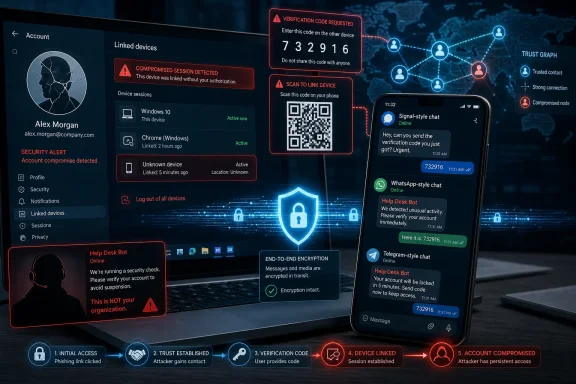 Moscow Has Found the Door Beside the Encryption
The updated warning lands in a moment when encrypted messaging has become both mundane and politically loaded. Signal and WhatsApp are not fringe tools anymore; they are how officials coordinate, how reporters protect sources, how executives talk outside email, and how families route around carrier spam. That popularity has made them useful, but it has also made them worth targeting.The Russian-linked campaigns described by CISA and the FBI are best understood as account-access operations, not cryptographic breakthroughs. The agencies have been careful to say that the actors compromised individual commercial messaging application accounts, not the underlying encryption or the applications themselves. That distinction is easy to flatten in headlines, but it is the central fact of the case.
End-to-end encryption protects a message in transit and, depending on implementation, limits what the platform itself can see. It does not save a user who is tricked into adding an attacker’s device to an account, surrendering a verification code, or handing over a PIN. Once the adversary becomes a legitimate account participant, the conversation is no longer being intercepted from the outside. It is being read from inside the room.
That is why this campaign should worry security teams that have spent the past decade pushing sensitive conversations out of SMS and email and into “secure” messaging apps. The advice was not wrong. It was incomplete. Secure messaging reduces one category of risk while concentrating another around identity, device linking, recovery flows, and trust between contacts.
The Phish Is Wearing a Help Desk Badge
The updated PSA’s most useful contribution is its emphasis on how ordinary the social engineering looks. Russian intelligence-associated actors are reportedly masquerading as automated support accounts, security bots, or service notices. The messages are written to create a familiar panic: suspicious activity has been detected, an unknown device has connected, your account needs verification, or a code must be sent back to stop an unauthorized login.This is not a novel trick. Banks, cloud providers, Microsoft 365 tenants, payroll portals, and VPN gateways have been abused this way for years. The novelty is the venue. A message arriving inside a trusted messaging app, possibly from a familiar contact or a plausible-looking support identity, feels less like a spam email and more like an operational alert.
That emotional shift matters. Users have learned, imperfectly, to distrust strange email links. They are less practiced at distrusting a chat thread that appears in the same inbox as their colleagues, relatives, sources, and security-conscious friends. A messenger’s intimacy becomes part of the lure.
The attack path is also well matched to mobile behavior. A phone is where users are most likely to act quickly, skim text, accept prompts, and treat account warnings as something to clear before the next meeting. Commercial messaging apps have spent years reducing friction for legitimate users. Intelligence operators are now turning some of that reduced friction into an account-takeover workflow.
Linked Devices Turn Convenience Into a Spyglass
One of the most consequential techniques in the alert is linked-device abuse. Many messaging platforms allow a user to connect a desktop client, tablet, browser session, or companion device to an existing account. Done properly, this is a convenience feature. Done under coercion or deception, it becomes a quiet way to let an intruder watch.The scary part is that linked-device compromise can be less dramatic than a full account takeover. The victim may not immediately lose access. Messages still arrive. Groups still appear normal. The attacker’s device, however, may also receive content or enough account visibility to harvest contacts, identify targets, and pivot into new conversations.
This is particularly relevant to WindowsForum readers because desktop linking is where the personal phone meets the Windows workstation. A user scans a QR code to bring a messenger onto a Windows PC, or uses the desktop app during the workday because it is faster than typing on glass. That bridge is legitimate, but it also creates a habit: scan, approve, move on.
The campaign abuses that habit. If a fake support message convinces a target to scan a malicious QR code or follow a link that initiates a pairing flow, the victim may believe they are securing the account while actually authorizing surveillance. This is the same psychological inversion that powers many modern attacks: the user performs the compromise in the name of protection.
Account Takeover Is the Second Act, Not the Whole Play
The other major path is classic account takeover through verification codes, two-factor prompts, or PINs. A victim receives a message asking for a code that the platform has just sent by SMS or generated as part of account recovery. If the victim shares it, the attacker can complete registration or seize control of the account.Security professionals sometimes dismiss this as basic hygiene failure, but that underestimates the context. These campaigns are reportedly aimed at high-intelligence-value individuals: current and former government officials, military personnel, political figures, journalists, and people in their networks. The attacker is not blasting coupon spam at random. The attacker may know enough about the target’s role, contacts, language, timing, and current anxieties to make the request feel plausible.
Once an account is compromised, the intelligence value is broader than the victim’s own chat history. Contact lists are maps of trust. Group memberships reveal communities, projects, campaigns, units, beats, and informal power structures. A single account can become a launchpad for follow-on phishing because messages from a real account inherit credibility.
That is the compounding effect CISA and the FBI are trying to interrupt. A compromised account is not merely a breached inbox. It is a passport into other people’s attention.
The Apps Are Not Broken, But the Operating Model Is
The agencies’ language about encryption not being compromised will be comforting to platform vendors, and it is technically important. But it should not become a blanket defense of the status quo. If attackers repeatedly gain practical access to protected conversations by manipulating account flows, then the security model still has a problem, even if the cipher suite remains pristine.This is the old endpoint problem in a new costume. Encryption can protect traffic between devices, but it cannot guarantee that every device is legitimate, every user action is informed, or every recovery path is resistant to social engineering. Messaging apps are now identity systems, device-management systems, and trust-distribution systems, whether their product teams want to describe them that way or not.
The practical burden also falls unevenly. A trained security engineer may know to check linked devices, distrust QR codes, and refuse to share one-time codes. A political staffer, local official, freelance reporter, or retired military officer may not. Many of the people most valuable to an intelligence service are not sitting behind a mature enterprise security stack.
For organizations, this creates a governance gap. Corporate email, endpoint detection, conditional access, and managed identity are heavily instrumented. Personal messaging apps used for sensitive work often are not. They may be tolerated, unofficially relied upon, or explicitly banned on paper while still flourishing in practice.
Windows Desktops Are Part of the Messaging Attack Surface
This is a Windows story because the desktop remains where sensitive work happens. The phone may be the authentication object, but the Windows PC is often where documents are drafted, briefings are read, screenshots are saved, and chat apps are kept open all day. If a messenger account is linked to a Windows endpoint, the security of that endpoint becomes part of the account’s real-world exposure.The risk cuts both ways. A compromised messaging account can lure a user into downloading malware onto a Windows machine. A compromised Windows machine can expose local message caches, screenshots, browser sessions, notification previews, or the QR-code pairing process itself. Even if an app’s core cryptography is sound, the surrounding Windows environment can leak the context an operator actually wants.
Administrators should resist the temptation to treat this as a purely mobile or consumer-app problem. If staff use desktop messaging clients for business-adjacent communications, those clients need to appear in asset inventories, acceptable-use policies, incident response playbooks, and user training. Shadow communication channels have a way of becoming official during crises and invisible during audits.
The update’s mention that actors may adopt additional techniques, including malware, is the bridge from social engineering into traditional endpoint defense. Today’s lure asks for a code. Tomorrow’s lure may install a payload, capture a session, or persist through a browser extension. The messaging account is the beachhead; the Windows device may be the interior.
The Trust Graph Is the Prize
State-backed phishing is often discussed as if the attacker wants a password and nothing more. In this campaign, the more valuable asset may be the trust graph. Who talks to whom, in which groups, at what cadence, under what names, and about what topics can be as revealing as a single document.For journalists, that can expose sources. For officials, it can expose informal channels. For military personnel, it can expose personal networks, deployment-adjacent chatter, or family connections useful for pressure campaigns. For political figures, it can expose strategy, donors, internal disagreements, or the broader circle of staff and advisers.
The intelligence service does not need every message to be classified to make the intrusion worthwhile. Metadata-like observations, group memberships, recurring contacts, and conversational timing can help build targeting packages. In espionage, context is often the product.
That is why “I don’t discuss anything sensitive there” is a weaker defense than many users assume. Attackers may be after the people around you, not just you. Your account can be the trusted voice that opens the next door.
Enterprise Policy Cannot Stop at “Don’t Use Signal”
The predictable managerial response is to ban commercial messaging apps for sensitive work. In some environments, that is necessary. Regulated industries, government agencies, legal teams, and defense contractors have retention, discovery, classification, and operational-security obligations that consumer-grade channels may not satisfy.But a ban is not a strategy if everyone knows it will be ignored. Workers use messaging apps because they are fast, cross-platform, familiar, and resilient when official systems are slow or inconvenient. Senior leaders are often the worst offenders because they have the most external contacts and the least patience for friction.
The better policy begins with an honest inventory of behavior. Which apps are used? By whom? For what kind of conversations? Are desktop clients installed? Are browser versions allowed? Are message-expiration settings compatible with records rules? Are high-risk users receiving tailored briefings rather than generic phishing slides?
Organizations then need practical controls. Managed devices can restrict unauthorized desktop clients where appropriate. Mobile device management can enforce baseline protections on employer-issued phones. Security teams can build reporting paths for suspicious messages that do not require users to admit embarrassment through a slow ticketing queue. Executives can be given concierge-style security support, not because they are special, but because they are targeted.
Verification Has to Move Out of Band
The updated guidance’s most durable advice is simple: verify strange requests through another channel. That principle sounds obvious until you try to operationalize it at scale. If a compromised account asks for help, a code, a document, or a new contact, replying in the same thread is exactly what the attacker wants.Out-of-band verification needs to become muscle memory. Call a known number. Use a managed corporate channel. Confirm in person. Check with the security team. For high-risk groups, establish phrases, procedures, or escalation paths before a crisis, not during one.
This is not just about refusing to share codes. It is about treating unexpected changes in conversational behavior as security signals. A contact who suddenly asks you to verify an account, join a new group, scan a QR code, move to another platform, or open an urgent file should trigger friction.
The problem is that friction is socially awkward. People do not want to look paranoid, especially when the apparent sender is a boss, source, client, or senior official. Security culture has to make verification polite, normal, and expected. A user who says “I’m going to confirm this another way” should be praised, not teased for slowing the work down.
The Security Bot Is Now a Villain
One of the more revealing details in the sample-message pattern is the abuse of the security-support persona. Attackers are not only pretending to be friends. They are pretending to be the mechanism that protects the account. That should force platforms and administrators to rethink how legitimate security communication is presented.Users are told to heed warnings. They are told to enable two-factor authentication, respond to suspicious login notices, and take account alerts seriously. A convincing fake support bot exploits that training. The more urgent and official it sounds, the more it resembles the sort of warning users have been conditioned to obey.
Platforms can help by reducing ambiguity. Legitimate account-security notices should be clearly distinguishable from ordinary chat messages. Support accounts should not behave like random contacts. Verification flows should repeatedly tell users that staff will never ask for codes or PINs inside the app. Linked-device prompts should explain, in plain language, what the action will permit.
None of this eliminates phishing. But interface design can either dampen or amplify deception. If a critical account action looks like just another chat interaction, the attacker has already borrowed the app’s trust.
Message Expiration Is Not a Magic Eraser
CISA and the FBI also point users toward message-expiration features, with appropriate caveats for employer-issued devices and records-retention requirements. This is sensible, but it is not a cure. Disappearing messages reduce the amount of historical material available after a compromise. They do not prevent real-time access by a linked device or attacker-controlled account.There is also a governance tension. Security-minded users like ephemeral messaging because it limits blast radius. Lawyers, compliance officers, public agencies, and regulated firms may see it as a records problem. The right setting depends on the environment, the type of communication, and the applicable legal obligations.
For personal use, shorter retention can be a meaningful improvement. For organizations, the decision should not be left to individual preference in a panic after an alert. If disappearing messages are allowed, prohibited, or required in certain contexts, the policy should be written, communicated, and technically supported where possible.
The broader lesson is that data minimization still matters. Attackers cannot steal what no longer exists. But if the account is actively compromised, minimization only narrows the window; it does not close the door.
Reporting Is Still Too Hard
The PSA urges victims to report incidents to organizational security teams, local FBI offices, or IC3. That is the right advice, but the industry should be honest about the user experience. Reporting suspicious chat messages is often clumsy, especially when the message arrives in a personal app used partly for work.Employees may worry they will be blamed for using an unauthorized channel. Journalists may worry about exposing sources. Former officials and political figures may not know which security team, if any, still supports them. Contractors may fall between organizational boundaries.
This is an operational weakness intelligence actors can exploit. A victim who hesitates for six hours because the reporting path is unclear has given the attacker six more hours to read, pivot, and impersonate. High-risk communities need prearranged reporting routes that are fast, confidential, and nonpunitive.
Security teams should also prepare for partial information. A user may have a screenshot, a phone number, a display name, a suspicious QR code, or a vague memory of a prompt. That may be enough to begin containment: check linked devices, revoke sessions, reset account protections, warn contacts, and preserve evidence.
The Consumerization of Espionage Changes the Defender’s Job
The uncomfortable theme running through the updated warning is that espionage tradecraft now travels through consumer workflows. QR codes, support bots, verification codes, linked devices, group chats, and mobile notifications are not exotic capabilities. They are everyday product features being turned toward intelligence collection.That puts defenders in a strange position. The controls that matter are partly technical, partly behavioral, and partly cultural. A firewall will not stop a user from sending a code to a fake support account. Endpoint detection may not notice a legitimate linked-device session. A mobile app’s encryption badge may mean little if the user has authorized the adversary as a participant.
The answer is not despair. It is precision. Security teams need to focus on the moments where trust changes state: account registration, device linking, recovery, support interaction, group membership, and unusual requests from known contacts. Those are the seams the attacker is pulling.
For Windows-heavy organizations, this also means tightening the connection between identity security and endpoint management. If desktop messaging clients are allowed, they should be patched, monitored where feasible, and included in incident response. If they are not allowed, that restriction should be technically enforced rather than merely wished into existence.
The Practical Lessons Hidden in the Phishing Samples
The updated alert’s sample messages are valuable because they show how unspectacular the lures can be. They use the language of suspicious activity, data leaks, unrecognized devices, mandatory verification, and blocked login attempts. Some may contain awkward phrasing; others may be polished enough to pass a distracted glance.The weak point is not always grammar. It is the requested action. Legitimate support will not ask a user inside a chat to send back a verification code, disclose a PIN, scan a random QR code, or click a link to “restore” access. If the action would grant access, approve a device, or bypass a recovery process, it deserves suspicion.
This is where user training often fails. People are shown bad spelling and cartoonish scams, then encounter a targeted message that is plausible, timely, and socially convincing. Training should instead teach invariants: never share codes, never approve actions you did not initiate, never use links from unexpected messages to manage an account, and always inspect linked devices after any suspicious interaction.
The most effective advice is boring because the attack is built around panic. Slow down. Do not interact. Verify elsewhere. Report quickly. Check the account’s device list. Warn contacts if compromise is suspected.
The Part of the Warning That Should Survive the News Cycle
This advisory will compete with louder cybersecurity stories: zero-days, ransomware disruptions, supply-chain compromises, and the monthly avalanche of Windows patches. But its importance is durable because it describes a normal way sensitive people now get compromised. The attack does not require a cinematic exploit. It requires a target who is busy, reachable, and trained to trust the wrong prompt.- Russian intelligence-linked actors are targeting messaging accounts through phishing and social engineering, not by breaking the core encryption of the apps.
- The most dangerous workflows are linked-device approval, account recovery, verification-code sharing, and fake support interactions.
- A compromised messaging account can expose contacts and group relationships even when the victim believes the conversations themselves are low sensitivity.
- Windows desktops matter because desktop messaging clients, browser sessions, local files, and endpoint malware can all expand the impact of a mobile-account compromise.
- Organizations should create realistic policies for commercial messaging apps instead of relying on bans that high-value users quietly ignore.
- Users should treat any unexpected request to share a code, scan a QR code, approve a device, or move a conversation as a security event until verified elsewhere.
References
- Primary source: CISA
Published: 2026-06-26T12:00:00+00:00
Russian Intelligence Services Continue to Target Commercial Messaging Applications | CISA
This updated PSA provides recent tactics, recommended mitigations, and samples of phishing messages.
www.cisa.gov
- Related coverage: threatbeat.com
Russian Intelligence Services target commercial messaging application accounts - Threat Beat
CISA and the Federal Bureau of Investigation have released a Public Service Announcement (PSA) warning about ongoing phishing campaigns by cyber actors… threatbeat.com
- Related coverage: malwarebytes.com
FBI, CISA warn of Russian hackers hijacking Signal and WhatsApp accounts | Malwarebytes
The FBI and CISA join European agencies in warning of a widespread, easily scalable social engineering campaign targeting messaging apps.www.malwarebytes.com - Related coverage: fbi.gov
Russian Government Cyber Actors Targeting Networking Devices, Critical Infrastructure — FBI
The FBI is warning the public, private sector, and international community of the threat posed to computer networks and critical infrastructure by cyber actors attributed to the Russian Federal Security Service's (FSB) Center 16.www.fbi.gov - Related coverage: cyberscoop.com
FBI, CISA issue PSA on Russian intelligence campaign to target messaging apps | CyberScoop
It echoes earlier alerts from the Netherlands and Germany, and is the latest to warn about targeting of Signal users and others.cyberscoop.com - Related coverage: techradar.com
Signal is being targeted by Russian hackers in a huge new phishing campaign, FBI says | TechRadar
The campaign is allegedly already a successwww.techradar.com
- Related coverage: gblock.app
Russian Spies Are Hijacking Signal and WhatsApp Accounts
The FBI says Russian intelligence has compromised thousands of Signal and WhatsApp accounts by impersonating in app support. Government officials, journalists, and military personnel are targets. www.gblock.app
- Related coverage: bleepingcomputer.com
FBI links Signal phishing attacks to Russian intelligence services
The FBI has issued a public service announcement warning that Russian intelligence-linked threat actors are actively targeting users of encrypted messaging apps such as Signal and WhatsApp in phishing campaigns that have already compromised thousands of accounts.www.bleepingcomputer.com
- Related coverage: foxnews.com
FBI warns Russian hackers are targeting Signal users via phishing | Fox News
FBI Director Kash Patel warns Russian intelligence-linked hackers are targeting Signal users of 'high intelligence value,' using phishing to access private messages.www.foxnews.com
- Related coverage: defencematters.eu
Cyber actors linked to Russia target messaging app users, FBI warns - Defence Matters
The United States has warned that cyber actors associated with Russian intelligence services are targeting users of commercial messaging applications, with Signal identified as a particular focus in a campaign that has already compromised thousands of individual accounts worldwide. In a joint...defencematters.eu - Related coverage: aha.org
- Related coverage: morningoverview.com
- Related coverage: ctrlaltnod.com
FBI Links Signal Phishing Attacks to Russian Intelligence Services
FBI and CISA warn of sophisticated Russian phishing campaign targeting Signal and WhatsApp users globally, compromising thousands of accounts.www.ctrlaltnod.com - Related coverage: zerosday.com
FBI Warns Russian Hackers Target Signal, WhatsApp in Mass Phishing Attacks | zerosday
Threat actors affiliated with Russian Intelligence Services are conducting phishing campaigns to compromise commercial messaging applications (CMAs) like WhatsApp and Signal to seize control of accounts belonging to indiwww.zerosday.com - Related coverage: windowsforum.com
Russian-Linked Phishing Targets Messaging Accounts, Not Encryption | Windows Forum
Russian state-linked cyber operators are again leaning on a familiar but still highly effective tactic: phishing the person instead of breaking the...windowsforum.com

