

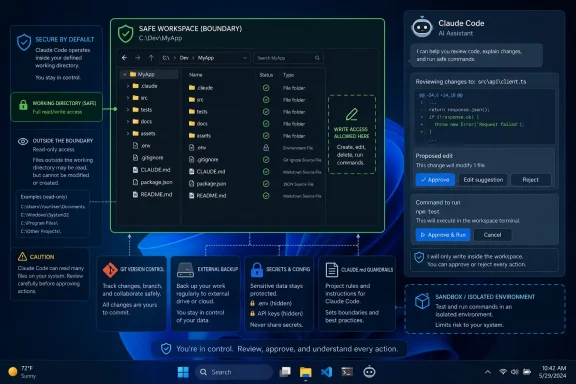
A new GroovyPost guide lays out five basic precautions before giving Anthropic’s Claude Code permission to inspect, edit, and run commands against a project folder. The advice is sensible, but Windows users should add one important caveat: Claude Code’s write access is normally scoped to its working directory and subdirectories, while files outside that scope may still be readable unless access is otherwise restricted.
First, make an ordinary backup outside the folder Claude Code will use. A copied project on another drive, in a backup location, or in a separate archive gives users a clean way back if an agent makes broad or unwanted changes.
Then initialize Git and make a baseline commit. Git is local version control, not GitHub, and it is the most useful safety net for a code project. A simple
For Windows users, Git can also be a prerequisite for running Claude Code natively through Git Bash. Anthropic supports Windows 10 and later through WSL or Git for Windows.
Anthropic’s documentation says Claude Code requires network access for authentication and AI processing when using its standard service. That makes least-privilege folder design more than a housekeeping exercise: do not put credentials in the working directory merely because they are convenient.
The guide’s fourth recommendation is a project-level
Those instructions are not a security boundary. Anthropic’s own permission system is the more concrete control: file edits and shell commands should prompt for approval in the default mode, while its
Admins should go further with sensitive repositories: use a dedicated Windows account, WSL environment, VM, dev container, or sandbox; keep mapped drives out of scope; and review any configured MCP servers or additional directories. Anthropic notes that extra directories can expand the files Claude Code can access, and third-party MCP servers are not necessarily audited by Anthropic.
The practical rule is simple: treat Claude Code like a fast junior administrator with a shell, not like an autocomplete box.
 Start with a recoverable project
First, make an ordinary backup outside the folder Claude Code will use. A copied project on another drive, in a backup location, or in a separate archive gives users a clean way back if an agent makes broad or unwanted changes.Then initialize Git and make a baseline commit. Git is local version control, not GitHub, and it is the most useful safety net for a code project. A simple
git init, git add ., and initial commit makes it possible to inspect the changes Claude Code made and restore tracked files. This is especially useful when the result is technically valid but not what the user asked for.For Windows users, Git can also be a prerequisite for running Claude Code natively through Git Bash. Anthropic supports Windows 10 and later through WSL or Git for Windows.
Keep secrets out of reach
The third step is to remove passwords, API keys, tokens, SSH material,.env files, customer exports, and personal documents that Claude Code does not need. Replace needed configuration with placeholders or an example file such as .env.example.Anthropic’s documentation says Claude Code requires network access for authentication and AI processing when using its standard service. That makes least-privilege folder design more than a housekeeping exercise: do not put credentials in the working directory merely because they are convenient.
The guide’s fourth recommendation is a project-level
CLAUDE.md file. Claude Code can use this file as project guidance, so it is a useful place to state guardrails: do not delete or move files; limit edits to a named directory; do not install packages; do not use administrator privileges; explain commands before running them; and present a plan before making changes.Those instructions are not a security boundary. Anthropic’s own permission system is the more concrete control: file edits and shell commands should prompt for approval in the default mode, while its
plan mode allows analysis without file modifications or command execution. Avoid broad approvals and never use the --dangerously-skip-permissions option on a real project unless the environment is deliberately disposable.Test the workflow before trusting it
Finally, use a small test folder before pointing Claude Code at a production repository, photo archive, or document collection. Give it a narrow task, review its proposed actions, and learn how its approval prompts behave.Admins should go further with sensitive repositories: use a dedicated Windows account, WSL environment, VM, dev container, or sandbox; keep mapped drives out of scope; and review any configured MCP servers or additional directories. Anthropic notes that extra directories can expand the files Claude Code can access, and third-party MCP servers are not necessarily audited by Anthropic.
The practical rule is simple: treat Claude Code like a fast junior administrator with a shell, not like an autocomplete box.
References
- Primary source: groovyPost
Published: 2026-07-19T13:05:30+00:00
5 things you should do before letting Claude Code touch your files
Giving an AI access to your files comes with risks. Here are some practicai steps to take before letting Claude Code touch your files.www.groovypost.com - Official source: docs.anthropic.com
CLI reference - Claude Code Docs
Complete reference for Claude Code command-line interface, including commands and flags.docs.anthropic.com
