

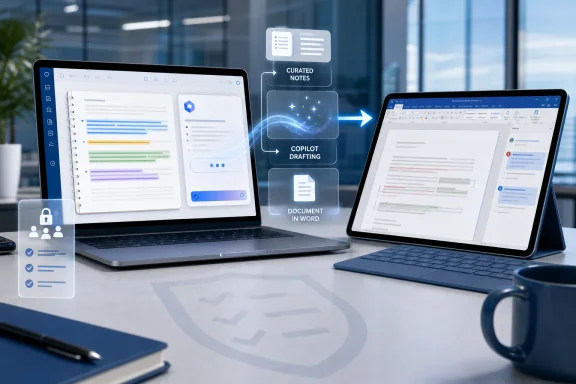
Microsoft has launched Roadmap ID 558934, a Microsoft 365 Copilot feature that lets users create Word documents from Copilot Notebooks on desktop and web, with preview availability listed for March 2026 and general availability for May 2026 in the worldwide standard multi-tenant cloud. The feature sounds modest: take the material gathered in a notebook, ask Copilot to draft, and open the result in Word. But the real move is larger than a file-export button. Microsoft is turning Copilot Notebooks into a staging area for enterprise writing, where raw context becomes a first draft before Word’s familiar editing machinery takes over.
The first era of Microsoft 365 Copilot was dominated by the chat box. Users asked questions, summarized meetings, rewrote paragraphs, or prompted Word and PowerPoint directly from inside an app. That was useful, but it also exposed a structural weakness: most office work does not begin as a clean prompt.
It begins as a mess. A project brief lives in one document, a few decisions are buried in Teams meetings, a spreadsheet contains the inconvenient numbers, and somebody’s OneNote page has the part everyone forgot to copy into the deck. Copilot Notebooks is Microsoft’s answer to that mess: a place to collect references around a topic or project so the model has a bounded, user-curated body of context.
The new Word-document creation feature matters because it makes that notebook less of a holding pen and more of a production surface. Microsoft is not merely saying, “Ask questions about your notes.” It is saying, “Use this assembled context as the raw material for a formal artifact.”
That is a different workflow. It shifts Copilot from being a conversational assistant toward being an editorial system embedded in Microsoft 365. For many users, the distinction will not feel philosophical; it will feel like fewer blank pages.
Copilot Notebooks tries to collapse that early editorial phase. If a notebook already contains source files, meeting notes, Copilot pages, chats, and other Microsoft 365 references, then a generated Word draft can begin from the user’s actual working context rather than a generic prompt. That is the important claim behind the roadmap item: the draft is grounded in the notebook’s content and references.
Grounding is doing a lot of work here. In AI product language, it implies that the model is not simply free-associating from a vague instruction. It is using a bounded set of references selected by the user, which should make the output more relevant and potentially easier to audit.
The practical result is simple. A product manager can collect discovery notes, roadmap fragments, customer feedback, and meeting transcripts in a notebook, then ask Copilot to generate a proposal. A consultant can assemble client materials and produce a structured report. A sysadmin can collect incident notes and create a postmortem draft without manually copying every detail into Word.
That does not make the draft final. It makes the draft exist.
Word is still where formatting, review, legal cleanup, accessibility checks, tracked changes, comments, and final approvals happen. The notebook may be the context engine, but Word remains the system of record for the document. That is exactly how Microsoft wants it.
This is also where the feature becomes more credible for professional users. A generated answer in a chat pane is ephemeral, easy to lose, and awkward to route through established document-review processes. A Word file fits existing habits. It can be shared, versioned, redlined, locked down, archived, and routed through the same governance processes as any other document.
That continuity is Microsoft’s great advantage over standalone AI writing tools. The company does not need to persuade enterprises to adopt a new document format or collaboration model. It only needs to persuade them that Copilot can safely accelerate the first mile of work inside the tools they already use.
The risk, of course, is that users may treat a polished-looking Word draft as more finished than it is. A document generated from curated notebook content can still omit context, misread nuance, flatten disagreement, or overstate confidence. The Word handoff solves the workflow problem; it does not solve the judgment problem.
That matters because enterprise AI has a context problem more than a model problem. The hard part is rarely getting a model to produce fluent prose. The hard part is giving it the right materials, excluding the wrong ones, preserving permissions, and making the output traceable enough that a human can trust it.
A notebook gives users a more deliberate alternative to the “search my entire tenant” experience. Instead of asking Copilot to infer the relevant corpus from a broad prompt, the user assembles a collection around a project or topic. That act of curation is valuable. It turns prompting from a guessing game into a workflow.
This also reveals why Microsoft is threading Notebooks through OneNote, the Microsoft 365 app, and Copilot itself. OneNote has long been the place where work-in-progress knowledge goes to become semi-structured. Copilot gives that semi-structured material an action layer. Word then becomes the polished output.
In other words, Microsoft is trying to connect the three stages of knowledge work: gather, reason, publish. The new feature is a small bridge between stages two and three.
The notebook constrains the input. The Word file constrains the output. The human editor remains in the loop. That is less glamorous than the usual AI keynote language, but it is much closer to how real offices operate.
This is the product lesson Microsoft appears to be absorbing: Copilot is more useful when it is embedded in a defined process than when it floats as an all-purpose oracle. A notebook says, “Here is the material.” A document-generation prompt says, “Here is the deliverable.” Word says, “Here is where the organization can revise and approve it.”
That workflow also reduces one of the most common failure modes in workplace AI: the beautifully written answer that cannot be traced back to the actual project. If users build notebooks carefully, generated drafts should be easier to inspect because the relevant material is already gathered in one place.
But the caveat is unavoidable. If the notebook is incomplete, stale, or polluted with irrelevant references, the generated Word document will inherit that weakness. AI cannot turn bad source control into good institutional memory.
That raises practical governance questions. Who can create notebooks? What data can be added to them? How are permissions preserved when content from multiple references is used to generate a new document? What happens when a draft combines sensitive internal material with general business prose and then gets shared more broadly than the source documents?
Microsoft 365’s permission model is supposed to provide the foundation here, and Copilot for Microsoft 365 is designed to respect existing access controls. But admins know that respecting permissions is not the same thing as preventing bad judgment. A user with legitimate access to several sensitive files may still generate a summary that exposes too much in a new document.
The real administrative work will be cultural as much as technical. Organizations will need guidance for when AI-generated drafts are acceptable, when human review is mandatory, and how employees should disclose or verify AI-assisted content. The feature reduces manual steps, but it also reduces friction, and reduced friction is not always benign.
This is especially true in regulated environments. A draft proposal, compliance memo, or incident report can carry consequences even before it is final. If Copilot-generated Word documents become routine, organizations will need to treat them as part of the document lifecycle from the moment they are created.
The value is less clear for users whose source material is scattered, poorly named, or inconsistently maintained. Copilot can help organize information, but it cannot fully compensate for chaotic work habits. A notebook workflow rewards users who take the time to gather the right references before asking for an output.
That dynamic may create an interesting split inside organizations. Power users who understand how to curate context will get better drafts and faster results. Casual users may see inconsistent output and blame the model when the real issue is the quality of the notebook.
Microsoft’s challenge is to make the curation step feel natural rather than bureaucratic. If creating a useful notebook becomes just another prep chore, adoption will stall. If it feels like normal project work with an AI payoff at the end, the feature could become sticky.
This is where OneNote integration may help. Microsoft does not have to invent the idea of a work notebook. It only has to make the old notebook useful enough to become the front door for AI-assisted document creation.
That is powerful because the model can accelerate synthesis. It can turn scattered input into something that stakeholders can react to. Anyone who has worked in a corporate environment knows that people are often better at editing a draft than agreeing on what the draft should be.
But it is also risky because the first draft has agenda-setting power. The structure Copilot chooses can influence what reviewers notice and what they ignore. The phrasing it uses can make uncertainty sound settled. The sections it omits may never be missed unless someone already knows they should be there.
This is why the phrase “ready-to-use document” deserves scrutiny. Ready to use should not mean ready to trust. It should mean ready to edit, test, verify, and adapt.
The healthiest way to understand the feature is as a way to reduce the cost of starting, not the cost of thinking. If Microsoft markets it that way and organizations train it that way, the feature will be useful. If users treat it as a document vending machine, predictable problems will follow.
The enterprise software winners in AI will not be the companies that produce the most dazzling demos. They will be the ones that turn AI into repeatable, governed, boringly useful workflows. Microsoft has spent decades embedding itself in the boring machinery of office life. Copilot Notebooks-to-Word is a classic Microsoft move: not revolutionary in isolation, but potentially consequential because of where it sits.
It also shows Microsoft trying to solve the last-mile problem of AI adoption. Many employees can get a summary from Copilot. Fewer can turn that summary into a document that survives review, formatting, sharing, and revision. By handing the generated draft to Word, Microsoft is betting that the last mile still belongs to Office.
The competitive implication is straightforward. Standalone AI tools can generate text, but Microsoft can generate text inside the workflow where the text is supposed to live. That is not always better technologically, but it is often better organizationally.
For WindowsForum readers, that is the more important story. This is not just another Copilot feature landing somewhere in the Microsoft 365 maze. It is part of the continuing absorption of AI into the everyday file formats and work habits that define enterprise computing.
For users and admins trying to decide how much attention to give it, the signal is not that Word can receive another AI-generated draft. The signal is that Microsoft is making curated context portable across Microsoft 365 outputs. That is the architecture to watch.
 Microsoft Is Moving Copilot From Chat Window to Workbench
The first era of Microsoft 365 Copilot was dominated by the chat box. Users asked questions, summarized meetings, rewrote paragraphs, or prompted Word and PowerPoint directly from inside an app. That was useful, but it also exposed a structural weakness: most office work does not begin as a clean prompt.It begins as a mess. A project brief lives in one document, a few decisions are buried in Teams meetings, a spreadsheet contains the inconvenient numbers, and somebody’s OneNote page has the part everyone forgot to copy into the deck. Copilot Notebooks is Microsoft’s answer to that mess: a place to collect references around a topic or project so the model has a bounded, user-curated body of context.
The new Word-document creation feature matters because it makes that notebook less of a holding pen and more of a production surface. Microsoft is not merely saying, “Ask questions about your notes.” It is saying, “Use this assembled context as the raw material for a formal artifact.”
That is a different workflow. It shifts Copilot from being a conversational assistant toward being an editorial system embedded in Microsoft 365. For many users, the distinction will not feel philosophical; it will feel like fewer blank pages.
The Blank Page Was Always the Enemy
Word has had templates, mail merge, styles, outline view, and collaboration for decades, but none of those features solved the most stubborn problem in document creation: getting from scattered material to a coherent first draft. People do not usually struggle because Word lacks a button. They struggle because they have to decide what belongs in the document, what order it should appear in, and how to turn source material into something another person can read.Copilot Notebooks tries to collapse that early editorial phase. If a notebook already contains source files, meeting notes, Copilot pages, chats, and other Microsoft 365 references, then a generated Word draft can begin from the user’s actual working context rather than a generic prompt. That is the important claim behind the roadmap item: the draft is grounded in the notebook’s content and references.
Grounding is doing a lot of work here. In AI product language, it implies that the model is not simply free-associating from a vague instruction. It is using a bounded set of references selected by the user, which should make the output more relevant and potentially easier to audit.
The practical result is simple. A product manager can collect discovery notes, roadmap fragments, customer feedback, and meeting transcripts in a notebook, then ask Copilot to generate a proposal. A consultant can assemble client materials and produce a structured report. A sysadmin can collect incident notes and create a postmortem draft without manually copying every detail into Word.
That does not make the draft final. It makes the draft exist.
Word Remains the Place Where the Draft Has to Grow Up
Microsoft’s framing is careful: Copilot drafts a structured document that can be opened and edited in Word. That second half is not an afterthought. It is the safety valve that keeps this from becoming another “AI writes everything” demo detached from how organizations actually work.Word is still where formatting, review, legal cleanup, accessibility checks, tracked changes, comments, and final approvals happen. The notebook may be the context engine, but Word remains the system of record for the document. That is exactly how Microsoft wants it.
This is also where the feature becomes more credible for professional users. A generated answer in a chat pane is ephemeral, easy to lose, and awkward to route through established document-review processes. A Word file fits existing habits. It can be shared, versioned, redlined, locked down, archived, and routed through the same governance processes as any other document.
That continuity is Microsoft’s great advantage over standalone AI writing tools. The company does not need to persuade enterprises to adopt a new document format or collaboration model. It only needs to persuade them that Copilot can safely accelerate the first mile of work inside the tools they already use.
The risk, of course, is that users may treat a polished-looking Word draft as more finished than it is. A document generated from curated notebook content can still omit context, misread nuance, flatten disagreement, or overstate confidence. The Word handoff solves the workflow problem; it does not solve the judgment problem.
Notebooks Are Becoming Microsoft’s Context Layer
The roadmap item sits inside a broader Copilot strategy that has become increasingly clear: Microsoft wants users to build context once and reuse it across outputs. Copilot Notebooks is useful for summarization and Q&A, but its bigger role is as a reusable context container. Once the notebook exists, Word documents are only one possible downstream artifact.That matters because enterprise AI has a context problem more than a model problem. The hard part is rarely getting a model to produce fluent prose. The hard part is giving it the right materials, excluding the wrong ones, preserving permissions, and making the output traceable enough that a human can trust it.
A notebook gives users a more deliberate alternative to the “search my entire tenant” experience. Instead of asking Copilot to infer the relevant corpus from a broad prompt, the user assembles a collection around a project or topic. That act of curation is valuable. It turns prompting from a guessing game into a workflow.
This also reveals why Microsoft is threading Notebooks through OneNote, the Microsoft 365 app, and Copilot itself. OneNote has long been the place where work-in-progress knowledge goes to become semi-structured. Copilot gives that semi-structured material an action layer. Word then becomes the polished output.
In other words, Microsoft is trying to connect the three stages of knowledge work: gather, reason, publish. The new feature is a small bridge between stages two and three.
The Feature Is Also a Quiet Admission About Copilot’s Limits
There is a reason Microsoft is not simply telling users to open Word and ask Copilot to create a document from everything relevant. That sounds magical, but enterprise users have learned to be skeptical of magic. A notebook-based workflow is more controlled, and control is what Copilot needs if it is going to become mundane enough to be trusted.The notebook constrains the input. The Word file constrains the output. The human editor remains in the loop. That is less glamorous than the usual AI keynote language, but it is much closer to how real offices operate.
This is the product lesson Microsoft appears to be absorbing: Copilot is more useful when it is embedded in a defined process than when it floats as an all-purpose oracle. A notebook says, “Here is the material.” A document-generation prompt says, “Here is the deliverable.” Word says, “Here is where the organization can revise and approve it.”
That workflow also reduces one of the most common failure modes in workplace AI: the beautifully written answer that cannot be traced back to the actual project. If users build notebooks carefully, generated drafts should be easier to inspect because the relevant material is already gathered in one place.
But the caveat is unavoidable. If the notebook is incomplete, stale, or polluted with irrelevant references, the generated Word document will inherit that weakness. AI cannot turn bad source control into good institutional memory.
The Enterprise Question Is Governance, Not Magic
For administrators, the launch of document generation from Copilot Notebooks is another reminder that AI features are becoming content-creation infrastructure, not optional curiosities. The output is not just a chat response. It is a Word document that may circulate through the organization and eventually become policy, customer material, legal evidence, or operational guidance.That raises practical governance questions. Who can create notebooks? What data can be added to them? How are permissions preserved when content from multiple references is used to generate a new document? What happens when a draft combines sensitive internal material with general business prose and then gets shared more broadly than the source documents?
Microsoft 365’s permission model is supposed to provide the foundation here, and Copilot for Microsoft 365 is designed to respect existing access controls. But admins know that respecting permissions is not the same thing as preventing bad judgment. A user with legitimate access to several sensitive files may still generate a summary that exposes too much in a new document.
The real administrative work will be cultural as much as technical. Organizations will need guidance for when AI-generated drafts are acceptable, when human review is mandatory, and how employees should disclose or verify AI-assisted content. The feature reduces manual steps, but it also reduces friction, and reduced friction is not always benign.
This is especially true in regulated environments. A draft proposal, compliance memo, or incident report can carry consequences even before it is final. If Copilot-generated Word documents become routine, organizations will need to treat them as part of the document lifecycle from the moment they are created.
The Productivity Win Is Real, but It Is Uneven
For users who already maintain disciplined notebooks, this feature could be immediately useful. The best use cases are obvious: project proposals, research summaries, meeting follow-ups, executive briefs, training documents, status reports, and early policy drafts. These are documents where structure and synthesis matter more than literary originality.The value is less clear for users whose source material is scattered, poorly named, or inconsistently maintained. Copilot can help organize information, but it cannot fully compensate for chaotic work habits. A notebook workflow rewards users who take the time to gather the right references before asking for an output.
That dynamic may create an interesting split inside organizations. Power users who understand how to curate context will get better drafts and faster results. Casual users may see inconsistent output and blame the model when the real issue is the quality of the notebook.
Microsoft’s challenge is to make the curation step feel natural rather than bureaucratic. If creating a useful notebook becomes just another prep chore, adoption will stall. If it feels like normal project work with an AI payoff at the end, the feature could become sticky.
This is where OneNote integration may help. Microsoft does not have to invent the idea of a work notebook. It only has to make the old notebook useful enough to become the front door for AI-assisted document creation.
The Word File Is the New AI Boundary Object
In business, a document is often less a container of text than a negotiated object. It carries decisions, edits, approvals, objections, and institutional memory. By generating Word documents from notebooks, Microsoft is placing Copilot directly into that negotiation.That is powerful because the model can accelerate synthesis. It can turn scattered input into something that stakeholders can react to. Anyone who has worked in a corporate environment knows that people are often better at editing a draft than agreeing on what the draft should be.
But it is also risky because the first draft has agenda-setting power. The structure Copilot chooses can influence what reviewers notice and what they ignore. The phrasing it uses can make uncertainty sound settled. The sections it omits may never be missed unless someone already knows they should be there.
This is why the phrase “ready-to-use document” deserves scrutiny. Ready to use should not mean ready to trust. It should mean ready to edit, test, verify, and adapt.
The healthiest way to understand the feature is as a way to reduce the cost of starting, not the cost of thinking. If Microsoft markets it that way and organizations train it that way, the feature will be useful. If users treat it as a document vending machine, predictable problems will follow.
Microsoft’s AI Strategy Is Becoming Boring on Purpose
There is a tendency to judge AI product announcements by how futuristic they sound. This one does not sound futuristic. It sounds like a workflow improvement for people who make Word documents, which is precisely why it may matter.The enterprise software winners in AI will not be the companies that produce the most dazzling demos. They will be the ones that turn AI into repeatable, governed, boringly useful workflows. Microsoft has spent decades embedding itself in the boring machinery of office life. Copilot Notebooks-to-Word is a classic Microsoft move: not revolutionary in isolation, but potentially consequential because of where it sits.
It also shows Microsoft trying to solve the last-mile problem of AI adoption. Many employees can get a summary from Copilot. Fewer can turn that summary into a document that survives review, formatting, sharing, and revision. By handing the generated draft to Word, Microsoft is betting that the last mile still belongs to Office.
The competitive implication is straightforward. Standalone AI tools can generate text, but Microsoft can generate text inside the workflow where the text is supposed to live. That is not always better technologically, but it is often better organizationally.
For WindowsForum readers, that is the more important story. This is not just another Copilot feature landing somewhere in the Microsoft 365 maze. It is part of the continuing absorption of AI into the everyday file formats and work habits that define enterprise computing.
The May Launch Turns Notebooks Into a Draft Factory
The concrete facts are narrow, but the practical consequences are broad. Microsoft lists the feature as launched, with preview availability in March 2026 and general availability in May 2026 for worldwide standard multi-tenant customers across desktop and web. It applies to Microsoft 365, OneNote, the Microsoft 365 app, and Microsoft 365 Copilot.For users and admins trying to decide how much attention to give it, the signal is not that Word can receive another AI-generated draft. The signal is that Microsoft is making curated context portable across Microsoft 365 outputs. That is the architecture to watch.
- Microsoft has launched the ability to create Word documents from Copilot Notebooks under Microsoft 365 Roadmap ID 558934.
- The feature uses notebook content and references to produce a structured draft that opens in Word for editing.
- The listed rollout covers desktop and web experiences in the worldwide standard multi-tenant cloud.
- The strongest use cases are structured business documents built from already gathered project material.
- Administrators should treat generated Word files as part of the normal document lifecycle, not as disposable chat output.
- The feature’s quality will depend heavily on how carefully users curate notebook references before generating a draft.
References
- Primary source: Microsoft 365 Roadmap
Published: 2026-06-24T23:15:55.6812517Z
Microsoft 365 Roadmap | Microsoft 365
The Microsoft 365 Roadmap lists updates that are currently planned for applicable subscribers. Check here for more information on the status of new features and updates.www.microsoft.com
- Official source: support.microsoft.com
How Microsoft 365 Copilot Notebooks works | Microsoft Support
Learn how Microsoft 365 Copilot Notebooks works. Copilot Notebooks is your AI-powered workspace that brings together all the content that matters to your task or project.support.microsoft.com - Related coverage: windowsreport.com
Copilot Notebooks Will Soon Let You Create Word Documents & PowerPoint Presentations
Microsoft Copilot Notebooks will soon generate Word docs and PowerPoint decks directly from your notebooks, rolling out May 2026. windowsreport.com
- Official source: techcommunity.microsoft.com
What’s New in Microsoft 365 Copilot | April 2026 | Microsoft Community Hub
Welcome to the Apr 2026 edition of What's New in Microsoft 365 Copilot! techcommunity.microsoft.com
- Related coverage: windowscentral.com
New Copilot keyboard shortcuts are coming to Microsoft 365 | Windows Central
A new floating icon and Alt + C shortcut are replacing old entry points in Microsoft 365 apps.www.windowscentral.com - Related coverage: techradar.com
Your favorite Microsoft 365 apps are getting a load more Copilot AI Agents - Word, Excel, Outlook, PowerPoint all get a boost | TechRadar
More AI agents are coming to Microsoft 365www.techradar.com
- Related coverage: tomsguide.com
Get ready to 'vibe work' in Microsoft Office with new AI agents — here's how | Tom's Guide
Microsoft is adding new AI agents to Word and Excel that let you tell a chatbot what documents to generate or what edits to make, and it should just do it. Here's how it's meant to work.www.tomsguide.com
