

Microsoft’s Copilot has taken a clear step from being a productivity aide to an active, transaction-oriented assistant: shopping tools that used to live as scattered Edge features are now folded into Copilot in Edge and the standalone Copilot app, giving users price comparison, price history, price‑tracking alerts, product review summaries, and built‑in cashback signals — all surfaced conversationally in the browser sidebar and Copilot Mode.
Microsoft has been steadily repositioning Copilot from a chat- and productivity-first feature into a broader consumer platform that can act on users’ behalf inside Windows and Edge. The company formally announced the migration of Edge’s standalone shopping features into Copilot as part of a holiday-season push, saying the unified experience centralizes Price Comparison, Price History, Price Tracking, Product Insights, and Cashback into one AI-powered surface. Independent coverage confirmed the direction: the new Copilot Mode in Edge adds permissioned, proactive behavior — such as looking across open tabs, nudging when a lower price exists elsewhere, and surfacing cashback offers before checkout — while Microsoft retains the opt-in controls and settings designed to protect user privacy. Why this matters: shopping is one of the most frequent, repeatable, and monetizable activities on the web. By inserting Copilot into the discovery-to-checkout workflow, Microsoft is trying to make price‑shopping automatic and conversational — and to keep more of that activity inside Edge and the Microsoft ecosystem.
Reuters, The Verge, and Windows Central covered Copilot Mode’s tab‑aware and agentic abilities, which provide the necessary technical foundation for Copilot to act as a shopping assistant — not just a summarizer. These independent reports align with Microsoft’s blog posts and support documentation on shopping features.
If widely adopted, Copilot Shopping could normalize assistant-driven discovery, making “price-shopping” an automated, background behavior rather than a manual research chore. That changes the incentives across the whole chain: consumers will expect smarter price signals; merchants will need faster, cleaner feeds and dynamic pricing; and platforms will vie for the discovery layer where affiliate economics and checkout control can be monetized.
At the same time, centralizing commerce in an assistant raises meaningful questions about provenance, transparency, and the interplay of convenience vs. control. The most successful implementations will be those that combine strong merchant partnerships, clear consent and privacy controls, and robust mechanisms to surface provenance and confidence for AI-driven recommendations.
Overall, Copilot Shopping makes holiday shopping faster and smarter for many users today while also highlighting the unresolved operational and trust challenges that will determine whether AI can sustainably own the future of online commerce.
Source: Lapaas Voice Microsoft brings shopping feature in Copilot
 Background
Microsoft has been steadily repositioning Copilot from a chat- and productivity-first feature into a broader consumer platform that can act on users’ behalf inside Windows and Edge. The company formally announced the migration of Edge’s standalone shopping features into Copilot as part of a holiday-season push, saying the unified experience centralizes Price Comparison, Price History, Price Tracking, Product Insights, and Cashback into one AI-powered surface. Independent coverage confirmed the direction: the new Copilot Mode in Edge adds permissioned, proactive behavior — such as looking across open tabs, nudging when a lower price exists elsewhere, and surfacing cashback offers before checkout — while Microsoft retains the opt-in controls and settings designed to protect user privacy. Why this matters: shopping is one of the most frequent, repeatable, and monetizable activities on the web. By inserting Copilot into the discovery-to-checkout workflow, Microsoft is trying to make price‑shopping automatic and conversational — and to keep more of that activity inside Edge and the Microsoft ecosystem.Overview of the Shopping Features
What’s included — feature checklist
- Price Comparison — Copilot searches the web and merchant feeds to show alternative sellers and competitive pricing within the Copilot pane.
- Price History — historical price charts that help you judge whether a current price is high, low, or typical.
- Price Tracking / Alerts — set a target price or track an item and receive notifications when it drops to your goal.
- Product Insights — AI‑summarized review highlights, aggregated sentiment, and pros/cons to speed decision making.
- Microsoft Cashback — Detects merchant-funded cashback offers and guides users through activation and redemption; payouts are handled via PayPal in supported markets.
How Copilot surfaces shopping data
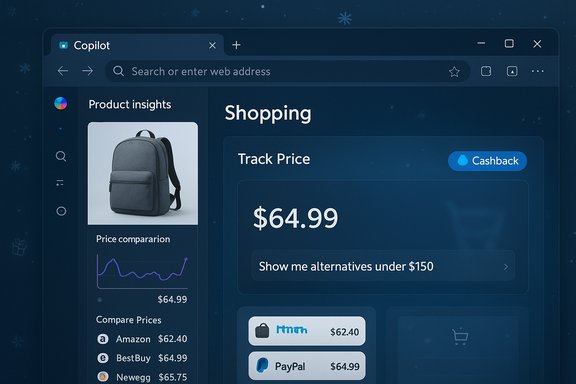
When you visit a supported retailer page, clicking the Copilot icon opens a product insights card: image, price, ratings, a price‑history chart and compare entries with alternate sellers. From that card you can click View Details, set price tracking, or follow Copilot prompts to activate cashback when available. The experience is conversational — follow‑ups like “Show me alternatives under $150” or “Has this dropped in the last 30 days?” return updated cards in the same pane. Copilot Mode is the proactive element: with explicit permission, Copilot can scan open tabs and notify you if a lower price exists elsewhere or if a product is cashback-eligible before you complete checkout. Microsoft frames these prompts as convenience features that rely on opt‑in permissions and visibility indicators.How to Use Copilot Shopping (Practical Steps)
- Update Microsoft Edge to the latest version and sign in with a Microsoft account. Some features require account sign-in and the newest browser build.
- Click the Copilot icon in the Edge sidebar (or open the Copilot app) while on a product page. Copilot will surface a product insights card containing price, reviews, and comparison entries.
- Use the Track Price control to set a price goal and enable notifications; Copilot will alert you when the item reaches your target.
- If Copilot Mode is enabled (and you’ve consented), allow Copilot to access page context so it can proactively detect lower prices or cashback on other open tabs and notify you during checkout. Toggle these behaviors off at any time via Edge privacy settings.
- When cashback is available, follow Copilot’s activation steps. Microsoft documents PayPal as the payout mechanism for cashback redemptions — monitor the cashback dashboard and keep receipts until funds appear.
Verification and Cross‑Checks
Key claims about the feature were verified against Microsoft’s own support and product pages and cross‑checked with independent reporting.- Microsoft’s official documentation explains the migration of shopping features into Copilot and details how Price Comparison, Price History, Price Tracking, and Cashback operate inside the Copilot pane.
- Microsoft’s Edge feature pages enumerate availability (for example, Price Comparison lists supported countries) and show the UX patterns Copilot uses to surface deals and comparisons. The Price Comparison page lists availability in 29 countries at the time of publication.
- Independent outlets such as Reuters and The Verge reported on Copilot Mode’s broader capabilities — notably the ability to act across tabs and take actions with explicit permission — and placed the shopping addition in the context of Microsoft’s AI browser strategy.
What This Means for Users
Benefits
- Convenience and time savings: Copilot collapses the multi‑tab price‑shopping workflow into a single conversational pane, eliminating screen‑foldup and manual price comparisons. This is particularly valuable during high-volume sale periods like Black Friday and Cyber Week.
- Potential cost savings: Built‑in price tracking and historical charts let shoppers wait for better prices or set alerts, which can avoid impulse overpayment.
- Faster decisions: Product Insights aim to reduce review fatigue by summarizing key sentiment and representative comments, speeding the decision process for complex purchases.
Practical limitations users should know
- Region and retailer variability: Not every country or retailer supports every feature. Some items in the Copilot product cards will lack price history or cashback signals if merchant feeds are incomplete. Microsoft notes initial prioritization for the United States, with other markets to follow.
- Final price authority remains the merchant: Copilot’s price comparisons and signals are designed to help research; the official checkout page and merchant terms are the definitive sources for price, shipping, taxes, and returns. Always confirm before purchasing.
- Cashback is not instantaneous or guaranteed: Microsoft documents PayPal as the payout route for cashback, but community reports and merchant rules can delay or nullify cashback eligibility. Keep transaction records until payouts clear.
What This Means for Retailers and the Market
Retailer implications
- Increased price transparency: Copilot’s side‑by‑side comparison cards make cross‑merchant pricing more visible to users, which increases competitive pressure on price, shipping speed, and stock accuracy. Retailers need clean, timely feeds to stay competitive in Copilot’s cards.
- Merchant onboarding and verification: To appear reliably in comparisons and cashback placements, merchants must use Microsoft Merchant Center feeds, domain verification, and accurate product metadata — otherwise listings can be rejected or downgraded. Merchant ingestion and review processes may take days in some cases.
- Opportunity for smaller retailers: Smaller merchants who maintain accurate feeds and participate in cashback programs could surface alongside larger marketplaces, gaining visibility outside the major platforms.
Platform dynamics and monetization
By embedding shopping into Copilot, Microsoft is pursuing an integrated discovery‑to‑checkout loop that’s easier to monetize via partnerships, affiliate economics, and native checkout commissions. The risk for retailers is that platform-level placements can shift discovery away from direct channels (own site searches, marketplaces) toward the browser’s assistant layer, changing the balance of power in e‑commerce discovery.Privacy, Trust, and Safety Concerns
Data and permissions
Copilot’s value depends on contextual signals — browsing context, order history, and merchant feeds. Microsoft emphasizes permissioned access: many of Copilot Mode’s proactive actions require explicit opt‑in and visual indicators. Still, centralizing purchase history and tracking across services creates a high-value dataset that raises questions about retention, use for personalization or advertising, and enterprise policy controls. Users should review Edge privacy settings and Copilot consent dialogs before enabling proactive features.Accuracy and AI limitations
- Review summarization risk: AI summarizers can misrepresent nuance, amplify manipulated review signals, or over‑simplify complex user feedback. Summaries should be treated as a research aid, not a court of final judgment.
- Price insights can be wrong: Historical price datasets have holes; a chart could miss a brief sale or a marketplace listing may have incorrect metadata. Copilot’s “good time to buy” suggestions are probabilistic judgments and should be double‑checked.
Cashback reliability
Microsoft documents PayPal as the payout mechanism for Cashback, and the company provides a dashboard showing participating retailers. Community reports — including user threads — have flagged delays and occasional eligibility problems, so shoppers should treat cashback as a potential bonus subject to verification rather than a guaranteed immediate discount.Competitive Context: Where Copilot Shopping Fits
This isn’t Microsoft inventing shopping AI; Google, Amazon, OpenAI, and smaller startups are also pushing shopping-first features. The differentiator for Microsoft is its system‑level distribution: Edge ships on Windows, ties into Microsoft accounts, and can leverage Microsoft Rewards, Merchant Center, and enterprise retail integrations (Dynamics 365, Cloud for Retail) to support both consumer-facing features and merchant partnerships. That system presence gives Microsoft a practical path to scale an integrated shopping assistant more quickly than a standalone app might.Reuters, The Verge, and Windows Central covered Copilot Mode’s tab‑aware and agentic abilities, which provide the necessary technical foundation for Copilot to act as a shopping assistant — not just a summarizer. These independent reports align with Microsoft’s blog posts and support documentation on shopping features.
Known Unknowns and Unverifiable Claims
- Reports that a specific number of countries support cashback or that merchant onboarding can be guaranteed in “as little as five minutes” should be treated cautiously. Microsoft’s public pages list supported countries for some features (e.g., Price Comparison in 29 countries), but cashback participation and merchant approval windows can change rapidly. Verify current availability via Microsoft’s dashboard for your market.
- Claims about flawless cashback payouts are unverifiable on a blanket basis because payouts involve merchant confirmation, coupon eligibility rules, account linking, and third‑party payment systems (PayPal). Expect variance; keep purchase records until cashback is confirmed.
- Any specific reliability number (percentage of items with price history, average alert latency, exact payout timelines) is variable and depends on merchant feeds, geography, and account setup. Users and IT pros should treat such metrics as operationally dependent and re-verify periodically.
Recommendations — For Users, IT, and Retailers
For shoppers
- Use Copilot Shopping to speed research and set price alerts, but always confirm price, shipping, and return policy on the merchant’s checkout page before buying.
- Keep payment receipts and track cashback status until funds hit your PayPal account. If cashback is a deciding factor, factor in possible delays.
- Review and customize Edge privacy and Copilot settings — disable proactive tab scanning if you don’t want cross‑tab suggestions.
For IT and enterprise admins
- Expect user questions about Copilot privacy and proactive features; update acceptable‑use and MDM/Intune policies accordingly. Copilot Mode’s cross‑tab behavior can be controlled via settings and in some cases by enterprise policy.
- For managed devices where data sensitivity is high, consider rolling Copilot features out in phases and document consent flows for end users.
For retailers
- Keep product feeds accurate and timely. Merchant Center compliance (metadata, domain verification, shipping and returns pages) matters for visibility in Copilot comparison cards.
- Consider participating in cashback programs if operationally feasible — it’s a direct way to appear in Copilot’s cashback prompts and comparison edge cases. Monitor potential impact on margins and fraud risk.
The Big Picture: What This Move Signals About the Future of E‑Commerce
Microsoft’s move to fold shopping into Copilot underscores a broader trend: AI assistants are evolving from tools for composing text and triaging inboxes into practical, transaction‑capable companions that handle everyday consumer tasks. Embedding price-tracking, review summarization, and cashback into an assistant changes user behavior by reducing friction and centralizing decision heuristics.If widely adopted, Copilot Shopping could normalize assistant-driven discovery, making “price-shopping” an automated, background behavior rather than a manual research chore. That changes the incentives across the whole chain: consumers will expect smarter price signals; merchants will need faster, cleaner feeds and dynamic pricing; and platforms will vie for the discovery layer where affiliate economics and checkout control can be monetized.
At the same time, centralizing commerce in an assistant raises meaningful questions about provenance, transparency, and the interplay of convenience vs. control. The most successful implementations will be those that combine strong merchant partnerships, clear consent and privacy controls, and robust mechanisms to surface provenance and confidence for AI-driven recommendations.
Conclusion
Copilot’s shopping features deliver a tangible, user-facing benefit: search, compare, and track prices without leaving the browser, with the added convenience of AI‑summarized reviews and cashback prompts. Microsoft has consolidated existing Edge shopping tools into Copilot and added proactive, permissioned behaviors that position the assistant as an AI-powered personal shopper in the browser. The experience is a clear upgrade for users who prize convenience and smarter deal discovery, but it is not a silver bullet. Region gating, merchant feed quality, cashback reliability, AI summarization limits, and privacy trade-offs mean shoppers should use Copilot as a powerful aid — not an infallible authority. For retailers, the integration raises the stakes for clean product data and participation in platform programs. For the industry, it is a meaningful milestone in the evolution of AI from assistant to agent in the shopping experience.Overall, Copilot Shopping makes holiday shopping faster and smarter for many users today while also highlighting the unresolved operational and trust challenges that will determine whether AI can sustainably own the future of online commerce.
Source: Lapaas Voice Microsoft brings shopping feature in Copilot
