

Microsoft’s newest move with Copilot Tasks signals a clear shift: AI is no longer meant only for conversation and creation — it’s being positioned to quietly do the heavy lifting in the background, planning and executing multi-step work on your behalf while you focus on higher-value activities.
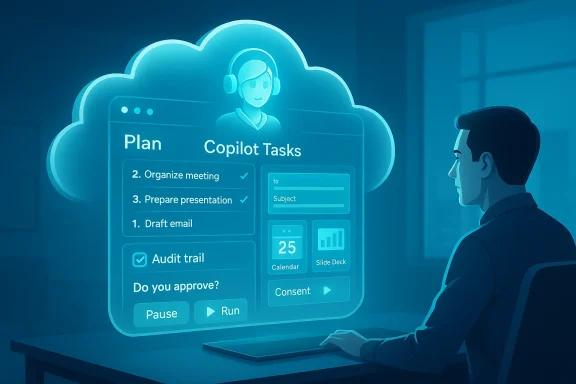
Microsoft today expanded the Copilot family with Copilot Tasks, a research-preview feature that purposely moves Copilot from “answer engine” to a background executor. Instead of offering only suggestions or draft text, Copilot Tasks is designed to accept natural‑language instructions, create a plan, and then carry out the steps — across web pages, apps, and services — using a Microsoft-hosted compute environment and a browser that runs on the AI’s side. The company describes the experience as “not autopilot” but a copilot: it will ask for permission before taking meaningful actions (such as sending messages or making payments) and will provide reports after tasks complete.
The rollout strategy is conservative: Microsoft has opened a research preview to a small group of testers and a waitlist for early access. This staged approach lets the company collect real-world feedback before exposing the feature more broadly.
Key architectural elements described by Microsoft and corroborated in early reporting:
Important UX questions include:
Considerations:
A key competitive advantage for Microsoft is its tight integration with Microsoft 365 and existing enterprise relationships — if Copilot Tasks can securely leverage enterprise identity and governance, it could gain traction among business users faster than consumer-only offerings.
But promise is different from practice. The technology raises real questions about reliability, credential management, auditability, and data handling. Microsoft’s early emphasis on consent and reporting is encouraging, yet the details that will determine whether Copilot Tasks becomes a trusted part of personal and enterprise workflows are not fully visible in the preview stage.
For end users, the sensible path is cautious experimentation: start with monitoring and read-only tasks, require explicit review for any item that can cost money or damage relationships, and demand clear logs. For enterprises, the calculus will hinge on governance controls and data residency assurances.
If Microsoft can deliver robust permissions, transparent auditability, and resilient automation that gracefully handles real‑world web complexity, Copilot Tasks could change how we delegate digital chores. If not, it risks being another neat AI demo that struggles at scale. Either way, this marks a major step in the industry’s move from conversational AI to agentic automation — and it’s a development worth watching closely as the preview expands.
Source: Techlusive Microsoft’s Copilot Tasks turns AI into your background assistant: Here’s how
 Background
Microsoft today expanded the Copilot family with Copilot Tasks, a research-preview feature that purposely moves Copilot from “answer engine” to a background executor. Instead of offering only suggestions or draft text, Copilot Tasks is designed to accept natural‑language instructions, create a plan, and then carry out the steps — across web pages, apps, and services — using a Microsoft-hosted compute environment and a browser that runs on the AI’s side. The company describes the experience as “not autopilot” but a copilot: it will ask for permission before taking meaningful actions (such as sending messages or making payments) and will provide reports after tasks complete.The rollout strategy is conservative: Microsoft has opened a research preview to a small group of testers and a waitlist for early access. This staged approach lets the company collect real-world feedback before exposing the feature more broadly.
What Copilot Tasks claims to do
Microsoft frames Copilot Tasks around everyday, multi-step chores that are painful or repetitive. The examples the company and early reports highlight include:- Surfacing urgent emails each evening with draft replies and managing promotional unsubscribes.
- Tracking apartment or job listings on a schedule and booking viewings or tailoring applications.
- Turning email threads, attachments, and images into structured slide decks.
- Generating study plans from a course syllabus, with practice questions and structured timelines.
- Comparing service providers (for example, plumbers or contractors) and booking appointments.
- Monitoring flight delays and adjusting ride or transfer bookings when itineraries change.
- Compiling a Monday briefing about upcoming meetings and time-allocation analysis.
How it works — architecture and user flow
Cloud-hosted agents, not local macros
Copilot Tasks runs in Microsoft’s environment rather than as client‑side automation. That has practical implications right away: the AI can maintain a continuous presence (scheduled or recurring tasks) without requiring your PC to be awake and connected. It also enables the AI to manage sessions across disparate services from a centralized agent.Key architectural elements described by Microsoft and corroborated in early reporting:
- An AI agent plans a multi-step sequence based on a single natural-language prompt.
- The agent executes steps using a dedicated browser running in Microsoft’s cloud environment.
- Actions that have real-world impact (send an email, make a payment, confirm a booking) require explicit user consent before execution.
- The agent generates a task report and an audit trail indicating what it did and why.
The typical user flow
- Describe the desired outcome in plain language.
- Copilot Tasks proposes a plan and the necessary steps for approval.
- User selects whether the task runs once, on a schedule, or repeatedly.
- The agent executes steps in the background using its cloud browser.
- The agent requests consent where actions are meaningful.
- The user receives a completion report and can review logs, accept results, or roll back where possible.
Strengths — why this matters
1. Real productivity gains for routine, repetitive workflows
The central advantage is removing context switching. Many productivity tasks — monitoring listings, reconciling appointment options, drafting and sending routine replies — require jumping between sites, apps, or inbox threads. Copilot Tasks promises to consolidate that into a single instruction and then perform the required steps end-to-end.2. Recurring automation without local infrastructure
Because the agents run in Microsoft’s cloud, users can schedule recurring tasks without keeping a device powered on, which addresses a common pain point with consumer automation tools that rely on a local client or laptop.3. Natural language to complex workflow mapping
Users don’t need to program rules or step sequences. The AI interprets intent and decomposes it into actions, which lowers the bar for automation adoption among non‑technical users.4. Integration potential across the Microsoft stack
Copilot Tasks arrives with the potential to integrate tightly with Microsoft 365, Outlook, Teams, and Edge, and tie into enterprise identity and permissions systems. For business users already in the Microsoft ecosystem, that could create a seamless path for automating coordination-heavy processes.5. Human oversight by default
Microsoft’s stated requirement for consent prior to “meaningful actions” — and the ability to pause or cancel tasks — preserves a degree of control that helps mitigate user concerns about runaway automation.Where it could fall short — practical limitations and unknowns
Reliability and brittle automations
Agentic browsing — using a virtual browser to interact with third‑party sites — can be fragile. Websites change structure frequently; forms and captchas can block automation; and error handling across disparate services is hard to get right. Unless Copilot Tasks can maintain resilience to small UI changes (for example, by using APIs rather than DOM scraping where possible), tasks may fail unpredictably.Permissions and credential management
The usefulness of Copilot Tasks depends on its ability to authenticate into services on users’ behalf. How Microsoft will manage credentials, token lifetimes, and delegated access scopes is a crucial design detail. Broad permissions could enable convenience but increase risk if tokens are abused or mis‑scoped.Scope of “meaningful actions”
Microsoft says Copilot Tasks will ask for permission before making payments or sending messages, but the definition of “meaningful” matters. Will booking a showing that requires only a calendar invite be considered meaningful? What about submitting a job application? Ambiguity in those boundaries can cause either friction (too many prompts) or risk (automation that acts without adequate confirmation).Privacy and data exposure
Running a cloud-based browser means Copilot Tasks will handle HTML, images, and possibly personal data from third‑party sites. Even when Microsoft uses robust server-side controls, that data flows through Microsoft systems, raising questions about data residency, retention policies, and third‑party disclosure. Enterprise customers will weigh those factors heavily.Auditability and error recovery
Users will want clear logs and the ability to understand exactly what the agent did and why. Even a small error — a cancelled appointment or an unsubscribed important mailing list — can have outsized consequences. The completeness and clarity of audit reports and rollback capabilities will determine trust.Security and privacy analysis
Attack surface and abuse vectors
- Credential theft: If Copilot Tasks stores or leverages OAuth tokens to sign into services, attackers may target those tokens.
- Social engineering amplification: An attacker could try to trick a user into authorizing a malicious or poorly scoped task that performs unwanted actions.
- Data exposure: Because the cloud agent accesses web pages and attachments, sensitive content may be processed and stored transiently — raising compliance considerations in regulated industries.
Mitigations Microsoft has announced or should be expected to provide
Microsoft’s public messaging emphasizes consent and control. To be credible in practice, the platform should include:- Granular OAuth-style permission scopes, with time-limited tokens and clear labels for what an agent may do.
- Read-only modes for data collection tasks (e.g., monitoring listings) that avoid exposing sensitive credentials.
- Detailed, human-readable audit logs showing step-by-step actions and associated evidence (screenshots, extracted text).
- Rollback tools where feasible (for example, reversing an email send via delayed send or prompting before final delivery).
- Rate-limiting and anomaly detection to prevent abuse or automated scraping at scale.
Regulatory and compliance considerations
Businesses will face questions about where Copilot Tasks runs and how long processed data is retained. For regulated sectors (financial services, health, public sector), Microsoft will likely need to provide options for regional data controls, contractual protections, and attestations to meet compliance frameworks.UX and trust: the human-in-the-loop problem
Users typically tolerate automation when outcomes are predictable and reversible. Copilot Tasks aims to keep humans in the loop, but practical UX design will determine whether the experience feels like a true copiloting partnership.Important UX questions include:
- How are consent prompts presented? Will they be concise and contextual, or verbose and confusing?
- How much preview does the user get before a recurring task runs?
- Can users sandbox tasks for safe testing before giving them recurring permissions?
- Are cancellation and rollback functions immediate and effective?
Developer and enterprise implications
For developers and IT admins
Copilot Tasks opens new possibilities and new support challenges. Admins must decide whether to allow such agents for enterprise accounts, and developers must consider building APIs and integration points that are agent-friendly.Considerations:
- Admin controls and governance: Enterprises will want policy controls that limit agent access to only sanctioned services or data types.
- Logging and SIEM integration: Audit logs for automated agent actions should be compatible with existing security information and event management systems.
- Role-based scopes: Enterprises will require per-user or per-role permissioning for agents that act on behalf of users.
For ISVs and service providers
Third-party service providers will need to clarify how they support agentic automation. Companies with robust public APIs will provide more reliable integration surfaces than those relying on web‑scraping approaches. This may accelerate API adoption and stronger developer documentation across the web if agentic AI becomes ubiquitous.Competitive context — where Copilot Tasks fits in the broader agentic AI landscape
Agentic assistants — models that plan and execute multi-step goals autonomously — have been a major area of focus across the industry. Microsoft’s launch of Copilot Tasks positions it directly against other vendors that have introduced agent modes or background automation features. The difference Microsoft is emphasizing is integration into the existing Copilot ecosystem and operation from its own cloud-hosted compute and browser, enabling scheduled, recurring tasks without the user’s machine being involved.A key competitive advantage for Microsoft is its tight integration with Microsoft 365 and existing enterprise relationships — if Copilot Tasks can securely leverage enterprise identity and governance, it could gain traction among business users faster than consumer-only offerings.
Practical advice for early adopters
If you’re considering joining the Copilot Tasks waitlist or plan to try the preview, keep these practical tips in mind:- Start with read-only monitoring tasks. Use Copilot Tasks initially for surveillance-style jobs (price monitoring, listing alerts, briefing compilations) that don’t require write permissions.
- Audit credentials and scopes. Grant the least privilege required and prefer explicit account linking through secure OAuth flows rather than pasting credentials into free-text fields.
- Test in a sandbox. Where possible, run tasks against dummy accounts or controlled scenarios to understand failure modes before enabling recurring runs on live data.
- Keep communication channels short. Enforce policies that prevent agents from sending messages before you’ve reviewed them.
- Maintain manual control points. For appointment bookings or purchases that could cost money, require explicit final confirmation.
- Archive and review logs. Insist on keeping task reports and evidence in a place you can quickly review and search.
Potential societal and economic impact
The move from conversation to action could yield broad productivity benefits: knowledge workers spend a significant portion of their day on repetitive coordination, scheduling, and triage tasks. Offloading that load to trusted agents could free time for higher-order work. But the automation of routine work also raises questions:- What happens to job roles that primarily perform scheduling and coordination?
- Will the convenience of agentic AI reduce people’s institutional knowledge over time?
- How will liability be allocated when an automated agent makes an error that has financial or legal consequences?
Limitations and claims that still need verification
Microsoft has made specific claims about capabilities and safeguards. Several of these are straightforward to validate technically, but others depend on implementation details that will matter in real-world use:- Claim: The agent runs on Microsoft’s own computer and browser. This appears accurate in announcements and early coverage; practical implications for data handling and session management are not fully disclosed.
- Claim: The agent will always ask for consent before meaningful actions. Microsoft states this policy, but the exact gating logic and UX for consent are not publicly visible; early preview experiences will determine how well this works in practice.
- Claim: Copilot Tasks can reliably interact with a wide variety of third-party sites. This is plausible but will be tested by real-world site variability, anti-bot measures, CAPTCHAs, and API limits.
- Claim: Tasks will provide clear audit reports. Microsoft promises reporting, but the quality, granularity, and preservation of those reports for compliance scenarios are yet to be evaluated.
How Microsoft should address outstanding concerns
For Copilot Tasks to earn broad user and enterprise trust, Microsoft should prioritize the following:- Granular permission model: Make it easy to grant narrow, time‑bound access for specific tasks and revoke tokens in one click.
- Comprehensive audit trail: Deliver machine-readable and human-readable logs plus evidence (screenshots, extracted text) for every action.
- Sandbox mode and preview runs: Allow users and admins to simulate tasks before enabling recurring execution in production environments.
- Clear data-retention policies: Publish how long task artifacts are kept, where they are stored, and options for regional data residency.
- Enterprise governance: Provide admin controls, policy templates, and SIEM connectors out of the box.
- Error-recovery primitives: Offer rollback or remediation flows for common failure modes (appointment double-booking, incorrect unsubscribes, misrouted emails).
The practical future: scenarios where Copilot Tasks helps most
- Busy professionals who need recurring triage (e.g., evening urgent-email briefings) will get immediate value.
- Small-business owners managing vendor comparisons and bookings will appreciate reduced administrative overhead.
- Students or learners can benefit from syllabus-to-study-plan automation.
- Heavy Microsoft 365 users in enterprise environments could gain the most if Copilot Tasks integrates with enterprise identity and compliance features.
Conclusion
Copilot Tasks is an important evolution in how mainstream AI may be used: less as a conversational partner and more as an active assistant that plans and executes workflows on your behalf. The promise — fewer clicks, less context switching, and automated recurring chores — is compelling, especially for road-worn productivity tasks that today waste time and attention.But promise is different from practice. The technology raises real questions about reliability, credential management, auditability, and data handling. Microsoft’s early emphasis on consent and reporting is encouraging, yet the details that will determine whether Copilot Tasks becomes a trusted part of personal and enterprise workflows are not fully visible in the preview stage.
For end users, the sensible path is cautious experimentation: start with monitoring and read-only tasks, require explicit review for any item that can cost money or damage relationships, and demand clear logs. For enterprises, the calculus will hinge on governance controls and data residency assurances.
If Microsoft can deliver robust permissions, transparent auditability, and resilient automation that gracefully handles real‑world web complexity, Copilot Tasks could change how we delegate digital chores. If not, it risks being another neat AI demo that struggles at scale. Either way, this marks a major step in the industry’s move from conversational AI to agentic automation — and it’s a development worth watching closely as the preview expands.
Source: Techlusive Microsoft’s Copilot Tasks turns AI into your background assistant: Here’s how
