

Google assigned CVE-2026-11080 to a medium-severity use-after-free flaw in Android WebView, disclosed June 4, 2026, affecting Google Chrome on Android before version 149.0.7827.53 and potentially allowing remote heap corruption through a crafted HTML page. The vulnerability is not the loudest item in Chrome 149’s unusually large security release, but it is one of the more instructive ones. It sits at the intersection of Chrome, Android, app-embedded browsing, and the increasingly messy public vulnerability data pipeline. For administrators, the practical lesson is simple: WebView bugs should be treated as platform exposure, not just browser trivia.
CVE-2026-11080 is classified by Chromium as medium severity, yet CISA’s enrichment data gives it a CVSS 3.1 score of 8.8, a high rating driven by network reachability, low attack complexity, no privilege requirement, user interaction, and high potential impact to confidentiality, integrity, and availability. That mismatch is not necessarily a contradiction. It is a reminder that Chrome’s internal severity language and CVSS scoring are built for different audiences.
Chromium’s severity label reflects the project’s view of exploitability and impact within Chrome’s architecture, mitigations, process model, and component boundaries. CVSS, by contrast, tries to compress a vulnerability into a portable risk score that procurement systems, scanners, and dashboards can understand. The result is that a bug can look modest in a vendor advisory and urgent in a vulnerability management console.
The affected component matters. Android WebView is not merely “Chrome, but smaller.” It is the Chromium-powered rendering engine that countless Android applications use to show web content without launching the full browser. When WebView has a memory safety problem, the exposure is distributed across apps that may not look like browsers to users at all.
That is why this CVE deserves more attention than its medium label might suggest. The attack path still requires a crafted HTML page and user interaction, but the delivery surface can be broader than a person deliberately opening Chrome. Any app that embeds web content becomes part of the practical risk conversation.
Modern browsers are engineered around the assumption that hostile content is normal. JavaScript, HTML, CSS, media codecs, GPU pipelines, font handling, storage systems, and IPC mechanisms all process attacker-controlled input every day. The browser is less a single application than a federation of parsers and sandboxes constantly negotiating with untrusted data.
That makes memory safety bugs especially important. A crafted HTML page is not exotic. It is the ordinary unit of the web. If a flaw in WebView lets that ordinary unit trigger heap corruption, defenders have to think about phishing, malicious ads, compromised websites, in-app browsers, and content previews.
Chrome’s process isolation and Android’s application sandbox reduce the blast radius, but they do not make memory corruption irrelevant. Attackers often chain bugs: one flaw gets code execution in a constrained context, another escapes a sandbox or accesses sensitive data, and a third provides persistence or privilege. A medium component bug can become one link in a serious exploit chain.
This is where endpoint management gets awkward. A managed Android fleet may have Chrome update policies, app update policies, and operating system patch expectations, but WebView sits in the middle. Depending on Android version, device vendor, and management posture, WebView updates may arrive through Google Play system components or browser package updates. That means the fix path is often real but not always obvious to the person reading the CVE.
For consumers, the answer is usually to update Chrome and Android System WebView through Google Play and keep automatic updates enabled. For enterprises, the answer is more procedural: verify that managed devices actually received version 149.0.7827.53 or later where applicable, and do not assume that app updates alone remove embedded rendering risk.
Windows administrators should still care, even though this CVE is Android-specific. Many organizations that standardize on Windows desktops also manage Android handhelds, rugged devices, kiosks, Teams Rooms peripherals, scanners, point-of-sale devices, and mobile access workflows. Browser vulnerability management is no longer a desktop-only discipline.
The headline-grabbing items in Chrome 149 were the critical and high-severity flaws: out-of-bounds reads and writes, use-after-free bugs across major components, type confusion issues, heap overflows, and validation failures. Against that backdrop, a medium WebView bug could easily disappear into the advisory’s long tail.
But the long tail is the story. Chrome’s security model is constantly absorbing defects across a sprawling codebase and its dependencies. The browser’s attack surface includes graphics translation layers, GPU code, networking, WebRTC, password management, DevTools, media, extensions, autofill, printing, and platform integration. The sheer variety of affected components shows how difficult it is to maintain a browser as both a consumer app and a cross-platform runtime.
For IT teams, the operational conclusion is not “panic because there are hundreds of CVEs.” It is that Chrome updates are now infrastructure updates. They deserve the same urgency as OS servicing, especially on systems where browsers mediate authentication, SaaS access, privileged admin consoles, and enterprise data.
That sequence matters because many vulnerability management programs still treat NVD enrichment as the canonical signal. If a CVE appears before complete scoring, CPE data, and automated scanner mappings settle, organizations can miss early prioritization windows. The record may be published, but the operational clarity arrives in pieces.
The CPE configuration is also interesting. The record describes Chrome versions up to but excluding 149.0.7827.53 and includes Android as the operating system context. That is exactly the sort of detail scanners need, yet it can be awkward for WebView because the vulnerable technology is experienced through both a system component and app-embedded surfaces.
This is why vulnerability management teams should resist over-automating interpretation. A scanner may flag Chrome. A mobile device management platform may report Android System WebView. An app inventory may show neither in a way that obviously maps to the CVE. The absence of a clean dashboard finding is not proof of absence.
Still, “not known exploited” is not the same as “not exploitable.” The description says a remote attacker could potentially exploit heap corruption through crafted HTML. That is enough to justify normal rapid browser patching, especially because Chrome and WebView updates are generally designed to be low-friction compared with full OS upgrades.
The user interaction requirement is also easy to overstate. In CVSS terms, user interaction often means the victim must visit or load malicious content. On the modern web, that can happen through a link, an embedded browser view, a malicious redirect, a compromised site, or a webview-based app workflow. It is a real constraint, but it is not much comfort in environments where users are constantly asked to authenticate, approve, scan, tap, and browse.
For enterprises, the more useful framing is exposure duration. How long do managed devices remain on vulnerable WebView or Chrome builds after a stable release? How many devices block Play updates? How many kiosk or line-of-business devices run pinned browser components because updating once broke an app? Those are the questions that determine risk more than the word “medium.”
This matters for WebView because the vulnerable code may be used by applications that are otherwise fully patched. A banking app, helpdesk app, MDM enrollment app, or identity provider app can all embed web content and inherit the behavior of the underlying WebView implementation. The app developer does not necessarily need to ship a new version for the WebView fix to matter.
For bring-your-own-device environments, visibility becomes a policy problem. If employees access corporate resources from Android devices, administrators should know whether conditional access rules, mobile threat defense tooling, or endpoint compliance checks can detect outdated WebView and Chrome versions. If they cannot, the organization may be relying on user update hygiene while pretending it has device assurance.
For dedicated devices, the problem is often inertia. Ruggedized Android devices in warehouses, hospitals, factories, and field service fleets can remain on old builds because they are certified for a single workflow. Those are precisely the devices where embedded WebView content may be central to the business process and least likely to be patched promptly.
A vulnerable Android WebView may not compromise a Windows workstation directly. But it may expose credentials, session tokens, enterprise web apps, or mobile workflows that tie back into the same Microsoft tenant. The endpoint form factor is different; the account graph is shared.
There is also a browser-engine lesson for Edge users. Microsoft Edge on desktop is Chromium-based, but CVE applicability depends on component, platform, and shipped version. A Chrome-on-Android WebView CVE should not be blindly copied onto Edge for Windows. At the same time, the volume and character of Chrome 149’s fixes remind us that Chromium-derived products inherit both the benefits and the maintenance burden of a common engine.
The right operational stance is neither complacency nor copy-paste panic. Track the affected product precisely, patch the platforms that actually carry the vulnerable code, and recognize that browser engine vulnerabilities are now part of the enterprise attack surface whether the device says Windows, Android, macOS, Linux, or ChromeOS.
The phrase “Use after free in WebView” carries a lot of compressed meaning. It says memory corruption, embedded browsing, Android, crafted HTML, and potential remote exploitation. But to a busy administrator, it may look like just another Chrome row in a giant patch release.
This is where vendor advisories and vulnerability databases serve different purposes. Google’s release note tells users to update and discloses enough to credit reporters and categorize risk while keeping bug details restricted until fixes propagate. NVD and CISA-ADP translate the issue into standardized metadata. Security teams then have to turn both into action, often before every field is complete.
That last step is where organizations succeed or fail. The best teams do not wait for perfect enrichment if the product, version, and remediation are clear. They use the advisory as a trigger, confirm exposure through inventory, deploy the update, and revisit the record later if exploitability details change.
In browser exploitation, heap manipulation is often the craft. Attackers shape memory layout, trigger object lifetime mistakes, and attempt to turn a crash into control. Browser vendors invest heavily in mitigations precisely because the underlying bug classes have historically been exploitable.
On Android, additional platform defenses raise the bar. App sandboxing, memory protections, site isolation work, and hardened allocators all complicate exploitation. But exploit developers do not need every bug to work on every device. They need a reliable path against a valuable target population, and they often combine weaknesses until the chain is stable enough.
That is why defenders should avoid binary thinking. CVE-2026-11080 is not publicly described as an actively exploited zero-day. It is not the scariest Chrome 149 issue. Yet it belongs to a class of bugs that browser security teams take seriously because, under the right conditions, memory corruption is the raw material of compromise.
For individual users, the simplest path is to open the Play Store, update Chrome and Android System WebView if listed, and restart apps that embed web content. For managed environments, administrators should verify version compliance through MDM rather than trusting automatic updates. Browser auto-update is good, but compliance evidence is better.
Organizations with Android Enterprise deployments should pay particular attention to devices with restricted Play Store access, delayed update policies, kiosk mode, or frozen application sets. These are the places where “automatic” silently becomes “eventually,” and “eventually” is an uncomfortable patching strategy for browser engines.
The best control is cadence. If Chrome and WebView updates are treated as routine emergency exceptions every time a CVE lands, teams burn out and devices drift. If they are treated as standard high-frequency maintenance with clear reporting, CVE-2026-11080 becomes just another successful patch cycle.
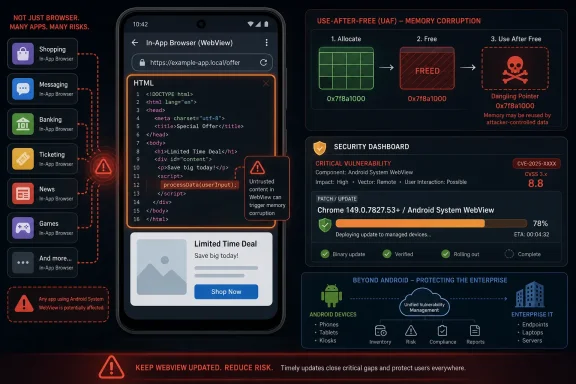 A Medium Chrome Bug Lands in a High-Impact Place
CVE-2026-11080 is classified by Chromium as medium severity, yet CISA’s enrichment data gives it a CVSS 3.1 score of 8.8, a high rating driven by network reachability, low attack complexity, no privilege requirement, user interaction, and high potential impact to confidentiality, integrity, and availability. That mismatch is not necessarily a contradiction. It is a reminder that Chrome’s internal severity language and CVSS scoring are built for different audiences.Chromium’s severity label reflects the project’s view of exploitability and impact within Chrome’s architecture, mitigations, process model, and component boundaries. CVSS, by contrast, tries to compress a vulnerability into a portable risk score that procurement systems, scanners, and dashboards can understand. The result is that a bug can look modest in a vendor advisory and urgent in a vulnerability management console.
The affected component matters. Android WebView is not merely “Chrome, but smaller.” It is the Chromium-powered rendering engine that countless Android applications use to show web content without launching the full browser. When WebView has a memory safety problem, the exposure is distributed across apps that may not look like browsers to users at all.
That is why this CVE deserves more attention than its medium label might suggest. The attack path still requires a crafted HTML page and user interaction, but the delivery surface can be broader than a person deliberately opening Chrome. Any app that embeds web content becomes part of the practical risk conversation.
Use-After-Free Remains the Browser Bug That Will Not Die
A use-after-free vulnerability is one of the oldest and most stubborn classes of memory corruption bugs. In plain English, software frees a chunk of memory, then later tries to use it again as if it still owned it. If an attacker can influence what occupies that memory afterward, the program may be pushed into reading, writing, crashing, or executing in ways the developer never intended.Modern browsers are engineered around the assumption that hostile content is normal. JavaScript, HTML, CSS, media codecs, GPU pipelines, font handling, storage systems, and IPC mechanisms all process attacker-controlled input every day. The browser is less a single application than a federation of parsers and sandboxes constantly negotiating with untrusted data.
That makes memory safety bugs especially important. A crafted HTML page is not exotic. It is the ordinary unit of the web. If a flaw in WebView lets that ordinary unit trigger heap corruption, defenders have to think about phishing, malicious ads, compromised websites, in-app browsers, and content previews.
Chrome’s process isolation and Android’s application sandbox reduce the blast radius, but they do not make memory corruption irrelevant. Attackers often chain bugs: one flaw gets code execution in a constrained context, another escapes a sandbox or accesses sensitive data, and a third provides persistence or privilege. A medium component bug can become one link in a serious exploit chain.
WebView Turns Browser Security Into App Security
The most important word in CVE-2026-11080 is not “Chrome.” It is “WebView.” On Android, WebView is the quiet dependency that many users never see and many organizations forget to inventory. It powers login screens, help pages, embedded dashboards, payment flows, support chat windows, enterprise portals, and the little browser panes inside apps that were never marketed as browsers.This is where endpoint management gets awkward. A managed Android fleet may have Chrome update policies, app update policies, and operating system patch expectations, but WebView sits in the middle. Depending on Android version, device vendor, and management posture, WebView updates may arrive through Google Play system components or browser package updates. That means the fix path is often real but not always obvious to the person reading the CVE.
For consumers, the answer is usually to update Chrome and Android System WebView through Google Play and keep automatic updates enabled. For enterprises, the answer is more procedural: verify that managed devices actually received version 149.0.7827.53 or later where applicable, and do not assume that app updates alone remove embedded rendering risk.
Windows administrators should still care, even though this CVE is Android-specific. Many organizations that standardize on Windows desktops also manage Android handhelds, rugged devices, kiosks, Teams Rooms peripherals, scanners, point-of-sale devices, and mobile access workflows. Browser vulnerability management is no longer a desktop-only discipline.
Chrome 149 Was Not a Normal Patch Drop
CVE-2026-11080 arrived inside Chrome 149, a release Google promoted to stable on June 2, 2026, for Windows, macOS, and Linux, with Android-related CVE records following through the public vulnerability ecosystem. Google’s release notes list 429 security fixes in that update, an eye-catching number even by Chrome’s usually busy standards.The headline-grabbing items in Chrome 149 were the critical and high-severity flaws: out-of-bounds reads and writes, use-after-free bugs across major components, type confusion issues, heap overflows, and validation failures. Against that backdrop, a medium WebView bug could easily disappear into the advisory’s long tail.
But the long tail is the story. Chrome’s security model is constantly absorbing defects across a sprawling codebase and its dependencies. The browser’s attack surface includes graphics translation layers, GPU code, networking, WebRTC, password management, DevTools, media, extensions, autofill, printing, and platform integration. The sheer variety of affected components shows how difficult it is to maintain a browser as both a consumer app and a cross-platform runtime.
For IT teams, the operational conclusion is not “panic because there are hundreds of CVEs.” It is that Chrome updates are now infrastructure updates. They deserve the same urgency as OS servicing, especially on systems where browsers mediate authentication, SaaS access, privileged admin consoles, and enterprise data.
The NVD Record Shows the Data Pipeline Lagging Behind the Risk
The NVD entry for CVE-2026-11080 is useful, but it also illustrates the uneven state of vulnerability metadata. At the time reflected in the record, NVD had not supplied its own CVSS 4.0 or CVSS 3.x assessment, while CISA-ADP had contributed a CVSS 3.1 vector and mapped the issue to CWE-416. NIST later added affected software configuration data tying the vulnerable Chrome application to Android.That sequence matters because many vulnerability management programs still treat NVD enrichment as the canonical signal. If a CVE appears before complete scoring, CPE data, and automated scanner mappings settle, organizations can miss early prioritization windows. The record may be published, but the operational clarity arrives in pieces.
The CPE configuration is also interesting. The record describes Chrome versions up to but excluding 149.0.7827.53 and includes Android as the operating system context. That is exactly the sort of detail scanners need, yet it can be awkward for WebView because the vulnerable technology is experienced through both a system component and app-embedded surfaces.
This is why vulnerability management teams should resist over-automating interpretation. A scanner may flag Chrome. A mobile device management platform may report Android System WebView. An app inventory may show neither in a way that obviously maps to the CVE. The absence of a clean dashboard finding is not proof of absence.
“Medium” Does Not Mean “Can Wait Until Next Quarter”
The browser security world has trained administrators to prioritize actively exploited zero-days, and rightly so. If Google says an exploit exists in the wild, patching jumps the queue. CVE-2026-11080 does not currently carry that kind of public exploitation signal in the provided record.Still, “not known exploited” is not the same as “not exploitable.” The description says a remote attacker could potentially exploit heap corruption through crafted HTML. That is enough to justify normal rapid browser patching, especially because Chrome and WebView updates are generally designed to be low-friction compared with full OS upgrades.
The user interaction requirement is also easy to overstate. In CVSS terms, user interaction often means the victim must visit or load malicious content. On the modern web, that can happen through a link, an embedded browser view, a malicious redirect, a compromised site, or a webview-based app workflow. It is a real constraint, but it is not much comfort in environments where users are constantly asked to authenticate, approve, scan, tap, and browse.
For enterprises, the more useful framing is exposure duration. How long do managed devices remain on vulnerable WebView or Chrome builds after a stable release? How many devices block Play updates? How many kiosk or line-of-business devices run pinned browser components because updating once broke an app? Those are the questions that determine risk more than the word “medium.”
Android Makes Patch Verification Harder Than Patch Advice
On a Windows desktop, the Chrome update story is relatively familiar: Chrome updates itself, enterprise policies can control cadence, and administrators can query installed versions. Android is less uniform. OEM behavior, managed Play policy, user restrictions, app store access, and device age all shape the patch path.This matters for WebView because the vulnerable code may be used by applications that are otherwise fully patched. A banking app, helpdesk app, MDM enrollment app, or identity provider app can all embed web content and inherit the behavior of the underlying WebView implementation. The app developer does not necessarily need to ship a new version for the WebView fix to matter.
For bring-your-own-device environments, visibility becomes a policy problem. If employees access corporate resources from Android devices, administrators should know whether conditional access rules, mobile threat defense tooling, or endpoint compliance checks can detect outdated WebView and Chrome versions. If they cannot, the organization may be relying on user update hygiene while pretending it has device assurance.
For dedicated devices, the problem is often inertia. Ruggedized Android devices in warehouses, hospitals, factories, and field service fleets can remain on old builds because they are certified for a single workflow. Those are precisely the devices where embedded WebView content may be central to the business process and least likely to be patched promptly.
Windows Shops Should Treat This as a Cross-Platform Warning
A WindowsForum.com reader might reasonably ask why an Android WebView CVE belongs in a Windows-centered security conversation. The answer is that Microsoft shops rarely run Microsoft-only estates anymore. Entra ID, Intune, Defender, Edge, Chrome, Android Enterprise, Teams, Outlook, and SaaS apps all meet at the identity layer, and identity is where attackers increasingly aim.A vulnerable Android WebView may not compromise a Windows workstation directly. But it may expose credentials, session tokens, enterprise web apps, or mobile workflows that tie back into the same Microsoft tenant. The endpoint form factor is different; the account graph is shared.
There is also a browser-engine lesson for Edge users. Microsoft Edge on desktop is Chromium-based, but CVE applicability depends on component, platform, and shipped version. A Chrome-on-Android WebView CVE should not be blindly copied onto Edge for Windows. At the same time, the volume and character of Chrome 149’s fixes remind us that Chromium-derived products inherit both the benefits and the maintenance burden of a common engine.
The right operational stance is neither complacency nor copy-paste panic. Track the affected product precisely, patch the platforms that actually carry the vulnerable code, and recognize that browser engine vulnerabilities are now part of the enterprise attack surface whether the device says Windows, Android, macOS, Linux, or ChromeOS.
The Advisory Economy Still Rewards Skimming
CVE-2026-11080 also exposes a weakness in how security information is consumed. The public record includes a short description, a CWE, a contributed CVSS vector, references, change history, and CPE data. That is enough for machines to ingest, but not always enough for humans to reason from.The phrase “Use after free in WebView” carries a lot of compressed meaning. It says memory corruption, embedded browsing, Android, crafted HTML, and potential remote exploitation. But to a busy administrator, it may look like just another Chrome row in a giant patch release.
This is where vendor advisories and vulnerability databases serve different purposes. Google’s release note tells users to update and discloses enough to credit reporters and categorize risk while keeping bug details restricted until fixes propagate. NVD and CISA-ADP translate the issue into standardized metadata. Security teams then have to turn both into action, often before every field is complete.
That last step is where organizations succeed or fail. The best teams do not wait for perfect enrichment if the product, version, and remediation are clear. They use the advisory as a trigger, confirm exposure through inventory, deploy the update, and revisit the record later if exploitability details change.
Heap Corruption Is a Warning About Chains, Not Just Crashes
The NVD description says the vulnerability could allow a remote attacker to “potentially exploit heap corruption.” That phrasing is careful, and it should be read carefully. Heap corruption is not a guaranteed remote code execution claim, but it is also not merely a denial-of-service footnote.In browser exploitation, heap manipulation is often the craft. Attackers shape memory layout, trigger object lifetime mistakes, and attempt to turn a crash into control. Browser vendors invest heavily in mitigations precisely because the underlying bug classes have historically been exploitable.
On Android, additional platform defenses raise the bar. App sandboxing, memory protections, site isolation work, and hardened allocators all complicate exploitation. But exploit developers do not need every bug to work on every device. They need a reliable path against a valuable target population, and they often combine weaknesses until the chain is stable enough.
That is why defenders should avoid binary thinking. CVE-2026-11080 is not publicly described as an actively exploited zero-day. It is not the scariest Chrome 149 issue. Yet it belongs to a class of bugs that browser security teams take seriously because, under the right conditions, memory corruption is the raw material of compromise.
The Real Remediation Is Boring, Which Is Why It Works
The fix is not glamorous: update to Chrome 149.0.7827.53 or later on affected Android installations, and ensure the WebView component is current. For desktop Chrome, the June 2 stable release moved Windows and macOS to 149.0.7827.53 or 149.0.7827.54 and Linux to 149.0.7827.53, with later updates already emerging for additional issues. The exact target version should therefore be treated as a floor, not a ceiling.For individual users, the simplest path is to open the Play Store, update Chrome and Android System WebView if listed, and restart apps that embed web content. For managed environments, administrators should verify version compliance through MDM rather than trusting automatic updates. Browser auto-update is good, but compliance evidence is better.
Organizations with Android Enterprise deployments should pay particular attention to devices with restricted Play Store access, delayed update policies, kiosk mode, or frozen application sets. These are the places where “automatic” silently becomes “eventually,” and “eventually” is an uncomfortable patching strategy for browser engines.
The best control is cadence. If Chrome and WebView updates are treated as routine emergency exceptions every time a CVE lands, teams burn out and devices drift. If they are treated as standard high-frequency maintenance with clear reporting, CVE-2026-11080 becomes just another successful patch cycle.
The Small WebView Bug That Tests the Whole Patch Machine
CVE-2026-11080 is a narrow vulnerability, but it asks broad questions about inventory, mobile governance, and the way organizations interpret browser risk. The concrete actions are straightforward, even if the surrounding ecosystem is not.- Organizations should verify that affected Android devices have Chrome or Android WebView components updated to 149.0.7827.53 or later, while treating newer stable releases as preferable where available.
- Security teams should not downgrade the issue solely because Chromium labels it medium, since the contributed CVSS 3.1 vector rates the potential impact as high.
- Administrators should remember that WebView exposure often appears inside non-browser apps, including enterprise apps that render login pages, dashboards, and support content.
- Vulnerability managers should account for NVD enrichment lag and avoid waiting for every database field to settle when the affected product and fixed version are already clear.
- Windows-centered IT teams should include Android browser components in their identity and endpoint risk models, because mobile compromise can still threaten shared corporate accounts and cloud sessions.
References
- Primary source: NVD / Chromium
Published: 2026-06-09T07:00:46-07:00
NVD - CVE-2026-11080
 nvd.nist.gov
- Security advisory: MSRC
Published: 2026-06-09T07:00:46-07:00
Original feed URL
Security Update Guide - Microsoft Security Response Center
 msrc.microsoft.com
- Related coverage: security.snyk.io
Use After Free in chromium | CVE-2026-11080 | Snyk
Use After Free in chromium | CVE-2026-11080security.snyk.io - Related coverage: govcert.gov.hk
GovCERT.HK - Security Alert (A26-06-08): Multiple Vulnerabilities in Google Chrome
Security Alert (A26-06-08): Multiple Vulnerabilities in Google Chromewww.govcert.gov.hk
- Related coverage: vuldb.com
CVE-2026-11080 Google Chrome WebView Excesso de tampão (ID 500032)
Foi identificada uma vulnerabilidade em Google Chrome no Android. Esta vulnerabilidade está registrada como CVE-2026-11080. É recomendado que o componente afetado seja atualizado.vuldb.com - Official source: nist.gov
National Vulnerability Database
NIST maintains the National Vulnerability Database (NVD), a repository of information on software and hardware flaws that can compromise computer security. This is a key piece of the nation’s cybersecurity infrastructure.www.nist.gov
- Related coverage: labs.cloudsecurityalliance.org
NVD Enrichment Triage: Enterprise Vulnerability Programs Must Adapt
PDF documentlabs.cloudsecurityalliance.org
