

Google disclosed CVE-2026-11127 on June 4, 2026, as a medium-severity Chrome for Android flaw in WebAPKs that affected versions before 149.0.7827.53 and could let a remote attacker spoof a domain through a crafted WebAPK. The bug is not the scariest item in Chrome 149’s unusually large security rollup, but it is one of the more revealing. It sits at the intersection of progressive web apps, Android trust signals, and the increasingly blurry line between “website” and “installed application.” That is exactly where phishing risk becomes less theatrical and more operational.
CVE-2026-11127 is easy to undersell because it is not a memory corruption bug, not a browser sandbox escape, and not listed as actively exploited. CISA’s ADP scoring gives it a CVSS 3.1 base score of 6.5, with network attack vector, low attack complexity, no privileges required, and user interaction required. In the language of vulnerability dashboards, that lands comfortably in the “patch it, but don’t panic” bucket.
But the interesting part is not the number. The interesting part is what the flaw abuses: WebAPKs, the Android packaging mechanism Chrome uses when a progressive web app is installed so it can behave more like a native application. A WebAPK can appear in the launcher, show up in Android app settings, and register intent filters. That gives web software a more privileged-feeling place in the user’s mental model, even when the underlying app remains web content.
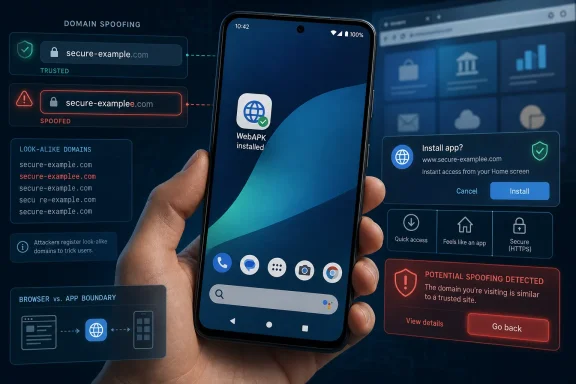
Domain spoofing in that environment is not just a cosmetic problem. The browser address bar is the web’s oldest user-facing security boundary, flawed though it may be. When an app-like web experience moves outside the ordinary browser frame, the system has to replace that boundary with other cues: app name, icon, install prompt, Android settings entry, and the implied legitimacy of something that “installed.” CVE-2026-11127 is a reminder that those replacement cues are still security-critical UI, not mere product polish.
Google’s own advisory lists CVE-2026-11127 as a medium issue in the Chrome 149 stable update, reported internally on April 10 and fixed before the public CVE landed. NVD later recorded the affected condition as Chrome versions before 149.0.7827.53 on Android, with Android included in the affected configuration logic. That chronology matters: this was not a breathless zero-day scramble, but a routine hardening fix inside a browser release that carried hundreds of security entries.
That architecture is one of the web platform’s most important strategic bets. It lets a service bypass app-store friction while still offering an app-like experience. It also lets developers ship updates through the web rather than waiting on store review cycles. For users, a good PWA can feel indistinguishable from a lightweight native app until something goes wrong.
Security people have always been uneasy about that bargain. A website in a tab is surrounded by browser chrome, origin indicators, permission prompts, and a familiar expectation that the address bar matters. A web app installed as a WebAPK asks the user to treat web content as an app, while still relying on web-origin rules under the hood. That is powerful, but it is also cognitively expensive.
CVE-2026-11127 appears to have hit precisely that trust seam. The published description says a crafted WebAPK could allow domain spoofing. The restricted Chromium issue tracker does not provide public exploit mechanics, which is common for recently fixed browser bugs. Still, the risk category is clear enough: a user could be made to see or trust the wrong domain identity in an app-like context.
That is why this bug deserves attention even without a sensational exploit chain. The browser industry has spent two decades teaching users to look for domains, locks, prompts, and app surfaces. WebAPKs compress those signals into a smaller, more app-native package. If the package can be made to misrepresent its origin, the platform has not merely lost a string comparison; it has lost part of the story it tells users about trust.
Against that backdrop, a medium WebAPK spoofing issue looks almost modest. It does not promise remote code execution. It requires user interaction. It appears to affect Chrome on Android rather than the desktop builds that dominate many enterprise patch spreadsheets. For a Windows-focused community, it would be tempting to file this under “mobile Chrome housekeeping” and move on.
That would be the wrong lesson. Modern Windows shops are rarely Windows-only in practice. Their users authenticate into Microsoft 365, Google Workspace, SaaS dashboards, banking portals, password managers, help-desk systems, VPN enrollment flows, and internal portals from phones as often as from PCs. A mobile-origin spoofing bug can become an enterprise problem the moment it helps harvest credentials or session tokens.
Chrome 149’s scale also creates a triage problem. When a release fixes hundreds of vulnerabilities, administrators need a way to distinguish exploitability, business exposure, and user behavior risk. CVE-2026-11127 is not the highest-priority patch in that bundle, but it is the kind of bug that maps to real-world deception. In phishing defense, “medium” severity can still be operationally serious.
There is also a visibility problem. Desktop Chrome updates are comparatively easy to track through enterprise tools, browser management policies, and vulnerability scanners. Android Chrome versions are messier, depending on Play Store update cadence, managed device policy, OEM behavior, user settings, and whether the user is running Chrome proper or another Chromium-derived browser. A Chrome Android flaw can sit outside the patch hygiene processes that organizations have spent years refining on Windows.
But attackers love ambiguity. If a crafted WebAPK can make a malicious app-like surface appear to belong to a trusted domain, the attacker does not need to defeat TLS or compromise DNS. They need to defeat the user’s ability to tell what they are interacting with. That is the same basic logic behind homograph domains, fake login pages, malicious OAuth consent screens, and browser-in-the-browser attacks.
The WebAPK angle is especially uncomfortable because installed apps carry a different trust aura. Users are suspicious of random web pages; they are less suspicious of icons in their launcher. They may assume that if Android accepted the install, Chrome minted the package, and the icon looks right, the app has passed some meaningful trust test. Sometimes that assumption is reasonable. Sometimes it is exactly what a spoofing bug is designed to exploit.
This is why security UI bugs matter. A misleading domain indicator can turn every subsequent permission prompt, login form, or payment screen into a confidence trick. The attacker may still need to persuade the user to install or launch the malicious WebAPK, but phishing campaigns are built around persuasion. User interaction is not a barrier when the exploit path is social by design.
The published CVSS vector reflects that tension. User interaction is required, confidentiality impact is scored as none, integrity impact is high, and availability impact is none. That is a fair mechanical description, but it does not fully capture downstream consequences. If spoofing helps a user submit credentials to the wrong place, the CVE did not directly read secrets; the campaign did.
The user-facing NVD page, however, still asks whether a CPE is missing while the CPE section loads, a familiar artifact of vulnerability database plumbing rather than necessarily a sign that the record is substantively wrong. In the change history, the affected configuration is present. In practical terms, defenders should treat the affected stack as Chrome on Android before 149.0.7827.53, not generic desktop Chrome and not Android as a standalone OS vulnerability.
That distinction matters for scanners. A naïve interpretation might flag every Chrome install below 149.0.7827.53, including desktop systems where WebAPKs are not the relevant feature path. Another might miss the issue if it keys only on desktop Chrome advisories, because Google’s reference page is titled as a desktop stable-channel update even though the CVE description specifically calls out Chrome on Android. Vulnerability management often fails in these seams between advisory titles, CPEs, and product-specific feature surfaces.
The Chrome release post itself is also an imperfect artifact for defenders. It is the canonical vendor advisory, but it lists hundreds of CVEs in a single page and does not provide detailed platform impact for each one. That is not unusual; Chrome’s security process deliberately restricts bug details until users are updated. But it means enterprise teams have to combine vendor posts, NVD enrichment, mobile fleet telemetry, and their own asset context to understand exposure.
For WindowsForum readers, the important point is not whether NVD’s page rendering looks elegant. It is that vulnerability records are still negotiated objects. They evolve after publication, they inherit vendor ambiguity, and they sometimes need human interpretation before being fed into policy. CVE-2026-11127 is a small case study in why “just scan the CVEs” remains a fantasy.
That does not mean every Windows admin must become a mobile device management specialist overnight. It does mean browser policy can no longer stop at the desktop. If a company allows Android devices to access corporate SaaS, then Chrome Android is part of the access path. If users install PWAs for internal tools, then WebAPK behavior becomes part of the company’s application surface.
The practical risk is not that CVE-2026-11127 alone will topple an enterprise. The practical risk is that it sits inside a familiar chain: a user receives a convincing link, installs or launches an app-like web experience, sees domain cues that appear trustworthy, and enters credentials or approves a workflow. That chain may end in account takeover, fraudulent payment approval, or session abuse. The CVE is one link, not the whole attack.
Managed Android environments have tools to reduce that exposure. Admins can enforce Chrome updates, restrict unknown app behaviors, control install sources, manage browser settings, and require phishing-resistant authentication for sensitive apps. But many organizations still treat personally owned Android devices as a convenience layer rather than a managed endpoint class. The browser does not care about that organizational fiction.
There is also a consumer angle. Windows enthusiasts often run Android phones alongside Windows PCs and sync passwords, notifications, tabs, and identities across them. A spoofed WebAPK on the phone is not isolated from the desktop if it captures a Microsoft account password, a GitHub credential, or a session into a cloud admin console. Cross-device convenience has made mobile browser bugs part of desktop risk.
The problem is not that web apps can be installed. The problem is that installed web apps need trust signals as strong as the role they are asked to play. If Chrome and Android make a PWA feel like a native app, the origin model has to remain legible after the browser’s ordinary frame disappears. Users should not need to understand WebAPK internals to know which domain they are trusting.
Google has already recognized parts of this problem in Chrome’s user-facing guidance. Chrome’s help material warns users to be cautious when a web app wants to change its name, especially if the change resembles another app. That warning gets at a deeper truth: identity mutation is dangerous in app-like web surfaces. Names, icons, domains, manifests, and install prompts are not decoration; they are the user’s security interface.
Developers also have responsibility here. A PWA that mimics another service too closely, uses ambiguous branding, or changes manifest identity aggressively is creating risk even if it is not malicious. Enterprises building internal PWAs should use clear naming, stable icons, obvious domain ownership, and documented installation flows. If users are expected to install a company web app, they should know exactly where it comes from and what it looks like.
The browser vendor’s job is harder. Chrome must preserve the convenience of app-like web installation while preventing attackers from abusing that convenience. That means enforcing origin consistency, surfacing meaningful identity cues, handling manifest changes carefully, and patching bugs like CVE-2026-11127 before they become exploit tutorials. The medium severity label does not make that work optional.
The behavioral fix is harder. Users have been trained to install apps casually, accept prompts quickly, and trust icons they recognize. PWAs complicate that training because they turn websites into app-like objects without the same review model users associate with app stores. That does not make PWAs unsafe by default, but it does make identity clarity essential.
Security awareness programs usually tell users to check the URL. That advice is already strained on mobile, where address bars are smaller and often hidden. In a WebAPK context, the advice becomes even less direct. Users need to be taught not only “check the URL,” but “be cautious when a website asks to install an app-like experience, and be especially cautious if the app’s identity changes or resembles a sensitive service.”
For administrators, the better answer is to reduce reliance on user interpretation. Phishing-resistant MFA, passkeys, conditional access, device compliance checks, and managed browser policies all help blunt the impact of spoofed UI. A spoofed domain cue is less damaging when credentials cannot be reused and sensitive actions require device-bound authentication.
That is the broader lesson of CVE-2026-11127. UI trust bugs are inevitable in complex platforms. The defensive goal is not to convince every user to become a forensic analyst of app manifests. It is to make sure a single successful deception does not automatically become account compromise.
 A Medium Bug With a Very Modern Blast Radius
CVE-2026-11127 is easy to undersell because it is not a memory corruption bug, not a browser sandbox escape, and not listed as actively exploited. CISA’s ADP scoring gives it a CVSS 3.1 base score of 6.5, with network attack vector, low attack complexity, no privileges required, and user interaction required. In the language of vulnerability dashboards, that lands comfortably in the “patch it, but don’t panic” bucket.But the interesting part is not the number. The interesting part is what the flaw abuses: WebAPKs, the Android packaging mechanism Chrome uses when a progressive web app is installed so it can behave more like a native application. A WebAPK can appear in the launcher, show up in Android app settings, and register intent filters. That gives web software a more privileged-feeling place in the user’s mental model, even when the underlying app remains web content.
Domain spoofing in that environment is not just a cosmetic problem. The browser address bar is the web’s oldest user-facing security boundary, flawed though it may be. When an app-like web experience moves outside the ordinary browser frame, the system has to replace that boundary with other cues: app name, icon, install prompt, Android settings entry, and the implied legitimacy of something that “installed.” CVE-2026-11127 is a reminder that those replacement cues are still security-critical UI, not mere product polish.
Google’s own advisory lists CVE-2026-11127 as a medium issue in the Chrome 149 stable update, reported internally on April 10 and fixed before the public CVE landed. NVD later recorded the affected condition as Chrome versions before 149.0.7827.53 on Android, with Android included in the affected configuration logic. That chronology matters: this was not a breathless zero-day scramble, but a routine hardening fix inside a browser release that carried hundreds of security entries.
WebAPKs Turn “Add to Home Screen” Into an Install Story
For years, “Add to Home Screen” sounded harmless. It evoked bookmarks, shortcuts, and convenience. On Android, however, Chrome’s WebAPK system made the feature more ambitious: install a progressive web app and Chrome can generate an APK wrapper for it, giving it a presence much closer to a native app than a simple shortcut.That architecture is one of the web platform’s most important strategic bets. It lets a service bypass app-store friction while still offering an app-like experience. It also lets developers ship updates through the web rather than waiting on store review cycles. For users, a good PWA can feel indistinguishable from a lightweight native app until something goes wrong.
Security people have always been uneasy about that bargain. A website in a tab is surrounded by browser chrome, origin indicators, permission prompts, and a familiar expectation that the address bar matters. A web app installed as a WebAPK asks the user to treat web content as an app, while still relying on web-origin rules under the hood. That is powerful, but it is also cognitively expensive.
CVE-2026-11127 appears to have hit precisely that trust seam. The published description says a crafted WebAPK could allow domain spoofing. The restricted Chromium issue tracker does not provide public exploit mechanics, which is common for recently fixed browser bugs. Still, the risk category is clear enough: a user could be made to see or trust the wrong domain identity in an app-like context.
That is why this bug deserves attention even without a sensational exploit chain. The browser industry has spent two decades teaching users to look for domains, locks, prompts, and app surfaces. WebAPKs compress those signals into a smaller, more app-native package. If the package can be made to misrepresent its origin, the platform has not merely lost a string comparison; it has lost part of the story it tells users about trust.
Chrome 149’s Mountain of Fixes Makes Small Bugs Easier to Miss
The June 2 Chrome 149 stable update was not a small patch. Google said the release contained 429 security fixes, with a long list of externally reported and internally found vulnerabilities. The headline risks in such a release naturally cluster around critical and high-severity memory safety bugs: out-of-bounds writes, use-after-free flaws, type confusion, GPU and ANGLE issues, and other defects that map more directly to code execution.Against that backdrop, a medium WebAPK spoofing issue looks almost modest. It does not promise remote code execution. It requires user interaction. It appears to affect Chrome on Android rather than the desktop builds that dominate many enterprise patch spreadsheets. For a Windows-focused community, it would be tempting to file this under “mobile Chrome housekeeping” and move on.
That would be the wrong lesson. Modern Windows shops are rarely Windows-only in practice. Their users authenticate into Microsoft 365, Google Workspace, SaaS dashboards, banking portals, password managers, help-desk systems, VPN enrollment flows, and internal portals from phones as often as from PCs. A mobile-origin spoofing bug can become an enterprise problem the moment it helps harvest credentials or session tokens.
Chrome 149’s scale also creates a triage problem. When a release fixes hundreds of vulnerabilities, administrators need a way to distinguish exploitability, business exposure, and user behavior risk. CVE-2026-11127 is not the highest-priority patch in that bundle, but it is the kind of bug that maps to real-world deception. In phishing defense, “medium” severity can still be operationally serious.
There is also a visibility problem. Desktop Chrome updates are comparatively easy to track through enterprise tools, browser management policies, and vulnerability scanners. Android Chrome versions are messier, depending on Play Store update cadence, managed device policy, OEM behavior, user settings, and whether the user is running Chrome proper or another Chromium-derived browser. A Chrome Android flaw can sit outside the patch hygiene processes that organizations have spent years refining on Windows.
Domain Spoofing Is a UI Vulnerability With Security Consequences
Security teams tend to prefer bugs with clean mechanics: a buffer overflows, a pointer is reused, a sandbox boundary fails. Domain spoofing is less tidy. It lives in UI, workflow, identity, and user perception. That makes it harder to score and easier to dismiss.But attackers love ambiguity. If a crafted WebAPK can make a malicious app-like surface appear to belong to a trusted domain, the attacker does not need to defeat TLS or compromise DNS. They need to defeat the user’s ability to tell what they are interacting with. That is the same basic logic behind homograph domains, fake login pages, malicious OAuth consent screens, and browser-in-the-browser attacks.
The WebAPK angle is especially uncomfortable because installed apps carry a different trust aura. Users are suspicious of random web pages; they are less suspicious of icons in their launcher. They may assume that if Android accepted the install, Chrome minted the package, and the icon looks right, the app has passed some meaningful trust test. Sometimes that assumption is reasonable. Sometimes it is exactly what a spoofing bug is designed to exploit.
This is why security UI bugs matter. A misleading domain indicator can turn every subsequent permission prompt, login form, or payment screen into a confidence trick. The attacker may still need to persuade the user to install or launch the malicious WebAPK, but phishing campaigns are built around persuasion. User interaction is not a barrier when the exploit path is social by design.
The published CVSS vector reflects that tension. User interaction is required, confidentiality impact is scored as none, integrity impact is high, and availability impact is none. That is a fair mechanical description, but it does not fully capture downstream consequences. If spoofing helps a user submit credentials to the wrong place, the CVE did not directly read secrets; the campaign did.
The CPE Entry Tells Its Own Messy Story
The NVD change history adds another layer worth unpacking. NIST’s initial analysis added a CPE configuration that combines Google Chrome versions before 149.0.7827.53 with Android. That is broadly consistent with the description: Chrome on Android prior to the fixed version is the affected product context.The user-facing NVD page, however, still asks whether a CPE is missing while the CPE section loads, a familiar artifact of vulnerability database plumbing rather than necessarily a sign that the record is substantively wrong. In the change history, the affected configuration is present. In practical terms, defenders should treat the affected stack as Chrome on Android before 149.0.7827.53, not generic desktop Chrome and not Android as a standalone OS vulnerability.
That distinction matters for scanners. A naïve interpretation might flag every Chrome install below 149.0.7827.53, including desktop systems where WebAPKs are not the relevant feature path. Another might miss the issue if it keys only on desktop Chrome advisories, because Google’s reference page is titled as a desktop stable-channel update even though the CVE description specifically calls out Chrome on Android. Vulnerability management often fails in these seams between advisory titles, CPEs, and product-specific feature surfaces.
The Chrome release post itself is also an imperfect artifact for defenders. It is the canonical vendor advisory, but it lists hundreds of CVEs in a single page and does not provide detailed platform impact for each one. That is not unusual; Chrome’s security process deliberately restricts bug details until users are updated. But it means enterprise teams have to combine vendor posts, NVD enrichment, mobile fleet telemetry, and their own asset context to understand exposure.
For WindowsForum readers, the important point is not whether NVD’s page rendering looks elegant. It is that vulnerability records are still negotiated objects. They evolve after publication, they inherit vendor ambiguity, and they sometimes need human interpretation before being fed into policy. CVE-2026-11127 is a small case study in why “just scan the CVEs” remains a fantasy.
Android Patch Hygiene Is Now Part of Windows Security
A decade ago, a Chrome-on-Android spoofing bug might have been outside the center of gravity for Windows administrators. Today, the boundary is gone. The same user who signs into Entra ID on a Windows laptop may approve MFA on Android, open a Teams link on Android, install a PWA for a line-of-business portal, and save credentials through a cross-platform password manager.That does not mean every Windows admin must become a mobile device management specialist overnight. It does mean browser policy can no longer stop at the desktop. If a company allows Android devices to access corporate SaaS, then Chrome Android is part of the access path. If users install PWAs for internal tools, then WebAPK behavior becomes part of the company’s application surface.
The practical risk is not that CVE-2026-11127 alone will topple an enterprise. The practical risk is that it sits inside a familiar chain: a user receives a convincing link, installs or launches an app-like web experience, sees domain cues that appear trustworthy, and enters credentials or approves a workflow. That chain may end in account takeover, fraudulent payment approval, or session abuse. The CVE is one link, not the whole attack.
Managed Android environments have tools to reduce that exposure. Admins can enforce Chrome updates, restrict unknown app behaviors, control install sources, manage browser settings, and require phishing-resistant authentication for sensitive apps. But many organizations still treat personally owned Android devices as a convenience layer rather than a managed endpoint class. The browser does not care about that organizational fiction.
There is also a consumer angle. Windows enthusiasts often run Android phones alongside Windows PCs and sync passwords, notifications, tabs, and identities across them. A spoofed WebAPK on the phone is not isolated from the desktop if it captures a Microsoft account password, a GitHub credential, or a session into a cloud admin console. Cross-device convenience has made mobile browser bugs part of desktop risk.
Progressive Web Apps Need Better Trust Signals, Not Less Ambition
It would be easy to use CVE-2026-11127 as an argument against PWAs. That would be too simplistic. The web needs credible installable app models, and users benefit when services do not have to ship heavyweight native clients for every platform. PWAs can be faster to update, easier to audit in some ways, and less monopolized by app-store gatekeeping.The problem is not that web apps can be installed. The problem is that installed web apps need trust signals as strong as the role they are asked to play. If Chrome and Android make a PWA feel like a native app, the origin model has to remain legible after the browser’s ordinary frame disappears. Users should not need to understand WebAPK internals to know which domain they are trusting.
Google has already recognized parts of this problem in Chrome’s user-facing guidance. Chrome’s help material warns users to be cautious when a web app wants to change its name, especially if the change resembles another app. That warning gets at a deeper truth: identity mutation is dangerous in app-like web surfaces. Names, icons, domains, manifests, and install prompts are not decoration; they are the user’s security interface.
Developers also have responsibility here. A PWA that mimics another service too closely, uses ambiguous branding, or changes manifest identity aggressively is creating risk even if it is not malicious. Enterprises building internal PWAs should use clear naming, stable icons, obvious domain ownership, and documented installation flows. If users are expected to install a company web app, they should know exactly where it comes from and what it looks like.
The browser vendor’s job is harder. Chrome must preserve the convenience of app-like web installation while preventing attackers from abusing that convenience. That means enforcing origin consistency, surfacing meaningful identity cues, handling manifest changes carefully, and patching bugs like CVE-2026-11127 before they become exploit tutorials. The medium severity label does not make that work optional.
The Real Patch Is Behavioral as Much as Technical
The immediate technical fix is straightforward: update Chrome on Android to 149.0.7827.53 or later. Because Google released the fix through the Chrome stable channel, most users should receive it through the normal Play Store update path. Managed fleets should verify rather than assume.The behavioral fix is harder. Users have been trained to install apps casually, accept prompts quickly, and trust icons they recognize. PWAs complicate that training because they turn websites into app-like objects without the same review model users associate with app stores. That does not make PWAs unsafe by default, but it does make identity clarity essential.
Security awareness programs usually tell users to check the URL. That advice is already strained on mobile, where address bars are smaller and often hidden. In a WebAPK context, the advice becomes even less direct. Users need to be taught not only “check the URL,” but “be cautious when a website asks to install an app-like experience, and be especially cautious if the app’s identity changes or resembles a sensitive service.”
For administrators, the better answer is to reduce reliance on user interpretation. Phishing-resistant MFA, passkeys, conditional access, device compliance checks, and managed browser policies all help blunt the impact of spoofed UI. A spoofed domain cue is less damaging when credentials cannot be reused and sensitive actions require device-bound authentication.
That is the broader lesson of CVE-2026-11127. UI trust bugs are inevitable in complex platforms. The defensive goal is not to convince every user to become a forensic analyst of app manifests. It is to make sure a single successful deception does not automatically become account compromise.
The WebAPK Flaw Leaves a Short Checklist for a Long Tail
The most concrete reading of CVE-2026-11127 is that Chrome on Android needed a WebAPK identity fix, and Google shipped it in Chrome 149. The more durable reading is that installable web apps are now important enough to deserve the same operational attention as browsers, extensions, and native mobile apps.- Chrome on Android versions before 149.0.7827.53 should be treated as exposed to CVE-2026-11127.
- The vulnerability is a medium-severity domain-spoofing issue, not a known remote-code-execution flaw or publicly confirmed zero-day.
- The attack requires user interaction, but that requirement fits naturally into phishing and social-engineering campaigns.
- WebAPKs matter because they make progressive web apps appear in Android as installed, app-like objects rather than ordinary browser tabs.
- Enterprise teams should verify Android Chrome update status in managed and bring-your-own-device environments that access corporate services.
- Organizations using PWAs should standardize naming, icons, installation instructions, and authentication controls so users are not asked to make high-stakes trust decisions from weak UI cues.
References
- Primary source: NVD / Chromium
Published: 2026-06-09T07:00:36-07:00
NVD - CVE-2026-11127
 nvd.nist.gov
- Security advisory: MSRC
Published: 2026-06-09T07:00:36-07:00
Original feed URL
Security Update Guide - Microsoft Security Response Center
 msrc.microsoft.com
- Related coverage: security.snyk.io
CVE-2026-11127 in chromium | CVE-2026-11127 | Snyk
CVE-2026-11127 in chromium | CVE-2026-11127security.snyk.io - Related coverage: vuldb.com
CVE-2026-11127 Google Chrome WebAPKs clickjacking (ID 501535)
A security flaw has been discovered in Google Chrome on Android. This vulnerability is identified as CVE-2026-11127. You should upgrade the affected component.vuldb.com - Related coverage: govcert.gov.hk
GovCERT.HK - Security Alert (A26-06-08): Multiple Vulnerabilities in Google Chrome
Security Alert (A26-06-08): Multiple Vulnerabilities in Google Chromewww.govcert.gov.hk
- Related coverage: labs.cloudsecurityalliance.org
NVD Enrichment Triage: Enterprise Vulnerability Programs Must Adapt
PDF documentlabs.cloudsecurityalliance.org
- Related coverage: web.dev
WebAPKs no Android | Articles | web.dev
Quando o usuário adiciona seu Progressive Web App à tela inicial do Android, o Chrome gera automaticamente um APK para você, que às vezes chamamos de WebAPK. A instalação via APK permite que seu app apareça no Acesso rápido aos apps, nas configurações do Android e registre um conjunto de filtros... web.dev
- Related coverage: chromium.googlesource.com
- Related coverage: androidheadlines.com
Latest Chromium For Android Includes Enable WebAPKs Flag
Google is laying the groundwork for progressive web apps as the most recent build of Chromium for Android was discovered to have a flag for enabling www.androidheadlines.com
