

Google Chrome for Android before version 149.0.7827.53 contained CVE-2026-11226, a PreviewTab policy-enforcement flaw disclosed on June 4, 2026, that could let a remote attacker bypass the browser’s same-origin policy after persuading a user to perform specific UI gestures. The vulnerability is not the sort of bug that should send every home user into panic mode, but it is exactly the sort of bug that explains why browser security has become less about dramatic “click once and lose everything” moments and more about the seams between features. Chrome’s preview surfaces, mobile gestures, and web isolation rules now form a shared attack surface. That makes this low-severity Chromium issue a useful warning flare for WindowsForum readers who manage mixed fleets, Android devices, and Chromium-based browsers across personal and enterprise environments.
The same-origin policy is one of the web’s oldest and most important guardrails. In plain terms, it is the rule that keeps one website from freely reading or manipulating another website’s data just because both are open in the same browser. Without it, the modern web collapses into a permissions free-for-all where a malicious page could peer across tabs, sessions, frames, or embedded content that should be isolated.
CVE-2026-11226 is described as “insufficient policy enforcement” in PreviewTab, affecting Google Chrome on Android before 149.0.7827.53. The attacker must convince the user to interact with a crafted HTML page through specific gestures, which matters because it places this bug in the category of user-assisted exploitation rather than silent drive-by compromise. That requirement helps explain Chromium’s own “Low” severity rating.
But “Low” is not “irrelevant.” Browser vendors reserve their highest alarms for memory corruption, sandbox escapes, remote code execution, and active exploitation. A same-origin policy bypass with user interaction sits lower on that ladder, yet the affected security boundary is still foundational. If an attacker can make a browser treat separated web content as less separated than it should be, defenders have to care.
The apparent mismatch between Chromium’s low severity and CISA-ADP’s medium CVSS 3.1 score of 6.5 is not surprising. CVSS looks at abstract exploit characteristics and potential impact; vendor severity often folds in practical exploitability, mitigation layers, affected platform, and internal knowledge of the bug. The interesting story is not that these labels differ. It is that both labels are trying to describe a browser flaw whose risk depends heavily on context.
That ambiguity is where bugs like CVE-2026-11226 live. The vulnerability description points to PreviewTab, not Chrome’s general renderer, V8 engine, or network stack. That matters because the flaw appears to sit at the intersection of UI behavior and web policy enforcement. The browser did not simply forget the same-origin policy existed; rather, some preview-specific path reportedly failed to enforce it consistently.
Mobile browsers are especially exposed to this class of mistake because their interfaces are gesture-heavy. A desktop user clicks, right-clicks, types, and drags with relatively explicit input states. A phone user taps, long-presses, previews, back-swipes, shares, opens in another surface, and shifts between app and browser contexts. Those interactions are intuitive to users but complicated for security engineers.
The web platform’s security model was not originally designed around a world where a link might be half-opened in a preview pane, partially interactive, visually adjacent to another context, and controlled by a mixture of browser UI and page content. Chrome’s job is to make that feel seamless. Chrome security’s job is to ensure the seam is not exploitable.
Still, Windows administrators should not file this away as “someone else’s mobile problem.” Many organizations treat Android as an endpoint tier that is less formally managed than Windows laptops, even when the Android device has access to email, SSO portals, corporate chat, password managers, and cloud dashboards. A same-origin policy bypass in mobile Chrome may not compromise a Windows machine, but it can still touch the identities and sessions that Windows infrastructure depends on.
This is the uncomfortable reality of modern endpoint security: the browser is no longer just software installed on a PC. It is the front end for enterprise identity, admin portals, ticketing systems, HR platforms, source repositories, and internal documentation. If a user’s mobile browser is a weak link, the blast radius can reach far beyond the phone.
There is also a reporting trap here. Because the NVD change history lists a CPE configuration involving Google Chrome and Android, scanners and dashboards may represent the issue in ways that require interpretation. Security teams should verify whether their tooling is mapping the vulnerability to Android Chrome specifically, to Chromium generally, or to desktop Chrome packages as collateral noise. The difference affects prioritization, but it should not affect the basic remediation advice: update Chrome.
That combination is worth unpacking because it tells a more nuanced story than the base score alone. The attacker can theoretically reach the victim remotely through web content, which is bad. The victim does not need to be logged into the attacker’s site or grant special privileges, which is also bad. But the attack depends on specific UI gestures, which usually reduces reliability and makes mass exploitation harder.
The high integrity impact is the eyebrow-raiser. Same-origin policy bypasses are often discussed in terms of reading data, but this scoring suggests the meaningful concern is unauthorized modification or action rather than data disclosure. In practice, a same-origin policy failure may allow one origin to influence another context in a way that should be forbidden. The public description is too thin to say exactly what could be changed, but the scoring points toward tampering as the major theoretical harm.
Chromium’s “Low” severity can coexist with that CVSS profile if Google judged exploitation to be narrow, gesture-dependent, platform-specific, or constrained by other mitigations. That is common in browser advisories. The vendor often knows details that the public CVE entry does not disclose, especially while users are still patching.
For defenders, the best reading is sober rather than sensational. CVE-2026-11226 is not presented as a zero-day, not described as actively exploited, and not assigned a critical rating. But it affects a core browser boundary and has a medium third-party CVSS score. It belongs in the patch queue, not the panic queue.
That lag is normal, but it can confuse patch operations. Security teams often treat NVD as the canonical source, even when NVD is still enriching the record. During that window, scanners may show partial data, missing CPEs, vendor references without full analysis, or multiple severity labels from different contributors. The result is a familiar enterprise ritual: a vulnerability appears, dashboards disagree, and administrators have to decide whether to wait for metadata to settle or patch now.
The practical answer is to separate remediation from classification. If the affected software is Chrome on Android before 149.0.7827.53, the fix is an update. Whether NVD eventually assigns a slightly different score does not change that. Classification matters for reporting, SLAs, and executive dashboards; patching matters for exposure.
The “Are we missing a CPE?” prompt in NVD’s affected software section is also a reminder that CPE matching remains an imperfect machine-readable layer over a messy software ecosystem. Chrome on Android is an app, Android is an operating system, Chromium is an upstream project, and many vendors ship Chromium-derived browsers with their own release cadences. A clean vulnerability record rarely captures that complexity on day one.
This is why browser patch management has become less about reading every CVE and more about maintaining update velocity. A security team can and should understand the notable bugs, especially those involving active exploitation or sandbox escape chains. But the operational model cannot depend on hand-triaging every low and medium Chromium issue before approving an update. The web attack surface changes too quickly.
Chrome’s rapid release cadence is built around that reality. Stable releases, extended stable channels, mobile app updates, emergency point releases, and vendor advisories all exist because browsers sit directly between users and untrusted code. Any delay in patch deployment gives attackers more time to study fixed bugs, diff patches, and search for exploit paths in unpatched installations.
For Windows environments, that lesson is familiar from Edge as well as Chrome. Microsoft Edge is Chromium-based, but CVE mapping between Chrome and Edge is not always one-to-one at the same moment, particularly for platform-specific features. Administrators need to track both upstream Chromium advisories and the vendor-specific release notes for the browser actually deployed. Assuming “Chromium fixed it” is not the same as verifying “my installed browser build contains the fix.”
Cookie banners, fake CAPTCHA prompts, “tap to continue” overlays, mobile game ads, deceptive install prompts, and social-engineered support pages all normalize interaction. On a phone, where screen space is limited and UI elements shift under the user’s finger, a gesture requirement may be less of a barrier than desktop administrators imagine. Attackers do not need perfect compliance if they can scale lures broadly enough.
The more subtle point is that browsers themselves increasingly assign security meaning to gestures. Autoplay rules, popup permissions, clipboard access, file pickers, payment prompts, and navigation behaviors may all distinguish between user-initiated and script-initiated actions. That makes user gestures a kind of security currency. If a malicious page can convert ordinary taps into privileged browser behavior, the boundary between user intent and attacker intent starts to blur.
CVE-2026-11226 appears to fit that pattern. The attacker must convince the user to engage in specific gestures, and the payoff is a same-origin policy bypass through a preview feature. The public record does not describe the exact choreography, but the shape is recognizable: a UI affordance intended to help users becomes a path around a web security rule.
This is why security training that simply tells users “don’t click suspicious links” feels increasingly inadequate. The malicious link is only the beginning. The actual exploit path may involve a sequence of plausible interactions on a page that looks routine. Technical controls and fast patching carry more weight than expecting users to identify subtle browser-state manipulation.
Modern web applications add additional defenses: Content Security Policy, SameSite cookies, CSRF tokens, frame restrictions, CORS controls, origin checks, and isolation headers. But those mechanisms assume the browser correctly identifies and enforces origins. If the browser gets that wrong in a specific UI path, higher-level protections may not behave as expected.
The integrity-focused CVSS impact for CVE-2026-11226 is therefore important. In enterprise terms, unauthorized modification can mean actions taken in the context of a trusted site, not necessarily theft of raw secrets. Depending on the details, same-origin bypasses can contribute to account changes, state confusion, fraudulent submissions, or unexpected interactions with web apps that assume browser-enforced separation.
We should be careful not to overstate what this particular CVE enables. The public description is short, the Chromium issue tracker entry may require permissions, and there is no public proof-of-concept in the material at hand. But the class of bug is serious enough that it should not be waved away merely because the word “Low” appears in the vendor severity field.
For bring-your-own-device environments, the gap is even wider. IT may manage Windows endpoints with Intune, Group Policy, Defender, update rings, and browser policies while leaving personal Android devices governed mostly by user behavior and app-store auto-update settings. That mismatch creates a strange hierarchy: the most controlled device may not be the one most often used for identity confirmation.
CVE-2026-11226 is not evidence that Android Chrome is uniquely unsafe. It is evidence that mobile browser attack surface deserves the same operational seriousness as desktop browser attack surface. If a user can access corporate resources from Chrome on Android, then Chrome on Android is part of the enterprise perimeter.
Managed Android environments should verify Chrome update status, app update policies, and minimum version compliance. Unmanaged environments should at least be covered by conditional access policies that account for device health and browser freshness where possible. The goal is not to micromanage every personal phone. The goal is to stop pretending the browser on that phone has no bearing on enterprise risk.
This is where vulnerability management becomes less about CVE literacy and more about asset truth. Do you know which Android devices are allowed to access work resources? Do you know which browser they use? Do you know whether Chrome auto-updates are enabled? Do you have a way to enforce or at least measure minimum app versions? If the answer is no, the CPE debate is a symptom, not the disease.
Windows administrators often have excellent visibility into desktop Chrome and Edge versions because those browsers are part of software inventory, patch management, or endpoint detection telemetry. Mobile app inventory may be less mature, especially outside fully managed device programs. That gap makes mobile-specific CVEs harder to operationalize even when the fix is straightforward.
The right response is not to wait for perfect metadata. It is to establish version-based controls that are resilient to metadata imperfections. If Chrome on Android must be at or above 149.0.7827.53 to avoid this issue, then the compliance question is simple. The difficulty lies in whether the organization can answer it.
CVE-2026-11226 is explicitly tied to Google Chrome on Android and the PreviewTab component. That does not automatically mean Microsoft Edge on Windows is affected. It also does not automatically mean every Android Chromium derivative is safe. The answer depends on whether the vulnerable code path exists, whether it is enabled, how the vendor implemented preview behavior, and when the vendor pulled the upstream fix.
This is why vendor-specific advisories matter. Upstream Chromium is the source of many fixes, but downstream browsers package, disable, modify, or replace features. Mobile platforms add another layer because Android browser behavior may depend on app integration, custom tabs, WebView interactions, and UI surfaces that do not exist on desktop.
For WindowsForum readers, the lesson is to resist both extremes. Do not assume every Chromium bug hits your Windows browser stack with equal force. Do not assume platform-specific Chrome bugs are irrelevant to your users. The right posture is to map the bug to actual deployed software, then patch the release train aggressively.
A same-origin policy bypass can be catastrophic in one context and limited in another. A memory bug can be theoretical if unreachable or devastating if it enables remote code execution. A local privilege escalation can be irrelevant to a locked-down kiosk or urgent on a shared workstation. Severity is contextual, and context is often hidden from the public advisory.
That said, vendors have an incentive to avoid overstating risk, while defenders have an incentive to avoid missing risk. The tension is healthy when both sides are honest. Google’s low Chromium severity tells us the company likely viewed this as constrained. CISA-ADP’s medium CVSS score tells us the abstract impact model sees a meaningful integrity risk. Both views are useful.
The worst response is severity absolutism. If a dashboard says “Low,” some teams ignore the issue entirely. If a dashboard says “Medium,” others treat it as a near-emergency. Browser vulnerabilities deserve a different lens: because updates are frequent and exploitation research moves fast, the operational priority is usually to keep the browser current rather than litigate each label.
CVE-2026-11226 is a textbook example. The public description names the component, the affected platform, the fixed version, the broad exploit condition, and the violated security principle. It does not provide a proof-of-concept, step-by-step trigger, or detailed impact scenario. That is enough to remediate, but not enough to fully model every possible consequence.
For personal users, the advice is simple: update Chrome on Android through Google Play and confirm the installed version is at least 149.0.7827.53. For managed environments, confirm that mobile app update policies are actually moving devices forward rather than assuming auto-update has done its job. For security teams, treat stale mobile browsers as endpoint exposure, not user preference.
The larger point is that browser patching is now more like antivirus signature freshness than traditional quarterly application maintenance. The browser is continuously exposed to hostile input. A slow patch process is not a governance virtue; it is an attack window.
That creates a testing burden that traditional web security models did not fully anticipate. It is not enough to verify that origins are isolated during ordinary navigation. Engineers must verify that origins remain isolated while content is previewed, partially activated, backgrounded, foregrounded, moved across surfaces, or controlled through gestures. Every convenience feature becomes a policy edge case.
Users experience this as polish. Attackers experience it as opportunity. Defenders experience it as another reason to prioritize browser updates even when a CVE does not look dramatic.
The same pattern applies beyond Chrome. Windows itself is full of convenience layers: previews, widgets, embedded web views, shell integrations, notification actions, and identity prompts. Each layer tries to reduce friction by placing content closer to the user. Each layer must also preserve the boundary between content and trust.
The fix threshold is clear: Chrome on Android should be updated to 149.0.7827.53 or later for this vulnerability. If an organization cannot determine that, the vulnerability has exposed an inventory weakness as much as a browser weakness. That is often where small CVEs provide their biggest value.
A single low-severity mobile browser flaw can reveal whether mobile endpoints are visible, whether BYOD policy is enforceable, whether conditional access reflects browser state, and whether security teams understand how Chromium advisories map to their environment. Those are not theoretical governance questions. They shape how quickly the next, more serious browser bug gets contained.
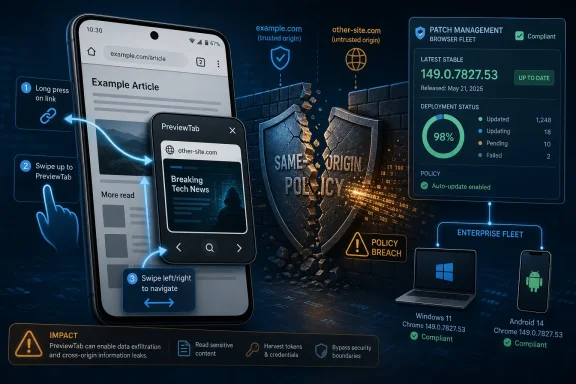 A Low-Severity Bug Still Reaches Into Chrome’s Core Promise
The same-origin policy is one of the web’s oldest and most important guardrails. In plain terms, it is the rule that keeps one website from freely reading or manipulating another website’s data just because both are open in the same browser. Without it, the modern web collapses into a permissions free-for-all where a malicious page could peer across tabs, sessions, frames, or embedded content that should be isolated.CVE-2026-11226 is described as “insufficient policy enforcement” in PreviewTab, affecting Google Chrome on Android before 149.0.7827.53. The attacker must convince the user to interact with a crafted HTML page through specific gestures, which matters because it places this bug in the category of user-assisted exploitation rather than silent drive-by compromise. That requirement helps explain Chromium’s own “Low” severity rating.
But “Low” is not “irrelevant.” Browser vendors reserve their highest alarms for memory corruption, sandbox escapes, remote code execution, and active exploitation. A same-origin policy bypass with user interaction sits lower on that ladder, yet the affected security boundary is still foundational. If an attacker can make a browser treat separated web content as less separated than it should be, defenders have to care.
The apparent mismatch between Chromium’s low severity and CISA-ADP’s medium CVSS 3.1 score of 6.5 is not surprising. CVSS looks at abstract exploit characteristics and potential impact; vendor severity often folds in practical exploitability, mitigation layers, affected platform, and internal knowledge of the bug. The interesting story is not that these labels differ. It is that both labels are trying to describe a browser flaw whose risk depends heavily on context.
PreviewTab Turns Convenience Into a Security Boundary
Preview features are built to reduce friction. On mobile, they make the browser feel faster and more fluid by letting users glance at links or content without committing to a full navigation. The problem is that every in-between state in a browser creates design pressure: Is this content fully loaded? Is it isolated like a normal tab? Does it inherit state? Can it initiate navigation? Can it communicate with other frames or origins? What exactly did the user consent to when tapping, pressing, previewing, or swiping?That ambiguity is where bugs like CVE-2026-11226 live. The vulnerability description points to PreviewTab, not Chrome’s general renderer, V8 engine, or network stack. That matters because the flaw appears to sit at the intersection of UI behavior and web policy enforcement. The browser did not simply forget the same-origin policy existed; rather, some preview-specific path reportedly failed to enforce it consistently.
Mobile browsers are especially exposed to this class of mistake because their interfaces are gesture-heavy. A desktop user clicks, right-clicks, types, and drags with relatively explicit input states. A phone user taps, long-presses, previews, back-swipes, shares, opens in another surface, and shifts between app and browser contexts. Those interactions are intuitive to users but complicated for security engineers.
The web platform’s security model was not originally designed around a world where a link might be half-opened in a preview pane, partially interactive, visually adjacent to another context, and controlled by a mixture of browser UI and page content. Chrome’s job is to make that feel seamless. Chrome security’s job is to ensure the seam is not exploitable.
The Android Scope Should Not Reassure Windows Shops Too Much
The published description is explicit: this issue affects Google Chrome on Android before 149.0.7827.53. That means Windows desktop Chrome is not the directly named vulnerable product for CVE-2026-11226, even though the same Chrome 149 release train also carried desktop updates. For WindowsForum readers, that distinction matters. Not every Chrome CVE maps cleanly across Windows, macOS, Linux, Android, ChromeOS, and iOS.Still, Windows administrators should not file this away as “someone else’s mobile problem.” Many organizations treat Android as an endpoint tier that is less formally managed than Windows laptops, even when the Android device has access to email, SSO portals, corporate chat, password managers, and cloud dashboards. A same-origin policy bypass in mobile Chrome may not compromise a Windows machine, but it can still touch the identities and sessions that Windows infrastructure depends on.
This is the uncomfortable reality of modern endpoint security: the browser is no longer just software installed on a PC. It is the front end for enterprise identity, admin portals, ticketing systems, HR platforms, source repositories, and internal documentation. If a user’s mobile browser is a weak link, the blast radius can reach far beyond the phone.
There is also a reporting trap here. Because the NVD change history lists a CPE configuration involving Google Chrome and Android, scanners and dashboards may represent the issue in ways that require interpretation. Security teams should verify whether their tooling is mapping the vulnerability to Android Chrome specifically, to Chromium generally, or to desktop Chrome packages as collateral noise. The difference affects prioritization, but it should not affect the basic remediation advice: update Chrome.
The CVSS Score Says “Medium,” the Exploit Story Says “Conditional”
The CISA-ADP vector for CVE-2026-11226 is AV:N/AC:L/PR:N/UI:R/S:U/C:N/I:H/A:N. Translated from CVSS shorthand, the vulnerability is network-accessible, does not require high attack complexity, does not require privileges, does require user interaction, does not cross CVSS scope, and is assessed as having high integrity impact without confidentiality or availability impact.That combination is worth unpacking because it tells a more nuanced story than the base score alone. The attacker can theoretically reach the victim remotely through web content, which is bad. The victim does not need to be logged into the attacker’s site or grant special privileges, which is also bad. But the attack depends on specific UI gestures, which usually reduces reliability and makes mass exploitation harder.
The high integrity impact is the eyebrow-raiser. Same-origin policy bypasses are often discussed in terms of reading data, but this scoring suggests the meaningful concern is unauthorized modification or action rather than data disclosure. In practice, a same-origin policy failure may allow one origin to influence another context in a way that should be forbidden. The public description is too thin to say exactly what could be changed, but the scoring points toward tampering as the major theoretical harm.
Chromium’s “Low” severity can coexist with that CVSS profile if Google judged exploitation to be narrow, gesture-dependent, platform-specific, or constrained by other mitigations. That is common in browser advisories. The vendor often knows details that the public CVE entry does not disclose, especially while users are still patching.
For defenders, the best reading is sober rather than sensational. CVE-2026-11226 is not presented as a zero-day, not described as actively exploited, and not assigned a critical rating. But it affects a core browser boundary and has a medium third-party CVSS score. It belongs in the patch queue, not the panic queue.
The NVD Entry Shows How Vulnerability Metadata Becomes Its Own Problem
The user-facing CVE description is short, but the metadata around it is already doing work. The NVD page shows the CVE was received from Chrome on June 4, 2026, modified by CISA-ADP on June 5, and then received initial NIST analysis later that day. NIST had not yet provided its own CVSS score at the time reflected in the entry, while CISA-ADP had supplied a CVSS 3.1 vector and CWE-346, Origin Validation Error.That lag is normal, but it can confuse patch operations. Security teams often treat NVD as the canonical source, even when NVD is still enriching the record. During that window, scanners may show partial data, missing CPEs, vendor references without full analysis, or multiple severity labels from different contributors. The result is a familiar enterprise ritual: a vulnerability appears, dashboards disagree, and administrators have to decide whether to wait for metadata to settle or patch now.
The practical answer is to separate remediation from classification. If the affected software is Chrome on Android before 149.0.7827.53, the fix is an update. Whether NVD eventually assigns a slightly different score does not change that. Classification matters for reporting, SLAs, and executive dashboards; patching matters for exposure.
The “Are we missing a CPE?” prompt in NVD’s affected software section is also a reminder that CPE matching remains an imperfect machine-readable layer over a messy software ecosystem. Chrome on Android is an app, Android is an operating system, Chromium is an upstream project, and many vendors ship Chromium-derived browsers with their own release cadences. A clean vulnerability record rarely captures that complexity on day one.
Chrome’s Release Train Makes Single-CVE Thinking Obsolete
CVE-2026-11226 did not arrive in isolation. It was part of the broader Chrome 149 security update cycle, which included a large set of fixes across Chrome components. That context matters because admins rarely patch Chrome for one CVE. They patch a release train, and the release train often carries dozens or hundreds of fixes whose individual public descriptions range from alarming to nearly opaque.This is why browser patch management has become less about reading every CVE and more about maintaining update velocity. A security team can and should understand the notable bugs, especially those involving active exploitation or sandbox escape chains. But the operational model cannot depend on hand-triaging every low and medium Chromium issue before approving an update. The web attack surface changes too quickly.
Chrome’s rapid release cadence is built around that reality. Stable releases, extended stable channels, mobile app updates, emergency point releases, and vendor advisories all exist because browsers sit directly between users and untrusted code. Any delay in patch deployment gives attackers more time to study fixed bugs, diff patches, and search for exploit paths in unpatched installations.
For Windows environments, that lesson is familiar from Edge as well as Chrome. Microsoft Edge is Chromium-based, but CVE mapping between Chrome and Edge is not always one-to-one at the same moment, particularly for platform-specific features. Administrators need to track both upstream Chromium advisories and the vendor-specific release notes for the browser actually deployed. Assuming “Chromium fixed it” is not the same as verifying “my installed browser build contains the fix.”
User Gesture Requirements Are Not a Free Pass
Security advisories often mention user interaction in a way that makes a bug sound less serious, and in many cases that is fair. A vulnerability that requires a carefully choreographed tap sequence is less threatening than one triggered by loading a page in the background. But the modern web is exceptionally good at eliciting user gestures.Cookie banners, fake CAPTCHA prompts, “tap to continue” overlays, mobile game ads, deceptive install prompts, and social-engineered support pages all normalize interaction. On a phone, where screen space is limited and UI elements shift under the user’s finger, a gesture requirement may be less of a barrier than desktop administrators imagine. Attackers do not need perfect compliance if they can scale lures broadly enough.
The more subtle point is that browsers themselves increasingly assign security meaning to gestures. Autoplay rules, popup permissions, clipboard access, file pickers, payment prompts, and navigation behaviors may all distinguish between user-initiated and script-initiated actions. That makes user gestures a kind of security currency. If a malicious page can convert ordinary taps into privileged browser behavior, the boundary between user intent and attacker intent starts to blur.
CVE-2026-11226 appears to fit that pattern. The attacker must convince the user to engage in specific gestures, and the payoff is a same-origin policy bypass through a preview feature. The public record does not describe the exact choreography, but the shape is recognizable: a UI affordance intended to help users becomes a path around a web security rule.
This is why security training that simply tells users “don’t click suspicious links” feels increasingly inadequate. The malicious link is only the beginning. The actual exploit path may involve a sequence of plausible interactions on a page that looks routine. Technical controls and fast patching carry more weight than expecting users to identify subtle browser-state manipulation.
Same-Origin Policy Bugs Still Matter in an OAuth World
Some readers may be tempted to dismiss same-origin policy bypasses as browser-theory bugs, important to standards people but not necessarily to enterprise defenders. That is a mistake. The same-origin policy underpins the security assumptions behind webmail, cloud consoles, identity providers, document editors, CRM systems, and admin dashboards. It is one reason a malicious website cannot simply reach into your authenticated Microsoft 365 session and start issuing requests or reading state as if it were the legitimate app.Modern web applications add additional defenses: Content Security Policy, SameSite cookies, CSRF tokens, frame restrictions, CORS controls, origin checks, and isolation headers. But those mechanisms assume the browser correctly identifies and enforces origins. If the browser gets that wrong in a specific UI path, higher-level protections may not behave as expected.
The integrity-focused CVSS impact for CVE-2026-11226 is therefore important. In enterprise terms, unauthorized modification can mean actions taken in the context of a trusted site, not necessarily theft of raw secrets. Depending on the details, same-origin bypasses can contribute to account changes, state confusion, fraudulent submissions, or unexpected interactions with web apps that assume browser-enforced separation.
We should be careful not to overstate what this particular CVE enables. The public description is short, the Chromium issue tracker entry may require permissions, and there is no public proof-of-concept in the material at hand. But the class of bug is serious enough that it should not be waved away merely because the word “Low” appears in the vendor severity field.
Android Chrome Is an Enterprise Browser Whether IT Likes It or Not
The old enterprise mental model treated mobile browsers as secondary. The desktop was where “real work” happened, and mobile was for email, chat, and quick approvals. That model has been obsolete for years. Phone browsers now touch SSO flows, privileged admin confirmations, password reset pages, device enrollment portals, and internal SaaS applications.For bring-your-own-device environments, the gap is even wider. IT may manage Windows endpoints with Intune, Group Policy, Defender, update rings, and browser policies while leaving personal Android devices governed mostly by user behavior and app-store auto-update settings. That mismatch creates a strange hierarchy: the most controlled device may not be the one most often used for identity confirmation.
CVE-2026-11226 is not evidence that Android Chrome is uniquely unsafe. It is evidence that mobile browser attack surface deserves the same operational seriousness as desktop browser attack surface. If a user can access corporate resources from Chrome on Android, then Chrome on Android is part of the enterprise perimeter.
Managed Android environments should verify Chrome update status, app update policies, and minimum version compliance. Unmanaged environments should at least be covered by conditional access policies that account for device health and browser freshness where possible. The goal is not to micromanage every personal phone. The goal is to stop pretending the browser on that phone has no bearing on enterprise risk.
The CPE Question Is Really a Fleet-Visibility Question
The NVD entry’s affected-configuration language includes Chrome versions up to but excluding 149.0.7827.53 and Android as an operating-system component in the configuration. That is a reasonable attempt to model “Chrome on Android,” but it also highlights how vulnerability scanners can produce noisy or ambiguous results. A scanner that sees Chrome below 149 on a Windows machine and blindly associates CVE-2026-11226 may over-report. A mobile fleet tool that does not inventory app versions well may under-report.This is where vulnerability management becomes less about CVE literacy and more about asset truth. Do you know which Android devices are allowed to access work resources? Do you know which browser they use? Do you know whether Chrome auto-updates are enabled? Do you have a way to enforce or at least measure minimum app versions? If the answer is no, the CPE debate is a symptom, not the disease.
Windows administrators often have excellent visibility into desktop Chrome and Edge versions because those browsers are part of software inventory, patch management, or endpoint detection telemetry. Mobile app inventory may be less mature, especially outside fully managed device programs. That gap makes mobile-specific CVEs harder to operationalize even when the fix is straightforward.
The right response is not to wait for perfect metadata. It is to establish version-based controls that are resilient to metadata imperfections. If Chrome on Android must be at or above 149.0.7827.53 to avoid this issue, then the compliance question is simple. The difficulty lies in whether the organization can answer it.
Chromium’s Shared Codebase Does Not Mean Shared Exposure
Chromium’s success has given the web a common engine across Chrome, Edge, Brave, Vivaldi, Opera, and many embedded browsers. That commonality is a security advantage when fixes propagate quickly, but it also tempts defenders into lazy equivalence. A Chromium CVE may affect all Chromium-based browsers, only some of them, or only one platform-specific integration.CVE-2026-11226 is explicitly tied to Google Chrome on Android and the PreviewTab component. That does not automatically mean Microsoft Edge on Windows is affected. It also does not automatically mean every Android Chromium derivative is safe. The answer depends on whether the vulnerable code path exists, whether it is enabled, how the vendor implemented preview behavior, and when the vendor pulled the upstream fix.
This is why vendor-specific advisories matter. Upstream Chromium is the source of many fixes, but downstream browsers package, disable, modify, or replace features. Mobile platforms add another layer because Android browser behavior may depend on app integration, custom tabs, WebView interactions, and UI surfaces that do not exist on desktop.
For WindowsForum readers, the lesson is to resist both extremes. Do not assume every Chromium bug hits your Windows browser stack with equal force. Do not assume platform-specific Chrome bugs are irrelevant to your users. The right posture is to map the bug to actual deployed software, then patch the release train aggressively.
Security Severity Is a Product Judgment, Not a Moral Verdict
There is a recurring argument in vulnerability discussions: if a bug bypasses a core security policy, how can it be “Low”? The answer is that severity labels are not moral judgments about the importance of the violated principle. They are product-risk judgments about exploitability, impact, reach, and mitigations.A same-origin policy bypass can be catastrophic in one context and limited in another. A memory bug can be theoretical if unreachable or devastating if it enables remote code execution. A local privilege escalation can be irrelevant to a locked-down kiosk or urgent on a shared workstation. Severity is contextual, and context is often hidden from the public advisory.
That said, vendors have an incentive to avoid overstating risk, while defenders have an incentive to avoid missing risk. The tension is healthy when both sides are honest. Google’s low Chromium severity tells us the company likely viewed this as constrained. CISA-ADP’s medium CVSS score tells us the abstract impact model sees a meaningful integrity risk. Both views are useful.
The worst response is severity absolutism. If a dashboard says “Low,” some teams ignore the issue entirely. If a dashboard says “Medium,” others treat it as a near-emergency. Browser vulnerabilities deserve a different lens: because updates are frequent and exploitation research moves fast, the operational priority is usually to keep the browser current rather than litigate each label.
Patch Cadence Beats Perfect Understanding
The uncomfortable truth for defenders is that Chrome fixes often arrive with less public detail than security researchers would like. That is intentional. Vendors limit detail while patches roll out to reduce copycat exploitation. Administrators therefore must patch before they fully understand the bug.CVE-2026-11226 is a textbook example. The public description names the component, the affected platform, the fixed version, the broad exploit condition, and the violated security principle. It does not provide a proof-of-concept, step-by-step trigger, or detailed impact scenario. That is enough to remediate, but not enough to fully model every possible consequence.
For personal users, the advice is simple: update Chrome on Android through Google Play and confirm the installed version is at least 149.0.7827.53. For managed environments, confirm that mobile app update policies are actually moving devices forward rather than assuming auto-update has done its job. For security teams, treat stale mobile browsers as endpoint exposure, not user preference.
The larger point is that browser patching is now more like antivirus signature freshness than traditional quarterly application maintenance. The browser is continuously exposed to hostile input. A slow patch process is not a governance virtue; it is an attack window.
The Real Story Is the Shrinking Distance Between UX and Security
CVE-2026-11226 is easy to summarize as a small Chrome for Android bug. That summary is accurate but incomplete. The more interesting story is that browser UX features now routinely participate in security decisions. Previewing, swiping, sharing, opening, embedding, and continuing between surfaces are no longer cosmetic behaviors. They are part of the enforcement fabric.That creates a testing burden that traditional web security models did not fully anticipate. It is not enough to verify that origins are isolated during ordinary navigation. Engineers must verify that origins remain isolated while content is previewed, partially activated, backgrounded, foregrounded, moved across surfaces, or controlled through gestures. Every convenience feature becomes a policy edge case.
Users experience this as polish. Attackers experience it as opportunity. Defenders experience it as another reason to prioritize browser updates even when a CVE does not look dramatic.
The same pattern applies beyond Chrome. Windows itself is full of convenience layers: previews, widgets, embedded web views, shell integrations, notification actions, and identity prompts. Each layer tries to reduce friction by placing content closer to the user. Each layer must also preserve the boundary between content and trust.
The Chrome 149 Fix Is a Reminder to Audit the Quiet Endpoints
This is the point in the story where the advice becomes less glamorous and more useful. CVE-2026-11226 does not call for emergency password resets, firewall changes, or disabling the web. It calls for verifying that the devices users actually browse with are updated, including the ones that do not sit in a Windows patch dashboard.The fix threshold is clear: Chrome on Android should be updated to 149.0.7827.53 or later for this vulnerability. If an organization cannot determine that, the vulnerability has exposed an inventory weakness as much as a browser weakness. That is often where small CVEs provide their biggest value.
A single low-severity mobile browser flaw can reveal whether mobile endpoints are visible, whether BYOD policy is enforceable, whether conditional access reflects browser state, and whether security teams understand how Chromium advisories map to their environment. Those are not theoretical governance questions. They shape how quickly the next, more serious browser bug gets contained.
The Practical Read for CVE-2026-11226
The useful conclusion is not that this is the scariest Chrome bug of the month. It is that even a constrained PreviewTab flaw can touch a web security boundary that enterprises rely on every day. Treat it as a patch-management check, a mobile-fleet visibility test, and a reminder that browser UI is now security-critical infrastructure.- Chrome on Android versions before 149.0.7827.53 are the named affected target for CVE-2026-11226.
- The vulnerability involves insufficient PreviewTab policy enforcement that could allow a same-origin policy bypass through a crafted HTML page and specific user gestures.
- Chromium rated the issue low severity, while CISA-ADP supplied a medium CVSS 3.1 score of 6.5 with high integrity impact.
- There is no public indication in the provided record that this CVE was exploited in the wild, but the affected boundary is important enough to patch promptly.
- Windows administrators should verify mobile Chrome exposure separately from desktop Chrome and Edge patch status.
- The most important operational question is whether the organization can identify and enforce current browser versions on Android devices that access work resources.
References
- Primary source: NVD / Chromium
Published: 2026-06-09T07:00:28-07:00
NVD - CVE-2026-11226
 nvd.nist.gov
- Security advisory: MSRC
Published: 2026-06-09T07:00:28-07:00
Original feed URL
Security Update Guide - Microsoft Security Response Center
 msrc.microsoft.com
