

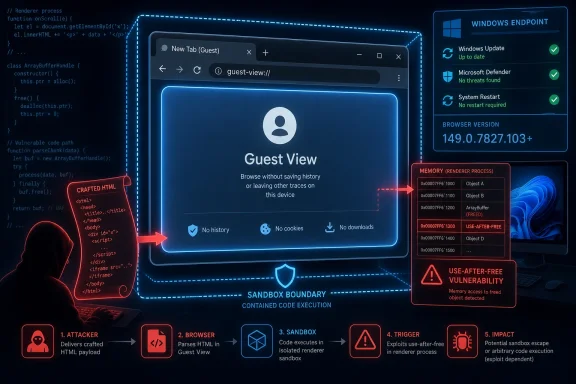
CVE-2026-11674 is a high-severity Google Chrome vulnerability, published by NVD on June 8, 2026 and modified June 9, affecting Chrome versions before 149.0.7827.103, where a use-after-free flaw in Guest View could let a remote attacker run code inside Chrome’s sandbox through crafted HTML. That phrasing sounds narrow, almost bureaucratic, but it describes the sort of browser bug that still matters in a world where the browser is the operating system’s front door. The immediate fix is routine: update Chrome, restart it, and verify the version. The larger story is less routine: Chrome’s sandbox continues to absorb dangerous failures that would be far worse without it, but memory-safety bugs are still arriving at a pace that should make administrators uncomfortable.
The most important phrase in the CVE is not “Guest View.” It is “remote attacker.” This is not a local privilege bug requiring access to a machine, a compromised account, or a physical keyboard; the published description says a crafted HTML page is enough to reach the vulnerable code path in affected versions of Chrome.
That does not mean every Chrome user who visited a suspicious page was automatically owned. The CVE says code execution occurs inside a sandbox, which is a meaningful boundary. Chrome’s renderer sandbox is designed precisely to contain attacks that begin with malicious web content.
But “inside a sandbox” should not be confused with “safe.” Attackers chain browser bugs for a living. A code-execution primitive in a renderer or adjacent browser component can become the first move in a longer campaign, paired with a separate sandbox escape, credential theft technique, malicious extension flow, or session hijacking attempt.
That is why the CISA ADP scoring matters. A CVSS 3.1 score of 8.8, with network attack vector, low attack complexity, no privileges required, and user interaction required, maps closely to the everyday risk model of modern browsing. The victim has to open or render something, but that is not much of a hurdle when the entire web is a delivery mechanism.
The history of browser exploitation is full of bugs in places that looked peripheral until they became reachable. PDF viewers, media codecs, graphics stacks, extension APIs, inter-process communication glue, WebRTC, WebUSB, WebGL, clipboard handling, autofill, print preview — the modern browser is a city, not a window. A vulnerability does not need to live in the address bar to matter.
Use-after-free flaws are especially familiar in this terrain. They occur when software continues to use memory after it has been released, creating the possibility that an attacker can manipulate what now occupies that memory. In safe failure modes, the browser crashes. In unsafe failure modes, the attacker gains a path to controlled execution.
The CVE does not provide exploit details, and that is normal for a freshly patched Chrome vulnerability. Google and Chromium routinely restrict bug tracker access until enough users have updated, partly to avoid handing working clues to attackers while the vulnerable population is still large. For defenders, the absence of detail should not be read as absence of danger.
The published impact stops at arbitrary code execution inside the sandbox. That distinction matters. A bug that directly escapes the sandbox or runs code at the operating-system level would be more immediately alarming, particularly on unmanaged Windows systems where browsers often run under accounts with broad access to local files and cloud sessions.
Still, defenders should not over-celebrate containment. Sandboxes are boundaries, not force fields. Attackers with a reliable in-sandbox execution bug can fingerprint the environment, probe available interfaces, abuse browser-granted capabilities, or wait for a second vulnerability to complete the chain.
Enterprise security teams already think this way. They do not ask whether a single CVE is a complete intrusion path; they ask whether it contributes to one. For a browser bug reachable by crafted HTML, the answer is almost always yes.
For Windows administrators, the practical response is to validate against the vendor’s current channel metadata rather than rely on a single dotted version copied into a ticket. Chrome’s own About page, enterprise management console data, endpoint management inventory, and software update tooling should all converge on the same conclusion: the browser must be on the stable build containing the June 2026 security fixes.
This is also where Chromium’s ecosystem complicates the story. Microsoft Edge, Brave, Vivaldi, Opera, and other Chromium-derived browsers share large amounts of upstream code, but they do not always ship the same version number on the same hour. A Chrome CVE does not automatically prove every Chromium browser is vulnerable in the same way, but it is a prompt to check each vendor’s advisory and patch cadence.
For organizations that standardize on Edge rather than Chrome, the lesson is still relevant. Chromium vulnerabilities often become cross-browser operational events. If your patch dashboard treats “browser” as a single application instead of a family of related runtimes, it is probably giving you false comfort.
The NVD change history shows a CPE configuration that combines Google Chrome with operating-system entries for Windows, Linux, and macOS. At a high level, that makes sense: Chrome desktop exists across those platforms, and the vulnerability is associated with the application. But CPEs can fail to capture the messy reality of how Chrome arrives on devices.
On Windows, Chrome may be installed per-machine or per-user, managed through Google Update, packaged through third-party patching tools, or embedded in golden images that lag behind. On Linux, Chromium and Chrome packaging differs by distribution, and Ubuntu’s own security notes distinguish its chromium-browser packaging history from Google’s Chrome release stream. On macOS, version drift often hides behind users who rarely restart the browser.
So yes, a CPE may be missing or incomplete for your environment, especially if you are tracking Chromium derivatives, distro-specific packages, portable builds, or application virtualization. But the bigger point is that CPE matching should be treated as a starting point rather than the final word. Browser security requires version telemetry, process visibility, and restart enforcement.
That last step is the catch. A patched binary sitting on disk does not protect the user who has kept the same browser session alive for days. In business environments, the restart problem is worse because users treat browser windows as workspaces, authentication containers, research notebooks, and unsaved task lists.
This is why serious Chrome patching is not just “deploy update.” It is “deploy update, confirm version, and force or strongly prompt relaunch within an acceptable window.” For high-severity browser bugs, especially those involving crafted web content, a week-long grace period is often a policy decision disguised as user empathy.
Windows shops have tools to solve this, but they need to use them. Chrome enterprise policies can notify users, set relaunch deadlines, and coordinate update behavior. Endpoint management tools can report stale versions. Security teams can correlate browser age with exposure to risky categories of web traffic. None of that is exotic; it is basic hygiene made urgent by the browser’s role.
For administrators, the distinction is less important than the operational conclusion. If a Chrome stable-channel update ships with many security fixes and at least one bug reportedly exploited in the wild, the entire update becomes urgent. You do not patch only the CVE that made the headline; you move the browser to the fixed channel.
This is one of the oddities of browser security communication. Each CVE has its own identifier, weakness classification, and CVSS vector, but the remediation is usually the same blunt instrument: install the latest browser. That can make individual CVEs feel interchangeable, even when they affect different subsystems.
The risk is that teams tune out. Chrome advisories arrive frequently, memory bugs sound repetitive, and “crafted HTML page” becomes background noise. Attackers benefit from that fatigue. The web’s attack surface is repetitive because users keep giving it fresh execution opportunities.
A compromised browser context can be more valuable than a compromised file system. Session cookies, single sign-on tokens, password managers, synced data, webmail, admin portals, developer consoles, SaaS dashboards, and remote management tools all live inside the browser’s daily workflow. Even sandboxed code execution can be a meaningful foothold if it helps an attacker manipulate what the user is already authorized to see.
For home users, the guidance is simple but still often ignored: update Chrome, relaunch it, and avoid assuming that closing the laptop is the same as restarting the browser. If Chrome says an update is pending, treat that as a security prompt, not a cosmetic nuisance.
For IT pros, the guidance is more structural. Browser patch compliance should be measured with the same seriousness as Windows cumulative update compliance. If the organization can report OS patch levels but cannot answer how many active Chrome processes are still running pre-fix builds, it has a visibility gap.
Google has invested heavily in sandboxing, fuzzing, exploit mitigations, site isolation, MiraclePtr-style protections, and incremental memory-safety work. Those efforts matter. They have raised the cost of exploitation and likely prevented countless crashes from becoming compromises.
But the recurring appearance of use-after-free vulnerabilities shows the limits of mitigation without full memory safety. As long as large parts of Chromium depend on C and C++ patterns where object lifetime errors can become security issues, the vulnerability stream will continue. Attackers do not need the whole architecture to be weak; they need one reachable mistake.
The industry’s gradual move toward Rust and other safer components is promising but slow. Browser compatibility is a brutal constraint. You cannot rewrite the web platform overnight, and you cannot break the long tail of sites, extensions, enterprise apps, embedded flows, and accessibility tools that depend on current behavior.
The CVSS vector for CVE-2026-11674 includes user interaction, which reduces the score. In browser reality, user interaction is not a strong mitigating factor. Users browse. Users click links. Users open documents that render web content. Users land on compromised legitimate sites, poisoned ads, and redirect chains they never knowingly chose.
The sandbox scope also affects interpretation. Because the published impact is contained inside Chrome’s sandbox, the vulnerability is not rated as a direct full-system compromise. That is technically fair, but risk models should account for exploit chains and the value of browser-resident data.
A good patch policy does not blindly override CVSS, but it contextualizes it. For Chrome and Chromium-family browsers, a high-severity remotely reachable memory corruption bug should usually be treated as an urgent endpoint patch, especially on systems used for privileged administration, finance, development, or access to sensitive cloud services.
Chrome’s rapid release model rewards organizations that build for continuous change. It punishes those that still think in monthly patch cycles. A browser can move from safe to vulnerable to patched again between two ordinary change-control meetings.
The answer is not panic. It is automation with verification. Patch the browser continuously, enforce relaunches proportionally to severity, and maintain enough telemetry to know which machines remain behind.
This is particularly important for WindowsForum’s core audience because enthusiasts and IT pros often run more complicated setups than ordinary users. Multiple browsers, beta channels, portable builds, test VMs, old installers, and policy tweaks are common. Complexity is useful, but it is also where old vulnerable binaries survive.
CVE-2026-11674 will probably disappear into the long ledger of Chromium memory-safety bugs once enough users have moved past the vulnerable build, but the pattern will remain. The browser keeps gaining power, the web keeps supplying attacker-controlled input, and defenders keep depending on a race between exploit development and automatic updates. The organizations that win that race will not be the ones with the longest advisory write-ups; they will be the ones that can prove, quickly and continuously, that the vulnerable browser is gone.
 The Bug Is Small, but the Blast Radius Is Not
The most important phrase in the CVE is not “Guest View.” It is “remote attacker.” This is not a local privilege bug requiring access to a machine, a compromised account, or a physical keyboard; the published description says a crafted HTML page is enough to reach the vulnerable code path in affected versions of Chrome.That does not mean every Chrome user who visited a suspicious page was automatically owned. The CVE says code execution occurs inside a sandbox, which is a meaningful boundary. Chrome’s renderer sandbox is designed precisely to contain attacks that begin with malicious web content.
But “inside a sandbox” should not be confused with “safe.” Attackers chain browser bugs for a living. A code-execution primitive in a renderer or adjacent browser component can become the first move in a longer campaign, paired with a separate sandbox escape, credential theft technique, malicious extension flow, or session hijacking attempt.
That is why the CISA ADP scoring matters. A CVSS 3.1 score of 8.8, with network attack vector, low attack complexity, no privileges required, and user interaction required, maps closely to the everyday risk model of modern browsing. The victim has to open or render something, but that is not much of a hurdle when the entire web is a delivery mechanism.
Guest View Is an Odd Corner Until It Is the Target
Chrome’s Guest View is not the browser’s most glamorous surface. It is a supporting piece of Chromium’s architecture used in contexts where web content is embedded or isolated in ways that differ from a normal tab. That is exactly the sort of component many users never think about and many attackers love to probe.The history of browser exploitation is full of bugs in places that looked peripheral until they became reachable. PDF viewers, media codecs, graphics stacks, extension APIs, inter-process communication glue, WebRTC, WebUSB, WebGL, clipboard handling, autofill, print preview — the modern browser is a city, not a window. A vulnerability does not need to live in the address bar to matter.
Use-after-free flaws are especially familiar in this terrain. They occur when software continues to use memory after it has been released, creating the possibility that an attacker can manipulate what now occupies that memory. In safe failure modes, the browser crashes. In unsafe failure modes, the attacker gains a path to controlled execution.
The CVE does not provide exploit details, and that is normal for a freshly patched Chrome vulnerability. Google and Chromium routinely restrict bug tracker access until enough users have updated, partly to avoid handing working clues to attackers while the vulnerable population is still large. For defenders, the absence of detail should not be read as absence of danger.
The Sandbox Is Doing Its Job, but It Cannot Be the Strategy
Chrome’s sandbox is one of the great quiet successes of consumer security engineering. It assumes that untrusted web content will eventually trigger memory corruption, logic bugs, and confused-deputy failures, then tries to contain the damage. In that sense, CVE-2026-11674 is evidence both of the problem and of the mitigation.The published impact stops at arbitrary code execution inside the sandbox. That distinction matters. A bug that directly escapes the sandbox or runs code at the operating-system level would be more immediately alarming, particularly on unmanaged Windows systems where browsers often run under accounts with broad access to local files and cloud sessions.
Still, defenders should not over-celebrate containment. Sandboxes are boundaries, not force fields. Attackers with a reliable in-sandbox execution bug can fingerprint the environment, probe available interfaces, abuse browser-granted capabilities, or wait for a second vulnerability to complete the chain.
Enterprise security teams already think this way. They do not ask whether a single CVE is a complete intrusion path; they ask whether it contributes to one. For a browser bug reachable by crafted HTML, the answer is almost always yes.
The Version Number Tells Administrators Where to Look
The affected line is clear: Google Chrome before 149.0.7827.103 is vulnerable according to the CVE record. Other reporting around the same stable-channel update indicates platform-specific patched builds in the 149.0.7827.102 and 149.0.7827.103 range, with macOS commonly called out at .103 and Windows/Linux at .102 in Google’s rollout language. That sort of split is not unusual in Chrome releases, but it can confuse inventory tools and help-desk scripts.For Windows administrators, the practical response is to validate against the vendor’s current channel metadata rather than rely on a single dotted version copied into a ticket. Chrome’s own About page, enterprise management console data, endpoint management inventory, and software update tooling should all converge on the same conclusion: the browser must be on the stable build containing the June 2026 security fixes.
This is also where Chromium’s ecosystem complicates the story. Microsoft Edge, Brave, Vivaldi, Opera, and other Chromium-derived browsers share large amounts of upstream code, but they do not always ship the same version number on the same hour. A Chrome CVE does not automatically prove every Chromium browser is vulnerable in the same way, but it is a prompt to check each vendor’s advisory and patch cadence.
For organizations that standardize on Edge rather than Chrome, the lesson is still relevant. Chromium vulnerabilities often become cross-browser operational events. If your patch dashboard treats “browser” as a single application instead of a family of related runtimes, it is probably giving you false comfort.
NVD’s CPE Record Is Useful, but It Is Not the Whole Asset Model
The user-facing frustration in the NVD entry is familiar: “Are we missing a CPE here?” Vulnerability management platforms live and die by CPE matching, and browser records can be awkward because the application runs across operating systems, package formats, enterprise channels, and downstream rebuilds.The NVD change history shows a CPE configuration that combines Google Chrome with operating-system entries for Windows, Linux, and macOS. At a high level, that makes sense: Chrome desktop exists across those platforms, and the vulnerability is associated with the application. But CPEs can fail to capture the messy reality of how Chrome arrives on devices.
On Windows, Chrome may be installed per-machine or per-user, managed through Google Update, packaged through third-party patching tools, or embedded in golden images that lag behind. On Linux, Chromium and Chrome packaging differs by distribution, and Ubuntu’s own security notes distinguish its chromium-browser packaging history from Google’s Chrome release stream. On macOS, version drift often hides behind users who rarely restart the browser.
So yes, a CPE may be missing or incomplete for your environment, especially if you are tracking Chromium derivatives, distro-specific packages, portable builds, or application virtualization. But the bigger point is that CPE matching should be treated as a starting point rather than the final word. Browser security requires version telemetry, process visibility, and restart enforcement.
The Restart Remains the Weakest Link
Chrome’s update machinery is one of the reasons the web did not collapse under the weight of browser vulnerabilities years ago. Most consumers receive updates without downloading installers or reading advisories. The browser does the work quietly, then waits for a relaunch.That last step is the catch. A patched binary sitting on disk does not protect the user who has kept the same browser session alive for days. In business environments, the restart problem is worse because users treat browser windows as workspaces, authentication containers, research notebooks, and unsaved task lists.
This is why serious Chrome patching is not just “deploy update.” It is “deploy update, confirm version, and force or strongly prompt relaunch within an acceptable window.” For high-severity browser bugs, especially those involving crafted web content, a week-long grace period is often a policy decision disguised as user empathy.
Windows shops have tools to solve this, but they need to use them. Chrome enterprise policies can notify users, set relaunch deadlines, and coordinate update behavior. Endpoint management tools can report stale versions. Security teams can correlate browser age with exposure to risky categories of web traffic. None of that is exotic; it is basic hygiene made urgent by the browser’s role.
This CVE Was Not the Only June Chrome Fire Drill
CVE-2026-11674 landed in the same general update cycle as a broader Chrome security release that drew attention for dozens of fixes and, separately, an actively exploited V8 vulnerability tracked as CVE-2026-11645. That distinction matters because security coverage can blur the two: one bug in Guest View, another in V8, both tied to crafted HTML and Chrome 149-era patching.For administrators, the distinction is less important than the operational conclusion. If a Chrome stable-channel update ships with many security fixes and at least one bug reportedly exploited in the wild, the entire update becomes urgent. You do not patch only the CVE that made the headline; you move the browser to the fixed channel.
This is one of the oddities of browser security communication. Each CVE has its own identifier, weakness classification, and CVSS vector, but the remediation is usually the same blunt instrument: install the latest browser. That can make individual CVEs feel interchangeable, even when they affect different subsystems.
The risk is that teams tune out. Chrome advisories arrive frequently, memory bugs sound repetitive, and “crafted HTML page” becomes background noise. Attackers benefit from that fatigue. The web’s attack surface is repetitive because users keep giving it fresh execution opportunities.
Windows Users Should Treat Browser Bugs as Endpoint Bugs
There was a time when Windows security advice mostly meant patching the operating system, running antivirus, and avoiding suspicious executables. That model is obsolete. The browser is now the most exposed application on many PCs, and it is often the application with the richest access to identity.A compromised browser context can be more valuable than a compromised file system. Session cookies, single sign-on tokens, password managers, synced data, webmail, admin portals, developer consoles, SaaS dashboards, and remote management tools all live inside the browser’s daily workflow. Even sandboxed code execution can be a meaningful foothold if it helps an attacker manipulate what the user is already authorized to see.
For home users, the guidance is simple but still often ignored: update Chrome, relaunch it, and avoid assuming that closing the laptop is the same as restarting the browser. If Chrome says an update is pending, treat that as a security prompt, not a cosmetic nuisance.
For IT pros, the guidance is more structural. Browser patch compliance should be measured with the same seriousness as Windows cumulative update compliance. If the organization can report OS patch levels but cannot answer how many active Chrome processes are still running pre-fix builds, it has a visibility gap.
Memory Safety Is the Unfinished Business of Chromium
CVE-2026-11674 is categorized as CWE-416, use after free. That classification is not a footnote; it is part of a long-running pattern. Browser engines and their surrounding components are written largely in memory-unsafe languages, and their speed, compatibility, and complexity have made them extraordinarily difficult to harden completely.Google has invested heavily in sandboxing, fuzzing, exploit mitigations, site isolation, MiraclePtr-style protections, and incremental memory-safety work. Those efforts matter. They have raised the cost of exploitation and likely prevented countless crashes from becoming compromises.
But the recurring appearance of use-after-free vulnerabilities shows the limits of mitigation without full memory safety. As long as large parts of Chromium depend on C and C++ patterns where object lifetime errors can become security issues, the vulnerability stream will continue. Attackers do not need the whole architecture to be weak; they need one reachable mistake.
The industry’s gradual move toward Rust and other safer components is promising but slow. Browser compatibility is a brutal constraint. You cannot rewrite the web platform overnight, and you cannot break the long tail of sites, extensions, enterprise apps, embedded flows, and accessibility tools that depend on current behavior.
Security Teams Need to Read Between the Severity Lines
“High” severity can undersell browser vulnerabilities. It sits below “Critical,” which leads some organizations to delay remediation under policies that reserve emergency change windows for the top label. That may be rational for some server-side bugs; it is less rational for remotely reachable browser flaws triggered by web content.The CVSS vector for CVE-2026-11674 includes user interaction, which reduces the score. In browser reality, user interaction is not a strong mitigating factor. Users browse. Users click links. Users open documents that render web content. Users land on compromised legitimate sites, poisoned ads, and redirect chains they never knowingly chose.
The sandbox scope also affects interpretation. Because the published impact is contained inside Chrome’s sandbox, the vulnerability is not rated as a direct full-system compromise. That is technically fair, but risk models should account for exploit chains and the value of browser-resident data.
A good patch policy does not blindly override CVSS, but it contextualizes it. For Chrome and Chromium-family browsers, a high-severity remotely reachable memory corruption bug should usually be treated as an urgent endpoint patch, especially on systems used for privileged administration, finance, development, or access to sensitive cloud services.
The Real Test Is Managed Drift
Most organizations do not fail at browser patching because they never deploy updates. They fail because a minority of devices drift, and that minority is enough. A field laptop offline for a week, a kiosk image frozen for compatibility, a developer workstation running multiple browser channels, a VDI pool with stale base images — these are the systems that turn a patched CVE into an active exposure.Chrome’s rapid release model rewards organizations that build for continuous change. It punishes those that still think in monthly patch cycles. A browser can move from safe to vulnerable to patched again between two ordinary change-control meetings.
The answer is not panic. It is automation with verification. Patch the browser continuously, enforce relaunches proportionally to severity, and maintain enough telemetry to know which machines remain behind.
This is particularly important for WindowsForum’s core audience because enthusiasts and IT pros often run more complicated setups than ordinary users. Multiple browsers, beta channels, portable builds, test VMs, old installers, and policy tweaks are common. Complexity is useful, but it is also where old vulnerable binaries survive.
The June Guest View Fix Leaves a Clear Checklist
CVE-2026-11674 is not a mystery novel; defenders do not need the exploit to know what to do. The published record gives enough information to act, and the uncertainty around exploit mechanics is a reason to move faster rather than wait.- Chrome installations should be updated to a fixed 149.0.7827.103-era build or later, with administrators checking vendor-specific platform versions rather than relying on memory.
- Users should relaunch Chrome after the update, because pending browser updates do not fully protect long-running sessions.
- Enterprise teams should verify Chromium-based browsers separately, since shared upstream code does not guarantee identical downstream versioning or release timing.
- Vulnerability scanners that depend on CPE matching should be checked against actual browser inventory, especially for nonstandard packages, per-user installs, and Chromium derivatives.
- High-severity browser memory bugs reachable by crafted HTML should be handled as urgent endpoint risks, even when the published impact is limited to code execution inside a sandbox.
CVE-2026-11674 will probably disappear into the long ledger of Chromium memory-safety bugs once enough users have moved past the vulnerable build, but the pattern will remain. The browser keeps gaining power, the web keeps supplying attacker-controlled input, and defenders keep depending on a race between exploit development and automatic updates. The organizations that win that race will not be the ones with the longest advisory write-ups; they will be the ones that can prove, quickly and continuously, that the vulnerable browser is gone.
References
- Primary source: NVD / Chromium
Published: 2026-06-15T19:14:34-07:00
NVD - CVE-2026-11674
 nvd.nist.gov
- Security advisory: MSRC
Published: 2026-06-15T19:14:34-07:00
Original feed URL
Security Update Guide - Microsoft Security Response Center
 msrc.microsoft.com
- Related coverage: vulnerability.circl.lu
Vulnerability-Lookup
Vulnerability-Lookup - Fast vulnerability lookup correlation from different sources.vulnerability.circl.lu
