

CVE-2026-11697 is a high-severity Google Chrome vulnerability, published by NVD on June 8, 2026, affecting Chrome versions before 149.0.7827.103 on Windows, macOS, and Linux, where insufficient UI input validation could let a remote attacker attempt sandbox escape through a crafted HTML page. That plain description hides the real story: this is not merely another entry in Chrome’s long CVE conveyor belt, but a reminder that the browser’s interface is now part of the attack surface. For Windows users and administrators, the fix is straightforward; the implications are less so. Chrome’s security model increasingly depends not only on isolating hostile web content, but on making sure the browser’s own trusted surfaces do not become bridges out of that isolation.
For years, browser security conversations have revolved around JavaScript engines, memory corruption, and the sandbox. Those still matter, and they matter enormously. But CVE-2026-11697 lands in a more awkward category: insufficient validation of untrusted input in the browser’s user interface.
That phrasing sounds dry, almost bureaucratic. In practice, it means some data originating from a web page or other untrusted path was able to influence a UI component in a way Chrome did not adequately police. The consequence, according to the published vulnerability description, was potential sandbox escape.
That last phrase is what raises the temperature. A browser sandbox is supposed to contain damage after a renderer is compromised or otherwise tricked into doing something dangerous. A vulnerability with sandbox-escape potential suggests a path from the messy, hostile web into a more privileged part of the browser or operating environment.
The important point is not that every user who visited a malicious page was automatically owned. The CVSS vector still requires user interaction, and the public details remain limited. The important point is that Chrome’s trusted interface layer — the menus, prompts, surfaces, and browser-managed UI that users are trained to trust — remains a boundary worth attacking.
That version split is familiar to anyone who manages Chrome at scale. Google often publishes slightly different build numbers across platforms during a stable rollout, and vulnerability databases sometimes normalize around the highest fixed version. For a help-desk technician, the safe answer is simple: if Chrome reports a build older than the fixed 149.0.7827.102/.103 line, treat it as vulnerable.
The patch did not arrive alone. Google’s advisory says the desktop update contained 74 security fixes, a large batch that included critical and high-severity issues across Ozone, Aura, V8, Printing, GPU, Extensions, Network, PDF, WebRTC, and other browser components. CVE-2026-11697 is one item in that bundle, but it is an unusually telling one because it sits at the intersection of web content, browser UI, and sandbox boundaries.
For WindowsForum readers, this is where the usual advice — “just update Chrome” — is necessary but incomplete. If Chrome is unmanaged, automatic updates may already have done the job. If Chrome is managed through enterprise tooling, the lag between Google’s release and fleet-wide compliance is the real risk window.
CVE-2026-11697 is described as allowing a remote attacker to potentially perform a sandbox escape via a crafted HTML page. That careful wording matters. Public advisories often avoid exploit-chain specifics, especially while most users are still updating, and Google commonly keeps bug details restricted until the patch has reached a broad population.
Still, the shape of the issue is clear enough for defenders. A malicious page is the delivery vehicle. User interaction is required. The impacted component is Chrome’s UI input validation. The security impact, as scored by CISA’s ADP enrichment, is severe: confidentiality, integrity, and availability are all rated high, with scope changed.
Scope changed is one of those CVSS details that deserves translation. It indicates that successful exploitation may affect resources beyond the vulnerable component’s original security authority. In browser language, that is exactly the kind of boundary-crossing that turns a web bug from a nuisance into a fleet-management problem.
This is not necessarily a contradiction. Vendor severity ratings and CVSS scores answer different questions. Google’s internal severity classification reflects Chromium’s triage system, exploitability assumptions, and product context. CVSS tries to encode technical characteristics into a standardized numerical score that can be compared across vendors and ecosystems.
For administrators, the distinction is less interesting than the shared conclusion. Whether you call it High or Critical, CVE-2026-11697 should not sit around waiting for a monthly patch window. A browser flaw reachable through a crafted HTML page, requiring no privileges, and carrying sandbox-escape potential belongs in the fast lane.
The lack of a NIST CVSS score also should not be misread as uncertainty about whether the issue matters. NVD enrichment often trails initial publication, and the Chrome source record plus the CISA-ADP vector already give defenders enough information to prioritize action.
The practical reading is simple: the vulnerable software is Chrome, and the supported desktop platforms are in scope. This is not a Windows kernel vulnerability. It is not a macOS vulnerability. It is not a Linux kernel vulnerability. The operating systems appear because Chrome is distributed and assessed across those desktop environments.
For Windows shops, that distinction matters because remediation lives in browser inventory, not Windows Update. Microsoft Defender, Intune, Configuration Manager, third-party patch managers, and Chrome’s own enterprise update controls may all play a role, but the thing to verify is the Chrome build installed on endpoints.
The same logic applies to Chromium-based browsers, but with a caveat. Edge, Brave, Vivaldi, Opera, and other Chromium descendants do not automatically become fixed the instant Google ships Chrome. Each vendor must ingest the relevant Chromium patches and ship its own update. That lag is usually short for major security fixes, but it is not zero.
The user interaction requirement should not lull anyone into complacency. Clicking a link, opening a malicious page from email, visiting a compromised site, following a poisoned ad chain, or loading a lure in a collaboration tool may all satisfy the human step in real-world campaigns. “User interaction required” is not the same as “hard to exploit.”
The more interesting part is the UI angle. Browser UI is supposed to be the user’s trusted frame around an untrusted web. When validation mistakes appear there, attackers may try to confuse browser-managed surfaces, trigger privileged flows, or abuse assumptions that internal components make about the safety of what they receive.
That is why UI bugs can be nastier than their name suggests. A button, prompt, dialog, omnibox behavior, permission surface, tab strip, or browser-rendered page can be a security boundary if it mediates trust. The web page may be untrusted, but the browser’s reaction to it can carry privilege.
A browser that has downloaded an update but not relaunched is still running vulnerable code. That detail is easy to miss in dashboards that show an update staged or an installer completed. The running process is what matters.
In managed Windows environments, the practical response should include both version enforcement and restart hygiene. Administrators need to know not only whether 149.0.7827.102/.103 or later is installed, but whether users have actually restarted Chrome. In virtual desktop and kiosk environments, that may require policy rather than polite notification.
There is also an asset-management problem. Chrome may exist in more places than the standard desktop image: developer workstations, test VMs, jump boxes, shared lab machines, portable installs, and old user profiles on rarely used endpoints. Vulnerability scanners that rely on stale software inventory can undercount browsers precisely when the browser is the most exposed application on the machine.
That means administrators should avoid two equal and opposite mistakes. The first is assuming Edge is vulnerable to every Chrome CVE until proven otherwise. The second is assuming Edge is immune because the advisory says “Google Chrome.” Chromium is a shared foundation, and vulnerabilities in shared components can propagate across the browser family.
CVE-2026-11697 is specifically recorded against Chrome. Public details do not establish, from the vulnerability entry alone, whether every Chromium-based browser exposed the same path in the same way. But the prudent operational posture is to check the corresponding vendor updates for any Chromium browser deployed in the environment.
This is especially true for mixed-browser fleets. Many enterprises standardize on Edge officially while tolerating Chrome for developers, marketing teams, web testing, or user preference. Attackers do not care which browser is the sanctioned one; they care which vulnerable executable opens the link.
Security tools depend on CPE mappings to decide whether a CVE applies to an asset. If the mapping is late, broad, narrow, or awkwardly modeled, scanners can misfire. They may fail to flag a vulnerable browser, or they may generate noise that analysts learn to ignore.
The browser ecosystem makes this harder. Chrome’s update cadence is fast, version numbers differ by platform, and Chromium-derived products complicate product identity. A vulnerability may live in upstream Chromium, in a Chrome-specific integration, or in a component that downstream vendors use differently.
That is why mature vulnerability management cannot stop at “the scanner says green.” For browser CVEs with sandbox-escape potential, defenders should correlate scanner output with software inventory, update policy, and actual executable versions. The closer the asset is to email, web browsing, privileged admin portals, or identity management consoles, the less tolerance there should be for ambiguity.
On the one hand, limited detail makes independent risk analysis harder. Administrators cannot inspect the bug mechanics, confirm exploitability in their own environment, or build highly specific detections from the patch note alone. Security teams are left with a compressed description and a version threshold.
On the other hand, publishing a detailed exploit recipe before the patch has reached most desktops would be reckless. Browser bugs are unusually scalable. Once exploit developers understand a reliable path, the distance from proof-of-concept to opportunistic abuse can be short.
The correct response is to treat the silence as part of the risk signal. When a browser vendor restricts details around a high-severity issue with sandbox-escape potential, the lack of public exploit detail should not become a reason to delay. It is a reason to reduce exposure while the technical picture remains intentionally incomplete.
That is how modern browser exploitation often works. One bug gets code running or corrupts state in a constrained context. Another bug crosses a privilege boundary. A third technique handles persistence, credential theft, or lateral movement. The user experiences a page load; the attacker sees a sequence of gates.
This is also why severity debates can become sterile. A single CVE record rarely tells the whole operational story. A bug that looks conditional in isolation can become dangerous when paired with a renderer exploit, a permissive enterprise policy, a stale browser extension, or a user logged into high-value SaaS applications.
For Windows environments, the browser is no longer merely an app. It is the front end to identity, email, documents, admin consoles, cloud dashboards, and line-of-business tools. A sandbox escape in that context is not just a browser event; it is a possible opening move against the workstation and everything the workstation can reach.
The harder part is making that boring playbook reliable. Enterprises should have policies that force Chrome relaunch after a reasonable grace period, dashboards that show active browser versions rather than merely installed packages, and exception handling for machines that sit offline or outside normal management channels.
Security teams should also review whether browser isolation and exploit mitigations are actually enabled where expected. Site isolation, extension control, download restrictions, safe browsing policies, and least-privilege desktop configurations do not replace patching, but they can change the blast radius when a user reaches the wrong page.
For individual Windows users, the advice is even simpler. Open Chrome’s About page, let it check for updates, and restart when prompted. If the version is below the fixed 149.0.7827.102/.103 range, do not wait for the browser to get around to it at its leisure.
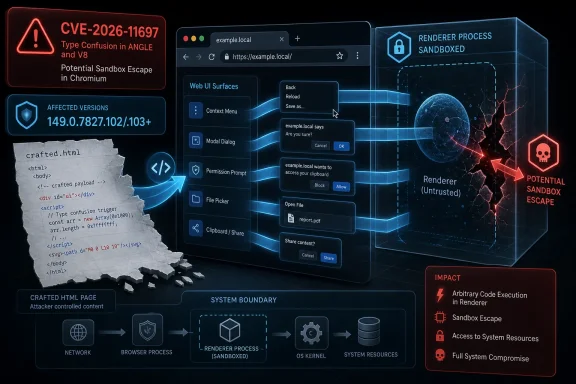 Chrome’s UI Is No Longer Just Chrome’s Furniture
For years, browser security conversations have revolved around JavaScript engines, memory corruption, and the sandbox. Those still matter, and they matter enormously. But CVE-2026-11697 lands in a more awkward category: insufficient validation of untrusted input in the browser’s user interface.That phrasing sounds dry, almost bureaucratic. In practice, it means some data originating from a web page or other untrusted path was able to influence a UI component in a way Chrome did not adequately police. The consequence, according to the published vulnerability description, was potential sandbox escape.
That last phrase is what raises the temperature. A browser sandbox is supposed to contain damage after a renderer is compromised or otherwise tricked into doing something dangerous. A vulnerability with sandbox-escape potential suggests a path from the messy, hostile web into a more privileged part of the browser or operating environment.
The important point is not that every user who visited a malicious page was automatically owned. The CVSS vector still requires user interaction, and the public details remain limited. The important point is that Chrome’s trusted interface layer — the menus, prompts, surfaces, and browser-managed UI that users are trained to trust — remains a boundary worth attacking.
The Patch Number Matters More Than the CVE Number
Google’s June 8 Stable Channel update moved desktop Chrome to 149.0.7827.102/.103 for Windows and Mac, and 149.0.7827.102 for Linux, with rollout over the following days and weeks. NVD’s entry for CVE-2026-11697 lists versions prior to 149.0.7827.103 as affected, which is the practical threshold administrators should use when checking exposure.That version split is familiar to anyone who manages Chrome at scale. Google often publishes slightly different build numbers across platforms during a stable rollout, and vulnerability databases sometimes normalize around the highest fixed version. For a help-desk technician, the safe answer is simple: if Chrome reports a build older than the fixed 149.0.7827.102/.103 line, treat it as vulnerable.
The patch did not arrive alone. Google’s advisory says the desktop update contained 74 security fixes, a large batch that included critical and high-severity issues across Ozone, Aura, V8, Printing, GPU, Extensions, Network, PDF, WebRTC, and other browser components. CVE-2026-11697 is one item in that bundle, but it is an unusually telling one because it sits at the intersection of web content, browser UI, and sandbox boundaries.
For WindowsForum readers, this is where the usual advice — “just update Chrome” — is necessary but incomplete. If Chrome is unmanaged, automatic updates may already have done the job. If Chrome is managed through enterprise tooling, the lag between Google’s release and fleet-wide compliance is the real risk window.
The Sandbox Is a Wall, Not a Force Field
Chrome’s sandbox is one of the reasons modern browser exploitation is harder than it used to be. A renderer compromise is bad, but the attacker still needs a second step to get beyond the confined process and reach more meaningful privileges. That second step is often where sandbox escapes enter the picture.CVE-2026-11697 is described as allowing a remote attacker to potentially perform a sandbox escape via a crafted HTML page. That careful wording matters. Public advisories often avoid exploit-chain specifics, especially while most users are still updating, and Google commonly keeps bug details restricted until the patch has reached a broad population.
Still, the shape of the issue is clear enough for defenders. A malicious page is the delivery vehicle. User interaction is required. The impacted component is Chrome’s UI input validation. The security impact, as scored by CISA’s ADP enrichment, is severe: confidentiality, integrity, and availability are all rated high, with scope changed.
Scope changed is one of those CVSS details that deserves translation. It indicates that successful exploitation may affect resources beyond the vulnerable component’s original security authority. In browser language, that is exactly the kind of boundary-crossing that turns a web bug from a nuisance into a fleet-management problem.
A “High” Chrome Bug Can Still Score Like a Crisis
There is a small but important mismatch in the way this vulnerability is described. Chromium labels the severity as High. CISA’s ADP CVSS 3.1 enrichment assigns a 9.6 Critical score. NVD, at the time reflected in the entry, had not yet provided its own CVSS score.This is not necessarily a contradiction. Vendor severity ratings and CVSS scores answer different questions. Google’s internal severity classification reflects Chromium’s triage system, exploitability assumptions, and product context. CVSS tries to encode technical characteristics into a standardized numerical score that can be compared across vendors and ecosystems.
For administrators, the distinction is less interesting than the shared conclusion. Whether you call it High or Critical, CVE-2026-11697 should not sit around waiting for a monthly patch window. A browser flaw reachable through a crafted HTML page, requiring no privileges, and carrying sandbox-escape potential belongs in the fast lane.
The lack of a NIST CVSS score also should not be misread as uncertainty about whether the issue matters. NVD enrichment often trails initial publication, and the Chrome source record plus the CISA-ADP vector already give defenders enough information to prioritize action.
Windows Is Named, But Chrome Is the Product at Risk
NVD’s affected configuration lists Google Chrome versions up to but excluding 149.0.7827.103, combined with Windows, Linux, or macOS operating platforms. That can look odd to readers who are used to seeing one clean product CPE rather than an application-and-OS configuration tree.The practical reading is simple: the vulnerable software is Chrome, and the supported desktop platforms are in scope. This is not a Windows kernel vulnerability. It is not a macOS vulnerability. It is not a Linux kernel vulnerability. The operating systems appear because Chrome is distributed and assessed across those desktop environments.
For Windows shops, that distinction matters because remediation lives in browser inventory, not Windows Update. Microsoft Defender, Intune, Configuration Manager, third-party patch managers, and Chrome’s own enterprise update controls may all play a role, but the thing to verify is the Chrome build installed on endpoints.
The same logic applies to Chromium-based browsers, but with a caveat. Edge, Brave, Vivaldi, Opera, and other Chromium descendants do not automatically become fixed the instant Google ships Chrome. Each vendor must ingest the relevant Chromium patches and ship its own update. That lag is usually short for major security fixes, but it is not zero.
The Crafted Page Remains the Browser’s Oldest Trick
The attack scenario in the public description is almost mundane: a crafted HTML page. That is precisely why the issue matters. Browser vulnerabilities do not need exotic delivery mechanisms when the browser’s job is to ingest untrusted markup, scripts, media, and interface events all day long.The user interaction requirement should not lull anyone into complacency. Clicking a link, opening a malicious page from email, visiting a compromised site, following a poisoned ad chain, or loading a lure in a collaboration tool may all satisfy the human step in real-world campaigns. “User interaction required” is not the same as “hard to exploit.”
The more interesting part is the UI angle. Browser UI is supposed to be the user’s trusted frame around an untrusted web. When validation mistakes appear there, attackers may try to confuse browser-managed surfaces, trigger privileged flows, or abuse assumptions that internal components make about the safety of what they receive.
That is why UI bugs can be nastier than their name suggests. A button, prompt, dialog, omnibox behavior, permission surface, tab strip, or browser-rendered page can be a security boundary if it mediates trust. The web page may be untrusted, but the browser’s reaction to it can carry privilege.
Enterprise Chrome Has a Patch Latency Problem
Most home users will get the update without thinking about it. Chrome’s updater checks in, downloads the new build, and asks for a relaunch if necessary. The gap appears when uptime, session persistence, change windows, and enterprise controls slow the last step.A browser that has downloaded an update but not relaunched is still running vulnerable code. That detail is easy to miss in dashboards that show an update staged or an installer completed. The running process is what matters.
In managed Windows environments, the practical response should include both version enforcement and restart hygiene. Administrators need to know not only whether 149.0.7827.102/.103 or later is installed, but whether users have actually restarted Chrome. In virtual desktop and kiosk environments, that may require policy rather than polite notification.
There is also an asset-management problem. Chrome may exist in more places than the standard desktop image: developer workstations, test VMs, jump boxes, shared lab machines, portable installs, and old user profiles on rarely used endpoints. Vulnerability scanners that rely on stale software inventory can undercount browsers precisely when the browser is the most exposed application on the machine.
Edge Shops Should Not Treat This as Someone Else’s Fire
Windows administrators often ask whether a Chrome CVE matters if their organization standardizes on Microsoft Edge. The answer is: maybe directly, definitely conceptually. Edge is Chromium-based, but Microsoft ships its own browser builds and advisories; a Chrome version number does not map cleanly onto Edge.That means administrators should avoid two equal and opposite mistakes. The first is assuming Edge is vulnerable to every Chrome CVE until proven otherwise. The second is assuming Edge is immune because the advisory says “Google Chrome.” Chromium is a shared foundation, and vulnerabilities in shared components can propagate across the browser family.
CVE-2026-11697 is specifically recorded against Chrome. Public details do not establish, from the vulnerability entry alone, whether every Chromium-based browser exposed the same path in the same way. But the prudent operational posture is to check the corresponding vendor updates for any Chromium browser deployed in the environment.
This is especially true for mixed-browser fleets. Many enterprises standardize on Edge officially while tolerating Chrome for developers, marketing teams, web testing, or user preference. Attackers do not care which browser is the sanctioned one; they care which vulnerable executable opens the link.
The CPE Question Is a Symptom of a Bigger Inventory Mess
The NVD page includes the familiar “Are we missing a CPE?” prompt, and the change history shows a CPE configuration added for Chrome across Windows, Linux, and macOS. That may look like clerical plumbing, but CPE accuracy has real consequences for vulnerability management.Security tools depend on CPE mappings to decide whether a CVE applies to an asset. If the mapping is late, broad, narrow, or awkwardly modeled, scanners can misfire. They may fail to flag a vulnerable browser, or they may generate noise that analysts learn to ignore.
The browser ecosystem makes this harder. Chrome’s update cadence is fast, version numbers differ by platform, and Chromium-derived products complicate product identity. A vulnerability may live in upstream Chromium, in a Chrome-specific integration, or in a component that downstream vendors use differently.
That is why mature vulnerability management cannot stop at “the scanner says green.” For browser CVEs with sandbox-escape potential, defenders should correlate scanner output with software inventory, update policy, and actual executable versions. The closer the asset is to email, web browsing, privileged admin portals, or identity management consoles, the less tolerance there should be for ambiguity.
Google’s Disclosure Silence Is a Security Feature and a Frustration
The Chromium issue tracker entry linked from NVD requires permission, and Google’s advisory repeats its standard warning that bug details may remain restricted until most users are updated. This is one of those policies that irritates researchers and reassures defenders at the same time.On the one hand, limited detail makes independent risk analysis harder. Administrators cannot inspect the bug mechanics, confirm exploitability in their own environment, or build highly specific detections from the patch note alone. Security teams are left with a compressed description and a version threshold.
On the other hand, publishing a detailed exploit recipe before the patch has reached most desktops would be reckless. Browser bugs are unusually scalable. Once exploit developers understand a reliable path, the distance from proof-of-concept to opportunistic abuse can be short.
The correct response is to treat the silence as part of the risk signal. When a browser vendor restricts details around a high-severity issue with sandbox-escape potential, the lack of public exploit detail should not become a reason to delay. It is a reason to reduce exposure while the technical picture remains intentionally incomplete.
The Real Risk Is the Chain, Not the Link
CVE-2026-11697 should be understood as a link in a possible chain. On its own, the public description points to potential sandbox escape through crafted HTML and UI input validation failure. In a real intrusion, that kind of bug would likely be paired with another flaw, a social-engineering lure, or a compromised web surface.That is how modern browser exploitation often works. One bug gets code running or corrupts state in a constrained context. Another bug crosses a privilege boundary. A third technique handles persistence, credential theft, or lateral movement. The user experiences a page load; the attacker sees a sequence of gates.
This is also why severity debates can become sterile. A single CVE record rarely tells the whole operational story. A bug that looks conditional in isolation can become dangerous when paired with a renderer exploit, a permissive enterprise policy, a stale browser extension, or a user logged into high-value SaaS applications.
For Windows environments, the browser is no longer merely an app. It is the front end to identity, email, documents, admin consoles, cloud dashboards, and line-of-business tools. A sandbox escape in that context is not just a browser event; it is a possible opening move against the workstation and everything the workstation can reach.
The Patch Playbook Is Boring Because It Works
The immediate remediation is not glamorous. Update Chrome. Confirm the installed version. Relaunch the browser. Verify compliance. Repeat for every endpoint and every Chromium-family browser that your organization allows.The harder part is making that boring playbook reliable. Enterprises should have policies that force Chrome relaunch after a reasonable grace period, dashboards that show active browser versions rather than merely installed packages, and exception handling for machines that sit offline or outside normal management channels.
Security teams should also review whether browser isolation and exploit mitigations are actually enabled where expected. Site isolation, extension control, download restrictions, safe browsing policies, and least-privilege desktop configurations do not replace patching, but they can change the blast radius when a user reaches the wrong page.
For individual Windows users, the advice is even simpler. Open Chrome’s About page, let it check for updates, and restart when prompted. If the version is below the fixed 149.0.7827.102/.103 range, do not wait for the browser to get around to it at its leisure.
This One Chrome CVE Says the Quiet Part Aloud
CVE-2026-11697 is not the biggest Chrome bug by name recognition, and it is not the only serious issue in the June 8 update. But it captures several realities that Windows users and IT teams need to internalize.- Chrome versions before the fixed 149.0.7827.102/.103 desktop release line should be treated as exposed to this vulnerability.
- The vulnerability is tied to insufficient validation of untrusted input in Chrome’s UI, not merely to a traditional web-rendering memory bug.
- The public impact statement includes potential sandbox escape via a crafted HTML page, which places it above routine browser hardening work.
- The CISA-ADP CVSS score of 9.6 reflects a worst-case technical assessment even though Chromium’s own severity label is High.
- Enterprise remediation should verify running browser versions and completed relaunches, not just whether an installer has been deployed.
- Chromium-based browsers outside Google Chrome deserve separate vendor-version checks rather than assumptions of safety or exposure.
References
- Primary source: NVD / Chromium
Published: 2026-06-15T19:15:03-07:00
NVD - CVE-2026-11697
 nvd.nist.gov
- Security advisory: MSRC
Published: 2026-06-15T19:15:03-07:00
Original feed URL
Security Update Guide - Microsoft Security Response Center
 msrc.microsoft.com
- Related coverage: vulnerability.circl.lu
Vulnerability-Lookup
Vulnerability-Lookup - Fast vulnerability lookup correlation from different sources.vulnerability.circl.lu
