

Microsoft documented CVE-2026-12441 in the Security Update Guide because Microsoft Edge is built on Chromium, the same open-source browser engine affected by the flaw, and Microsoft uses the guide to tell Edge users when its Chromium-based browser has absorbed the upstream fix. The practical answer is simpler than the database entry makes it sound: this is a Chrome-origin vulnerability, but it matters to Edge because Edge ships Chromium code. To check whether you are protected, open Edge, go to
The confusion around CVE-2026-12441 is understandable because the wording appears to point in two directions at once. The vulnerability is described as a use-after-free flaw in “File Input” in Google Chrome, yet it appears in Microsoft’s Security Update Guide under Microsoft Edge. That is not a clerical mistake; it is the consequence of Microsoft’s decision to base Edge on Chromium.
Chromium is the open-source foundation underneath Google Chrome, Microsoft Edge, Brave, Vivaldi, and several other browsers. Each vendor adds its own services, interface choices, update systems, policies, and telemetry decisions, but the core rendering and browser plumbing come from the same upstream project. When a flaw is found in Chromium code that Edge consumes, Microsoft has a security disclosure obligation of its own.
That is why Microsoft’s answer is so terse: the CVE is in Chromium open-source software, and Edge consumes Chromium. The Security Update Guide entry exists to tell administrators and users that the latest Edge build is no longer vulnerable. It is less a claim that Microsoft authored the vulnerable component than an admission that Microsoft ships it.
The distinction matters. In enterprise security, the product you deploy is the product you must patch, regardless of where the vulnerable code originated. If Edge contains affected Chromium code, then Edge needs an Edge update, Edge release notes, Edge policy handling, and Edge inventory checks.
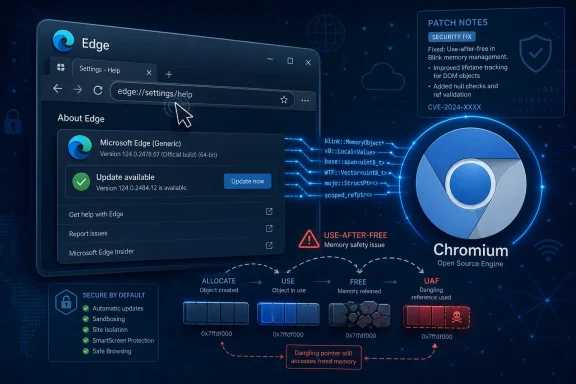
A use-after-free bug is a memory safety error. In plain English, software frees a chunk of memory and later tries to use it again, creating an opening for corruption, crashes, or potentially attacker-controlled behavior. In a browser, that is serious because hostile web content is exactly the kind of input the browser is built to process all day.
The important practical detail is that the reported attack path involves a crafted HTML page and user interaction. That does not mean the bug is harmless. Browsers are exposed to arbitrary pages constantly, and modern attacks often rely on chaining one memory corruption bug with another sandbox escape or logic flaw.
The “File Input” label also should not lull administrators into thinking only deliberate file uploads are risky. Browser component names describe where a bug lives in the codebase, not necessarily the whole exploit story. For defenders, the meaningful question is whether the deployed browser build contains the fixed Chromium code.
That can make the guide look odd to casual readers. A CVE may originate from Google’s Chrome security process, be fixed upstream in Chromium, and then appear in Microsoft’s portal because Edge inherits the affected code. The same vulnerability can therefore show up across multiple vendor advisories without implying that each vendor independently created the bug.
For IT teams, that duplication is a feature, not noise. Vulnerability scanners, compliance dashboards, and patch management workflows often key off Microsoft product names and Microsoft advisories. If Microsoft did not document Chromium CVEs affecting Edge, many Windows-centric environments would have an incomplete view of browser exposure.
This is especially important because Edge is no longer just a consumer browser sitting outside the operating system story. It is integrated into Windows management patterns, enterprise policy, identity workflows, WebView2 dependencies, and Microsoft 365 usage. A Chromium vulnerability in Edge can therefore become an enterprise Windows concern even if the original bug report says “Google Chrome.”
That trade is generally good for users. A browser engine maintained by a broad industry project receives intense testing, fuzzing, and researcher attention. When Chromium ships a fix, downstream browsers can consume it rather than rediscovering and repairing the same defect in isolation.
The cost is interpretive ambiguity. Users see “Chrome CVE” and ask why Microsoft is involved. Administrators see “Microsoft Edge” and wonder whether Windows Update is enough. Security tools may flag Edge even on systems where Chrome is not installed, because the vulnerable code path lives in Chromium, not in the Chrome brand.
The right mental model is supply chain inheritance. Edge is a Microsoft product with Microsoft features, but its engine supply chain includes Chromium. When Chromium has a security defect, Microsoft has to answer the same question any downstream software vendor must answer: did we ship the affected code, and have we shipped the fix?
There is a second route through the interface: open the three-dot menu, choose Help and feedback, and select About Microsoft Edge. That lands on the same page. The version number shown there is the number administrators should compare against Microsoft’s advisory and Edge security release notes.
For deeper troubleshooting,
The key point is that “latest” is not a feeling. It is a build number. If Edge has updated past the vulnerable build listed by Microsoft, the machine has the relevant browser fix; if it has not, the machine remains exposed even if Windows itself says it is otherwise current.
On consumer PCs, Edge normally updates itself in the background. The user may only notice when the About page says a restart is needed. That low-friction model is one reason browser security has improved over the past decade: the patch pipeline is no longer tied solely to monthly operating system servicing.
In managed environments, however, the story can be more complicated. Enterprises may use Microsoft Edge Update policies, Intune, Configuration Manager, WSUS-connected workflows, application control, network filtering, or staged deployment rings. Those controls are legitimate, but they can also delay browser fixes if the organization treats Edge as just another application rather than a high-exposure security boundary.
This is where Chromium CVEs become operationally urgent. A browser is a frontline parser for hostile content, not a passive office utility. If an organization delays Edge updates for compatibility testing, it should do so with an explicit risk decision, not because nobody noticed that a “Chrome” CVE applies to Microsoft’s browser too.
That phrasing is familiar to administrators because it separates availability from installation. A patch can exist without being installed. A browser can download an update without completing it. A server, kiosk, or VDI image can keep launching an old browser build long after a fixed version is public.
Browser restarts are a particular weak spot. Edge can stage an update in the background, but the running browser process has to be restarted before the new code is active. Users who keep browsers open for weeks can remain on the old binary longer than patch dashboards imply unless management tooling checks the running version or enforces restarts.
The fix, then, is not simply “trust automatic updates.” It is to verify. On a personal machine, that means visiting the About page. In a fleet, it means inventorying Edge versions and confirming that the fixed build has actually landed across the estate.
File input is a perfect example. It looks mundane because users see it as a button: choose a file, upload a file, attach a file. Underneath, the browser has to coordinate renderer processes, permissions, operating system dialogs, file metadata, event handling, and web page state.
That machinery has to be safe even when the page is malicious. A crafted HTML page may try to trigger edge cases the normal user interface never exposes. Memory safety bugs emerge in precisely those seams, where lifecycle assumptions break and code uses an object after it should have been gone.
This is why browser security advisories so often sound both tiny and alarming. A single component name may sit atop a chain of complex state transitions. In a mature browser, attackers hunt those transitions because the obvious bugs have already been squeezed out.
That does not mean every Edge update should be pushed blindly to production the instant it appears. Enterprises need rings, telemetry, rollback plans, and app compatibility checks. But the default posture for browser security updates should be speed, with delay treated as an exception.
The reason is exposure. Browsers sit between users and the open internet, SaaS platforms, email links, identity portals, admin consoles, and third-party content. A vulnerable browser on a fully patched Windows device is still a vulnerable endpoint.
Administrators should also remember that Edge exists in multiple channels: Stable, Extended Stable, Beta, Dev, and Canary. Most production fleets should care primarily about Stable or Extended Stable, but machines used by developers, testers, or power users may run other channels. Those channels have different update expectations and should not be lumped together in inventory reports.
If you are checking a family member’s PC, a kiosk, or a lightly managed business machine, do not stop at “Windows Update looks fine.” Check the browser itself. The browser About page is the simplest way to force the question: what build is actually installed?
On Windows, the Edge version can also be checked through Settings under installed apps, but that route is less useful because it does not always trigger the update check as directly. The About page is better because it combines inventory and remediation. It tells you what you have and tries to move you forward.
For administrators, the equivalent question should be asked at scale. Device inventory should report Edge version, update channel, update status, and last restart where possible. A CVE like this becomes manageable only when the organization can answer which machines are still running pre-fix browser builds.
The difference is not pedantry. Chrome is Google’s packaged browser. Chromium is the open-source project from which Chrome and Edge draw major components. Edge is Microsoft’s packaged browser built on Chromium, with Microsoft’s account integration, enterprise controls, PDF handling choices, update systems, and Windows hooks.
When the vulnerable code is in Chromium, the blast radius depends on which downstream products consumed it and how quickly each ships the fix. That is why the same CVE can appear in Google’s release notes, Microsoft’s Security Update Guide, Linux distribution advisories, and third-party vulnerability databases. Each ecosystem is translating the same upstream flaw into its own product language.
For Windows users, the most important translation is Microsoft’s. If the Security Update Guide says Edge is affected or has been fixed, that is the signal to check Edge, not to assume the issue is irrelevant because the CVE description mentions Chrome.
Here is the short version Windows users and administrators should carry forward:
edge://settings/help, and confirm the browser updates to the latest available build.
 Microsoft’s Browser Is Not a Chrome Clone, but It Shares Chrome’s Risk Surface
The confusion around CVE-2026-12441 is understandable because the wording appears to point in two directions at once. The vulnerability is described as a use-after-free flaw in “File Input” in Google Chrome, yet it appears in Microsoft’s Security Update Guide under Microsoft Edge. That is not a clerical mistake; it is the consequence of Microsoft’s decision to base Edge on Chromium.Chromium is the open-source foundation underneath Google Chrome, Microsoft Edge, Brave, Vivaldi, and several other browsers. Each vendor adds its own services, interface choices, update systems, policies, and telemetry decisions, but the core rendering and browser plumbing come from the same upstream project. When a flaw is found in Chromium code that Edge consumes, Microsoft has a security disclosure obligation of its own.
That is why Microsoft’s answer is so terse: the CVE is in Chromium open-source software, and Edge consumes Chromium. The Security Update Guide entry exists to tell administrators and users that the latest Edge build is no longer vulnerable. It is less a claim that Microsoft authored the vulnerable component than an admission that Microsoft ships it.
The distinction matters. In enterprise security, the product you deploy is the product you must patch, regardless of where the vulnerable code originated. If Edge contains affected Chromium code, then Edge needs an Edge update, Edge release notes, Edge policy handling, and Edge inventory checks.
The CVE Is About Memory Safety, Not the File Picker You See on Screen
CVE-2026-12441 is described as a use-after-free vulnerability in File Input. That phrase sounds narrow, but browser vulnerabilities often hide behind bland component names. “File Input” points to the machinery used when a web page asks the browser to handle user-selected files, a familiar part of uploading an attachment, selecting a photo, or interacting with a web app.A use-after-free bug is a memory safety error. In plain English, software frees a chunk of memory and later tries to use it again, creating an opening for corruption, crashes, or potentially attacker-controlled behavior. In a browser, that is serious because hostile web content is exactly the kind of input the browser is built to process all day.
The important practical detail is that the reported attack path involves a crafted HTML page and user interaction. That does not mean the bug is harmless. Browsers are exposed to arbitrary pages constantly, and modern attacks often rely on chaining one memory corruption bug with another sandbox escape or logic flaw.
The “File Input” label also should not lull administrators into thinking only deliberate file uploads are risky. Browser component names describe where a bug lives in the codebase, not necessarily the whole exploit story. For defenders, the meaningful question is whether the deployed browser build contains the fixed Chromium code.
The Security Update Guide Is Doing Inventory Work
Microsoft’s Security Update Guide is not only a list of flaws in Windows itself. It is also a map of Microsoft-supported products that need security attention, including products that incorporate third-party or open-source components. Edge’s Chromium base makes it a regular guest in that system.That can make the guide look odd to casual readers. A CVE may originate from Google’s Chrome security process, be fixed upstream in Chromium, and then appear in Microsoft’s portal because Edge inherits the affected code. The same vulnerability can therefore show up across multiple vendor advisories without implying that each vendor independently created the bug.
For IT teams, that duplication is a feature, not noise. Vulnerability scanners, compliance dashboards, and patch management workflows often key off Microsoft product names and Microsoft advisories. If Microsoft did not document Chromium CVEs affecting Edge, many Windows-centric environments would have an incomplete view of browser exposure.
This is especially important because Edge is no longer just a consumer browser sitting outside the operating system story. It is integrated into Windows management patterns, enterprise policy, identity workflows, WebView2 dependencies, and Microsoft 365 usage. A Chromium vulnerability in Edge can therefore become an enterprise Windows concern even if the original bug report says “Google Chrome.”
Edge’s Chromium Pact Made Updates Faster and Ambiguity More Common
Microsoft’s move from the old EdgeHTML engine to Chromium solved one problem and created another. It gave Edge much better web compatibility, faster uptake of web platform changes, and access to a massive security engineering ecosystem. But it also tied Edge’s vulnerability rhythm to Chromium’s.That trade is generally good for users. A browser engine maintained by a broad industry project receives intense testing, fuzzing, and researcher attention. When Chromium ships a fix, downstream browsers can consume it rather than rediscovering and repairing the same defect in isolation.
The cost is interpretive ambiguity. Users see “Chrome CVE” and ask why Microsoft is involved. Administrators see “Microsoft Edge” and wonder whether Windows Update is enough. Security tools may flag Edge even on systems where Chrome is not installed, because the vulnerable code path lives in Chromium, not in the Chrome brand.
The right mental model is supply chain inheritance. Edge is a Microsoft product with Microsoft features, but its engine supply chain includes Chromium. When Chromium has a security defect, Microsoft has to answer the same question any downstream software vendor must answer: did we ship the affected code, and have we shipped the fix?
The Browser Version Is the Evidence That Matters
For an individual user, the fastest way to check Edge is to open the browser and typeedge://settings/help in the address bar. Edge will display the installed version and, on most unmanaged systems, immediately check for updates. If an update is available, it will download, install, and usually ask for a restart of the browser.There is a second route through the interface: open the three-dot menu, choose Help and feedback, and select About Microsoft Edge. That lands on the same page. The version number shown there is the number administrators should compare against Microsoft’s advisory and Edge security release notes.
For deeper troubleshooting,
edge://version exposes more detail about the browser build, executable path, command-line flags, profile path, and underlying component information. That page is less friendly for ordinary users but more useful when diagnosing managed devices, side-by-side channels, or suspicious version drift.The key point is that “latest” is not a feeling. It is a build number. If Edge has updated past the vulnerable build listed by Microsoft, the machine has the relevant browser fix; if it has not, the machine remains exposed even if Windows itself says it is otherwise current.
Windows Update Is Not Always the Whole Browser Story
One of the persistent mistakes in Windows security hygiene is treating “patched Windows” and “patched Microsoft Edge” as identical states. They often overlap, but they are not the same thing. Edge uses its own update mechanisms in many configurations, and enterprise environments can control those updates separately.On consumer PCs, Edge normally updates itself in the background. The user may only notice when the About page says a restart is needed. That low-friction model is one reason browser security has improved over the past decade: the patch pipeline is no longer tied solely to monthly operating system servicing.
In managed environments, however, the story can be more complicated. Enterprises may use Microsoft Edge Update policies, Intune, Configuration Manager, WSUS-connected workflows, application control, network filtering, or staged deployment rings. Those controls are legitimate, but they can also delay browser fixes if the organization treats Edge as just another application rather than a high-exposure security boundary.
This is where Chromium CVEs become operationally urgent. A browser is a frontline parser for hostile content, not a passive office utility. If an organization delays Edge updates for compatibility testing, it should do so with an explicit risk decision, not because nobody noticed that a “Chrome” CVE applies to Microsoft’s browser too.
The “No Longer Vulnerable” Phrase Is Doing Heavy Lifting
Microsoft’s language that the latest version of Edge is “no longer vulnerable” is carefully chosen. It does not mean every installed copy of Edge is safe. It means Microsoft has shipped a version that contains the fix, and responsibility now shifts to deployment, verification, and restart behavior.That phrasing is familiar to administrators because it separates availability from installation. A patch can exist without being installed. A browser can download an update without completing it. A server, kiosk, or VDI image can keep launching an old browser build long after a fixed version is public.
Browser restarts are a particular weak spot. Edge can stage an update in the background, but the running browser process has to be restarted before the new code is active. Users who keep browsers open for weeks can remain on the old binary longer than patch dashboards imply unless management tooling checks the running version or enforces restarts.
The fix, then, is not simply “trust automatic updates.” It is to verify. On a personal machine, that means visiting the About page. In a fleet, it means inventorying Edge versions and confirming that the fixed build has actually landed across the estate.
File Input Bugs Are a Reminder That Web Features Are Attack Surface
The web’s power comes from turning the browser into an application platform. File upload widgets, drag-and-drop, camera access, local storage, clipboard hooks, graphics APIs, and hardware acceleration all make web apps feel native. Each feature also adds code that must safely process untrusted input.File input is a perfect example. It looks mundane because users see it as a button: choose a file, upload a file, attach a file. Underneath, the browser has to coordinate renderer processes, permissions, operating system dialogs, file metadata, event handling, and web page state.
That machinery has to be safe even when the page is malicious. A crafted HTML page may try to trigger edge cases the normal user interface never exposes. Memory safety bugs emerge in precisely those seams, where lifecycle assumptions break and code uses an object after it should have been gone.
This is why browser security advisories so often sound both tiny and alarming. A single component name may sit atop a chain of complex state transitions. In a mature browser, attackers hunt those transitions because the obvious bugs have already been squeezed out.
Edge Administrators Need a Chromium Calendar
For enterprise IT, CVE-2026-12441 is another argument for tracking Chromium-based Edge outside the Patch Tuesday mindset. Microsoft still publishes security information through its own channels, but Chromium fixes often move on a faster cadence. Browser security is closer to continuous servicing than monthly servicing.That does not mean every Edge update should be pushed blindly to production the instant it appears. Enterprises need rings, telemetry, rollback plans, and app compatibility checks. But the default posture for browser security updates should be speed, with delay treated as an exception.
The reason is exposure. Browsers sit between users and the open internet, SaaS platforms, email links, identity portals, admin consoles, and third-party content. A vulnerable browser on a fully patched Windows device is still a vulnerable endpoint.
Administrators should also remember that Edge exists in multiple channels: Stable, Extended Stable, Beta, Dev, and Canary. Most production fleets should care primarily about Stable or Extended Stable, but machines used by developers, testers, or power users may run other channels. Those channels have different update expectations and should not be lumped together in inventory reports.
The User’s Version Check Is the Smallest Useful Security Audit
The immediate user-level instruction is straightforward. Open Microsoft Edge, typeedge://settings/help, and let the browser check for updates. If Edge says an update is available, install it and restart the browser when prompted.If you are checking a family member’s PC, a kiosk, or a lightly managed business machine, do not stop at “Windows Update looks fine.” Check the browser itself. The browser About page is the simplest way to force the question: what build is actually installed?
On Windows, the Edge version can also be checked through Settings under installed apps, but that route is less useful because it does not always trigger the update check as directly. The About page is better because it combines inventory and remediation. It tells you what you have and tries to move you forward.
For administrators, the equivalent question should be asked at scale. Device inventory should report Edge version, update channel, update status, and last restart where possible. A CVE like this becomes manageable only when the organization can answer which machines are still running pre-fix browser builds.
The Branding Problem Will Keep Repeating
This will not be the last time a Chrome CVE appears relevant to Edge. As long as Microsoft Edge is Chromium-based, Microsoft will inherit both the advantages and liabilities of that ecosystem. The result is a recurring branding problem: users think “Chrome” means Google’s browser, while security teams know “Chromium” means shared code.The difference is not pedantry. Chrome is Google’s packaged browser. Chromium is the open-source project from which Chrome and Edge draw major components. Edge is Microsoft’s packaged browser built on Chromium, with Microsoft’s account integration, enterprise controls, PDF handling choices, update systems, and Windows hooks.
When the vulnerable code is in Chromium, the blast radius depends on which downstream products consumed it and how quickly each ships the fix. That is why the same CVE can appear in Google’s release notes, Microsoft’s Security Update Guide, Linux distribution advisories, and third-party vulnerability databases. Each ecosystem is translating the same upstream flaw into its own product language.
For Windows users, the most important translation is Microsoft’s. If the Security Update Guide says Edge is affected or has been fixed, that is the signal to check Edge, not to assume the issue is irrelevant because the CVE description mentions Chrome.
The Edge Fix Is Only Real When the Build Number Changes
The concrete lesson from CVE-2026-12441 is that vulnerability management has moved from operating system patching to component-aware patching. A Windows machine can be current in one layer and stale in another. The browser is one of the layers that matters most.Here is the short version Windows users and administrators should carry forward:
- Microsoft included CVE-2026-12441 in the Security Update Guide because Edge consumes Chromium code affected by the vulnerability.
- The CVE’s Chrome wording does not make it irrelevant to Edge; it reflects where the vulnerable code originated.
- The fastest way to check Edge is to open
edge://settings/helpand let the About page display and update the installed version. - A downloaded browser update may still require a restart before the fixed code is actually running.
- Enterprise teams should inventory Edge versions separately from general Windows patch status.
- Any organization delaying Edge updates should treat that delay as an explicit browser-risk exception, not routine application maintenance.
References
- Primary source: MSRC
Published: 2026-06-19T13:52:24-07:00
Security Update Guide - Microsoft Security Response Center
 msrc.microsoft.com
- Related coverage: vulnerability.circl.lu
Vulnerability-Lookup
Vulnerability-Lookup - Fast vulnerability lookup correlation from different sources.vulnerability.circl.lu - Related coverage: rapid7.com
Rapid7 Vulnerability Database
Rapid7's VulnDB is curated repository of vetted computer software exploits and exploitable vulnerabilities.www.rapid7.com - Related coverage: windowsforum.com
CVE-2026-3917 Use-After-Free: How Microsoft Edge Inherits Chromium Fixes | Windows Forum
Microsoft has now identified CVE-2026-3917, a use-after-free flaw in Chromium’s Agents component, as one of the vulnerabilities folded into the latest...windowsforum.com - Related coverage: threats.kaspersky.com
Kaspersky Threats — KLA90965
threats.kaspersky.com
- Official source: learn.microsoft.com
Release notes for Microsoft Edge Security Updates | Microsoft Learn
Release notes for Microsoft Edge Security Updateslearn.microsoft.com
- Related coverage: www2.gov.bc.ca
