

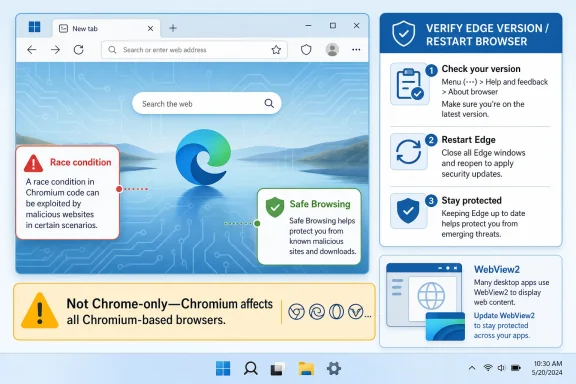
CVE-2026-12454 is listed in Microsoft’s Security Update Guide because Microsoft Edge is built on Chromium, and Microsoft uses the guide to tell customers when Edge has absorbed a Chromium security fix that removes exposure to the bug. The short version is that this is not a “Chrome-only” problem in the practical sense. It is a Chromium problem that can matter to every browser vendor shipping Chromium code, including Microsoft. For users and administrators, the important action is simple: check that Edge has updated, and do not assume Windows Update alone tells the whole browser story.
The confusion around CVE-2026-12454 starts with a perfectly reasonable instinct: if the advisory says Chrome, why is Microsoft talking about it? The answer is that modern Edge is not the old EdgeHTML browser Microsoft shipped with Windows 10 in 2015. Since 2020, mainstream Microsoft Edge has been Chromium-based, which means it inherits a large body of browser engine code from the same open source project that underpins Google Chrome.
That does not make Edge a rebadged Chrome. Microsoft replaces or augments plenty of services, policy hooks, identity integrations, update plumbing, enterprise controls, security features, and user-interface behavior. But at the security boundary where web content is parsed, rendered, sandboxed, scanned, and executed, shared Chromium components matter enormously.
CVE-2026-12454 is described as a race condition in Safe Browsing. In browser security language, a race is not a metaphor; it is a class of bug where the outcome depends on timing between operations that should have been safely ordered. If an attacker can influence that timing, a check that looked safe at one moment may no longer protect the action that follows.
That is why Microsoft documents the CVE even when the original upstream advisory is framed around Google Chrome. The vulnerability lives in open source Chromium code consumed by Edge. Microsoft’s Security Update Guide entry is the company’s way of saying: this issue was relevant to the codebase we ship, and the current Microsoft Edge build is no longer vulnerable.
That makes the guide less of a pure Microsoft defect ledger and more of a dependency map. A listed Chromium CVE is not Microsoft claiming Google’s bug as its own original engineering failure. It is Microsoft acknowledging that its product incorporated affected code and that administrators need a canonical Microsoft place to track remediation.
This matters because enterprises do not manage risk through vibes. They manage risk through inventories, scanners, compliance attestations, patch dashboards, and exception reports. If a scanner flags CVE-2026-12454 on a Windows endpoint running Edge, the security team needs an authoritative Microsoft artifact that says which Edge versions are fixed.
The alternative would be worse. Microsoft could leave Chromium CVEs to Google’s release notes and force Windows administrators to infer Edge exposure from upstream Chrome advisories. That would produce gaps, false positives, and needless confusion across fleets where Edge is the default browser, WebView2 is embedded in business apps, and browser updates may be governed by enterprise policy.
Chromium is the key distinction. Google Chrome is a Google product built from Chromium plus Google-specific components. Microsoft Edge is a Microsoft product built from Chromium plus Microsoft-specific components. Other browsers and embedded runtimes may also take Chromium code, sometimes with different update timing and different exposure depending on platform, feature flags, build options, and backports.
That shared foundation is a feature and a liability. It lets vendors benefit from a large security research ecosystem and rapid upstream fixes. It also means a serious bug in a core Chromium component can ripple across the browser market.
CVE-2026-12454 appears to be one of those cases where Microsoft’s customer-facing answer is deliberately narrow: the vulnerability is in Chromium OSS, Microsoft Edge consumes Chromium OSS, and the Security Update Guide entry exists to announce that the latest Edge release is no longer vulnerable. That is a practical statement, not a philosophical one.
But browser security features are rarely just passive warning signs. They operate inside a complicated pipeline that includes network requests, page loads, renderer processes, inter-process communication, local caches, verdict lookups, and user prompts. When a vulnerability is described as a race in Safe Browsing, the interesting part is not only the brand-name feature; it is where that feature touches the browser’s privilege boundaries.
The public description says the issue could allow a remote attacker who had already compromised the renderer process to potentially perform a sandbox escape via a crafted HTML page. That wording is important. This is not described as a one-click universal compromise from a clean starting point. It is framed as a second-stage problem: the attacker first needs renderer compromise, then uses the race to try to break out of the sandbox.
That still matters. Modern browser exploitation often chains bugs. A renderer compromise may give code execution in a constrained process, but the sandbox is supposed to limit what that code can do to the underlying system. A sandbox escape is the difference between “bad inside the tab” and “potentially much worse on the device.”
The cautious answer is that platform scoping in upstream advisories does not always translate cleanly into enterprise risk triage. A vulnerability may be practically exploitable on one platform, present in shared code used across platforms, or fixed across several builds as part of a general Chromium update train. Microsoft’s Security Update Guide exists to state Microsoft’s product status, not to make every administrator reverse-engineer Chromium’s platform-specific exposure.
For WindowsForum readers, the practical line is this: if Microsoft documents the CVE for Edge, treat Edge version currency as the control. Do not overfit your response to the word “Mac” in a Chrome-oriented summary unless Microsoft explicitly says your Edge platform is unaffected. Security teams get into trouble when they turn a narrow public exploitability note into a broad exemption.
There is also a second Windows angle that is easy to miss. Edge is not only a user-launched browser. The Edge WebView2 Runtime is a Chromium-based web platform used by desktop applications to render web content. CVE handling for Edge and WebView2 has become part of the Windows application security story, not merely browser hygiene.
That page shows the installed version and normally triggers an update check. If an update is downloaded, Edge will usually ask for a restart to finish applying it. Until the browser restarts, the fixed binaries may not be the ones actually running in the active session.
On managed devices, the story can be more complicated. Enterprise policy may pin channels, delay updates, control update checks, or route update delivery through management tooling. That is not inherently bad; controlled rollout is a legitimate operations practice. But a browser CVE with potential sandbox-escape consequences is exactly where delayed update rings need scrutiny.
For administrators, the version string matters more than a vague statement that “updates are automatic.” Automatic updates are a mechanism, not evidence. Evidence is the installed Edge version across the fleet, the update channel, the restart state, and whether any policies are blocking the fixed build.
That independent update model is one of the best security decisions Microsoft made when it moved Edge to Chromium. It lets the company ingest upstream Chromium fixes quickly and deliver them to users without waiting for a full operating system servicing event. But it also means old Windows instincts can be misleading.
A machine can be fully current on Windows cumulative updates and still have an Edge update pending. A user can have the fixed Edge package installed but remain exposed in practice until the browser restarts. A managed endpoint can sit behind an update policy that made sense for feature churn but looks risky when the issue is a high-severity browser sandbox escape chain.
The right operational question is not “Did this month’s Windows update install?” It is “What Edge build is actually running right now?”
Chromium’s dominance intensifies that role. A single upstream flaw can land in consumer browsers, enterprise browsers, embedded web runtimes, kiosk systems, electron-style applications, and management consoles. The upside is that one upstream fix can also improve security across a huge ecosystem. The downside is that laggards become easier to spot and easier to target.
Microsoft’s Edge documentation strategy reflects this reality. The Security Update Guide is not only about who wrote the vulnerable line of code. It is about who shipped it to customers. That distinction is the difference between legal ownership and operational responsibility.
For security teams, this is the same lesson learned from OpenSSL, Log4j, libwebp, and countless bundled libraries: dependency risk becomes product risk the moment it ships in your environment. Chromium is not an obscure library buried in a server package, but the principle is the same.
The browser sandbox is designed around containment. It assumes that parsing hostile web content is dangerous and tries to limit the blast radius when something goes wrong. A sandbox escape is therefore not just another bug class; it is an attack on the architecture that keeps a compromised tab from becoming a compromised machine.
That is why fast browser patching matters even when a single CVE description contains caveats. The practical attacker may pair a renderer bug with a sandbox escape, a phishing lure with a malicious page, or a compromised legitimate site with exploit delivery. Users do not experience those as separate CVEs. They experience them as one incident.
Microsoft’s message that the latest Edge is no longer vulnerable is therefore the center of the advisory. The fix is not a registry tweak or a mitigation checklist. It is running a version of Edge that contains the patched Chromium code.
That routine is worth learning because browser CVEs arrive outside the emotional calendar of Patch Tuesday. Most people will never memorize version numbers, and they should not have to. But they should know where the version page lives and understand that a pending restart can leave yesterday’s vulnerable browser running today.
Users who run multiple browsers should repeat the same mental model for each of them. Chrome, Edge, Brave, Vivaldi, Opera, and other Chromium-based browsers do not all update at the same instant just because Chromium upstream has landed a fix. Each vendor must ship its own updated build.
The deeper point is that the default browser is now one of the most security-critical apps on a PC. It deserves the same update seriousness people once reserved only for Windows itself.
Edge update policy is often shaped by competing priorities. Desktop teams want stability. Security teams want speed. Application owners worry about browser regressions. None of those concerns are imaginary, but browser security updates are not the same as arbitrary feature updates.
The healthier model is staged urgency. Test quickly, roll broadly, monitor breakage, and reserve long deferrals for cases where there is a documented business reason. When the vulnerability class touches sandbox escape potential, “we update browsers quarterly” is not a policy; it is an exposure statement.
Administrators should also distinguish between installed version and running version. Endpoint tools may report package state, but users can keep browser sessions open for days or weeks. If Edge requires a restart to complete the update, update compliance and runtime compliance are not identical.
Microsoft generally services the WebView2 Runtime through the Evergreen model, which is meant to keep it current. But administrators still need visibility into runtime versions, especially in locked-down environments, offline networks, VDI images, and systems where update services are restricted. A patched Edge icon on the taskbar does not automatically prove every Chromium-based surface in the estate is where it should be.
This is not a reason to panic. WebView2 exists partly to avoid the old nightmare of every application bundling and forgetting its own stale web engine. But it is a reason to include WebView2 in vulnerability management conversations rather than treating it as a developer detail.
The broader lesson is that Chromium has become infrastructure. It is visible as a browser, but it is also embedded as a runtime. Security response has to match that reality.
Microsoft’s Security Update Guide helps anchor that mapping. It gives vulnerability management platforms and enterprise teams a Microsoft source to associate the CVE with Edge and to determine whether the local build is fixed. That is why the guide includes entries that may look odd to a human reader expecting only Microsoft-originated flaws.
The wording “latest version of Microsoft Edge is no longer vulnerable” is doing a lot of work. It tells administrators that remediation is version-based. It tells auditors that Edge was within the vulnerability’s scope. It tells scanners that the right fix state is not “ignore because Chrome,” but “verify Edge has advanced.”
This is the unglamorous part of security communication, but it matters. A clean advisory ecosystem reduces the time between upstream fix and enterprise closure. In a browser vulnerability, that time is the exposure window.
But none of those layers should be treated as a reason to coast on a vulnerable browser build. Browser exploitation is a high-investment field because the payoff is so large. Attackers adapt to mitigations, and exploit chains are designed to cross boundaries one link at a time.
Safe Browsing itself illustrates the paradox. It is a defensive technology, but the code that implements defensive technology still has to be memory-safe, race-safe, sandbox-aware, and correct under hostile conditions. Security features are software too, and software has bugs.
The right conclusion is not that Safe Browsing is bad or that Chromium is uniquely unsafe. It is that high-value security code deserves rapid patching because attackers care about it precisely where it intersects with trust decisions and process boundaries.
 Microsoft’s Browser Is Not Google’s Browser, but It Shares Google’s Engine
The confusion around CVE-2026-12454 starts with a perfectly reasonable instinct: if the advisory says Chrome, why is Microsoft talking about it? The answer is that modern Edge is not the old EdgeHTML browser Microsoft shipped with Windows 10 in 2015. Since 2020, mainstream Microsoft Edge has been Chromium-based, which means it inherits a large body of browser engine code from the same open source project that underpins Google Chrome.That does not make Edge a rebadged Chrome. Microsoft replaces or augments plenty of services, policy hooks, identity integrations, update plumbing, enterprise controls, security features, and user-interface behavior. But at the security boundary where web content is parsed, rendered, sandboxed, scanned, and executed, shared Chromium components matter enormously.
CVE-2026-12454 is described as a race condition in Safe Browsing. In browser security language, a race is not a metaphor; it is a class of bug where the outcome depends on timing between operations that should have been safely ordered. If an attacker can influence that timing, a check that looked safe at one moment may no longer protect the action that follows.
That is why Microsoft documents the CVE even when the original upstream advisory is framed around Google Chrome. The vulnerability lives in open source Chromium code consumed by Edge. Microsoft’s Security Update Guide entry is the company’s way of saying: this issue was relevant to the codebase we ship, and the current Microsoft Edge build is no longer vulnerable.
The Security Update Guide Has Become a Map of Dependencies
The Security Update Guide used to feel like a catalog of Microsoft-owned flaws: Windows kernel bugs, Office memory corruption, Exchange vulnerabilities, .NET issues, and the usual Patch Tuesday machinery. Edge changed that rhythm. Microsoft now ships a browser whose security posture is tied to a fast-moving upstream project that is patched on a cadence much livelier than the monthly Windows servicing drumbeat.That makes the guide less of a pure Microsoft defect ledger and more of a dependency map. A listed Chromium CVE is not Microsoft claiming Google’s bug as its own original engineering failure. It is Microsoft acknowledging that its product incorporated affected code and that administrators need a canonical Microsoft place to track remediation.
This matters because enterprises do not manage risk through vibes. They manage risk through inventories, scanners, compliance attestations, patch dashboards, and exception reports. If a scanner flags CVE-2026-12454 on a Windows endpoint running Edge, the security team needs an authoritative Microsoft artifact that says which Edge versions are fixed.
The alternative would be worse. Microsoft could leave Chromium CVEs to Google’s release notes and force Windows administrators to infer Edge exposure from upstream Chrome advisories. That would produce gaps, false positives, and needless confusion across fleets where Edge is the default browser, WebView2 is embedded in business apps, and browser updates may be governed by enterprise policy.
“Chrome CVE” Is a Misleading Shortcut
Calling CVE-2026-12454 a Chrome CVE is understandable, but imprecise. CVEs are assigned to vulnerabilities, not brand names in the way end users experience software. The same underlying flaw can affect multiple products if those products consume the same vulnerable component.Chromium is the key distinction. Google Chrome is a Google product built from Chromium plus Google-specific components. Microsoft Edge is a Microsoft product built from Chromium plus Microsoft-specific components. Other browsers and embedded runtimes may also take Chromium code, sometimes with different update timing and different exposure depending on platform, feature flags, build options, and backports.
That shared foundation is a feature and a liability. It lets vendors benefit from a large security research ecosystem and rapid upstream fixes. It also means a serious bug in a core Chromium component can ripple across the browser market.
CVE-2026-12454 appears to be one of those cases where Microsoft’s customer-facing answer is deliberately narrow: the vulnerability is in Chromium OSS, Microsoft Edge consumes Chromium OSS, and the Security Update Guide entry exists to announce that the latest Edge release is no longer vulnerable. That is a practical statement, not a philosophical one.
Safe Browsing Is Part of the Browser’s Security Perimeter
Safe Browsing sounds like a reputation service bolted onto the side of the browser, and in some threat models that is how people treat it. Users know it as the warning page that appears when a site is suspected of phishing, malware distribution, or other abuse. Administrators may think of it as one layer among many, sitting somewhere between DNS filtering and endpoint protection.But browser security features are rarely just passive warning signs. They operate inside a complicated pipeline that includes network requests, page loads, renderer processes, inter-process communication, local caches, verdict lookups, and user prompts. When a vulnerability is described as a race in Safe Browsing, the interesting part is not only the brand-name feature; it is where that feature touches the browser’s privilege boundaries.
The public description says the issue could allow a remote attacker who had already compromised the renderer process to potentially perform a sandbox escape via a crafted HTML page. That wording is important. This is not described as a one-click universal compromise from a clean starting point. It is framed as a second-stage problem: the attacker first needs renderer compromise, then uses the race to try to break out of the sandbox.
That still matters. Modern browser exploitation often chains bugs. A renderer compromise may give code execution in a constrained process, but the sandbox is supposed to limit what that code can do to the underlying system. A sandbox escape is the difference between “bad inside the tab” and “potentially much worse on the device.”
The Mac Detail Does Not Let Windows Shops Ignore It
The public CVE description seen in vulnerability databases has emphasized Google Chrome on Mac prior to a fixed version. That naturally raises another question for Windows administrators: if the affected Chrome platform is Mac, why should a Windows-focused Microsoft advisory matter?The cautious answer is that platform scoping in upstream advisories does not always translate cleanly into enterprise risk triage. A vulnerability may be practically exploitable on one platform, present in shared code used across platforms, or fixed across several builds as part of a general Chromium update train. Microsoft’s Security Update Guide exists to state Microsoft’s product status, not to make every administrator reverse-engineer Chromium’s platform-specific exposure.
For WindowsForum readers, the practical line is this: if Microsoft documents the CVE for Edge, treat Edge version currency as the control. Do not overfit your response to the word “Mac” in a Chrome-oriented summary unless Microsoft explicitly says your Edge platform is unaffected. Security teams get into trouble when they turn a narrow public exploitability note into a broad exemption.
There is also a second Windows angle that is easy to miss. Edge is not only a user-launched browser. The Edge WebView2 Runtime is a Chromium-based web platform used by desktop applications to render web content. CVE handling for Edge and WebView2 has become part of the Windows application security story, not merely browser hygiene.
The Version Number Is the Real Patch State
Microsoft’s advisory answer ends with the practical question users actually need answered: how can I see the version of the browser? In Edge, the easiest route is to open the menu, go to Help and feedback, and select About Microsoft Edge. You can also typeedge://settings/help directly into the address bar.That page shows the installed version and normally triggers an update check. If an update is downloaded, Edge will usually ask for a restart to finish applying it. Until the browser restarts, the fixed binaries may not be the ones actually running in the active session.
On managed devices, the story can be more complicated. Enterprise policy may pin channels, delay updates, control update checks, or route update delivery through management tooling. That is not inherently bad; controlled rollout is a legitimate operations practice. But a browser CVE with potential sandbox-escape consequences is exactly where delayed update rings need scrutiny.
For administrators, the version string matters more than a vague statement that “updates are automatic.” Automatic updates are a mechanism, not evidence. Evidence is the installed Edge version across the fleet, the update channel, the restart state, and whether any policies are blocking the fixed build.
Edge’s Update Model Lives Beside Windows Update, Not Entirely Inside It
One persistent source of confusion is the relationship between Edge updates and Windows updates. Edge can update independently of the monthly cumulative update cycle, and that is by design. Browsers face active web threats on a timeline that does not politely wait for Patch Tuesday.That independent update model is one of the best security decisions Microsoft made when it moved Edge to Chromium. It lets the company ingest upstream Chromium fixes quickly and deliver them to users without waiting for a full operating system servicing event. But it also means old Windows instincts can be misleading.
A machine can be fully current on Windows cumulative updates and still have an Edge update pending. A user can have the fixed Edge package installed but remain exposed in practice until the browser restarts. A managed endpoint can sit behind an update policy that made sense for feature churn but looks risky when the issue is a high-severity browser sandbox escape chain.
The right operational question is not “Did this month’s Windows update install?” It is “What Edge build is actually running right now?”
Shared Code Has Made Browser Security a Supply Chain Problem
The inclusion of CVE-2026-12454 in Microsoft’s guide is part of a broader shift in how desktop security works. The operating system is no longer the only privileged platform that matters. The browser is an application runtime, a document viewer, an identity surface, a password manager, a sync client, a security decision engine, and a front door to most enterprise SaaS.Chromium’s dominance intensifies that role. A single upstream flaw can land in consumer browsers, enterprise browsers, embedded web runtimes, kiosk systems, electron-style applications, and management consoles. The upside is that one upstream fix can also improve security across a huge ecosystem. The downside is that laggards become easier to spot and easier to target.
Microsoft’s Edge documentation strategy reflects this reality. The Security Update Guide is not only about who wrote the vulnerable line of code. It is about who shipped it to customers. That distinction is the difference between legal ownership and operational responsibility.
For security teams, this is the same lesson learned from OpenSSL, Log4j, libwebp, and countless bundled libraries: dependency risk becomes product risk the moment it ships in your environment. Chromium is not an obscure library buried in a server package, but the principle is the same.
The Browser Sandbox Is Strongest When the Patch Pipeline Is Fast
The public severity language around CVE-2026-12454 is easy to misread. A high-severity issue requiring renderer compromise and user interaction may sound less urgent than a wormable network bug. In the browser world, however, exploit chains are the norm, and attackers do not need every link to be trivial if the target population is large enough.The browser sandbox is designed around containment. It assumes that parsing hostile web content is dangerous and tries to limit the blast radius when something goes wrong. A sandbox escape is therefore not just another bug class; it is an attack on the architecture that keeps a compromised tab from becoming a compromised machine.
That is why fast browser patching matters even when a single CVE description contains caveats. The practical attacker may pair a renderer bug with a sandbox escape, a phishing lure with a malicious page, or a compromised legitimate site with exploit delivery. Users do not experience those as separate CVEs. They experience them as one incident.
Microsoft’s message that the latest Edge is no longer vulnerable is therefore the center of the advisory. The fix is not a registry tweak or a mitigation checklist. It is running a version of Edge that contains the patched Chromium code.
What Home Users Should Actually Do
For home users, the advice is blessedly short. Open Edge, go toedge://settings/help, let the browser check for updates, and restart it if prompted. After restart, return to the same page and verify that Edge reports it is up to date.That routine is worth learning because browser CVEs arrive outside the emotional calendar of Patch Tuesday. Most people will never memorize version numbers, and they should not have to. But they should know where the version page lives and understand that a pending restart can leave yesterday’s vulnerable browser running today.
Users who run multiple browsers should repeat the same mental model for each of them. Chrome, Edge, Brave, Vivaldi, Opera, and other Chromium-based browsers do not all update at the same instant just because Chromium upstream has landed a fix. Each vendor must ship its own updated build.
The deeper point is that the default browser is now one of the most security-critical apps on a PC. It deserves the same update seriousness people once reserved only for Windows itself.
What Administrators Should Check Before Closing the Ticket
In enterprise environments, CVE-2026-12454 should not be closed merely because Microsoft says the latest Edge is fixed. The phrase “latest version” has to be translated into fleet reality. That means inventory, policy review, restart enforcement, and attention to non-obvious Chromium surfaces such as WebView2.Edge update policy is often shaped by competing priorities. Desktop teams want stability. Security teams want speed. Application owners worry about browser regressions. None of those concerns are imaginary, but browser security updates are not the same as arbitrary feature updates.
The healthier model is staged urgency. Test quickly, roll broadly, monitor breakage, and reserve long deferrals for cases where there is a documented business reason. When the vulnerability class touches sandbox escape potential, “we update browsers quarterly” is not a policy; it is an exposure statement.
Administrators should also distinguish between installed version and running version. Endpoint tools may report package state, but users can keep browser sessions open for days or weeks. If Edge requires a restart to complete the update, update compliance and runtime compliance are not identical.
WebView2 Keeps the Story from Ending at the Browser Icon
WebView2 complicates the tidy mental picture of “update the browser.” Many Windows applications use WebView2 to host web content inside desktop app windows. That makes Chromium code part of workflows where users may not think they are using a browser at all.Microsoft generally services the WebView2 Runtime through the Evergreen model, which is meant to keep it current. But administrators still need visibility into runtime versions, especially in locked-down environments, offline networks, VDI images, and systems where update services are restricted. A patched Edge icon on the taskbar does not automatically prove every Chromium-based surface in the estate is where it should be.
This is not a reason to panic. WebView2 exists partly to avoid the old nightmare of every application bundling and forgetting its own stale web engine. But it is a reason to include WebView2 in vulnerability management conversations rather than treating it as a developer detail.
The broader lesson is that Chromium has become infrastructure. It is visible as a browser, but it is also embedded as a runtime. Security response has to match that reality.
Microsoft’s Advisory Is Also a Message to Scanners
Security scanners are unforgiving literalists. They see product names, version ranges, CVE identifiers, and installed software. When a Chromium CVE lands, the scanner ecosystem needs vendor-specific mapping to avoid both missed detections and noisy false positives.Microsoft’s Security Update Guide helps anchor that mapping. It gives vulnerability management platforms and enterprise teams a Microsoft source to associate the CVE with Edge and to determine whether the local build is fixed. That is why the guide includes entries that may look odd to a human reader expecting only Microsoft-originated flaws.
The wording “latest version of Microsoft Edge is no longer vulnerable” is doing a lot of work. It tells administrators that remediation is version-based. It tells auditors that Edge was within the vulnerability’s scope. It tells scanners that the right fix state is not “ignore because Chrome,” but “verify Edge has advanced.”
This is the unglamorous part of security communication, but it matters. A clean advisory ecosystem reduces the time between upstream fix and enterprise closure. In a browser vulnerability, that time is the exposure window.
The Race Bug Is a Reminder That Mitigations Are Not Substitutes for Updates
Microsoft Edge includes security features that can reduce browser attack surface, including enhanced security modes and enterprise controls. Windows also adds layers such as application control, endpoint detection, exploit protection, and least-privilege account design. These are valuable, and in mature environments they can turn a bad bug into a harder operation for attackers.But none of those layers should be treated as a reason to coast on a vulnerable browser build. Browser exploitation is a high-investment field because the payoff is so large. Attackers adapt to mitigations, and exploit chains are designed to cross boundaries one link at a time.
Safe Browsing itself illustrates the paradox. It is a defensive technology, but the code that implements defensive technology still has to be memory-safe, race-safe, sandbox-aware, and correct under hostile conditions. Security features are software too, and software has bugs.
The right conclusion is not that Safe Browsing is bad or that Chromium is uniquely unsafe. It is that high-value security code deserves rapid patching because attackers care about it precisely where it intersects with trust decisions and process boundaries.
The Practical Signal Hidden in Microsoft’s Chromium Paper Trail
Microsoft’s CVE-2026-12454 entry is less mysterious once you read it as a supply-chain notice rather than a branding mistake. The company is telling Edge users that a Chromium vulnerability relevant to the browser has been addressed in the current release. The job for Windows users and administrators is to verify that the current release is actually present and running.- Open Microsoft Edge and visit
edge://settings/helpto see the installed browser version and trigger an update check. - Restart Edge after an update downloads, because the fixed build may not protect an already-running browser session until relaunch.
- Treat Chromium CVEs as potentially relevant to Edge even when the first public description mentions Google Chrome.
- Do not close enterprise remediation work until fleet inventory confirms the fixed Edge version across managed devices.
- Include WebView2 Runtime visibility in the same conversation, especially on managed, offline, kiosk, or VDI systems.
- Review update deferral policies when browser vulnerabilities involve sandbox escape potential or other chainable attack primitives.
References
- Primary source: MSRC
Published: 2026-06-19T13:52:50-07:00
Security Update Guide - Microsoft Security Response Center
 msrc.microsoft.com
- Related coverage: vulnerability.circl.lu
Vulnerability-Lookup
Vulnerability-Lookup - Fast vulnerability lookup correlation from different sources.vulnerability.circl.lu - Official source: microsoft.com
Security Update Guide FAQs
Frequently asked questions on the Security Update Guidewww.microsoft.com
- Official source: learn.microsoft.com
- Related coverage: techradar.com
Google patches worrying Chrome zero-day flaw being exploited in the wild - here's how to stay safe | TechRadar
A bug in Google Chrome V8 allowed for arbitrary code executionwww.techradar.com - Related coverage: www2.gov.bc.ca
- Related coverage: aha.org
h isac tlp white microsoft edge addresses exploited zero day vulnerability cve 2024 7971 8 23 2024
PDF documentwww.aha.org
- Related coverage: sra.io
